We sacrifice by not doing any other technology, so that you get the best of Magento.

We sacrifice by not doing any other technology, so that you get the best of Magento.

    Drawbacks of Not Having Magento as Your eCommerce Platform

    The eCommerce market has plenty of options when it comes to adopting an eCommerce platform. Some are free, and some, of course, are premium amongst them. In this post, we are going to share with you the drawbacks of not choosing the famous Magento eCommerce platform.

    Unresponsive to Mobile

    Most people use their mobile phones when they want to surf, so it is essential to have a mobile responsive website. You might choose WooCommerce as your eCommerce platform as it facilitates building a mobile responsive website. But, keep in mind that WooCommerce is just a WordPress plugin, not a specialist in creating a responsive website.

    If you choose Magento, which is an open-source framework, especially for estore development, then you will be able to provide a wonderful experience to your users. Magento is known for its mobile web design standards, and it is highly recommended for big as well as small online businesses. With Magento, you will create the best mobile responsive website.

    Limited or No” Customization Options

    Every business has different requirements, and so you need a web development that provides the maximum customization options. You might choose Shopify as it’s the least costly and comes with pre-built features, but it does not offer customization. If you select WooCommerce, then also you will get limited custom options.

    Magento is a winner here! It offers incomprehensible core customization options. It let you customize website themes, templates, and much more. Besides, it provides advanced solutions to fix problems at any time. Thus, if you hire Magento developer, you can get free support and continuous upgrades for your estore as per changing trends.

    Limited Payment and Language Support

    If you want your estore to reach a global market, then multiple payment and language supports are a must for your eCommerce store. If you pick WooCommerce, BigCommerce, or Shopify, you will get a limited number of payment modes, which might become a problem for you when you want to expand your business worldwide and at that time you will need a platform that offers a wide scope.

    Magento is leading again. Magento is used by most of the US and international stores because it supports a variety of languages and payment methods. Now, it’s your call whether to choose Magento or any other eCommerce platforms and remain back concerning language and payment methods.

    Poor Search Engine Optimization

    Search Engine Optimization (SEO) plays a vital role in the eCommerce industry. It has a direct impact on the number of visitors. So, when you opt for an eCommerce platform based on its SEO friendliness, Magento and Prestashop are both excellent. But, we have to pick a better one, and that’s Magento.

    The reason for selecting Magento is that it’s up to date with the most prominent SEO features. IT comes with an excellent URL structure and meta-implementation options. Magento can easily manage duplicate content, indexing, page traffics, etc. hence create your SEO-friendly store with Magento.

    At the End

    We hope that the above points have made it clear that what drawbacks you might suffer from if you do not have Magento as your eCommerce platform. Magento is one of the best choices for an eCommerce store as it’s flexible and simple as compared to other platforms. Mage Monkeys recommend Magento for all larger eCommerce development. It is fully packed with a lot of functionalities that help developers create the perfect estore as per the business requirements.

    Now, it’s time for you to decide which eCommerce platform is the best for your business needs. Good luck, and make a smart choice!

    The herald of Artificial Intelligence in Magento eCommerce

    We have been looking at the transformation of online shopping experiences among buyers. Today, the priority is given to explicit user experience. It’s not just about selling a particular product but bringing overall vibrancy to the customer shopping experience. There are a lot of players today in the eCommerce domain to compete with cautiously. In this race, being a start-up or an established business the key aspect is engagement, experience, and ethics. When you have these 3Es it certainly wins you more customers at a much faster rate.

    Perhaps, if you are planning to use the Magento platform to develop an eCommerce store or upgrade features of your current store, it is vital to have thought-provoking strategies for better user experiences.

    You will need innovative technology that can enhance the shopping user experience and simplify checkout processes. Artificial Intelligence exactly does the same by rapidly making its way towards the eCommerce ecosystem. Just imagine the duo of strong eCommerce platforms like Magento getting hardcore technology to uproot by Artificial Intelligence can go hand-in-hand wonders. AI helps businesses to identify the exact consumer behavior, persona thereby extending the level of qualitative service matching the expectations.

    Let us look at some of the possible areas where AI will leave a long-lasting impact on redefining the future endeavor of Magento eCommerce.

    Constructive Personalized Business ecosystem

    In a competitive era, selling your products to customers with personalized interactions is the key to retaining them. It is very important to analyze their custom choices as well as expectations from you and provide them with exactly that. When you work along with AI technology it enhances your campaigns designed exclusively customer-centric which helps you to target at the right time a specific audience with diversified channels for outreach.

    These campaigns can be given the personalized touch with push notifications and pop-ups that can leverage your sales. When these growth hacks are used along with Magento 2 features like cross-selling, up-selling options, personalized suggestions, and loyalty programs it is a matter of fact that AI is enormously banging with huge opportunities in near future.

    Contextual Search is easy now

    When a buyer comes to your eCommerce store, the first action is searching for the relevant product through Product Search functionality which is vital and that’s where the customer journey begins. It is also seen during this course of time that keywords play an important role to search for a product within the listing. It is interesting to know that today voice-based search has become more interactive and contextual for every visitor.

    With the help of AI technology, product search through voice has simplified than ever imagined to be. This is because the search module works upon Natural Language Process (NLP) rather than depending upon specific keywords pertaining to buyers who want to purchase a product. Using NLP can bring about a huge impact on searchability which ultimately enhances the chances of getting noticed substantially among more users.

    Influences Buying Decisions for a Buyer

    AI enables your Magento store to influence buying decisions among your visitors thereby increasing your sales. A recent study reveals that every visitor spends at least 15 – 30 minutes surfing the store and looking for products that might interest them. The period is an asset for store owners to convert those visitors into potential customers for a longer time.

    It might interest you fact that AI technology helps businesses encouraging buyers to take decisions rapidly for buying either directly or indirectly. Artificial Intelligence is very handy in providing you detailed analytics and data of sales which helps you to invest more in modules where visitors spend most of the time. If a visitor is spending time on a particular page there are chances that they might complete the purchase cycle soon.

    Chatbot facility 

    Apart from a contextual search that we are discussing, chatbots are another important asset that can influence users in your store. While you upgrade your store to Magento 2 with the help of a strong and experienced team of developers, they will suggest you add virtual assistant functionality to your eCommerce store for better sales. The chatbots are like a virtual companion in nature which assists you with your queries exactly just you interact with human executives.

    Again not to forget chatbots are driven by AI technology which enables the assistant to understand human language and addressing relevant queries as humans do. The best part about these chatbots, they are smart enough to understand every small preference of a buyer and give them tailored recommendations for improving customer shopping experiences.

    Safeguard from Scam and Fraudulent activities

    When we see rapid growth in the eCommerce industry, the number of risks of fraudulent activities subsequently increases. It all starts with online payment frauds while people commonly pay using credit and debit cards. In actual this is one of the most serious fraud activities every single eCommerce store faces. Every personal and financial detail of customers is compromised while the stores are hacked. The emerging architecture of AI looks promising in securing data of users and keeping stores safe from high intellectual frauds.

    Summary 

    Since AI has significantly enhanced the shopping experience within the eCommerce industry, it is Magento stores that will give extra mileage in attracting potential customers. It is important to keep up the pace with the latest technology like AI, not doing so will always give you a conventional set-up in competing with key players.

    It is highly recommended to get in touch with the best Magento 2 development company to architect, design, plan your requirements for a better eCommerce store shopping experience for potential customers.

    When you are looking to enhance your store with the Magento platform, it is the Mage Monkeys team that can be trusted for advanced experience and industry-specific recommendations. Our AI-enabled approach to date has helped us to envision the hidden potential within this domain. We feel proud to share that with the optimistic approach it is our team which have successfully implemented AI technology for so many clients till today.

    To get a competitive edge contact us today with your custom requirements and we will create an eCommerce store driven by AI-technology keeping in mind the futuristic Magento store enablement with advanced functionalities fulfilling your needs and expectations.

    Why is December month the best time to start your Magento upgrade?

    After the latest updates from Magento ending its support for Magento 1 after June 2020, there has been a lot of turnarounds. For the store owners, merchants, what will be the consequences if they do not upgrade Magento? Well, it is a matter of the fact that security & functionalities always need to be updated to safeguard sensitive data of the users.

    But before there is second thought on upgrading Magento,

    What’s there in December month?

    According to one research, the eight busiest days for in-store foot traffic this year will be:

    December 21, the last Saturday before Christmas
    December 26, the day after Christmas
    December 14, two Saturdays before Christmas
    December 22, the last Sunday before Christmas
    December 23, the Monday before Christmas
    December 28, the Saturday after Christmas
    December 27, the Friday after Christmas
    December 7, the first Saturday in December

    These are the days when the eCommerce sales market will go on hype.

    But what will happen after these dates?

    The short answer is – “The sales graph will go down.”

    It’s undeniable. Right?

    Then, why should you start to upgrade your Magento store in December?

    Magento upgradation is not a one-two days task. It takes a minimum of a month. So if you’ll opt upgradation process in December, then your tech team can deliver you upgraded Magento store by January.

    January is the time when sales go down. But, if your Magento store is upgraded at the latest version by January, then your store can leverage the advantages of Magento 2.3 which are,

    1. PWA features
    2. Improved speed and scalability
    3. Enhanced checkout system
    4. Page Builder
    5. Search engine friendly
    6. Upgraded add-to-cart
    7. Better security
    8. Multi-Source Inventory (MSI)
    9. Database segmentation

    It’s been noted repeatedly that after the migration, Magento store’s sales go high. As per a survey, it’s been recorded that to newer version provides you an ability to speed up the process of checkout by 38%, which is quite good.

    Why should you plan a month early? 

    – Magento offers a long list of features & functionalities, but if you take time and decide features you require that provide you much time to think, plan & implement them.

    – You know very well that your eCommerce store will have thousands of media files about products, features, etc. You will need time to manually change or upgrade to a newer version keeping the data intact.

    – Each and every version of Magento has a different database structure & architecture. Here, you will need adequate time to upgrade to a newer version taking care of the database, file structures, media files, etc.

    – When you get space to work upon your eCommerce store, it allows removing all unwanted files or redundant files from the existing database of your store. This will help you to free up space and help to manage data very well.

    – It is often experienced by Magento developers that not every extension & functionality can be upgraded at a time very easily. Some of them might not be compatible with a newer version; in that case, you need to recreate those extensions & class files.

    Big Question: Won’t it affect our December sales if the site will be passed through technical migration?

    No, your tech partner needs to sure that they run migration procedures offline and live your site with 0% downtime. By adopting this methodology, your migration will get live post-December, and it won’t affect your live tech or sales operations.

    Conclusion

    The best advice is to start planning, looking for relevant features, and implement them as early as possible before the December month ends. It will help you to manage your sales and your site will be technically healthy in 2020.

    Add Hover image in a Product to display on listing page Magento 2

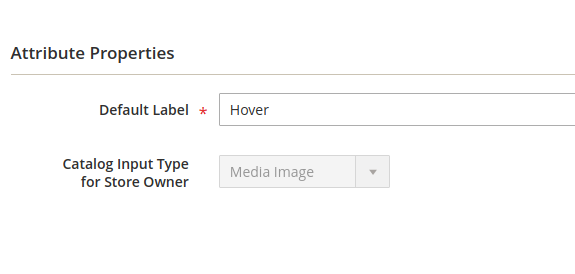
    1) Add “Hover” attribute

    Go to Stores > Attributes > Products and click on “Add New Attribute”

    Create the attribute “Hover” and Select “Media Image” in the “Catalog Input

    Type for Store Owner” dropdown and Save it.

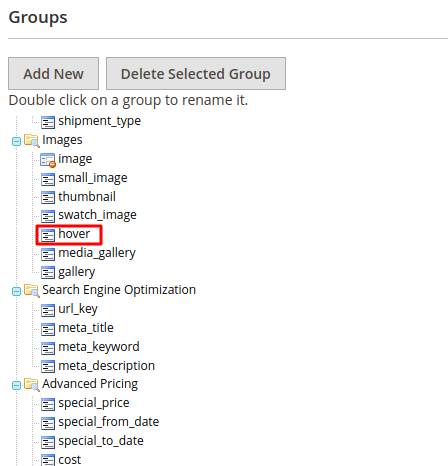
    2) Now go to Attribute Set.

    Stores > Attributes > Attribute Set

    Add “hover” attribute to “Images” Group like the below screenshot.

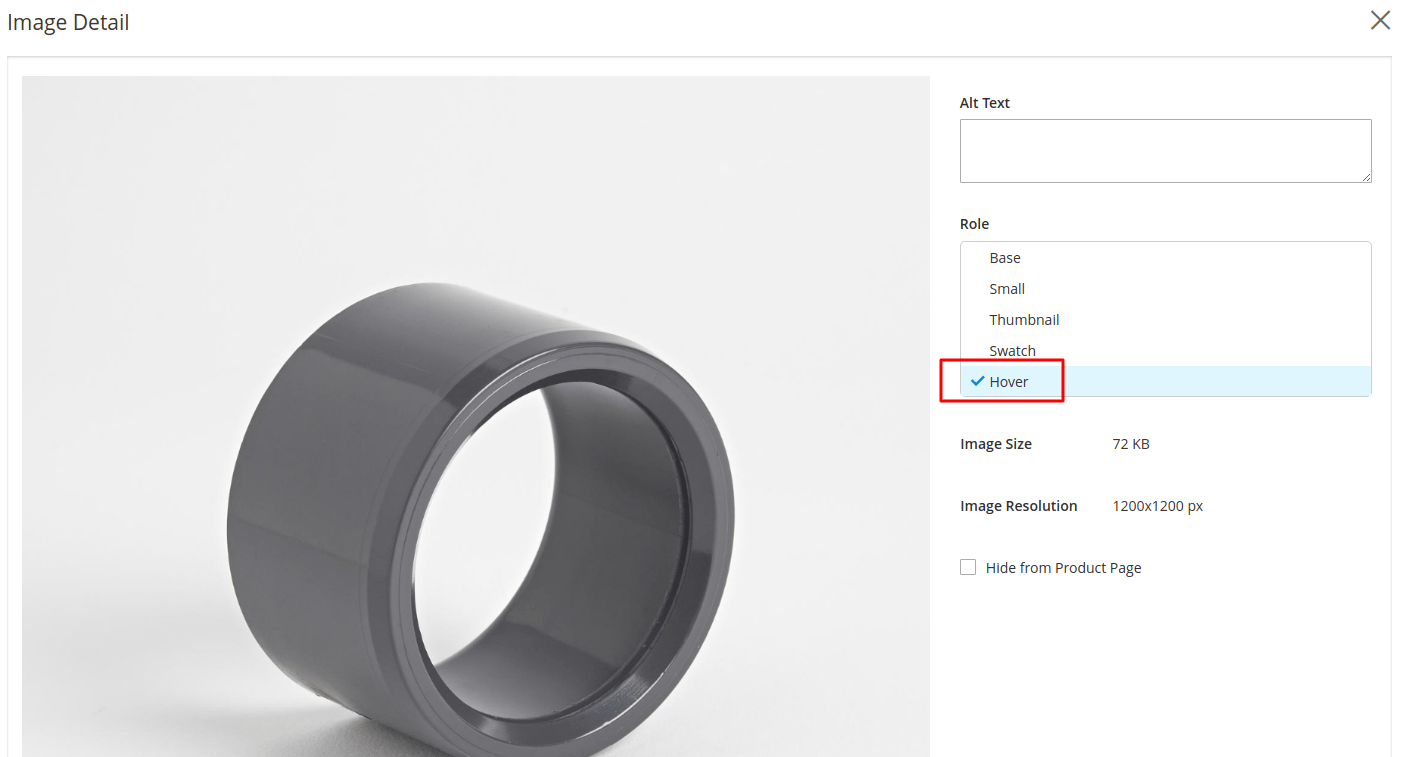
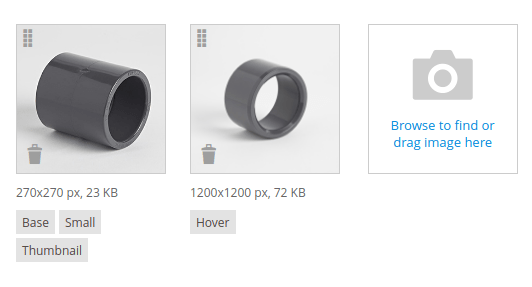
    3) Now go to product and upload an image and select Hover like below screenshot.

    4) Now we have to use this attribute in the listing page. So we have to make ‘used_in_product_listing’ to 1.

    We can do that by using MySQL.
    You need to take “hover” Attribute_ID from admin.
    You can go to your “hover” attribute page in admin and get its ID from URL.
    Suppose that Attribute_ID is 99 in our case.
    Now, go to the database and select the “catalog_eav_attribute” table.
    Select the attribute with id 99 and change the value of the `used_in_product_listing` column to 1.
    Use below MySQL query :

    UPDATE catalog_eav_attribute SET used_in_product_listing = ‘1’ WHERE attribute_id = 99;

    5) Declare Hover attribute in view.xml
    view.xml should be in app/design/frontend/MyThemeVendor/MyTheme/etc/view.xml

    add below code

    <?xml version="1.0"?>
     <view xmlns:xsi="http://www.w3.org/2001/XMLSchema-instance" xsi:noNamespaceSchemaLocation="urn:magento:module:Magento_Catalog:etc/view.xsd">
     <media>
      <images module="Magento_Catalog">
       <image id="hover_product_list" type="hover">
        <width>240</width>
        <height>300</height>
       </image>
      </images>
     </media>
    </view>


    6) Get “Hover” attribute in listing template

    Listing template is in app/design/frontend/MyThemeVendor/MyTheme/Magento_Catalog/templates/product/list.phtml

    User below helper to initialize hover image.

    <?php 
    $_imageHelper = $this->helper('MagentoCatalogHelperImage');
    $_imageHover = 'hover_product_list';
    ?>

    Search “product-image” class and use the below code and CSS to get a hover image.

    <div class="product-image">
        <div class="product-label">
            <?php 
                $newFromDate = $_product->getNewsFromDate();
                $newToDate = $_product->getNewsToDate(); 
                $now = date("Y-m-d H:m:s");
                // Get the Special Price
                $specialprice = $_product->getSpecialPrice(); 
                // Get the Special Price FROM date
                $specialPriceFromDate = $_product->getSpecialFromDate();
                // Get the Special Price TO date
                $specialPriceToDate = $_product->getSpecialToDate();
            ?>
            <?php if($specialprice && (($specialPriceFromDate <= $now && $specialPriceToDate >= $now) || (($specialPriceFromDate <= $now && $specialPriceFromDate != NULL) && $specialPriceToDate  == ''))): ?>
                <span class="sale"><?php echo __('Wras'); ?></span>
            <?php endif; ?>                        
            <?php if((($newFromDate <= $now && $newToDate >= $now) || (($newFromDate <= $now && $newFromDate != NULL) && $newToDate == NULL))): ?>
                <span class="new"><?php echo __('New'); ?></span>
            <?php endif; ?>
        </div>
        <div class="product-item-image" data-container="product-grid">
            <?php
                $productImage = $block->getImage($_product, $imageDisplayArea);
                if ($pos != null) {
                    $position = ' style="left:' . $productImage->getWidth() . 'px;'
                        . 'top:' . $productImage->getHeight() . 'px;"';
                }
            ?>
            <?php // Product Image ?>
            <a class="product-item-photo-focus" href="<?= $block->escapeUrl($_product->getProductUrl()) ?>">
                <?= $productImage->toHtml() ?>
            </a>
            <?php //Product Image Hovered ?>
            <?php
            $productImageHover = $_imageHelper->init($_product, $_imageHover);
            if ($pos != null) {
                $position = ' style="left:' . $productImage->getWidth() . 'px;'
            . 'top:' . $productImage->getHeight() . 'px;"';
            }
            ?>
            <?php if (strpos($productImageHover->getUrl(), 'Magento_Catalog/images/product/placeholder/hover.jpg') == false) { ?>
                <a href="<?php /* @escapeNotVerified */ echo $_product->getProductUrl() ?>" class="product-item-photo-hovered" tabindex="-1">
                    <img src="<?php echo $productImageHover->getUrl(); ?>" class="photo-image-hover" width="<?php echo $productImage->getWidth(); ?>" height="<?php echo $productImage->getWidth() ?>" alt="<?php echo $productImageHover->getLabel() ?>"/>
                </a>
            <?php } ?>
        </div>
    </div>

    CSS:

    .product-item-image {position: relative;}
    .product-item-image:hover .product-item-photo-hovered {opacity:1;z-index: 1;visibility: visible;}
    .product-item-photo-hovered {position: absolute;top: 0;left: 0;visibility: hidden;opacity: 0;transition: 0.6s;}


    Optimize Your Magento eCommerce site for 2019 Holiday Season

    As per Adobe, direct website traffic is the biggest driver of holiday sales at 25.3 percent.

    You would want to make the most out of such a huge number, isn’t it? But for that, you have to ensure that your store is not only optimized to host this massive traffic. Preparing your eCommerce site for the crush of online visitors is important.

    We have prepared a checklist that Magento store owners should consider employing to ensure a digital holiday season.

    For Digital Storefront

    Secure your Digital Storefront

    Security is the utmost important aspect of online business. Make sure that your site is running on the latest version or patch of Magento Commerce which includes a technical stack and extensions like PHP, ECE Tools, and Fastly.

    For best-possible security posture, you can also use Magento’s Security Scan ahead of the holidays.

    Boost Sales with Your Store Configuration

    Ensure that you are taking advantage of recommended best practices in-store management and this includes pricing, staged content, and price rules.

    Don’t Let Changes Go Unnoticed

    Your Search Engine Optimization can take a step back when your digital store rapidly prepares for holiday sales so make sure your team is taking advantage of recommendations for Magento Commerce site SEO which can be found in our article on Best Magento SEO Practices.

    Optimize for faster site

    Speed plays a crucial part in any well-run digital storefront. Online stores contain images and those lovely images tend to slow down a website’s speed. Therefore, to speed up your site consider image resizing as this will make sure that the site loads as fast as possible. Full Page Caching will also help you in enhancing the speed of your Magento Commerce sites. For a smooth shopping experience, you can use tools like WebPageTest, GTMetrix, or Google PageSpeed Insights.

    Share the Rainbow

    Magento or any other eCommerce store sells a variety of products in terms of colors, size, or any other aspects. Therefore, during holidays showcasing the variety of your store is very crucial. The customers are likely to buy products if they are similar to their preferred pattern or tone. We also suggest that not to make your eCommerce so diverse that your customer gets confused.

    For Cloud Infrastructure

    Update to the Latest ECE-tools Package

    Take advantage of the enhancements delivered in Magento deployment tooling by ensuring that your cloud environment is updated to the latest version of ECE-tools. The recent releases keep on bringing enhancements like improvement in local development experience, speeding up the deployment of static content, or adding self-service capabilities for enhanced productivity.

    Don’t Let Deployment Get You Down

    To provide a seamless shopping experience during the holiday season, you have to configure your project. This way your customer will experience zero downtime during the deployment.

    Back-Up Your eCommerce Site

    When it comes to optimization, backing your data is one of the significant factors to be considered. Data backup will help you in preventing time-consuming roll-backs. For instance, if something goes wrong then a snapshot allows you to restore the backed-up data anytime. As the Magento environment deploys as read-only files, using the Snapshot restoration can bring the environment back quickly

    Monitor Your Performance

    Always keep track of the performance during the optimization process. You can monitor the performance with the help of various project-friendly or even free tools which are available in the market. For a successful holiday run, plan and lay the groundwork.

    In Nutshell

    The store owner needs to drive more customers and sales by optimizing their Magento store during any holiday season. Customers always tend to buy products for which they don’t have to lose their pocket much. Driving more sales during the holiday season is an effective marketing strategy and it will immense growth and success to your brand.

    Why Your Magento Store Needs Code Audit?

    No one wants to have their site crashing or leave customer data open to hackers. That’s why Magento Code Audit is very important as it has a proactive problem-solving approach. The audit analysis the overall performance of your eCommerce store, look for bugs and vulnerabilities and solve these issues before they become problem for you and your customers. If an issue has already affected your site, the code audit can help discover the source of the problem so it can be stopped and prevented from happening again.

    In this post, we have discussed several cases when a Magento Code Audit is a proactive initiative worth spending.

    So, we ask you:

    Are there any recent customizations performed in your Magento application by the development team?

    Your Magento store is in trouble if your Magento extensions are non-compliant with Magento coding standards. Such custom injections may slow down your site and also open to security vulnerabilities.

    In this situation, a code audit of newly added modules serves to guard your website from possible problems. Audit checks separate pieces of custom code and covers extension compatibility further when the flaws are detected, they quickly fixed without being lost in the ever-growing code base.

    Have you ever spotted a high bounce rate on your website?

    There is no specific indication of where a bounce rate starts coming off as high but low-quality Magento code results in poor performance which leads to heavy queries running from the server to the database.

    Talking about Magento performance optimization, we always recommend looking for the core problem instead of implementation of random optimization techniques. The Magento code audit detects performance killers and properly plan accurate remedy for it.

    Are you planning Magento upgrade anytime soon? 

    We timely follow Magento releases and upgrades as we know that an amateur approach with no proper planning can turn the initiative into a burden. Recently there was a case where the process of Magento migration got jammed because of bugs in code. Therefore, the code audit is an important measure that must be in place before you go for a Magento upgrade.

    Moreover, the pre-upgrade code audit detects core code overrides and ensures that you won’t lose a piece of functionality later on.

    Your Takeaway

    Contact your third-party teams of professional Magento code audit service to check the code and see that the delivered code quality is high. At Mage Monkeys, code audit is the part of the initial steps as it helps us in providing you with more precise project estimation and also prevents issues.

    Apply Free shipping Cart rule on subtotal after discount in Magento 2

    If you want to apply cart price rules like free shipping after discount and tax calculation, then you need to do customization in the sales rule module.

    To add new option in the cart price rule condition drop-down, You need to create custom extension like “Magemonkeys_Cartrule”.

    1. Create registration.php in app/code/Magemonkeys/Cartrule/

    <?php 
    MagentoFrameworkComponentComponentRegistrar::register(
        MagentoFrameworkComponentComponentRegistrar::MODULE,
        'Magemonkeys_Cartrule',
        __DIR__
    );

    2. Create module.xml in app/code/Magemonkeys/Cartrule/etc/

    <?xml version="1.0"?>
    <config xmlns:xsi="http://www.w3.org/2001/XMLSchema-instance" xsi:noNamespaceSchemaLocation="../../../../../lib/internal/Magento/Framework/Module/etc/module.xsd">
        <module name="Magemonkeys_Cartrule" setup_version="1.0.0">
        </module>
    </config>

    3. Create di.xml in app/code/Magemonkeys/Cartrule/etc/adminhtml/di.xml

    <?xml version="1.0"?>
    <config xmlns:xsi="http://www.w3.org/2001/XMLSchema-instance" xsi:noNamespaceSchemaLocation="urn:magento:framework:ObjectManager/etc/config.xsd">    
        <preference for="MagentoSalesRuleModelRuleConditionAddress" type="MagemonkeysCartruleModelRuleConditionAddress" />
    </config>

    4. Create Address.php in app/code/Magemonkeys/Cartrule/Model/Rule/Condition/Address.php

    <?php
    
    namespace MagemonkeysCartruleModelRuleCondition;
    
    /**
     * Class Address
     */
    class Address extends MagentoSalesRuleModelRuleConditionAddress
    {
        
        /**
         * Load attribute options
         * @return $this
         */
        public function loadAttributeOptions()
        {
            $attributes = [
                'base_subtotal_with_discount' => __('Subtotal (Excl. Tax)'),
                'base_subtotal' => __('Subtotal'),
                'total_qty' => __('Total Items Quantity'),
                'weight' => __('Total Weight'),
                'shipping_method' => __('Shipping Method'),
                'postcode' => __('Shipping Postcode'),
                'region' => __('Shipping Region'),
                'region_id' => __('Shipping State/Province'),
                'country_id' => __('Shipping Country'),
            ];
    
            $this->setAttributeOption($attributes);
    
            return $this;
        }
    
        /**
         * Get input type
         * @return numeric
         */
        public function getInputType()
        {
            switch ($this->getAttribute()) {
                case 'base_subtotal_with_discount':
                case 'base_subtotal':
                case 'weight':
                case 'total_qty':
                    return 'numeric';
    
                case 'shipping_method':
                case 'payment_method':
                case 'country_id':
                case 'region_id':
                    return 'select';
            }
            return 'string';
        }
    
    }

    5. Run php bin/magento setup:upgrade command

    So you can see the “Subtotal (Excl. Tax)” option in cart price rule’s condition drop-down.

    Note: This option has already added by Magento in Magento 2.3.2+ version

    How Augmented Reality can Benefit Magento Stores?

    The Digital era has opened new opportunities for merchants to attract buyers and retain the existing ones. E-retailers always look for modern technologies to outpace their competitors and build customer loyalty.

    Augmented Reality is one of the most promising technologies in the field of eCommerce. There has been a steady growth in the popularity of AR/VR. It has reached 9.4 billion dollars in 2017 and the combined AR/VR market is expected to hit 215 billion dollars by 2021.

    Augmented reality uses different forms to promote the company’s products and services. 40 percent of buyers are more interested in products that offer an augmented reality experience. It provides a cohesive and interactive customer experience both in-store and online.

    In this post, we have shared the top three areas where augmented reality can bring the most value to eCommerce businesses.

    Product Visualization and Testing

    Online store lacks in proper visualization when it’s compared to a physical retail store. Sometimes even high-quality product images do not showcase a product at its best whereas augmented reality easily erases this issue by providing reality-like visualizations and representing a product from a different angle. Thus, customers can clearly understand what the product actually looks like in real life, and also they can play around with products and test-drive them.

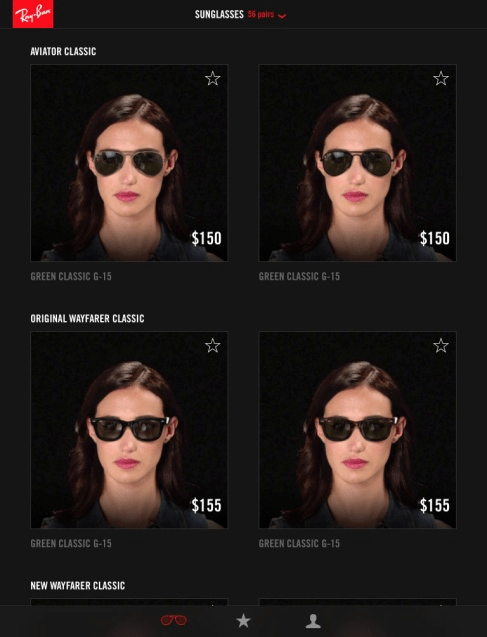
    Ray-Ban, a well-known sunglasses, and eyewear brand uses AR and face mapping technologies to allow customers to preview glasses. Below is the image, you can see that customer creates a virtual model and then try the chosen glasses on to see how they will look on their face.

    Product Modification and Customization

    Augmented reality allows customers to customize their desired products. They can easily customize color, shape, dimensions, or any other characteristics in real-time. These kinds of changes are difficult in the physical store since the product model can be out of stock or unavailable at that moment, especially in the home and décor industry.

    One suitable example is Ikea. Their AR-powered application, Ikea Place, helps buyers to visualize furniture pieces from any angle and put them inside actual homes.

    Customer Engagement and Experience

    Augmented reality allows buyers to interact with products and surroundings which gives them a new and immersive experience and also making the entire shopping process simple and more interesting. Customers receive a personalized approach as they can test different items on themselves. Together, it increases the conversion rates and also builds customer loyalty.

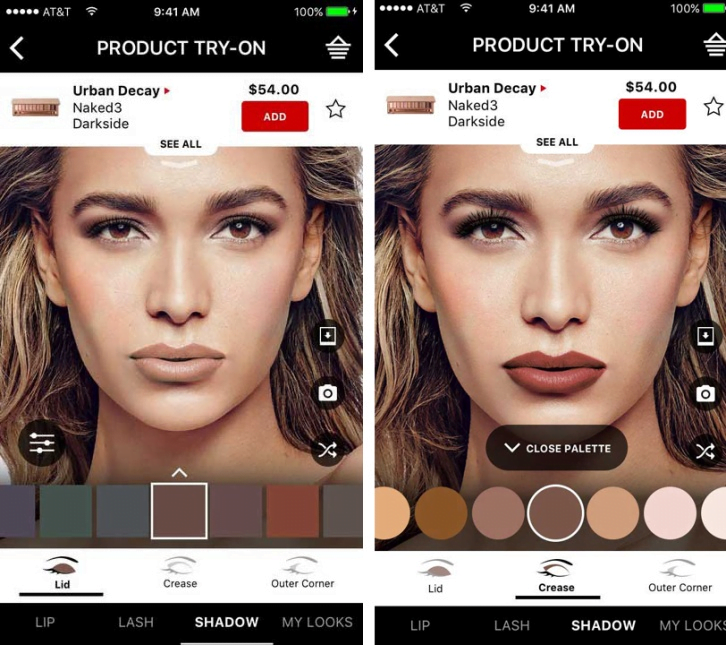
    One such example is Sephora. Its Virtual artist allows users to apply makeup products on their face and this way they have a greater shopping experience.

    Bottom Line

    Augmented reality is the cutting-edge technology that is providing outstanding opportunities for enhancing customer experience and transforming the way we shop. It is rapidly touching many more aspects of our lives. If you are looking for optimized results for your online store, then this is the best time to go with AR technology.

    Consult an experienced eCommerce development company, Mage Monkeys is reliable and have all the resources to provide solutions regarding eCommerce website.

    Magento 2 “Category” Filter Expand by default for all categories in layered navigation

    By default Magento collapse all filters in layered navigation. So if you want to expand only “Category” filter please follow below steps.

    First you have to override below PHTML file in your theme:

    vendor/magento/module-layered-navigation/view/frontend/templates/layer/view.phtml

    Like:

    app/design/frontend/[VENDOR_THEME_NAME]/[THEME_NAME]/Magento_LayeredNavigation/templates/layer/view.phtml

    After overriding above PHTML file find below code and replace with new code (Around line no. 33 to 42):

    <?php foreach ($block->getFilters() as $filter): ?>
        <?php if (!$wrapOptions): ?>
            <strong role="heading" aria-level="2" class="block-subtitle filter-subtitle"><?= /* @escapeNotVerified */ __('Shopping Options') ?></strong>
            <dl class="filter-options" id="narrow-by-list">
        <?php $wrapOptions = true; endif; ?>
            <?php if ($filter->getItemsCount()): ?>
                <dt role="heading" aria-level="3" class="filter-options-title"><?= $block->escapeHtml(__($filter->getName())) ?></dt>
                <dd class="filter-options-content"><?= /* @escapeNotVerified */ $block->getChildBlock('renderer')->render($filter) ?></dd>
            <?php endif; ?>
    <?php endforeach; ?>

    Replace with this code:

    <?php foreach ($block->getFilters() as $filter): ?>
        <?php if ($filter->getItemsCount()): ?>
            <?php if (!$wrapOptions): ?>
                <?php  
                    $collapsibleRange = '';
                    $cat = __('Category');
                    if($filter->getName() == $cat){
                	   $collapsibleRange = $catcount; 
                    }
                    $catcount++;
                ?>
                <strong role="heading" aria-level="2" class="block-subtitle filter-subtitle"><?php /* @escapeNotVerified */ echo __('Shopping Options') ?></strong>            
                <dl class="filter-options" id="narrow-by-list" data-role="content" data-mage-init='{"accordion":{"openedState": "active", "collapsible": true, "active": "<?php echo $collapsibleRange ?>", "multipleCollapsible": false}}'>
                <?php $wrapOptions = true; ?>
            <?php endif; ?>
            <div data-role="collapsible" class="filter-options-item">
                <div data-role="title" class="filter-options-title"><?php /* @escapeNotVerified */ echo __($filter->getName()) ?></div>
                <div data-role="content" class="filter-options-content"><?php /* @escapeNotVerified */ echo $block->getChildBlock('renderer')->render($filter); ?></div>
            </div>
        <?php endif; ?>
    <?php endforeach; ?>

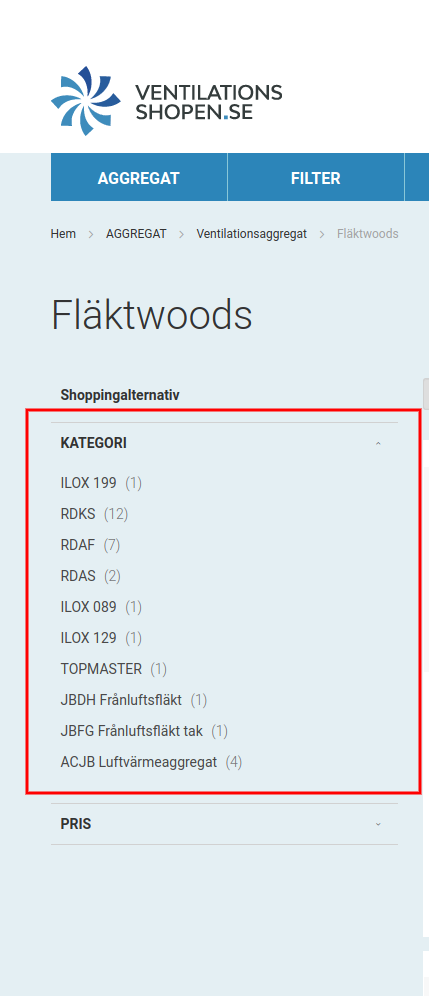
    After doing all steps please clean the cache php bin/magento cache:clean and check in front-end categories page category filer is expand like below image:

    Magento 2.2.x Add file Attachment in email using custom module

    If you want to implement “add file attachment in the email” functionality in Magento 2, then please follow the below step.

    Step 1) Create Vendor/Module/etc/di.xml

    <?xml version="1.0"?>
    <config xmlns:xsi="http://www.w3.org/2001/XMLSchema-instance" xsi:noNamespaceSchemaLocation="urn:magento:framework:ObjectManager/etc/config.xsd">
      <preference for="MagentoFrameworkMailTemplateTransportBuilder" type="VendorModuleModelMailTransportBuilder" />
    </config>

    Step 2) Please create the email template in Vendor/Module/view/frontend/email/email_template.html
    then after calling this file to Vendor/Module/etc/email_templates.xml

    Step 3) CreateTransportBuilder and extend with MagentoFrameworkMailTemplateTransportBuilder

    Create Vendor/Module/Model/Mail/TransportBuilder.php

    <?php
    namespace VendorModuleModelMail;
    
    use Zend_Mime;
    class TransportBuilder extends MagentoFrameworkMailTemplateTransportBuilder
    {
        public function addAttachment(
            $body,
            $mimeType    = Zend_Mime::TYPE_OCTETSTREAM,
            $disposition = Zend_Mime::DISPOSITION_ATTACHMENT,
            $encoding    = Zend_Mime::ENCODING_BASE64,
            $filename    = null
        ) {
            $this->message->createAttachment($body, $mimeType, $disposition, $encoding, $filename);
            return $this;
        }
    }
    

    Step 4) Send mail using controller in execute method
    Create Vendor/Module/Controller/Index/Index.php

    <?php
    namespace VendorModuleControllerIndex;
    
    use MagentoFrameworkAppActionContext;
    use MagentoFrameworkUrlFactory;
    use MagentoFrameworkAppFilesystemDirectoryList;
    use MagentoFrameworkTranslateInlineStateInterface;
    use VendorModuleModelMailTransportBuilder;
    use MagentoFrameworkAppConfigScopeConfigInterface;
    use MagentoStoreModelScopeInterface;
    use Zend_Mime;
    
    
    class Index extends MagentoCustomerControllerAbstractAccount {
        
        public function __construct(Context $context, 
            MagentoFrameworkFilesystem $fileSystem,
            StateInterface $inlineTranslation,
            TransportBuilder $transportBuilder,  
            ScopeConfigInterface $scopeConfig,
            UrlFactory $urlFactory, 
            MagentoFrameworkMessageManagerInterface $messageManager
        ) {
            $this->_filesystem = $fileSystem;
            $this->urlModel = $urlFactory->create ();
            $this->inlineTranslation = $inlineTranslation;
            $this->_transportBuilder = $transportBuilder;
            $this->scopeConfig = $scopeConfig;
            $this->messageManager = $messageManager;
            parent::__construct ( $context );
        }
        public function execute() {
            $objectManager = MagentoFrameworkAppObjectManager::getInstance();
            $storeurl = $objectManager->get( 'MagentoStoreModelStoreManagerInterface' )->getStore()->getBaseUrl();
            $result = array();
            $resultRedirect = $this->resultRedirectFactory->create ();
            if($_FILES['fileattach']['name']){
                try {
                    $uploader = $objectManager->create('MagentoMediaStorageModelFileUploader',['fileId' => 'fileattach']);
                    $uploader->setAllowedExtensions(['docx']);
                    $uploader->setAllowRenameFiles(true);
                    $uploader->setFilesDispersion(true);
                    // get media directory
                    $mediaDirectory = $this->_filesystem->getDirectoryRead(DirectoryList::MEDIA);
                    // save the image to media directory
                    
                    $result = $uploader->save($mediaDirectory->getAbsolutePath()."fileupload");
                    $email = $this->scopeConfig->getValue('trans_email/ident_general/email',ScopeInterface::SCOPE_STORE);
                    $name  = $this->scopeConfig->getValue('trans_email/ident_general/name',ScopeInterface::SCOPE_STORE);
                    $pdfFile = $result['path'].$result['file'];
                    $emailTemplateVariables['message'] = 'This is a test message.';
                    $this->inlineTranslation->suspend();
                    $this->_transportBuilder->setTemplateIdentifier('email_template') // Add your template name
                      ->setTemplateOptions(
                          [
                              'area' => MagentoFrameworkAppArea::AREA_FRONTEND,
                              'store' =>  $objectManager->get( 'MagentoStoreModelStoreManagerInterface' )->getStore()->getId(),
                          ]
                      )
                      ->setTemplateVars($emailTemplateVariables)
                      ->setFrom([
                          'name' => 'From Name',
                          'email' => "test1@gmail.com",
                      ])
                      ->addTo("test123@gmail.com", "To Name")
                      ->addAttachment(file_get_contents($pdfFile),$result['type'],Zend_Mime::DISPOSITION_ATTACHMENT,Zend_Mime::ENCODING_BASE64,$result['name']); //Attachment goes here.
                  try {
                      $transport = $this->_transportBuilder->getTransport();
                      $transport->sendMessage();
                      $this->inlineTranslation->resume();
                  } catch (Exception $e) {
                      echo $e->getMessage(); die;
                  }
                } catch (Exception $e) {
                    Zend_Debug::dump($e->getMessage());
                }
            }else{
                $url = $this->urlModel->getUrl ( '*/*/create', [ 
                        '_secure' => true 
                ] );
                $resultRedirect->setUrl ( $this->_redirect->error ( $url ) );
                $this->messageManager->addError(__('Please upload the document'));
                return $resultRedirect;
            }
          }
        }