We sacrifice by not doing any other technology, so that you get the best of Magento.

We sacrifice by not doing any other technology, so that you get the best of Magento.

    What Is New In The Latest Version Of Magento 2? (Magento 2.3.4)

    What’s new in Magento 2?

    Magento released the latest upgrade of the Magento 2, which is Magento 2.3.4. The upgraded version has several security updates, improved PSD2-compliant core payment methods, 220 functional fixes, and more than 30 security enhancements.

    Now, let’s explore new features of Magento 2.3.4:

    Security improvements:

    This version upgrade has over 30 security enhancements.

    • The changes will help in removing the remote code vulnerabilities and will stop cross-site scripting. With no confirmed records of hackers’ pertaining to this version, Magento has identified this vulnerability, which can exploit and gain access to customer information via administrative controls.
    • Magento has advised using two-factor authentication, VPNs, IP Whitelisting, and unique solution instead of/admin and strong password to make hackers unable to access the administration panel.
    • The latest version comes with some fixes to core codes like the elimination of the custom layout, enhanced remote application execution.
    • Now you can add whitelisted factors in the template as Magento has redesigned its features of the content template.

    Enhanced Performance:

    • Through bundling mechanism, PHTML files are refactored to identify all dependencies on Javascript.
    • The latest version gives enhanced cache logic, which eliminates non-cached demands and the invalidation of the consumer section.
    • A new default has been introduced that will allow store owners to disable static collecting for report modules. You can go to System configuration > General>Reports>General Options; to enable it for better performance and turn it off when not needed.

    Platform Updates:

    Magento has performed several updates for enhancing website safety and compliance with PCI.

    • The latest third-party technology version of RabbitMQ V3.8 improves the message queue framework.
    • Magento 2.3.4 will not support Authorize.net payment methods; therefore, you need to use the official payment integration, which is available in the market.
    • The latest version of Redis V5.0.6 will give you enhanced page caching and session storage
    • Magento has developed support to employ a declarative scheme with MariaDB 10.2 and MYSQL.

    Improved Infrastructure: 

    • There are 250 enhancements to core quality in the Magento 2.3.4, which improves functionality, the quality of the framework and catalog, sales. Elasticsearch, PayPal, CMS, B2B, and import.

    Improvements in Merchant tools:

    • Magento 2 has integrated a new Adobe Stock integration extension, which will allow merchants to add high-quality images and videos to the web pages.

    Inventory Management:

    There are several enhancements made in inventory management performance:

    • Shopping cart problem has been resolved that caused higher than expected loads on the database server.
    • Inventory Reservations CLI command has been updated to minimize memory usage.
    • Multiple quality issues are solved like credit memos, stock mass, and grouped commodity,

    Improvements in GraphQL:

    Magento has released numerous enhancements in GraphQL to improve cart functionality, layered navigation, and other attributes.

    • Now, you can link carts to customers and render them on different services.
    • GraphQL users can easily do price rendering on the storefront with the improved method of returning price.
    • A cart can have promotional details.
    • Layered navigation will now have custom filters.
    • The issue related to product tax and product discount information is fixed.
    • The category data can be obtained by name, slug, or ID.

    CONCLUSION:

    There are significant improvements in Magento 2.3.4, and you can download and install the latest version in a plethora of ways. But, first, you need to understand your business requirements and join hands with a professional Magento development company that can handle the entire process seamlessly.

    What Do You Need To Know About The Most Awaited Magento 2.4 Release Expected Soon?

    Its official, Magento 2.4 to be released in the next couple of months in 2020. But this time it’s bigger and advanced.

    Magento has always been the talk of the town concerning its robustness, security, reliability, scalability, and capability to provide amazing features for both B2C & B2B businesses. And why would it be not so popular when it holds a prestigious place in the global market.

    If we look around Magento over the years, it has emerged to be one of the most promising hand-held solutions for businesses for several reasons.

    It was May 21, 2018, when Adobe acquired the Magento and from there it has gained momentum regularly releasing updates for security and quality to give utmost benefits for the whole Magento Community along with the Magento Commerce edition.

    There has been a lot of discussion and excitement when all the people and developers within Magento Community were rattled with the most awaited news of the updated release of Magento 2 to Magento 2.4 in the next couple of months.

    The Big News is here!!!

    We are well-versed with the fact that Magento regularly releases updates every quarter bringing in new features emphasized more on enhancing performance and security patches.

    The recent news of Magento 2.4 update about to be released soon will also have a lot of new features and improvements.

    The real thing was now when Magento’s engineer team worked in-depth consistently for a couple of months to focus on improving the performance of Magento and the interesting functionalities of GraphQL.

    Magento R & D team hinted along with the upcoming release of Magento 2.4 that developers will experience better GraphQL performance this time around along with a new concept of storefront API to be a show stopper for all. This particular update will have a lot of new features, improvement in performance, core components upgrade, product stability, etc.

    Magento Community has always been power-packed with dedicated contributors and high-performing that leads to consistent improvement as a popular open-source platform.

    This strengthened community support; we will be able to experience the improved core features, front-end framework, and a lot of tireless efforts to eliminate 100+ bugs right away.

    Remember, this time community has worked so hard that the subsequent announcement of additional features is yet to be revealed that may surprise us all to the next level.

    It is interesting to see Magento invite contributors to join the community project while they open new code repositories on GitHub about Magento 2.4 soon. This will be a platform where every individual contributor will be able to share their contribution with other Magento community members.

    There also have been planning by the Magento team to stop all the contribution-level work for their existing GitHub repository.

    As per the announcement of the new upgraded version Magento 2.4, other additional improvements are to be expected in the following directions:

    • Improvements in the functionality of GraphQL
    • Expected to include “shiny new API” together with tons of awesome new features, product stability, component upgrades, store performance, etc.
    • Better Progressive Web App technology for B2B and B2C types
    • Provide Full coverage to the admins in Magento Open Source, Commerce Edition, and Cloud-Based technology
    • Expected to introduce a new concept of the Storefront API
    • Better functionality for Admin UX
    • Improvements in the frontend framework
    • Improvements in Asynchronous Import functionality
    • Improvements in Magento 2 Commerce Cloud deployment process
    • Improvements in Page Builder and other extensions
    • Latest upgrades and updates in security patches
    • Hundreds of Bug fixes and tests

    This short but particular update from Magento has engraved enthusiasm into the minds of every beloved community member of Magento waiting to explore all the new features as early as possible

    By now, we assure you that your excitement would be at a peak, therefore, stay tuned for more detailed news of updates along with every bulletin of Magento 2.4 release. In case, if you want to upgrade your Magento store, contact certified upgrade experts to get the task done.

    Upgrade Your Magento Store ASAP To Prevent Attacks

    Magento is one of the most popular platforms that businesses use to build and manage their websites. That makes them an enticing target for hackers. Magneto stores experience malicious attacks in the wild which can harm critical remote code-execution vulnerability. So, security is a serious concern.

    Since Magento powers a significant portion of online eCommerce, it is no surprise that hackers and skimmers often target it. Cybercriminals attack websites built on the unpatched eCommerce platform to access confidential data. The scripts steal customers’ payment card details, and other sensitive information entered on the page.

    There is a vulnerability (CVE-2019-8144) that holds a severity ranking of 10 out 10 on the CVSS v.3 scales, which can enable an unauthenticated user to insert a malicious payload into a merchant’s site via Page Builder template methods and then execute it. The Page Builder lets websites design content updates preview them live and schedule them to be published, and the bug exists explicitly in the preview function.

    This flaw affected Magento 2.3 and patched in Magento Commerce 2.3.3 and with the security-only patch 2.3.3-p2 released in October. The company has already stated that patching will have the side effect of “blocking administrators from viewing previews for products, blocks and dynamic blocks but they have assured that it will re-enable the preview functionality as soon as possible.

    Piotr Kaminski of the Magento security team wrote in a posting on Monday “We recommend that all merchants, even those who have already upgraded to 2.3.3 or applied security-only patch 2.3.2-p2, review the security of their Magento site to confirm that it was not potentially compromised before the upgrade,” Further he added “Applying this hotfix or upgrading…will help defend your store against potential attacks going forward, but will not address the effects of an earlier attack. The same update patches several other critical emote-execution flaws with a CVSS v.3 scores of 9 and above, as well as cross-site scripting (CSS) issues.”

    According to RiskIQ, there are 573 known command-and-control (C2) domains for the group and nearly 10000 hosts actively loading those domains. RiskIQ has detected almost 2 million instances of Magcart’s javaScript binaries with more than 18,000 eCommerce hosts directly breached.

    Some of the crucial measures to secure your Magento store from Magecart attacks:

    • Audit Magento Third-Party Extensions and Plugins
    • Database Logging in Magento Enterprise
    • Web Log Analysis and Monitoring
    • Perform Regular Penetration Tests
    • Implement Code Integrity Checks
    • Regular Updates and Patching
    • Implement a Web Application Firewall
    • Set Strict File Permissions
    • Use Two-Factor Authentication

    Conclusion

    Magento is a fantastic platform for creating a thriving website. It has a 24*7 support team that works consistently on maintenance and security updates. We recommend Magento store owners stay current on the best security practices. As the old saying goes, “it’s better to be safe than sorry”. Talk with a trusted Magento upgrade service provider to upgrade your Magento store before it’s too late.

    What Are The Symptoms Of A Hacked Magento Site And How To Prevent It?

    For all Magento users, security concerns are always present. Even with some of the best security features available, Magento websites often get hacked because new vulnerabilities are constantly discovered.  According to this news, more than 4500+ Magento stores were hacked so it’s better to develop security before it’s too late.

    In this article, we will explain what makes Magento store vulnerable and share a set of security audits and how you can prevent your store from future hack attacks.

    Symptoms Of A Hacked Magento Store

    First, let us understand some of the possible signs of a hacked Magento store and also possible attack types that might have affected it:


    1. Web store unavailability

    • Your store is constantly unavailable.
    • Your store is blocked by the hosting service.

    Possible attack type: Denial-of-Service (DoS) (it disturbs your online presence but do not threaten your data safety)

    2. Administration panel and content issues

    • You are unable to log in to the admin panel
    • Unwanted changes made to your store content
    • There is a new user with administrator rights

    Possible Attack Type: Admin panel break-in (Critically dangerous to the website and business)

    3. Poor performance

    • Your store does not appear in search engines.
    • The store gets redirected to unsolicited pages and shows a major drop in traffic.

    Possible Attack Type: Hacked Redirect (an attack that aims to grab the store’s traffic and expose customers to malware, phishing attacks, or advertising spam.

    4. Reported data theft

    • Customers report suspicious activities with their accounts
    • Customers report their credit card credentials stole

    Possible Attack Type: Phishing (email-based attacks with the intent of data access and identity theft)

    Action/Prevention plan

    It is important to prevent your store from future hacking and for that, you have to detect and fix existing vulnerabilities and perform a security audit. We have listed the primary steps of the action/prevention plan.

    Magento extensions review

    Magento extensions are very useful but there are few which we do not need or no longer maintained by their creators and thus have vulnerabilities. Therefore, it is important to review your list of add-ons and check whether they are up-to-date, this helps to remove the abandoned extensions and uninstall them to lower security risks.

    Install Fixes & Patches

    Developers can fix bugs and vulnerabilities once they are uncovered. Magento regularly releases fixes in the form of patches so it is recommended to check if all the latest patches are installed on your system.

    User permissions check

    It is vital to check the appropriate permissions level because this way you can prevent any further unsolicited access to your Magento store. The check ensures that all groups of users are granted only intended access rights.

    Deep scanning for malware

    You can use custom and commercial tools to scan your Magento store for malware and also scan cross-system integrations as the attack could have affected them.

    Introduce Two-factor authentication 

    To remove existing unsolicited access to your Magento administration panel and prevent its hacking in the future, it is advisable to implement two-factor authentication. Even if a hacker has the credentials to your admin panel, they won’t be able to enter without a code sent to your registered email or mobile phone.

    Backup plan

    Even though you have applied rigorous security measures, it is essential to have your entire web store data backed up. This will help in restoring your web store in case of data loss.

    Summary

    Magento has its own security mechanisms but we need to be proactive and take preventative steps like security audits, penetration testing, and vulnerabilities assessment. Timely updates and regular monitoring is the most efficient way to lower the possibilities of your solution being hacked to the minimum

    Consider These 3 Important Points Before Migrating Your Magento Store

    Today we’re going to discuss three important points which are followed by a certified Magento development agency before migrating your store.

    Review your old code

    It is vital to look at the extensions and data on your current site. Determine what features are being used and which extension requires fewer customizations on Magento 2. Upgrading your Magento to the latest version removes outdated and unused extensions and redundant data from your Magento 1 site.

    Make sure you always clean up the old code

    The process of migration becomes simple if you leave unnecessary things behind. But it is also essential to have a detailed plan about the commodity features that may act as a differentiator for your business like a store locator, store pickup, etc.

    Draft The Requirements Of Your New System 

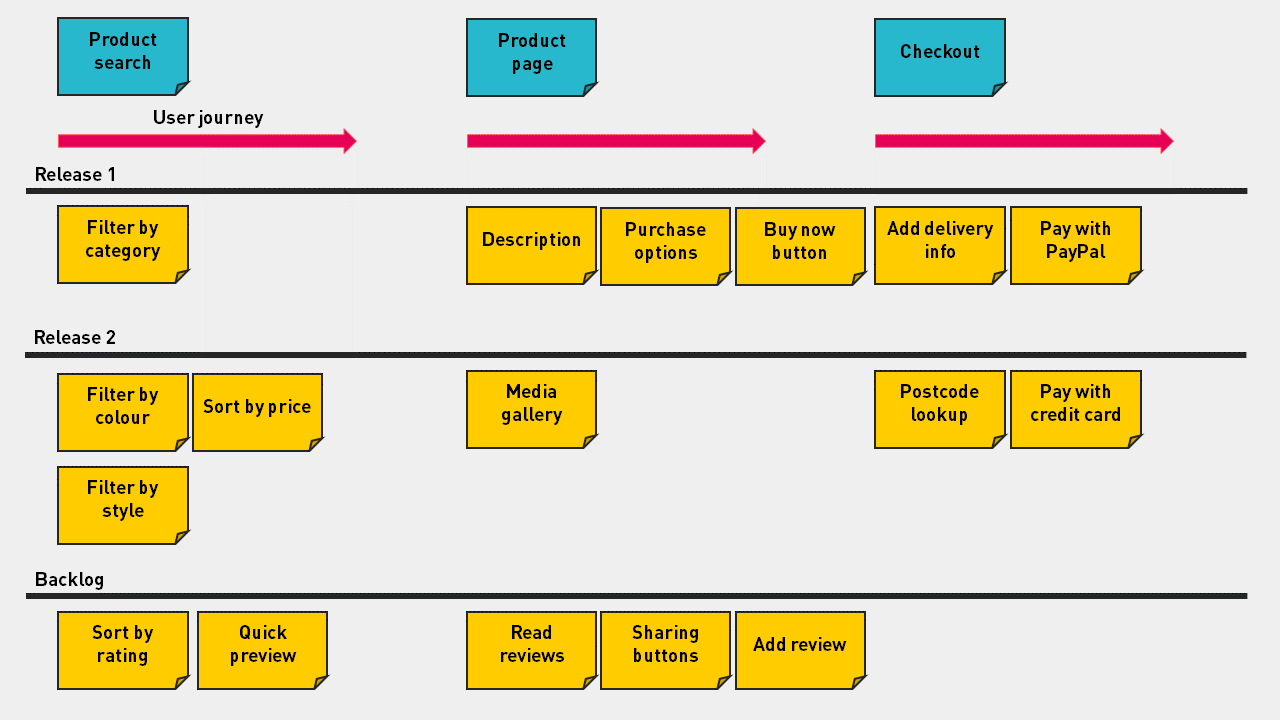
    One of the effective ways to shape your new platform and maximize the value for users of the system is through building a smooth user journey. To put in simple words, identify your user goals from which you obtain activities, tasks, and user stories. This process helps you understand what the MVP go-live version of your new platform looks like.

    Capture A User Journey On Your Site

    After you have a user story map, your next task is to analyze the map and come to a conclusion by asking the below questions:

    • Does this functionality be included in the new platform?
    • If not, do you need to customize to meet your business processes?
    • How is the return for that feature compared with the investment?

    Answering these questions will help you in focusing on doing valuable things, and also you can limit the amount of unnecessary customization which occurs in your business.

    Review Ecommerce SEO And Technical Optimization

    Your site undergoes structural changes when you migrate from Magento 1 to Magento2. So, it would best if you run an eCommerce SEO checklist to overcome any issue that impacts the organic traffic of your site.

    Here are some factors that need your concern:

    • Meta tags for products and categories;
    • SEO-friendly URLs;
    • Prefixes and suffixes for title tags;
    • Images and media are optimized;
    • On-page content is optimized correctly;
    • Internal links are used appropriately.

    How to add select all button in export products using plugin in Magento 2?

    If you want to implement “add select all button in Export Product” functionality in Magento 2, then please follow the below step.

    Step 1. Create Magemonkey/Exportproduct/registration.php file and add below code

    <?php
    MagentoFrameworkComponentComponentRegistrar::register(
        MagentoFrameworkComponentComponentRegistrar::MODULE,
        'Magemonkey_Exportproduct',
        __DIR__
    );

    Step 2. Create file of Magemonkey/Exportproduct/etc/module.xml

    <?xml version="1.0" ?>
    <config xmlns:xsi="http://www.w3.org/2001/XMLSchema-instance" xsi:noNamespaceSchemaLocation="urn:magento:framework:Module/etc/module.xsd">
        <module name="Magemonkey_Exportproduct" setup_version="1.0.0">
            <sequence>
                <module name="Magento_Backend"/>
            </sequence>
        </module>
    </config>

    Step 3. Create file of Magemonkey/Exportproduct/etc/adminhtml/di.xml

    <?xml version="1.0" ?>
    <config xmlns:xsi="http://www.w3.org/2001/XMLSchema-instance" xsi:noNamespaceSchemaLocation="urn:magento:framework:ObjectManager/etc/config.xsd">
        <type name="MagentoBackendBlockWidgetGridExtended">
            <plugin disabled="false" name="Magemonkey_Exportproduct_Plugin_Backend_Magento_Backend_Block_Widget_Grid_Extended" sortOrder="10" type="MagemonkeyExportproductPluginBackendMagentoBackendBlockWidgetGridExtended"/>
        </type>
    </config>
    

    Step 4. Create plugin file of Magemonkey/Exportproduct/Plugin/Backend/Magento/Backend/Block/Widget/Grid/Extended.php

    <?php
    namespace MagemonkeyExportproductPluginBackendMagentoBackendBlockWidgetGrid;
    class Extended
    {
        protected $request;
    
    	public function __construct(
            MagentoFrameworkAppRequestHttp $request
        ){
            $this->request = $request;
        }
        public function afterGetMainButtonsHtml(
            MagentoBackendBlockWidgetGridExtended $subject,
            $result
        ) {
        	$moduleName = $this->request->getModuleName();
            $controller = $this->request->getControllerName();
            $action     = $this->request->getActionName();
            $route      = $this->request->getRouteName();
    
            if($controller == 'export' && $action == 'getFilter'){ //check controller and action
            $result .= '<button id="" title="Select All" type="button" class="action-default scalable action-reset action-tertiary" onclick="export_filter_gridJsObject.selectAll()" data-action="grid-filter-reset" data-ui-id="widget-button-3"><span>Select All</span></button>';
        	}else{
        	$result .= '';
        	}
            return $result;
        }
    }
    

    Step 5. Override the /vendor/magento/module-import-export/view/adminhtml/templates/export/form/filter/after.phtml file and add below code after line 18

    export_filter_gridJsObject.selectAll = function () {
                // class admin__control-checkbox is selector 
                var inputs = document.getElementsByClassName("admin__control-checkbox");
                for(var i = 0; i < inputs.length; i++) {
                    if(inputs[i].type == "checkbox") {
                        inputs[i].checked = true;
                    }
                }
            };


    Note. Create the admin theme using this link and follow that step https://magemonkeys.com/magento-2-change-default-logo-of-admin-panel

    Magento 2: how to add new custom configuration option to editor global variable

    If you want to add new custom configuration option to editor global variable than you need to below steps:

    1. First you need to add your configuration option in your extension system.xml file.

    <?xml version="1.0"?>
    <config xmlns:xsi="http://www.w3.org/2001/XMLSchema-instance" xsi:noNamespaceSchemaLocation="urn:magento:module:Magento_Config:etc/system_file.xsd">
     <system>
     <section id="general">
     <group id="store_information">
     <field id="company_no" translate="label" type="text" sortOrder="65" showInDefault="1" showInWebsite="1" showInStore="1">
     <label>Company Number</label>
     </field>
     </group>
     </section>
     </system>
    </config>

    2. After add configuration option you need to register your configuration option in Magento Variables via your di.xml

    <?xml version="1.0"?>
    <config xmlns:xsi="http://www.w3.org/2001/XMLSchema-instance" xsi:noNamespaceSchemaLocation="urn:magento:framework:ObjectManager/etc/config.xsd">
     <type name="MagentoVariableModelSourceVariables">
     <arguments>
     <argument name="configPaths" xsi:type="array"> 
     <item name="general/store_information" xsi:type="array">
     <item name="general/store_information/company_no" xsi:type="string">1</item>
     </item>
     </argument>
     </arguments>
     </type>
    </config>

    How To Increase The Speed Of Your Magento Store And What Should Be Google Speed Test Rank?

    One of the crucial factors of your eCommerce website is loading speed. A fast-loading website converts more visitors into customers and increases your sales.

    In this post, we have discussed some of the steps on how to increase the speed of your Magento 2 website.

    1. Update to the Latest Magento Version 

    Ensure you are running the latest version of Magento. New releases often include performance improvements and other patches which affect performance. Hire Magento upgrade service provider if you don’t know how to upgrade the store.

    2. Enable all Magento caches

    Enable caching to reduce the number of database operations required for each page request.

    Where: System -> Cache Management

    3. Optimize your images

    Compress the images before you add in your Magento 2 store. For products, you can use JPEG images, whereas PNG/SVG can be used for other images. Use a photo editor such as Adobe Photoshop to reduce file size.

    4. Use a fast hosting server

    Your hosting server needs to focus on time to first byte (TTFB) as it provides information on how fast the response from the server is passed to a browser request. In simple words, how speedily your server implements a PHP code. A good TTFB should be around 1s.

    5. Make sure your third-party extension is up to date.

    Keep the number of third/community extensions to a minimum. Many extensions introduce extra processing and database queries which harm the overall performance

    6. Enable flat categories and products

    Enable the Flat Catalog module for products and categories in the Magento Admin Panel. We have seen quite significant improvements by turning on this feature, especially on large catalogs.

    Where: System -> Configuration -> Catalog

    7. CSS/JS Minification and Merge

    A JS/CSS “minifier” such as the Minify Javascript / CSS, which is made by a leading provider of Magento extensions. Minify JS / CSS will combine, compress, and cache Javascript and CSS files. Also, it will even add expiry tags forever to the data to ensure the fastest browser loading.

    Why Should You Check Your Site Through Google Pagespeed Insights?

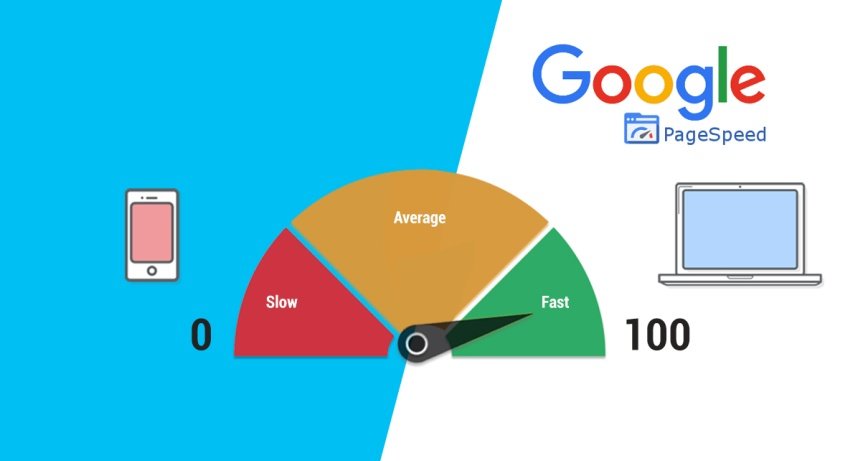
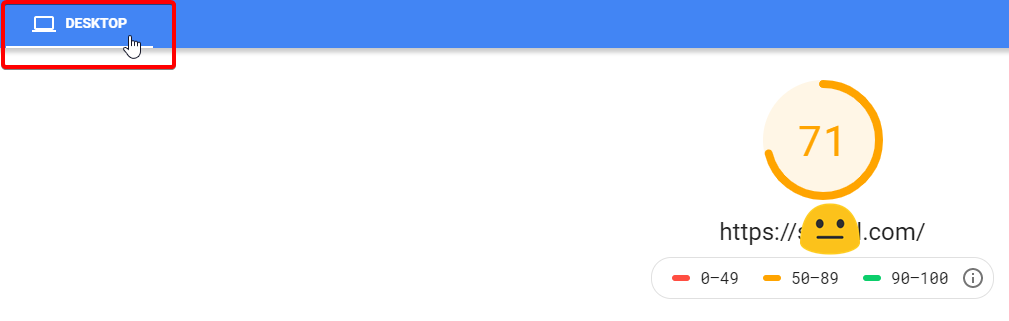
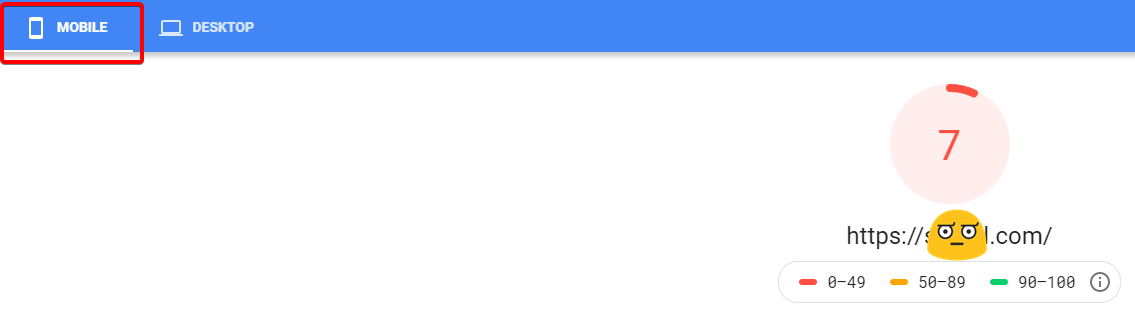
    PageSpeed Insights shows the real-world performance of a page for mobile and desktop devices and also provide suggestions on how you can improve the page loading speed.

    A Magento site with an excellent performance can also get an average PageSpeed Insights score. Though, one needs to understand that these metrics are not 100 percent accurate because Google doesn’t see your site the same way as your customers do. It does not consider the subtleties of eCommerce user experience and many other Magento quirks that deal regularly.

    However, PageSpeed Insights is doing its best to analyze the store and accordingly provide actionable suggestions for any page.

    As per PageSpeed Insights, What should be an ideal page speed score?

    The score is displayed at the top of your PageSpeed Insights, and this report is generated by running Lighthouse, which collects and analyzes lab data about the page.


    A score of 90 or above is considered fast, and score between 50 and 90 is moderate and below 50 is slow. You should take quick action if you get a score below 50.

    What Can You Do To Improve The Pagespeed Of Your Magento Store?

    Speed is essential to your sales and conversions, as explained above. If you want to get the best result, then you should invest quite of your time into analyzing, fixing, and debugging every Google page speed opportunity. We advise you to get in touch with a technical person as this process needs an expert level of technical knowledge.

    Top Magento support services requests and solutions

    Your Magento store requires constant attention and unbiased maintenance to ensure serving your audience with a flawless experience. Magento support services include different tasks such as design changes, migrating to the latest version, site optimization, installing security updates, third-party integration, and so on.

    In this post, we have a hand-picked list of Magento support service requests and solutions which are useful for every Magento store owner.

    1. Site optimization

    Magento 2 very different from Magento 1. It is customizable and scalable but also has strong challenges and requires efforts for systematic optimization.

    To enhance store performance, we implement some of the best practice, such as:

    • loading ‘above-the-fold’ contents first
    • reducing page size
    • implementation of PWA (Progressive Web Apps)
    • JS bundling
    • Optimizing Time to First Byte (TTFB)
    • capitalizing on HTTP ver.2
    • varnishing for full page caching

    The optimization process also includes Magento catalogs, setup CDN (for faster response time), deleted unused extensions, create Elastic search for quicker search, and more.

    2. Magento 2 migration

    Magento 2 comes with excellent features, bug fixes, and enhancements. Magento 2 migration process includes:

    • checking extensions compatibility
    • getting Magento 2 infrastructure ready
    • initiating the migration steps
    • performing system integration tests
    • getting prepared for go-live
    • turning on Magento 2.x store

    Migrating the store from Magento 1 to 2 or 2.3 needs meticulous planning. It consumes significant time and resources, but the benefits like quick page loading speed, faster catalog performance, more orders processing capabilities, latest security updates, Magento 2 features, etc., are too hard to ignore.

    3. Integrating third-party extensions

    Magento is so flexible and customizable that you can easily integrate your Magento with third-party extensions through extension-based functionality. Third-party extensions are quite common when it comes to Magento support service requests.

    To enhance the online user experience, Magento 2 can be integrated with various third-party extensions that can help you implement cutting-edge smart solutions. When the site uses too many third-party extensions, then there are chances that the website can face some glitches, and performance could drop. Therefore, the very first step after the integration is auditing the website as the developer can resolve the conflicts before adding the next extension.

    4. Implementing security updates

    To keep the site protected and performance intact, you need to avoid any security vulnerabilities. So we periodically check and update the site with the latest security patches officially released by Magento.

    It’s tricky to implement security updates on a heavily modified Magento site. In such a scenario, we keep the original state of the Magento cores and execute the security update outside in such a way that it does not interrupt the core files. After successfully updating security, we install and test the customizations to check if they function correctly.

    5. Integration with ERPs, CRMs, and others

    There are so many crucial tasks involved when you integrate ERPs and CRMs with your Magento. These tasks depend on ERPs such as suppliers, orders, warehouses, product returns, and so on.

    In a nutshell, the most common requests in Magento manage services and supports are Magento performance optimization, installing security patches, third-party integrations, and migration to the latest Magento versions. At times these requests may overlap with each other, and in many cases, security updates, migration, and big fixes are inevitable.

    7 Major Pitfalls You May Face With Magento Migration

    Effective technology is the most important thing behind any eCommerce store. Migrating from Magento 1 to Magento 2 is now the most important step for your online business. Magento 2 is far better than Magento 1. It like running your estore on an entirely new platform that has enhanced search, secure checkout, effort-less store management, faster page loading.

    Migration is a process that takes time and migrating from Magento 1 to Magento 2 takes three to five months. Still, this time can be longer if the site is complex or highly customized and especially if you run into some pitfalls.

    To make migration easy for you, Mage Monkeys have compiled a list of the most common pitfalls and how you can avoid them.

    Pitfall 1: Magento 2 data migration is not as simple as dragging and dropping

    You cannot simply copy-paste Magento 1 data into Magento 2. First, you will prepare a Magento 2 platform for custom data. Next, you can merge custom migration scripts in which the official data migration tool and manual migration are used to migrate Magento settings and bulk data.

    Pitfall 2: Messy code and a shoddy data structure may lead to a lot of custom development

    It may happen that during migration, some problems might arise related to data structure depending on how old your site is and who built it. Migration becomes difficult if code is messy as shifting through disorganized code is time-consuming. To ease this pitfall, you need to audit your site first as it will conclude that custom migration scripts are required or not or the developer can begin with a clean installation of Magento.

    Pitfall 3: Sometimes Magento Migration leads to poor SEO performance

    Search Engine Optimization is essential for your business. It needs to be done correctly else your site might come across the following issues:

    Lower search engine ranking

    Redirects that don’t work

    Broken URLs

    You have to map out your old site architecture and match it up with the new site as this will keep your SEO healthy after migration. The migration will retain your ranking, and you will not lose traffic because of unavailable or broken pages.

    Pitfall 4: Magento 1 extensions cannot be used in Magento 2

    Your Magento 1 extensions won’t work in Magento 2 over during migration. But, if your Magento 1 extensions have Magento 2 versions then it quite easy to migrate settings and data, and this way your business will not be affected.

    Pitfall 5: Store Theme and Design have to be redone from scratch

    Same like extensions, theme, and design won’t work after the migration because Magento 2 uses a modern architecture and has different frontend and backend requirements. Mobile phones are used more compared to other devices, so it is necessary to take advantage of Magento 2’s mobile-friendly responsive design features.

    Pitfall 6: The process takes time

    Migrating to Magento 2 is a significant upgrade, and it will give you numerous benefits like enhanced performance and scalability, easy checkout, mobile-friendly, advanced reporting and much more. Magento 2 is very different from Magento 1, steps like planning, custom development, redesign, and extension installation need the right amount of time.

    Auditing your site will give you a better picture of the entire migration process (in terms of time).

    Pitfall 7: Craft your Definition of Done correctly

    Definition of Done (DoD) is a predetermined set of criteria where the development team agrees that the project will be completed with a high level of quality.

    Why is DoD critical in Magento migration?

    Before the migration process starts, a proper timeline, plan, and understanding are required; otherwise, the project can go indefinitely. Preferably, we want to migrate as fast as possible, along with keeping DoD in mind.

    Takeaways

    Upgrading your store to Magento 2 is a huge step, a step that will enhance user experience and also generate more revenue. Your Magento migration needs to happen soon because Magento has officially declared that Magento 1 will reach the end of life on June 1, 2020, so we recommend you to contact Professional Magento Developer soon.