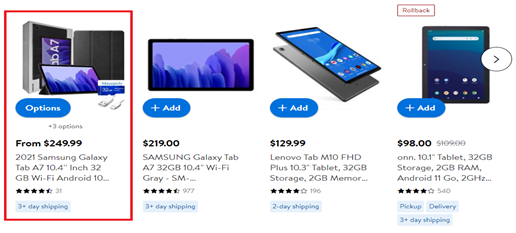
We sacrifice by not doing any other technology, so that you get the best of Magento.

We sacrifice by not doing any other technology, so that you get the best of Magento.

    How To Make Customers Trust Products At Your Ecommerce Store

    It is not easy for customers to trust any eCommerce business and start spending money on their products. With several fake eCommerce stores coming up and increased fraudulent cases getting registered, eCommerce businesses need to build trust among their customers if they want to increase their revenue.

    Here in this article, we will see a few ways in which an eCommerce store can make customers trust their products and shop.


    1. Add human touch to your brand

    Studies show that people are emotionally attracted to brands. So don’t limit yourself to just product information.


    • Take the opportunity to tell your story and use creative methods for the same.
    • Let your customers know the people behind your brand.
    • Tell them why you chose these products for the brand.
    • Explain your brand vision and mission.
    • Come up with an amazing about section.


    All these things make you more trustworthy and authentic in front of your customers.


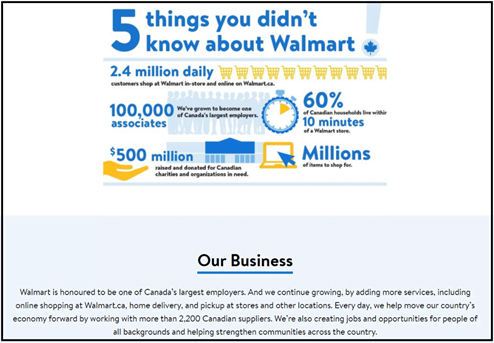
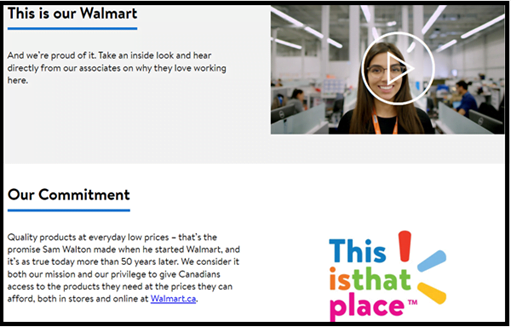
    Example: About Us page of Walmart


    1. Add in clear product descriptions

    If your shoppers understand the item that they are about to buy, then chances are high that they may end up buying it. So…


    • Write short and clear product descriptions that are up to the point.
    • Come up with an honest, catchy, and compelling product description.
    • Don’t exaggerate things when writing the description.
    • Include important things about your product like colour, weight, ingredients, measurements, warranty details, etc.
    • Also mention how the product is going to help the customers.


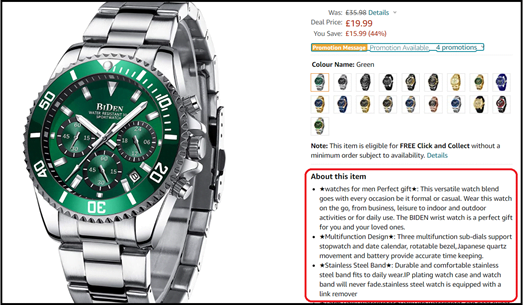
    Example: Product description from Amazon


    1. Be transparent and honest

    When visiting your online store, customers completely have to depend on the information you show there. So, you need to be transparent and honest to win them.


    • Show company details like address, contact number, etc. on the site.
    • Show the faces of your team so that customers can know real people are working behind the eCommerce store.
    • Mention your exchange policy, refund policy, and shipping information on the site.


    1. Social proof

    Social proof helps brands to build connections around different social media platforms. It helps-


    • Brands promote their products and services with ease using the best of creativity.
    • Helps easily connect and communicate with prospects and customers.
    • Helps build brand loyalty.


    1. Testimonials/ video testimonials

    Testimonials confirm your products are genuine. It saves customers from unnecessary confusion when it comes to buying products online.


    • You can add text testimonials about your product on your eCommerce store and make them available on all pages.
    • Add video testimonials on the pages as they influence customers more as compared to text testimonials.


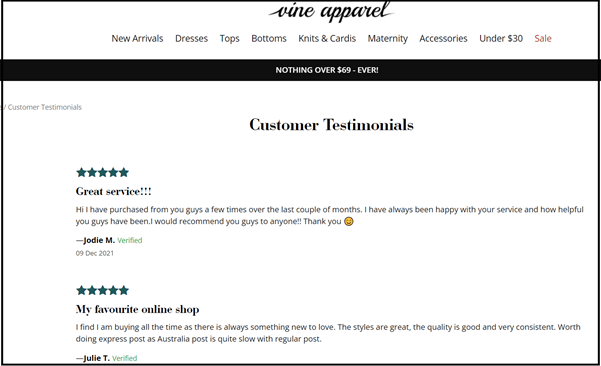
    Example: Text testimonial from Vine Apparel


    1. Reviews/ratings

    Customers rely on what other customers have to say about your products and so mentioning reviews and ratings on your eCommerce store is important.


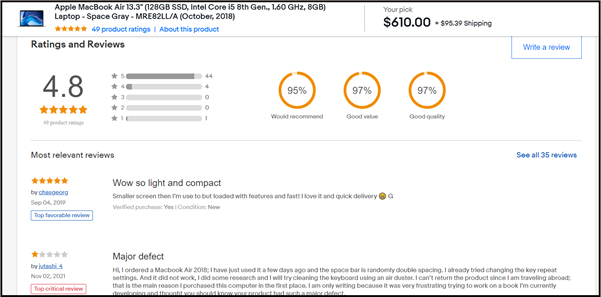
    Example: Reviews and ratings for Apple MacBook at eBay.


    1. Statistics displaying your product adoption

    Try to display the number of customers who bought your product. This will build trust within potential buyers who are at your eCommerce store and checking out the product.


    1. Live chat

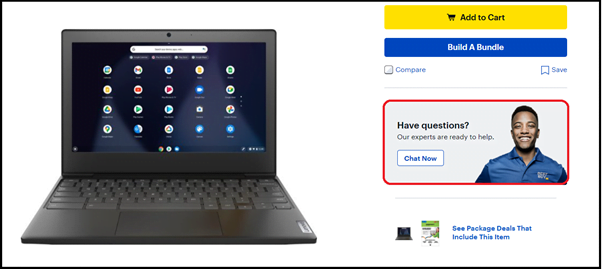
    Customers may need detailed information on return policy, shipping, size charts, etc. while browsing. So, add in a live chat option to be always present for your clueless customers.


    Example: Live chat feature at the product page of Best Buy


    1. Collect and implement feedback

    It is critical to know what people think about your brand and your business. Use this opportunity to collect feedback about your eCommerce store.


    • Implement new changes or functionalities in your online store based on the collected feedback
    • You can introduce newer products or remove the ones that are least searched by customers after learning from feedback.


    1. Be clear about returns/warranty

    When shopping online the main concern of shoppers is that they don’t want to end up with products that they could not use or that are not up to their expectations. This means you need to offer them a complete satisfaction guarantee when shopping from you.


    • Highlight the return policy of the products
    • Highlight the warranty policy of the product
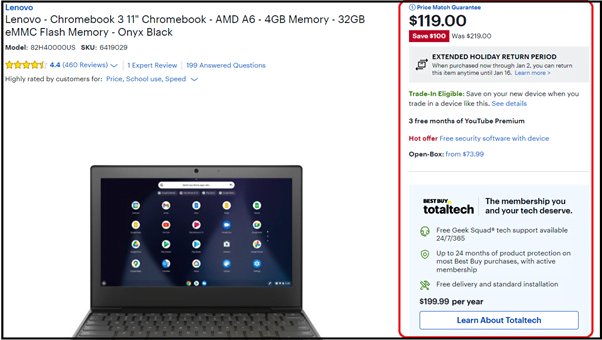
    • Mention price guarantee on product page
    • Offer membership for added services


    Example: Returns policy and warranty details at the product page of Best Buy


    For an eCommerce store to be successful it is important that it gains the trust and loyalty of customers. To make that happen, the store needs to focus on a lot many big and small things. With years of experience and gained expertise, Mage Monkeys can help you make that happen through its unmatched Magento development services designed for eCommerce businesses.

    2021-3

    Cost of Hiring a Magento developer is CHEAPER than not hiring one

    Yes, you read it correctly. If you own or manage a Magento store, then you must have a Magento developer who can work for your Magento store developer whenever requires.

    While discussing with Magento clients, we realize that clients loose big time when they compromises on hiring a Magento developer.

    The lose impact on the sales directly. The loses can be,

    – Slow site
    – Bugs on site
    – Downtime on site
    – Site security may get compromised.
    – No upgrade benefits.
    – Sales drops.
    – No support to your marketing team
    – No tech marketing
    – & many more.

    When you don’t have a Magento developer who can work for you as per your needs, then you face a big time loss.

    Having a Magento developer won’t let you have such losses. That’s why it’s suggestable to have a Magento developer who should be just a call away. Fill the below form if you wish to hire a Magento developer for your store.


    Why you should have a dedicated Magento developer for your store?

    Having a live site in Magento is a half way run. When you do marketing or want to increase sales through the store, you may face lots of problems. To solve such tech issues, it’s advisable to have a dedicated developer who can help you with,

    – Installing Regular Updates -> Magento launches updates very frequently. If your store isn’t having the latest technological touch, then you may miss many technological benefits which has power to accelerate the sales. So, a dedicated developer can help you to leverage benefits of all regular updates from Magento.

    – Installing security patches -> Hackers & hacking is growing day-by-day. eCommerce is the target, as it has lots of customers with credit cards. That’s why your store is not safe until you have security shields which can be installed by certified Magento developers.

    hire dedicated magento developer

    – For customized requirement -> Sometimes, you may require such facilities which aren’t offered by Magento. To get such requirements shorted, you need to have a skilled developer, who can help you to execute your customized requirements.

    – Improving store speed -> You website may get slow day-by-day due to heavy usage from the customers or having larger database. Cache may get full & due to many other reasons, your site may take a lot time to load even if you solve the issue once. This issue will re-appear again-and-again. To get the permanent solution, it’s advisable to have a developer who can make sure to not let your store’s speed go down.

    – To do regular audit -> A website may need regular audit. Having a developer will take away that job from your plate and you can focus on your sales.

    Apart from above reason, there are numerous reason that can turn helpful for you if you have a dedicated developer for your store. Fill the below form if you are looking to hire a certified and skilled developer.

    How to remove ‘Invalid security or form key. Please refresh the page’ error message when logged in Magento admin 2.4.x?

    If you want to remove ‘Invalid security or form key. Please refresh the page’ error message when logged in to Magento admin 2.4.x, then you need to make changes to the following file.

    Step 1 : Open the vendor file like /vendor/magento/module-backend/App/Action/Plugin/Authentication.php and override to your custom theme

    Step 2 : Find below code in the bottom section of the Authentication.php file. Approx line no. 228

    $requestParts = explode('/', trim($request->getRequestUri(), '/'), 3);
    $baseUrlPath = trim(parse_url($this->backendUrl->getBaseUrl(), PHP_URL_PATH), '/');
    $routeIndex = empty($baseUrlPath) ? 0 : 1;
    $requestUri = $this->_url->getUrl($requestParts[$routeIndex]);

    Step 3 : Replace above code with below mentioned code

    $requestParts = strpos(trim($request->getRequestUri(),'/'), $request->getFrontName()) === 0 ?
                    explode('/', trim($request->getRequestUri(), '/'), 4) :
                    explode('/', trim($request->getRequestUri(), '/'), 3);
    if (($key = array_search($request->getFrontName(), $requestParts)) !== false) {
        unset($requestParts[$key]);
    }
    $requestParams = $request->getParams();
    unset($requestParams['key'], $requestParams['form_key']);
    $requestUri = $this->_url->getUrl(implode('/', $requestParts), $requestParams);


    Step 4 : After change above code, please run below mentioned commands

    - php bin/magento setup:upgrade
    - php bin/magento setup:static-content:deploy
    - php bin/magento cache:clean


    That’s it…

    Now logout your admin panel and again logged in and see your error now resolved…

    Top Upselling Mistakes Made By eCommerce Businesses And How To Avoid Them

    For eCommerce businesses, upselling has proved to be beneficial in increasing average order value and boosting sales. However, businesses fail to generate more revenue through upselling because of the few mistakes they make.

    Here in this article, we will discuss some of such mistakes and the necessary steps that can be taken to avoid them.

    1. Not having an easy upselling process

    Many of the online stores only have product information in the first fold of the product page. Customers go through them and add the product in the cart. This means you are losing your chances for upselling.

    Solution:
    • You can add some similar products targeting upselling opportunities in the first fold.

    Upselling example at Amazon:


    2. Not showing similar product comparisons

    Product comparisons is one of the upselling opportunities that eCommerce stores fail to use properly.

    Solution:

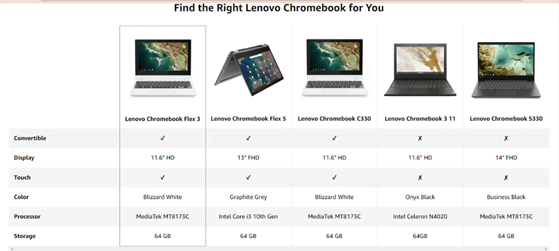
    • Your business has better chances of engaging customers by offering feature comparisons for similar types of products having higher order value.
    • Customers get to check similar products before adding the current one in the cart and go ahead with it if they find the compared product better.


    Product comparison example at Amazon:


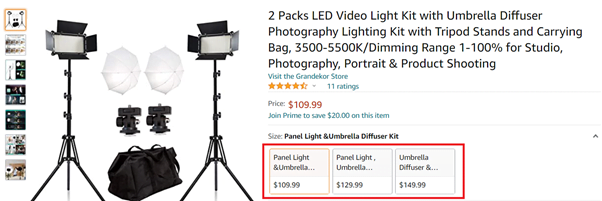
    3. Offering highly priced product alternatives

    Many eCommerce stores offer highly priced alternative product options to customers.

    Solution:

    • You need to be realistic with your upselling strategies.
    • You need to set the maximum margin for upselling alternative products.
    • You need to be sure that it is not 50% more priced than the product they are already looking at.


    Upsell example at Best Buy showing a product with little higher price:


    4. Offering poor quality options

    Some online stores display similar types of products but seldom projects its quality to customers to entice them.

    Solution:

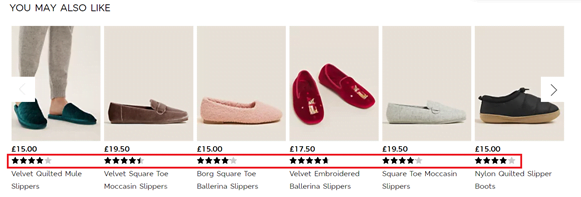
    • Add in ratings to the products or mention “Most Searched Products” to the category, etc.


    Marks & Spencer example where related products are listed with star ratings:


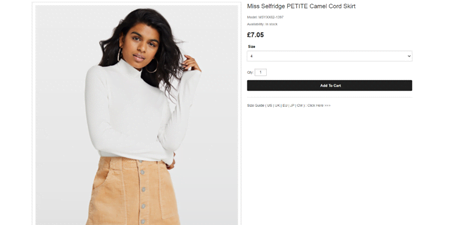
    5. Not showing items related to the product

    Sometimes stores display many products that customers skip, as they fail to relate it with the current product they are viewing.

    Solution:

    • Be clear about your product listing for a successful upselling strategy.
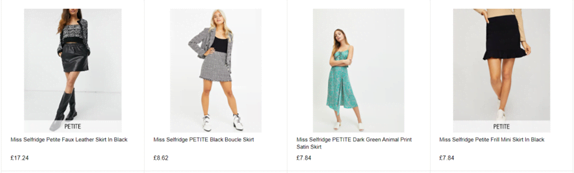
    • Choose items that can be used with the product the customer is looking at or ones that customer can choose to go ahead with instead of the current product.


    Miss Selfridge example with related items:


    6. Not investing in combo deals

    Sometimes investing in a single product is not enough, customers needs to buy items related to it to make the product function better.

    Solution:

    • Offer bundled products instead of offering single products.
    • Showcase a group of products for a single discounted price which your customers cannot wait to buy!


    Walmart example with combo deal:


    Upsells are one of the best ways for an eCommerce store to enhance ROI. If you are finding it hard to boost sales at your eCommerce store through upselling, then it is time you partner with Mage Monkeys. Here we have the best team of Magento experts who can help you with effective upselling strategies enough to bring in profits for your business.

    Tips to optimize checkout process from UX perspective

    For any eCommerce store, offering an excellent user experience is at the center of everything. This is important as only enhanced user experience will help your business with better customer retention and customer acquisition, thus leading to increased ROI.

    The majority of the businesses understand the importance of increased cart abandonment rates and focus majorly on it; however, it is equally important to focus on the process that leads to it. A good number of eCommerce stores out there have witnessed cart abandonment while shoppers were moving through the checkout process. So, optimizing the checkout process by keeping user experience in mind is crucial to avoid such situations.

    There are a few amazing tips that you can follow to enhance the user experience of your eCommerce store. They are:

    Have a simple interface for the checkout

    When it comes to delivering an unmatched user experience to your customers, how can you not invest in a good checkout page! Just like the rest of the pages on your online store, the checkout page is equally important as it is where your customers make the purchase. So having many browser controls here will not work in your favour, rather will distract the customers from the actual task. You need to keep the checkout page simple and clutter-free and it should not have any unnecessary elements that may take away customers, attention.

    However, it is important that you provide a “return to shopping” button or link to let the customers shop again if they wish to go back and buy something more. Moreover, ensure all the buttons leading to the next step is prominent enough to be followed by customers.

    Allow guest checkout

    There are many online shoppers who are not interested to create an account just to shop at an eCommerce store. This means you will be able to boost the conversion rates at your store by 10-30% simply by removing the compulsory account creation process to guest checkout. This way shoppers won’t be compelled to create an account to place an order. Now, this can be equally beneficial to the customers who have forgotten their username or password as well as for the store trying to deliver an amazing user experience.

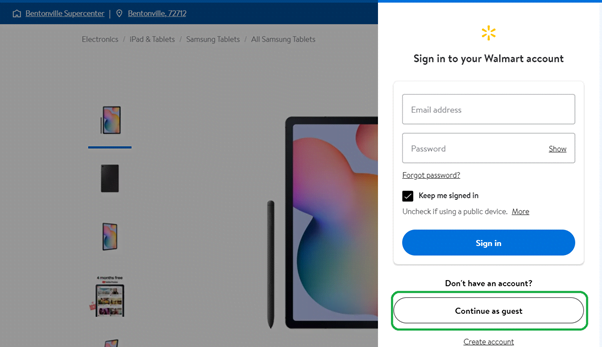
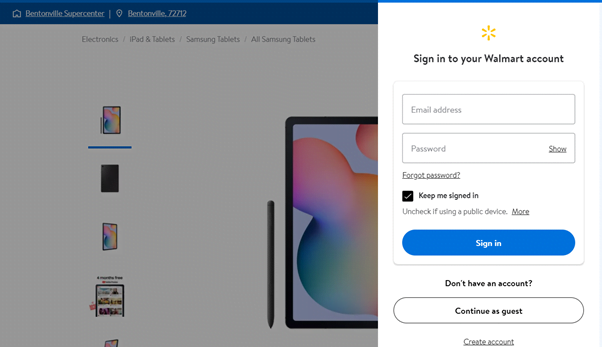
    If you are shopping at Walmart, you will see that it allows buyers to browse products, add them to the cart and finally reach checkout without having to register at the store in the first place. Here shoppers can easily complete the checkout process as a guest.


    Don’t turn signups as barriers

    When customers come to your shop let them shop rather than forcing them to fill forms first. It would be better that you keep registration to the checkout and not before that. You don’t want to do anything that will stop visitors from adding items to the basket in the first place. Many avoid these as they feel that it takes effort and time to fill them up. Moreover, it is not good from the user experience perspective too.

    You increase the chances of your visitors turning into customers by moving such barriers even further down the line. This is because your visitors got a chance to go through the products and even select the ones they like to buy before reaching the form and so chances are less that they will stop now. However, if you place such barriers at the beginning of your sales process, chances are high that they may walk away.

    If you look at the same example mentioned above, you will see that Walmart only asks for signup/login when the customer reaches the cart to checkout.


    Have a single-page checkout

    Lately, single-page checkouts have become quite a popular feature among eCommerce businesses as well as shoppers. Apart from delivering unmatched user experience, their role is huge in enhancing conversion rates. As per a report of Baymard, a long and complicated checkout process leads to around a 21% increase in cart abandonment rate.  Single-page checkouts are easy to implement while it gives full control to the store over many things.

    Offer single-click sign-ins

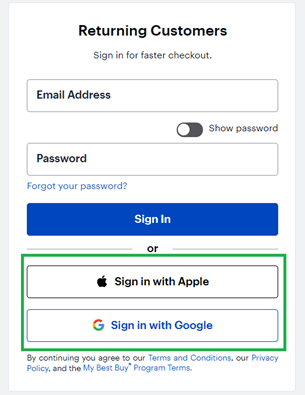
    For digital presence, IDs and passwords have turned out to be critical. However, people are not comfortable remembering different credentials for different logins. Now you can manage to offer an enhanced user experience at your store by offering one-click sign-ins. Here you can provide the facility to use social accounts like Facebook and Google to make it easy for the shoppers to get into your marketplace. Apart from easing the registration process for the customers, this functionality will give your business some pre-vetted information about the users.

    At Best Buy, they let the customers sign in to their store by using their Google or Apple credentials.


    Add “Save for later” feature

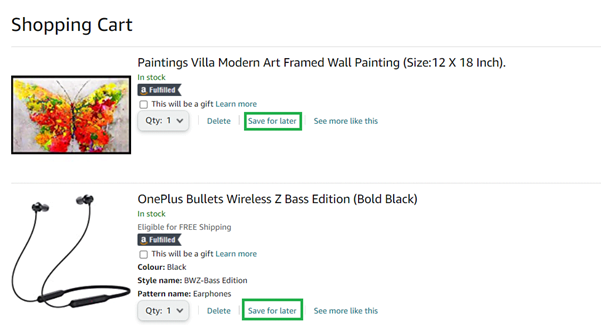
    Some users believe that the cart information will be saved when they return back and will be frustrated to know that everything is gone. They will be too irritated to fill up the cart again and buy from you. Such a poor user experience will lead to a lower conversion rate for your store. Your store will be able to reduce cart abandonment numbers due to such incidents by adding in the feature of “Save for later”. This will let the shoppers choose products and save them to be bought later. With this feature, the shoppers can easily visit the cart whenever they want and continue shopping from where they left last time. This means saving all efforts and time spent browsing and selecting products!

    Let’s here take the example of Amazon where you will see that when you will visit the cart after adding in items, you will be offered an option to Save for later. This way you can buy the item spontaneously next time you visit the store without having to go through the pain of browsing and choosing.


    Display a progress indicator

    The checkout process usually involves multiple steps. This means the customer will have to keep moving a few steps before completing the order. So, when you add in a progress indicator to this process, your customer will be able to know the exact step they are at right now and how many more to go.

    Your customers will have a better understanding of their position in the checkout process by looking at the progress indicator. This gives them better control over the steps while working from the user experience perspective. They will know the steps that they covered and the ones they will need to cover and this will remove any kind of confusion that they have.

    Optimize it for mobile

    Today the use of smartphones to access the internet and browse websites is on a rise. With more millennials and the following generation using mobile phones for everything, it is justifying for a business to smoothen the whole user journey of their eCommerce store for mobile devices.

    This means eCommerce stores will be able to deliver a better user experience by optimizing their checkout process in a way that simplifies the shopping experience for mobile users.

    Allow ease of order modification

    Chances are there that people can have a change of shopping plans or even may have added in wrong goods to the cart. So, it is up to you to simplify the checkout process by working towards improving the user experience.

    You should start by offering ease of modification and thus save your potential customers from frustration. In case the customer wishes to remove an item from the cart just offer a remove link which they can simply click and delete the product without any hassle.

    Remove distractions – keep the customers sticking to the checkout process

    It is important for the eCommerce business to establish an uninterrupted checkout process to boost conversions. Apart from helping businesses with increased conversions, this works as a great step towards enhanced user experience. Moreover, having distractions in the process can confuse the customers and they may even leave without completing the process. Some of such distractions can be unwanted graphics, product recommendations, advertisements, etc.

    Spark emotions

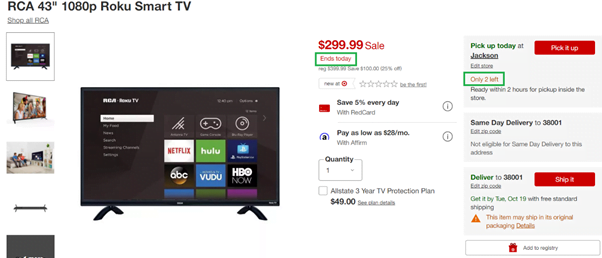
    The majority of the time customers want to buy a product by completing the checkout process. However, there are a few tips to speed up the process and turn it into a reality. You can create a sense of urgency and induct the fear of missing out by displaying the remaining number of product units. This can work as a good step towards building customer loyalty, thereby enhancing the shopping experience. You can also display here the benefits of buying the product immediately and thus increase your chances of more sales.

    If you go through the Target store, especially through the daily deals, you will see the items are mentioned with remaining stock and a limited period of deal availability. Just see here the example of Roku Smart TV.


    Direct “Buy Now” option with products

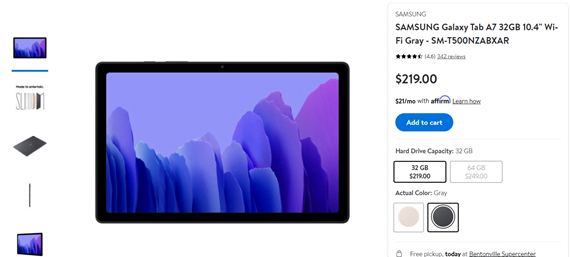
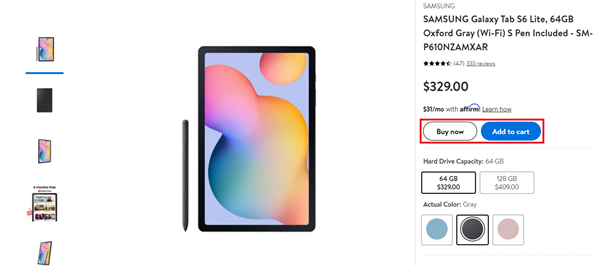
    Designing a simple and smooth checkout process should be the main agenda for any eCommerce business. There are customers who visit the site with the aim focused on buying a single product and move out through checkout quickly. To help such customers, provide the “Buy Now” option directly on the product page along with the “Go To Cart” option. This will save a lot of time for the buyers and will thus let the store offer a better user experience.

    For example, when you visit product pages at Walmart, you will see a “Buy Now” button along with the “Add to Cart” option. Just check out the example of the Samsung Galaxy Tab here.


    For an eCommerce store improving the checkout process based on user experience is crucial. If your business is finding it hard to get the job done, the Mage Monkeys team can handle the job for you. Right from identifying the pain points in your checkout process to implementing the right strategies, our team of experts will help you enhance the user experience of your eCommerce store, thus boosting conversions.

    2021-1
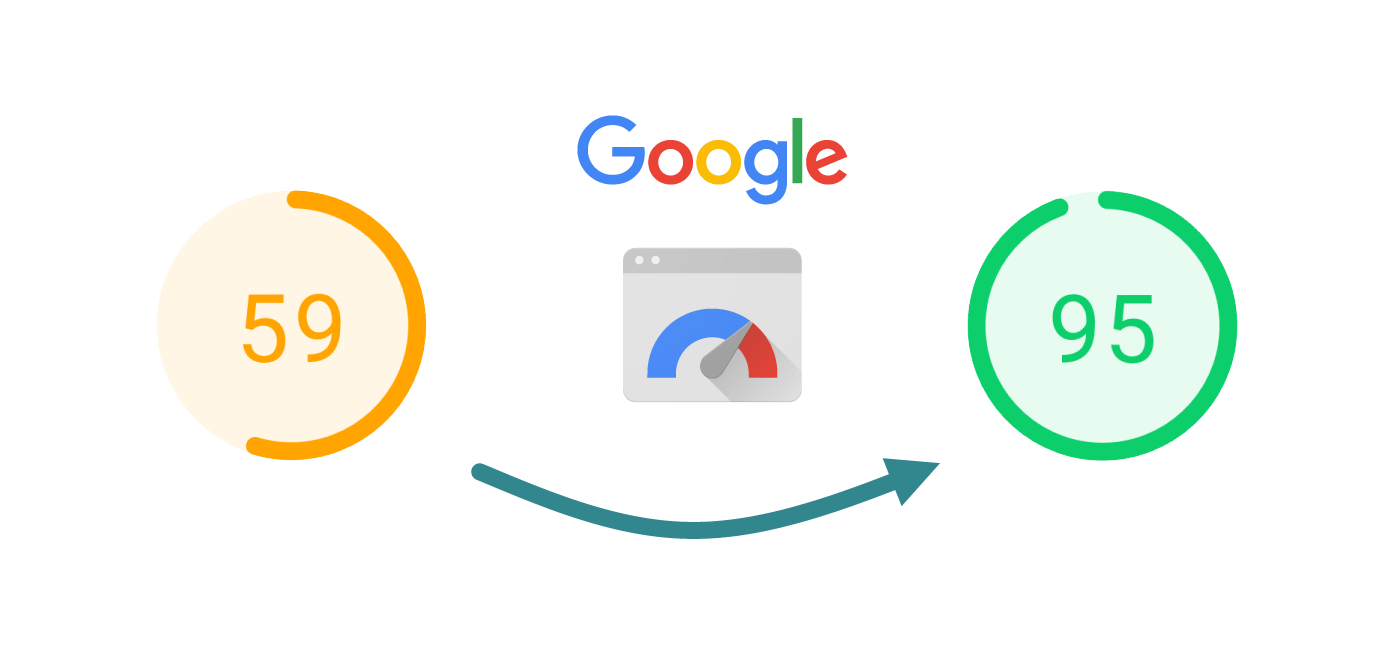
    Achieve more SALES & 90+ store load speed

    A recent study proved that for every 1 second your page loads above the global benchmark (2 seconds for desktop, 4 seconds for mobile) you lose out on up to 7% on your conversion rates.

    Add that up over the space of a year. That’s a LARGE CHUNK OF REVENUE that your business is missing out on.

    What’s the solution?

    The easiest solution is to optimize your eCommerce theme, codes, plugins, media, API & every technical section.

    With the help of Mage Monkeys, you can achieve below figures.

    Yes, the figures are not impossible. It’s achievable. We helped stores to achieve such figures by optimizing their store & themes.

    Let your store load flawlessly and power-up your sales.

    Fill the below form to adopt this new technological trend & boost up sales.

    Skyrocket sales by having “Buy on Whatsapp” option

    There are certain ways to increase your sales without spending extra money on marketing.

    Doing some UI/UX changes on your website & making it more user friendly is a way to achieve more sales.

    A regular user’s product buying journey includes below steps from product page.

    1. Product page
    2. View Cart Page
    3. Four layer Checkout page
    4. Thank-you page

    It normally takes minimum 5 mins, button clicking, data input and many other factors to complete a sales.

    But, what if you can bypass it all with just a single click. It will save lots of time of user and you will get rid of “ABANDONED CART” & many other issues.

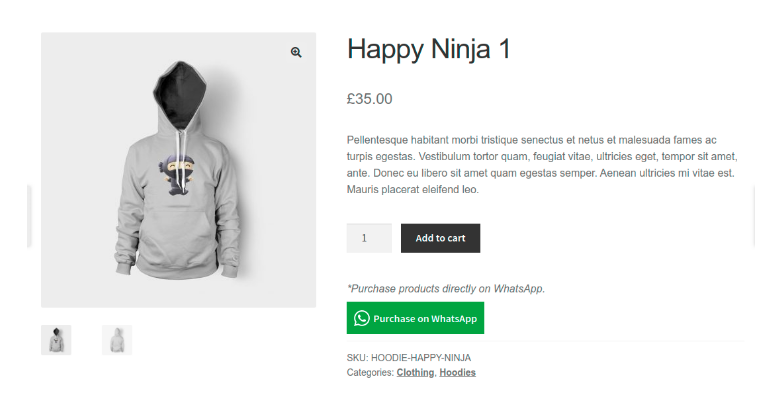
    You just have to add a “BUY ON WHATSAPP” button on every product page or product-view page as shown in below.

    Product page view:


    By implementing this functionality, users will directly connect with you on Whatsapp and sales will happen through Whatsapp .

    BONUS ADVANTAGE:
    USERS WILL BYPASS COUPON, DISCOUNT AND DEALS SECTION. 🙂

    It’s been observed that many eCommerce witness skyrocket sales after implementing such functionality.

    Fill the below form if you wish to implement “BUY ON WHATSAPP” for your eCommerce store.

    Upgrade Magento Store to Latest Magento 2.4.3
    A Major Update from Magento

    Adobe acquired Magento has launched his latest Magento 2.4.3 release which is talk of the eCommerce town. The update has launched 400+ fixes that include many major features which will help the Magento store to increase performance, security & sales.

    Below are the features available in the upgraded version.

    1) Performance enhancements:

    This release includes enhancements that decrease indexation time for Product Price and Catalog Rule indexers. Merchants can now exclude a website from a customer group or shared catalog, which reduces the number of records for indexing and improves indexing times. Web Speed improvement in a nutshell.

    2) Cart, checkout & catalog:

    Cart and checkout pages are the most sensitive pages for any eCommerce page. The new version has upgraded those pages in such a way that it smoother the buyer’s journey which helps you to increase the sales. Apart from it, mass updates have been launched in the catalog section which smoothens admin operations.

    3) Infrastructure Improvement:

    The release contains enhancement that improves below functional areas of your store such as customer account, catalog, CMS, OMS, Import/Export, Promotions, and Targeting, Cart and Checkout, B2B, Staging and Preview & many more.

    4) Fixed issues & Security enhancement:

    There are numerous issues that are fixed from installation, upgrade, and deployment levels. It gives a flawless experience to your Magento store. Apart from this, Magento 2.4.3 has launched more than 30+ security changes that give a shield to your store against hackers and malware.

    5) Cache & Captcha:

    Captcha features have been upgraded as per the latest trends and guidelines. CAPTCHA now correctly validates data provided by a shopper. The cache file has been updated to bypass caching of the customer page.

    Apart from the above five, there are other 370+ functionality level fixes and 30+ security changes which shouldn’t be a miss for any Magento eCommerce merchant. If you haven’t upgrade your store to the 2.4.3 version yet, then it’s the right time to upgrade it to the latest version.

    5 Sure signs that you need an eCommerce consulting service

    Managing an eCommerce is not an easy task. There are lots of tech problems a merchant faces. Solving them will impact the business management time slot and that will lead to a sales drop.

    Sales drop itself is a crucial signal that your store needs an eCommerce consulting to keep all technical things on track.

    Apart from sales drop, there are below FIVE signals which can notify you to adopt an eCommerce consulting to smoothen your sales & business.

    1. You are not using the LATEST 2.4.3 version of Magento

    Adobe released the latest version 2.4.3 with 400+ fixes. If you’re still using a lower version then your store is having 400+ loopholes. Is that acceptable to you? We bet, it’s not. It’s like using iPhone 4 when the world is using iPhone 13. Using the latest version will always help your store to stay more secure, faster and lead to more sales. Have a tech consultant who can keep you updated with such technological upgrades.

    2. You don’t have a mobile app

    If you’re still not having a mobile app, then you’re losing the sales you could have achieved through an app. If budget is an issue, you could have opted for PWA. The right tech consultant could help you to create an app version of your store and market it to double your sales.

    3. Your store need advanced technical functionalities

    Any eCommerce platform offers limited functionality. You need to customize your store according to your visitor and product sales report. The right consultant can help you with some plugins which can skyrocket your sales and make your site more user-friendly.

    4. Your store has a high bounce rate

    Check through analytics tools & scan through bounce rate. Imagine what will happen if that bounce rate figure will get reduced. Eventually, it will turn to more sales. Yes, that’s correct. An experienced eCommerce consultant knows the drill. He knows what steps can be taken to reduce the bounce rate.

    5. Your store isn’t having good search results

    Google promotes your site FREE via SEO. But, are you leveraging benefits for your all products/categories URLs. If the answer is no, then you need an eCommerce consult who can customize your store in such a way that your site will start achieving good ranks & sales.

    Apart from the above five, there are numerous things such as low conversion rate, low site speed, bugs in the site, security issues with the site, responsiveness, email marketing where an eCommerce consultant can guide you to achieve desirable sales figures. Don’t pause your eCommerce sales & hire an eCommerce consultant today.