We sacrifice by not doing any other technology, so that you get the best of Magento.

We sacrifice by not doing any other technology, so that you get the best of Magento.

    Magento 2 add the product description or custom attribute in order email

    Override the vendor/magento/module-sales/view/frontend/templates/email/items/order/default.phtml file on your theme and add the below code.

    <?php
    /**
     * Copyright © Magento, Inc. All rights reserved.
     * See COPYING.txt for license details.
     */
    
    // phpcs:disable Magento2.Templates.ThisInTemplate
    
    /** @var $block MagentoSalesBlockOrderEmailItemsDefaultItems */
    
    /** @var $_item MagentoSalesModelOrderItem */
    $_item = $block->getItem();
    $_order = $_item->getOrder();
    $objectManager = MagentoFrameworkAppObjectManager::getInstance();
    $product_id = $_item->getProduct()->getId();
    $product = $objectManager->create('MagentoCatalogModelProduct')->load($product_id);
    $optionId = $product->getCustomAttr();
    $optionText = '';
    $attr = $product->getResource()->getAttribute('custom_attr');
     if ($attr->usesSource()) {
           $optionText = $attr->getSource()->getOptionText($optionId);
     }
    ?>
    <tr>
        <td class="item-info<?= ($block->getItemOptions() ? ' has-extra' : '') ?>">
            <p class="product-name"><?= $block->escapeHtml($_item->getName()) ?></p>
            <p class="sku" style="font-size: 11px;"><strong><?=$block->escapeHtml(__('SKU')) ?>:</strong><?=$block->escapeHtml($block->getSku($_item)) ?></p>
            <p class="description" style="font-size: 11px;"><strong><?=$block->escapeHtml(__('Description')) ?>:</strong><?php echo $product->getShortDescription(); ?></p>
            <?php if($optionText){ ?>
            <p class="custom-attr" style="font-size: 11px;"><strong><?=$block->escapeHtml(__('Custom Attribute')) ?>:</strong><?=$block->escapeHtml($optionText) ?></p>
            <?php } ?>
    
    
            <?php if ($block->getItemOptions()) : ?>
                <dl class="item-options">
                <?php foreach ($block->getItemOptions() as $option) : ?>
                    <dt><strong><em><?= $block->escapeHtml($option['label']) ?></em></strong></dt>
                    <dd>
                        <?= /* @noEscape */  nl2br($block->escapeHtml($option['value'])) ?>
                    </dd>
                <?php endforeach; ?>
                </dl>
            <?php endif; ?>
            <?php $addInfoBlock = $block->getProductAdditionalInformationBlock(); ?>
            <?php if ($addInfoBlock) :?>
                <?= $addInfoBlock->setItem($_item)->toHtml() ?>
            <?php endif; ?>
            <?= $block->escapeHtml($_item->getDescription()) ?>
        </td>
        <td class="item-qty"><?= (float) $_item->getQtyOrdered() ?></td>
        <td class="item-price">
            <?= /* @noEscape */ $block->getItemPrice($_item) ?>
        </td>
    </tr>
    <?php if ($_item->getGiftMessageId()
        && $_giftMessage = $this->helper(MagentoGiftMessageHelperMessage::class)
            ->getGiftMessage($_item->getGiftMessageId())
    ) : ?>
        <tr>
        <td colspan="3" class="item-extra">
            <table class="message-gift">
                <tr>
                    <td>
                        <h3><?= $block->escapeHtml(__('Gift Message')) ?></h3>
                        <strong><?= $block->escapeHtml(__('From:')) ?></strong> <?= $block->escapeHtml($_giftMessage->getSender()) ?>
                        <br /><strong><?= $block->escapeHtml(__('To:')) ?></strong> <?= $block->escapeHtml($_giftMessage->getRecipient()) ?>
                        <br /><strong><?= $block->escapeHtml(__('Message:')) ?></strong>
                        <br /><?= $block->escapeHtml($_giftMessage->getMessage()) ?>
                    </td>
                </tr>
            </table>
        </td>
    </tr>
    <?php endif; ?>



    Upgrade Magento Store to Latest Magento 2.4.3
    A Major Update from Magento

    Adobe acquired Magento has launched his latest Magento 2.4.3 release which is talk of the eCommerce town. The update has launched 400+ fixes that include many major features which will help the Magento store to increase performance, security & sales.

    Below are the features available in the upgraded version.

    1) Performance enhancements:

    This release includes enhancements that decrease indexation time for Product Price and Catalog Rule indexers. Merchants can now exclude a website from a customer group or shared catalog, which reduces the number of records for indexing and improves indexing times. Web Speed improvement in a nutshell.

    2) Cart, checkout & catalog:

    Cart and checkout pages are the most sensitive pages for any eCommerce page. The new version has upgraded those pages in such a way that it smoother the buyer’s journey which helps you to increase the sales. Apart from it, mass updates have been launched in the catalog section which smoothens admin operations.

    3) Infrastructure Improvement:

    The release contains enhancement that improves below functional areas of your store such as customer account, catalog, CMS, OMS, Import/Export, Promotions, and Targeting, Cart and Checkout, B2B, Staging and Preview & many more.

    4) Fixed issues & Security enhancement:

    There are numerous issues that are fixed from installation, upgrade, and deployment levels. It gives a flawless experience to your Magento store. Apart from this, Magento 2.4.3 has launched more than 30+ security changes that give a shield to your store against hackers and malware.

    5) Cache & Captcha:

    Captcha features have been upgraded as per the latest trends and guidelines. CAPTCHA now correctly validates data provided by a shopper. The cache file has been updated to bypass caching of the customer page.

    Apart from the above five, there are other 370+ functionality level fixes and 30+ security changes which shouldn’t be a miss for any Magento eCommerce merchant. If you haven’t upgrade your store to the 2.4.3 version yet, then it’s the right time to upgrade it to the latest version.

    5 Sure signs that you need an eCommerce consulting service

    Managing an eCommerce is not an easy task. There are lots of tech problems a merchant faces. Solving them will impact the business management time slot and that will lead to a sales drop.

    Sales drop itself is a crucial signal that your store needs an eCommerce consulting to keep all technical things on track.

    Apart from sales drop, there are below FIVE signals which can notify you to adopt an eCommerce consulting to smoothen your sales & business.

    1. You are not using the LATEST 2.4.3 version of Magento

    Adobe released the latest version 2.4.3 with 400+ fixes. If you’re still using a lower version then your store is having 400+ loopholes. Is that acceptable to you? We bet, it’s not. It’s like using iPhone 4 when the world is using iPhone 13. Using the latest version will always help your store to stay more secure, faster and lead to more sales. Have a tech consultant who can keep you updated with such technological upgrades.

    2. You don’t have a mobile app

    If you’re still not having a mobile app, then you’re losing the sales you could have achieved through an app. If budget is an issue, you could have opted for PWA. The right tech consultant could help you to create an app version of your store and market it to double your sales.

    3. Your store need advanced technical functionalities

    Any eCommerce platform offers limited functionality. You need to customize your store according to your visitor and product sales report. The right consultant can help you with some plugins which can skyrocket your sales and make your site more user-friendly.

    4. Your store has a high bounce rate

    Check through analytics tools & scan through bounce rate. Imagine what will happen if that bounce rate figure will get reduced. Eventually, it will turn to more sales. Yes, that’s correct. An experienced eCommerce consultant knows the drill. He knows what steps can be taken to reduce the bounce rate.

    5. Your store isn’t having good search results

    Google promotes your site FREE via SEO. But, are you leveraging benefits for your all products/categories URLs. If the answer is no, then you need an eCommerce consult who can customize your store in such a way that your site will start achieving good ranks & sales.

    Apart from the above five, there are numerous things such as low conversion rate, low site speed, bugs in the site, security issues with the site, responsiveness, email marketing where an eCommerce consultant can guide you to achieve desirable sales figures. Don’t pause your eCommerce sales & hire an eCommerce consultant today.

    Why an eCommerce business fail?

    Doing eCommerce business is not an easy task. It takes lots of operations to make your eCommerce business profitable.

    While doing a study, we realize many eCommerce business fails as their sites fails to convert visitor into the sales.

    Marketing can help you to get right audience at your store; Detailed marketing may help you to engage visitors with your store, but your store have to be technically strong and healthy to convert those visitors into the orders.

    A potential buyer may turnoff from your eCommerce store if,

    – the site fails to deliver accurate UI/UX.
    – the site is running slowly.
    – the site is not loading design properly.
    – the checkout process is lengthy or confusing.
    – buyer’s favorite payment gateway isn’t available on your store.
    – the site don’t have the product buyers are looking for.
    – the site is unsecured or not have HTTPS.
    – the site isn’t properly responsive.
    – the site fail to rank on Google with right keywords.
    – the site is not leveraging latest technological benefits.
    – the site is ignore Mobile-first approach.
    – the site is having poor navigation & operations.
    – the site is dealing with poor tech operations.

    Apart from above, there are numerous reasons for an eCommerce store to lose on technological ground.

    Every failed eCommerce store has its own reason to lost the path of success.

    What’s the solution to avoid eCommerce business to fail due to technological reason?

    The answer is “Hire EXPERIENCED eCommerce Consultant

    An experience eCommerce consultant has already scanned numerous eCommerce website. Thus, he/she knows from where the leakage could be in your eCommerce store. It will be a child task for him/her to fix the technical leaks and make your store more healthy.

    Having some experienced eCommerce consultant will accelerate your order cycle & smoother your sales.

    Hire an eCommerce consultant today before it’s too late. Fill the below form to connect with our experience eCommerce consultant today.


    Improve sales by video recording your store visitors

    Many digital stores fail as they aren’t able to understand customers’ behavior properly. Optimizing the site as per standard methods isn’t sufficient. eCommerce merchants have to keep customizing the site as per the customers’ needs & requirements.

    You should dig further & audit:

    – How customers are using your site?
    – What are they searching for?
    – Where are they clicking & interacting?
    – How are they completing their buyer’s journey?
    – & many more questions.

    video visitor 

    It’s about seeing the site from the customers’ perspective. At Mage Monkeys, we helped our clients to install a functionality called “VIDEO RECORDING VISITORS”

    It guided our clients to understand

    – What is working for their website.
    – What is not working for their website
    – From where potential buyers are dropping
    – Which designing problems they were dealing with
    – Which payment and other tech sensitive issues they had

    After installing the VIDEO RECORDING script, our clients realized that they were losing valuable conversions & sales due to many reasons.

    By studying the video data, we made an audit report & customized the site accordingly. That resulted in SALES GROWTH.

    If your eCommerce store is still missing such feature, then get it implemented immediately to achieve business growth.

    Magento 2: How to set load custom font as preload?

    Generally, if you load font as preload, it will load first and it will help to increase site speed.

    So If you want to add custom font as preload, you need to perform settings as shown below:

    The first step is to set your font .woff or .woff2 file in your theme web/fonts folder.

    Then after you need to set that font in between head like below in default.xml layout file.

    <?xml version="1.0"?>
    <!--
    /**
    * Copyright © Magento, Inc. All rights reserved.
    * See COPYING.txt for license details.
    */
    -->
    <page xmlns:xsi="http://www.w3.org/2001/XMLSchema-instance" xsi:noNamespaceSchemaLocation="urn:magento:framework:View/Layout/etc/page_configuration.xsd">
    <head>
    <font src="fonts/custom-font.woff2"/>
    </head>
    </page>

    Boost sales & visitors engagement with Elasticsearch

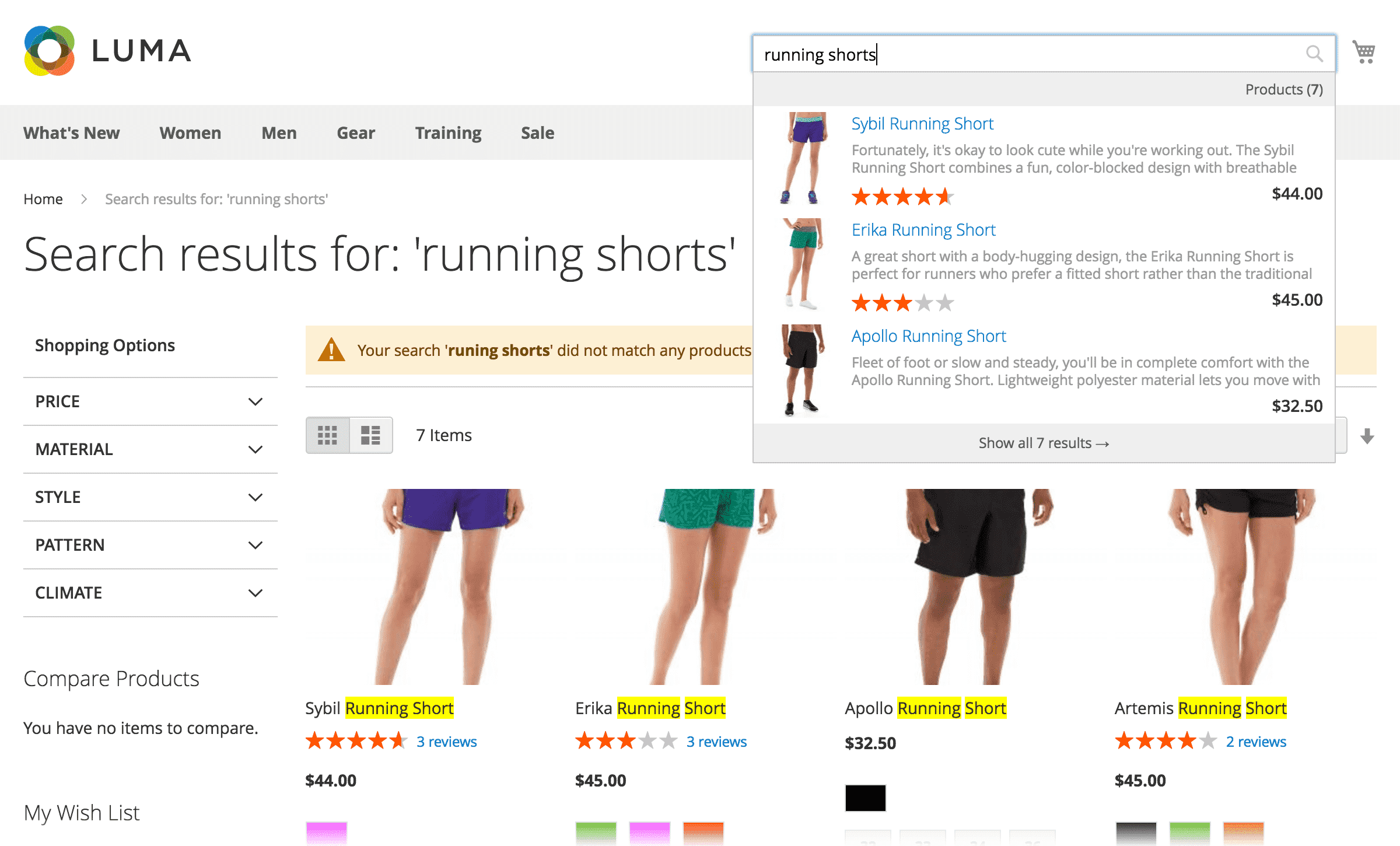
    Elasticsearch is a popular search engine adopted by many eCommerce merchants. It’s a well-designed blazing fast search engine that increase conversion rate & revenue growth.

    The Elasticsearch engine provides a multifunctional in-store search system that returns relevant results within milliseconds.

    It provides great search results to your customers and gives them an incredible search experience so that they could find and buy items they want much easier.

    Elasticsearch provides the following benefits:

    • High speed and more relevant search results
    • Super-fast search using autocomplete
    • Automatic correction of typing errors during search
    • Search across multiple content types
    • Responsive & mobile-friendly interface
    • Support for multiple languages
    • Support for stop words and synonyms
    • Shoppers are not disrupted while Elasticsearch reindexes
    • Works well out of the box
    • Supports real-time data and analysis
    • Applications in framework beyond search, including reporting, personalization, performance, and storage

    Let’s see an example:

    elastic search

    What stores have achieved after installing Elasticsearch?

    – Sales improved
    – Number of searches improved.
    – Number of orders improved.
    – Visitor’s engagement improved.
    – Web/Mobile’s vistor timing improved.
    – & many more.

    You can always make your store more powerful by installing such features. It will help you to increase sales & offer a good user experience to your buyers.

    Magento 2 convert registered customer order to guest order after placing order

    create the event.xml on your module under the Vendor/Module/etc/event.xml and add the below code

    <?xml version="1.0"?>
    <config xmlns:xsi="http://www.w3.org/2001/XMLSchema-instance" xsi:noNamespaceSchemaLocation="urn:magento:framework:Event/etc/events.xsd">
        <event name="checkout_submit_all_after">
            <observer name="checkout_order_place_after" instance="VendorModuleObserverPlaceAfter" />
        </event>
    </config>

    create the PlaceAfter.php on your module under the Vendor/Module/Observer/PlaceAfter.php and add the below code

    <?php
    
    namespace VendorModuleObserver;
    
    use MagentoFrameworkEventObserverInterface;
    use MagentoFrameworkEventObserver as EventObserver;
    use PsrLogLoggerInterface;
    use MagentoSalesApiOrderRepositoryInterface;
    
    
    class PlaceAfter implements ObserverInterface
    {
    
        protected $_customerSession;
        /**
         * @var OrderRepositoryInterface
         */
        protected $orderRepository;
        /**
         * @var LoggerInterface
         */
        protected $logger;
        /**
         * @var MagentoSalesModelOrderFactory
         */
        protected $orderModel;
        /**
         * @var MagentoSalesModelOrderEmailSenderOrderSender
         */
        protected $orderSender;
    
        /**
         * @param MagentoSalesModelOrderFactory $orderModel
         * @param MagentoSalesModelOrderEmailSenderOrderSender $orderSender
         * @param MagentoCheckoutModelSession $checkoutSession
         *
         * @codeCoverageIgnore
         */
        public function __construct(
            MagentoSalesModelOrderFactory $orderModel,
            LoggerInterface $logger,
            MagentoSalesModelOrderEmailSenderOrderSender $orderSender,
            MagentoCustomerModelSession $customerSession,
            OrderRepositoryInterface $orderRepository,
            MagentoSalesApiDataOrderInterface $orderData
        )
        {
            $this->logger = $logger;
            $this->orderModel = $orderModel;
            $this->orderSender = $orderSender;
            $this->_customerSession = $customerSession;
            $this->orderRepository = $orderRepository;
            $this->orderData = $orderData;
        }
    
        /**
         * @param MagentoFrameworkEventObserver $observer
         * @return void
         */
        public function execute(MagentoFrameworkEventObserver $observer)
        {
            $order = $observer->getEvent()->getOrder();
            $orderId = $order->getEntityId();
            $this->logger->info(print_r($orderId,true));
            $guestemail = "test@gmail.com";
            
            $comment = sprintf(
                __("%s customer order converted to : %s guest user"),
                $order->getCustomerEmail(),$guestemail
            );
            $order->addStatusHistoryComment($comment);
            $order->setCustomerId(null);
            $order->setCustomerIsGuest(1);
            $order->setCustomerEmail($guestemail);
            $this->orderRepository->save($order);
    
            $order->setCanSendNewEmailFlag(true);
            $order->save();
            $this->_customerSession->setForceOrderMailSentOnSuccess(true);
            $this->orderSender->send($order);
            
            return $this;
        }
    }


    Magento 2 : How to add custom meta tag in product view page?

    If you need a custom meta tag for a specific product page in Magento 2

    Step 1: Go to the below-given path.

    appdesignfrontendMagemonkeysCustomthemeMagento_Cataloglayoutcatalog_product_view.xml

    <?xml version="1.0"?>
    <page layout="1column" xmlns:xsi="http://www.w3.org/2001/XMLSchema-instance" xsi:noNamespaceSchemaLocation="urn:magento:framework:View/Layout/etc/page_configuration.xsd">
        <body>
            <referenceBlock name="head.additional">
                <block class="MagentoCatalogBlockProductView" name="meta_type_name" template="Magento_Catalog::product/view/custom_meta_name.phtml" />
            </referenceBlock>
         </body>
    </page>

    Step 2: Create a file named custom_meta_name.phtml at the following path

    appdesignfrontendMagemonkeysCustomthemeMagento_Catalogtemplatesproductview

    Finally, add the below code

    <meta property="og:your_custom_tag_name" content="your_custom_value" />


    How To Integrate Magento With Microsoft Dynamics 365?

    Have you ever felt that you are not able to track and manage all the processes in your Magento store? If your answer is yes, then it means that you need to integrate certain tools into your store to help it boost efficiency. You will be able to increase the sales at your store, offer better customer service and take care of business operations smoothly by integrating Microsoft Dynamics 365.


     To keep it short, when you integrate Magento with Dynamics, you will be able to improve finance & operations with the flexibility and features of Magento, driving operational efficiency, and unparalleled customer experience.


    Preparing for Magento Microsoft Dynamics 365 integration

    For a growing business, integrating ERP/CRM and an eCommerce store is considered critical today. If you achieve it properly, it can be good for your business. So, once you have decided to proceed with the integration, you will need to come up with a plan that can work in your favour. Now, this can begin with choosing experts at Mage Monkeys for the integration task. Integrating Dynamics 365 and Magento store involves a few steps and having an understanding of the same is important.


    Step 1:  Assess your data

    For an eCommerce store, you need to consider syncing various types of data. In the case of integrating Microsoft Dynamics 365 with Magento 2, you need to consider four types of data in specific. They are data related to inventory, order tracking, pricing, and product descriptions. You will have to determine many things for each piece of data and this includes deciding the frequency of updates, the place to store it, and how to manage it. This is where Mage Monkeys comes in. The experts at Mage Monkeys will work alongside you to help you with assessing the critical data and managing it for your business needs.

    Step 2: Use Microsoft Dynamics 365 to document your workflow

    The place where your data will go and when will be clarified by your workflows. The workflows followed by merchants are different. Compared to a retailer, the workflows followed by dropshippers and B2B companies are complex. So, Mage Monkeys will set up a workflow that aligns with your kind of business and will lead it to success. We will achieve this for your Magento store by integrating it with Microsoft Dynamics 365. 

    Step 3: Get involvement of the right stakeholders

    When you work with the right stakeholders for your Microsoft Dynamics 365 integration with the Magento store, you will be able to ensure that it supports the right business processes. Apart from that, such integration will ensure a better experience for everyone. The stakeholders involved here also include your target market. Now this includes the people related to sales, marketing, finance, and your potential suppliers and customers. During the integration process, the Mage Monkeys team will keep your stakeholders in the loop to ensure they have a better experience at your store. 

     Step 4: Make use of the right adapters

    It is possible to quickly integrate Dynamics 365 with Magento store using pre-built adapters. Using such adapters will save you from spending money on building one from scratch. There are some adapters available in the market that are certified by Microsoft and good to work for Magento. This helps such adapters with tasks related to inventory, order tracking, pricing, and product description and specs. Here at Mage Monkeys, we will tweak the adapters for you in a way that fits well with your business needs and workflows. Again, our team will work to ensure that the integration of Microsoft Dynamics 365 with your Magento 2 store is done well.


    Tips for successful Magento Dynamics integration

    Understanding the things to do for the integration is important but then to ensure it is successful, you need to follow certain tips too. They have been listed below:

    • Choose experienced partner

    You want the integration to meet your business needs and to make that happen you need to have the support of experts. You need to choose a partner like Mage Monkeys that have experience and expertise in working on high-level Magento Dynamics 365 integration projects. The best way to start is to meet our team and tell them your technical requirements and the kind of business goals you wish to achieve through this integration. The team will start by exploring the challenges, risks, costs, and deadlines and will communicate the same with them for more clarity.

    • Make use of middleware     

    For processes that are outside Dynamics 365 or Magento, using multichannel selling is now common in this new world. You can streamline data workflows using middleware and make it easier to interconnect Magento and Dynamics 365 for information passage. Such a middleware separates the ERP system from the frontend functions of your eCommerce store and thus adds in an extra layer of security.

    • Test your integration

    It is important to plan to test once your requirements have been specified. Testing your integration will help you ensure the expected results are achieved. It is important for you to know that your data reaches the right destination at the right time and the accuracy and reliability of your processes are maintained. The experts at Mage Monkeys will also involve your team during the process. During the testing process, our team will also look for the speed of updates as well as any synchronization errors related to the display of data. 

    • Training and support

    Magento Dynamics integration is quite business-critical and so it is important for everyone part of it to know how the processes work and how to handle issues if they arise. Our Mage Monkeys team will provide you training for the same and will offer continuous support if required. 


    Conclusion

    Magento Dynamics 365 integration can help the business with increased efficiency, properly presenting critical information on the website and reducing the chances of human errors. Mage Monkeys team ensures to complete the integration task for you with the utmost attention. We will work alongside your team to understand your business processes well and take care of errors during and post-integration before it can cause some serious issues. 

    If you are planning to upgrade your Magento store by adding ERP features through Microsoft Dynamics 365 integration, then talk to our team today. Right from planning the whole process to final execution, our team of professionals will take care of everything.