We sacrifice by not doing any other technology, so that you get the best of Magento.

We sacrifice by not doing any other technology, so that you get the best of Magento.

    How To Integrate Magento With NetSuite?

    NetSuite is one of the most popular ERP solutions in the market that is quite flexible and scalable. NetSuite is right for mid-sized businesses that have plans to grow and expand. Magento NetSuite integration needs to be done with care and by partnering with Mage Monkeys, you can go ahead and integrate NetSuite into your Magento store seamlessly.


    If you wish to go ahead with integrating these two systems, you need to be aware of a few things and the same has been explained below:


    NetSuite-Magento integration points

    There are a few touch-points covered in Magento-NetSuite integration which will be taken care of for you by Mage Monkeys and they are:

    Customer

    • The synchronization to NetSuite will be done for a new customer account, billing and shipping address, contact information, etc.
    • For the existing customer, it will automatically download customer details to NetSuite in real-time.

    Item

    • Maintain the right inventory of products in the eCommerce store through a real-time stock update from NetSuite.
    • Include and update the items in NetSuite with that of the Magento store and sync properly.
    • From Magento download the existing products to NetSuite. The update made of product details over Magento will be reflected in the NetSuite item instantly.
    • We will map Magento websites fully with warehouses of NetSuite. This way you can sync cumulative stock from different locations or inventory from a specific location to Magento.

    Shipment

    • Map Magento shipping methods along with shipping charges to NetSuite Shipping methods.

    Order

    • The sales orders placed by web customers and all web sales by guest customers on Magento will be turned into NetSuite sales orders.
    • We will sync web orders to NetSuite with status.
    • Sync in discounts for sales orders on NetSuite and for Magento to have the same value.


    How to integrate Magento and NetSuite?

    Magento and NetSuite integration can be achieved in three ways and Mage Monkeys can help you choose the preferred option to help you reach your goal.

    • Point-to-point integration

    Point-to-point Magento NetSuite integration is one of the ways to integrate eCommerce with ERP. In this case, both technologies are placed face-to-face to synchronize different data like orders, inventory, customers, and items. In this type of integration, there is no operational platform working between the systems. Therefore, it is up to you to decide which system you should choose as ‘Master’ to help with data management. Mage Monkeys can help you turn the Magento platform into the ‘master’ system and thereby manage everything from it by considering it as a central repository. Here data is sent between the systems in the original form. Moreover, you will see certain limitations in the functionality.


    In this case, data is generally synced between the systems in regular batches and that can be done on an hourly basis or once or twice a day. This kind of integration can work for small businesses that have no plans to make a big jump.


    • Custom Magento NetSuite integration

    Custom integration is another way of having NetSuite integration with Magento. Some eCommerce businesses go their own way of having their own custom integration. To help eCommerce stores with such integration, Mage Monkeys will work on APIs that are present on Magento and NetSuite and will tie both systems by writing custom codes.


    There may come situations when choosing custom integrations to become necessary for the business, like adding order fulfilment or SKU administration to your Magento 2 or NetSuite. Then there are situations where a custom solution is the only solution. In both cases, this integration solution works.


    • SaaS-based integration

    SaaS-based integration is considered to be the most cost-effective way to integrate NetSuite with Magento 2 stores. In this option, the platform makes use of pre-built NetSuite and Magento connectors designed for them.


    When compared to point-to-point integration, SaaS-based integration connectors are highly customizable and configurable so that they can easily satisfy your business needs. Here the businesses have the freedom to set the limits for their data and decide how it moves and behaves between the two systems. It offers them more visibility and control over the data. With Mage Monkeys, you can easily opt for SaaS-based integration for your eCommerce business and have the right connectors used for integration.


    Benefits of Oracle NetSuite Magento integration

    • Avoids out of the stock situation
    • Helps replenish inventory quickly
    • Fastens order process
    • Improves customer satisfaction
    • Automatically record financial entry
    • Track guest buyers and convert them to loyal customers


    Things to consider before carrying out Magento NetSuite integration

    As said above, Magento NetSuite integration needs to be done properly and the Mage Monkeys team will work closely with you to help you achieve it as per your business needs. There are a few things you need to consider or be aware of before going with the integration process and the same has been explained below:

    • Identify the data you want to integrate

    Oracle NetSuite Magento integration is all about streamlining the data that come from different sources. For increased efficiency, it is important to identify the data you want to integrate. Focusing on better automation, the data related to inventory, product information, and orders will be migrated to NetSuite software. Moreover, for better understanding and personalization, you can also integrate the data related to customer journey into NetSuite.

    • Triggering and processing time

    For an eCommerce business, time for processing and triggering happening between operations is critical. With Magento NetSuite integration you get to spend more time on the process as you get to streamline data.

    • Avoid redundancy in data entry

    In the case of an eCommerce business, tracking shipment is critical. Magento 2 NetSuite integration makes Magento website update quick and tracking easy. This means you can track customers in real-time by including their email lists. This process completely avoids the issues rising from human intervention and other data entry issues.

    • Middleware solutions and multi-channel data integration

    Geographies and channels don’t limit eCommerce business. You will have to manage your business sales from different channels once it keeps growing every year. NetSuite integration with Magento makes it easy to handle multiple APIs. Again, you get to streamline data workflows using middleware solutions and add in an extra layer of security. This will help you segregate frontend Magento operations with backend ERP operations.

    • Taxation streamlining

    You need to streamline and adjust taxation operations as your business operates from different locations at a time. You need to ensure that your NetSuite Magento integration is capable enough to support legal terms involved in taxation and easily switch between different currencies.

    • Security

    Irrespective of the size of the business, data security remains a daunting task for many. To keep your system safe from cyber-attacks it is important to keep it updated with the latest security protocols. You will be able to keep your system updated to the latest security standards by going for Celigo NetSuite Magento integration.

    • Adaptability

    One of the important things to consider during your Magento and NetSuite ERP integration is adaptability. As customizing the solution every time is not an easy job, it is important to make it feature-rich and future-ready for the market. This saves time, money, and resources for the business.


    Conclusion

    If you are planning to enhance the features of your Magento store by aggregating the features of NetSuite ERP then integrating both systems can do the job for you. The expertise of the Mage Monkeys team in handling Magento NetSuite integration can help your business enjoy the benefits of both systems in a way that turns your business more productive, makes it easy to manage, and helps in delivering excellent customer satisfaction.
    How much could a virus attack cost your eCommerce business?

    The real answer is “More than you may think

    A new virus attack is in the news every day, and it is not just Fortune 500 companies being targeted.

    Over 40% of virus attacks focus on small businesses and startups.

    Hope Is Not A Cybersecurity Plan
    Being proactive with cybersecurity protection through penetration testing, phishing training, vulnerability scans and more is the first step to protect your data and business.

    What’s the CONCRETE solution?
    The solution is to make your eCommerce store more secure.

    How you can secure your store?
    You need a security expert. If you think a regular eCommerce developer is enough for you then you’re wrong. Security experts are different compare to developers. They work on that segment of your digital system which is not learned by a developer. You need to consult with an eCommerce security expert who can enhance your store’s security to prevent any digital attack.

    What will this eCommerce security expert do in a nutshell?
    An eCommerce security expert performs a security audit and runs various tests to identify your site’s loophole. Then he codes & upgrades your store with standard security patches. In the demo site, he/she attacks eCommerce stores to find bugs & resolve them as per expertise.

    Where can I find such a security expert?
    There is numerous service provider, but not everyone is certified and expert as needed. Mage Monkeys has an in-house team of security experts who can help you to make your eshop more secure.

    The cost of hiring an eCommerce security expert is lower compare to not hiring. Don’t open your digital store’s gates open for attackers. Hire a security guard for your digital store so you can do business peacefully.


    Custom Neon® – Australia’s most affordable supplier of LED neon light signs.

    Custom Neon is an Australian-based company that designs and creates customized neon signs for various purposes. So, whether it is about creating business logo, or LEDs for weddings, events, names, or for anything else, Custom Neon creates safe and durable neon LED products that can be used as décor or for signs. Custom Neon came up with a Magento store to reach a larger customer base but, soon realized that there were some significant issues with their online store.

    They contacted a number of Magento agencies to get the issues resolved but, it was in vain. It was at this point that they happened to contact Mage Monkeys. We looked into their problem and decided to try our hand and get the issue resolved.

    The build process

    To begin with, our team of experts at Mage Monkeys looked into the issue the client was facing on their site and based on that came up with a clear working strategy. A dedicated developer was chosen to work on the project and ensure everything worked perfectly well in the store. The developer was responsible to update the client regarding the progress of the work and kept them in the loop throughout the development phase.

    Technology & tools

    • Magento
    • PHP
    • JavaScript
    • MySQL

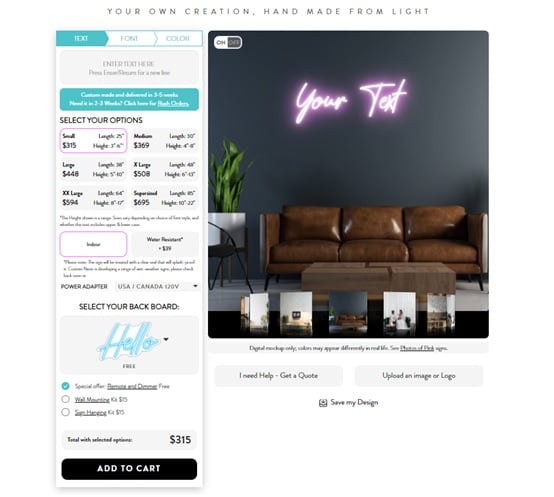
    Design your sign

    This feature lets you design a fully customized neon LED sign. Here you get to select different parameters to design your sign just with some clicks.

    design your sign custom neon

    Theme upgrade

    Theme upgrades helped our client uplift the look of their website and make it attractive for the visitors.

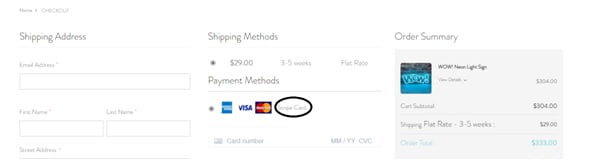
    Stripe as the payment method

    To help shoppers we integrated Stripe into the payment methods available on the store. Our client witnessed increase in online payments with this added feature.

    stripe payment gateway

    Problems

    • Key feature hanging up the site

    To begin with, Custom Neon faced a major issue with one of important feature “Design Your Own Sign” that is displayed on the homepage. Whenever a user clicks on the button, they are taken to a new page. Here the customer is supposed to choose their options and create text for the neon sign of their choice, as per their wish.

    However, whenever a user came on this page and started to work, the whole website would get hanged up. This stopped them from doing anything and the store lost some of their valuable prospects. The client wanted us to resolve this issue at the earliest as it was hurting their business.

    They came to Mage Monkeys after consulting other few agencies who failed to resolve this issue. So, they promised to sign a long-term contract with us if we succeed to resolve it. Our Magento experts looked into the issue and came up with a plan that could work in the favour of the website.

    • Dire need of site optimization

    Another thing that the client asked for was site optimization. We checked the website and analyzed the issues that were causing it to dip in traffic and affecting conversions. Based on that we selected the right tools and the strategy to tackle it.

    • Older Magento version issues

    Another thing that our client wanted was to improve the performance of the site and have features and functionalities that can help attract more customers. Mage Monkeys suggested Magento 1 to 2 upgrade as it can help the website have all the needed functionalities and features added. Based on client’s approval a new plan was laid down for the upgrade service as it involved many things.

    • Older theme affecting customer experience

    Having a better theme was something that client wanted next. Mage Monkeys knew well that it was important the user experience gets better with the theme upgrade process. So, our developer planned out the theme upgrade service cautiously so that it will not cause any trouble to the visitors.

    • Integration of new payment gateway

    Finally, including the payment method of Stripe into the site was something our client asked for. The store already had PayPal integrated in there and wanted to add in Stripe too. The team at Mage Monkeys came up with a plan to integrate the new payment gateway without causing any performance issue to the site.

    Challenges

    Our client Custom Neon was facing some critical issues on their website which was causing some loss of business. They had to find some quick solution to rectify the issue and they contacted Mage Monkeys with the same need. We understood the depth of the problem and so based on that planned out strategies which can resolve all the issues that our client had to face on the store. Now this was not that simple to start with!

    • Make the key feature work as expected

    To begin with, the main issue they faced was with one of their features – “Design Your Own Sign”. Now this was crucial to handle and critical for our future relationship with our client as they came to us only after facing disappointments from some other Magento agencies. We took this as a challenge and a senior Magento developer was selected to work dedicatedly on the project. As this feature was new to us and the issue was critical, it was important for the developer to take great care when working on the problem.

    • Analyze metrics and make improvements

    Optimizing the site for improved performance was another thing we had to do. Our developer used Google Analytics to check the performance of the site and based on the findings,had to optimize it. The tool checks different metrics related to the site performance and looks for areas that needs improvement. Based on the findings from the metrics, our developer optimized each area as a part of site optimization process.

    • Upgrade from Magento 1 to 2

    Magento store upgrade service was next on the list. Magento 1 to 2 upgrade has to be smooth and our Mage Monkeys developer knew that well. Now this is challenging as you have to add in new features and functionalities to the store while keeping the current data and information intact. With years of experience and expertise, our developer was able to devise a clear strategy along with a checklist of things to move during upgrade.

    • Theme upgrade for enhanced user experience

    Theme upgrade has to be done right and our team was well aware of the challenges that comes with this service. During the theme upgrade process, the developer has to ensure that no customizations made before gets affected and so everything has to be handled correctly. Moreover, it was critical to test the theme after it has been upgraded as you don’t want the visitors to get lost on the website and lead to increased bounce rate.

    • Integrating Stripe for better digital payments

    Finally, including Stripe as the payment gateway was a critical task for Mage Monkeys. When it comes to including a payment gateway it is important to ensure that it is done properly as issues related to security and privacy of customer data can lead to trust issues towards the brand in future. So, our developer cautiously and patiently laid out the plan for integrating Stripe into Custom Neon.

    Result

    Working on Custom Neon was quite challenging, however, it paid off well in the end. The effort we put in first to resolve the critical issue for the website helped us earn the trust of our client. This was followed by them signing up a long-term contract with us. At Mage Monkeys we helped our client experience enhanced performance, better security features, added functionalities, enhanced user experience, and easy checkout by making upgrades and improvements as needed. Last but not the least, the work we did for Custom Neon impressed another business client who then approached us to revamp their website for better conversions and an enhanced digital experience for their customers.

    This is what Custom Neon has to say about our work:

    “They communicate well, work hard, deliver on schedule.”

    Magento 2: How to auto clear cache product or any admin configuration?

    This article is a catch if you want to clean cache automatically after any admin configuration or product save.

    Follow below two steps to get it done.

    1. Create file event.xml on app/code/Magemonkeys/AutoFlushCache/etc

    <?xml version="1.0"?>
    <config xmlns:xsi="http://www.w3.org/2001/XMLSchema-instance" xsi:noNamespaceSchemaLocation="urn:magento:framework:Event/etc/events.xsd">
        <event name="controller_action_postdispatch_adminhtml_system_config_save">
            <observer name="auto_flush_cache" instance="MagemonkeysAutoFlushCacheObserverFlushCache"/>
        </event>
    </config>

    2. Create file FlushCache.php on app/code/Magemonkeys/AutoFlushCache/Observer

    <?php
    namespace MagemonkeysAutoFlushCacheObserver;
    
    class FlushCache implements MagentoFrameworkEventObserverInterface
    {
        public function __construct(MagentoFrameworkAppCacheTypeListInterface $cacheTypeList, MagentoFrameworkAppCacheFrontendPool $cacheFrontendPool)
        {
            $this->cacheTypeList = $cacheTypeList;
            $this->cacheFrontendPool = $cacheFrontendPool;
        }
    
        public function execute(MagentoFrameworkEventObserver $observer)
        {
            $types = array(
                'config',
                'layout',
                'block_html',
                'collections',
                'reflection',
                'db_ddl',
                'eav',
                'config_integration',
                'config_integration_api',
                'full_page',
                'translate',
                'config_webservice'
            );
            foreach ($types as $type)
            {
                $this->cacheTypeList->cleanType($type);
            }
            foreach ($this->cacheFrontendPool as $cacheFrontend)
            {
                $cacheFrontend->getBackend()->clean();
            }
        }
    }


    Magento 2: Set maxlength on street address field on checkout page

    If you want to add maxlength on the checkout street address field then you need to override on file in your theme

    <vendername>/<theme_name>/Magento_Ui/web/templates/form/element/input.html

    Make the above file & add the below code inside it

    <!--
    /**
    * Copyright © Magento, Inc. All rights reserved.
    * See COPYING.txt for license details.
    */
    -->
    <input class="input-text" type="text" data-bind="
    value: value,
    valueUpdate: 'keyup',
    hasFocus: focused,
    attr: {
    name: inputName,
    placeholder: placeholder,
    'aria-describedby': getDescriptionId(),
    'aria-required': required,
    'aria-invalid': error() ? true : 'false',
    id: uid,
    disabled: disabled,
    maxlength: inputName.slice(0,6) === 'street' ? 35 : 'none'
    }" />

    Note: We have tried this in Magento 2.3.7 version, If your version different then take copy this file from the vendor and add the last maxlength

    How to solve font error like ‘downloadable font: rejected by sanitizer’ in Magento 2?

    If you have faced below font related error in browser console,

    downloadable font: rejected by sanitizer (font-family: “Sofia Pro Regular” style:normal weight:400 stretch:100 src index:0) source: ../../../../../../en_US/fonts/SofiaProRegular.woff2 in magento 2

    Then follow given step-by-step guide to solve the error.

    Step 1: First check used fonts related ttf, woff and woff2 files. It must be available in the font folder with the same name.

    E.g.

    - app/design/frontend/Magemonkey/YourTheme/web/fonts/SofiaProRegular.ttf
    
    - app/design/frontend/Magemonkey/YourTheme/web/fonts/SofiaProRegular.woff
    
    - app/design/frontend/Magemonkey/YourTheme/web/fonts/SofiaProRegular.woff2


    Step 2 : Open below file

    app/design/frontend/Magemonkey/YourTheme/web/css/source/_typography.less

    Step 3 : Add below mention line under font path in _typoraphy.less

    E.g. @font-format: ‘woff’,

    See below code after adding above mention line and it should look like below

    .lib-font-face(
        @family-name: 'Sofia Pro Regular',
        @font-path: '@{baseDir}fonts/SofiaProRegular',
        @font-format: 'woff',                             // Add this line for remove above font related error
        @font-weight: 400,
        @font-style: normal,
        @font-display:swap
    );


    Step 4: After placing the above code, please run the below-mentioned commands

    - php bin/magento setup:upgrade
    
    - php bin/magento setup:static-content:deploy -f
    
    - php bin/magento cache:clean

    That’s it…

    Now refresh your site and check the console for this font-related error. Your font error should be solved.

    Magento 2: Change currency based on customer group using observer

    Vendor/Module/etc/frontend/events.xml

    <config xmlns:xsi="http://www.w3.org/2001/XMLSchema-instance" xsi:noNamespaceSchemaLocation="urn:magento:framework:Event/etc/events.xsd">
        <event name="controller_action_predispatch">
            <observer name="change_title_filter" instance="VendorModuleObserverCustomercurrency" />
        </event>
    </config>

    Vendor/Module/Observer/Customercurrency.php

    <?php
    
    namespace VendorModuleObserver;
    
    use MagentoFrameworkEventObserverInterface;
    use MagentoFrameworkEventObserver;
    use MagentoFrameworkViewLayoutInterface;
    
    class Customercurrency implements ObserverInterface
    {
        protected $context;
        public function __construct(
            MagentoCustomerModelSession $customerSession,
            MagentoFrameworkViewElementTemplate $context,
            MagentoFrameworkViewResultPage $resultPage,
            MagentoFrameworkViewPageConfig $pageConfig,
            MagentoStoreModelStoreManagerInterface $storeManager
    
        ) {
            $this->_customerSession = $customerSession;
            $this->pageConfig = $pageConfig;
            $this->resultPageFactory = $resultPage;
            $this->context = $context;
            $this->_storeManager = $storeManager;
        }  
        public function execute(MagentoFrameworkEventObserver $observer)
        {
            if($this->_customerSession->isLoggedIn()) {
                $customercurr = $this->helperData->getCurrenyCustomer();
                $customerGroup = $this->_customerSession->getCustomer()->getGroupId();
                $customergroupid = 1;
                if($customerGroup == $customergroupid){
                    $this->_storeManager->getStore()->setCurrentCurrencyCode('GBP');
                    break;
                }else{
                    $this->_storeManager->getStore()->setCurrentCurrencyCode('USD');
                }            
            }
        }
    }


    Luxury For Princess
    The Luxury Application Kit

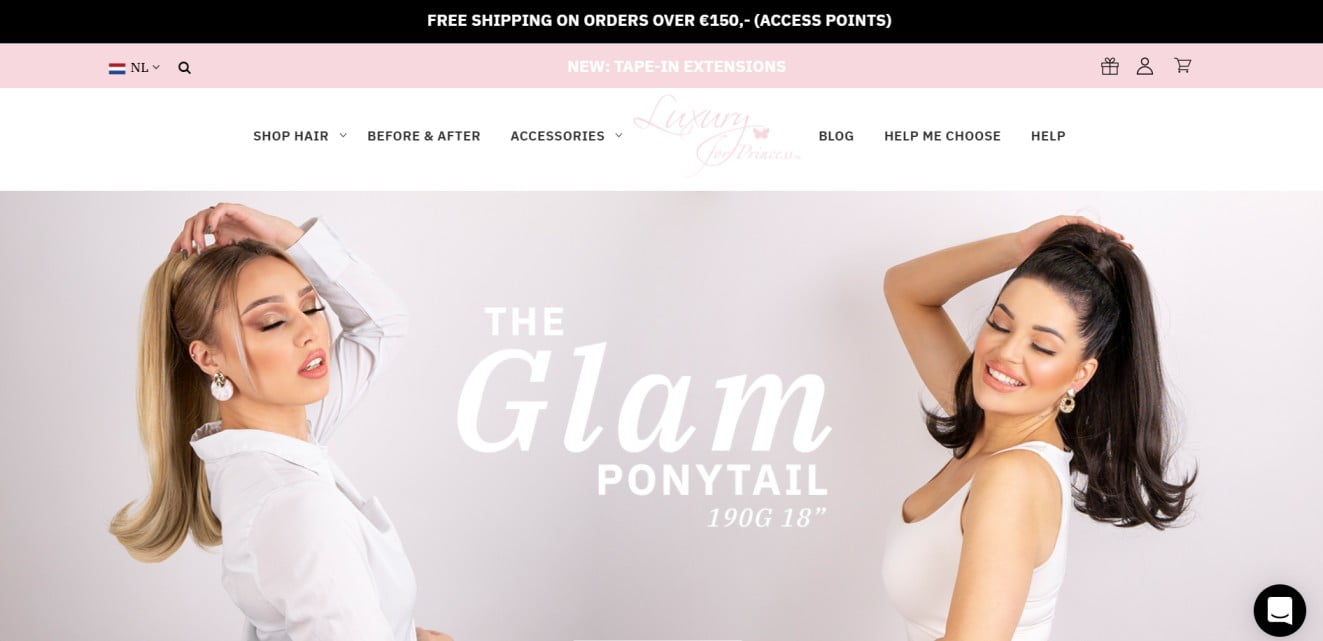
    Luxury For Princess is a Netherlands-based online beauty store that sells hair extensions and related accessories. The company was launched by Vera Speycken along with her father and through their store, they showcased a variety of high-quality hair extensions for their customers to choose from. Lately, Vera and her father were experiencing some critical issues with their online Magento store.

    So, when they came to Mage Monkeys Magento upgrade team with their problems, we offered them many solutions. Among them, one was to upgrade the store from current Magento 1.9 to Magento 2.3.

    The build process

    Our team at Mage Monkeys started by analyzing the issues faced by our client’s website. We then divided the issues and tackled them one by one. We kept the client in the loop to ensure transparency throughout the Magento upgrade journey.

    Technology & Tools

    • PHP
    • MySQL
    • Linux server
    • Apache

    An intuitive and attractive storefront

    Our team came up with a fully customized storefront for Luxury For Princess. The layout, colors, fonts, pictures, and everything were designed keeping the female customers in mind.

    luxury for princess storefront homepage
    Payment gateway integration for Multisafepay

    Adding the Magento 2 plugin for Multisafepay into the store helped our client introduce different payment options like Bancontact, SOFORT Banking, Trustly, etc.

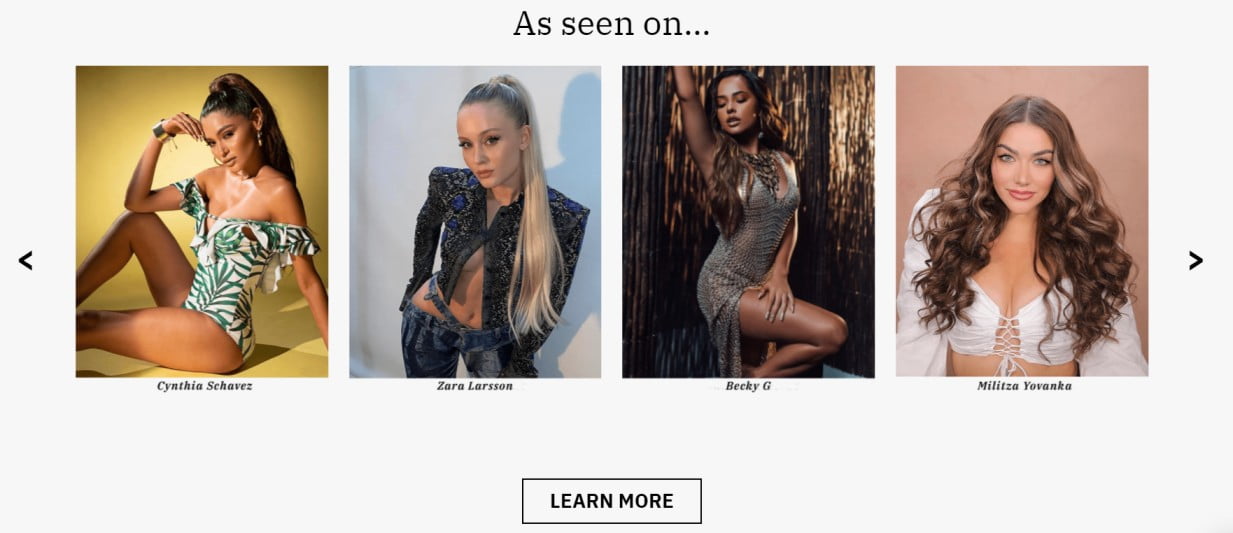
    As Seen On

    This feature showcases pictures and videos of different celebrities flaunting their looks by using hair extensions from LFP.


    Social media integration

    This feature lets the customers proudly share on Instagram the amazing products they bought from Luxury For Princess and how they have been using it.

    social media integration Magento store

    Problem

    While discussing the issue with our client, our team at Mage Monkeys realized that majority of their problems were caused because of the older version of Magento that the store was using. This restricted them from having a new set of functionalities for their store all the while affecting its overall performance. So, we had to plan out upgrades for the store based on their needs.

    Moreover, during the discussion, our client also expressed their desire to revamp the looks of the store in terms of design, colors, fonts, and much more. They wanted to make the frontend more attractive for their customers by using a refreshing theme while making it easy for users to browse and shop. So, the Mage Monkeys team had to plan out a new design layout that would be very attractive and easy to use.

    Another problem that our client faced was related to the limited access to their online store from different devices. To resolve this problem our team at Mage Monkeys suggested making the online store mobile-friendly.

    One of the other challenges that LFP faced was with their customer support partner -Webshipper. Being an older Magento version, our client was having trouble connecting with Webshipper. Our team needed to resolve this issue as they were not planning to change the customer support company.

    One final issue that they discussed with us was to get more payment gateways integrated into their system to boost customer experience and enhance conversions. They already had PayPal and wanted to integrate more options into the system. Again, the older version of Magento was not much secure and safe for online transactions and it was one of their major concerns too.

    Challenges

    Our client being into an online business, it was important for them to stay on top of everything. So instead of making some changes in the current Magento store, Mage Monkeys suggested they make an upgrade and move to the latest version. Making them understand the need to move to the latest version was challenging and our team did that well by explaining to them all benefits that they will get to enjoy.

    Our client wanted to have a new theme designed for their store. They wanted it to match with their brand vision, products, and customers -who were the beautiful ladies out there! After understanding the needs of our clients and their idea about how their store should look, our team of Magento designers at Mage Monkeys came up with highly customized and responsive designs as part of the upgrade service. Our team communicated with the client on a regular basis throughout the designing phase and made multiple revisions as needed to achieve the final look. Our designers also ensured to make the design mobile-friendly so that it can be seamlessly accessed by visitors using mobile phones and tablets.

    The older Magento version was making it difficult for our client to have smoother relation with their customer support company – Webshipper. The Magento 2 upgrade was not able to resolve the problem for our client and the integration was not successful from the client’s end. As our client wanted to keep doing business with Webshipper, it was a big challenge for our team to resolve the issue. Our team then contacted Webshipper on behalf of Luxury For Princess and customized the integration from their end.

    For online transactions, our client made use of PayPal. It was safe and secure but was not enough as people were using different payment options for making digital payments. Keeping that in mind, during the Magento upgrade service Mage Monkeys suggested the client include some banking options which they denied as they were not having plans to get entangled in banking procedures. They wanted to include Multisafepay payment methods in their store. So, we added the Magento 2 plugin for Multisafepay into the store. Now, this was challenging as Multisafepay needed customization to work well with the store and let it have multiple payment options included.

    Result

    After coming up with multiple versions, trying out many strategies, and implementing new custom changes, Mage Monkeys team were able to come up with an attractive, fully customized, high-performing, and secure online store for Luxury For Princess. During the Magento 1.9 to 2.3 upgrade, we also took care of technical glitches that were present in the earlier version. The inclusion of multiple safe and secure payment options in the store by adding in Magento 2 plugin for Multisafepay helped the store see an increase in online transactions and more purchases. The new version of the online store was mobile-friendly and responsive which made it easy for the customers to access the store using their mobile devices on the go. The Magento upgrade service helped our client with better customer acquisition and they witnessed a tremendous increase in their conversion rate.

    Magento 2 get current visitor Id for compare items

    Override the ListCompare block.

    Create Vendor/Module/etc/di.xml on your custom module

    <?xml version="1.0"?>
    <config xmlns:xsi="http://www.w3.org/2001/XMLSchema-instance" xsi:noNamespaceSchemaLocation="urn:magento:framework:ObjectManager/etc/config.xsd">
        <preference for="MagentoCatalogBlockProductCompareListCompare" type="VendorModuleBlockProductCompareListCompare" />
    </config>

    Create Vendor/Module/Block/Product/Compare/ListCompare.php

    <?php
    namespace VendorModuleBlockProductCompare;
    
    class ListCompare extends MagentoCatalogBlockProductCompareListCompare
    {
    	public function __construct(
            MagentoCatalogBlockProductContext $context,
            MagentoFrameworkUrlEncoderInterface $urlEncoder,
            MagentoCatalogModelResourceModelProductCompareItemCollectionFactory $itemCollectionFactory,
            MagentoCatalogModelProductVisibility $catalogProductVisibility,
            MagentoCustomerModelVisitor $customerVisitor,
            MagentoFrameworkAppHttpContext $httpContext,
            MagentoCustomerHelperSessionCurrentCustomer $currentCustomer,
            MagentoFrameworkObjectManagerInterface $objectManager,
            array $data = []
        ) {
        	$this->objectManager = $objectManager;
            parent::__construct($context,$urlEncoder,$itemCollectionFactory,$catalogProductVisibility,$customerVisitor,$httpContext,$currentCustomer,$data);
        }
    
    	/**
         * Retrieve Product Compare items collection
         *
         * @return MagentoCatalogModelResourceModelProductCompareItemCollection
         */
        public function getItems()
        {
        	if ($this->_items === null) {
                $this->_compareProduct->setAllowUsedFlat(false);
    
                $this->_items = $this->_itemCollectionFactory->create();
                $this->_items->useProductItem(true)->setStoreId($this->_storeManager->getStore()->getId());
    
                if ($this->httpContext->getValue(MagentoCustomerModelContext::CONTEXT_AUTH)) {
                    $this->_items->setCustomerId($this->currentCustomer->getCustomerId());
                } elseif ($this->_customerId) {
                    $this->_items->setCustomerId($this->_customerId);
                } else {
                	/****** Custom Code ******/
                    $sessionManager  = $this->objectManager->create('MagentoFrameworkSessionSessionManagerInterface');
                    $visitor = $sessionManager->getVisitorData();
                    if(!$this->_customerVisitor->getId() && isset($visitor['visitor_id'])){
                    	$visitorid = $visitor['visitor_id'];
                    }else{
                    	$visitorid = $this->_customerVisitor->getId();
                    }
                	/****** Custom Code ******/
                    $this->_items->setVisitorId($visitorid);
                }
    
                $this->_items->addAttributeToSelect(
                    $this->_catalogConfig->getProductAttributes()
                )->loadComparableAttributes()->addMinimalPrice()->addTaxPercents()->setVisibility(
                    $this->_catalogProductVisibility->getVisibleInSiteIds()
                );
            }
            return $this->_items;
        }
    }


    How to add quantity increment/decrement button on Minicart in Magento 2?

    The default Magento 2 does not provide an increment-decrement button in the minicart. If you want to set the increment-decrement button in minicart then follow the below steps

    Step 1 : Create phtml file like app/design/frontend/Magemonkey/YourTheme/Magento_Checkout/templates/cart/minicart.phtml

    Now open and add the below jQuery code in minicart.phtml

    <script type="text/javascript">
        require(["jquery"],function($){
            $('body').on("click",".more, .less",function(){
                var obj = $(this);
                var currentQty = obj.siblings('.cart-item-qty').val();
                var iid = obj.siblings('.update-cart-item').attr('data-cart-item');
    
                if(obj.hasClass('more')){
                    var newAdd = parseInt(currentQty)+parseInt(1);
                    obj.siblings('.cart-item-qty').val(newAdd);
                    obj.siblings('.cart-item-qty').attr('data-item-qty',newAdd);
                    //$('#update-cart-item-'+iid).click();
                    $('.update-cart-item').show();
                } else {
                    if(parseInt(currentQty) > 1){
                        var newAdd = parseInt(currentQty)-parseInt(1);
                        obj.siblings('.cart-item-qty').val(newAdd); 
                        obj.siblings('.cart-item-qty').attr('data-item-qty',newAdd);
                        //$('#update-cart-item-'+iid).click();
                        $('.update-cart-item').show();
                    }
                }
            });
        });
    </script>

    Step 2: Create HTML file like app/design/frontend/Magemonkey/YourTheme/Magento_Checkout/web/template/minicart/item/default.html

    Now add below two classes in your default.html inside the details-qty qty class.

    <div class="more">+</div>
    
    <div class="less">-</div>

    Now default.html file looks like this

    <!--
    /**
     * Copyright © Magento, Inc. All rights reserved.
     * See COPYING.txt for license details.
     */
    -->
    <li class="item product product-item" data-role="product-item">
        <div class="product">
            
            ...
    
            <div class="product-item-details">
                
                ...
                ...
                ...
    
                <div class="product-item-pricing">
                    
                    ...
    
                    <div class="details-qty qty">
                        <label class="label" data-bind="i18n: 'Qty', attr: {
                               for: 'cart-item-'+item_id+'-qty'}"></label>
                               <div class="more">+</div>
                        <input data-bind="attr: {
                               id: 'cart-item-'+item_id+'-qty',
                               'data-cart-item': item_id,
                               'data-item-qty': qty,
                               'data-cart-item-id': product_sku
                               }, value: qty"
                               type="number"
                               size="4"
                               class="item-qty cart-item-qty">
                               <div class="less">-</div>
                        <button data-bind="attr: {
                               id: 'update-cart-item-'+item_id,
                               'data-cart-item': item_id,
                               title: $t('Update')
                               }"
                                class="update-cart-item"
                                style="display: none">
                            <span data-bind="i18n: 'Update'"></span>
                        </button>
                    </div>
                </div>
    
                ...
                ...
    
            </div>
        </div>
        
        ...
        ...
    
    </li>

    Step 3: After placing the above code, please run the below-mentioned commands

    - php bin/magento setup:upgrade
    
    - php bin/magento setup:static-content:deploy -f
    
    - php bin/magento cache:clean

    That’s it…

    Now add some qty to the cart and check Minicart. The increment/Decrement button should be visible in minicart.