We sacrifice by not doing any other technology, so that you get the best of Magento.

We sacrifice by not doing any other technology, so that you get the best of Magento.

    New Instant Purchase Checkout Boosts Sales

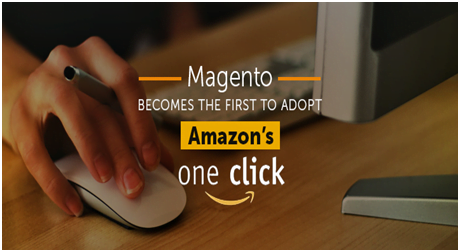
    Ten long years. That’s how long Amazon has had exclusive ownership of the one-click checkout process. While some rivals have licensed Amazon’s technology to stay completive, most have had to forgo the higher conversion rates and repeat purchases enabled by this faster checkout experience.

    As of September 2017, the wait is over. With the expiration of Amazon’s patent, merchants are free to offer their customers a better way to buy. Magento is the first commerce leader to offer an ‘Amazon-like’ experience as a standard feature, now available in the latest release of Magento Commerce.

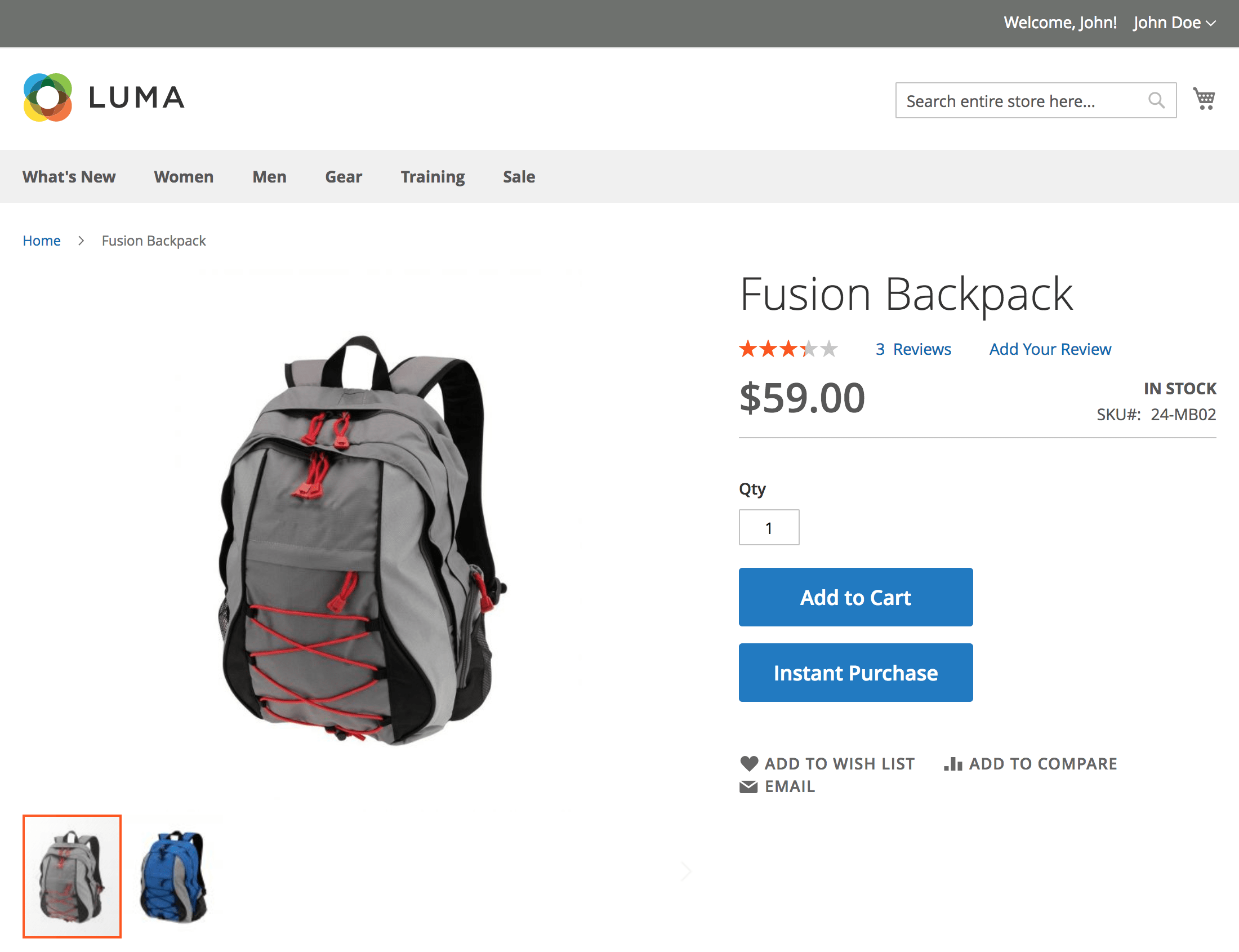
    The new Instant Purchase feature provides returning customers with a faster checkout experience by using previously-stored payment credentials and shipping information to skip checkout steps. When a customer selects the “Instant Purchase” button on a product detail page, they are immediately taken to a confirmation page where they can place the order. There’s no need to enter their address, payment information, or shipping preference. Magento takes care of all of that.

    (Instant Purchase checkout option on the product detail page)

    Merchants who have tested Instant Purchase have found that it can shorten the amount of time it takes to place an order by upwards of 90 percent. It is particularly well-suited for mobile shopping and replenishment purchases because it minimizes friction in the process. Other merchants have found that it helps to drive impulse sales. Shoppers can click and buy as they go through a site without the sticker shock of seeing the total cost of ALL items in their cart.

    Instant Purchase leverages Braintree Vault, available with Braintree Credit Card, Braintree PayPal, and PayPal Payflow Pro for stored payment information. Consistent with Magento flexibility, merchants can easily modify the Instant Purchase button text and business logic to customize the experience for their needs.

    The Instant Purchase feature was contributed to the core Magento codebase by Enterprise Solution Partner, Creatuity, as part of the Magento Innovation Labs program. This contribution is an example of the extraordinary power of the Magento community to bring new capabilities to market quickly. Look for more community collaboration on Instant Purchase and other features in future releases.

    Email Marketing Automation

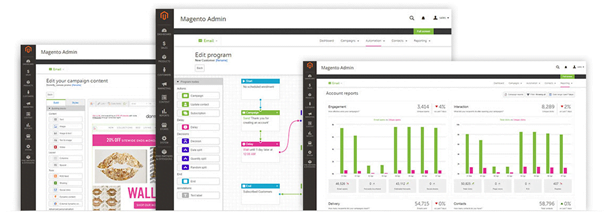
    The latest Magento Commerce release offers more than Instant Purchase to help accelerate sales growth. It also integrates dotmailer email marketing automation, allowing merchants to easily set up and start creating campaigns in minutes.

    dotmailer is a Premier Magento Partner servicing over 4,000 B2B and B2C brands across 150 countries. They enable customers to deliver smarter, faster email campaigns that maximize ROI through advanced segmentation and personalization capabilities. They use all Magento attributes (including custom ones) and integrations with other backend systems, like Microsoft Dynamics and Salesforce, to create a complete view of the customer for highly targeted campaigns. No more batch and blast.

    dotmailer supports automated campaigns through SMS, Push, email and other channels and can manage transactional emails for Magento stores. As the first Email Service Provider with a drag-and-drop editor, dotmailer offers an incredibly flexible toolset that makes implementing advanced marketing techniques easy. Live support is available 24×5 to ensure customers have expert advice when needed.

    Magento merchants can test out dotmailer with a free 14-day trial. Learn more by visiting the dotmailer site.

    Advanced Reporting

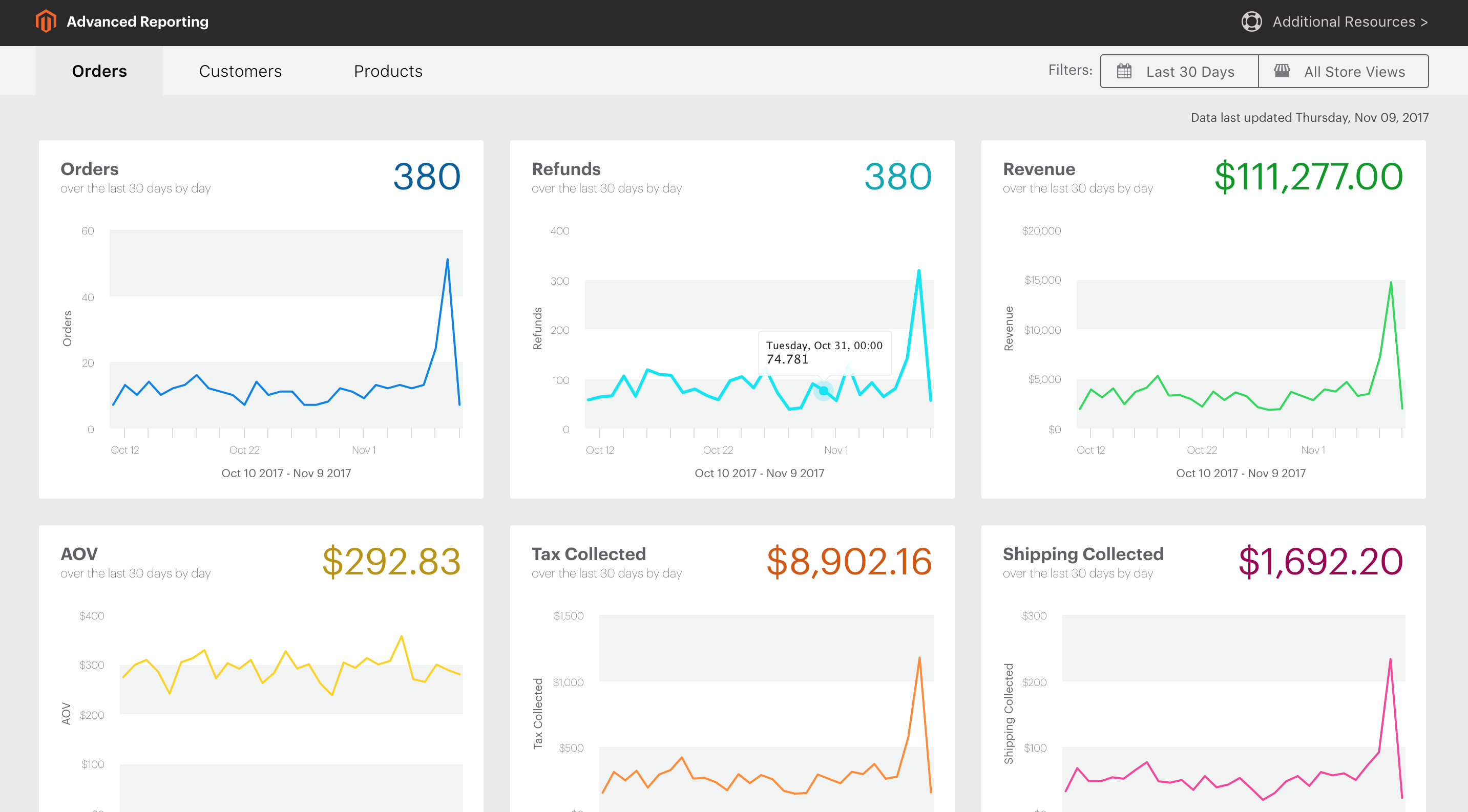
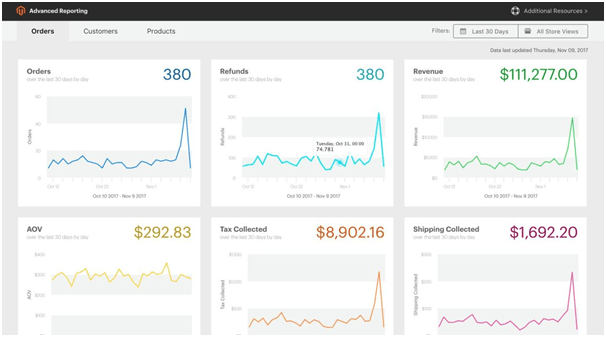
    Our latest release also helps merchants operate with greater efficiency and intelligence. New Advanced Reporting provides merchants with 20 reports delivered through an easy-to-use web interface available from the Magento Admin. These visually-compelling reports offer critical business insights through three pre-configured dashboards:

    • Orders: number of orders, revenue, AOV, taxes and shipping fees collected
    • Customers: registered accounts, unique customers, key metrics by customer
    • Products: quantity ordered and bestselling products by revenue and volume

    (Advanced Reporting Orders dashboard)

    Data is updated daily and reports can be configured to show different date ranges – from a single day to 2 years. Merchants can also filter reports by store view. With reports expressly designed for business users, featuring vital metrics and great visualization, Magento customers now have the power to better manage their businesses.

    Magento Shipping

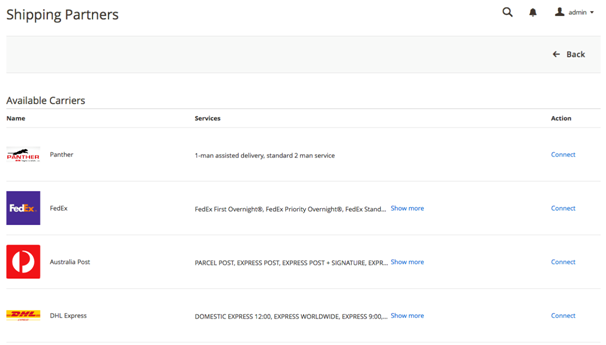
    The latest Magento Commerce version also boosts efficiency by integrating Magento Shipping’s multi-carrier shipping and fulfillment capabilities. Rather than using multiple extensions, merchants can now fully manage shipping tasks, from configuring shipping options and fulfillment rules to comparing shipping prices across carriers, right from the Magento Admin. Merchants also gain faster access to carriers for improved operations and customer experiences that deliver profitable growth.

    Merchants using Magento Commerce 2.2.2 can find out if Magento Shipping is right for them by completing the form in the Magento Admin.

    Is your website ready for social commerce?

    In life, some things just naturally pair well with each other. Peanut butter and jelly. Wine and cheese. Fall and football. Together, the sweet and savory joy that they deliver is amplified and everyone benefits.

    Sticking true to the virtues of wine and cheese is the combination of social media and digital commerce.

    Today, we know that pair as social commerce, a type of electronic commerce that employs social media to promote online transactions.

    Since the beginning of time, location, location, location has been critical to a merchant’s success. Today, the concept of location is changing and becoming digital. More and more people are spending time on social networks. In fact, from 2016 to 2017 the number of active social media users grew by 21%. What’s even more interesting is that these social networks are transforming into something greater than just a place to hang out. Sure, pictures and birthday wishes are still being shared. However, social media users are also actively engaging with companies. They are sharing what they like, posting about negative experiences and shouting out their favorite brands. According to a study, 86% of people follow brands on social media and 75% of them have purchased a product because they saw it on a social channel. Together, those statistics have caught the attention of businesses that are seeking to harness the massive opportunity that social media presents.

    For companies that are looking to maximize the impact of social commerce, Facebook’s 1.5 billion users present the largest opportunity. They represent a massive pool of prospects that companies are hungry to acquire, convert and retain as loyal customers. Businesses that are eager to capitalize on this audience are advertising on Facebook and using the Facebook shop feature to turn their “Page” into a convenient social storefront for customers. But, leveraging Facebook can be a complex process when trying to deliver a consistent look, feel and message that is aligned with a company’s other channels. It grows tougher when manually juggling a library of product images, descriptions and price changes while simultaneously managing product promotions.

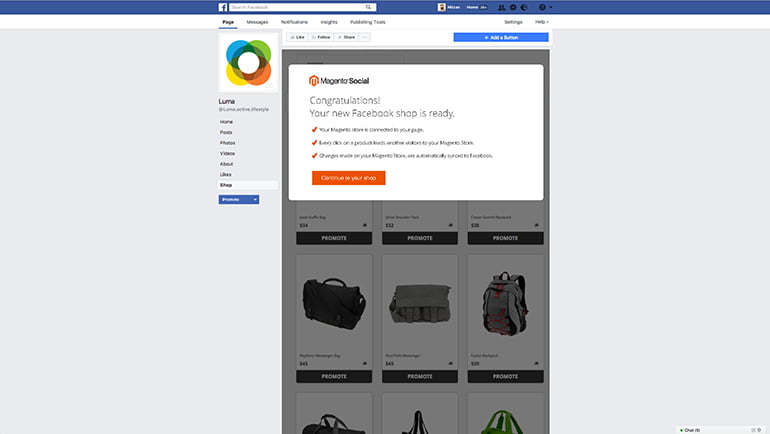
    Merchants should fear not! Leveraging the power of social commerce on Facebook doesn’t have to be frustrating. The right technology can remove a lot of the burden. Magento Social makes setting up a Facebook shop easier by directly integrating with Magento Commerce. This means within minutes, a company’s Facebook store is automatically created with all the correct product information, from photos and descriptions to pricing. Product listings are automatically updated on a regular basis to keep your store fresh, highlighting your latest products and promotions. This eliminates the need to manually manage product catalogs in multiple places.

    Having consistent up-to-date listings is important because Magento Social makes it is more convenient for your customers to like and share their favorite products. Each product listing on a merchant’s Facebook store is equipped with icons that enable consumers to quickly share them to their various social feeds. Considering that 92% of people trust recommendations from friends and family above all else, encouraging customer sharing can play a role in acquiring more customers and increasing your brand awareness.

    Facebook advertising is also critical to a successful social strategy. With projected ad revenues of 23 billion dollars, merchants are aggressively investing in this channel. But, efficiently managing these ads can be a challenge if you are doing it on your own. Magento Social makes it easier. Thanks to tight integration with Magento Commerce, Magento Social merchants can save time and effortlessly create and optimize Facebook ads for specific products, in just a few clicks. There is no need to create or upload any additional content and you can easily monitor performance and available budget towards the best-performing products and categories. This allows for immediate turnaround and management when launching a promotion for a bestselling product, or perhaps one that you are looking to quickly clear inventory on.

    At the end of the day, merchants that invest in delivering simple and integrated social commerce experiences will open the door to opportunities to charm and acquire customers that may not have existed before. Providing existing and potential customers with the convenience to learn about, purchase and share products in a continuous manner will drive success. This is why implementing a solution that helps save time and makes it easier for businesses to keep their initiatives aligned is becoming more and more important. From up-to-date product listings and flexible targeted advertisements to impactful sharing, Magento Social helps merchants turn their social media initiatives into an engine for growth.

    _________

    Magento Social is now included as a bundled extension with Magento 2.2. It is also available for all other Magento 2 merchants to download and try for free at the Magento Marketplace. To learn more, visit the Magento Social product page.

    5 Magento Tactics For Keeping Your Post-Holiday Sales High After the New Year

    As the calendar year is about to end, this is the most profitable time of the year for Ecommerce business. Online sales are going rapidly every year. Web stores are busy with seasonal sales and holiday marketing to increase its profit as Christmas is around the clock. But as the season comes to an end a sudden lapse in customer activity is seen.

    This sudden lapse leaves the online seller with one major problem.

    How to keep Post-Holiday Sales up as the New Year Begins?

    Customers shop a lot during this period so when the sales end they tend to tighten their wallets but this does not mean that online spending stops. With the right planning and strategy, we can effectively inspire sales during this seasonal slump. Below are the 5 strategies for your online store that will help your E-commerce operations flourish after the holiday’s end.

    • Start New Year with PromotionThere is a large market for self-improvement oriented consumer to consider. New marketing opportunities can be made possible by online retailers which have products such as health and wellness. You need to grab your customer’s attention by pulling out New Year’s promotions and offers. You can offer discounts, bonus gifts, vouchers, etc. to give a kick start to your post-holiday sales off strong in the New Year.
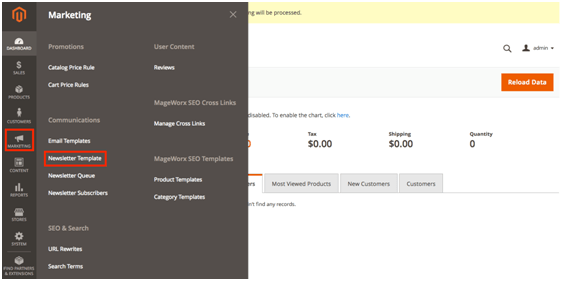
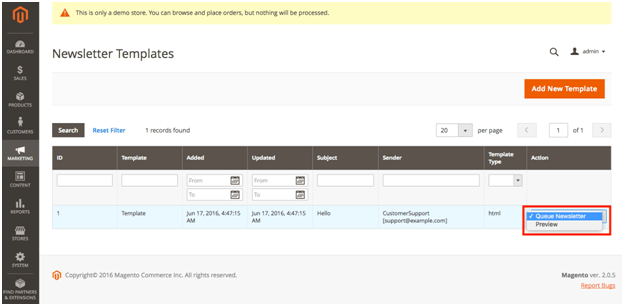
    • Stay Connected to your Customer through EmailDon’t excuse yourself from your customer just because the holiday season is coming to an end. Be in touch with them by sending an Email. Run an Email campaign which will connect your customer to your brand. You can increase conversion rate by 50% if you connect with your customer through Email marketing automation. In case if you’re wondering how to do that, give this article a read – https://magemonkeys.com/how-to-manage-newsletters-magento-2/
    • Get them back with Customer Rewards After your customer makes a purchase from your website, then after bring them back with a special reward which is especially for them. Customers love when they get something in return and this will also help in your business. Along with Email campaigns, go for offering discounts to generate more activity with the same customer. Discounted price will always make your products more appealing to them. A post-purchase coupon will encourage customers to come back for future purchase. Hence, customer reviews will help market your products while you provide rewards for a repeat business.
    • Interest them with their recent viewed itemsOnline shoppers go through the number of things and fill their carts with countless items that they never end up buying. This shows that they have an active interest in those items but for some reasons, they don’t purchase. So a gentle reminder after the holiday season ends can easily boost your sales and it can create new opportunities. Create product recommendations based on your customer’s past activity to give impactful messages that in return turn into sales.
    • Sell Holiday Gift CardsWhen a customer buys a gift card for your store or from your store then you have to make an immediate profit but its just the beginning of the benefits holiday gift cards provide. Regardless that gift card you sold is being used or not, you have already made your sale. The best part is the recipient of the gift card will have a reason to your store and do the purchasing. The gift card also helps in increasing brand awareness. There are chances that in future they will visit your store again with a gift card or without a gift card.Boost up your sales with above-mentioned Tactics to bring back your post new year holiday sales.

    How to Efficiently Implement Backorder in Magento?

    It is important for any business to have Backorder, especially in the E-commerce Field. It lets merchants sell products which are currently out of stock. It will also help in increasing customer satisfaction with the brand.

    Magento comes with a built-in feature of Backorder which you can turn on easily whenever you need.

    There might be the number of things you want to know about Backorder. Like what is Backorder? How to enable Backorder in Magento?, etc. Read on to know more about it.

    1.What is Backorder?

    Backorder is an order which contains products which are not available in merchant’s inventory, but at the same time customer can place its order so they will receive the product as and when the seller restock it again. It works as a good indicator of your business’s health by evaluating the amount of backorder per total order, or average period of backorder. It also helps in solving a problem which is faced by the business owner.

    For Example:

    You want to buy a CD of Ed Sheeran’s album. You go to your favorite CD store and you quickly realize that the edition was sold out after week.

    The web store notifies you that you can still place an order and you will receive the edition when the product is present in their inventory. Hence when you place an order it gets stored on Merchant’s backorder.

    Since you had paid for your Backorder items which you have actually not received so now its seller’s responsibility to get it delivered to your address when it’s available.

    Further, the CD Shop also places an order to their supplier soon after noticing the quantity of Ed Sheeran’s album reached to below 1. Their supplier (record label) is out of stock too and so he will continue to produce more as he will see the demand for it. Then the Supplier will allows CD shop to order 1000 copies and receives money from the CD shop as a down payment.

    If you allow customers to place a backorder then pay more attention to, how you notify them of the condition and also to the time when it takes for goods to be refilled, payment mode (before or after the goods are received) with backorder cost.

    Just-in-time inventory management strategy usually has backorders and therefore merchants can easily predict the demand. In companies, backorder management plays an important part.

    2. What is the difference between Backorder and Pre-Order?

    Backorder Pre-Order
    1. Backorder means when the product was in stock but the moment customer wanted to buy it. It was not available and a customer will receive only when it restocked. 1. Pre-order means customer demand on not-yet-released products in the market and they want to buy it soon as they are available.
    2. For example: Due to more demand for iPhone X after its release Apple doesn’t have enough goods so now you place a Backorder and wait for its available again, 2. For example: Months ago, Apple was preparing to release their latest phone which is iPhone X and you wanted to be first to buy it so you place a pre-order for it.

    3. How can you enable Backorder on your Magento backend?

    There are 2 ways to enable Magento backorder settings.

    a. If you want to enable for new product

    Step 1: Login to Magento backend.

    Step 2: On the menu bar, choose System then click Configuration

    Step 3: Now on the next page, you can see the Inventory tab under Catalog section

    Step 4: Click to open the Product Stock Options in Backorders dropdown you will see three options No Backorders, Allow Qty Below 0, Allow Qty Below 0 and Notify Customer.

    Step 5: After choosing, click on the save config button.

    No Backorders: It is selected by default. If the quantity of the product is below 0 then a customer cannot buy until you replenish again.

    Allow Qty Below 0: In this, if your inventory is out of stock then also customer can buy the product. It will show no difference to buyer’s perspective.

    Allow Qty Below 0 and Notify Customer: It allows customer to place an order and they will receive a notification of the backorder status in the frontend.

    It all depends on the strategy of your business. Keep in mind all the options and choose wisely between the second and the third option to avoid customer oriented problems.

    b. If you want to config backorder for existing products

    Step 1: In Menu bar, Choose Catalog and click on Manager Products

    Step 2: The next screen will display all your products then you need to select desired products on which you want to apply backorder config.

    Step 3: On the Action drop-down Menu, choose Update Attributes then click on Submit.

    Step 4: Then Click on the Inventory. You will see the backorder row, click on change box, and then the drop-down menu will automatically light up and then you will get 3 options from that click the most suitable one. Then, find the stock Availability row, then check the change box and change the status from Out of Stock to In Stock

    Step 5: Save the changes.

    All You Need To Know About Magento 2.2.2

    Magento released 2.2.2 version of its Commerce and Open Source platforms on 12th December. It comes with a unique feature and great performance

    New Features included in Magento 2.2.2 are:

    • Optimized Shipping
    • New Marketing Automation Software
    • Merchants will be provided with a detailed and actionable analytics insight
    • Streamline Important Store Operations

    (In detail, Magento 2.2.2)

    Email Marketing Automation

    Email marketing automation feature gets integrated with dotmailer for generating email marketing with B2B and B2C businesses. Now merchants can draft highly personalized email campaigns by using different types of store data.

    New Functionalities are:

    Within your Magento 2 site, you can analyze the effectiveness of marketing efforts and can also calculate and track ROI of your campaigns.

    Better communication and engagement with new and existing store customer.

    It will recover lost revenue by creating highly targeted and personalized cart emails.

    It will take order data with the database from your campaigns to synchronize all customer.

    Instant Purchase Checkout

    Amazon uses an exclusive one-click checkout patent which has expired last year in September. So, the new technology is now available to all the E-commerce solution providers. Magento is the 1st Ecommerce platform that has incorporated this ‘Amazon-like’ experience in its primary product.

    An instant purchase checkout feature store previously entered payment and shipping details and then uses them for any future purchases. This lets shoppers skip few steps in the checkout process which results in faster checkout experience and better conversion rates.

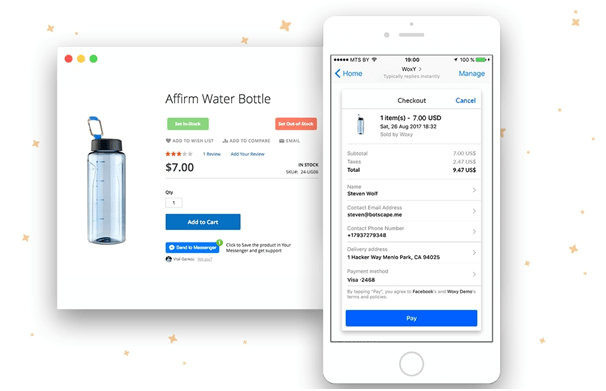
    You can also use Woxy- Messenger Shopping Assistant which is a One-Tap feature offers native and secure integration of your store payment environment with Facebook Messenger.

    When you enable this feature then customers can place orders in messenger with a one mouse click.

    Sales Analytics

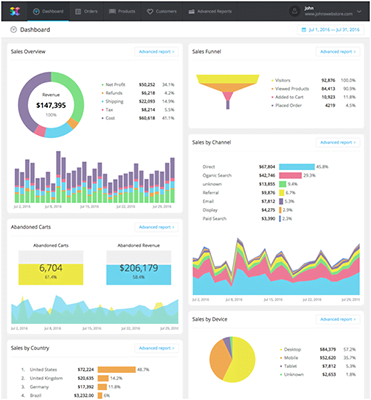
    Now, merchants can get 20 insightful reports on order data, product sales, and customer behavior. Magento Business Intelligence creates reports and delivers data for:

    • Store Revenue, #of orders, AOV, shipping fees, and taxes.
    • Key Metrics by customer (registered accounts, returning customer, etc.)
    • Key metrics by product (best/worst selling products, revenue each product generates, and so on)

    If in case you are running the community version of Magento 2 then you can fetch data with SavvyCube – E-commerce Analytics Software for Magento.

    Moreover, you will also learn about:

    • You will come to know about your customers’ shipping behavior like who have spent the most in your store, who are the most loyal and even more.
    • It will show you details regarding sales, the product which sell more, profit, which are often refunded and also the product which doesn’t sell at all.
    • You will now know in detail about the amount of revenue, net profit of each product, category, and region.

    In addition, the software also works with the Enterprise version of Magento 2.

    Optimized Shipping

    With multi-carrier shipping and fulfillment capabilities, Magento 2.2.2 is best in providing shipping service. With new functionality, merchants can now easily handle multiple shipping activities
    Such As:

    • Adding & Configuring 11 shipping carriers (including FedEx, DHL Express, UPS, etc.)
    • To make shipping fulfillment rules
    • Comparing shipping rates and more.

    Magento shipping package starts at $99 per month. There is also a 30 day trial period which got number of limitations for carriers, locations, stores and shipment per month)

    Magento is on a right track by making some major strides in improving the newer 2.0 version and the release of the B2B functionality is a major step to the many B2B E-commerce businesses on Magento. This will help many companies in providing both B2B and B2C on Magento. If you’re looking a get Magento B2B implemented in your store then you can contact Mage Monkeys.

    Magento 2.2.2 version is much faster than ever before so move your store to the latest version of Magento 2.2.2 and experience all the new features.

    How Abandoned Cart Emails Can Boost Your Business

    For an e-commerce business, shopping cart abandonment is the most common and most inevitable scenario. A recent study states that 68.63% of carts are abandoned every year which means that only about 1 in every 4 customers actually finishes their purchase.

    No wonder promotions, discounts, and special offers are for online stores to attract customers but there are visitors who have added items to their cart and later don’t even complete their purchase and that leave you with a huge number of lost sales.

    So, how can you recover those customers?

    One of the main reasons for shoppers abandoning their carts is the extra fees added at the end of the checkout process along with shipping charges. Another reason is communication say, you have processed for a number of items and now you are ready to pay and then you find out that cost has jumped up by 10% and that will disappoint any potential customer.

    How to use Emails to Recover Abandoned Carts?

    Abandoned carts will always be part of your store but there are ways to recover some of the lost revenue occurred due to it.

    The following steps will help you recover Abandoned Carts:

    Always find ways to improve your checkout process by limiting the number of steps customers take to complete the purchase. Try and make the checkout process as easy as you can so that customer can buy on your site.

    Below are the ways to recover abandoned cart sales.

    Automated Email Campaigns: Abandoned cart emails always receive a higher rate than any other marketing emails.

    How to Run an Abandoned Cart Email Campaign:

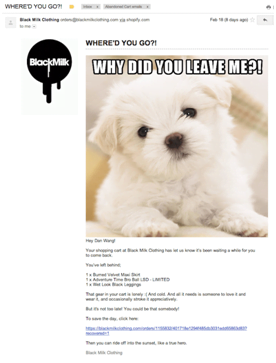
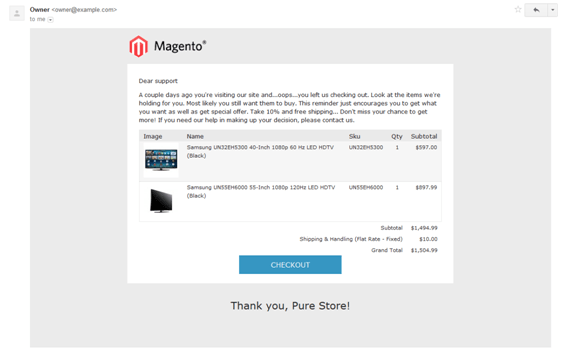
    Remind customers about their abandoned cart immediately in an hour by sending them the first mail. Add only a reminder in a mail and it should be open and friendly. Email is considered to be the most effective way for abandoned carts hence it’s worth putting efforts into the design and copywriting.

    Friendly and Focused

    Keep your mail friendly and easy to read. For example, Fab is doing a great job by reminding the shoppers of the product they left in the cart.

    Mail should include a big image of the product along with an offer. Mention that stock is limited it will help in pushing the urgency factor for customers to buy that particular item at the earliest.

    Make a point to mention complete contact details. The tone of the mail should be friendly and enticing for shoppers to finish their purchase as abandoned cart takes place when the customer got distracted or the website got crashed as this mail a boost your sales.

    Humor

    Humor is an excellent tool to use in abandoned cart well it depends on brand also. Humor should be played safe. Draft a mail keeping in mind about the audience.

    Mail should contain a powerful message so that it comes difficult for anyone to move away from the email without completing the purchase.

    A smart use of gentle humor can help you deliver a memorable and inviting email which you can send to your subscribers and it will also increase brand value.

    Personalize

    Personalize emails are considered to be the best way to increase interaction with subscribers. So use it in abandoned carts to increase sales.

    Mail should be plain text and a personal message which would be in an open tone addressing to the recipient. Mail should be such a way that it creates a lasting impression on the reader.

    Second Email

    Second mail should be sent around 72 hours after they have abandoned their carts and they have not made any purchase after receiving the first reminder. Again the tone of the mail should be friendly and open but send them a mail with a special offer. The most common strategy is to provide free shipping if the cart meets the minimum requirement which was set by you.

    You can send voucher code to attract them to their abandoned cart. You can send the third email if you haven’t received any response yet. Third mail should have urgency for customers to buy such as limited stock or a deadline on a special offer. The main goal is to give a friendly nudge to the shopper and hope that they click through to complete the purchase.

    Bottom Line

    We offer automated email solution to enable Magento merchants to recover their lost revenue. It is possible to draft a friendly and engaging mail campaign to bring your shoppers back to your site to complete their purchase.

    Abandoned cart arises due to different reasons. They also compare one product at different websites to buy that particular product at a minimum rate.

    Magento store can push ahead of the competition with the help of automated emails by offering discounts, free shipping or any other simply helpful advice.

    Saying that email is the most effective method of recovering abandoned cart sales so go ahead, plan now. Send people a friendly reminder that they left something behind.

    How to Design an Excellent Checkout Page?

    For a web visitor, shopping online can be little irritating if the process is not designed correctly.

    The checkout page is like a double-edged sword which can either enhance your conversions or scare away the customers to your competitors.

    First, you check out the link and then fill out the registration forms and then you come to know that the product you are looking for is out of stock. For every E-commerce business, the design of the checkout page is very important for it growth. You need a have a website that ensures a smooth user experience with easy navigation.

    There is a reason that 7 out of 10 shopping carts are abandoned. More than 20 years have passed but still, consumers are wary of providing sensitive information such as credit card details unless a retailer can prove that it is trustworthy and secure. In order to make sure that your customers shop from you it is advisable to buy Rapid SSL Certificate for secure transaction. This Certificate helps in protecting confidential information and encrypts the data transfer over the internet.

    You should optimize your checkout page design at a regular interval to increase your sales. Below are some tips that you should consider while you design your checkout page.

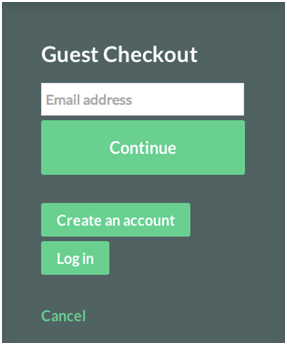
    1. Guest Checkouts

    25.6% of online consumers will abandon your cart if you force them to register first. Guest checkouts are an imperative addition to any online store. Asking them to sign-in will simply lose conversions. Registration requires a level of psychological commitment that many users simply aren’t prepared to make.

    Some websites offer three distinct paths for its online shoppers:

    1. Sign in for current members

    2. Account creation for new visitors

    3. Guest Checkout for anybody that wants to maintain a semblance of anonymity

    A workaround for this problem is a guest checkout option that simplifies the checkout process.

    2. One-Page Checkout

    Multiple checkout pages reflect longer checkout process than the single page checkout and single page checkout works better psychologically as each field is available on one page. There are some benefits of using multiple pages but studies are in the favor of single page checkout.

    3. Easy to Fill Forms

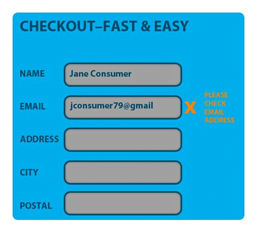
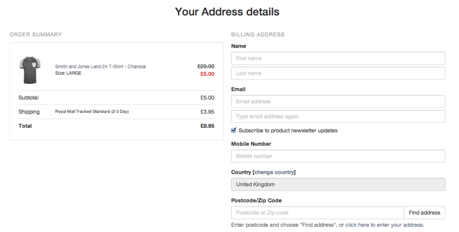
    Too many fields and long forms are a major turn off for shoppers which lead to higher cart abandonment rate. Keep in mind to design a form in such a way that you only ask required information and offer a quick checkout. For returning customers, you can pre-populate the fields with the already available information like address and pin code. Display a validation error by bringing attention to the required fields. Highlight optional fields such as address landmark and alternative contact information.

    4. Keep it Simple and Neat

    Your checkout page should be free of unnecessary elements or distractions. Everyone wishes for the short and fast checkout process. Some tips are mentioned below to minimize the clutter

    • Highlight the compulsory fields using asterisks (*)
    • Latest offers, latest deals, and product categories can distract the customers which can lead to an incomplete purchase.
    • Highlight features like free shipping or easy returns policy.
    • Provide freedom to modify the products in their cart or change the quantity
    • Your form should not be lengthy
    • Show the entire checkout process for example Login -> Delivery Information -> Billing Details -> Review the Order -> Payment -> Confirmation.

    5. Provide Live Chat

    According to a survey, 44% people find a live customer service representative as one of the top features of an online store. Further, 91% users find live chat feature more effective in solving their queries. Some products are such where customers might need technical help so in that case, live chat proves to be of great help in encouraging the customers to finish the purchase.

    6. Display Trust Signals throughout the checkout process

    Every business is run on a pillar of trust and for higher conversion rate optimization for e-commerce sector customer should be given zero risks of the security breach and their information is safe. Customers should be given assurance that if they are not happy with the product then they can return it. Provide a full refund policy to increase sales. Build a strong online presence on social media platforms by interacting with customers and display their product review.

    7. Mobile Friendly Checkout

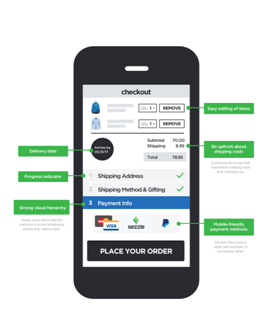
    Today, more than 50% E-commerce customers use smartphones so an easy checkout process should be provided for faster conversion rate. You can use color contrast for different call-to-action buttons for mobile-friendly navigation. Use a validation coding like set a number keyboard for the fields like phone number and alphabet keyboard for other text-based fields. Pre=populate the fields with information which is already filled in the past.

    Final Word

    All in all, your E-commerce checkout page is the most important part of your online store. You cannot increase sales if you cannot get customers to convert.

    Design a checkout page as convenient as possible. It should be in such a way that customers make a quick purchase without a doubt by eliminating all the possible doubts that may put them in second thoughts. Most important thing ‘its about making it easy’ because after all, the quicker a customer can check out, the happier they will be and the quicker you will close the sale. Hence, design a lightweight checkout page with enhanced mobile pages which makes the checkout a faster.

    Error Free Magento ERP Integration

    One of the most complex challenges with E-commerce businesses is managing the integration of E-commerce stores to other systems and here we are talking about Magento ERP. Proper implementation of three things is important first the online store, second ERP software and the third the connection between them to make a concrete base for the online business and this can benefit to your overall success of a company.

    The most critical points of such ERP systems are:

    • The pieces of ERP software
    • The E-commerce platform
    • The Data Flow design between them
    • To Implement Data Flow

    Business Perspective

    Why do you need to integrate your online store and ERP system?

    If you are a big company or a small Estore with limited products then you will be happy to optimize and automate repetitive tasks. It will save your time and money and also it will reduce the risk of errors and multiply your capabilities. Therefore you should integrate. To get the best of everything you need different systems to optimize with different tasks such as ERP for resourcing management, E-commerce marketing software for online sale, CRMs for managing the connection.

    Integration is the only solution for all your ERP related problems. Another benefit of integration is that you have to perform a certain task only once in one system and rest the system will perform automatically. Once the integration is done it will be seamless and automatic. There is no point if your integration gives you more trouble than actual work.

    ERP is the tool where you can handle all your data in one place. It is a dedicated system to get all your special tasks done at central places no matter where orders are created, online or offline. Further, if you want to manage to import, set prices and configure products in your ERP then you do not wish to do the same thing again in your online store. You can make compromises in ERP like creating products via batch imports from ERP as well as from Magento and then only sync with inventory.

    In order to come to the conclusion we have simplified and concentrate on the theoretically and practically, ideal flow keeping apart the implementation efforts, technical difficulties, and potential costs.
    Role of Company size and E-commerce in it:

    With bigger business comes bigger E-commerce and more things you want to do centrally in your ERP and sync it all to your Magento.

    A new venture might have few virtual products for which you want to integrate an invoicing system. The system will sync orders from the Estore and manage everything else directly in Magento.

    A merchant has to create, manage products inventory, pricing, invoicing and shipping in an ERP system if they have several warehouses and physical shops or a drop shipping company operating globally then they need an accurate E-commerce solution to integrate seamlessly to the ERP which will work without even having to log in to the store admin area except when you adjust some UI or marketing stuff.

    What about other integrated systems?

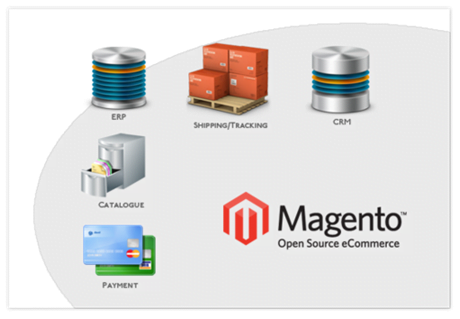
    It is less practical to integrate CRM, BI, E-commerce, 3PL to integrate into the E-commerce platform directly and it will be beneficial to sync to the Enterprise Resource Management solution where everything is actually managed.

    Remember, the golden rule for E-commerce integration and integration, in general, is that

    You need to do kind of operation in one system and use that system as the source point of integration in rest of other systems.

    But the question is why you need integrated Magento?

    Below are important benefits of Integrated Magento:

    Multiple Features

    Magento is designed in such a way that it is a full-featured E-commerce platform from the start. It’s an open source approach with multi-site design, different product types, flexible product attributes, customer groups, layered navigation, price rules, payment and shipping integration, import and export capabilities. These all features make it a unique player in the global market.

    Application Programming Interface (API)

    Advanced API is one of the most important benefits of Magento. Speaking of technologies, Magento has SOAP API v1, v2, XML-RPC, REST and XMLConnect for mobile. They are all well-documented APIs. It is extendable in a modular way which is another valuable feature of Magento API from the integration point of view.

    Already Integrated

    Magento is already integrated with dozens of out-of-the-box integration on the market for all the major ERPs such as SAP, Microsoft Dynamics, Sage, NetSuite, etc.

    The ERP side of Integration

    ERPs basic work is to connect all the processes such as finance, budgeting, payment management, accounting, manufacturing, invoicing, human resource management, workflow management, quality control, procurement, supply chain management, warehousing, inventory management, customer relationship management and so on.

    ERPs help in the number of things like improve quality, efficiency, collaboration, monitoring and facilitate decision making in a company.

    The limitation of Flexibility

    As per the need of an actual company ERPs are tailored and configured as a result flexibility is built in the genes of every good ERP. If your ERP is more flexible and customized then it will eventually be difficult to connect to another system. In case of the complex system like Magento where potentially different ERP modules handle different connection points in both connected parties.

    Cloud-based or on Premise – ERP?

    Today, cloud-based services are everywhere and it is also segmented in the ERP world too. The main advantage is that it takes less time for setup which helps in reducing overall operational costs, a reliability of service, transparent updates and enhanced API connectivity. Thus all these features make cloud-based ERPs an extremely competitive choice for mid-sized companies. By nature, cloud based service has to take special care to a flexible API. It’s a good position for anyone who wants to have E-commerce integration.

    On-Premise, middle-sized and big merchants have self-hosted ERPs. Moreover, it gives more freedom to merchants when it comes to control, data security and the ability of deeper customizations.

    For a small company, a compact ERP with dedicated support on the office computers or in a nearby data center will work fine as well. E-commerce integration in general needs deep customized solution.

    ERP connectivity – System-wide APIs work great

    After the rapid growth of cloud-based services, vendors have realized the importance of full connectivity. It will give you well documented, extendable, feature-rich, robust and high performance, system-wide APIs.

    APIs have two major aspects which serve as an advantage

    • The business logic which makes the internal processes accessible through controlled data exchange.
    • The standardized and documented interface which site on top of it.

    Many of the legacy ERP systems only offer database or file/document based access. Some ERPs have already integrated online stores as a module. If the integration is made via API on the ERP or the E-commerce side then it is generally possible to replace the Estore with reasonable to a better one leveraging the same interfaces as the original.

    How to connect Magento with your ERP?
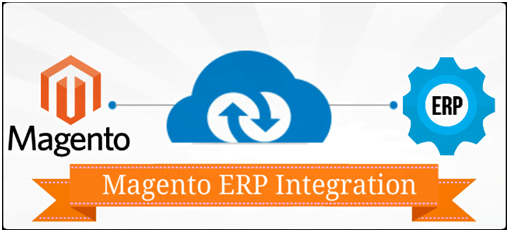
    You can connect your E-commerce platform with ERP if it meets all our requirements.
    You have to consider some major architectural points when it comes to Data flow design

    Data flow – source and target

    Data flow design is the easiest and highest level of concept. We all want that our data should be created or updated in one system and should be transferred to another system. Our main concern is that you want this in your system. For example, if the product attribute is changed in the ERP then you want the modification to be done in your Ecommerce store as well.

    Timing

    Once you have figured out the data flow schema of transferring data from point A to point B and vice versa then it is also important to make a note that how much time it will take and work is done at a minimum delay, when updates are required and where you can manage your delays.

    Stock levels and product availability keeps on changing quickly and you have to keep it up-to-date in the E-commerce system as much as possible.

    Sync or Async

    Timing comes with synchronicity. Two operations are synchronous in the system one is local and another is remote they have to wait for the results or termination of a call. Say, Data transfer – to be able to perform the next operation.

    In case of async I/O instead of idle waiting time, the system can do rest of the useful things and can come back to the original operation when the call is finished. It also happens that blocking dependency between certain calls is inevitable but in case of data flow design, it is a good practice to avoid eliminating these kinds of sequential dependencies whenever needed and then make it an overall design async.

    You need to b wise in async processes and scale up the things in a better way. Make sure there is less of “traffic jams” and bottlenecks. If you use async processes, then belittle desirable for feedback on the success of the operation and this all is related to fault tolerance and robustness.

    Payment Transactional and order creation data

    Sometimes the goal is to make sure that series of operations across two systems take place together or it does not happen at all. Some payment transactions are the most trivial examples

    Transfer of Money from one place to another at the same time

    The entire process has to be rolled back to the original state on both ends if anything prevents it to happen even in the middle of the process.

    Order creation in E-commerce data sync

    There are sellers who sell discounted items at a very low stock level from a warehouse which even sells offline too. Here it is important that an order should be created in the store and the ERP together or should not be created at all with an error message sent to the customer in the online shop which showcases that product is no longer available in enough quantity.

    Work on implementation of ERP integration

    You are ready to think of the actual implementation when your integration, understanding of data sources, timing, sync and sync processes and transactions are all in place.

    API between Server and Client

    One of the main objects of data engineering is the server-client design where the client starts to communicate, actively pushes or pulls data or sends commands while the server performs what it is asked to do, processes, return data or performs different tasks.

    A server/client setup can easily handle parallel connections with multiple clients. Client call servers through some channels and then servers process the call by giving some prompt response as a feedback which enables the synchronous communication between two or more systems. It stands as for handling series of sync processes where feedback is important for the success of the operation.

    File transfer and data feeds

    It is also called protocol-less data transfer method where one party simply makes new data available for the other party as a simple document. The simplest form is to publish data via a web or FTP server or upload it through FTP to the target machine. As it is simple so this model works best under plain peer to peer circumstances where the receiving party trusts the data source and due to which no substantial authentication, authorization validation, and direct feedback are essential.

    It perfectly fits in one way flow of data provider/data consumer or more commonly broadcaster/receiver paradigm. Even nowadays it is very common for product data transfer. When you think about transferred data by nature it is async but for document delivery and processing it can be controlled, queued or sequentialized. This type of communication works both ways in sending and receiving part’s side.

    Direct database queries

    It’s a powerful approach to use direct database queries to sync data but in most cases, it is very error-prone and dangerous at the same time as everything is built around the database.

    Middlewares

    One more pattern is a middleman in the communication which is the third system. You will find this between the systems connected to optimize, monitor, log data flow, and translate different formats and cache things. This is not only a bridge between two systems but a junction point of a whole infrastructure of subsystems providing a connection to everything.

    These middlewares are also known as Enterprise Service Buses for example Zapier. It gives hundreds of different APIs as a client and then translates input data format coming from the source system to the export data format of the target system and offers all this as a service.
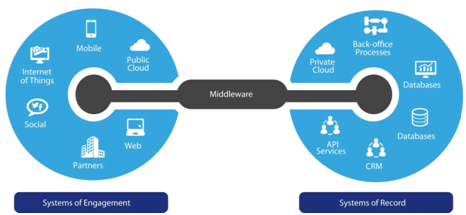
    The beauty of this approach is that it’s a data hub which you have to implement the APIs client to an external system only once that you only have to map data correctly between them. These middlewares can be extended with server endpoints, with its own API and it can reach actively from outside. Here different server/client endpoints of the data hub speak the same language and no peer to peer translation is compulsory between them. Data only needs to be routed and spread across the different endpoints. Thus it is a highly idealized model with up-to-date trend of data networks.

    Lately, integrators have realized that middleware approach is beneficial in some way or the other. If you are connecting multiple ERPs to multiple E-commerce platforms then you have to create and maintain several peers to peer integration requirements and potential issues and costs.

    The main difference between Point to point and middleware

    In point to point integration two systems are connected directly. In server-client point of view, the architecture of P2P connection will be diverse. In some cases, ERP connects as a client to the E-commerce platform whereas in some cases it works the other way around plus there are situations where both combinations are used. It is also seen that APIs are built especially for the sake of P2P integration on one or both ends. In P2P integration there is normally more space for planning and customization and this way business meets its growth.

    How to choose your Magento ERP integration service provider key?

    The right data flow design and features are some of the key factors of integration. On the other hand, there are some aspects which can be crucial being it irrespective of an integrator, technology, and implementation. Your primary focus should be on the reliability and fitness while incorporating specific technology or a mix of technologies and your ERP integration provider. Keep a right balance between costs, performance, scalability, quality of support and other factors.

    Conclusion

    Before you integrate Magento with an ERP make sure that you analyze and understand the business needs first and then create a high-level architectural design depending on your prioritized list of features, performance requirements and other important factors.

    Can Magento Handle Very Huge Products Catalog

    Magento store owners with the large product catalog generally raise this question:
    how many products can Magento actually manage? Today, we will explain the answer by providing practical guidelines.

    • With and without extra optimizations, how many products different versions on Magento can be easily managed on an average server?
    • What makes the difference between Magento versions in terms of catalog performance?
    • How can Magento be scaled to handle even more products and what are the main bottlenecks for a big catalog?

    What are the common mistakes that a person can make when handling a huge Magento catalog?

    With and without extra optimizations, how many products different versions on Magento can be easily managed on an average server?

    • Magento CE 1.9.x safely manages – 10,000 – 25,000 products in most cases, without much extra care. And on another hand, with more heavy system-wide scaling, resources tuning code optimization, it can manage 100,000 – 200,000 products.
    • Magento EE 13.x. 14.x safely manages – 100,000 – 200,000 products in most cases, without much extra care. And on another hand, with proper scaling, optimization and server resources, it can manage 400,000 – 500,000 products.
    • Magento 2 CE safely manages – 100,000 – 200,000 products in most cases, without much scaling and extra care, and with proper scaling, optimization and server resources, it can manage 400,000 – 500,000 products.
    • Magento 2 EE is designed to be able to manage even more**, depending on some highly advanced enterprise features like database sharding, job ques, advanced MySQL and web server topologies and proper resources.

    All these details give a rough idea, of course, it refers to a catalog with few categories and simple products. These reports and figures are based on Magento’s own performance and own experiences. The figures may vary greatly after a period of time depending upon the setup and software resources too.

    And this brings to notice that, due to Magento’s database design, there are some especially massive aspects that act as an add-on to get the actual number of products Magento really works with.

    Some of the most important elements that have a huge impact are:

    • A number of Magento shops/languages.
    • A number of product attributes.
    • A number of categories and depth of the category tree.
    • A number of configurable/bundle products.
    • A number of customer groups with different product prices.

    All this means that a Magento catalog with a few thousand products in a heavyweight catalog setup is concerned in a catalog management.

    There are few features that make Magento really flexible, but nothing comes for free.

    What makes the difference between Magento versions in terms of catalog performance?

    Magento CE 1.x, including 1.9.x and

    • Indexing, especially URL and search indexes are not optimized for large catalogs (this also applies to EE up to 1.12.x).
    • Full Page Cache (FPC) is not available by default.
    • Some frontend optimizations like javascript + CSS merging, CDN support.

    Magento CE 1.x, including 1.9.x and

    • FPC which speeds up catalog browsing and saves a lot of server resources is available.
    • From version 1.13+.x incremental indexing is introduced whereby products that were changed or added will be re-indexed in the background by cron jobs.
    • From version 1.13+.x full reindex processes are highly improved as well which work well even for large catalogs.

    Magento 1.x EE

    • FPC which speeds up catalog browsing and saves a lot of server resources is available.
    • From version 1.13+.x incremental indexing is introduced whereby products that were changed or added will be re-indexed in the background by cron jobs.
    • From version 1.13+.x full reindex processes are highly improved as well which work well even for large catalogs.
    • Solr search engine is by default available.

    Magento 2 CE

    • Inherits incremental indexing feature from Magento EE 1.13+.x
    • Inherits FPC from EE 1.13+.x and Varnish frontend cache is added as a choice of FPC. The load on the web nodes reduces, as the requests that are served by the varnish cache never need to reach the servers of Magento application, which improves the time of response.
    • Browser cache is utilized for session data caching
    • Checkout process is improved greatly
    • Async order and product updates
    • Client side optimizations like minification, js resources bundling, caching static content, image compression
    • PHP 7 is supported by default. PHP 7 may have even 200% performance gain over PHP 5.x by itself.

    Magento 2 EE

    • Has all the features of Magento 2 CE
    • Solr (2.0) and Elasticsearch (2.1) for search
    • Database sharding separating catalog, checkout and order business domains is available
    • Mysql cluster and Multi-master MySQL setup is supported
    • Job queues introduced for advanced background data processing (deferred stock update as the first implementation)

    How can Magento be scaled to handle even more products and what are the main bottlenecks for a big catalog?

    • Hosting – a multi-node server setup may be needed, as big catalog obviously needs more resources, a VPS with plenty of memory and a multicore processor is a must.
    • Server software – Nginx – As a web server and PHP 7 and Mysql 5.6 or equivalent (Percona/MariaDb) are highly recommended, even for Magento 1. Fine tuning of these pieces of server software for Magento is essential in this case.
    • Product Import – optimized and tailored product import and update is one of the key elements in this case. Batch database updates enable tools which are most helpful. Any method or tool that uses single product updates is a huge potential bottleneck. Magmi is one of the preferred choices here.
    • Some other rules of thumb:
      • Save only what has changed
      • Use dedicated resources for import processes
      • Separate price, stock, and basic product data import
      • Re-index only products and product data that need to be reindexed

    Indexing

    Indexing in Magento is a second step of saving product data and it is the trickiest part when having a huge catalog. It consists of a series of processes to copy product data from database tables optimized for data storage to tables optimized for different aspects of frontend data access. Since indexing is “only” needed for Magento frontend features, it is possible to separate indexing from product save or import. In the newer versions of Magento 1 EE and Magento 2 CE and EE to speed up working in the admin, incremental background indexing is introduced. but still may not be ideal for large volume product updates.

    Indexing in Magento 1 CE is one of the greatest bottlenecks.

    URL indexing can be bloated to millions of records as tends to provide the most issues, as it runs for a long time and in Magento 1 CE it is not optimized for big catalogs.

    Beyond a certain catalog size and number of Magento stores, the increased overhead of product flat indexes will outweigh its benefits so it tends to be better not to turn on this feature for a big catalog.

    Catalog search

    Many resources need Default MYSQL full-text search for indexing and the actual search on the front end tends to decrease its accuracy and the relevance of the result set is fairly poor. So it is needful to replace, even in Magento 1. There are free alternatives for Magento 1 to replace MYSQL search with Solr, Elasticsearch or Sphinx. Magento 1 EE has Solr and Magento 2 from 2.1 on Elasticsearch. A 3rd party Elasticsearch and Solr 3rd extensions can replace the default MYSQL layered navigation engine at the same time, which can be a huge benefit.

    Full Page Cache

    Full Page Cache (FPC) is a mechanism whereby HTML pages generated by the server software are cached as a whole.

    Next time the same web page is required, the cached version is returned without the need to regenerate the content. No FPC is there in Magento 1 CE and Magento code itself manages the Magento 1 EE caching. It’s too speedy and saves the lot of resources which makes it economical, by implementing caching in a layer in front of Magento is the best way to do FPC and there is no need to touch Magento at all when a cached content is served. This is achieved by Varnish caching in Magento 2. Though Magento 1 CE has no FPC and Varnish, there are good extensions to implement these features, too.

    Application Cache

    Magento heavily supports different types of configuration and application caches, Redis which is a memory based, scalable application cache is highly recommended with tag management. Magento starting from the latest version of Magento 1 CE creates an extension to handle redis to built.

    To sum it up different versions of Magento

    • Common bottlenecks are search and layered navigation on the front end and product import and indexing in the backend. There are other important factors like checkout and order management but these are more strongly related to the number of visitors and transactions.
    • In many Magento versions, there are chances that batch products import is to be tailored and optimized. But still features like rich and optimized product import to be solved even in Magento 2 EE.
    • Magento 1 Ce cannot handle big catalogs, but this can be solved through heavy scaling, proper hosting and 3rd party extensions that provide better indexing, search and caching, and it can be considered upscaled. above all, this indexing may still remain a bottleneck.
    • To implement Varnish cache and fine tune to Magento 1 EE, the server architecture are the best candidates to scale it up in future, as it already has a bunch of optimizations in place.
    • Just like Magento 1 EE, Magento 2 CE is also designed in a way that it should be prepared to serve middle-sized businesses also. But functionality wise, features like store credits, better CMS management etc., are still lacking in Magento 2 CE. But due to Varnish, the performance of Magento 2 CE is almost equal to Magento 1 EE. By using built-in optimization option, there is a way to scale it up through fine architecture and resource and element Elasticsearch or Solr for catalog search.
    • To utilize the benefits of cloud computing, Magento 2 EE targets enterprises even beyond the middle size range and further aims to offer a highly scalable architecture.

    What are the common mistakes that a person can make when handling a huge Magento catalog?

    There are chances that you can come across additional mistakes while having a huge catalog.

    Under scaling :

    It is very important to build a live Magento store in such a way that it has plenty of system reserves. Performance tests throughout the development cycles are very useful so that you should know the limit of your system.

    Low-quality 3rd party or custom extensions

    Generally, 3rd party extensions are not meant for testing the large catalogs. Sometimes even a small oversight in the extension design can harm the performance.

    Lack of proper monitoring

    You need to monitor your system at a regular interval to avoid issues and bottlenecks.

    Some technical insights

    Data Storage in Magento

    Magento is very complex and its features are virtually maxing out the limits of a PHP/MYSQL based system. Products are urged along with it comes the number of attribute scheme through prices, images, categories, product options to different product relations.

    All these properties have different layers of values as many stores and languages used. Moreover, these aspects are potentially extended by a number of 3rd party extensions. Thus, it concludes that saving and updating products in the database is complex action.

    Magento’s Frontend Data Access – Indexes

    In Magento, indexing is a process where data is copied from the database tables optimized for data storage to tables optimized for frontend data access.

    The structure of the database tables where product data is primarily saved is optimized for flexibility for data storage but as nature is complex in rational databases which are not optimized for different types of data retrieval at the same time. To reduce all this Magento has introduced Index tables which are known by the name of indexing.

    You need some indexes for your stock Magento to work like URL, category/product relation, price and stock and attribute indexes and also search index. Apart from these, there are some optional indexes such as catalog flat and product indexes which flatten the EAV and multi-store data to dedicated store tables and single product rows.

    Indexing in Magento comes with two faces first; it enables Magento’s most powerful features to work and optimizes data access and second, it makes it more complex, time-consuming and resource greedy to store product data in a usable way for the frontend.

    Product Attributes Index :

    It is just as layered navigation will work as it copies product/attribute options data to a table structure that is optimal for finding products based on the different attribute options which are already included. The number of attribute options is multiplied by the number of stores/languages Magento has.

    Product Price Index :

    By default, it is important so that sorting and filtering product prices work. Tier prices, configurable, bundle, and product complicate this calculation since the minimal price of complex product types depends on the price of the constituent products. The number of Magento websites and price groups complicates these factors.

    Catalog URL Rewrites Index :

    This index is essential so that SEO friendly URLs and redirection from old URLs to new ones work. The table is greatly affected by the depth and size of the category structure, the number of old URLs and stores/languages. The size of the table can go up to millions of records and later also it will keep on growing even in the case of a catalog with a few thousand products and few languages. As far as big catalogs are concerned Magento 1 CE and Magento 1 EE up to 12.x are facing the most problematic indexer.

    Category Products Index :

    Based on categories you have to optimize product filtering by storing catalog-product relations in a separate table. It is essential for the frontend.

    Catalog Search Index :

    For MYSQL based search you need this index. It merges option labels of individual products and the text of product attributes so that you can easily search in MYSQL full-text engine. Due to many stores, their many index rows are created for the single product.

    Stock Status Index :

    This index is used for calculating the fact whether the product is purchasable in Magento which can be governed by the mixture of some global, website and product level values and settings.

    Product Flat Data Index :

    This index is optional and was part of Magento in later stages of product listing/sorting and spare server resources. Its job is copied product attribute values which can be normally retrieved by huge queries of joining multiple tables into a flat structure with only one record per product and store.

    Database Design

    Magento EAV

    EAV stands for Entity-Attribute-Value. Is a dynamic attribute management pattern which enables adding/removing/modifying product attributes like color, manufacturer etc., without changing the structure of the database tables. It is a very powerful and user-friendly feature and Magento has a number of configurational options for custom attributes out of the box.

    Magento Multi-Store :

    It is a unique Magento feature that a single Magento database can manage multiple stores in a way that attributes can have dedicated store level values that may override default values. This, again, is a highly user-friendly approach and makes it easy, for example, to create different language versions of the same catalog only by changing the description of the products and label of the product options.

    Magento Indexing :

    In Magento, Indexing is a process where data is copied from database tables and optimized for data storage to tables and then optimized for frontend data access. Different indexes are used for different types of data access. Indexing processes are built to speed up the shop and generally provide a huge benefit, in the case of full reindexing, which is sometimes inevitable, and any Magento shop should be prepared to be able to perform a full index rebuild, it may take a long time and require huge resources to reindex all product data.

    Bottom Line

    Magento has seen a great evolution since the beginning and now with Magento 2 which is not only the most feature rich open source online store system but also it is considered best in performance. If proper care and resourced are provided then huge catalogs can be managed easily and your business might go on increasing.