We sacrifice by not doing any other technology, so that you get the best of Magento.

We sacrifice by not doing any other technology, so that you get the best of Magento.

    Make your site sales-friendly by optimizing the search box

    The search box is the most underrated functionality that is frequently ignored by eCommerce merchants.

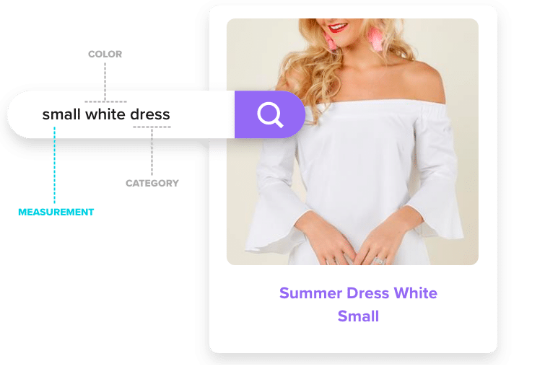
    The search box is the place through which users find the products they need. But the question for you is that can you search box understand user’s query in detailed like below?

    If such results can be delivered, you will surely see a spike in your sales.

    At Mage monkeys, we have helped eCommerce merchants design their own search engine that delivers:

    • Personalized search results based on user behavior.
    • Time-saving automated merchandising processes.
    • Integration with Google Analytics to provide more data.
    • Product recommendations that drive sales.
    • Powerful AI-based results.
    • And many more benefits that results in more sales and orders.

    If you’re also looking to give a boost to your sales cycle and enhance the user experience, then let’s have a call. Our technical experts will guide you step-by-step to achieve more sales by implementing an AI-based search engine.

    What Exactly Is In-Store Pickup For Magento?

    Now your customers can order or reserve products online and they can also pick them from a store with an in-store pickup feature. Companies are opting for this facture to provide convenience to their valuable customers as they don’t have to wait at home for the delivery instead they can pick up their ordered products by visiting the physical store. Thus, it saves shoppers shipping costs plus this feature does not require address details.

    What Statistics prove?

    As per the eMarketer survey, 86% of customers said they will prefer buying a $50 product if they are able to save $10 by picking it up from the store. Further, 50% of customers wish that they visit the physical store to make the purchase and the address should be featured on the merchant’s site.

    An added advantage for customers as well as for merchants is that they can save money on the delivery and spend that money on additional products and can pick them all up at once rather than purchase differently.

    Examples of in-store pickup implementations

    Before we read more about in-store pickup implementation let’s see few examples of how this solution works:

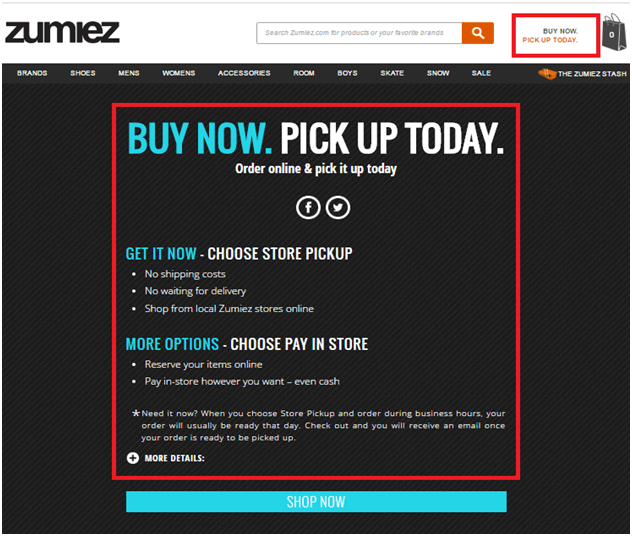
    Here, let’s take Zumiez which is a great example of multi-step implementation of the personal pickup feature. It has got in-store pickup feature on almost every relevant page. Have a look at the below image which shows the personal pickup option in the header: be it anywhere on the site.

    In-store pickup information page:

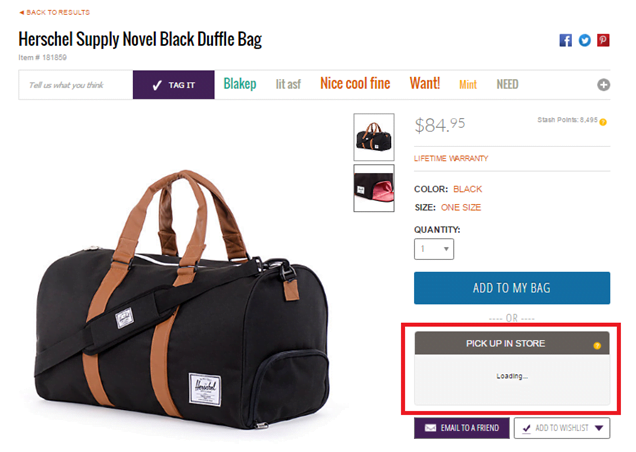
    Product page:

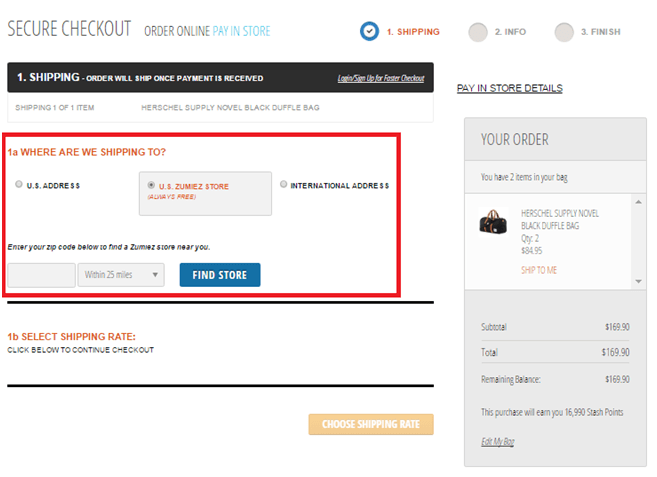
    on the checkout page, there is an option of Personal pickup

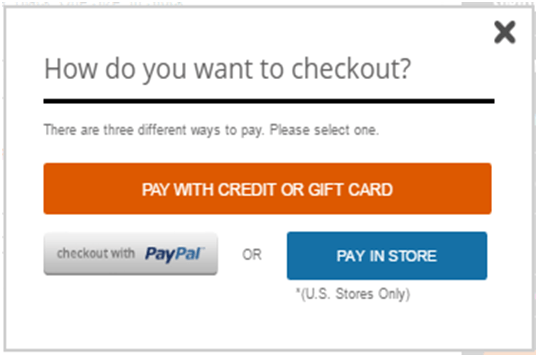
    In-store payment option:

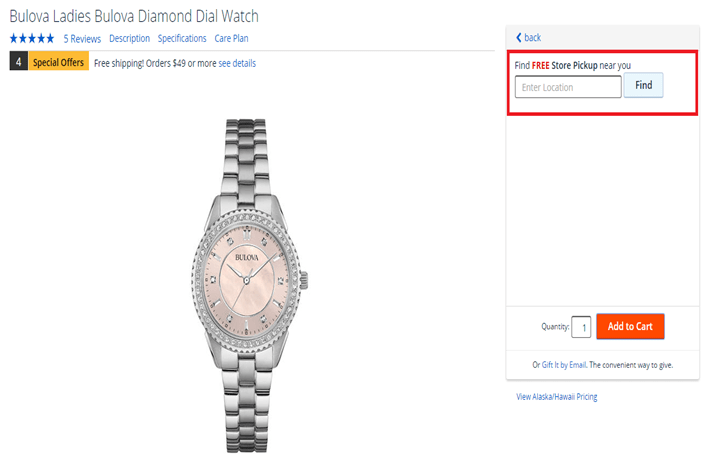
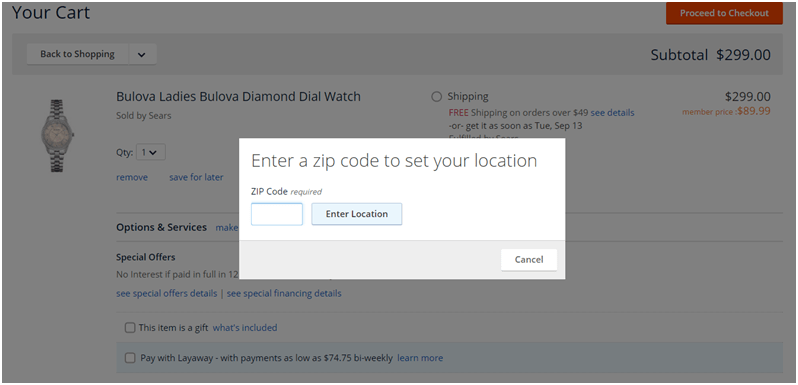
    Sears is the second-best example of in-store pickup. The main advantage of this solution is its simple layout and easy-to-find pickup options.

    In-store pickup on a product page:

    Searching for the nearest store:

    In-store pickup options

    Now, let’s see what is in-store pickup options?

    What are the main features offered by personal pickup solutions?

    For the customers:

    • You can place an online order and then pick it up from a store.
    • Select one from different pickup locations.
    • Choose one preferred pickup date.
    • You can view and take the print of the pickup location as well as the order.
    • You can look for stores by tags, area, and distance.
    • You will receive a notification when products are ready for pickup.
    • one order includes pickup items and shipment items
    • Pay in store for the ordered products

    For the store managers:

    • Import stores and locations via CSV files
    • Set open times in mass
    • Specify the description of a pickup location
    • Designate a pickup location for each product
    • Define available pick up dates and times
    • Track store messages and orders
    • Notify managers of the selected store
    • Define available search criteria
    • One can limit the number of stores available during the checkout page
    • Place a default store on the checkout page
    • Determine minimum and maximum cart value restrictions for in-store pickup.

    How will you add an in-store pickup feature in Magento?

    For this task, you need a right choice of an extension. Adding an in-store pickup feature in Magento is not that difficult. But you need to keep few things in mind before making any changes:

    • Which products can be pick up from the store: Do you want to give this option for some specific orders or for all products?
    • Make a decision of who will pick up products and if you wish you can give the option to registered customers only or to everyone.
    • You can provide a geolocation option and show the nearest stores which will be based on customer’s IP addresses so that it will be easy for them to locate the nearest store. Give them options to search by postcode, city, state, etc.
    • Decide to whom you will assign the responsibility for processing the transaction and how will you inform your staff about the details of in-store pickup orders?
    • Clear your mind regarding modes of payment. Will you give them the various payment methods like customers can pay in-store when they come for in-store pickup?

    The only thing you have to do is to choose and install the right extension to implement basic in-store pickup functionality.

    Extensions for Magento store:

    There are few extensions available but it comes with limitations. Do not install an extension that disturbs the self-cycle of your online store. If you want the right extension then you need professional help. You can hire experienced Magento extension developers who can get you the perfect extension hence resulting in increased sales.

    Some complex solutions:

    This wonderful feature will help you in avoiding some problems but what if two different customers are interested in buying the same product at the same time like one is buying online and another one from the physical store. Well, the solution is to synchronize your online catalog with the brick-and-mortar store inventory. But yes such cases will need additional development.

    Personal pickup is a great choice for any online retailer and you can even customize the feature as per your need like postal code or country and which mode of payment works best for in-store pickup. You can take the advantage of this amazing feature and increase your online sales and build long-time relationships with local buyers. You are providing a faster delivery option to your customers for free. It might be challenging for new retailers but overall this feature is very easy to install, customize and manage. Thus, we strongly suggest In-store pick-up feature to all our retailers be it small or big, who has the means to offer such delivery option.

    How Store Finder Can Boost Your Online Sales?

    If you own a Ecommerce business along with multiple physical stores then you might have faced below mentioned problems:

    • Customers have difficulties finding your store
    • Your stores have different open hours
    • Your stores have different available items
    • Your stores have different sales campaign

    But, how to overcome these problems?

    Well you need a store locator. It can help your customers reach to you within no time.

    What is a store locator?

    To explain you in simple words, a store locator is a map-based service that provides comprehensive geographic details of your store location. Though, with recent researches and discovery in UX, a store locator can give you much more than just addresses and locations.

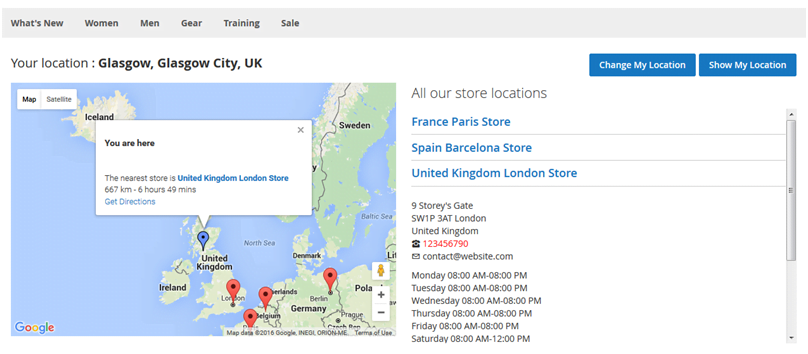
    Below is the example of store Locator for Magento 2.

    The store locator is integrated into your site and then it will let you enter or upload the details of many offices or shops and it makes it easier for website visitors to locate stores that are close to them by using an embedded Google Maps form.

    The locations and landmarks you add are not limited to stores nor does it require any official verification. Basically you can add any location you want. So, whether you have a website for stores, or want to itemize the location of any remarkable place on your website, they make them easy to locate by the audience.

    So what are the advantages of using Store Locator?

    • It saves your employees’ time
    • With a comprehensive store finder, you can provide customers with that exact information.
    • Now with smartphones and Google Maps your employee does not have to spend time providing direction guides to customer
    • Having a store finder on your site can significantly reduce the time customers need to find and get directions to your store.
    • It provides your customers a better experience.
    • It provides detailed directions as sometimes your customers may not be the best at navigation, or that your store is situated in some alley that could easily be overlooked.
    • With native Google APIs, customers can use GPS right on your website to locate themselves and get direction from there. (if he don’t know his current location)
    • Have you ever experienced to find a particular new shirt and then it turned out to be only available some-store-else? Well, don’t let your customers go through the same thing. Store Locator provides you to add the list of stores to a product page and this way your customers can know where they can find that product.
    • Store Locator allows you to set special dates for individual store locations.

    And then there are those days that customers have to call the store to ask for directions because they just can’t find it with the given address. Now with smart phones and Google Maps, it’s much easier for customers to find the direction to a store.

    Above are the reasons why you should use a store finder on your website. With the help from it, you can quickly improve your sales and service. Good luck with your business!

    The benefits of Social Login in E-commerce

    Today the E-commerce has reached new level for enhancing user experience to increase sales and it has become one of the vital requirements of a website. So for that purpose the use of single sign-on is very popular these days.

    Social media plays a crucial part and in this article we are going to explore the benefits that social login can bring to an eCommerce website.

    1. Easy Login

    First thing first, the easier registration is the most convenient way for shoppers and the automatic registration functionally means that the customer can get instant access to a store.

    One can feel annoyed if they have to fill in a registration form of a website. A small cell phone is not convenient for tapping on each blanket to add the personal data but with social login, we can have got the right solution to the problem. It will keep the shoppers feel comfortable and are more likely to stick with you.

    While visiting a website if one can find the option to sign up using their social accounts like Facebook, Google, Pinterest, etc. then this might help customers to gain user access faster than traditional sign-up methods. It is also a time-saver for people who get turned off as they have spent a lot of time inputting their personal data.

    2. For collecting users’ data

    It is but obvious that when you ask fill in a customer information sheet, he may not give you the incorrect data. In the worst case, the customer may get angered and he will quit buying products in the store. According to a reliable source, we have 88% of shoppers tending to fill in the form with incorrect data.

    As you know, each personal account of the customer has lot of meaningful data for creating the targeted advertising and if the businessmen can collect useful information then they can never need to run the fill-in-the-sheet project.

    When a particular shopper login with social login buttons and that point we can collect customer data automatically with the functional software and this way you get more data of customers is linking to several accounts as various login options.

    3. Great for the targeted marketing campaign

    Customers’ data is very useful to improve marketing campaigns of the whole business project. In detail, they can base on the information to decipher a lot of segments. Just say a businessman can separate the customer into particular groups like age, gender, interest, as well as geographic location.

    A seller knows what customers are actually looking for in their website and they can build up the proper sale marketing. So, social login provides an additional figures to improve marketing campaign.

    How to Setup Facebook Livechat in Magento 2?

    Do you know customer Chat Facebook is a free application that you can integrate directly into your website for free.

    In this post, we will tell you how to set up Facebook Livechat in Magento 2.

    But first let’s understand What is Facebook Chat and what are its benefits?

    Customer Chat Facebook is a customer chat software that comes with great features such as customer care, consulting, sales, etc directly on Landing Page. All management and customer care is done through Facebook Messenger. It also helps users to chat and receive messages without logging in if the admin sends the message.

    Below are a few simple steps to set up Facebook Chat (Live chat Facebook) for your landing page.

    How to Setup Facebook Livechat in Magento 2

    To Setup Facebook Livechat

    • Step 1: Access your Fanpage > enter your domain path > choose Save
    • Step 2: Copy and paste the code into the </ body> tag of the Landing Page

    Step 1: Access your Fanpage > enter your domain path > choose Save

    In this step, go to your Fanpage > select Settings > click on Messenger Platform.

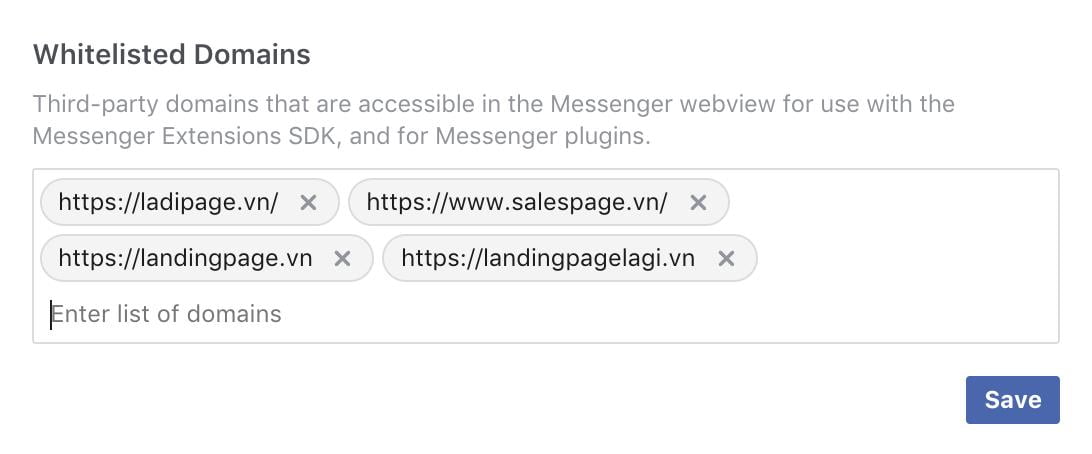
    Now, you enter the path of the domain that you want to use in the Whitelisted Domains field. After that, click on Save to complete.

    Please follow the image below:

    Step 2: Copy and paste the code into the tag of the Landing Page

    • In this step enter the code that you need to copy and paste it into the tag of your Landing Page:
    • Your App ID: Replace with your Facebook App ID and If you don’t have it then create one
    • Page_ID: Replace with the ID code of your Fanpage. You can get page ID

    Wonderful! This is how the integration is done between Facebook Livechat in Magento 2.

    Yes, only in Magento 2, not with any older version.

    With Livechat Facebook Messenger on Landing Page you will be able to use multi-channel marketing strategies. Try it and you won’t be disappointed.

    Is your website ready for social commerce?

    In life, some things just naturally pair well with each other. Peanut butter and jelly. Wine and cheese. Fall and football. Together, the sweet and savory joy that they deliver is amplified and everyone benefits.

    Sticking true to the virtues of wine and cheese is the combination of social media and digital commerce.

    Today, we know that pair as social commerce, a type of electronic commerce that employs social media to promote online transactions.

    Since the beginning of time, location, location, location has been critical to a merchant’s success. Today, the concept of location is changing and becoming digital. More and more people are spending time on social networks. In fact, from 2016 to 2017 the number of active social media users grew by 21%. What’s even more interesting is that these social networks are transforming into something greater than just a place to hang out. Sure, pictures and birthday wishes are still being shared. However, social media users are also actively engaging with companies. They are sharing what they like, posting about negative experiences and shouting out their favorite brands. According to a study, 86% of people follow brands on social media and 75% of them have purchased a product because they saw it on a social channel. Together, those statistics have caught the attention of businesses that are seeking to harness the massive opportunity that social media presents.

    For companies that are looking to maximize the impact of social commerce, Facebook’s 1.5 billion users present the largest opportunity. They represent a massive pool of prospects that companies are hungry to acquire, convert and retain as loyal customers. Businesses that are eager to capitalize on this audience are advertising on Facebook and using the Facebook shop feature to turn their “Page” into a convenient social storefront for customers. But, leveraging Facebook can be a complex process when trying to deliver a consistent look, feel and message that is aligned with a company’s other channels. It grows tougher when manually juggling a library of product images, descriptions and price changes while simultaneously managing product promotions.

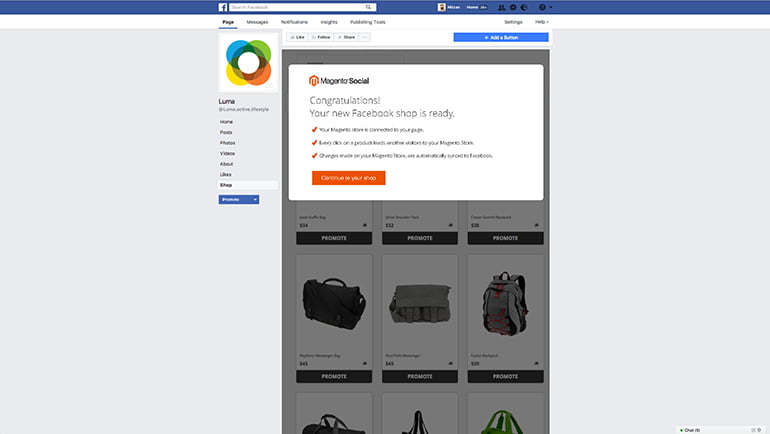
    Merchants should fear not! Leveraging the power of social commerce on Facebook doesn’t have to be frustrating. The right technology can remove a lot of the burden. Magento Social makes setting up a Facebook shop easier by directly integrating with Magento Commerce. This means within minutes, a company’s Facebook store is automatically created with all the correct product information, from photos and descriptions to pricing. Product listings are automatically updated on a regular basis to keep your store fresh, highlighting your latest products and promotions. This eliminates the need to manually manage product catalogs in multiple places.

    Having consistent up-to-date listings is important because Magento Social makes it is more convenient for your customers to like and share their favorite products. Each product listing on a merchant’s Facebook store is equipped with icons that enable consumers to quickly share them to their various social feeds. Considering that 92% of people trust recommendations from friends and family above all else, encouraging customer sharing can play a role in acquiring more customers and increasing your brand awareness.

    Facebook advertising is also critical to a successful social strategy. With projected ad revenues of 23 billion dollars, merchants are aggressively investing in this channel. But, efficiently managing these ads can be a challenge if you are doing it on your own. Magento Social makes it easier. Thanks to tight integration with Magento Commerce, Magento Social merchants can save time and effortlessly create and optimize Facebook ads for specific products, in just a few clicks. There is no need to create or upload any additional content and you can easily monitor performance and available budget towards the best-performing products and categories. This allows for immediate turnaround and management when launching a promotion for a bestselling product, or perhaps one that you are looking to quickly clear inventory on.

    At the end of the day, merchants that invest in delivering simple and integrated social commerce experiences will open the door to opportunities to charm and acquire customers that may not have existed before. Providing existing and potential customers with the convenience to learn about, purchase and share products in a continuous manner will drive success. This is why implementing a solution that helps save time and makes it easier for businesses to keep their initiatives aligned is becoming more and more important. From up-to-date product listings and flexible targeted advertisements to impactful sharing, Magento Social helps merchants turn their social media initiatives into an engine for growth.

    _________

    Magento Social is now included as a bundled extension with Magento 2.2. It is also available for all other Magento 2 merchants to download and try for free at the Magento Marketplace. To learn more, visit the Magento Social product page.

    How to Efficiently Implement Backorder in Magento?

    It is important for any business to have Backorder, especially in the E-commerce Field. It lets merchants sell products which are currently out of stock. It will also help in increasing customer satisfaction with the brand.

    Magento comes with a built-in feature of Backorder which you can turn on easily whenever you need.

    There might be the number of things you want to know about Backorder. Like what is Backorder? How to enable Backorder in Magento?, etc. Read on to know more about it.

    1.What is Backorder?

    Backorder is an order which contains products which are not available in merchant’s inventory, but at the same time customer can place its order so they will receive the product as and when the seller restock it again. It works as a good indicator of your business’s health by evaluating the amount of backorder per total order, or average period of backorder. It also helps in solving a problem which is faced by the business owner.

    For Example:

    You want to buy a CD of Ed Sheeran’s album. You go to your favorite CD store and you quickly realize that the edition was sold out after week.

    The web store notifies you that you can still place an order and you will receive the edition when the product is present in their inventory. Hence when you place an order it gets stored on Merchant’s backorder.

    Since you had paid for your Backorder items which you have actually not received so now its seller’s responsibility to get it delivered to your address when it’s available.

    Further, the CD Shop also places an order to their supplier soon after noticing the quantity of Ed Sheeran’s album reached to below 1. Their supplier (record label) is out of stock too and so he will continue to produce more as he will see the demand for it. Then the Supplier will allows CD shop to order 1000 copies and receives money from the CD shop as a down payment.

    If you allow customers to place a backorder then pay more attention to, how you notify them of the condition and also to the time when it takes for goods to be refilled, payment mode (before or after the goods are received) with backorder cost.

    Just-in-time inventory management strategy usually has backorders and therefore merchants can easily predict the demand. In companies, backorder management plays an important part.

    2. What is the difference between Backorder and Pre-Order?
    Backorder Pre-Order
    1. Backorder means when the product was in stock but the moment customer wanted to buy it. It was not available and a customer will receive only when it restocked. 1. Pre-order means customer demand on not-yet-released products in the market and they want to buy it soon as they are available.
    2. For example: Due to more demand for iPhone X after its release Apple doesn’t have enough goods so now you place a Backorder and wait for its available again, 2. For example: Months ago, Apple was preparing to release their latest phone which is iPhone X and you wanted to be first to buy it so you place a pre-order for it.

    3. How can you enable Backorder on your Magento backend?

    There are 2 ways to enable Magento backorder settings.

    a. If you want to enable for new product

    Step 1: Login to Magento backend.

    Step 2: On the menu bar, choose System then click Configuration

    Step 3: Now on the next page, you can see the Inventory tab under Catalog section

    Step 4: Click to open the Product Stock Options in Backorders dropdown you will see three options No Backorders, Allow Qty Below 0, Allow Qty Below 0 and Notify Customer.

    Step 5: After choosing, click on the save config button.

    No Backorders: It is selected by default. If the quantity of the product is below 0 then a customer cannot buy until you replenish again.

    Allow Qty Below 0: In this, if your inventory is out of stock then also customer can buy the product. It will show no difference to buyer’s perspective.

    Allow Qty Below 0 and Notify Customer: It allows customer to place an order and they will receive a notification of the backorder status in the frontend.

    It all depends on the strategy of your business. Keep in mind all the options and choose wisely between the second and the third option to avoid customer oriented problems.

    b. If you want to config backorder for existing products

    Step 1: In Menu bar, Choose Catalog and click on Manager Products

    Step 2: The next screen will display all your products then you need to select desired products on which you want to apply backorder config.

    Step 3: On the Action drop-down Menu, choose Update Attributes then click on Submit.

    Step 4: Then Click on the Inventory. You will see the backorder row, click on change box, and then the drop-down menu will automatically light up and then you will get 3 options from that click the most suitable one. Then, find the stock Availability row, then check the change box and change the status from Out of Stock to In Stock

    Step 5: Save the changes.
    How To Add Facebook Like Button On Your Magento Store?

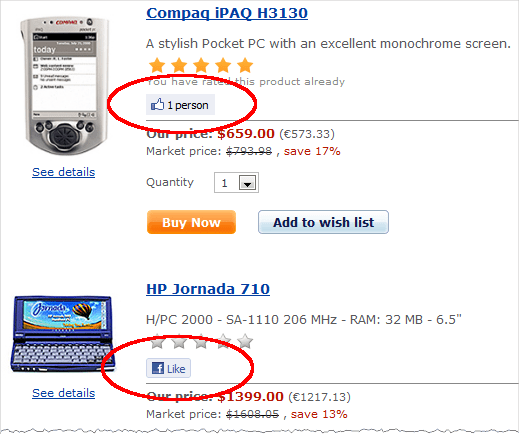
    Today many sites you visit have a link to like & share their article, page or product with your Facebook friends. Facebook sharing is increasing day by day to reach the maximum number of people hence this article will it little easier for your customer to share your products with their Facebook friends.

    To explain you in a better way we have used the Magento default theme as a reference. You can adjust your code slightly if you are using a custom theme.

    Get Facebook Like Button code

    Here, we are adding Facebook like button to your product view.

    With your favourite text editor, I like Notepad++ ,
    open
    /app/design/frontend/base/default/template/catalog/product/view.phtml and around line 57 find the following code:

    <br/>

    <span class=”h1″><?php echo $_helper->productAttribute($_product, $_product->getName(), ‘name’) ?></span>

    Place the following code on a new line below:

    <br />

    <div id=”fb-root”></div><br />

    <script>(function(d, s, id) {

    var js, fjs = d.getElementsByTagName(s)[0];

    if (d.getElementById(id)) return;

    js = d.createElement(s); js.id = id;

    js.src = ‘https://connect.facebook.net/en_GB/sdk.js#xfbml=1&version=v2.12’;

    fjs.parentNode.insertBefore(js, fjs);

    }(document, ‘script’, ‘facebook-jssdk’));</script><br />

    <fb:like href=”<?php echo $_product->getProductUrl() ?>” send=”false” show_faces=”false”></fb:like><br />


    That block of code should look something like this :

    <br />

    <div class=”product-name”><br />

    <span class=”h1″><?php echo $_helper->productAttribute($_product, $_product->getName(), ‘name’) ?></span>

    <div id=”fb-root”></div><br />

    <script>(function(d, s, id) {

    var js, fjs = d.getElementsByTagName(s)[0];

    if (d.getElementById(id)) return;

    js = d.createElement(s); js.id = id;

    js.src = ‘https://connect.facebook.net/en_GB/sdk.js#xfbml=1&version=v2.12’;

    fjs.parentNode.insertBefore(js, fjs);

    }(document, ‘script’, ‘facebook-jssdk’));</script><br />

    <fb:like href=”<?php echo $_product->getProductUrl() ?>” send=”false” show_faces=”false”></fb:like><br />

    </div><br />


    Refresh your product view page and see the like button. If you don’t see any change then you may need to refresh the Blocks HTML output cache in System > Cache Management.

    To Conclude

    Social media has become an inseparable organ of the businesses today. You can use social media for social advertisement, social login plugins or social sharing. It is helping businesses in countless ways. Which kind of social media option do you use in your business? Do let us know in the comment section below.