We sacrifice by not doing any other technology, so that you get the best of Magento.

We sacrifice by not doing any other technology, so that you get the best of Magento.

    How To Add Facebook Like Button On Your Magento Store?

    Today many sites you visit have a link to like & share their article, page or product with your Facebook friends. Facebook sharing is increasing day by day to reach the maximum number of people hence this article will it little easier for your customer to share your products with their Facebook friends.

    To explain you in a better way we have used the Magento default theme as a reference. You can adjust your code slightly if you are using a custom theme.

    Get Facebook Like Button code

    Here, we are adding Facebook like button to your product view.

    With your favourite text editor, I like Notepad++ ,
    open
    /app/design/frontend/base/default/template/catalog/product/view.phtml and around line 57 find the following code:

    <br/>

    <span class=”h1″><?php echo $_helper->productAttribute($_product, $_product->getName(), ‘name’) ?></span>

    Place the following code on a new line below:

    <br />

    <div id=”fb-root”></div><br />

    <script>(function(d, s, id) {

    var js, fjs = d.getElementsByTagName(s)[0];

    if (d.getElementById(id)) return;

    js = d.createElement(s); js.id = id;

    js.src = ‘https://connect.facebook.net/en_GB/sdk.js#xfbml=1&version=v2.12’;

    fjs.parentNode.insertBefore(js, fjs);

    }(document, ‘script’, ‘facebook-jssdk’));</script><br />

    <fb:like href=”<?php echo $_product->getProductUrl() ?>” send=”false” show_faces=”false”></fb:like><br />


    That block of code should look something like this :

    <br />

    <div class=”product-name”><br />

    <span class=”h1″><?php echo $_helper->productAttribute($_product, $_product->getName(), ‘name’) ?></span>

    <div id=”fb-root”></div><br />

    <script>(function(d, s, id) {

    var js, fjs = d.getElementsByTagName(s)[0];

    if (d.getElementById(id)) return;

    js = d.createElement(s); js.id = id;

    js.src = ‘https://connect.facebook.net/en_GB/sdk.js#xfbml=1&version=v2.12’;

    fjs.parentNode.insertBefore(js, fjs);

    }(document, ‘script’, ‘facebook-jssdk’));</script><br />

    <fb:like href=”<?php echo $_product->getProductUrl() ?>” send=”false” show_faces=”false”></fb:like><br />

    </div><br />


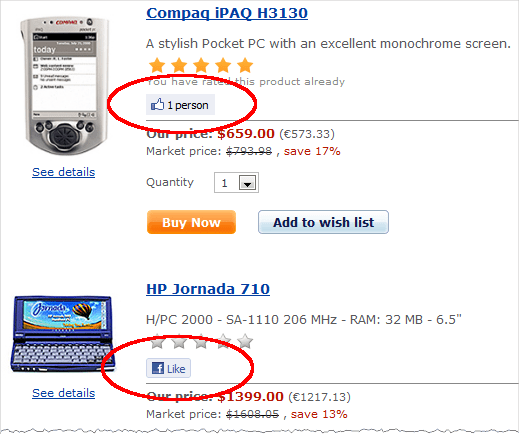
    Refresh your product view page and see the like button. If you don’t see any change then you may need to refresh the Blocks HTML output cache in System > Cache Management.

    To Conclude

    Social media has become an inseparable organ of the businesses today. You can use social media for social advertisement, social login plugins or social sharing. It is helping businesses in countless ways. Which kind of social media option do you use in your business? Do let us know in the comment section below.

    How To Display Sub Categories On A Category Page In Magento?

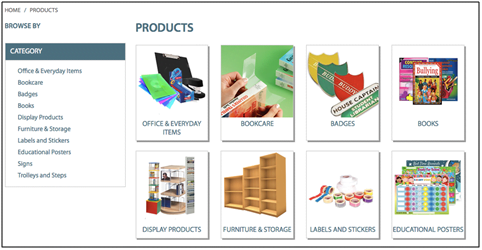
    By default, Magento will only display subcategories instead of product on a product listing page which is like an obvious option to have but due to some reason it is not possible unless you are aware.

    So let’s begin from the top:

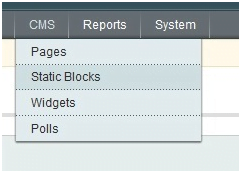
    1. In your Magento admin navigate to CMS > Static Blocks

    2. Click “Add New Block” at the top right

    3. Create a new static block as follows:

    Block Title : Sub Category Listing

    Identifier : subcategory_listing

    Status : Enabled

    Content :
    {{block type=”core/template” template=”catalog/navigation/subcategory_listing.phtml”}}

    4. Click “Save Block” in the top right

    5. Go to the parent category under Catalog > Manage Categories.

    6. Select the category that has sub-categories and under the “Display Settings Tab” reflect the following:

    Display mode : Static Block only

    CMS Block : Sub Category Listing

    Is Anchor : No

    7. Click “Save Category” at the top right

    8. Create a new file called “subcategory_listing.phtml” with the following content:

    app/design/frontend/yourpackagename/yourthemename/template/catalog/navigation/

    Containing the following code:

    <?php

    $layer = Mage::getSingleton(‘catalog/layer’);

    $_category   = $layer->getCurrentCategory();

    $_categories = $_category->getCollection()->addAttributeToSelect(array(‘url_key’,’name’,’image’,’all_children’,’is_anchor’,’description’))

    ->addAttributeToFilter(‘is_active’, 1)

    ->addIdFilter($_category->getChildren())

    ->setOrder(‘position’, ‘ASC’)

    ->joinUrlRewrite();

    ?>

    <div class=”listing-type-list catalog-listing”>

    <ul id=”subcats” class=”clear”>

    <?php foreach ($_categories as $_category): ?>

    <?php if($_category->getIsActive()): ?>

    <?php Mage::log($_category->debug(), null, ‘mylogfile.log’); ?>

    <li>

    <div class=”subcat clearfix”>

    <a class=”now-from-container” href=”<?php echo $_category->getURL() ?>”></a>

    <div class=”subcat-image”>

    <a href=”<?php echo $_category->getURL() ?>” title=”<?php echo $this->htmlEscape($_category->getName()) ?>”>

    <img src=”<?php echo $this->htmlEscape($_category->getImageUrl()) ?>” width=”190″ alt=”<?php echo $this->htmlEscape($_category->getName()) ?>” />

    </a>

    </div>

    <div class=”subcat-title-container”>

    <h2><a href=”<?php echo $_category->getURL() ?>” title=”<?php echo $this->htmlEscape($_category->getName()) ?>”><?php echo $this->htmlEscape($_category->getName()) ?></a></h2>

    </div>

    </div>

    </li>

    <?php endif; ?>

    <?php endforeach; ?>

    </ul>

    </div>

    So, all this does is what grabs the current category being viewed and cycles through the sub categories of the parent category. Checks each sub category to see if it is active, and if so outputs it to the sub category list.

    9. Make sure your sub categories have an image assigned to them under
    Catalog > Manage Categories > Sub Category

    And that’s how to display a sub category listing on a category page in Magento.

    If you do not see the changes, then try clearing your Magento/browser cache. If your sub-categories show no thumbnails then make sure that the images are actually uploaded to your subcategories.

    How To Update Magento Order Status In Mysql When Order Is Stuck?

    When your order is stuck and you want to update your Magento order status in my SQL then for that you have to create a temporary table called temp with 2 columns, increment_id and status.

    Fill this table with orders numbers that need to be updated and the new status
    e.g. canceled.

    Status values can be found at:-
    SELECT *
    FROM `sales_order_status_state`

    These queries will then update the sales order and the order grid with the new status.

    UPDATE `sales_flat_order`, temp
    SET sales_flat_order.state = temp.status, sales_flat_order.state = temp.status
    WHERE sales_flat_order.increment_id = temp.increment_id;

    UPDATE `sales_flat_order_grid`, temp
    SET sales_flat_order_grid.status = temp.status
    WHERE sales_flat_order_grid.increment_id = temp.increment_id

    Hope your query is solved now. Do share in your views and experiences in the comment section below.

    Should you opt and install the magento security patch?

    There are very few people who understand the importance of Magento security patch. There are few store owners who are not developers or don’t have an E-commerce digital agency have to perform regular updates or install security patches but still many are lacking in maintaining the security.

    U might think, if everything is running smoothly, a store is currently taking orders, new customers are signing up, a system is speedy and you are making the profit and nothing is broken then why fix it? In that case, you have to rethink.

    Magento security is the main concern and you have to keep in mind about the cost as well. The main purpose of the E-commerce store is to generate more and more sales and make money. Along with this you also have to protect your valuable customers’ privacy, increase your brand awareness and build a good market reputation.

    When you are updating to a new version of Magento then your regular critical updates also change. A critical update is so important that you can’t wait to fix it until the next release of Magento and this happens because of few listed below things:

    • Security flaws in checkout and credit card capture
    • Security vulnerabilities that allow a malicious piece of code to be ran remotely
    • Vulnerabilities allowing unauthorized people into the Magento admin
    • Updates to third-party APIs that could make Magento core functions no longer work
    • Vulnerabilities that put customers’ information at risk

    If you have not installed a critical security update on your Magento store since a long time then you should do it in an immediate basis.

    Security updates protects your customers’ private information and also increase your brand reputation. The repercussions of a malevolent person who is trying to gain access to your site for grabbing customer addresses, phone numbers, credit cards and other information might harm your reputation and decrease your sales in the short- and long-term.

    How to find out that you Site Has Been Compromised?

    If you face a situation where your site is not working properly or acting strange then you are having security issues in your Magento store.

    We have shared some of the common signs to determine whether your site has been compromised or not

    • Check your list of administrator users for unknown accounts. We have seen vpwq and defaultmanager being used, but any unknown account is suspicious
    • Check your Magento installation for any unknown files that were recently created and are suspicious. Compare all files to your code repository or staging server.
    • Check server access log files for request POST /index.php/admin/Cms_Wysiwyg/directive/index/ coming from unknown IP addresses.
    • Run a tool to check for trojans (e.g. chkrootkit)
    • Check for wrong permissions
    • Check for hidden files
    • Check for suspicious ports being opened (command: netstat -nap | grep LISTEN )
    • Check for any port redirections on OS level (sample command: iptables -L -n)

    If you’re experiencing any of these above-mentioned issues, then do get in touch with the Magento experts as your customers’ private information, Magento functionality, and store’s reputation could be on the line.

    Magento security patch is a major concern so fix even a small issue as soon as possible. Do share your views and experiences in the comment section below

    How Popular Is Magento? Facts & Statistics

    Currently, Magento is the most popular Ecommerce platform in the world since its launch in 2008. According to the Magento website, more than 250,000+ online stores domains run on Magento including some of the leading brands like Samsung, Ford, and other well-known brands.

    Magento is a versatile platform that offers marketing and promotion of various brands. It also focuses on Mobile Commerce offering responsive designs. It has a large number of products on one site with a possibility to handle more than 80,000 orders per hour.

    The main problem for Ecommerce business is abandoned shopping carts and it happens when the customer adds items to their shopping cart without buying those items. Based on online shop statistics, the amount of buying users is great. 10% exited the website from the shopping cart while 41% made the purchase.

    There have been more than 700,000+ Magento downloads by 2020 and it keeps on increasing to date.

    There are a numbers of reasons why people choose Magento for their online stores and we have gathered statistics which proves that Magento is really a popular Ecommerce platform.

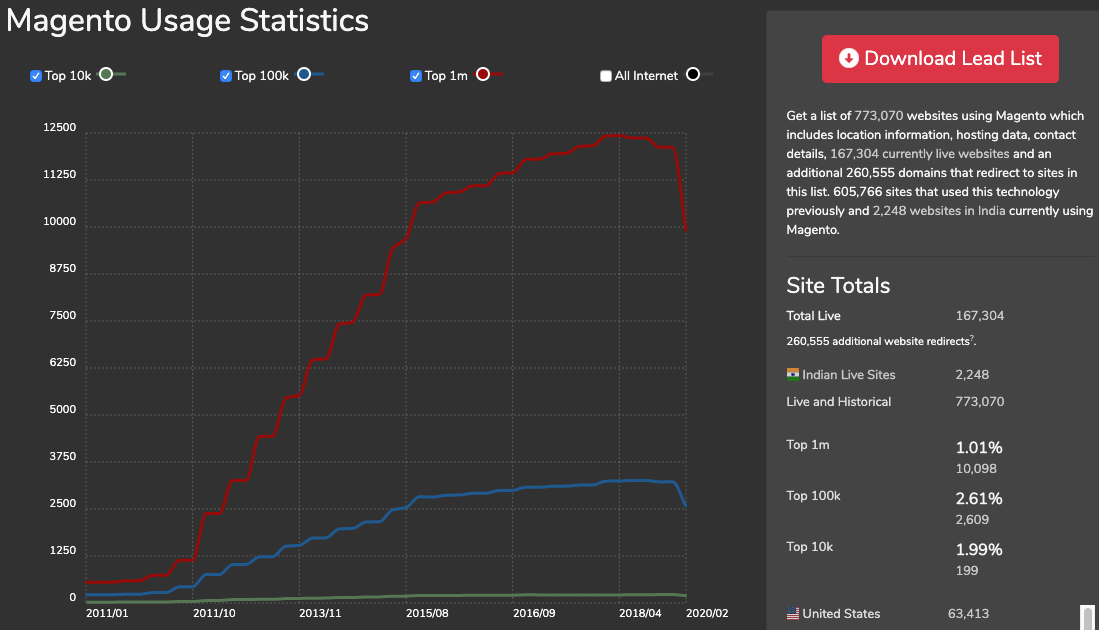
    Magento Usage Statistics:


    Source: trends.builtwith.com

    13% of the entire website which content management system use Magento. Hence we can call it a “Legend” of the Ecommerce world. From the beginning, Magento has gained more and more popularity.

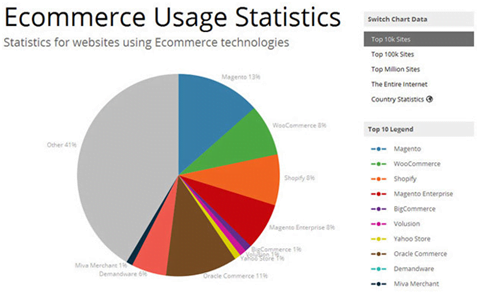
    Source: trends.builtwith.com

    With 31% of market share, Magento has become the most renowned and used Ecommerce platform. Based on Alexa ranking of 2015 it was among the top 1 Million websites where Magento has been used by 26% of them.

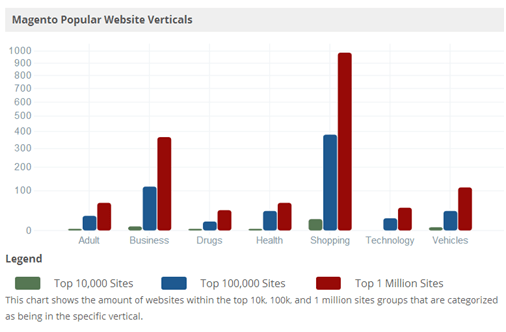
    Source: trends.builtwith.com

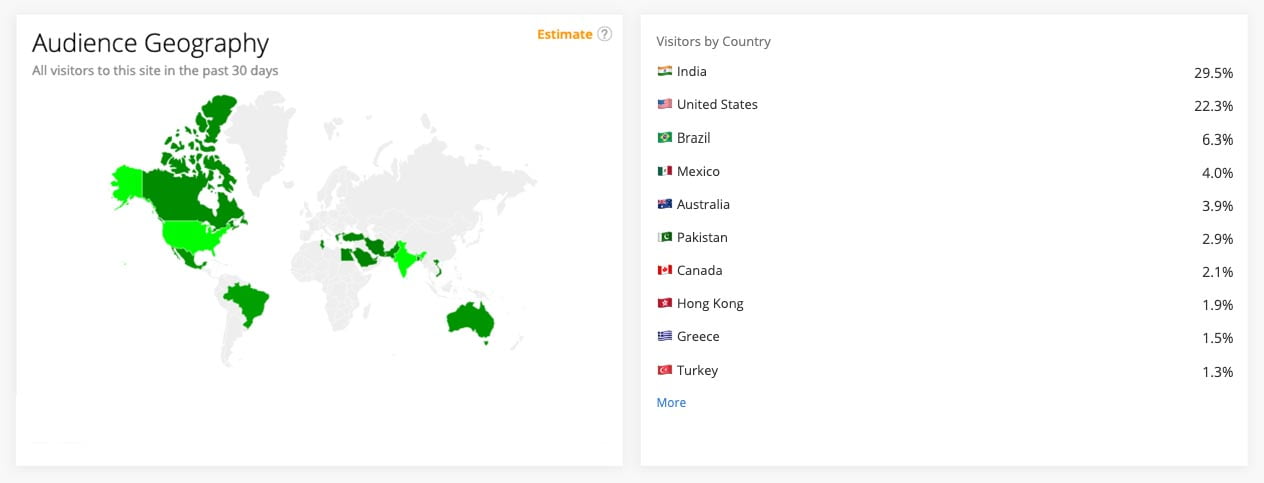
    The Magento community is constantly growing. As mentioned below, Magento rank statistics by countries that are mostly oriented on Magento development websites.

    Source: www.alexa.com [2020]

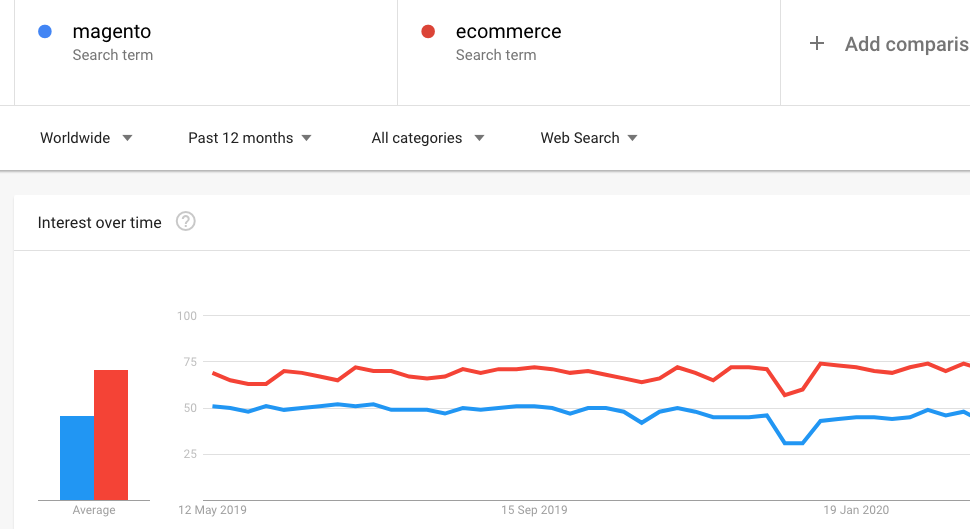
    From the above statistics, you can say that the word “Magento” is searched on Google is more often than the word “Ecommerce” since 2008 which does not surprise us at all.

    Source: trends.google.com [2020]

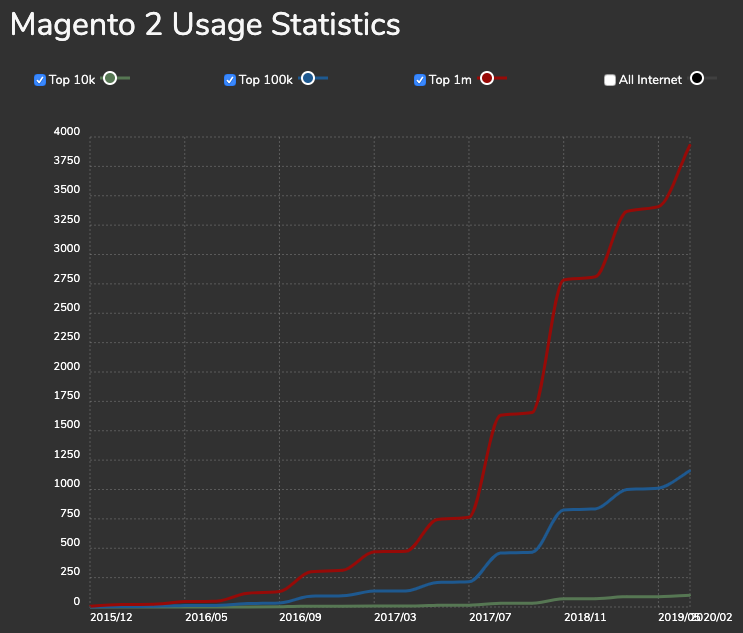
    With each passing year, Magento is becoming more and more professional and used platform by a large number of people. Magento 2 and later the Magento 2.1 the downloads are growing steadily and used by many business websites.

    Conclusion

    The above-provided statistics are just to illustrate how Magento is one of the best Ecommerce platforms with the comparison to working on other platforms. It wouldn’t have been so popular if the web development features it offers and the quality. It can handle a wide range of traffic and operate with high performance.

    There is your answer to the question from the title – yes a lot, to quote some of the real-world numbers from Magento’s official website:

    • $25 Billion in Transactions
    • 30,000+ Merchants
    • 2000+ extensions
    • 1.5 Million downloads

    And counting.

    According to a detailed report by Builtwith, In 2020, Magento is

    • 6th most popular in India in Open Source category.
    • 3rd most popular in the Top 10k sites in Open Source category.
    • 4th most popular in the Top 100k sites in Open Source category.
    • 5th most popular in the Top 1 Million sites in Open Source category.
    • 9th most popular on the Entire Internet in Open Source category.
    • 5th most popular in the United Kingdom in Open Source category.
    • 5th most popular in Israel in Open Source category.
    • 5th most popular in the Netherlands in Open Source category.
    • 5th most popular in UAE in Open Source category.
    • 5th most popular in Australia in Open Source category.
    • 6th most popular in India in eCommerce category.
    • 3rd most popular in the Top 10k sites in eCommerce category.
    • 4th most popular in the Top 100k sites in eCommerce category.
    • 4th most popular in the Top 1 Million sites in eCommerce category.
    • 10th most popular on the Entire Internet in eCommerce category.
    • 2nd most popular in Saint Helena in eCommerce category.
    • 3rd most popular in the Netherlands in eCommerce category.
    • 3rd most popular in Croatia in eCommerce category.
    • 3rd most popular in Slovenia in eCommerce category.
    • 4th most popular in Denmark in eCommerce category.

    What is your experience with Magento? Do these statistics hold true for your business? Do let us know.

    Magento 2 create customer attribute with add column and filter in customer grid

    Create the below files and add the code in your custom module

    Create the registration.php file to the following path in the app/code/Magemonkeys/CustomerAttr/registration.php
    <?php
    MagentoFrameworkComponentComponentRegistrar::register(
    	MagentoFrameworkComponentComponentRegistrar::MODULE,
    	'Magemonkeys_CustomerAttr',
    	__DIR__
    );
    Create the module.xml file to the following path in the app/code/Magemonkeys/CustomerAttr/etc/module.xml
    <?xml version="1.0"?>
    <config xmlns:xsi="http://www.w3.org/2001/XMLSchema-instance" xsi:noNamespaceSchemaLocation="urn:magento:framework:Module/etc/module.xsd">
        <module name="Magemonkeys_CustomerAttr" setup_version="1.0.0">
        </module>
    </config>
    Create MyCustomerAttribute.php file to the following path in the app/code/Magemonkeys/CustomerAttr/Setup/Patch/Data
    <?php
    namespace MagemonkeysCustomerAttrSetupPatchData;
     
    use MagentoFrameworkSetupPatchDataPatchInterface;
    use MagentoFrameworkSetupPatchPatchRevertableInterface;
    use MagentoFrameworkSetupModuleDataSetupInterface;
    use MagentoCustomerSetupCustomerSetupFactory;
    use MagentoCustomerSetupCustomerSetup;
    use MagentoEavModelEntityAttributeSetFactory;
     
    class MyCustomerAttribute implements DataPatchInterface, PatchRevertableInterface
    {
     
        /**
         * @var ModuleDataSetupInterface
         */
        private $moduleDataSetup;
        /**
         * @var CustomerSetup
         */
        private $customerSetupFactory;
     
        /**
         * Constructor
         *
         * @param ModuleDataSetupInterface $moduleDataSetup
         * @param CustomerSetupFactory $customerSetupFactory
         */
        public function __construct(
            ModuleDataSetupInterface $moduleDataSetup,
            CustomerSetupFactory $customerSetupFactory,
            SetFactory $attributeSetFactory
        ) {
            $this->moduleDataSetup = $moduleDataSetup;
            $this->customerSetupFactory = $customerSetupFactory;
            $this->attributeSetFactory = $attributeSetFactory;
        }
     
        /**
         * {@inheritdoc}
         */
        public function apply()
        {
            $this->moduleDataSetup->getConnection()->startSetup();
            /** @var CustomerSetup $customerSetup */
            $customerSetup = $this->customerSetupFactory->create(['setup' => $this->moduleDataSetup]);
            $customerEntity = $customerSetup->getEavConfig()->getEntityType(Customer::ENTITY);
            $attributeSetId = $customerEntity->getDefaultAttributeSetId();
    
            /** @var $attributeSet Set */
            $attributeSet = $this->attributeSetFactory->create();
            $attributeGroupId = $attributeSet->getDefaultGroupId($attributeSetId);
    
            $customerSetup->addAttribute(
                MagentoCustomerModelCustomer::ENTITY,
                'pan_number',
                [
                    'type' => 'varchar',
                    'label' => 'Pan Number',
                    'input' => 'text',
                    'source' => '',
                    'required' => false,
                    'visible' => true,
                    'position' => 500,
                    'system' => false,
                    'backend' => ''
                ]
            );
             
            $attribute = $customerSetup->getEavConfig()->getAttribute('customer', 'customer_pan_no')->addData([
                'is_used_in_grid' => true,
                'is_filterable_in_grid' => true,
                'is_searchable_in_grid' => true,
                'used_in_forms' => [
                    'adminhtml_customer'
                ]
            ]);
            $attribute->addData([
                'attribute_set_id' => $attributeSetId,
                'attribute_group_id' => $attributeGroupId
    
            ]);
            $attribute->save();
     
            $this->moduleDataSetup->getConnection()->endSetup();
        }
     
        public function revert()
        {
            $this->moduleDataSetup->getConnection()->startSetup();
            /** @var CustomerSetup $customerSetup */
            $customerSetup = $this->eavSetupFactory->create(['setup' => $this->moduleDataSetup]);
            $customerSetup->removeAttribute(MagentoCustomerModelCustomer::ENTITY, 'pan_number');
            $this->moduleDataSetup->getConnection()->endSetup();
        }
     
        /**
         * {@inheritdoc}
         */
        public function getAliases()
        {
            return [];
        }
     
        /**
         * {@inheritdoc}
         */
        public static function getDependencies()
        {
            return [
             
            ];
        }
    }
    Create CustomerPancolumn.php file to the following path in the app/code/Magemonkeys/CustomerAttr/Ui/Component/Listing/Column
    <?php
    namespace MagemonkeysCustomerAttrUiComponentListingColumn;
    
    use MagentoFrameworkViewElementUiComponentContextInterface;
    use MagentoFrameworkViewElementUiComponentFactory;
    use MagentoUiComponentListingColumnsColumn;
    use MagentoCustomerModelCustomerFactory;
    
    class CustomerPancolumn extends Column
    {
        /**
         *
         * @param ContextInterface   $context
         * @param UiComponentFactory $uiComponentFactory
         * @param array              $components
         * @param array              $data
         */
        public function __construct(
            ContextInterface $context,
            UiComponentFactory $uiComponentFactory,
            CustomerFactory $customerFactory,
            array $components = [],
            array $data = []
        ) {
            $this->customerFactory = $customerFactory;
            parent::__construct($context, $uiComponentFactory, $components, $data);
        }
        /**
         * Prepare Data Source
         *
         * @param array $dataSource
         * @return array
         */
        public function prepareDataSource(array $dataSource)
        {
            if (isset($dataSource['data']['items'])) {
                foreach ($dataSource['data']['items'] as & $item)
                {
                    $customer = $this->customerFactory->create()->load($item['entity_id']);
                    $item[$this->getData('name')] = $customer->getCustomerPanNumber();
                }
            }
            return $dataSource;
        }
    }
    ?>
    create customer_listing.xml file to the following path in the app/code/Magemonkeys/CustomerAttr/view/adminhtml/ui_component
    <?xml version="1.0" encoding="UTF-8"?>
    <listing xmlns:xsi="http://www.w3.org/2001/XMLSchema-instance" xsi:noNamespaceSchemaLocation="urn:magento:module:Magento_Ui:etc/ui_configuration.xsd">
    <listingToolbar name="listing_top"/>
        <columns name="customer_columns" class="MagentoCustomerUiComponentListingColumns">
            <column name="customer_pan_number" class="MagemonkeysCustomerAttrUiComponentListingColumnCustomerPancolumn">
                <argument name="data" xsi:type="array">
                    <item name="config" xsi:type="array">
                        <item name="filter" xsi:type="string">text</item>
                        <item name="label" translate="true" xsi:type="string">Pan Number</item>
                    </item>
                </argument>
            </column>
        </columns>
    </listing>
    
    Please execute the required command
    php bin/magento setup:upgrade
    php bin/magento setup:di:compile
    php bin/magento cache:flush
    Now you can check your PAN number field showing in the column and filter for the customer grid.

    Save Time, Money & Energy By Hiring A Virtual Assistant For Your Ecommerce Work

    As a merchant you should spare your time to top priority & operational tasks.

    You can hire a resource remotely who can do all your


    Now you don’t have to build, nurture and grow your eCommerce business alone. You don’t have to drown yourself taking care of all trivial tasks.

    Everything can be managed smoothly by hiring an eCommerce virtual assistant or VA.

    By having right eCommerce virtual assistant,you will be able to easily delegate your tasks to someone. Such a hired virtual assistant will help you handle a range of tasks related to your eCommerce store.

    • A VA will be a professional who will have the experience of running a business. They will make required recommendations by reviewing your existing systems in terms of technologies used or methods followed. This will help in streamlining operations.
    • A VA will suggest cost-effective alternatives by researching suppliers.
    • A VA will manage the inventory and take care of all orders.
    • A VA will offer a remainder service by keeping a tab of upcoming events as well as responding to meeting requests.
    • A VA will let you know the areas where to concentrate your marketing efforts by coming up with an optimized marketing plan.
    • A VA will help the business maintain its existing customers and also with customer acquisition by offering excellent customer service support.
    • A VA will come up with a report of every planned campaign depicting its ROI.
    • A VA will help you follow the SEO best practices so as to help you boost the rankings of your website.
    • A VA will also help you organize and manage inquiries.

    At Mage Monkeys we provide eCommerce virtual assistance to our eCommerce clients to simplify their business. We help them save time, money, and energy in the process by offering someone to handle all their headaches.

    Fill the form below if you wish to hire someone virtually to take care of all your business tasks.

    How much does it cost to create an eCommerce website with an app in 2021?

    The trend to shop online is increasing day by day which inspired many entrepreneurs to create a digital shop. It surely helps to save the physical outlet costs. Apart from that, it also helps to gain more customers which can lead to hike sales revenues. eCommerce business is not limited to big sharks like eBay, Amazon, Alibaba, Wal-Mart, & Craigslist, but even small retailers are taking advantage of eCommerce trends & technologies.

    Majorly all businesses impacted negatively due to corona pandemics in 2020. Many physical outlets had to turn down their shutters due to lockdown and countries. But, their eCommerce app & site worked like a vaccine for their business.

    Such reasons have cleared one thing that having an eCommerce web & app is not add-on for business, but a need.

    In this article we are going to talk about eCommerce pricing in 2021. With technological upgradation, the pricing has changed year-by-year. Unlike other article copies from the Internet, we are focusing on the pricing structure of specifically 2021, not from 2020 or 2019 or vice versa. These pricing are defined after reading multiple articles related to eCommerce 2021 trends.

    If you’re not having a web or app then you must be wondering how much will it cost to create one? In this article we’re going to discuss the price you have to pay to create and maintain your eCommerce site/app.

    Table of Contents:

    (1) Domain Name:

    • How much does it cost to book a domain name for an eCommerce business?

    (2) Hosting Plan:

    • How much will it cost to host an eCommerce store?

    (3) SSL Certificate:

    • How much does it cost for having an ssl certificate for your eCommerce store?

    (4) eCommerce Platform:

    • (4.1) How to choose the right eCommerce platform?
    • (4.2) Fixed costs of different eCommerce platforms.

    (5) Design:

    • (5.1) How much does it cost to design an eCommerce website? (UI/UX)
      • (5.1.1) Factors to consider while designing an eCommerce website.
      • (5.1.2) How many hours will it take to design an eCommerce web store?
    • (5.2) How much does it cost to design an eCommerce app? (UI/UX)
      • (5.2.1) How many hours will it take to design an eCommerce mobile app?
    • (5.3) Add-On: Web Design Trends to Adopt in 2021

    6. Development:

    • (6.1) How much does it cost to develop an eCommerce website store?
      • (6.1.1) How many hours will it take to develop an eCommerce web store?
    • (6.2) How much does it cost to develop an eCommerce mobile app store?
      • (6.2.1) How many hours will it take to develop an eCommerce app store?
    • (6.3) Add-On: Web Development Trends to Adopt in 2021

    7. Testing:

    • (7.1) How much does an eCommerce website testing cost?
      • (7.1.1) How many hours will it take to test an eCommerce website?
    • (7.2) How much does an eCommerce mobile app testing cost?
      • (7.2.1) How many hours will it take to test an eCommerce mobile application?

    8. Maintenance:

    • (8.1) How much does it cost for eCommerce website store maintenance service?
      • (8.1.1) How many hours can it take to maintain an eCommerce site?
    • (8.2) How much does it cost for eCommerce mobile app store maintenance service?
      • (8.2.1) How many hours can it take to maintain an eCommerce mobile app?

    9. Conclusion

    Let’s start discussing eCommerce websites costing step-by-step.

    (1) Domain Name: How much does it cost to book a domain name for eCommerce business?

    Every business has a physical address. Just like it, domain name is your digital address where you customer will land. There are different types of domain. TLD, ccTLD, GTLD etc.

    You need to choose a domain name which can cost you somewhere between 1-40 USD as per the below pricing structure.
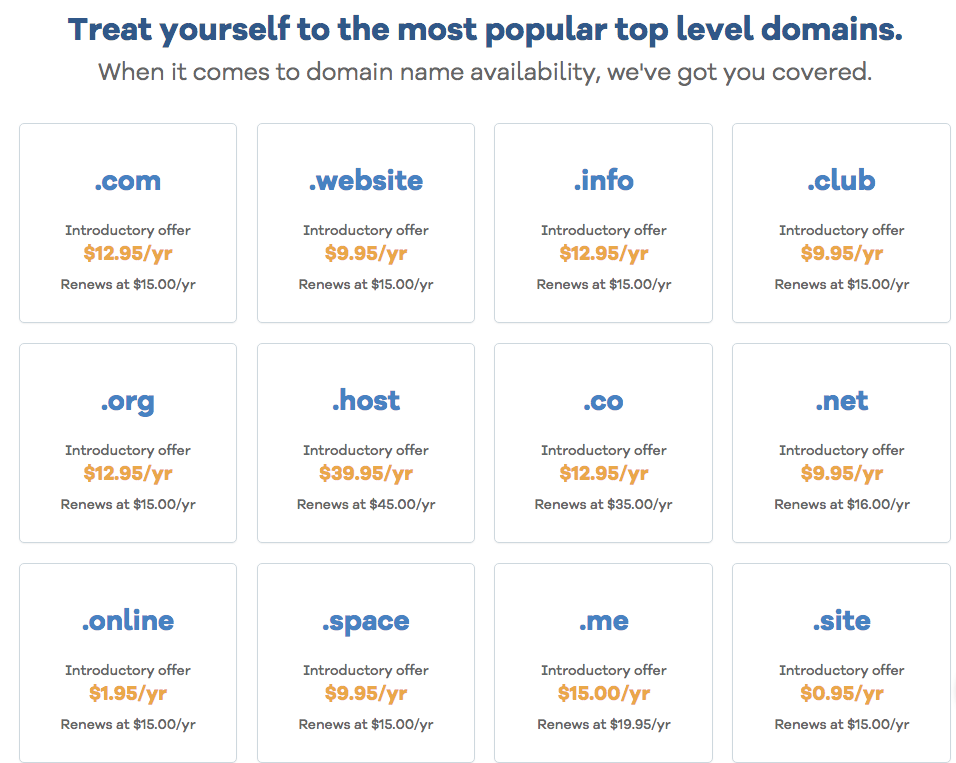
    (Source: HostGator)

    We will suggest you to book a .COM domain name that can cost you between 11-20 USD per year. Make sure you choose the right domain name that fits your business theme and helps you with SEO.

    (2) Hosting Plan: How much will it cost to host an eCommerce store?

    Let’s say you live in a flat no 12 in L block then L block is your hosting and flat no 12 is your domain name. You need to host your domain name. For that you need to buy a server. It cost

    differs from business to business. If you have 10000+ products then you need to choose dedicated hosting. If you have limited products then you can choose a shared server which is least advised. Average monthly pricing to host an eCommerce store lies between 5-100 USD
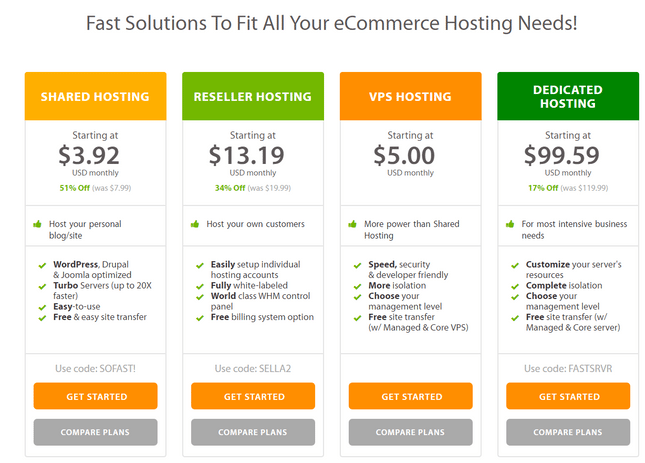
    (Source:websitebuilderexpert)

    Make sure you don’t compromise with hosting because it directly impacts your website loading speed which can impact on your sales. There are some SaaS based eCommerce platforms available in the market who provide a cloud-hosting built into the price of monthly or yearly subscriptions. If you choose to have your store in shopify then you don’t need to worry about choosing the right hosting partner.

    (3) SSL Certificate: How much does it cost for having an ssl certificate for your eCommerce store?

    SSL certificates are used to secure credit card transactions, digital data transfer & login-registration credentials. It is necessary for an eCommerce store to have the SSL because eCommerce sites are all about digital transactions. Major hosting plans don’t have SSL option, thus you need to opt for it separately. Below image will help you to understand how much an SSL can cost for a single site, multiple sites, or multiple subdomains etc?
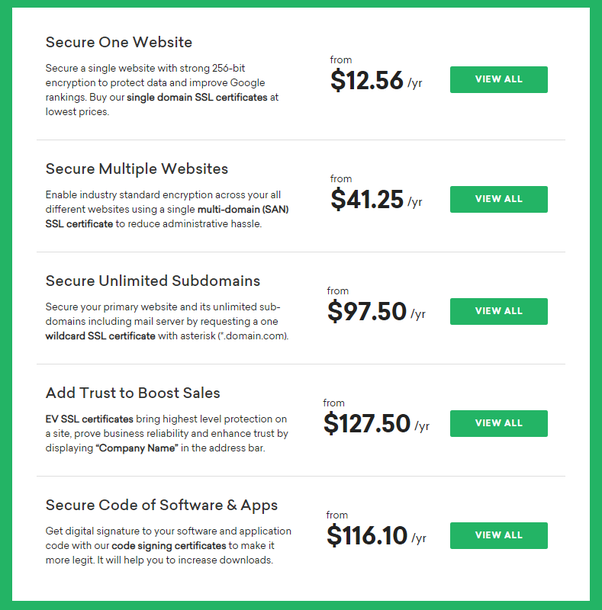
    (Source: Quora)

    An SSL certificate binds the domain name, server name or hostname. Google also considers SSL as a positive factor to gear up your search engine ranking positions. Thus, it’s advisable to not skip the installation of SSL for your site.

    Before proceeding further with design & development we would like to discuss choosing the right eCommerce platform as it plays a major role in eCommerce web & app development cost. There are numerous eCommerce platforms such as Magento, Shopify, BigCommerce, WooCommerce, OroCommerce, etc.
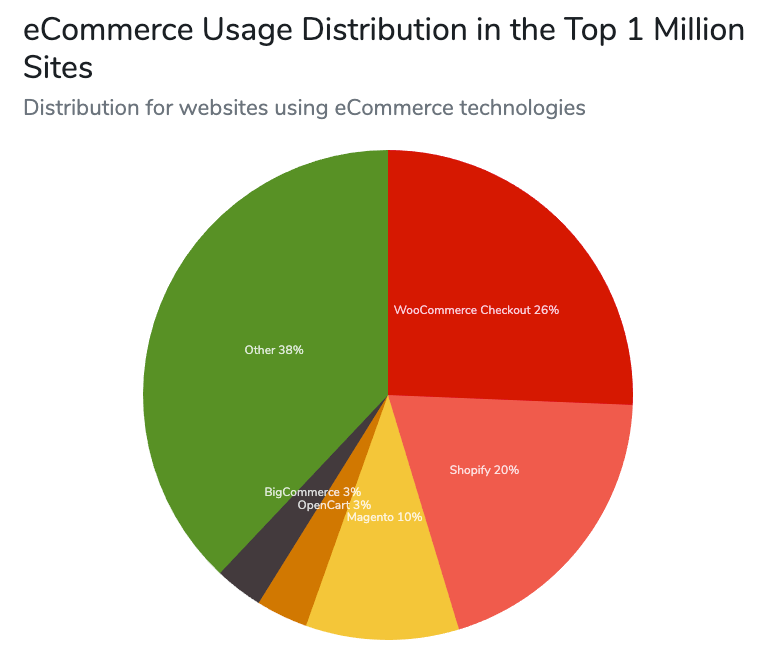
    (Source: Pagely)

    Let’s move to the next point and discuss
    (4.1)  eCommerce Platform: How to choose the right eCommerce platform?
    Let’s discuss the top 3 e-Commerce platform: (Shopify, WooCommerce, Magento)

    • If you are an entrepreneur or let’s say a startup with a limited economical budget who wants to sell limited products with less customisation then Shopify should be your choice. We suggest you visit http://www.shopysquad.com/ who works ONLY on Shopify technological development.
    • In case, if you’re a startup who has a budget to spend then WooCommerce offered by WordPress can be a good deal. WooCommerce is a good CMS platform which will help you to publish Search Engine friendly contents. Choose WordPressWolves. http://www.wordpresswolves.com/ is a core WooCommerce agency who can help you to give a digital curve to your eCommerce idea. They are a tech leader in giving WordPress & WooCommerce solutions with a wide range of portfolios from different domains.
    • If you’re an existing merchant who wants to leverage all eCommerce benefits or if you want to play eCommerce games on an enterprise level then Magento is the perfect choice for you to go ahead. It’s an open source software which can offer you a wide range of customisation is almost no limitation. In a nutshell, Magento is an all-inclusive eCommerce platform. If you trust by our recommendation, hire MageMonkeys.com to fulfil your Magento solutions needs. MageMonkey is a brand who has a pool of certified Magento experts who have experience in launching eCommerce projects in Magento from scratch.

    (4.2) eCommerce Platform: Let’s understand the fixed cost behind above eCommerce platforms:

    (Source: codeable.io)

    (5.1) Design: How much does it cost to design an eCommerce website? (UI/UX)

    Till now, we were communicating about pre-requirements, but the major process to construct an eCommerce will start with design. A web design is not as simple as it sounds.

    (5.1.1) You need to consider many factors in mind such as

    • Theme – You alway have two options with designing. Either you can buy a predesigned theme from any site or you can design it from scratch. Buying a theme may come with limitations, thus it’s advisable to hire a CREATIVE UI/UX designer to get the designing job done. Creating a design from scratch will allow you to do unlimited customisation for the lifetime.
    • Responsiveness – It’s no longer secret that Mobile users are having higher share compared to web users. The share of mobile users will increase more by 2021 which makes responsiveness an important factor to consider. Your design should look perfect from every different browser and every different device. It should not mess for different screen sizes. Your eCommerce store’s design should be responsive.
    • Integrating Designing with Development – Designing is a front face. But, what’s behind is your development code. Your designing should be easy to integrate with external eCommerce development platforms.
    • Lightweight – Your eCommerce store’s web design should be leight weighted. If it takes time to load then web user’s will bounce back. The images and other media should be reduced in size in such a way that they don’t compromise with visual quality.

    Apart from above, the web designer needs to focus on other web design factors such as visual appearance, ease of use, navigability, accessibility, interactivity etc.

    It’s suggestible to hire an experienced web designer. The designing cost depends on the number of hours taken by the designer to design ecommerce product pages, logo, homepage, mobile pages etc.

    (5.1.2) Design: How many hours will it take to design an eCommerce web store?

    Work

    Hourly Rate

    Timeline

    Final Cost

    Logo Designing

    10-20 USD

    5-15 Hours

    50-300 USD

    Homepage Designing

    10-20 USD

    30-60 Hours

    300-1200 USD

    eCommerce Product Pages Designing

    10-20 USD

    50-100 Hours

    500-2000 USD

    Responsive Designing

    10-20 USD

    50-100 Hours

    500-2000 USD

    UI-UX Changes

    10-20 USD

    30-80 Hours

    300-1600 USD

    Backend Designing,Other Page Designing, Testing,
    Bugs Solving, Other design changes etc

    10-20 USD

    40-100 Hours

    400-2000 USD

    (5.2) Design: How much does it cost to design an eCommerce app? (UI/UX)

    We already discussed the eCommerce store’s web design. But, app design is different compared with web design. Here the job is more creative. You need to design the app in such a way that it fits in all different devices which have different sizes. The designer you hire for web designing can perform the app designing task.

    App designing pricing depends on the type of app & hours taken to design the app. Refer below image to understand the approx pricing for your app.

    eCommerce app falls in the Complex app category.

    (5.2.1) Design: How many hours will it take to design an eCommerce mobile app?

    App Type

    Hourly Rate

    Timeline

    Final Cost

    Complex App (ONLY DESIGN)

    10-20 USD

    50-100 Hours

    500-2000 USD

    (5.2.1) Design: Add-ons: As we are talking about the costing of eCommerce in 2021, we would like to list nine trends from the designing industry that you should focus while designing the eCommerce website.

    • Parallax animation

    • Neomorphism

    • Abstract art compositions

    • Comfortable colors

    • Scrolling transformations

    • Digital interpretations of physical products

    • Captivating questionnaires

    • Three-dimensional colors

    • Material UI

    (6.1) Development: How much does it cost to develop an eCommerce website store?

    Development is a tricky game which shares the major part in creating an eCommerce website. Apart from executing programmatically work, it includes integrating designing, payment gateways, add-ons, and third party api & tools.

    (6.1.1) Development:  How many hours will it take to developer specific pages and how much they will be costing you.

    Work

    Hourly Rate

    Timeline

    Final Cost

    Authentication (sign-in page)

    10-20 USD

    20-30 Hours

    250-600 USD

    Catalog page

    10-20 USD

    40-50 Hours

    300-1200 USD

    Product details page

    10-20 USD

    40-50 Hours

    500-2000 USD

    Shopping cart page

    10-20 USD

    30-40 Hours

    500-2000 USD

    Checkout page

    10-20 USD

    30-50 Hours

    300-1600 USD

    About us

    10-20 USD

    05-15 Hours

    50-300 USD

    Customer Care (FAQ)

    10-20 USD

    05-15 Hours

    50-300 USD

    Contact Us page

    10-20 USD

    05-15 Hours

    50-300 USD

    CMS (Along with Blog setup with theme integration)

    10-20 USD

    50-100 Hours

    500-1400 USD

    Admin, Other Page Development, API Development,
    Coupon Module Development,
    Third Party integration Development,
    Other Custom development changes etc

    10-20 USD

    50-250 Hours

    500-5000 USD

    (6.2) Development: How much does it cost to develop an eCommerce mobile app store?

    Talking about eCommerce app business the mobile app should have functionalities such as sign-in (registration), social features, integrated payment gateways, equipped product catalogs, product pages, checkout system etc.

    (6.2.1) How many hours it will take to develop an eCommerce mobile app feature wise?

    Work

    Hourly Rate

    Timeline

    Final Cost

    In-App Search

    10-20 USD

    30-50 Hours

    300-1000 USD

    Shopping Cart

    10-20 USD

    50-100 Hours

    300-2000 USD

    Push Notification (With Personalization)

    10-20 USD

    30-50 Hours

    500-1000 USD

    Sign-in/ Sign-up (With Social Accounts)

    10-20 USD

    10-25 Hours

    100-500 USD

    Sharing Products with Open Graph Methodology

    10-20 USD

    10-25 Hours

    100-500 USD

    Database & Infrastructure Management

    10-20 USD

    50-100 Hours

    500-2000 USD

    Payment Integration

    10-20 USD

    50-100 Hours

    500-2000 USD

    Admin, Other Page Development, API Development,
    Third Party integration Development,
    Coupon Module Development,
    Other Custom development changes etc

    10-20 USD

    50-150 Hours

    500-3000 USD

    (6.3) Add-ons: Like designing world, the development industry has also changed time-by-time. You can adopt below eCommerce development technological trends in your future eCommerce store.

    • AI Chatbots

    • Single Page Application

    • Progressive Web Apps (PWAs)

    • Blockchain Technology

    • Accelerated Mobile Pages (AMP)

    • VR and AR

    • Voice Search

    (7.1) Testing: How much does an eCommerce website testing cost?

    Before proceeding further, let me ask you a question. What will happen to the world if the corona vaccine will go publicly without going on trial?

    It will be scary. Won’t be? Whether it’s a physical or digital product, a product should be launched after performing a proper testing. Websites and mobile apps should be tested in the same manner. Designers and developers make the site, but they are not users. They don’t think like users. Thus, to deliver a flawless user experience, it’s necessary to launch a site only after performing a usability testing.

    A Web & mobile app testing includes:

    • Functionality Testing

    • Usability Testing

    • Accessibility Testing

    • Performance Testing

    There are two ways to perform testing. Let’s understand the cost matrix along with timeline to test an eCommerce webstore

    Work

    Hourly Rate

    Timeline

    Final Cost

    Authentication (sign-in page)

    10-20 USD

    05-10 Hours

    50-200 USD

    Catalog page

    10-20 USD

    15-25 Hours

    150-500 USD

    Product details page

    10-20 USD

    15-25 Hours

    150-500 USD

    Shopping cart page

    10-20 USD

    10-20 Hours

    100-400 USD

    Checkout page

    10-20 USD

    10-20 Hours

    100-400 USD

    About us

    10-20 USD

    01-05 Hours

    10-100 USD

    Customer Care (FAQ)

    10-20 USD

    01-05 Hours

    10-100 USD

    Contact Us page

    10-20 USD

    01-05 Hours

    10-100 USD

    CMS (Along with Blog setup with theme integration)

    10-20 USD

    10-20 Hours

    20-400 USD

    Admin, Other Page Development, API Development,
    Coupon Module Development,
    Third Party integration Development,
    Other Custom development changes etc

    10-20 USD

    40-125 Hours

    400-2500 USD

    (7.2) Let’s move forward and understand the cost & timeline of performing testing on a mobile application.

    Work

    Hourly Rate

    Timeline

    Final Cost

    In-App Search

    10-20 USD

    10-20 Hours

    100-400 USD

    Shopping Cart

    10-20 USD

    10-20 Hours

    100-400 USD

    Push Notification (With Personalization)

    10-20 USD

    10-20 Hours

    100-400 USD

    Sign-in/ Sign-up (With Social Accounts)

    10-20 USD

    05-10 Hours

    50-200 USD

    Sharing Products with Open Graph Methodology

    10-20 USD

    05-10 Hours

    50-200 USD

    Database & Infrastructure Management

    10-20 USD

    15-30 Hours

    150-600 USD

    Payment Integration

    10-20 USD

    05-10 Hours

    50-200 USD

    Admin, Other Page Development, API Development,
    Third Party integration Development,
    Coupon Module Development,
    Other Custom development changes etc

    10-20 USD

    40-80 Hours

    400-1600 USD

    (8.1) Maintenance: How much does it cost for eCommerce website store maintenance service?

    Let’s say you build a house and start living there. Will it be okay if you won’t clean your house on a regular interval or won’t do pest control on a regular interval? What will happen to them?

    The answer is your house will look messy & smelly. Visitors will avoid coming to your place. Exactly the same can happen with your eCommerce web and app. If you don’t maintain your eCommerce website properly then web visitors will bounce back or avoid to visit it. In the case of eCommerce apps, THEY WILL UNINSTALL YOUR APP. That will be the high price you pay not for maintaining your eStore.

    Believe it or not, your eCommerce store needs maintenance service. You might be wondering what’s included in maintenance of eCommerce stores. Well, listing all tasks in below “eCommerce Web Monthly maintenance table”.

    Store Load Speed Testing

    Version Upgradation

    Extension Upgradation

    Regular Backup

    Security Patch Setup

    Basic UX/UI changes

    Server Maintenance

    Browser Compatibility Testing

    Store Troubleshooting

    Monthly Store Analysis

    Product Editing

    Theme Upgradation

    Traffic Stats and Analysis

    Store content updates

    Form Testing

    Link checking

    404 checking

    Image Replacement

    New Extension Installation

    & Many more

    Now, let’s understand how many hours can an eCom website store maintenance service take?

    Work

    Hourly Rate

    Timeline

    Final Cost

    All Tasks listed in eCommerce Web Monthly Maintenance Table

    10-20 USD

    40-60 Hours

    400-1200 USD

    (8.2) Maintenance: How much does it cost for eCommerce app maintenance service?

    Web maintenance and app maintenance holds different tasks. App maintenance tasks are different and tricky. Rare breed of app developer can perform it within a timeframe.

    Let’s understand what tasks are included in eCommerce app maintenance service.

    eCommerce Mobile App Monthly Maintenance Table

    Bug Fixing

    App Upgrade

    App Monitoring

    Regular Backup

    Database management

    Basic UX/UI changes

    Server Maintenance

    Reading App Console

    Store Troubleshooting

    Theme Upgradation

    Product Editing

    & Many more

    (8.2.1) Now, let’s understand how many hours can an eCommerce app maintenance service take?

    Work

    Hourly Rate

    Timeline

    Final Cost

    All Tasks listed in eCommerce Mobile App Monthly Maintenance Table

    10-20 USD

    40-60 Hours

    400-1200 USD

    (9) Conclusion:

    As we’ve already discussed the pricing of all aspects that impacts on eCommerce store development, it’s time to merge all the data and see the final pricing.

    #

    eCommerce Website Costs

    eCommerce Mobile App Costs (mCommerce)

    Domain Name Registration

    15-20 USD per Year

    NA

    Hosting

    5-100 USD per Month

    NA

    SSL Certificate

    13-130 USD per Month

    NA

    Design

    2000-9000 USD

    1000-5000 USD

    Development

    3000-14000 USD

    3800-12000 USD

    Testing

    1000-5200 USD

    1000-4000 USD

    Maintenance (Monthly)

    400-1200 USD

    400-1200 USD

    FINAL FIGURE

    6500-30000 USD

    6200 – 22000 USD

    Above figures vary as per the nature of your business and requirement. But mostly eCommerce websites & mobile apps can be developed under a given figure.