We sacrifice by not doing any other technology, so that you get the best of Magento.

We sacrifice by not doing any other technology, so that you get the best of Magento.

    Upgrade To Magento 2.3 For Smooth Operations And Higher Sales

    Magento 2.3 has made back office functioning very smooth. Its added features make this platform easier for retailers. The changes can be done at less cost and time. It has changed the way you work.

    What will you get from Magento 2.3?

    With the release of Magento 2.3, managing e-commerce store has become easier. To fulfil different sales channels, retailers can control inventory effectively. One of the hottest topics in the Magento community is Multi-Source Inventory (MSI) feature. Stock control has become easier to manage with order and inventory information stored in one place. Also, Magento 2.3 comes with an enhanced security system. A number of security strengthening options like Cache management which control what level of cache management a team member can perform. You can protect your site against malicious attempts by using Google reCAPTCHA and two-factor authentication

    Upgrading to Magento 2.3 will give you Magento-native POS which is a data in real time WITHOUT a single mouse click (100% automatic sync!). Since data from this native POS goes directly to your Magento backend without any 3rd party, you also find everything you need in one place. No effort wasted in running around different platforms for analysis. (Not mentioning higher security, too).

    MSI can handle the inventory of each sales channel separately thus gives you ways to boost your store efficiency by using the barcode as an add-on to simplify stock control. You can easily generate barcode and optimize the layout for printing by using the extension available for Magento 2.3. Retailers also use picked/packed items twice before shipping just to reduce errors.

    • Pick Items: You can print picking list for various orders at the same time and scan the barcode to cross-check the picked items.
    • Pack Items: here you have to scan the barcode again and then add packing slips.

    To improve the shopping experience of the website, Magento 2.3 provides you with many tools.
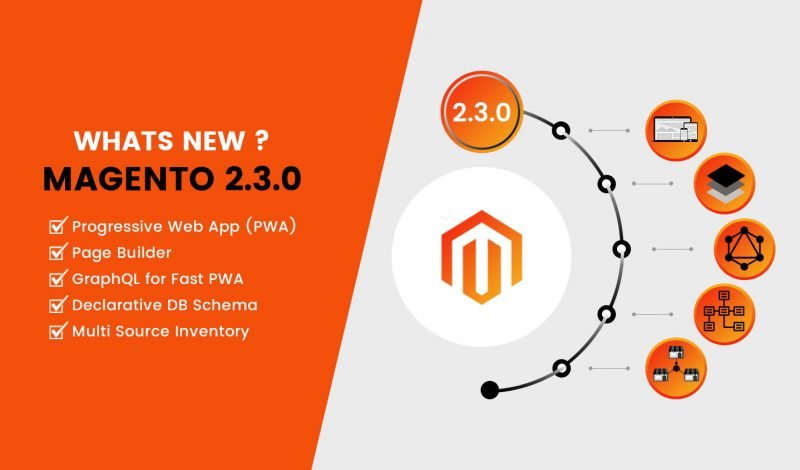
    Search Engine: finding one product on various eCommerce channels can be cumbersome. Elastic Search option in Magento 2.3 provides filtering by attributes. With this customer can get an easier way to find what they are looking for and this way sellers can get a higher chance of closing deals.

    Page Builder: Building a Magento website has become friendlier with this feature. It is easy and fast even for a non-tech savvy.

    PWA (Progressive Web App) is trending on mobile devices. It gives more power to boost sales.

    Can you get smooth operations and high sales at the same time?

    Magento 2.3 is a complete package to boost your store efficiency and revenue. Google progressive WebApp (PWA) technology is used for a robust point of sale which ensures fast checkout and real-time data update with Magento backend.

    Reward Points & Gift Card: Attract your potential customer with irresistible incentives on all sales channels to increase your sales.

    Barcode Generator/Printer & Purchase Order Management: you can manage your warehouse stock and purchases in one place with no error.

    Enhance Performance will give you higher sales – All in one solution for Magento 2.3

    Magento 2.3 will provide you with not just one product but a complete solution for your retail.

    Customers love omnichannel and Magento 2.3 with POS professional edition allows you an omnichannel transformation. Magento 2.3 gives you great additional benefits which are hard to find in any other platform.

    Seeking an eCommerce website development company for support with Magento 2.3?

    Magento 2.3.0 has open a new chapter in the eCommerce industry. Magento 2.3 has new features and upgrades to the existing components and makes this platform even better for merchants as well as visitors. It will boost Magento’s market share.

    Well, you’re in the right place. Magemonkeys has a team of expert Magento e-commerce developers with years of experience, and a high reputation in the industry. We possess all the experience, knowledge and expertise to serve to the best of your project needs.
    In Detail Explanation Of Magento Multistore Feature

    You know all about the challenges of managing a website that has more than one store. It takes a lot of time, effort, and money. The creators of Magento are completely aware of all the challenges and they have done their best to make Magento easier to maintain.

    Magento lets you manage your Multi stores through a single platform!

    This works best for merchants who manage multiple Magento installations and want all of them to manage on a single platform. A single admin panel allows them to view and control these eCommerce websites.

    The Structure of Magento Multistore

    A clear understanding of Magento multistore structure is very important for using this feature.

    • Step 1: Launch the global setup in which Magento installation will be done
    • Step 2: Within the global setup of the store, launch Magento multistore feature
    • Step 3: You can select to launch multiple stores with the Magento installation
    • Step 4: Now you can create multiple store views in each store you create

    BASICS OF MAGENTO MULTI-STORE MANAGEMENT

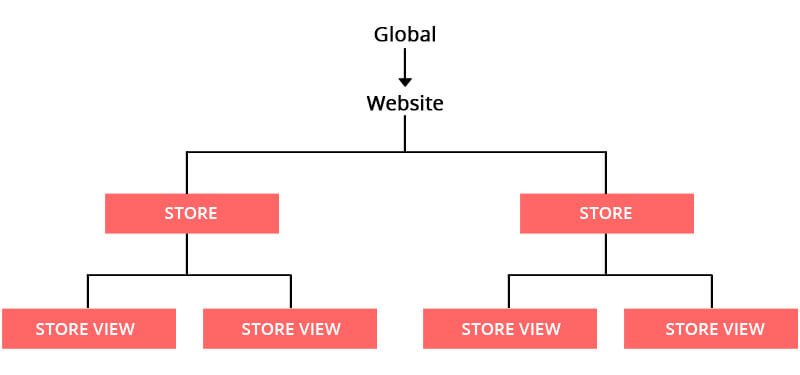
    Magento’s multi-store concept is quite simple. Under one hood, Magento offers 3 components: Global, Website, and Store. Each one has a different role in it. Each Magento installation automatically adds one more part which is called ‘store view’.

    The three components of GWS are explained in detail.

    1. Global stands at the top of a hierarchy and it does the complete installation of Magento. It has default settings, inventory and other information which are used for stores and store views.

    2. Magento Multisite (Website): A single installation can have multiple domains and each domain can manage more than one Magento 2 store. This lets you manage pricing, payments, shipping, products, taxes, order, and customers. Go to your configuration setting and set the price to be globally shared.

    3. Magento Multi stores (Stores): Here you represent your actual product catalogs. With a single web domain, you can sell multiple categories that connected to various goods and services. This feature makes your store look like a real shop with a number of products offered from a single domain. It allows you to have complete control over all your online stores.

    Magento Store Views (Store Views):

    Every store has a minimum of one store view that is used to store content having information about different products and services. Your website should support multiple languages, therefore, this feature is used to store multiple languages. With the help of the store view, you can adjust text and other design elements.

    Key Advantages Of Magento Multistore Functionality

    Magento 2 multistore feature makes your E-commerce management a lot easier. Below are some key benefits of it:

    • The website will be easy to navigate and explore.
    • Enhanced customer experience.
    • Central panel to alter the theme and restrict extensions.
    • Provides different payment and shipping methods for different regions.
    • Easy to add and edit catalogs.

    Checklist For Magneto Multistore

    If you want to set up a multistore feature, we have listed out those that are essential.

    • Purchase a multi-domain SSL certificate.
    • Ensure that you have multisite hosting to avoid any server issues in the future.
    • Take periodical back up to keep your store safe.
    • Through the admin panel, configure your Magento multistore.
    • Get a clean CSS code with the new free online tool hosted by HTML Cleaner.
    • Place your new domain name on your server.

    Bottom line

    Many people have confusion regarding Magento Multistore and they end up installing a separate Magento for each website/app and even different servers for each Magento site. We hope that the above article will help you in better understanding of Magento Multistore feature. We advise you to get the best Magento 2 hosting today and see a 50 percent increase in page speed.

    Our skilled team of professional Magento developers will help you to create an outstanding eCommerce website that fulfills your business requirements so that you can deliver the best user experience to your customers.

    Magento 2: How to resolve Item with the same ID “ID” already exists error?

    When you get error like: Item (MagentoCatalogModelProductInterceptor) with the same ID “<id>” already exists.

    Then you can use below module to resolve above error.

    1. Create new folders Magemonkey/DuplicateEntry in app/code magento folder.
    2. add new file registration.php in DuplicateEntry folder and put below code.

    <?php
    
    MagentoFrameworkComponentComponentRegistrar::register(
     MagentoFrameworkComponentComponentRegistrar::MODULE,
     'Magemonkey_DuplicateEntry',
     __DIR__
    );

    3. add new file etc/module.xml in DuplicateEntry folder and put below code.

    <?xml version="1.0"?>
    
    <config xmlns:xsi="http://www.w3.org/2001/XMLSchema-instance" xsi:noNamespaceSchemaLocation="urn:magento:framework:Module/etc/module.xsd">
     <module name="Magemonkey_DuplicateEntry" setup_version="1.0.1"></module>
    </config>

    4. add new file etc/di.xml in DuplicateEntry folder and put below code.

    <?xml version="1.0"?>
    
    <config xmlns:xsi="http://www.w3.org/2001/XMLSchema-instance" xsi:noNamespaceSchemaLocation="urn:magento:framework:ObjectManager/etc/config.xsd">
     <type name="MagentoEavModelEntityCollectionAbstractCollection">
        <plugin name="find_duplicate_entry" type="MagemonkeyDuplicateEntrypluginCollection" sortOrder="20"/>
     </type>
    </config>

    5. add new file plugin/Collection.php in DuplicateEntry folder and put below code.

    <?php
    /**
     * Copyright © Magento, Inc. All rights reserved.
     */
    namespace MagemonkeyDuplicateEntryplugin;
    use MagentoFrameworkDataCollectionEntityFactoryInterface;
    use MagentoFrameworkOptionArrayInterface;
    
    class Collection
    {
        /**
         * @param MagentoEavModelEntityCollectionAbstractCollection $subject
         * @param Closure $process
         * @param MagentoFrameworkDataObject $dataObject
         * @return $this
         */
        public function aroundAddItem(MagentoEavModelEntityCollectionAbstractCollection $subject, Closure $process, MagentoFrameworkDataObject $dataObject)
        {
            try{
                return $process($dataObject);
            }catch ( Exception $e){
                return $this;
            }
        }
    }

    Hides any other shipping methods if free shipping is available in Magento 2

    Add module.xml file in app/code/Magemonkeys/ShippingHide/etc and copy the following code in it:

    <?xml version="1.0"?>
    <config xmlns:xsi="http://www.w3.org/2001/XMLSchema-instance" 
    	xsi:noNamespaceSchemaLocation="../../../../../lib/internal/Magento/Framework/Module/etc/module.xsd">
        <module name="Magemonkeys_ShippingHide" setup_version="2.0.10">
            <sequence>
                <module name="Magento_Shipping"/>
            </sequence>
        </module>	
    </config>
    

    Add registration.php in app/code/Magemonkeys/ShippingHide and copy the following code in it:

    <?php
    MagentoFrameworkComponentComponentRegistrar::register(
        MagentoFrameworkComponentComponentRegistrar::MODULE,
        'Magemonkeys_ShippingHide',
        __DIR__
    );
    

    Add Uninstall.php file in app/code/Magemonkeys/ShippingHide/Setup and copy the following code in it:

    <?php
    
    namespace MagemonkeysShippingHideSetup;
    
    use MagentoFrameworkSetupUninstallInterface;
    use MagentoFrameworkSetupModuleContextInterface;
    use MagentoFrameworkSetupSchemaSetupInterface;
    use MagentoConfigModelResourceModelConfigDataCollectionFactory as ConfigCollectionFactory;
    
    /**
     * ShippingHide Uninstall
     */
    class Uninstall implements UninstallInterface
    {
        /**
         * Config Collection Factory
         *
         * @var MagentoConfigModelResourceModelConfigDataCollectionFactory
         */
        private $_configCollectionFactory;
    
        /**
         * Initialize Setup
         *
         * @param ConfigCollectionFactory $configCollectionFactory
         */
        public function __construct(
    		ConfigCollectionFactory $configCollectionFactory
    	) {
            $this->_configCollectionFactory = $configCollectionFactory;
        }
        
        /**
         * Uninstall DB Schema
         *
         * @param SchemaSetupInterface $setup
         * @param ModuleContextInterface $context
         * @return void
         */
        public function uninstall(SchemaSetupInterface $setup, ModuleContextInterface $context)
        {
            $setup->startSetup();
            $this->removeConfig();	
            $setup->endSetup();
        }
    
        /**
         * Remove Config
         *
         * @return void
         */
        private function removeConfig()
        {
            $path = 'shipping/behavior';
            /** @var MagentoConfigModelResourceModelConfigDataCollection $collection */
            $collection = $this->_configCollectionFactory->create(); 
            $collection->addPathFilter($path);
    
            foreach ($collection as $config) {
    			$config->delete(); 	
            }
        }    
    }

    Add config.xml file in app/code/Magemonkeys/ShippingHide/etc and copy the following code in it:

    <?xml version="1.0"?>
    <config xmlns:xsi="http://www.w3.org/2001/XMLSchema-instance" 
    	xsi:noNamespaceSchemaLocation="urn:magento:module:Magento_Store:etc/config.xsd">
        <default>
            <shipping>
                <behavior>
                    <hide>1</hide>
                </behavior>
            </shipping>		
        </default>
    </config>
    

    Add di.xml file in app/code/Magemonkeys/ShippingHide/etc and copy the following code in it:

    <?xml version="1.0"?>
    <config xmlns:xsi="http://www.w3.org/2001/XMLSchema-instance" 
    	xsi:noNamespaceSchemaLocation="../../../../../lib/internal/Magento/Framework/ObjectManager/etc/config.xsd">
    	<!-- plugin -->		
        <type name="MagentoShippingModelRateResult">
            <plugin name="Magemonkeys_ShippingHide" type="MagemonkeysShippingHidePluginShippingModelRateResult" />
        </type>
    </config>
    

    Add system.xml file in app/code/Magemonkeys/ShippingHide/etc/adminhtml and copy the following code in it:

    <?xml version="1.0"?>
    <config xmlns:xsi="http://www.w3.org/2001/XMLSchema-instance" 
    	xsi:noNamespaceSchemaLocation="urn:magento:module:Magento_Config:etc/system_file.xsd">
        <system>
            <section id="shipping">
    	   <group id="behavior" translate="label" showInDefault="1" showInWebsite="1" showInStore="1" sortOrder="310">
                    <label>Behavior of Methods</label>
                    <field id="hide" translate="label comment" type="select" sortOrder="10" showInDefault="1" showInWebsite="1" showInStore="1" canRestore="1">
                        <label>Hide Mode</label>
                        <comment>Hides any other shipping methods if free shipping is available.</comment>
                        <source_model>MagentoConfigModelConfigSourceYesno</source_model>
                    </field>
                </group>
            </section>
        </system>
    </config>
    

    Add Data.php file in app/code/Magemonkeys/ShippingHide/Helper and copy the following code in it:

    <?php
    
    namespace MagemonkeysShippingHideHelper;
    
    use MagentoStoreModelScopeInterface;
    use MagentoFrameworkAppHelperAbstractHelper;
    
    /**
     * Shipping Hide Helper
     */
    class Data extends AbstractHelper
    {
        /**
         * Enabled Config Path
         */
        const XML_CONFIG_ENABLED = 'shipping/behavior/hide';
     	
        /**
         * Check Hide mode Functionality Should be Enabled
         *
         * @return bool
         */
        public function isEnabled()
        {
            return $this->_getConfig(self::XML_CONFIG_ENABLED);
        } 
    
        /**
         * Retrieve Store Configuration Data
         *
         * @param   string $path
         * @return  string|null
         */
        protected function _getConfig($path)
        {
            return $this->scopeConfig->getValue($path, ScopeInterface::SCOPE_STORE);
        }      
    }
    

    Add Result.php file in app/code/Magemonkeys/ShippingHide/Plugin/Shipping/Model/Rate and copy the following code in it:

    <?php
    
    namespace MagemonkeysShippingHidePluginShippingModelRate; 
    
    use MagemonkeysShippingHideHelperData as ShippingHideHelper;
    
    /**
     * Shipping Result Plugin
     */
    class Result
    {   
        /**
         * Helper
         *
         * @var MagemonkeysShippingHideHelperData
         */
        protected $_helper;
        
        /**
         * Initialize Plugin
         * 
         * @param ShippingHideHelper $helper
         */
        public function __construct(
            ShippingHideHelper $helper
        ) {
            $this->_helper = $helper;
        }
            	
        /**
         * Return all Rates in the Result
         *
         * @param Result $subject
         * @param Method[] $result
         * @return Method[]
         */	
        public function afterGetAllRates($subject, $result) 
        {
            if (!$this->_helper->isEnabled()) {
                return $result;
            }       		
    		$rates = $this->getAllFreeRates($result);              
            return (count($rates) > 0) ? $rates : $result;
        }	
            	
        /**
         * Return all free Rates in the Result
         *
         * @param Method[] $result
         * @return Method[]
         */	
        public function getAllFreeRates($result) 
        {	
    		$rates = [];
            foreach ($result ?: [] as $rate) {
                if ($rate->getPrice() < 0.0001) {
                    $rates[] = $rate;
                }
            }               
            return $rates;
        }	    
    }
    

    Run CLI Commands

    rm -rf var/di/* var/generation/* var/cache/* var/log/* var/page_cache/* var/session/* var/view_preprocessed/* pub/static/*
    php bin/magento setup:upgrade
    php bin/magento setup:upgrade
    php bin/magento setup:static-content:deploy -f
    php bin/magento cache:clean
    php bin/magento cache:flush

    Result

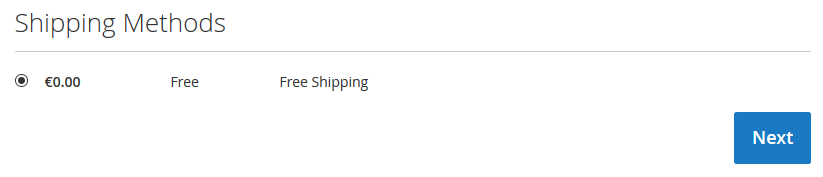
    No method of free shipping

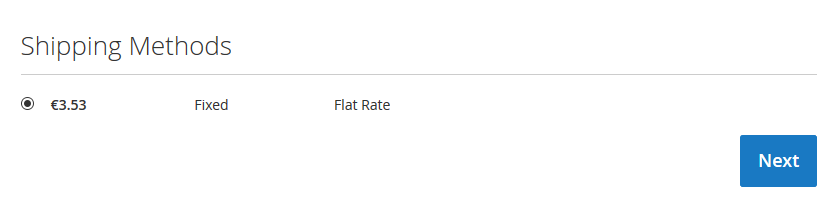
    There is a method of free shipping


    Save Simple Product Using Programming in Magento 2

    If you want to save simple product using programming use below code

    1. Create file in magento 2 root named saveproduct.php

    2. Put below code in saveproduct.php file

    <?php
    
    	use MagentoFrameworkAppBootstrap;
    	include('app/bootstrap.php');
    
    	// add bootstrap
    	$bootstraps = Bootstrap::create(BP, $_SERVER);
    	$object_Manager = $bootstraps->getObjectManager();
    
    	$app_state = $object_Manager->get('MagentoFrameworkAppState');
    	$app_state->setAreaCode('frontend');
    
    	// get date 
    	$today_date = date("m/d/Y");
    	$added_date = date('m/d/Y',strtotime("+17 day"));
    
    	$set_product = $object_Manager->create('MagentoCatalogModelProduct');
    
        $set_product->setWebsiteIds(array(1));
        $set_product->setAttributeSetId(9);
        $set_product->setTypeId('simple');
        $set_product->setCreatedAt(strtotime('now')); 
        // time of product creation
        $set_product->setName('Test Sample Product 2'); 
        // add Name of Product
        $set_product->setSku('add-sku-2');
        // add sku hear
        $set_product->setWeight(1.0000);
        // add weight of product
        $set_product->setStatus(1);
        $category_id = array(4,5);
        // add your catagory id
        $set_product->setCategoryIds($category_id); 
        // Product Category
        $set_product->setTaxClassId(0); 
        // type of tax class 
        // (0 - none, 1 - default, 2 - taxable, 4 - shipping)
        $set_product->setVisibility(4); 
        // catalog and search visibility
        $set_product->setManufacturer(28); 
        // manufacturer id
        $set_product->setColor(24);
        //print_r($_product);die;
        $set_product->setNewsFromDate($today_date); 
        // product set as new from
        $set_product->setNewsToDate($added_date); 
        // add image path hear
        $imagePath = "img/sony.png"; // path of the image (e.g pub/media/<image folder>)
        $set_product->addImageToMediaGallery($imagePath, array('image', 'small_image', 'thumbnail'), false, false);
        // product set as new to    
        $set_product->setCountryOfManufacture('IN'); 
        // country of manufacture (2-letter country code)
        $set_product->setPrice(100.99) ;
        // price in form 100.99
        $set_product->setCost(88.33); 
        // price in form 88.33
        $set_product->setSpecialPrice(99.85); 
        // special price in form 99.85
        $set_product->setSpecialFromDate('06/1/2016'); 
        // special price from (MM-DD-YYYY)
        $set_product->setSpecialToDate('06/30/2018'); 
        // special price to (MM-DD-YYYY)
        $set_product->setMsrpEnabled(1); 
        // enable MAP
        $set_product->setMsrpDisplayActualPriceType(1); 
        // display actual price 
        // (1 - on gesture, 2 - in cart, 3 - before order confirmation, 4 - use config)
        $set_product->setMsrp(99.99); 
        // Manufacturer's Suggested Retail Price
        $set_product->setMetaTitle('test meta title 2');
        $set_product->setMetaKeyword('test meta keyword 2');
        $set_product->setMetaDescription('test meta description 2');
        $set_product->setDescription('This is a long description');
        $set_product->setShortDescription('This is a short description');
        $set_product->setStockData(
            array(
            'use_config_manage_stock' => 0, 
            // checkbox for 'Use config settings' 
            'manage_stock' => 1, // manage stock
            'min_sale_qty' => 1, // Shopping Cart Minimum Qty Allowed 
            'max_sale_qty' => 2, // Shopping Cart Maximum Qty Allowed
            'is_in_stock' => 1, // Stock Availability of product
            'qty' => 100 // qty of product
            )
        );
    
        $attr1 = $set_product->getResource()->getAttribute('manufacturer');
        $avid1 = $attr1->getSource()->getOptionId('Sony'); //name in Default Store View
        $set_product->setData('manufacturer', $avid1);
    
        $attr2 = $set_product->getResource()->getAttribute('color');
        $avid2 = $attr2->getSource()->getOptionId('White'); //name in Default Store View
        $set_product->setData('color', $avid2);
        
        $years = array('India','Dubai','London', 'America', 'Indonesia');
        $attr3 = $set_product->getResource()->getAttribute('available_in')->getSource();
        $valuesIds = array_map(array($attr3, 'getOptionId'), $years);
        $set_product->setData('available_in', $valuesIds);
    
    
        $set_product->save();
        // get id of product
        $get_product_id = $set_product->getId();
        echo "Upload simple product id :: ".$get_product_id."n";
    
    ?>

    Here I have used attributes and category as per my requirement, So you should use attributes and category as per your requirements.

    Enable COD payment method for some products using programming in Magento 2

    If you want to Enable COD Payment Method for Particular Products, Follow below steps

    You need to create an extension for this,

    Here I have created extension : Magemonkeys_CodRestrict

    1. Add new YES/NO product attribute i.e enable_cod_payment and set in Attribute Set which you are using for products

    2. Create registration.php file in app/code/Magemonkeys/CodRestrict and add below code

    <?php
    MagentoFrameworkComponentComponentRegistrar::register(
    MagentoFrameworkComponentComponentRegistrar::MODULE,
    'Magemonkeys_CodRestrict',
    __DIR__
    );

    3. Create module.xml file in app/code/Magemonkeys/CodRestrict/etc and add below code

    <?xml version="1.0"?>
    <config xmlns:xsi="http://www.w3.org/2001/XMLSchema-instance" xsi:noNamespaceSchemaLocation="../../../../../lib/internal/Magento/Framework/Module/etc/module.xsd">
    	<module name="Magemonkeys_CodRestrict" setup_version="1.0">
    	</module>
    </config>

    3. Create module.xml file in app/code/Magemonkeys/CodRestrict/etc and add below code

    <?xml version="1.0"?>
    <config xmlns:xsi="http://www.w3.org/2001/XMLSchema-instance" xsi:noNamespaceSchemaLocation="../../../../../lib/internal/Magento/Framework/Module/etc/module.xsd">
    	<module name="Magemonkeys_CodRestrict" setup_version="1.0">
    	</module>
    </config>

    4. Create events.xml file in app/code/Magemonkeys/CodRestrict/etc and add below code

    <?xml version="1.0"?>
    <config xmlns:xsi="http://www.w3.org/2001/XMLSchema-instance" xsi:noNamespaceSchemaLocation="urn:magento:framework:Event/etc/events.xsd">
        <event name="payment_method_is_active">
            <observer name="codpayment" instance="MagemonkeysCodRestrictObserverCodAvailable" />
        </event>
    </config>

    5. Create CodAvailable.php file in app/code/Magemonkeys/CodRestrict/Observer and add below code

    <?php
     
    namespace MagemonkeysCodRestrictObserver;
     
    use MagentoFrameworkEventObserverInterface;
     
    class CodAvailable implements ObserverInterface
    {
    	/**
         * payment_method_is_active event handler.
         *
         * @param MagentoFrameworkEventObserver $observer
         */
        public function execute(MagentoFrameworkEventObserver $observer)
        {
            $objectManager = MagentoFrameworkAppObjectManager::getInstance();
    
    		$cartObj = $objectManager->get('MagentoCheckoutModelCart');
    
    		$cartItemsCollection = $cartObj->getQuote()->getItemsCollection(); 
    
    		$cartItemsVisible = $cartObj->getQuote()->getAllVisibleItems(); 
    
    		$itemsArray = $cartObj->getQuote()->getAllItems();
    		$enable_cod_payment = array();
    		foreach($itemsArray as $item) {
    			$productid = $item->getProductId();
    			$product = $objectManager->create('MagentoCatalogModelProduct')->load($productid);
       			$enable_cod_payment[] = $product->getData('enable_cod_payment');   			
    		}
    
    
            if($observer->getEvent()->getMethodInstance()->getCode()=="cashondelivery"){
    			if(in_array(0, $enable_cod_payment)){
    	            $checkResult = $observer->getEvent()->getResult();
    	            $checkResult->setData('is_available', false);
    	        }
        	}
        }
    }
    

    You can change payment method condition as per your need.

    Security Update for Magento 2.3.1, 2.2.8 and 2.1.17


    Magento is one of the most trusted eCommerce platforms has faced a few security-related problems. That’s the reason why Magneto releases its new version and security patches on a regular interval to guard against unexpected vulnerabilities.

    To enhance product security, performance and functionality, Magento recently released security patches including other updates for the new versions of Magento Commerce and Open Source:

    • Magento Commerce and Open Source 2.3.1
    • Magento Commerce and Open Source 2.2.8
    • Magento Commerce and Open Source 2.1.17
    • Magento Commerce 1.14.4.1
    • Magento Open Source 1.9.4.1
    • SUPEE-11086 to patch earlier Magento 1.x versions

    There were various high CVSSv3 severity issues that affect the product Magento Open Source prior to 1.9.4.1 and Magneto Commerce prior to 1.14.4.1, Magento 2.1 prior to 2.1.17, Magento 2.2 prior to 2.2.8, Magento 2.3 prior to 2.3.1.

    Below is the latest security update that is addressed to some high severity Magento vulnerabilities:

    Issue Type: Remote Code Execution (RCE)


    CVSSv3 Severity Security Bug Description
    9.8 Remote code execution though crafted newsletter and email templates An administrator user with access to the Braintree payment method configuration can trigger remote code execution through PHP object injection.
    9.1 Remote code execution via email template An authenticated user has right to execute arbitrary code via email template.
    8.5 An Unsafe deserialization of a PHP archive can lead to Arbitrary execution An authenticated user can execute arbitrary code via Phar deserialization vulnerability.
    8.5 The unsafe handling of an API call to a core bundled extension leads to Arbitrary code execution (Magento Shipping) An authenticated user can configure store settings to execute arbitrary code execution through server-side request forgery.
    8.5 To execute arbitrary code through PHP archive deserialization vulnerability, An authenticated user can configure email templates. The upload settings for B2B quote files are open to remote code execution attacks.


    Issue Type: SQL Injection and cross-site scripting


    7.7 Cross-site scripting and SQL injection vulnerability in catalog section (XSS) An authenticated user will embed malicious code via a stored cross-site scripting or SQL injection vulnerability in the catalog section by changing attribute_code.
    7.2 SQL injection vulnerability can come through an authenticated user An unauthenticated user can execute arbitrary code through an SQL injection vulnerability, which causes sensitive data leakage.
    6.5 SQL injection happens because of inadequate validation of user input. To execute arbitrary SQL queries, An authenticated user can configure email templates.


    Issue Type: Cross Site Scripting


    6.5 Admin Customer Segments area has cross-site scripting. An authenticated user will embed malicious code via a stored cross-site scripting or SQL injection vulnerability in the catalog section by changing attribute_code.
    6.3 Reflected cross-site scripting vulnerability in the Admin via the requisition list ID To embed malicious code, an authenticated user can use a cross-site scripting vulnerability
    5.8 Stored cross-site scripting in the admin panel through the Admin Shopping Cart Rules page An authenticated user can embed arbitrary code in the Conditions tab of Admin Shopping Cart Rules page.
    5.8 Cross-site request forgery can delete product attribute. An attacker can delete a product attribute within the context of authenticated administrator’s session through cross-site request forgery.
    5.8 Stored cross-site scripting in the admin panel through the Admin Shopping Cart Rules page An authenticated user can embed arbitrary code in the Conditions tab of Admin Shopping Cart Rules page.
    5.7 Cross-site request forgery vulnerability can lead to deletion of synonym groups. An attacker can delete all synonyms groups within the context of an authenticated administrator’s session through cross-site request forgery.


    Source: Magento

    To ensure the best security and performance, Magento has highly recommended deploying these new releases right away. You should implement and test the patch in a development phase to get the expected result or consult a professional.

    Always ask your Magento certified professional to carry out a security audit on a timely basis (say quarterly) as this will improve your store security especially if you have installed new extensions and made few changes to the site.

    Fill the form below if you want to implement security patches or want to upgrade your Magento website.

    WHAT ALL YOU NEED TO KNOW BEFORE AUDITING YOUR MAGENTO STORE?

    To ensure consistency in performance and user experience Magento websites require a constant audit. In this post, we have mentioned some tips to audit your Magento 2 website that you must do before development and immediately after you go live.

    Magento 2 Website Audit – Pre-Development Checklist

    1. Security policies

    Protect your site from hackers by having a proper site security policy. Check if the site has the latest security patch installed and as per the report you can install the specific patches.

    2. Magento 2 implementation audit

    It is very important for Magento developers to have exposure to all the new features, enhancements, and bug fixes offered in Magento 2 version as this helps them utilize the full potential of Magento 2 and enhance the overall performance of the site.

    3. Web Security Testing

    PCI-compliance is very important to strengthen your eCommerce store. Use various security tools to audit your site and take necessary steps if the report shows the site is vulnerable. Cybersecurity and managed security service providers can scan your site on a periodic basis to reduce security risks and protect data.

    4. Use PHP version

    You have updated the PHP version to PHP 7 when you upgrading to Magento 2 as this will ensure smooth performance and avoids any compatibility issues between the Magento version and PHP version.

    5. Avoid 404 pages

    SEO is one of the main concerns in maintaining site performance. If you have recently migrated from Magento 1 to Magento 2, ensure that you follow the best practices in SEO. Check if all your redirect links are working and avoid 404 pages.

    6. Timely backup and test

    How often do you backup your eCommerce website? Do you check if the backup operational mode or failover is in place? When the site is attacked, ‘Failover’ is very much needed to recover from the disaster and put the site back to live in the least possible time.

    Magento 2 Website Audit – Post-live checklist

    1. Update basic information regularly

    Regularly update your Magento 2 store information like contact details, email IDs, names, and addresses. They all should be updated as and when changes are made. This helps avoid site users from getting frustrated when they hurriedly look up to your support services.

    2. Site Load speed

    Your site should load quickly. Always check if the loading speed matches the expectations. Generally, the actual speed depends on the different customizations you have made on each site page.

    3. Using the PageSpeed tool

    You can use the Google PageSpeed tool to assess your site pages and provide scores besides recommendations on where you need to improve. Based on the outcome, you have to customize or modify the page. Make sure you get at least a ‘good’ score.

    4. Magento Coding Standards

    To reduce the chance of errors, we highly recommended following all Magento coding standards. The list of coding standards covers code demarcation, PHP, JavaScript, jQuery widget, DocBlock, LESS, and HTML style guide.

    5. Site Monitoring

    Site monitoring is an essential part of maintaining the user experience. When you monitor systemically, you look for potential problems before they occur and also prevent them from causing huge damage. You must implement complete server monitoring and an alert system that quickly notifies errors and issues as and when they occur.

    For instance, if you monitor an eCommerce site, you need to assess parameters like conversion rate, average order value, page views, average session duration, bounce rate, revenue across channels (organic search/paid/email), and devices (desktop/laptop/mobile), etc.,

    Use the online tools  to generate the perfect code in your web projects

    6. Check Sitemap configuration

    Sitemap configuration is a must for search engines for proper crawling and indexing of the site. An improper sitemap will cause SEO issues and also disappoint site visitors. An auto-generate of sitemaps, a feature in Magento 2 allows you to set ‘auto-generate’ either daily or weekly or monthly as per your requirements.

    Follow these tips to keep issues at bay before you get into the development phase and after going live.

    If you’re interested to learn more about this service, contact us for more information about pricing and timelines.

    How Magento 2 Hosting is better than its previous versions?

    Magento is used by millions of online stores around the world. Its out-of-box features make the entire process smooth. Developers love Magento as it’s an efficient way to manage time particularly when they are using the right Magento 2 hosting environment. Finding a reliable hosting platform for your Magento 2 is not an easy task.

    Our article will help you in finding a reliable and fast Magento 2 hosting provider for your business.

    Did you know?

    With optimized Magento hosting, you can improve your Magento store speed by 200%

    An Unoptimized Magento 2 Hosting will lead to the following issues:

    • Not meeting the minimum requirements for hosting Magento 2.
    • Installation of incompatible PHP version on the server.
    • The server has incompatible Apache or NGINX configurations.
    • Lack of necessary PHP extensions.
    • No regular updates or service on the server’s operating system.
    • The operating system has outdated patches.
    • Enabled incorrect files & folder.
    • Page loading takes time.
    • Issues on a server level.

    What factors should be considered for choosing the right Magento 2 hosting?

    There are a lot of options available that may appear to be a good fit for your store but you need to evaluate your options based on the following factors:

    Server Uptime

    Server uptime does not remain operational 100 percent of the time but having a guarantee of 95% uptime is a good place to start. It makes sure that your Magento 2 store is functioning smoothly and you aren’t missing any of your customers.

    Improved Response Time

    Nobody likes to visit a slow-performing website. Your store conversion rate will increase with the right server as it will give faster response time and it will also build trust among the customer.

    Server position

    The location of your server is very important as ensures better SERP rankings, latency, and performance of your target audience. The close server gives a faster page load and enhanced user experience.

    Customer Support

    Server error can be very frustrating and you might also miss sales and may risk SERP positions if your customer support team is not available to resolve it. Always check that your customer support system is available 24/7 and they have enough skill and knowledge to solve each and every query on time.

    Server Scalability

    Server scalability is one of the important requirements for your Magento 2 stores. it is important during the holiday season when the server will start to crash due to lack of server resources that time sever so always opt for the best Magento 2 hosting solution.

    Cache Technologies

    Always use advanced cache technology to enhance your Magento 2 store performance as it reduces the page load time. Therefore, pick the right Magento 2 hosting solution to get the best performance of your Magento 2 store.

    What Mage Monkeys can do?

    With Magento 2, our team can do eCommerce in a whole new way. Every year Magento comes with new versions and our team always drives to stay up until its levels by offering a robust, e-commerce-compatible, and easy-to-use managed Magento 2 hosting stack.

    Magento 1 is responsive but it was not perfect. Whereas Magento is a purpose-built eCommerce development solution based on HTML and CSS3. Magento 2 comes with some integrated extensions which were absent in Magento 1. You can easily manage product and tax management on Magento 2

    The embedded cache mechanism in Magento 2 makes the store performance-optimized. However, we ensure that your Magento 2 runs blazingly fast.

    Few things about Magento 2.3

    Last year in November Magento 2.3 was released. It has a number of new features, enhancements, and fixes for the core product. The key features of the release are:

    • Multi-Source Inventory (MSI)
    • PWA Studio
    • Page Builder
    • PHP 7.2 Support
    • Two-Factor Authentication
    • Elasticsearch

    Make a note that your hosting service is managed and that you go for a dedicated server. Ensure that your hosting provider supports Magento 2.0, and look for great customer service, top-notch security, scalability, and a good backup plan. Lastly, ensure that your vendor provides excellent service by opting for agencies with necessary certifications and partnerships.

    How can you make your Magento Mobile App Development Successful?

    Our life has become very easy with the development of mobile phones. In recent years there has been a sharp development of many types of open sources especially Magento leads to the business success of many store owners. For the best use of mobile and Magento, a focus should be given more on Magento mobile app development as it will definitely boost your business.

    In this post, we will discuss with you the main factors due to which Magento mobile app development is successful.

    Collection of relevant customer data

    You can collect useful data from customers such as their likes and browsing pattern. There is a number of support tools that can give you a report regarding the mobile app performance and their usage and also the reason for malfunctions. In short, you can completely control your entire system.

    Flexibility

    Magento gives you full freedom to customize your online store as per the product and/or services you are selling. You can even reset or manage attributes without altering the admin panel.

    Virtual Assistants

    The virtual assistant helps customers by providing them to browse the store and look for specific products, do the payment, and also give answers to their queries in terms of product return or exchange. These chatbots are intelligent assistants who are always ready to assist you at any time of the day.

    Mobile Wallet

    Online payment is rising as it’s comfortable for anyone to use. You should provide a maximum number of payment methods to reach out to more and more customers.

    Enhanced Design features

    Magento comes with an amazing responsive front-end design, therefore, customers find it easy and convenient to use.

    Voice Searches

    To make your search more interactive simply put voice search so that customers use search engines by speaking instead of typing.

    Make conversational interfaces

    We all love to interact so add a feature in your mobile app where they are able to discuss one’s choice with co-shoppers, sellers, and also customer care personnel. This will enhance the shopping experience along with building a trustworthy reputation for your business.

    Friendly eCommerce Features

    Give your mobile app simple navigation, easy check-out, synchronous as well as seamless order processing, multiple payment gateway support.

    Usage of Virtual Reality and Augmented Reality

    VR Make user feels like they are experiencing the simulated reality first-hand, AR is a technology that makes computer produced enhancements on top of an existing reality with the purpose of making it more meaningful via the ability to interact with it.

    Other factors include an uncluttered interface, enhanced filters, animated designs, informative shopping cart screen, easy navigation, push notifications.

    Wrapping up

    In the end, it’s all about catering exceptional experiences both across the web and the mobile. It is essential to follow the best practice along with keeping up with the trends. Magemonkeys expert developers have always helped many store owners in building up their business successfully. Our Magento mobile app developers are capable of taking your online store to the next level.