We sacrifice by not doing any other technology, so that you get the best of Magento.

We sacrifice by not doing any other technology, so that you get the best of Magento.

    WHY TO OPT FOR MAGENTO 2 IN 2019?

    Magento 2 provides a shopping cart solution for medium to large-scale business requirements. It offers an attractive design and a better user experience which makes it more disparate from the preceding version. Magento 2 is fully loaded with rich features and it also offers flexibility to the users to easily manage their content, layout, and functionality of the eCommerce store.

    Rich Features of Magento 2

    • It is search friendly and responsive
    • The admin navigation is cleaner and clutter-free.
    • It provides a split database solution.
    • Its three databases (product data, checkout, and order) protect your store from unwanted bugs.
    • More than one administrator can simultaneously work on any given product data as it has data safeguards for product data.
    • The menus are very well organized which makes finding a page much easier and simple.

    Merchants can choose any version from its three versions based on their business needs.

      • 1. MAGENTO ENTERPRISE EDITION

    Magento Enterprise Edition comes as a paid version. One can choose from the various feature sets depending on the requirement of the company.

      • 2. MAGENTO COMMUNITY EDITION

    Magento Community Edition is a fully open-source platform and it has the most active community of users.

      • 3. MAGENTO GO

    Magento go is a paid version and it is hosted on Magento’s servers.

    But, why you need Magento 2 for an eCommerce store?

    1. ENHANCED PERFORMANCE PARAMETERS

    Magento 2 diminishes the load on the server and increases user interaction. It is fast and you will see cart abandonment is also reduced. The main parameters on which Magento 2 has improved are

    PHP 7

    Upgraded Performance
    Better loading
    Optimized for PHP 7

    Ajax Cart

    Add items without reloading the entire page
    Less load on the hardware
    More responsive for the shoppers

    Cache

    HTTP accelerator easily cache the requests
    Edit product information without data conflicts
    More responsive for the shoppers

    Hosting Environment

    Use multiple servers
    Easy handling traffic spikes

    2. SMOOTH AND WELL-ORGANIZED CHECKOUT PROCESS

    As compared to Magento 1, Magento 2 is more flexible and improved in terms of check out. Magento 1 has six steps (checkout method, billing details, shipping information, payment information, and last order review) checkout process whereas Magento 2 has two different pages for its two-step checkout processes; shipping, review, and payment.

    The guest checkout does not have any login or registration thus it increases the process for the customer. Magento 2 provides a powerful shipping rate that is displayed as per your geographical location. Overall, it reduces friction and boosts the conversion rate.

    3. BETTER INDEXING AND TOOLKIT

    Magento 2 provides enhanced indexing to increase the query performance speed.

    The enhanced toolkit and improved widgets of Magento 2 help you set up your eCommerce store.

    • Effective backend operation
    • Web page optimization for faster delivery
    • Better response time for all website activities
    • Improved database flexibility to handle peak loads
    • Performance widgets that create test scripts for your store

    4. GREATLY SUITABLE

    Magento 2 lets you easily integrate and manage data. It also provides third-party extensions, and Web and cloud services. It is strongly compatible with PHP frameworks such as Zend and others. It works best with major databases like Oracle, MySQL, and Hadoop. Its default JavaScript library is jQuery library due to which it becomes easy for developers to work with Magento 2.

    CONCLUSION

    Being an open-source platform, it has rich templates, extensions, modules, and widgets to build a unique eCommerce store. It has many dynamic and powerful tools such as the Catalog Management tool and Marketing tool. It supports any device and also offers cross-browser support as well.

    So, these are some of the reasons why Magento 2 is going to stay in 2019 and make your online store stand different from the others. It provides a safe platform to build your business and boost your conversion rate. Though Migrating from Magento 1 to Magento 2 is requires detailed planning. One has to hire an eCommerce developer for easy and smooth migration.

    Which Magento Edition Is Right For You?

    When you decide to start your own eCommerce store first thing you need to consider is which edition will suit your business: Open Source, Commerce, or Commerce Cloud.

    Each edition provides a specific set of features. And before you select one, you should know your requirements. Let’s just understand these three editions so that it becomes easier for you to pick one for your Magento Store.

    1. Mаgеntо 2 Oреn Sоurсе Edіtіоn

    Magento 2 Open Source Edition is available for everyone to download and install for free of cost. Admin can make configuration changes in the software so that they can meet their specific requirements. If merchants want some particular advanced functionality then they can extend the basic features of Magento 2 Open Source Edition by simply installing third-party modules or custom modules that will meet your business needs. Magento does not provide any support for this edition. You can start the business with the basic features and with minimum expenses.

    Magento 2 Open Source Edition works best for:

    • For Developing Businesses
    • Startups
    • Small Stores

    2. Mаgеntо 2 Cоmmеrсе Edіtіоn

    Magento 2 Commerce Edition is also famous by the name of Magento 2 Enterprise. It gives users rich out-of-the-box features which have an unlimited ability to customize. It also comes with third-party integrations and 24/7 email support. It has features like product wishlist, flash sale, gift options, targeted promotions, rewards points, present related products for cross-selling, up-sell, Google tag manager, additional payment gateways, add a product by SKU, SDK to create custom mobile shopping apps, etc.

    With Magento 2 Commerce Edition you can also do corporate account management and customer support, company credit management, customized catalogs, returns management, and price lists. It has tools for fast ordering and processing online requests for quotes. Community Edition has a much more powerful search capability as compared to standard search.

    Further, Magento 2 Commerce Edition has one more amazing feature- Content Staging. This feature allows you to create, preview and schedule a wide range of content updates directly from the Admin Panel of your store. You can also create a dynamic page that will change automatically on scheduled dates throughout the year.

    Magento 2 Commerce Edition works best for:

    • B2B еntеrрrіѕеѕ and ѕtоrеѕ with high сuѕtоmеr trаffіс,
    • It takes care of large рrоduсt саtаlоgѕ,
    • For the company has Wіdе global рrеѕеnсе,
    • It can handle high buѕіnеѕѕ соmрlеxіtу.

    3. Mаgеntо 2 Cоmmеrсе Clоud Edіtіоn

    Magento 2 Commerce Cloud Edition is known by the name of Magento Enterprise Cloud Edition. It is an automated hosting platform that is particularly created for could solutions. It includes all the Magento 2 commerce features and also adds enhanced cloud infrastructure hosting that has Git integration and the key environment for development, live production, and staging. With this edition, merchants can code, test and deploy across the integration. Production environment and staging to make sure that performance is smooth of their store. This edition is a bit expensive than the self-hosted enterprise edition as it offers a powerful admin experience and flexibility to handle any kind of complex task.

    Magento 2 Commerce Cloud Edition works best for:

    • Large companies with complex requirements.

    Bottom Line:

    It is very important that you pay attention to your business volume, costs, and relevancy of customer support as these are the key factors when you decide on a Magento 2 edition.

    As a certified Magento expert, for small online stores, we suggest Magento 2 Community Edition as a good choice. In this edition, you can add features gradually. Magento 2 Commerce Edition should be your choice if you want to have a feature-rich store that can handle a large product catalog and massive customer traffic. If you want an integrated solution that includes hosting then we will advise you to pick Magento 2 Commerce Cloud.

    No matter which edition you choose for your business Magento 2 will give you the flexibility that you will love.

    Technical Guidelines To Overcome Magento 2 Drawbacks

    Magento is a leading platform for E-commerce business. It helps you beat your competition but it is facing some drawbacks. You can overcome those drawbacks with the help of certified Magento Developers who are experts in their work making your path towards an advanced ecosystem.

    There is a number of improvements made in Magento 2 but still, it has some weak points. If we see from a tech point of view, you can overcome these issues with some additional efforts and proper care.

    Before you think of migration you must be aware of those issues completely and know its way to resolve them

    Migrating from Magento 1 to Magento 2 is not as simple as you upgrade the latest version of an open-source platform by simply downloading and installing the source code above the already existing version. You need to perform various tasks carefully before you carry out the migration process.

    a) Code & Design Migration
    b) Data Migration
    c) Theme Migration
    d) Extension Migration

    Feasible solution:

    You need to hire a team of experienced Magento developers who can provide you with a cost-effective quote and speedy turnaround. Your Magento store consists of a number of data that you can’t risk losing it during the migration process.

    • Product details along with images.
    • Product/service reviews and categories.
    • Customer information which you use to provide a personalized experience.
    • Quick payment facilities CMS and other existing content on your site

    Data migration from Magento 1 database to Magento 2 database is yet another issue. It is not easy because of database structure, the functioning of the database, and the different way to data is exchanged. If a minor mistake is made during the data transfer process by the Magento migration team then it may result in a heavy data loss and cost has to be taken care of by the Magento merchant/owner

    Feasible Solutions:

    During the Magento 2 data migration, developers need to use proper migration tools which are provided by the official platform and also from third-party developers. Your Migration team will cross-check the consistency between Magento 1 and Magento 2 with regards to the database structure. After that, they will track the progress of the data transfer and create logs right before running data verification tests.

    To ease the data loss risks, Magento developers need to migrate Magento 1 store data to the development server where further migration process and the test will be done thoroughly. Once the team gets the desired result then it will shift from a development server to a live server on the E-commerce site.

    Magento Themes Migration Issues

    Earlier it was easy for developers to migrate themes from one version to the next because the theme provider offers version compatibility soon after the release. Just with a code moving you get the existing theme in the new version

    Sadly, the process is not at all same when you migrate Magento 1. to Magento 2.x. Migrating from Magento 1 theme to Magento 2 platform is impossible. To carry out the migration you need completely discard the existing theme and then work for the possible solutions to install the latest Magento 2 theme for your advanced online storefront

    Feasible Solutions:

    No.1: Find the latest theme on the Magento marketplace.

    Always look for an advanced and improved Magento theme compare to your previous theme. In terms of theme, take the benefit of additional offerings of the Magento 2 platform. You can go for a free theme or paid one as per your requirement because free themes have certain issues and limitations whereas paid one fit all your expectations.

    No.2: Get the theme that matches your current theme.

    Changing the entire theme may have a high risk for an eCommerce store. They aim for the same look in the new upgraded version of Magento 2 store so during the migration process you need to ask Magento 2 developers to create the same theme or new design on Magento 2 as per your existing Magento 1 theme.

    You have two alternatives, you can design a theme from scratch or you can customize the available themes in the market. This will take more time like from days to a month but it is worth spending

    No.3: Design Theme Right from the Scratch

    You can opt for an innovative theme for your Magento 2 store right from the beginning if you don’t want to use existing theme templates which are available in the market. So get your own theme to secure a high Return On Investment (ROI) from it.

    Problems during Magento Extension migration

    Same as the Magento theme, Magento 2.x does not support any extension existing on Magento 1.x. so, you need to take the same steps which we have seen for the Magento 2 theme migration

    Feasible Solutions:

    You only have to install a certain number of extensions for quality and necessary features to enhance your store because Magento 2 already has massive built-in capabilities, functionality, and features which reduces the number of more extensions

    Challenges during Magento Code Migration

    Magento open source code is not easy for experienced Magento developers. Hence, during the Magento development and migration process, this custom code becomes a big issue and makes developers rework custom modules for the new site.

    Feasible Solutions

    There are some code conflicts that are unavoidable to solve and it needs the development of modules from the start. To ease the issue upfront, developers can make use of Magento Code Migration Tools.

    SEO and Ranking are affected by Magento Migration Process

    Magento migration can highly affect your SEO features and functionality. You may also see its efforts on technical SEO.

    Feasible Solutions:

    Soon after the migration, you must go through the entire process of carrying out technical and design. You need to start your SEO process from scratch.

    Migrating to Magento 2 will take a lot of time.

    Migrating from one version to another version will take a good amount of time as the entire migration process is very lengthy and it faces a lot of issues which we have seen above. It needs proper attention and efforts to overcome everything successfully

    Feasible Solutions:

    One to three months is a standard migration period for Magento. Further, it depends on the volume, size, and complexities of the database in the current store. By implementing advanced tools and techniques one can reduce time to market. We advise our Magento merchants to prefer migration during their slack season or low-sale season. This way they can give more time to the process.

    Few more Magento 2 Drawbacks

    Apart from the above-mentioned Magento migration issues. We have noticed several other issues as well which need your consideration.

    For example:

    a) Magento 2 Speed Issue:

    After the release of Magento 2 number of complaints was in terms of the slow loading of the web page. Though by default, Magento 2 is at all slow it is just a few setting mistakes which are making it slow while loading.

    Feasible Solution:

    • Always update your Magento 2 version
    • Use updated PHP version
    • Enable varnish cache
    • Choose flat products and categories
    • Opt content delivery network
    • Do not use heavy themes and always optimize images
    • Install non-bug extensions

    b) Cost of Magento Development

    Magento development agency can not declare cost slabs because each project is different and unique and so the development team. Cost depends on the size and customization of the Magento stores.

    Take Away

    Before the Magento platform completely stops its support for Magento 1 store at that moment you have to migrate your store to Magento 2. Therefore you need to overcome whatever issues you are facing or forcing you to be alive on Magento 1 store because Magento 2 is better than Magento 1 but it is also true that the migration process is weak.

    We have seen that Magento 1.x to Magento 2.x migration is not at all easy and quick owing to its different structure. Get in touch with us to eliminate those hurdles you are facing because your store demands special care and our team consists of expert Magento developers who will always provide you right guidance keeping your requirements in mind.

    Key Benefits of Web Push Notifications for Magento 2 Stores!

    Web Push Notification can open up a new door of possibilities for your Magento store. It’s an effective way to drive sales and increase engagement by boosting brand awareness. It also helps you build a connection with your customers as you can send the push notification to your users easily and effectively.

    What are Web Push Notifications?

    Web push notification is basically an instant message in which notifications are directly sent from your website to the user’s web. The main feature of this tool is that it gets delivered even when the user is not using your website.

    If your user has subscribed to get notifications then you can connect with them instantly at any time, anywhere on the web. For a better recall, you can add product images, its description and also its price. You can do much more with this tool for example; you can inform them about new products, sales, and discounts.

    Web push notifications are significantly better than any other channel like Email so its opt-in rate is also higher than the others.

    But what’s the need?

    They are clickable messages and that are similar to mobile push notifications. These notifications can easily gain your user’s attention even when they are using other websites.

    • Reduces Abandoned Carts

    With web push notification you can remind your customers about their products which are waiting in the cart and this way you can recover abandoned carts. This will let you reach to your customers at the right time who need that extra push to complete a purchase. It provides you to bring lost orders back via automated abandoned cart notification which ultimately increases your sales

    • Enhance Engagement on the Website

    With Magento push notification you can inform your customers about new products, personalized updates, upcoming sales, special discounts, price drop alerts, and much more. If you want your notifications can have clickable buttons which will direct them to your site. This will encourage your customers to continue their shopping for more.

    • Instant Message Delivery

    They are delivered the right way and because your Magento push notifications are short you don’t have to think twice before you hit the “Send” button.

    Bottom Line

    Magento push notifications save a lot of time as you don’t have to write long Emails or messages to your customers. You just have to write concise and bang on messages to your users and then send to them at right time.

    As you know that the potential of increasing your conversion rate through web push notifications are many. You will be amazed at the results when you will implement this wonderful feature. It is extremely user-friendly and an affordable communication channel.

    Now it’s time for you to take the best advantage of web push notification for your Magento 2 store and boost up your sales.

    Here Comes The Magento 2. 3 With New Tools To Fuel Your Growth In 2019

    2018 has been a great year for Magento, for its merchants, and for the community. To help you continue that success in 2019, Magento has announced its latest version. Yes, you read correctly. Magento 2.3.0 is here with new tools to help merchants fuel their growth while empowering developers to deliver on client expectations faster and more easily.

    MULTI-SOURCE INVENTORY

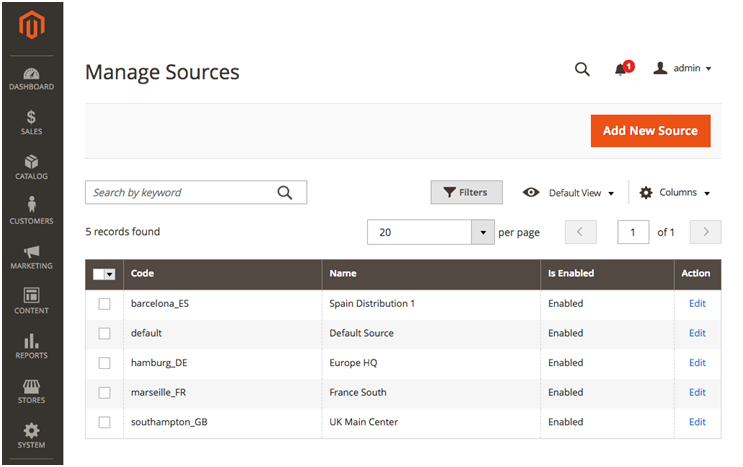
    Merchants grow and evolve and so do their ways of sell, store and deliver their products. Multi-Source Inventory (MSI) provides merchants with better operational efficiency by managing inventory across multiple physical locations from within the Magento admin,

    Along with this, merchants can also do the following:

    • The merchant can assign products and quantities to each fulfillment source like warehouses, stores, distribution centers or third-party drop shippers.
    • Track inventory at each source for easier management of inventory.
    • Streamline operations with rules to prioritize and automatically control the inventory sources that are used to fulfill orders for each website in real- time.
    • Integrate with third-party inventory systems

    What about the merchant with a single inventory?

    The merchant with a single inventory source will also get benefited from MSI with an inventory reservation system that tracks deductions from the saleable product stock when customers add products to carts. This results in accurate quantity counts and high performing checkouts that improve conversion rates.

    Multi-Source Inventory will improve your operations.

    PWA Studio

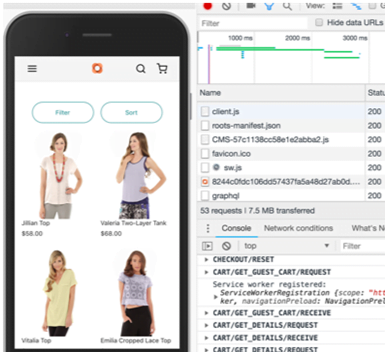
    In 2019, Smartphones penetration is expected to reach 90% with nearly three-quarters of consumers engaging in mobile shopping. Progressive Web Apps will allow merchants to deliver a superior mobile experience which will boost conversion rates and also increase engagement. With PWA Studio it will be faster and cheaper to build Magento-powered PWA experiences.

    PWA Studio will allow merchants to deliver app-like mobile commerce that is fast, integrated, and reliable. These experiences are proven to advance SEO and to drive 50% higher conversion rates and also 50% better page performance on average. PWA Studio also speeds time to market and lowers the total cost of ownership as it is designed with the developer in mind using reference themes, guided development, and open web standards

    As an open source initiative, PWA Studio will have regular updates that are independent of Magento releases and it will rapidly add new features, reference theme enhancements, and quality improvements. With developers and partners already building PWAs we are looking forward to the future of front-end development on Magento.

    Deliver app-like shopping experiences in the mobile browser

    PAGE BUILDER

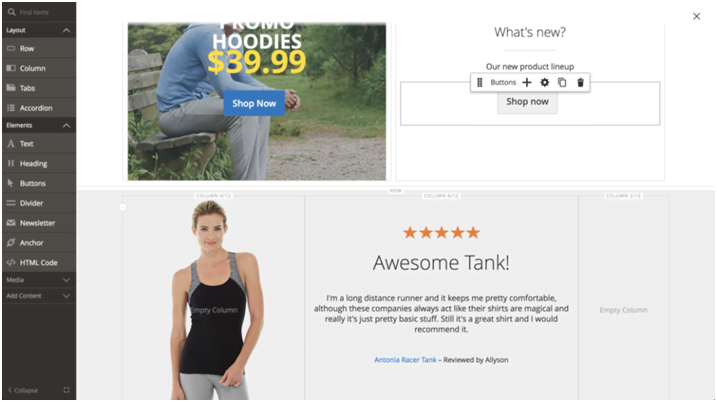
    Creating pages and managing site content using HTML and CSS has become a history now. Available for all our Magento Commerce, Page Builder introduces an intuitive, drag-and-drop interface; a powerful set of content types like images, videos, and banners; and instant preview capabilities that enable non-technical users to take control of their content. So now you can create new pages, enrich products and categories, and launch content updates quickly and easily. All of them can be done without the help of a front-end web developer.

    It has a flexible grid system which lets you to position page elements in a highly customizable way and in-context text editing streamlines the whole process. Even the appearance and behavior of content types can be quickly tuned to accommodate any design.

    Page Builder is completing integrated with existing Magento functionality like media gallery and widgets so now you can incorporate these assets into your pages. You can also use Page Builder to create dynamic content blocks used throughout your site, and also schedule content to go live in the future with content staging and preview.

    Currently, Page Builder has limited availability for our Early Adopter Program. If Magento Commerce customers are interested in being an Early Adopter then they can contact PageBuilderEAP@adobe.com to request access. Page Builder will be Generally Available for all Magento Commerce customers as part of the upcoming Magento 2.3.1 release.

    Now create and manage site content with an intuitive, powerful drag-and-drop.

    Additional Updates

    In addition to these new features included with the latest release, Magento 2.3.0 also delivers updates and enhancements across the entire platform:

    • Magento Shipping: It has an added support for new fulfillment options and expanded global availability.
    • GraphQL: It includes flexible and performant storefront API with rich developer tooling which is integrated into the Magento API ecosystem. Hence, developers can easily query specific data elements from APIs in a single request. GraphQL’s focused responses allow faster and more predictable presentation results that too even on slow networks.
    • Asynchronous & Bulk Web APIs: A New scalable APIs provides better control over the timing and execution visibility of API calls, at a greater volume so now you don’t have to wait for all previous operations to complete thus providing a faster performance.
    • Declarative Schema: Effortless upgrade and installation process by allowing developers to declare the final desired state of the database and have the system adjust to it automatically, without performing redundant operations.
    • Improved indexing performance: Sharding and parallel processing of indexers reduces indexation times by over 60% to support larger sites and quicker product updates.
    • New security tools: A better security for your stores and also prevents fake logins with Google ReCAPTCHA and Two Factor Authentication.

    We are happy to end 2018 with a new set of powerful tools and we are excited to continue growing with your business into the New Year!

    Magento 2 Performance Optimization – A complete guide for your Magento store


    As per Benchmark Testing, that makes the comparison between out-of-the-box supported and recommended configurations for Magento 2.0 which proved that Magento 2.0 is considered as the greater platform than Magento 1.x keeping in mind all metrics and use cases. Magento 2.0 will never disappoint you when you talk about a result.

    • Per hour orders process up to 39%
    • For catalog browsing, delivery nearly instant server response times.
    • 66% faster add-to-cart server response times.
    • Up to 51% faster end-to-end checkout times.

    Now, it’s time to understand How Magento 2 Performance is optimized?

    A normal Ecommerce page takes more than 3 seconds to load a product page. Now think for a minute that your customer can be annoyed if he needs to browse through five similar pages on your website? Indeed they will never be patient to wait for the delay. Hence keep the below steps in mind to give them the best experience of your site.

    Magento 2 Performance Optimization Step-by-step:

    • Step 1: Enable Flat Categories and Products
    • Step 2: Merge CSS and JS Files
    • Step 3: Content Delivery Network
    • Step 4: Caching
    • Step 5: Image Optimization
    • Step 6: Enable Compression
    • Step 7: Reduce Server Response Time
    • Step 8: Magento Updates

    Before following all steps, let us give you bonus advice in advance.

    First, check your website score in Google PageSpeed Tools
    Magento store speed score via Google Page Speed Checker

    If your score is low, make it high by following Google guidelines.

    Step 1: Enable Flat Categories and Products

    Magento 2 has created a great influence by its ability of database loading. In the configuration, you need to enable Flat Catalog to speed up that. Flat Catalog allows offloading the number of the database once there is any request for showing the product. Parallelly, the MySQL query complexity will reduce.

    Now, Go to backend, Stores > Configuration > Catalog > Catalog > Storefront,
    Choose Yes in Use Flat Catalog Category field.
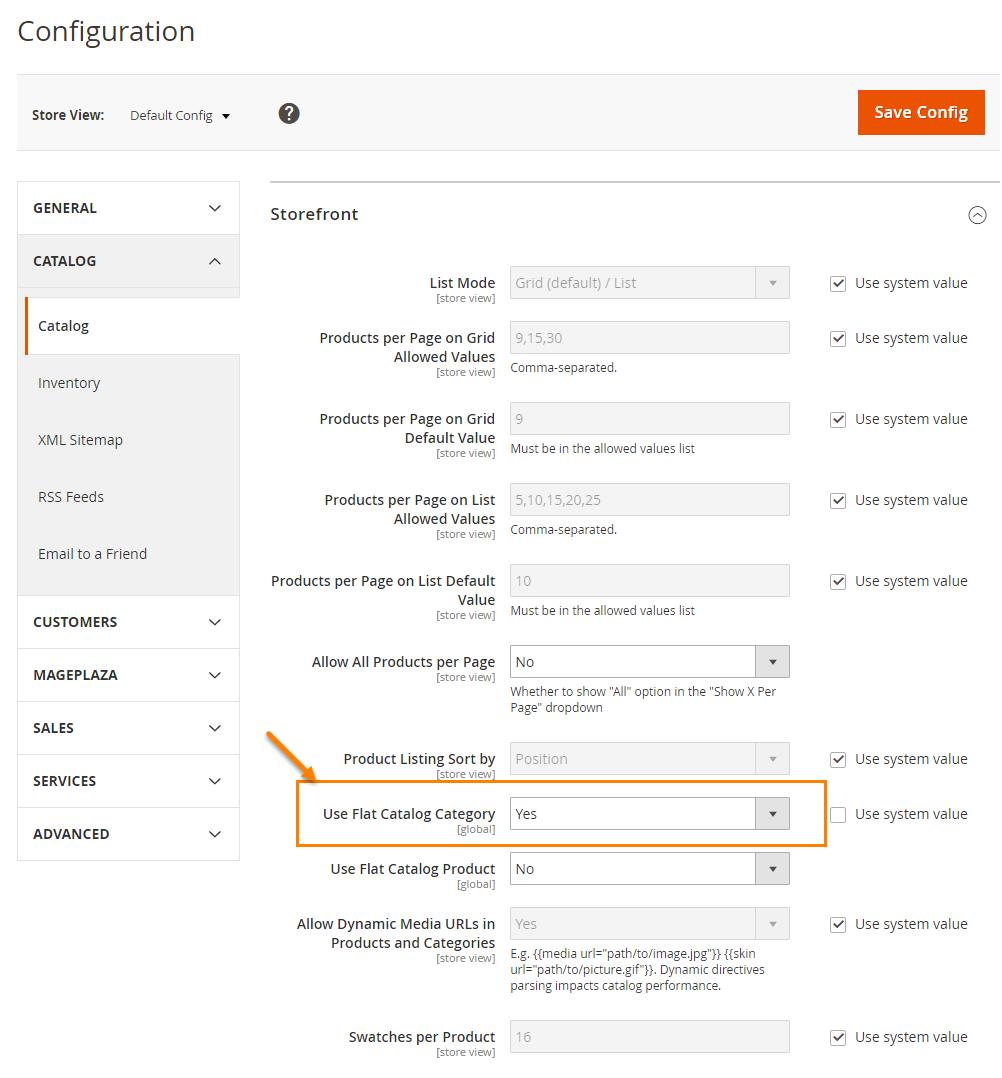
    Enable Flat Categories

    Step 2: Merge CSS and JS Files

    In this step, you need to follow is merging and minifying CSS and Javascript files, which means making the web page as light as possible for the fast loading that puts Magento 2 into production mode.

    ./bin/magento deploy:mode:set production

    Javascript File

    Go to backend, Stores -> Configuration > Advanced > Developer > JavaScript Settings

    Set Merge JavaScript Files to Yes

    Set Minify JavaScript Files to Yes
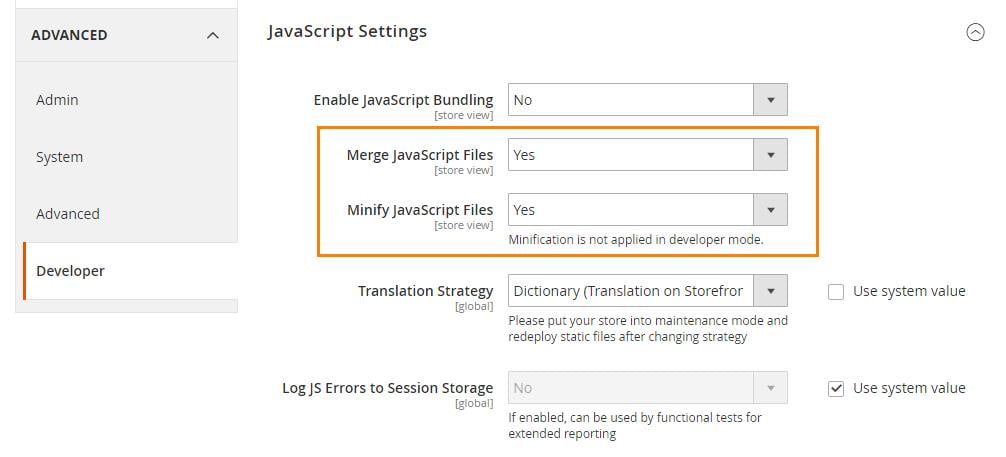
    Minify JavaScript Files

    CSS File

    Go to backend, Stores > Configuration > Advanced > Developer > CSS Settings

    Set Merge CSS Files to Yes

    Set Minify CSS Files to Yes
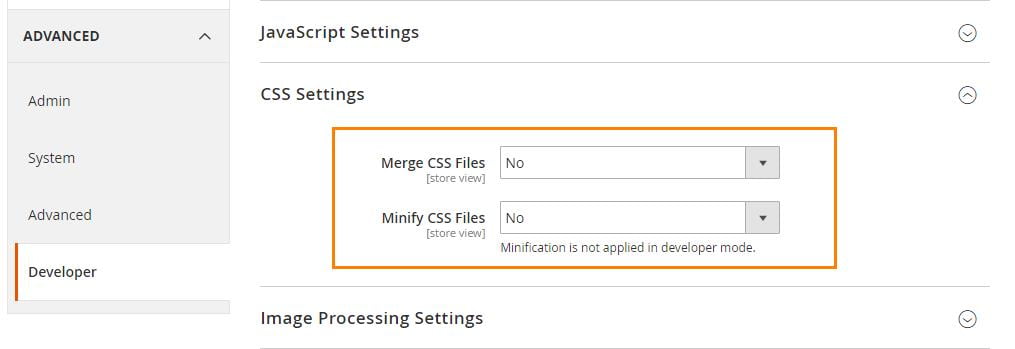
    Minify CSS Files

    When finished, click on Save Config and flush cache to activate the change.

    Step 3: Content Delivery Network

    Content Delivery Network (CDN) is a special system that can connect all cache servers also it also supports geographical proximity by taking over the delivering web content and fasten the page loading.

    Follow our guide to set up CDN for Magento 2 stores.

    Go to backend, Stores -> Configuration > General > Web > Base URLs (Secure)
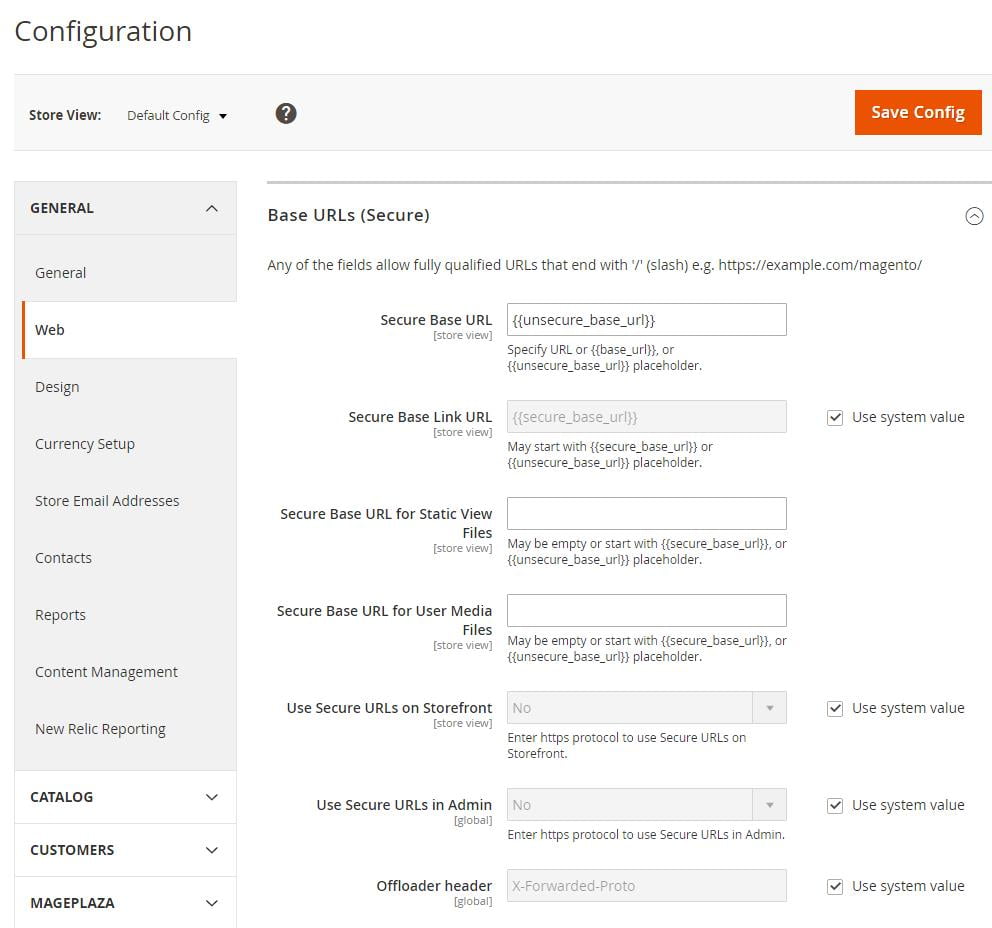
    set up CDN for Magento 2 stores

    Step 4: Caching

    In the backend go to the System > Cache Management.
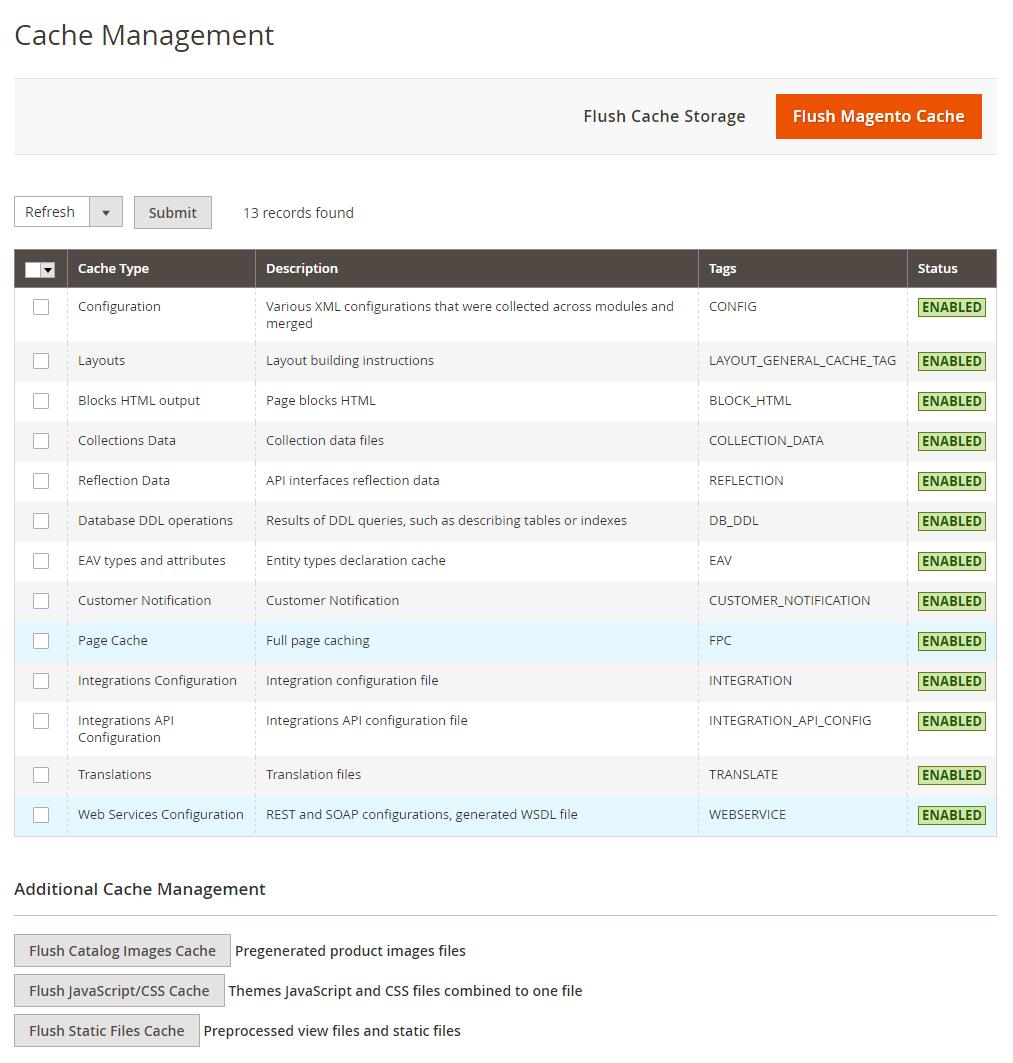
    Cache Management

    Here, you will find plenty of caching options to flush your Magento 2 cache.

    Click on Enable and then submit the options which you want.

    Step 5: Image Optimization

    The image plays an important factor to make your Magento 2 store’s performance more vivid. However, uploading the heavy size image on your site is one of the crucial reasons for the overload page. So, you have to compress the image before submitting any image. Using a JPEG format for Product images, and PNG or SVG for the layout as well as the logo is the best solution.

    Step 6: Enable Compression

    Follow below resources to enable compression by Google’s offer.

    Now let’s change nginx compression directives from:

    gzip_types: text/plain application/x-javascript text/javascript text/xml text/css image/x-icon image/bmp image/png image/gif; to gzip_types: *;

    Step 7: Reduce Server Response Time

    Your site’s response time is quite good with approximately 0.5s all thanks to Magento 2 built-in cache functionality. But as Google expects it is not the ideal time. Due to that, Magento 2 provides support to Full Page Cache via Varnish natively.

    Now, let’s set up Varnish to get the first byte around 0.1-0.2s.

    Go to backend, Stores > Configuration > Advanced > System > Full Page Cache,

    Transfer Caching Application to Varnish Cache.
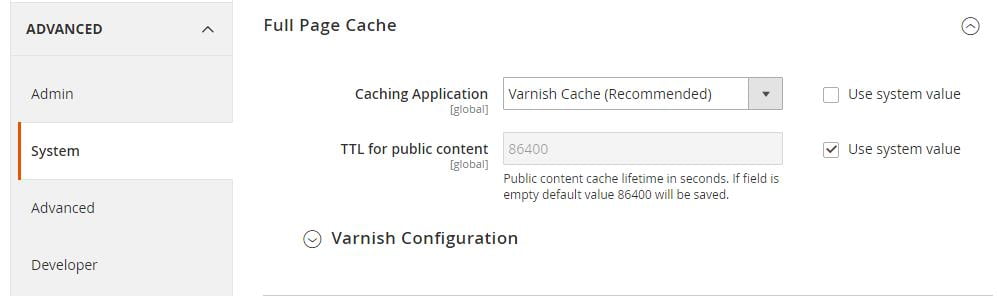
    Transfer Caching Application

    Open the Varnish Configuration section, complete the settings:
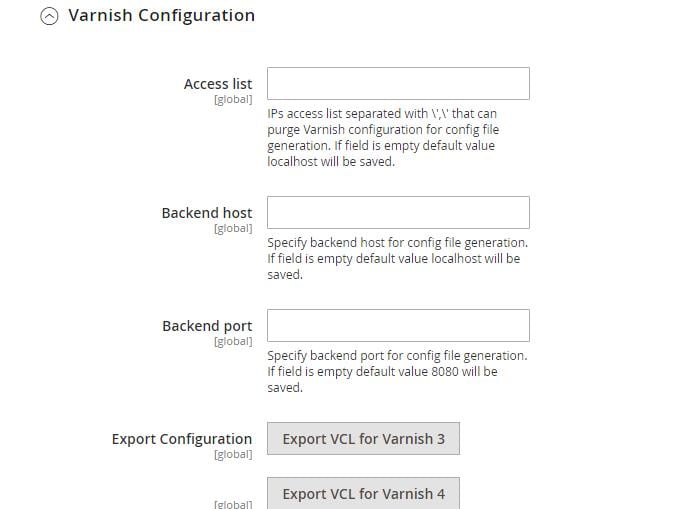
    Varnish Configuration

    Step 8: Magento Updates

    Remember to update your Magento 2 store. Mage monkeys team will try their best to help you optimize the site performance.

    The result after updating your store from older version to latest version.
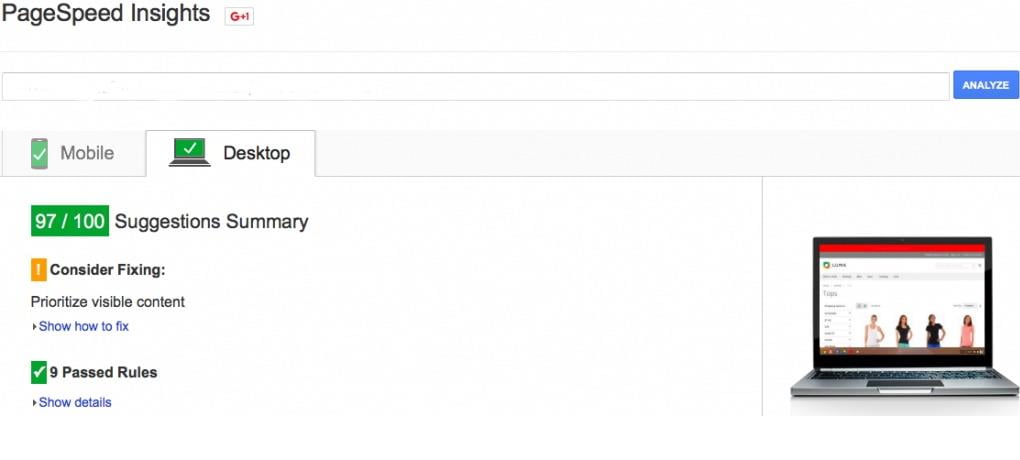
    Page Insights Magento stores

    Performance Toolkit (Optional)

    Installation

    jMeter:

    – go to http://jmeter.apache.org/download_jmeter.cgi and download jMeter in Binary section (pay you the attention that Java 6 or later is required) – unzip the archive

    Plugins (only if you want to additional reports (like graphs)):

    – go to http://jmeter-plugins.org/downloads/all/ and download JMeterPlugins-Standard and JMeterPlugins-Extras

    – unzip them to the appropriate ext directory of your jMeter instance.

    – Additional reports can now be added via GUI.

    Usage

    Before running the jMeter tests for the first time, you will need to first use bin/Magento setup:performance:generate-fixtures command to generate the test data.

    Run via console

    Scenario can accept parameters that are described bellow in format <parameter_name:default_value>:
    
    <host:localhost> URL component 'host' of application being tested (URL or IP). Default is 'localhost'.
    
    <base_path:/> Base path for tested site. Default is '/'.
    
    <report_save_path:./> Path where reports will be saved. Reports will be saved in current working directory by default. Default is './'.
    
    <ramp_period:300> Ramp period (seconds). Period the request will be distributed within. Default is '300'.
    
    <orders:0> Number of orders in the period specified in the current allocation. If <orders> is specified, the <users> parameter will be recalculated. Default is '0'.
    
    <users:100> Number of concurrent users. Recommended  amount is 100. Minimal amount is 10. Default is '100'.
    
    <view_product_add_to_cart_percent:62/> Percentage of users that will only reach the add to cart stage. Default is '62'.
    <view_catalog_percent:30/> Percentage of users that will only reach the view catalog stage. Default is '30'.
    
    <guest_checkout_percent:4/> Percentage of users that will reach the guest checkout stage. Default is '4'.
    
    <customer_checkout_percent:4/> Percentage of users that will reach the (logged-in) customer checkout stage. Default is '4'.
    
    <loops:1/> Number of loops to run. Default is '1'.
    
    <admin_path:admin/> Admin backend path. Default is 'admin'.
    
    <admin-user:admin/> Admin backend user. Default is 'admin'.
    
    <admin-password:123123q/> Admin backend password. Default is '123123q'.
    
    <think_time_deviation:1000> Deviation (ms) for "think time" emulation. Default is '1000'.
    
    <think_time_delay_offset:2000> Constant delay offset (ms) for "think time" emulation. Default is '2000'.
    
    Necessary parameters must be passed to [command line](https://magemonkeys.com/magento-2-command-line-interface-cli.html) with "J" prefix: "-J<parameter_name>=<parameter_value>"
    

    Example:

    > cd /directory_of_jMeter/bin/
    
    > jmeter -n -t /path_to_benchmark_file/benchmark.jmx -Jhost=magento2.dev -Jbase_path=/ -Jusers=100 -Jramp_period=300 -Jreport_save_path=./
    

    Run via GUI

    Open jMeter/bin directory and run jmeter.bat

    Click in menu File -> Open (Ctrl+O) and select file; or drag and drop benchmark.jmx file in opened GUI.

    On the first tab ‘Test Toolkit’ you can change ‘User Defined variables’ like as , , , , .

    For running script click “Start” (green arrow in the top menu).

    Results of running (Report types)

    When you run via GUI you can see the result of working in the left panel. Choose the corresponding report.

    After running the script via console report will be created in the path that has been specified.

    Threads

    jMeter script consists of five threads. Setup thread and four user threads.

    The percentage ratio between threads is as follows:

    • 62% browsing, adding items to the cart, and abandon cart (BrowsAddToCart suffix in reports)
    • Only Browsing is 30% (BrowsAddToCart suffix in reports)
    • 4% Browsing of adding items to cart and checkout it as guest (GuestChkt suffix in reports)
    • 4% Browsing of adding items to cart and checkout as registered customer (CustomerChkt suffix in reports)

    Magento 2 Performance Optimization Tools:

    If you are looking for professional shortcut tools to cut down the performance time conveniently, Mage Monkeys is happy to introduce one useful extension for both Magento 1 & 2 stores.

    Insights from a Magento Community Initiative to Increase Sales from Mobile Users

    Are you aware of the fact that 86 percent of mobile shoppers abandon their shopping carts during the checkout process.

    Today the mobile Ecommerce has become a huge challenge. In a way that it requires a collaborative efforts to overcome which is why Magento excitedly became the sponsors of the mobile Ecommerce Optimization Initiative.

    Below are the results from the Initiative:

    So far, Magento has gathered preliminary merchant data on four of the experiment templates:

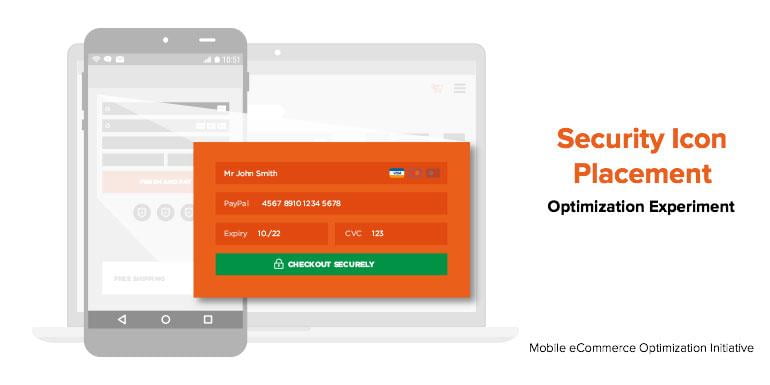
    • Security icon placement
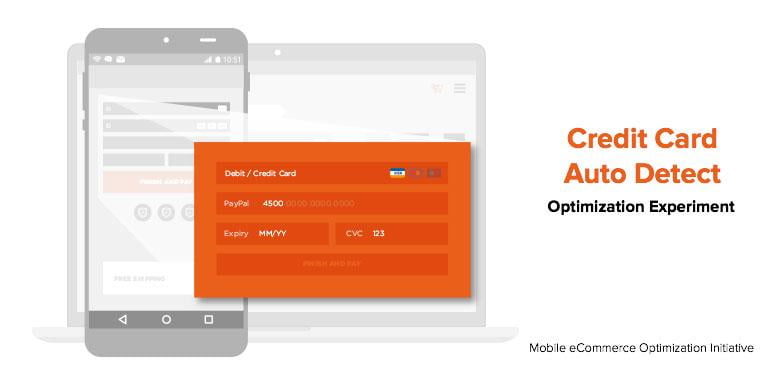
    • Credit card autodetect
    • PayPal express checkout
    • Zip code autofill

    EXPERIMENTS:

    Security Icon Placement

    Security is most concern factor for online shoppers because they share their personal and credit card information online. The main aim of this experiment is to determine how the presence of a security icon at checkout will impact mobile conversions.

    With an average lift of over 17 percent, the security icon surely has had a dramatic impact on mobile based revenue per visitor or RPV.

    • Credit Card Auto Detect

    During the online shopping experience if any form of friction occurs like added form fields or checkboxes then it might lead to shopping cart abandonment.

    The Credit Card Auto Detect experiment is to reduce this friction by auto-selecting a customer’s credit card type (Visa vs. Mastercard etc.) based on the first few numbers of the card they enter. This experiment was designed to decrease the number of fields to fill at checkout page and the credit-card auto detect had an RPV lift of 21.53 percent for desktop but a -7.99 percent drop for mobile users.

    With this experiments some merchants had seen a positive lift for mobile so Magento recommends testing it yourself to decide whether it works for you too.

    • PayPal Express Checkout

    Customers doesn’t like to enter the credit card number, expiry date and security code each time they shop online as they want their online sjopping to be fast and easy.

    So, this experiment will let you add an easy-pay options such as PayPal and/or PayPal Credit buttons on your checkout page which will increase a shopper’s likelihood of completing their shopping. You can easily apply the PayPal checkout button at different points in the checkout process. Adding the PayPal shortcut checkout on the Mini cart page provided the largest impact on RPV (with an 8.72 percent lift) without decreasing the average order value.

    Try to place this PayPal checkout buttons more prominently on your site and experiment with different locations to conclude what works best for you.

    • Zip Code Autofill

    Your customers mobile shopping experience might see a additional friction if they are manually entering shipping information every time they shop. The Zip Code Autofill experiment aims to reduce this friction by auto-filling a customer’s city, state, and country fields after their zip code is entered.

    This experiment has some surprising results, for mobile the RPV dropped by 0.88 percent, while the RPV for desktop increased by 3.42 percent.

    The relatively small impact on conversion may be attributed to the fact that shipping information is one of the last steps in the checkout process, where cart abandonment rates are already low.

    This may be a good experiment to try if you see a high shopping cart abandonment near the end of the checkout process.

    Its Time for you to start experimenting

    Magento recommends experimenting with the optimizations which you anticipate will have the biggest impact. And don’t worry if they don’t produce the immediate results you want. The key is to keep experimenting until you find the mix of changes that best work for you and your site.

    Buy X Get Y Free – How Can You Set Up Special Promotions In Magento 2?

    You can raise revenue of your business by setting up ‘buy X get Y free’ promotions.

    What do we mean by ‘buy X get Y free’ promotion?

    One of the important actions while creating the shopping cart price rule is a ‘buy X get Y promotion.

    It will increase online sales by providing you variety of different sale scenarios which will drive customer traffic. You can enter correct number of products from a given field in the cart by using the sub-selection tool.

    Let’s us learn…

    How can you create a Buy X get Y free promotion in your Magento 2 Store?

    You need to follow our below mentioned 5 steps in order to create a Buy X get Y free.

    Step 1: Set a Cart Price Rule
    Step 2: Make Conditions
    Step 3: Spot the Actions
    Step 4: Mention the Label
    Step 5: Save and Test

    Step 1: Set a Cart Price Rule

    • You need to go to Stores -> Marketing -> Promotions -> Cart Price Rules from the Admin sidebar
    • Next you have to Click “Add New Rule”. On the left side of the panel is an option “Rule Information, Conditions, Actions and Labels”.
    • Now edit “Rule Information” settings as follows:
      • Enter a Rule Name and a brief Description.
      • Now, set Status to “Active.”
    • Place Website to “Main Website.”
    • Choose the Customer Groups.

    Step 2: Make Conditions

    You have to set up the Conditions tab as follows:

    “If ALL of these conditions are TRUE
    Total items quantity is 2”
    Total items quantity shows a sub-selection of the items in cart and matching ALL of these conditions

    Step 3: Identify the Actions

    In step 3 you have to select “Actions” in the panel on the left. Then, do the below steps:

    • Set “Apply” to “Buy X get Y free”.
    • Take for example you set “Discount Amount” to 1 then that quantity your customer will receive for free.
    • Set number in the “Maximum Qty Discount is Applied to” field to enable the limit of the number of discounts that can be applied when the condition is met. For example, enter “1” to discount only one item.
    • Now, enter the quantity that the customers have to buy in order to qualify the discount in the Discount Qty Step (Buy X)” field.
    • When you are done with above steps then click on Save.

    Step 4: Mention the Labels

    In this step, select “Labels” on the left from the panel. Then, do one selections from the below

    • Enter a “Default Rule Label for All your Store Views”.
    • If your store is available in multiple places then you must enter “Store View Specific Labels.

    Step 5: Save and Test

    When you have completed all the steps then you need to click on “Save Rule”.

    Your Buy X get Y free promotion will appear on your Magento 2 Store after an hour or so. Allow enough time to your system to get into it. Users need a testing process so make sure that the new rule works correctly.

    Now it’s time for you to take advantage of this method by following our tutorial. With the help of this special promotion you can attract customers and visitors and raise your store revenue.

    Is Your Magento Website Upgradable to 2.X?

    Magento is one of the most powerful and stable e-commerce development platforms and the release of the Magento 2.0 version is sending new waves through the Magento community. In order to stay on board and thrive, the world is now directed towards upgrading its version from Magento 1 to Magento 2.0.

    Currently, Magento holds almost 14% of the market share and with this impending release, this is likely to increase. The migration from the older to newer version involves various components:

    • Data
    • Various Theme
    • Custom Code
    • Extensions and functionalities
    • Products
    • Orders

    To make the migration smooth, it is vital for organizations to properly strategize, plan migration detailing, and streamline the process before moving your store to Magento 2. But, kindly note if your current version’s theme, extension, or functionalities are not compatible with Magento’s latest version then you have to redevelop the entire website from scratch.

    Do you wonder why you need to upgrade? Let’s consider the following points:

    By far, Magento 1 was one of the most flexible platforms using which users could create dynamic e-commerce stores. However, it was unable to cater to basic needs like versatile built-in extensions, performance optimization, speed, responsiveness, and admin capabilities. Hence, developers came up with Magento 2.0.

    Features like amazing SEO optimization, functionalities, security, high stability, intuitive admin panel, scalability, better performance, etc. differentiate Magento 2.0 from Magento 1.

    Benefits of the up-gradation:

    • Faster Performance: The new update will make your eCommerce portal almost 20 times faster. The built-in extension of Magento 2.0 called ‘Varnish Cache’, speeds up the loading time of your web page to less than seconds rather than waiting for it to render.
    • Better SEO opportunities. Remember because of slow page load time, your Google ranking, conversion rates, and bounce rates were suffered. Well, with Magento 2.0 this problem will be solved! Better performance and it being SEO friendly is the most important advantage of switching to Magento 2.0
    • User-friendly check-out: Magento2.0 makes the check-out process streamlined, quicker, and easier. The checkout process in the newer version is quite flexible, customizable, and requires very few steps. It also has fewer abandoned carts and increases conversions.
    • Better integrations: Magento 2.0 integrates a lot of dynamic extensions which boosts better functionality and performance. It makes third-party integrations like payment gateways or Braintree a lot easier.
    • New admin interface: The admin interface in the latest version is specifically designed to reduce the time to manage an online store. A personalized panel helps increase productivity and gives quick access to important business information. Importing products is 4x faster in Magento 2.0.
    • Mobile responsiveness: It is mobile-friendly, helps improve sales. It comes with new mobile-friendly themes, integrated video, and an easier checkout process. On top it is touch-screen friendly to help you manage your store on the go!

    In Nutshell…

    In today’s highly competitive world, making a switch to Magento 2.0 is necessary if you want to stay in the competition, innovate, and outperform. However, initially, the process might seem tedious, but with proper planning, detailing at every step, and sticking to the migration plan, you can smoothly upgrade your eCommerce store.

    With each passing, you will get a new update from Magento 2.0, so if you are planning to switch, now is the time as Magento 1.x is already on a path of depreciation.

    7,339 Magento stores affected through Malware, Did yours too?

    Recently a Dutch security blogger and researcher Willem de Groot has found out that Ecommerce Websites which are using Magento Software have been hit by a dangerous payment skimming malware that has been stealing thousands from the users. The malware is termed as MagentoCore and affecting the Ecommerce sites that are using Magento.

    How many online stores are affected?

    In last six months, the skimmer was installed in more than 7,339 online stores and it’s been affecting more than 50 new websites each day.

    Willem de Groot said “The victim list contains multi-million dollar, publicly exchanged companies, which suggests the malware operators make a handsome profit. But the real sufferers are eventually the customers, who have their card and identity stolen,”

    How does the malware work?

    This malware uses the brute-force attack which means it tries to guess the password of the Magento Admin Panel for months and once the access is obtained then the software will inject a malicious piece of code to the HTML and from them all the keystrokes from the customers on the website are recodes and later the data is sent back to the hacker’s main server. This data is collection of usernames, passwords, credit card information and personal details. In addition to this, there is also a recovery mechanism which deleted the code when it has run.

    Groot has analyzed more than 220,000 websites and 4,2% of them were already leaking user data.

    What you can do?

    If you are store owner and found the MagentoCore.net skimmer in your store then you must ask your ops team or forensic investigator to do the below listed things.

    1. Search for Entry point: you need to analyse the first question that “how could attackers gain unauthorized access? Look for backend logs, correlate with staff IP’s and track their working hours. If you come across any suspicious activity from staff IP’s then it could be that a staff computer is infected with malware, or that the attacker has hijacked an authorized session.

    2. Check any backdoors and unauthorized changes in your database. You might find few in both frontend/backend code and the database.

    3. As soon as you discover all means of unauthorized access make sure to close them all at once.

    4. Eliminate the skimmer, backdoors and other code and if possible then go back to a certified safe copy of the code base. Malware is often hidden in default HTML header/footers and also in minimized, static Javascript files so you should check all HTML/JS assets that are loaded during the checkout process.

    5. A good start will be to execute secure procedures which cover timely patches, strong staff passwords and so on.