We sacrifice by not doing any other technology, so that you get the best of Magento.

We sacrifice by not doing any other technology, so that you get the best of Magento.

    How to integrate Zoho CRM with Magento 2?

    If you are looking for ways to collect information and customer data from your Magento 2 store then you must integrate Zoho CRM with your Magento 2. Zoho CRM will help you in attracting more customers to your store.

    So what exactly is ZOHO CRM?

    Zoho CRM is a one-stop solution for organizations, marketers, or sales departments to track customers, understand their behavior, and enhance their experience. Power-packed with features and varied functionalities it helps developers integrate all the customer data and migrate from the Magento 2 warehouse into the Zoho CRM platform easily.

    Making the integration smooth and seamless, gives easy access to the customer data for detailed analyses about a particular customer. This helps organizations with better decision-making for all the marketing campaigns based on customer demands.

    How to integrate Magento 2 and Zoho CRM?

    The following steps can be a quick guide that will make the migration easy for you:

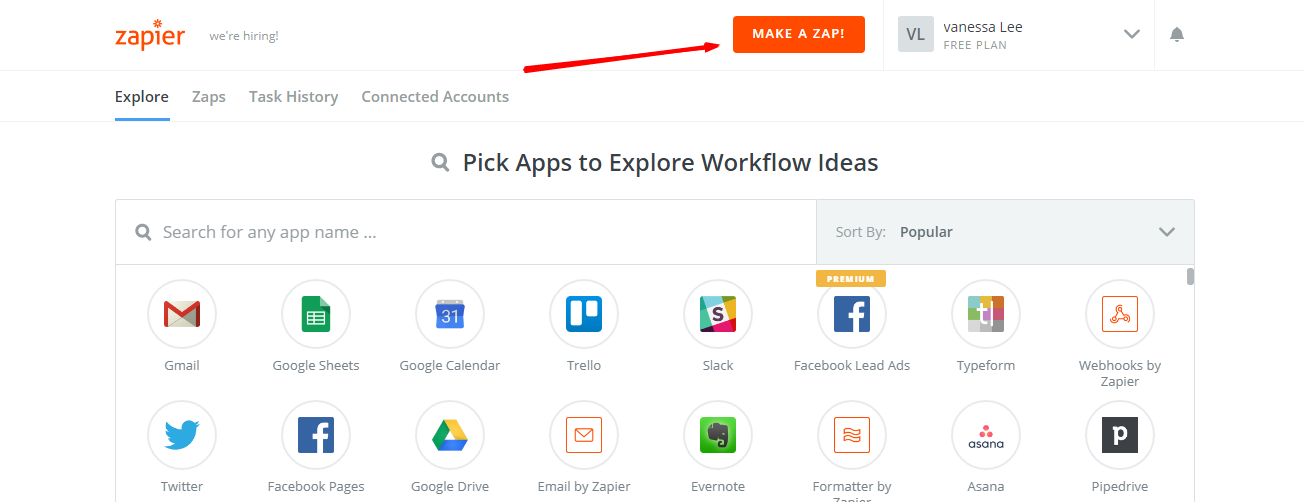
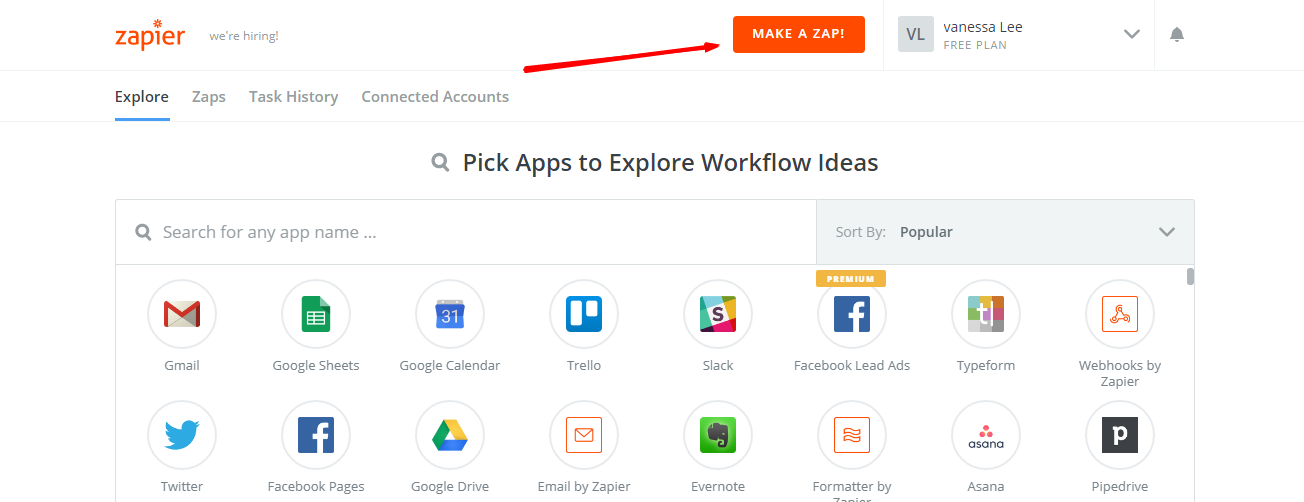
    • Sign in to your Zapier account -> Select Make a Zap
    • Go to ZOHO CRM login and sign up there
    • Then follow the below steps for an easy integration
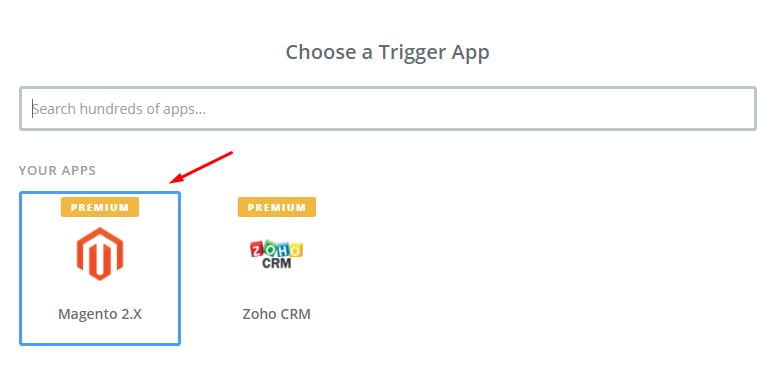
      • Choose a Trigger App which you want to integrate
      • Then from the Dropdown list select the field you want to integrate
      • Click on SAVE to continue

    Following images will make it easy for you to understand.

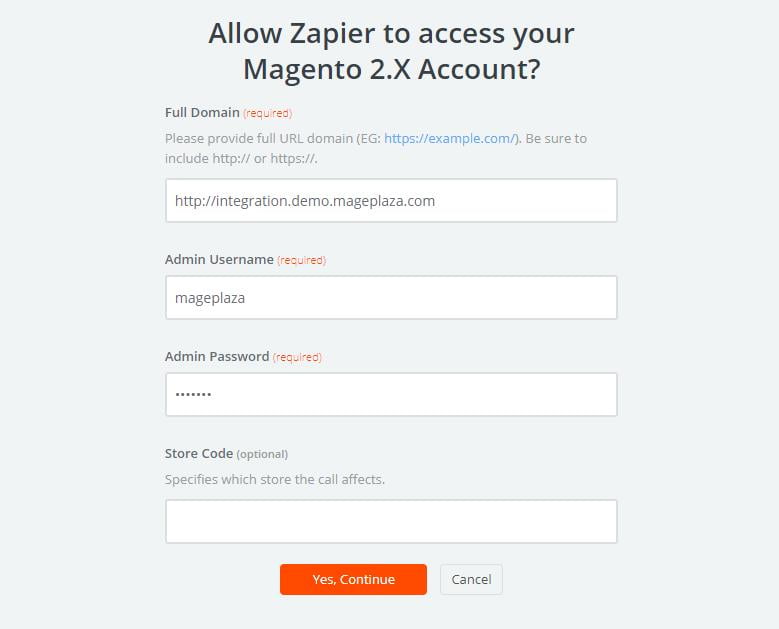
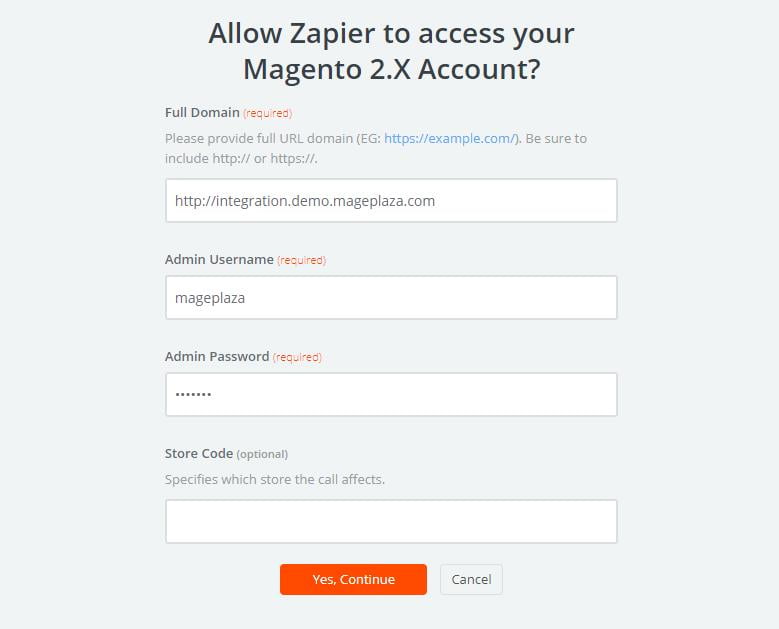
    Here at this stage, you have to connect your account. For this Go to Magento 2.0 store -> Select Account -> Enter Details like Full domain name, Admin User name, and Admin Password.

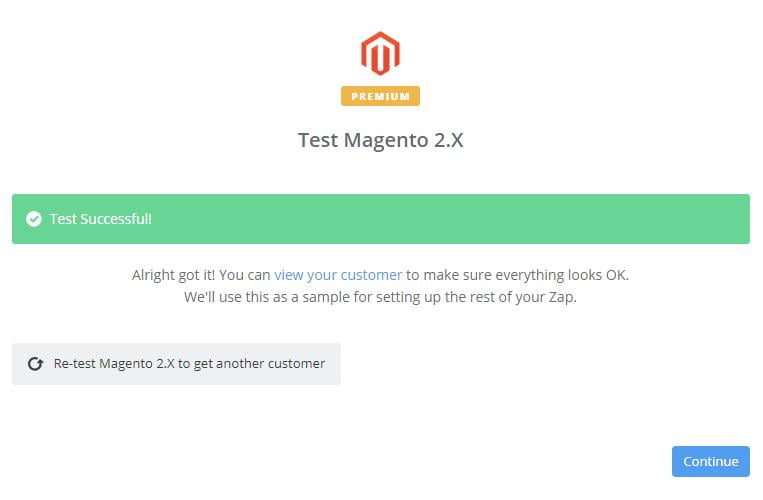
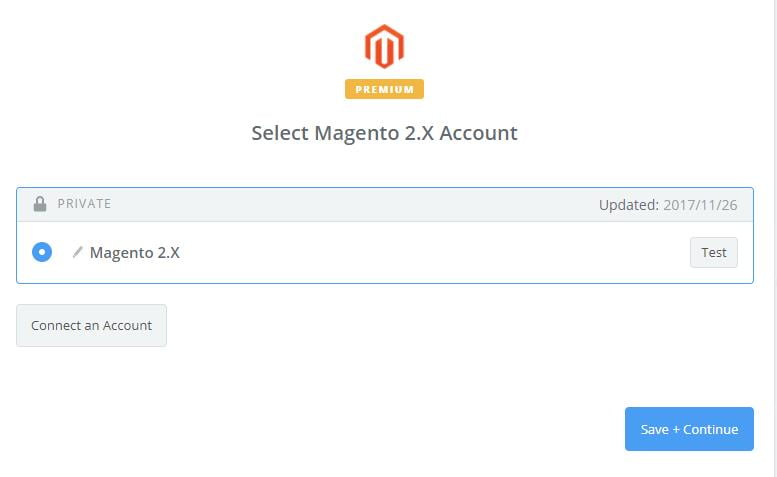
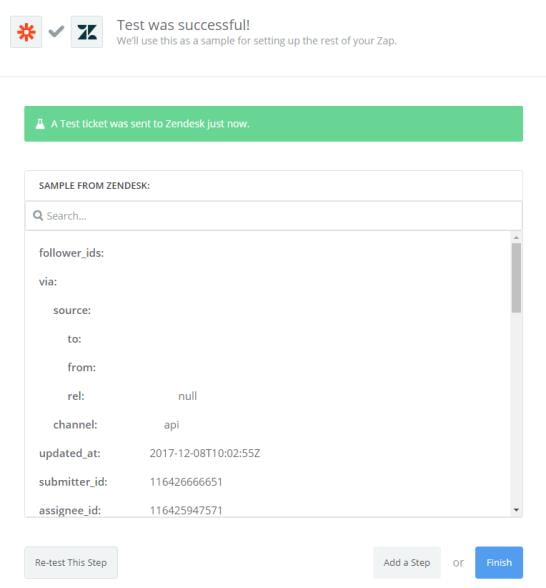
    Once you have entered the details, click Yes to continue. Great! This way you have tested Magento 2.0 successfully. Now follow the next steps to continue with the integration.

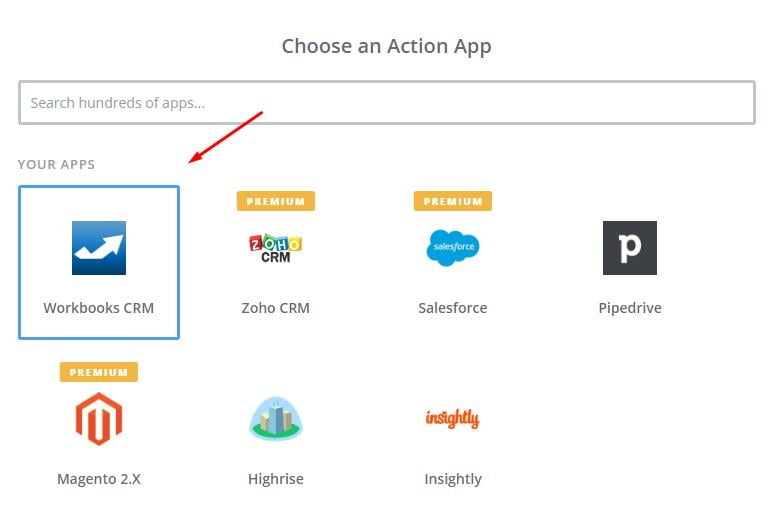
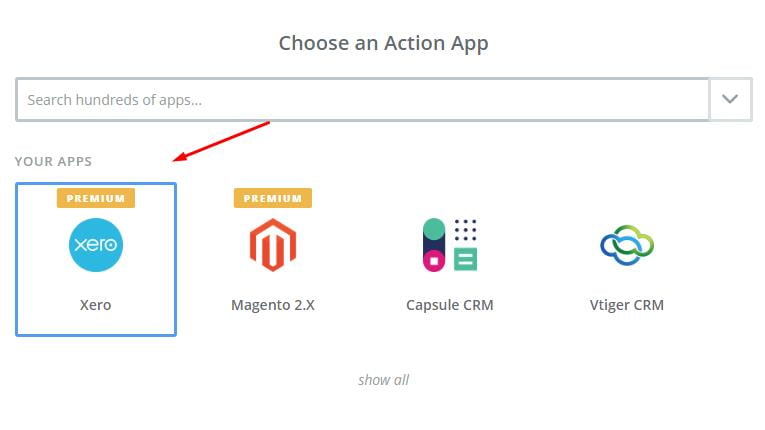
    • Go to ZOHO CRM -> Choose Action App field
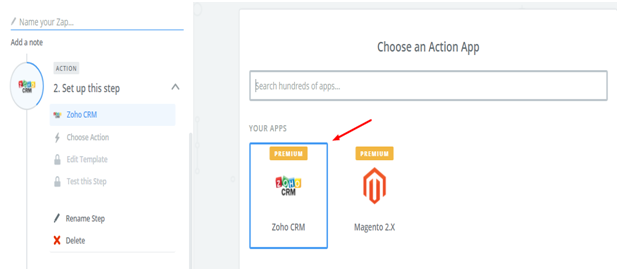
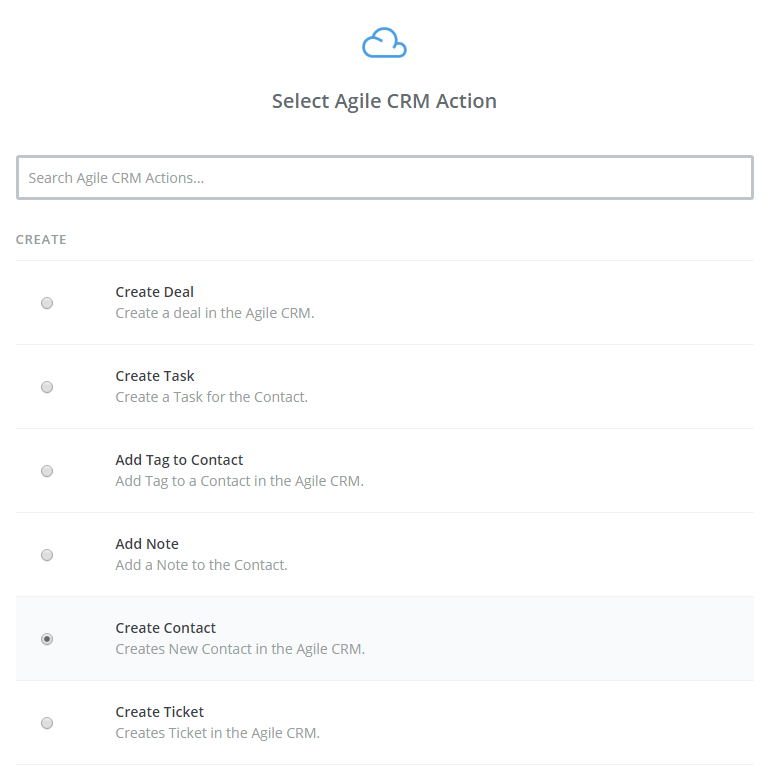
    • Select Action like to add new contact -> Click Save to continue
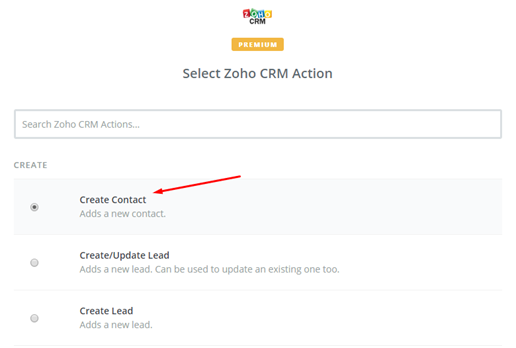
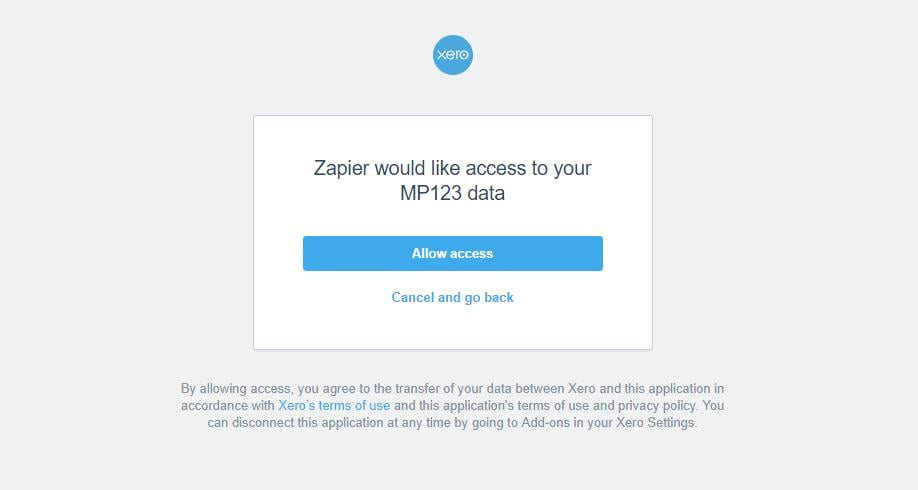
    • Then select ZOHO CRM Account -> Click on Connect Account -> Follow the guide
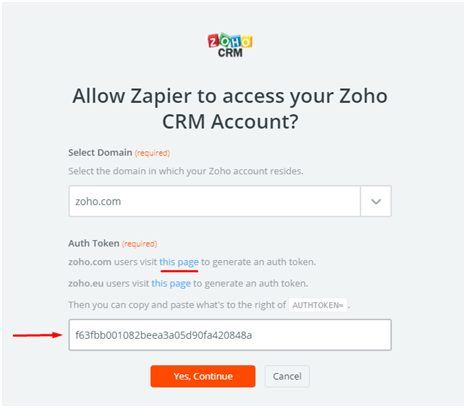
    • Next, Set up template -> Set up contact -> Enter details -> Click on continue
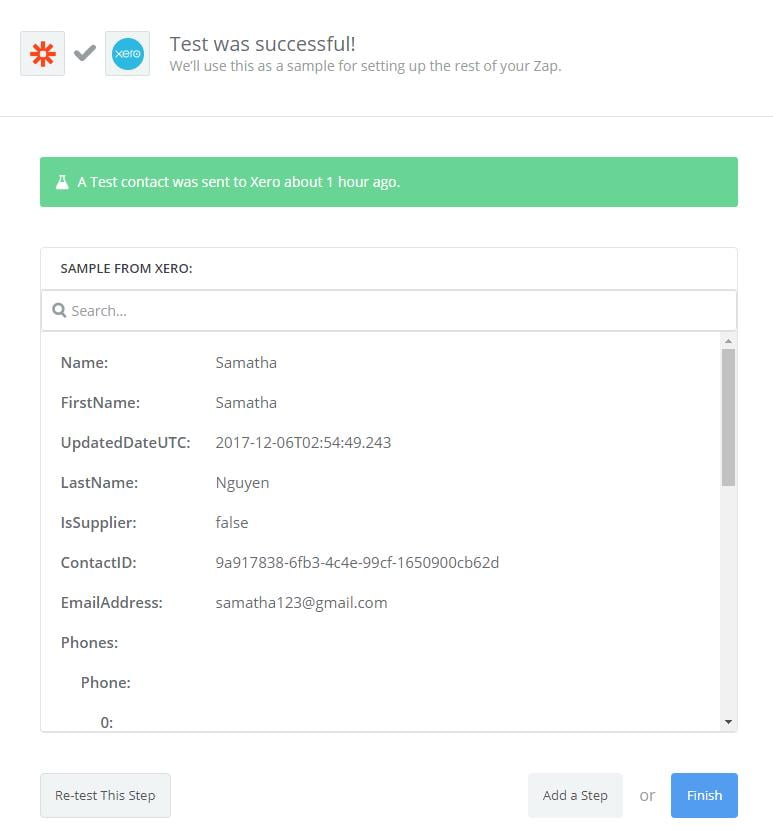
    • Zoho CRM integration tested successfully
    • Choose finish and set the new ZAP name to complete the integration
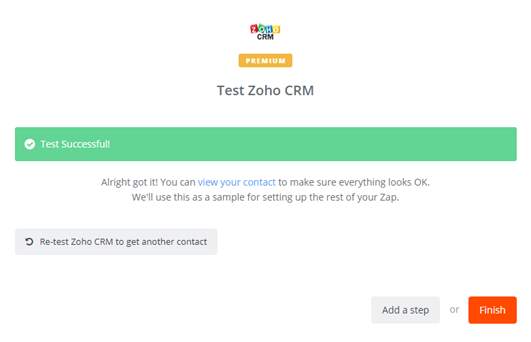
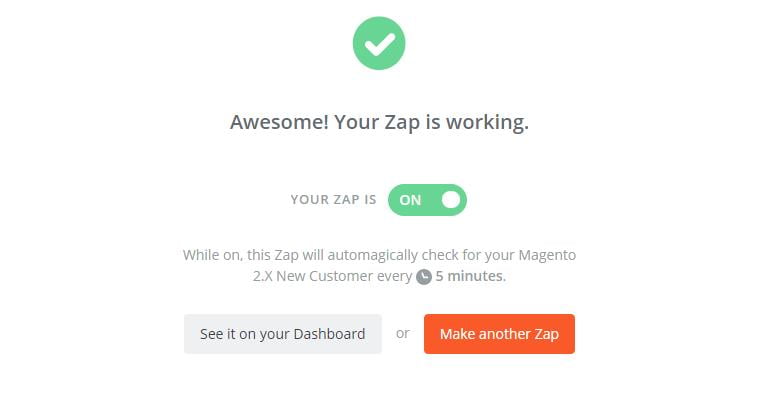
    You are done with your set up and now the system will help you with the auto-check in your Magento 2.0 store for any new customer automatically.

    • Below is the file that you have just established. All your contact details along with other information are just in one place for easy access.

    So, in this way, we integrate Zoho CRM with Magento 2 and now it’s time for you to try these steps for easy integration to uplift your sales. If you still failed to integrate, then hire Mage Monkeys for the Magento integration service.


    Buy X Get Y Free – How Can You Set Up Special Promotions In Magento 2?

    You can raise revenue of your business by setting up ‘buy X get Y free’ promotions.

    What do we mean by ‘buy X get Y free’ promotion?

    One of the important actions while creating the shopping cart price rule is a ‘buy X get Y promotion.

    It will increase online sales by providing you variety of different sale scenarios which will drive customer traffic. You can enter correct number of products from a given field in the cart by using the sub-selection tool.

    Let’s us learn…

    How can you create a Buy X get Y free promotion in your Magento 2 Store?

    You need to follow our below mentioned 5 steps in order to create a Buy X get Y free.

    Step 1: Set a Cart Price Rule
    Step 2: Make Conditions
    Step 3: Spot the Actions
    Step 4: Mention the Label
    Step 5: Save and Test

    Step 1: Set a Cart Price Rule

    • You need to go to Stores -> Marketing -> Promotions -> Cart Price Rules from the Admin sidebar
    • Next you have to Click “Add New Rule”. On the left side of the panel is an option “Rule Information, Conditions, Actions and Labels”.
    • Now edit “Rule Information” settings as follows:
      • Enter a Rule Name and a brief Description.
      • Now, set Status to “Active.”
    • Place Website to “Main Website.”
    • Choose the Customer Groups.

    Step 2: Make Conditions

    You have to set up the Conditions tab as follows:

    “If ALL of these conditions are TRUE
    Total items quantity is 2”
    Total items quantity shows a sub-selection of the items in cart and matching ALL of these conditions

    Step 3: Identify the Actions

    In step 3 you have to select “Actions” in the panel on the left. Then, do the below steps:

    • Set “Apply” to “Buy X get Y free”.
    • Take for example you set “Discount Amount” to 1 then that quantity your customer will receive for free.
    • Set number in the “Maximum Qty Discount is Applied to” field to enable the limit of the number of discounts that can be applied when the condition is met. For example, enter “1” to discount only one item.
    • Now, enter the quantity that the customers have to buy in order to qualify the discount in the Discount Qty Step (Buy X)” field.
    • When you are done with above steps then click on Save.

    Step 4: Mention the Labels

    In this step, select “Labels” on the left from the panel. Then, do one selections from the below

    • Enter a “Default Rule Label for All your Store Views”.
    • If your store is available in multiple places then you must enter “Store View Specific Labels.

    Step 5: Save and Test

    When you have completed all the steps then you need to click on “Save Rule”.

    Your Buy X get Y free promotion will appear on your Magento 2 Store after an hour or so. Allow enough time to your system to get into it. Users need a testing process so make sure that the new rule works correctly.

    Now it’s time for you to take advantage of this method by following our tutorial. With the help of this special promotion you can attract customers and visitors and raise your store revenue.

    Is Magento A/B Testing Will Give a Better Conversions Rate?

    Experienced chefs always love to try something new with ingredients in their kitchen to get that one perfect dish. Similarly, in E-commerce merchants struggle to come up with a store in order to provide excellent service. They don’t give up easily and find different ways to build a store which commonly known as A/B testing. This marketing technique is used to increase the conversion rate.

    We read numerous praises all over the internet and thought for a moment that is this method 100% effective or are there any hidden pitfalls which one should know?

    So, to get a clear picture we discussed this with our Magento experts and came up with all the pros and cons which are summarized and analyzed.

    Magento A/B testing boost conversion rate

    Merchants keep on trying different testing methods until they reach their desired result. Also, it is a good way to understand customers buying behaviours.

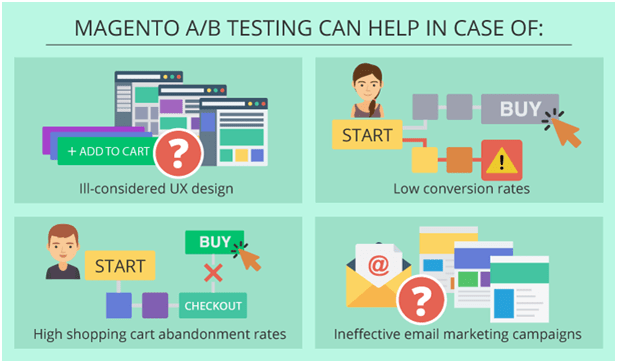
    Under what circumstance this technique will help?

    1. Doubts in UX design

    Based on their own perception, Merchants can’t come to an accurate reply to the questions like “what is the best colour for call-to-action-buttons? To find customers response, merchants need to try various options and this will also give them a better UX design.

    2. Low conversion rates

    A better result will always improve the conversion rate. The more time a customer spends on your site increases the chance of buying a product.

    3. High shopping cart abandonment rates

    Sellers must take quick measures as they know the fact that 70% of online shoppers abandon the cart at the checkout process. One can use different variants of a subject line, visuals, CTA buttons, length, and content and personalization tactics of an email. Estore owners can achieve better opening and click-through rates that will develop more effective customer communication.

    Retailers may use advanced tools like MailChimp or Remarkety to automate and improve Email marketing in their company and they both offer A/B testing as a part of the functionality.

    Every coin has two sides… so does the A/B testing:

    Till now it’s all good, we mean merchants know what works best for their customers and accordingly they improve their web store but then what are the possible inconveniences:

    • Magento A/B testing is a lengthy process.

    The most important thing about A/B testing is to find out about customer behaviour and to increase the conversion rate. To get a fair result you must test one feature at a time. A typical website has a number of pages types so getting the perfect combination for a customer-friendly experience might take long and if in case you get your desired result then you will be able to start website optimization as an ongoing process.

    • Coincidence can happen.

    In Magento A/B testing it happens that merchants tend to conclude results based on a time limit. For example, you have mentioned the behaviour pattern of a certain percentage of visitors but it does not mean the outcome will same with the whole audience so remember there is always a chance that findings are random.

    • Time frames can lead to the failure of the promotional campaign.

    One cannot define the duration of a testing experiment. And you should also test the promotional campaign as well. One can not only set time frames for playing with different elements like a position and colour of a banner but also they must have time to implement changes while the campaign is still on.

    • Options will make it complicated

    Merchants should take note that they should know what website element ruins their conversion.
    To get the proper result you must take a number of tests so keep in mind to conduct a preliminary analysis of the pages when your potential customers tend to leave not to attempt in the dark and to mention some clarity about A/B testing.

    Conclusion

    Magento A/B testing is a unique way to get the real response of customers to website changes before any implementation takes place permanently. We always encourage them to run this test for improved results. A fair picture will give them a chance to develop a smart strategy.

    Is Your Magento Website Upgradable to 2.X?

    Magento is one of the most powerful and stable e-commerce development platforms and the release of the Magento 2.0 version is sending new waves through the Magento community. In order to stay on board and thrive, the world is now directed towards upgrading its version from Magento 1 to Magento 2.0.

    Currently, Magento holds almost 14% of the market share and with this impending release, this is likely to increase. The migration from the older to newer version involves various components:

    • Data
    • Various Theme
    • Custom Code
    • Extensions and functionalities
    • Products
    • Orders

    To make the migration smooth, it is vital for organizations to properly strategize, plan migration detailing, and streamline the process before moving your store to Magento 2. But, kindly note if your current version’s theme, extension, or functionalities are not compatible with Magento’s latest version then you have to redevelop the entire website from scratch.

    Do you wonder why you need to upgrade? Let’s consider the following points:

    By far, Magento 1 was one of the most flexible platforms using which users could create dynamic e-commerce stores. However, it was unable to cater to basic needs like versatile built-in extensions, performance optimization, speed, responsiveness, and admin capabilities. Hence, developers came up with Magento 2.0.

    Features like amazing SEO optimization, functionalities, security, high stability, intuitive admin panel, scalability, better performance, etc. differentiate Magento 2.0 from Magento 1.

    Benefits of the up-gradation:

    • Faster Performance: The new update will make your eCommerce portal almost 20 times faster. The built-in extension of Magento 2.0 called ‘Varnish Cache’, speeds up the loading time of your web page to less than seconds rather than waiting for it to render.
    • Better SEO opportunities. Remember because of slow page load time, your Google ranking, conversion rates, and bounce rates were suffered. Well, with Magento 2.0 this problem will be solved! Better performance and it being SEO friendly is the most important advantage of switching to Magento 2.0
    • User-friendly check-out: Magento2.0 makes the check-out process streamlined, quicker, and easier. The checkout process in the newer version is quite flexible, customizable, and requires very few steps. It also has fewer abandoned carts and increases conversions.
    • Better integrations: Magento 2.0 integrates a lot of dynamic extensions which boosts better functionality and performance. It makes third-party integrations like payment gateways or Braintree a lot easier.
    • New admin interface: The admin interface in the latest version is specifically designed to reduce the time to manage an online store. A personalized panel helps increase productivity and gives quick access to important business information. Importing products is 4x faster in Magento 2.0.
    • Mobile responsiveness: It is mobile-friendly, helps improve sales. It comes with new mobile-friendly themes, integrated video, and an easier checkout process. On top it is touch-screen friendly to help you manage your store on the go!

    In Nutshell…

    In today’s highly competitive world, making a switch to Magento 2.0 is necessary if you want to stay in the competition, innovate, and outperform. However, initially, the process might seem tedious, but with proper planning, detailing at every step, and sticking to the migration plan, you can smoothly upgrade your eCommerce store.

    With each passing, you will get a new update from Magento 2.0, so if you are planning to switch, now is the time as Magento 1.x is already on a path of depreciation.

    How To Overcome Magento Issues Without Impacting On The Business?

    Magento issues need some quick fixation so that it does not interfere with business development hence below we have mentioned some major issues which will not come in the way to eCommerce success.

    Conflicts in Magento Extension

    The key benefit of this platform is that you can customize Magento in order to keep up with the business needs. The custom extension will add required features and it might also result in losing a piece of functionality or even fatal errors.

    Here, you might have a question that how many Magento extensions are needed?

    Well, the quality matters the most not the number of extensions. If you have one poorly coded extension then it can damage your store’s malfunctioning. The scope for conflicts increases if more extensions are installed.

    Some rules you need to follow if you want to minimize the risk of an extension conflict:

    • Always remember extension is very important for your store and the functionality never goes out-of-the-box in Magento.
    • Before deploying it in a functional store make sure you install an extension in a testing environment.
    • Entrust extension installation to skilled Magento developers who will review the code properly.
    • To prevent troubleshooting at a later stage, check for conflicts once an extension is installed.

    Magento speed issues

    Speed is one of the most important aspects for Magento store owners and we just can’t ignore this issue. If we are shopping online then we want the website to load in 2 seconds or less and with Magento, you can achieve this.

    By default, Magento is not slow, its operation speeds down because of improper configuration. A small delay in page load translates into a potential customer leaving for a competitor so to increase a page load speed we have mentioned a number of optimization tips:

    • Hardware is a must Magento power cannot be handled by the shared hosting so you need a fully dedicated server or a VPS (virtual private server).
    • Utilize Varnish and Full Page Caching to increase the speed of your Magento website.
    • Enable flat catalog As Magento stores catalog data comes with multiple tables making which is why MySQL queries are long and complex on the other hand flat catalog creates new tables on the fly which reduces query complexity. Due to which catalogs with around 500K+ SKUs can be indexed quickly.
    • Merge CSS and JavaScript files making your web pages lighter.
    • Enable caching reduces the number of database operations required for each page request.
    • Use Optimize images as heavy images take too much time to load
    • Optimize the website for mobile in the era of smartphones you will see a huge amount of traffic in mobile digital media.

    A business owner’s intention to speed up Magento performance is natural but doing so randomly might risk creating more issues than solving them. An experienced Magento developer will always check an online store for speed-slowing factors and efficiently address them.

    Magento security issues

    In 2015, nearly seven thousand Magento stores were under the massive cyber-attack and they all were caused by Guruincsite malware. Hackers focus on the Magento eCommerce website as the site contains customers’ personal and payment information. If a website is compromised in many ways then it may have a negative outcome on both the customer and the merchant. Your customer will suffer from financial loss and identity theft and this will not only keep them away from your online store but also sue it.

    Do not ignore security issues as you might face lawsuits, penalties, and revoked privileges that will harm your reputation. Always make a point to scan your site on regular practices so that your system to fully up to date with security patches.

    Keep your business unaffected from Magento issues:

    Any time an uncertain Magento issue may arise that does not mean you can’t meet your eCommerce requirement. Business owners can prevent these issues or solve them if they take action promptly.

    Below are some fundamental requirements for a flawless Magento store operation:

    • Periodic Magento Maintenance
    • Required Customization
    • Standard security testing
    • Contact Magento expert in case of malfunction

    As we have stated, Merchants should be fully aware of these critical issues in order to prevent them. Perform Magento performance optimization service with the help of experts to overcome Magento issues.

    How To Integrate Hubspot CRM With Magento 2?

    We all know the importance of HubSpot CRM to E-commerce stores. It is one of the leading CRM platforms on the market and if you want to know how to integrate HubSpot CRM then you are at a perfect place.

    What is HubSpot CRM?

    HubSpot CRM makes it easy to create contact and company profiles. It is a smart application and includes all the features needed for e-commerce stores. You can monitor every transaction; control all your business operations.

    How to integrate HubSpot CRM on Magento 2

    To integrate HubSpot CRM

    • Step 1: Sign up the Zapier account
    • Step 2: Sign up the HubSpot CRM account
    • Step 3: Integrate Magento 2.x
    • Step 4: Integrate HubSpot CRM for your Magento 2 store

    Step 1: Sign up the Zapier account

    • Signup Zapier

    Step 2: Sign up the HubSpot CRM account

    • Signup HubSpot CRM
    • When you log in into Zapier, select Make a Zap  to start integration

    Step 3: Integrate Magento 2.x

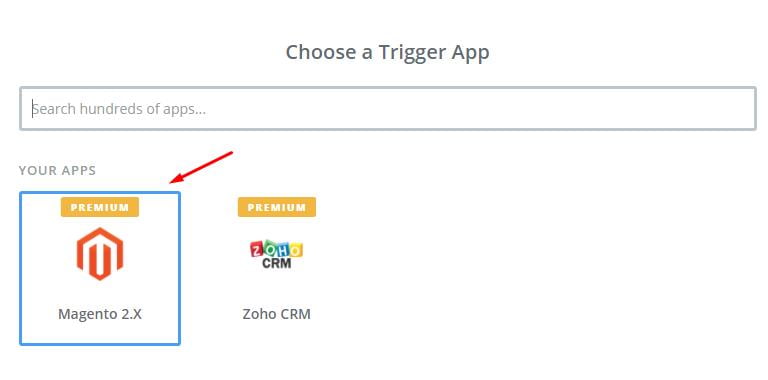
    • Next you have to get all your data from store so for that you need to choose Magento 2.x
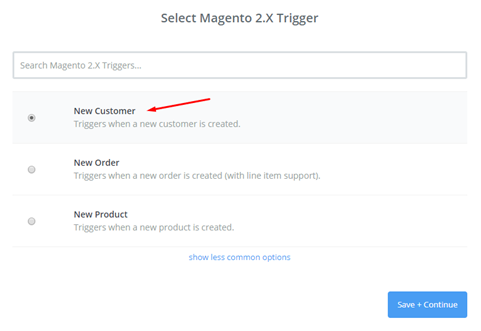
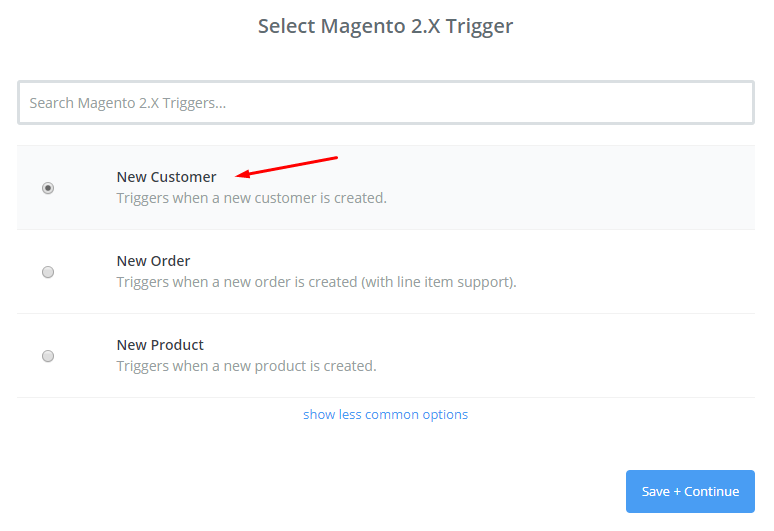
    • Then, choose New Customer  in select Magento 2.x Trigger field and then click on save+continue.
    • After that, you have to connect an Account in select Magento 2.x account field. In this step, make sure to enter full domain, admin username and admin password of your Magento 2 store as the following image:
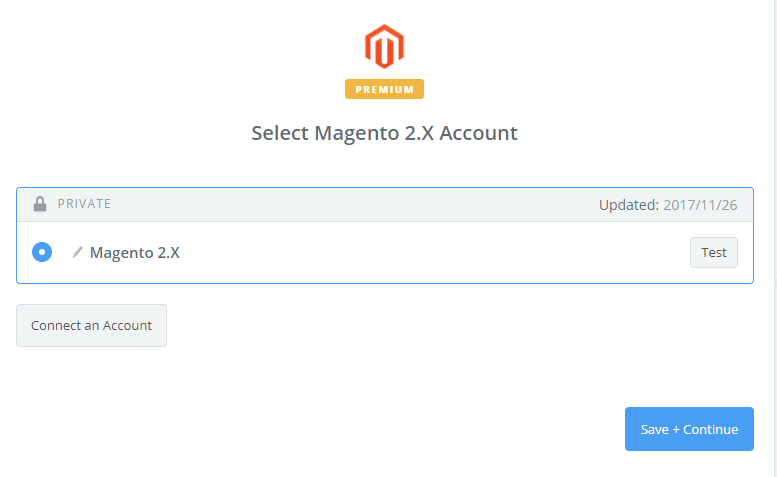
    • After generating your Magento 2.x account, the screen will display as an image below. Then, select Save + Continue.

    Great! You have just tested Magento 2.x successfully. Please continue doing the next step.

    Step 4: Integrate HubSpot CRM

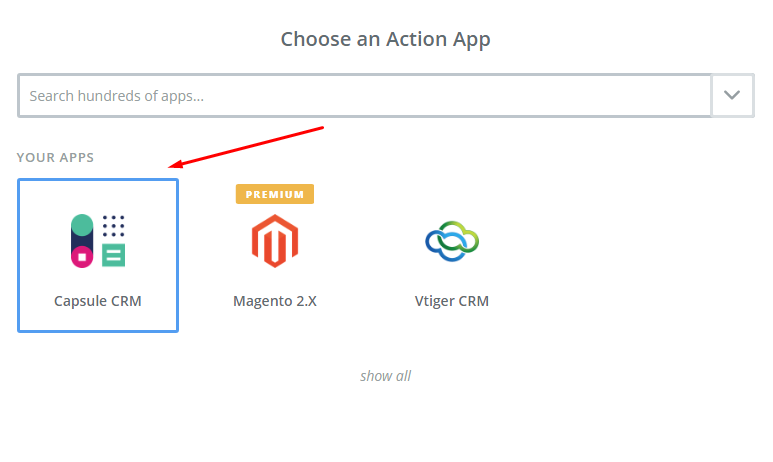
    • In Choose an Action App field, choose HubSpot CRM and then click on Continue.
    • Then, you need to choose one of the options in drop-down list of Select HubSpot CRM Action field. After selecting, click on continue.
    • Next, you need to select HubSpot CRM account and then click on Connect an Account.
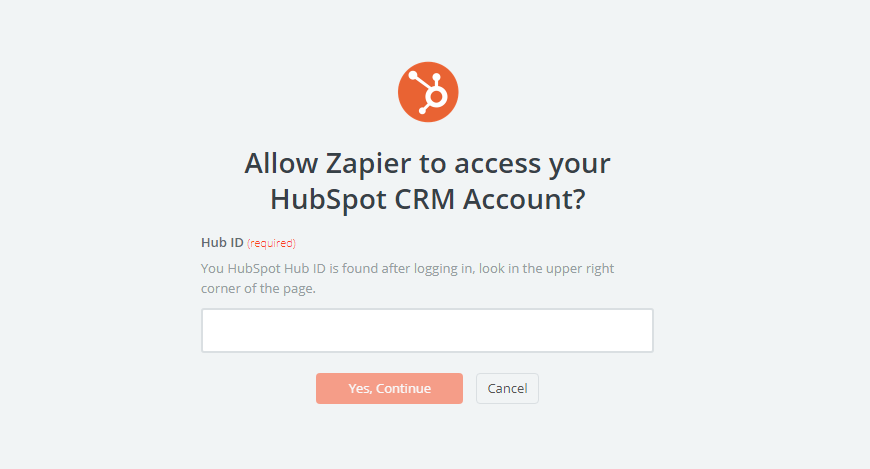
    • Now, your screen will display as an image below in which you must enter Hub ID that is found in user information of the HubSpot CRM account, then click on Yes, Continue.
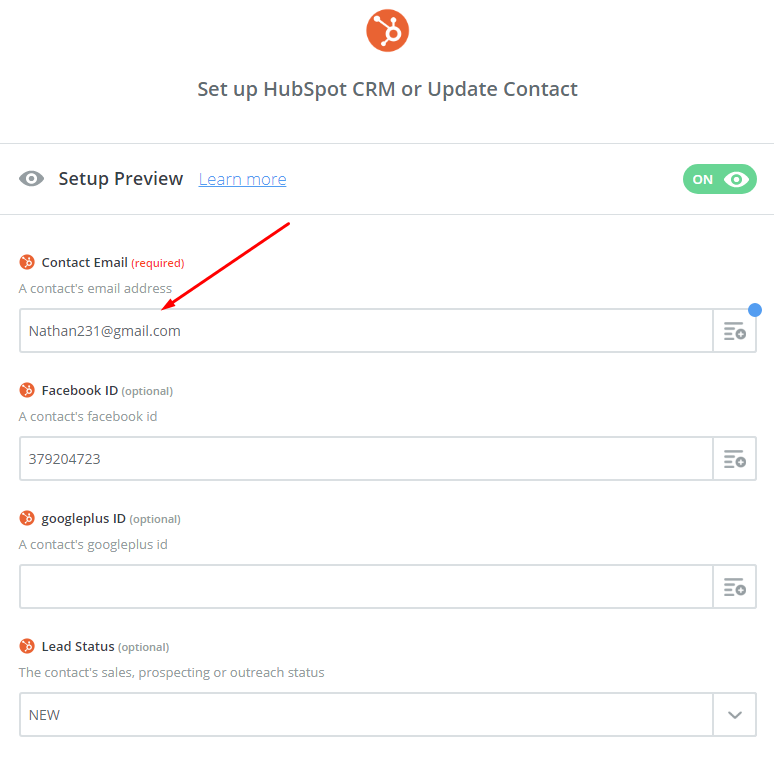
    • Next, you have to set up HubSpot CRM or Update Contact. Now, enter all required fields on this page, then choose continue box.

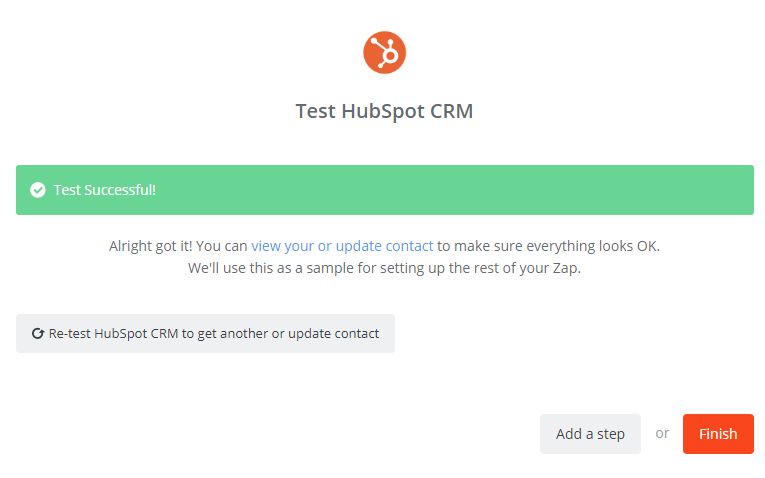
    Wonderful, you have tested HubSpot CRM successfully. Finally, choose Finish and set the name your zap to complete.

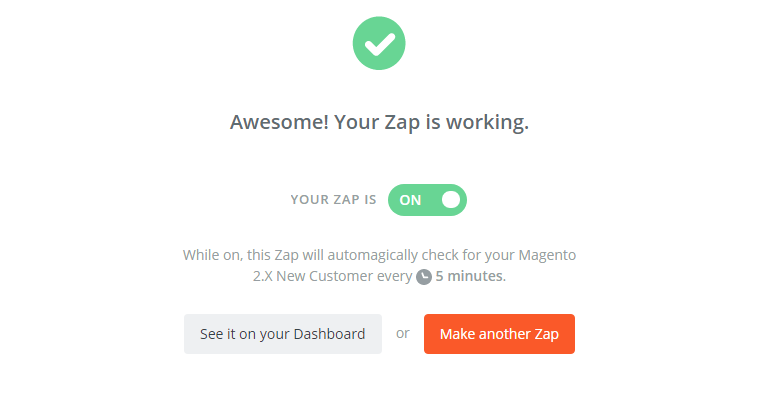
    • Your Zap is working and from now it will auto-check for your Magento 2.x new customer.
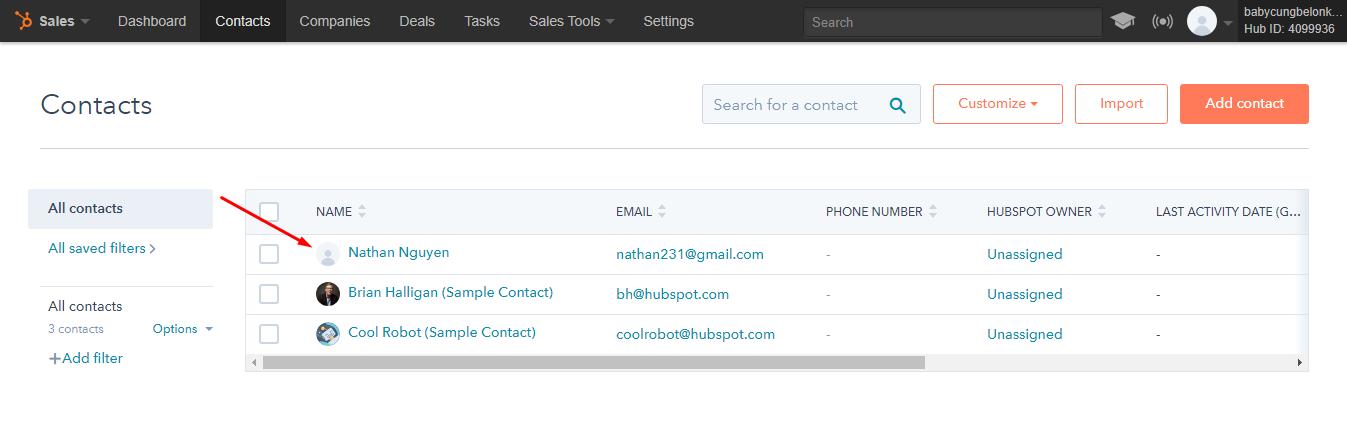
    • So this is how the integration is done and the result is displayed in the following image:

    HubSpot CRM will be your tool to help you boost sales and increase conversion rates significantly. Hence integrate today to see the difference. If you still failed to integrate, then hire Mage Monkeys for the Magento integration service.
    How to integrate Agile CRM with Magento 2?

    Many of our Ecommerce merchant partners have very little to engage with a potential buyer. But With Agile CRM all your queries are resolved. It comes with great benefits and in this article we will share the integration between Magento 2 and Agile CRM.

    What is Agile CRM?

    It is a customer relationship management solution which provides great user experiences through its simple web interface.

    Key Features:

    • It has great functionality for e-commerce stores like sales tracking, contact management, marketing automation, web analytics, and helpdesk with a clean and modern interface.
    • With Agile CRM you can record and access customer data to analyze customer behaviours. Through this, it enables marketers to create smart and logical marketing processes to reach customers quickly.

    How to integrate Agile CRM on Magento 2

    To integrate Agile CRM

    • Step 1: Sign up the Zapier account
    • Step 2: Sign up the Agile CRM account
    • Step 3: Integrate Magento 2.x
    • Step 4: Integrate Agile CRM for your Magento 2 store

    Step 1: Sign up the Zapier account

    • Signup Zapier

    Step 2: Sign up the Agile CRM account

    • Signup Agile CRM
    • After logging into Zapier, choose Make a Zap to start integrating

    Step 3: Integrate Magento 2.x

    • Here you have to choose Magento 2.x so that Zapier can get all data from your store.
    • Then, choose New Customer in select Magento 2.x Trigger field and click on save+continue.
    • Next, you need to connect an Account in select Magento 2.x account field. In this step, you shall enter full domain, admin username and admin password of your Magento 2 store as the following image:
    • After generating your Magento 2.x account, the screen will display as an image below. Then, choose Save + Continue.
    • Awesome! You have just tested Magento 2.x successfully. Now continue doing the next step.

    Step 4: Integrate Agile CRM

    • In Choose an Action App field, choose Agile CRM and then click on Continue.
    • The next step, you need to choose one of the options in drop-down list of Select Agile CRM Action field. After selecting, click on continue.
    • Then, you need to select Agile CRM account and click on Connect an Account.
    • Now, your screen will display as an image below. After that, enter username, API Key or Password and Domain that is required on that page, then click on Yes, Continue.
    • Next, you have to set up Agile CRM Contact and then enter all required fields on page, choose continue box.
    • Wonderful, you have tested Agile CRM successfully. Lastly, choose Finish and set the name your zap to complete.
    • Your Zap is working and from now onwards it will auto-check for your Magento 2.x new customer.
    • You have just done the integration and the image below is the result:

    This is how the integration is done between Agile CRM and Magento 2.

    If you still failed to integrate, then hire Mage Monkeys for the Magento integration service.

    7,339 Magento stores affected through Malware, Did yours too?

    Recently a Dutch security blogger and researcher Willem de Groot has found out that Ecommerce Websites which are using Magento Software have been hit by a dangerous payment skimming malware that has been stealing thousands from the users. The malware is termed as MagentoCore and affecting the Ecommerce sites that are using Magento.

    How many online stores are affected?

    In last six months, the skimmer was installed in more than 7,339 online stores and it’s been affecting more than 50 new websites each day.

    Willem de Groot said “The victim list contains multi-million dollar, publicly exchanged companies, which suggests the malware operators make a handsome profit. But the real sufferers are eventually the customers, who have their card and identity stolen,”

    How does the malware work?

    This malware uses the brute-force attack which means it tries to guess the password of the Magento Admin Panel for months and once the access is obtained then the software will inject a malicious piece of code to the HTML and from them all the keystrokes from the customers on the website are recodes and later the data is sent back to the hacker’s main server. This data is collection of usernames, passwords, credit card information and personal details. In addition to this, there is also a recovery mechanism which deleted the code when it has run.

    Groot has analyzed more than 220,000 websites and 4,2% of them were already leaking user data.

    What you can do?

    If you are store owner and found the MagentoCore.net skimmer in your store then you must ask your ops team or forensic investigator to do the below listed things.

    1. Search for Entry point: you need to analyse the first question that “how could attackers gain unauthorized access? Look for backend logs, correlate with staff IP’s and track their working hours. If you come across any suspicious activity from staff IP’s then it could be that a staff computer is infected with malware, or that the attacker has hijacked an authorized session.

    2. Check any backdoors and unauthorized changes in your database. You might find few in both frontend/backend code and the database.

    3. As soon as you discover all means of unauthorized access make sure to close them all at once.

    4. Eliminate the skimmer, backdoors and other code and if possible then go back to a certified safe copy of the code base. Malware is often hidden in default HTML header/footers and also in minimized, static Javascript files so you should check all HTML/JS assets that are loaded during the checkout process.

    5. A good start will be to execute secure procedures which cover timely patches, strong staff passwords and so on.

    How to Setup Facebook Livechat in Magento 2?

    Do you know customer Chat Facebook is a free application that you can integrate directly into your website for free.

    In this post, we will tell you how to set up Facebook Livechat in Magento 2.

    But first let’s understand What is Facebook Chat and what are its benefits?

    Customer Chat Facebook is a customer chat software that comes with great features such as customer care, consulting, sales, etc directly on Landing Page. All management and customer care is done through Facebook Messenger. It also helps users to chat and receive messages without logging in if the admin sends the message.

    Below are a few simple steps to set up Facebook Chat (Live chat Facebook) for your landing page.

    How to Setup Facebook Livechat in Magento 2

    To Setup Facebook Livechat

    • Step 1: Access your Fanpage > enter your domain path > choose Save
    • Step 2: Copy and paste the code into the </ body> tag of the Landing Page

    Step 1: Access your Fanpage > enter your domain path > choose Save

    In this step, go to your Fanpage > select Settings > click on Messenger Platform.

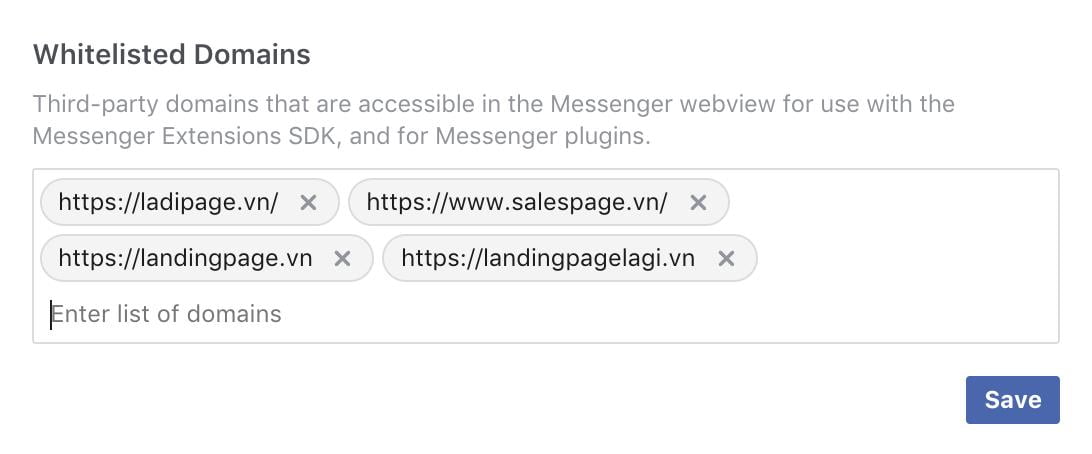
    Now, you enter the path of the domain that you want to use in the Whitelisted Domains field. After that, click on Save to complete.

    Please follow the image below:

    Step 2: Copy and paste the code into the tag of the Landing Page

    • In this step enter the code that you need to copy and paste it into the tag of your Landing Page:
    • Your App ID: Replace with your Facebook App ID and If you don’t have it then create one
    • Page_ID: Replace with the ID code of your Fanpage. You can get page ID

    Wonderful! This is how the integration is done between Facebook Livechat in Magento 2.

    Yes, only in Magento 2, not with any older version.

    With Livechat Facebook Messenger on Landing Page you will be able to use multi-channel marketing strategies. Try it and you won’t be disappointed.

    How To Integrate Workbooks CRM With Magento 2?

    Workbooks is an application which contributes a lot in your Ecommerce store and if it’s not integrated with your Magento store then it’s high time for you to know how to integrate Workbooks CRM with Magento 2.

    First let’s find out

    What is Workbook CRM?

    Workbooks CRM is software that provides necessary tools for merchants and marketers as well as helps them generate leads and sales channels. It also allows you to track the most effective online campaigns through detailed analysis and reports.

    One of the most useful features of Workbooks is it has the ability to integrate with social media and allows you to interact with customers wherever they want.

    In addition to this you can also take advantage of Workbooks’ leading automation and forecasting tools to track your competitor’s business. Thus it can help you to deliver the right marketing campaign for your store business.

    How to integrate Workbooks CRM on Magento 2

    To integrate Workbooks CRM

    • Step 1: Sign up the Zapier account
    • Step 2: Sign up the Workbooks CRM account
    • Step 3: Integrate Magento 2.x
    • Step 4: Integrate Workbooks CRM

    Step 1: Sign up the Zapier account

    • Signup Zapier

    Step 2: Sign up the Workbooks CRM account

    • Signup Workbooks CRM
    • When you log in into Zapier, click on Make a Zap to start integrating.

    Step 3: Integrate Magento 2.x

    • In this step, click on Magento 2.x so that Zapier can collect all the data from your store.
    • Further, click on New Customer in select Magento 2.x Trigger field and then choose save+continue.
    • Next, you need to connect an Account in select Magento 2.x account field. In this step, you have to enter full domain, admin username and admin password of your Magento 2 store as the following image:
    • After creating your Magento 2.x account your screen will display as an image below. Then, click on Save + Continue.

    Great! You have just tested Magento 2.x successfully. Please continue doing the next step.

    Step 4: Integrate Workbooks CRM

    In this step, choose an Action App field, select Workbooks CRM and then click on Continue.

    • In Select Workbooks CRM Action field, you can choose one of the options on this page and click on Continue.
    • Next, you need to select Workbooks CRM account for that click on Connect an Account.
    • Your screen will display as an image below, enter your API key from your Workbooks CRM account that you have signed up and click on Yes, Continue
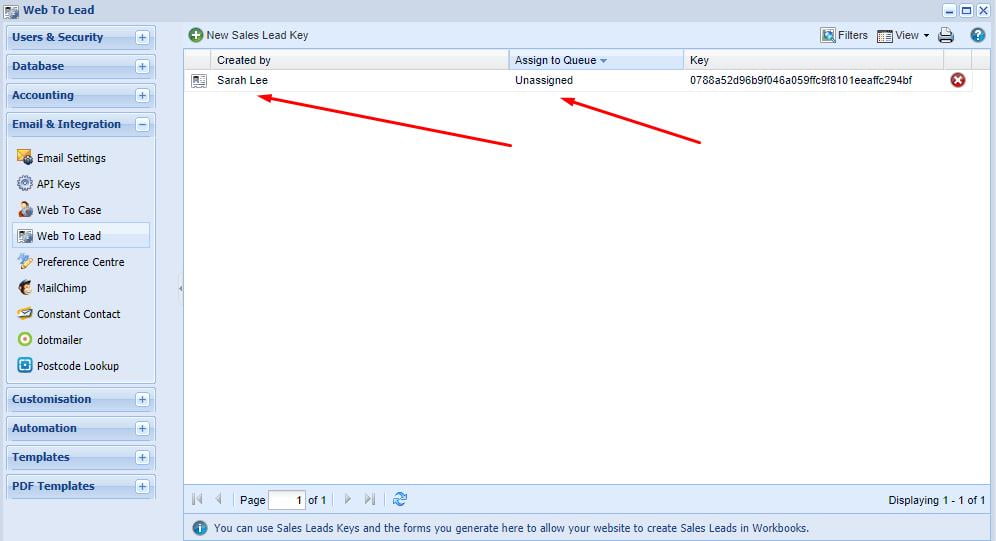
    • Next, you have to set up Workbooks CRM Sales Lead. For this enter all required fields on page, then choose continue box.
    • Wow, you have tested Workbooks CRM successfully. Finally, choose Finish and set the name your zap to complete.
    • Your Zap is working and from now it will auto-check for your Magento 2.x new customer.
    • Below is the result for all the steps you have done.

    Hence this is how we integrate Workbooks CRM with Magento 2.

    If you still failed to integrate, then hire Mage Monkeys for the Magento integration service.