We sacrifice by not doing any other technology, so that you get the best of Magento.

We sacrifice by not doing any other technology, so that you get the best of Magento.

    Add next and previous product pagination on product detail page

    Create a new file nextpreviouspagination.phtml at app/design/frontend/Vendor/theme/Magento_Catalog/templates/product/view/.
    Add following code in this new file:

    <?php 
    
        $productId = $block->getProduct()->getId(); 
        $categoryIds = $block->getProduct()->getCategoryIds();
    
        $objectManager = MagentoFrameworkAppObjectManager::getInstance();
    
        $nxtProduct = $objectManager->create('MagentoCatalogModelProduct');
        $prvProduct = $objectManager->create('MagentoCatalogModelProduct');
    
        $category = $objectManager->create('MagentoCatalogModelCategory')->load($categoryIds[0]);
        $categoryProduct = $category->getProductCollection()->addAttributeToSort('position', 'asc');
        $categoryProduct->addAttributeToFilter('status',1);
        $categoryProduct->addAttributeToFilter('visibility',4);
    
        $categoryProductIds = $categoryProduct->getAllIds();
    
        $position = array_search($productId, $categoryProductIds); // get position of the current product
        $nextPosition = $position+1;
        $previousPosition = $position-1;
        $keys = array_keys($categoryProductIds);
    
        if(in_array($nextPosition, $keys)){
            $nextProduct = $nxtProduct->load($categoryProductIds[$nextPosition]);
        }
        if(in_array($previousPosition, $keys)){
            $previousProduct = $prvProduct->load($categoryProductIds[$previousPosition]);   
        }
    
    ?>
    
    <div class="previous_next">
        <?php if(in_array($previousPosition, $keys)): ?>
            <a href="<?php print_r($previousProduct->getProductUrl()); ?>"><span>Previous </span></a>
        <?php endif; ?>
    
        <?php if(in_array($nextPosition, $keys)): ?>
            <a href="<?php print_r($nextProduct->getProductUrl()); ?>"><span>Next </span></a>
        <?php endif; ?>
    </div>

    Now open this file app/design/frontend/Vendor/theme/Magento_Catalog/layout/catalog_product_view.xml.
    Add following code between body tag of the catalog_product_view.xml file:

    <referenceContainer name="content">
        <block class="MagentoCatalogBlockProductViewDescription" name="product.info.nextpreviouspagination" template="product/view/nextpreviouspagination.phtml" />   
    </referenceContainer>
    
    <move element="product.info.nextpreviouspagination" destination="product.info.main" after="page.main.title"/>


    Why to migrate your shopify shop to Magento 2?

    Let’s understand the main reasons which you can consider for your eCommerce migration.

    • Popularity

    Magento is a licensed platform with a “most popular & widely used eCommerce platform” tag and that is the main reason to migrate to Magento 2, on the other hand, Shopify is a hosted eCommerce platform.

    • Tremendously Elastic

    Being an open-source platform Magento allows you to do modification as per your specific requirements in its existing features.

    • Advanced Customization Opportunities

    Magento 2 lets you set up multiple languages and currencies and also different prices for different customer groups. You can manage different stores from one admin panel.

    • Ownership of Code

    In Magento, you will have all ownership of your code which is not available with Shopify.

    • Numerous Third-Party Extensions

    Magento is rich in providing third party extensions so you can expand your online stores’ by enabling these extensions

    • Pricing

    Magento mainly comes in three editions Magento Commerce (free), Magento Go (hosted), Magento Enterprise (paid). So can select one from these editions as per your budget and specific business needs. In Magento, you won’t be charged for every transaction like Shopify and that’s a big relief.

    • Regular updates from Magento Community

    Magento itself is a large community so you can expect new releases in every few months. The latest versions are completely packed with bug fixes, better features, and other improvements. Apart from this, the Magento community gives you extensive technical support.

    Magento is the most advanced eCommerce platform having more than 500+ free extensions.

    So now you have enough reasons to migrate to Magento 2 from Shopify

    How to migrate?

    People find the migration process quite confusing especially those who don’t possess any technical skills. But it is not at all tedious or complicated. It also depends on your selection.

    We suggest you go for manual migration as the store contains several entities that are very important and you need to do it correctly else you might end up losing your data. The best is to hire Magento developer who will make your data transfer easy. Although this might cost you a little bit be you will have fewer problems with migration accuracy.

    Which Are The Top Magento Ecommerce Mobile App Trends?

    Magento stands first when we talk about a powerful eCommerce platform. Our life revolves around smartphones and mobile apps. We all use mobile apps to search for any products and/or services. Mobile apps give you the complete detail of a product or service like its advantages and various uses.

    Virtual reality e-commerce

    Today the virtual reality to showcase products is in demand. VR lets you explore the showroom visually and you can get a real-life like experience of products.

    Chat and shop

    Artificial Intelligence is increasing day by day to give a superior shopping experience for potential customers. Chatbots are available anytime and are extremely user-friendly. This is very handy for customers as they can get relevant information and guidance while shopping. Artificial Intelligence drives current mobile app features including personalized experience, recommendation engines as well as behavioral targeting. Chatbots are an AI tool that carries out human-like chats with potential customers. The benefit of using them is lower operating expenses as well as improved productivity.

    Mobile Digital Assistants

    Mobile Digital Assistants significantly bring down the time consumed by users in browsing, shipping as well as payment steps.

    Wearables and IoT

    Wearables give stand-alone functionality but at the same time need mobile app services such as calling. Using Wearables and IoT can inspect the product and test it for efficiency as well as effectiveness.

    Voice Search

    Users can verbally communicate with the app instead of typing out lengthy keywords. You can talk and simultaneously do other activities such as driving, walking, and more.

    Augmented Reality

    Augmented Reality lets you create an engaging shopping experience for users. Users can modify and customize selections. AR provides visual comprehend the functionality of any product. The return of products is reduced as users are able to have a 3D experience of selecting the virtual products by augmenting the real products.

    Mobile Wallet Usage

    Mobile wallets are used by everyone today. All thanks to the watertight security offered customers are beginning to trust as well as use this payment option. We all use mobile wallets to make payments for products and/or services. The security and ease of use will only increase in the future making online payment a breeze as well as extremely secure.

    Leveraging cloud technology

    The device which you use cannot store all of the elements of the Magento mobile app. Hence cloud computing comes to the rescue as it makes the app occupy minimum space, save money, deliver faster performance as well as be highly secure and resistant to cyber-attacks or damage to the device.

    mCommerce trends are getting changed day by day. Consult with an experienced Magento Mobile App development company to leverage mobile app benefits.

    Magneto 2: How to set image gallery thumbnail as vertical?

    Here, we will see,  how you can set the thumbnail of fotorama slider in product view page to left as vertical in Magento 2.

    Magento uses the view.xml file for gallery and magnifier theme settings.

    For example, if you are using the default theme luma, you should find the view.xml  at vendor/magento/theme-frontend-luma/etc/view.xml.

    In this file, we can see a variable navdir under <var name=”gallery”> node.

    This variable has the ability to change the thumbnails alignment in Fotorama.

    <var name="navdir"> horizontal</var>

    To set the thumbnails as vertical, you need to change the code as below:

    <var name="navdir"> vertical</var>

    You can define your own custom view.xml file in your theme at app/design/frontend/THEME-VENDOR/THEME/etc/view.xml,  and change navdir as per your requirement.

    How to solve guest order Create Account button not working in Magento 2.2.5

    I have faced the issue in Magento 2.2.5 version.  When I Place the order as a guest user, the “Create Account” button shows a blank error.

    So, I resolved this issue using below steps:

    First, you need to override vendor/magento/module- checkout/Block/Registration.php file in your any existing module.

    To override this file:
    Create new file ‘di.xml‘ at app/code/Vender/Modulename/etc/.

    Add the following code in the newly created file.

    <?xml version="1.0"?>
    <config xmlns:xsi="http://www.w3.org/2001/XMLSchema-instance" xsi:noNamespaceSchemaLocation="urn:magento:framework:ObjectManager/etc/config.xsd">
        <preference for="MagentoCheckoutBlockRegistration" type="VenderModulenameBlockRegistration" />
    </config>

    Then create new file Registration.php at app/code/Vender/Modulename/Block/, then find below code and replace it with new code as mentioned below:

    From:

    /**
         * Retrieve account creation url
         *
         * @return string
         * @codeCoverageIgnore
         */
        public function getCreateAccountUrl()
        {
            return $this->getUrl('checkout/account/delegateCreate');
        }

    To:

    /**
         * Retrieve account creation url
         *
         * @return string
         * @codeCoverageIgnore
         */
        public function getCreateAccountUrl()
        {
            return $this->getUrl('checkout/account/create');
        }


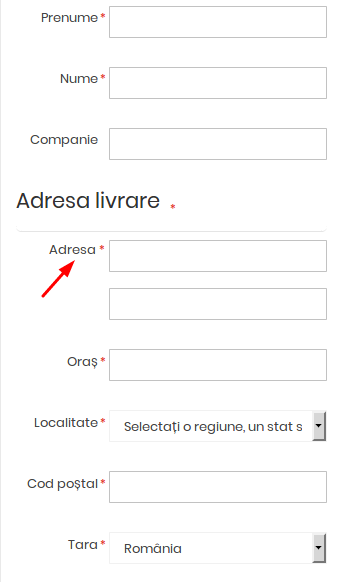
    Add labels of street fields in checkout shipping address also make it required fields

    Magento has a feature to define between 1 and 4 fields, how much do you want to use in the street field?

    I’ve activated 2 fields and would like to add a label for 1 field. I have done this on the checkout shipping address page which you can see in the image below:

    I just do rewriting checkout layout on di.xml :

    <type name="MagentoCheckoutBlockCheckoutLayoutProcessor">
        <plugin name="rewrite-street" type="VendorModuelNameModelCheckoutLayoutProcessorPlugin"/>
    </type>

    And create a new LayoutProcessorPlugin.php file at VendorModuelNameModelCheckoutLayoutProcessorPlugin.php path:

    <?php
    namespace VendorModuleNameModelCheckout;
    
    class LayoutProcessorPlugin
    {
        /**
         * @param MagentoCheckoutBlockCheckoutLayoutProcessor $subject
         * @param array $jsLayout
         * @return array
         */
    
        public function afterProcess(
            MagentoCheckoutBlockCheckoutLayoutProcessor $subject,
            array  $jsLayout
        ) {
            $jsLayout['components']['checkout']['children']['steps']['children']['shipping-step']['children']
            ['shippingAddress']['children']['shipping-address-fieldset']['children']['street'] = [
                'component' => 'Magento_Ui/js/form/components/group',
                'label' => __('Street Address'), // You can change main label from here
                'required' => true, //turn false if you can removed main label
                'dataScope' => 'shippingAddress.street',
                'provider' => 'checkoutProvider',
                'sortOrder' => 30, // You can set short order of street fields from other checkout fields
                'type' => 'group',
                'additionalClasses' => 'street',
                'children' => [
                    [
                        'label' => __('Label 1'), // Here I can set Label "Adresa" as per above image
                        'component' => 'Magento_Ui/js/form/element/abstract',
                        'config' => [
                            'customScope' => 'shippingAddress',
                            'template' => 'ui/form/field',
                            'elementTmpl' => 'ui/form/element/input'
                        ],
                        'dataScope' => '0',
                        'provider' => 'checkoutProvider',
                        'validation' => ['required-entry' => true, "min_text_len‌​gth" => 1], // You can also set "max_text_length"=> 255 in validation
                    ],
                    [
                        'label' => __('Label 2'),
                        'component' => 'Magento_Ui/js/form/element/abstract',
                        'config' => [
                            'customScope' => 'shippingAddress',
                            'template' => 'ui/form/field',
                            'elementTmpl' => 'ui/form/element/input'
                        ],
                        'dataScope' => '1',
                        'provider' => 'checkoutProvider',
                        'validation' => ['required-entry' => false, "min_text_len‌​gth" => 1],
                    ],
                ]
            ];
            return $jsLayout;
        }
    }

    You can do this in any existing module.

    Smartwave Porto theme shows an error like this in browser console and my page does not load properly

    I’m using Smartwave Porto theme for my Magento 2 website. When I load my website for the first time it’s loading properly, but every time I refresh the browser page it will show an error like this in browser console and my page does not load properly:

    Uncaught TypeError: $(...).swMegamenu is not a function
    Uncaught TypeError: $(...).stellar is not a function
    Uncaught TypeError: $(...).owlCarousel is not a function
    Uncaught TypeError: $.widget is not a function

    I just do below changes :

    Create a requirejs-config.js in the root of the child theme (you can also do this on root theme if you have not created a child theme) as per Porto child like this:

    app/design/frontend/Smartwave/porto_child and add the following code in it:

    var config = {
        shim: {
            jquery: {
                exports: '$'
            },
            'Smartwave_Megamenu/js/sw_megamenu':
                {
                    deps: ['jquery']
                }, 
            'owl.carousel/owl.carousel.min':
                {
                    deps: ['jquery']
                },
            'js/jquery.stellar.min': 
                {
                deps: ['jquery']
                },
            'js/jquery.parallax.min':
                {
                deps: ['jquery']
                }
        }
    };

    And also change child theme layout file at:

    app/design/frontend/Smartwave/porto_child/Magento_Theme/layout/default_head_blocks.xml

    From:

    <script src="jquery.js" />
    <script src="bootstrap/js/bootstrap.min.js" />
    <script src="fancybox/js/jquery.fancybox.js" />

    To:

    <remove src="jquery.js" />
    <remove src="bootstrap/js/bootstrap.min.js" />
    <remove src="fancybox/js/jquery.fancybox.js" />

    I don’t need the fancybox, So I have turned it off, but if you require it, I guess it should be included in the requirejs as well. If you face the same issue, follow the above steps to solve it.

    Add Quantity Increment and decrements Button in Magento 2

    Configure Module

    Configure your module by creating a module.xml file at app/code/Magemonkeys/QtyIncrement/etc. Add the following code in it:

    <?xml version="1.0"?>
    <config xmlns:xsi="http://www.w3.org/2001/XMLSchema-instance" xsi:noNamespaceSchemaLocation="urn:magento:framework:Module/etc/module.xsd">
    <module name="Magemonkeys_QtyIncrement" setup_version="1.0.0"></module>
    </config>


    Registration of Module

    Now, register the module by creating registration.php at app/code/Magemonkeys/QtyIncrement, and add the following code in it:

    <?php
    MagentoFrameworkComponentComponentRegistrar::register(
       MagentoFrameworkComponentComponentRegistrar::MODULE,
       'Magemonkeys_QtyIncrement',
       __DIR__
    );


    Copy addtocart.phtml

    Go to vendor/magento/module-catalog/view/frontend/templates/product/view from the root directory of your store and copy addtocart.phtml to your own module app/code /Magemonkeys/QtyIncrement/view/frontend/templates/catalog/product/view

    Edit addtocart.phtml

    <?php
    /**
    * Copyright © 2013-2017 Magento, Inc. All rights reserved.
    * See COPYING.txt for license details.
    */
    // @codingStandardsIgnoreFile
    /** @var $block MagentoCatalogBlockProductView */
    ?>
     
    <?php $_product = $block->getProduct(); ?>
    <?php $buttonTitle = __('Add to Cart'); ?>
    <?php if ($_product->isSaleable()): ?>
    <div class="box-tocart">
       <div class="fieldset">
           <?php if ($block->shouldRenderQuantity()): ?>
           <div class="field qty">
               <label class="label" for="qty"><span><?php /* @escapeNotVerified */ echo __('Qty') ?></span></label>
     
    <script type="text/x-magento-init">
    {
       "*": {
               "Magento_Ui/js/core/app": {
                   "components": {
                       "qty_change": {
                           "component": "Magemonkeys_QtyIncrement/js/view/product/view/qty_change",
                           "defaultQty": <?php echo $block->getProductDefaultQty() * 1 ?>
                       }
                   }
               }
       }
    }
    </script>
     
    <div class="control" data-bind="scope: 'qty_change'">
       <button data-bind="click: decreaseQty">-</button>
       <input  data-bind="value: qty()"
       type="number"
       name="qty"
       id="qty"
       maxlength="12"
       title="<?php echo __('Qty') ?>"
       class="input-text qty"
       data-validate="<?php echo $block->escapeHtml(json_encode($block->getQuantityValidators())) ?>"
       />
     
       <button data-bind="click: increaseQty">+</button>
    </div>
           </div>
           <?php endif; ?>
           <div class="actions">
               <button type="submit"
                       title="<?php /* @escapeNotVerified */ echo $buttonTitle ?>"
                       class="action primary tocart"
                       id="product-addtocart-button">
                   <span><?php /* @escapeNotVerified */ echo $buttonTitle ?></span>
               </button>
               <?php echo $block->getChildHtml('', true) ?>
           </div>
       </div>
    </div>
    <?php endif; ?>
    <script type="text/x-magento-init">
       {
           "#product_addtocart_form": {
               "Magento_Catalog/product/view/validation": {
                   "radioCheckboxClosest": ".nested"
               }
           }
       }
    </script>
    <?php if (!$block->isRedirectToCartEnabled()) : ?>
    <script type="text/x-magento-init">
       {
           "#product_addtocart_form": {
               "catalogAddToCart": {
                   "bindSubmit": false
               }
           }
       }
    </script>
    <?php endif; ?>

    Create qty_change.js

    Now, create qty_change.js at app/code/Magemonkeys/QtyIncrement/view/frontend/web/js/view/product/view. Add the following code in it:

    define([
       'ko',
       'uiComponent'
    ], function (ko, Component) {
       'use strict';
       return Component.extend({
           initialize: function () {
               //initialize parent Component
               this._super();
               this.qty = ko.observable(this.defaultQty);
           },
           decreaseQty: function() {
               var newQty = this.qty() - 1;
               if (newQty < 1) 
               {
                   newQty = 1;
               }
               this.qty(newQty);
           },
           increaseQty: function() {
               var newQty = this.qty() + 1;
               this.qty(newQty);
           }
       });
    });

    Create catalog_product_view.xml

    Lastly, just create catalog_product_view.xml  at app/code/Magemonkeys/QtyIncrement/view/frontend/layout. Add the following code in it:

    <?xml version="1.0"?>
    <page layout="1column" xmlns:xsi="http://www.w3.org/2001/XMLSchema-instance" xsi:noNamespaceSchemaLocation="urn:magento:framework:View/Layout/etc/page_configuration.xsd">
       <body>
           <referenceBlock name="product.info.addtocart">
               <action method="setTemplate">
                   <argument name="template" xsi:type="string">Magemonkeys_QtyIncrement::catalog/product/view/addtocart.phtml</argument>
               </action>
           </referenceBlock>
           <referenceBlock name="product.info.addtocart.additional">
               <action method="setTemplate">
                   <argument name="template" xsi:type="string">Magemonkeys_QtyIncrement::catalog/product/view/addtocart.phtml</argument>
               </action>
           </referenceBlock>
       </body>
    </page>

    Run the Commands

    Go to the root directory of your store by using SSH terminal and run the following commands:

    rm -rf var/di var/generation var/cache/* var/log/* var/page_cache/*
    
    php bin/magento module:enable Magemonkeys_QtyIncrement
    
    php bin/magento setup:upgrade
    
    php bin/magento setup:di:compile
    
    php bin/magento indexer:reindex
    
    php bin/magento cache:clean
    
    php bin/magento cache:flush

    Now, go to the product page and you will see the result:

    Restrict Payment Method based on Shipping Method

    I need Cash On Delivery payment method when the customer selects a Store Pick up Shipping method during the checkout process. You can do this using “payment_method_is_active“ event:

    Create an events.xml file at:
    /app/code/Vendor/Modulename/etc/. Add the following code in this file:

    <?xml version="1.0"?>
    <config xmlns:xsi="http://www.w3.org/2001/XMLSchema-instance" xsi:noNamespaceSchemaLocation="urn:magento:framework:Event/etc/events.xsd">
        <event name="payment_method_is_active">
            <observer name="codpaymentdisableregion" instance="VendorModulenameObserverPaymentactive" />
        </event>
    </config>

    And create Paymentactive.php file at
    Vendor/ModuelName/Observer/path. Add the following code in this file:

    <?php
    namespace VendorModuelNameObserver;
    
    use MagentoFrameworkEventObserverInterface;
    
    class Paymentactive implements ObserverInterface 
    {
        protected $_checkoutSession;
    
        public function __construct(MagentoCheckoutModelSession $checkoutSession) {
            $this->_checkoutSession = $checkoutSession;
        }
        public function execute(MagentoFrameworkEventObserver $observer) {
            $objectManager = MagentoFrameworkAppObjectManager::getInstance();
    
            $_session = $objectManager->get('MagentoCheckoutModelSession');
            $method = $observer->getEvent()->getMethodInstance();
            $result = $observer->getEvent()->getResult();


            $shippingMethod = $_session->getQuote()->getShippingAddress()->getShippingMethod();
            
            if($_session->getQuote()->getShippingAddress()->getShippingMethod()=='storepickup_storepickup' && $method->getCode()=="cashondelivery")
            {
                return $result->setData('is_available', true);
            }
            
            if(strpos($shippingMethod,'ups_') !== false && $method->getCode()=="paypal_express")
            {
                return $result->setData('is_available', true);
            }
            
            return $result->setData('is_available', false);
        }
    }
    

    You need to replace “storepickup_storepickup” with your shipping code and “cashondelivery” or “ paypal_express” with your payment method code.

    Top 5 E-Commerce CRM Software For Your Business

    Today we can shop from anywhere and all thanks to Ecommerce. Business owners make use of strong marketing tools for their products but they should also remember that Customer Relationship Management Software is equally important.

    What is Customer Relationship Management software?

    Designed for owners to monitor the relationship between enterprises and customers. The software helps in learning their habits and needs. With this software you can constantly update customer data and also store their data safely in the system database management in a systematic way. You can even use data detection tool to analyze and prepare a list of types of customers to build a proper customer care strategies. CRM will handle all your customer related issues quickly and efficiently.

    Below we have mentioned the current top 5 customer management software.

    1. Salesforce CRM

    Salesforce CRM lets merchants to manage customer information by using a well-designed and user friendly interface. You can collect comprehensive information based a single customer like name, contact number, e-mail, etc. Plus, it also shows the information of business and finance data which is collected from the interaction with customer.

    2. Zoho CRM

    Zoho CRM is affordable solution which can handle your customer information. It can easily solve the basic problem of managing and building customer relationships. Due to its sufficient basic features for customer management it manages to hold current position. As compare to Salesforce it lacks in advanced features therefore most of their customers are small and medium enterprises.

    3. Sage CRM

    Sage CRM is a information management software that can store contact details, history, notes and files. It can also integrate with social network profile to connect with your customers. It can store countless contact information. You can also integrate it with Microsoft Outlook or with Google contacts. Though it is useful in many ways but somewhere its software is bit confusing as there are number of options available to manage contacts.

    4. Insightly CRM

    Insightly is quite different from the other software. You can easily set up and navigate the information. It’s the ideal choice for online business model of small scale. The performance is good because of the integration with Google apps, Gmail and Google Drive. It is trusted by many merchants around the globe. You can find insightly on iOS and Android phones.

    5. Microsoft Dynamics 365

    Microsoft Dynamics CRM can track an email account, a contact or any other opportunity to increase the sales. It can be fully integrated with Microsoft 365 suite. For the application like outlook and office using this CRM can be a biggest advantage. It works on iOS, Android and old windows phones. Its customer care software is bit complicated in terms of user interface more specifically on browser versions.

    We hope this article has helped you to know the best CRM software available today.