We sacrifice by not doing any other technology, so that you get the best of Magento.

We sacrifice by not doing any other technology, so that you get the best of Magento.

    How to add additional text before attribute in Magento 2

    If you want to display brand attribute value in the product view page,  You can use the following code:

    <referenceContainer name="product.info.main">
        <block class="MagentoCatalogBlockProductViewDescription" name="product.info.brand" template="product/view/attribute.phtml" before="-">
            <arguments>
                <argument name="at_call" xsi:type="string">getBrand</argument>
                <argument name="at_code" xsi:type="string">brand</argument>
                <argument name="css_class" xsi:type="string">brand</argument>
                <argument name="at_label" xsi:type="string">none</argument>
                <argument name="add_attribute" xsi:type="string">itemprop="brand"</argument>
            </arguments>
        </block>
    </referenceContainer>

    Also If you need to display text before this attribute value in the product page something like:

    Brand: Apple

    For that you need to change ‘none’ to ‘default’ as shown below in ‘at_label’ :

    From:

    <argument name="at_label" xsi:type="string">none</argument>

    To:

    <argument name="at_label" xsi:type="string">default</argument>

    Now you can see product attribute value with it’s label in the product page.

    How to Add Comment Text for Product Attributes in Magento 2 Backend

    Default Magento comes with various functionality along with some helper text which makes that functionality easier to understand for the users.

    As the name suggests, Helper text is designed to help the users and default Magento contains builtin “attribute” class that let you add comment or note easily beside the option for the better understanding to product users.

    Here, I share the Easiest way to add your own comment along with product attribute, all you need to add the following code to InstallData.php file which is available at below path:

    appcodeVendorExtensionSetupInstallData.php

    <?php
    namespace VendorpExtensionSetup;
    use MagentoEavSetupEavSetupFactory;
    use MagentoFrameworkSetupInstallDataInterface;
    use MagentoFrameworkSetupModuleContextInterface;
    use MagentoFrameworkSetupModuleDataSetupInterface;
    
    class InstallData implements InstallDataInterface
    {
    	private $eavSetupFactory;
    	public function __construct(EavSetupFactory $eavSetupFactory)
    	{
                   $this->eavSetupFactory = $eavSetupFactory;
    	}
               	
               public function install(ModuleDataSetupInterface $setup, ModuleContextInterface $context)
    	{
                   $setup->startSetup();
       	
                   $eavSetup = $this->eavSetupFactory->create(['setup' => $setup]);
                   $eavSetup->addAttribute(
                                               	MagentoCatalogModelProduct::ENTITY,
                                               	'your_attribute_id',
                                               	[
                                                               	'type' => 'text',
                                                               	'label' => 'Attribute Label',
                                                               	'input' => 'text',
                                                               	'required' => false,
                                                               	'sort_order' => 4,
                                                               	'global' => MagentoEavModelEntityAttributeScopedAttributeInterface::SCOPE_GLOBAL,
                                                               	'group' => 'Attribute Groupe',
                                                               	'note' => 'Attribute Comment'
                                               	]
                               	);
           $setup->endSetup();
    	}
    }


    Hope this blog will help you to add comment text for product attributes.

    Here Comes The Magento 2. 3 With New Tools To Fuel Your Growth In 2019

    2018 has been a great year for Magento, for its merchants, and for the community. To help you continue that success in 2019, Magento has announced its latest version. Yes, you read correctly. Magento 2.3.0 is here with new tools to help merchants fuel their growth while empowering developers to deliver on client expectations faster and more easily.

    MULTI-SOURCE INVENTORY

    Merchants grow and evolve and so do their ways of sell, store and deliver their products. Multi-Source Inventory (MSI) provides merchants with better operational efficiency by managing inventory across multiple physical locations from within the Magento admin,

    Along with this, merchants can also do the following:

    • The merchant can assign products and quantities to each fulfillment source like warehouses, stores, distribution centers or third-party drop shippers.
    • Track inventory at each source for easier management of inventory.
    • Streamline operations with rules to prioritize and automatically control the inventory sources that are used to fulfill orders for each website in real- time.
    • Integrate with third-party inventory systems

    What about the merchant with a single inventory?

    The merchant with a single inventory source will also get benefited from MSI with an inventory reservation system that tracks deductions from the saleable product stock when customers add products to carts. This results in accurate quantity counts and high performing checkouts that improve conversion rates.
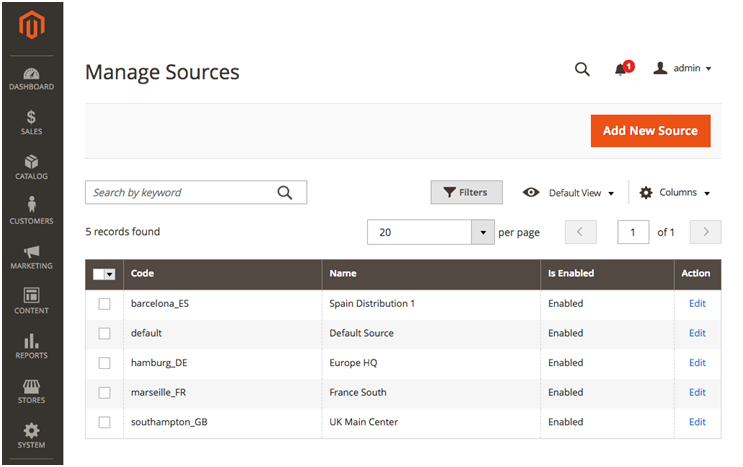
    Multi-Source Inventory will improve your operations.

    PWA Studio

    In 2019, Smartphones penetration is expected to reach 90% with nearly three-quarters of consumers engaging in mobile shopping. Progressive Web Apps will allow merchants to deliver a superior mobile experience which will boost conversion rates and also increase engagement. With PWA Studio it will be faster and cheaper to build Magento-powered PWA experiences.

    PWA Studio will allow merchants to deliver app-like mobile commerce that is fast, integrated, and reliable. These experiences are proven to advance SEO and to drive 50% higher conversion rates and also 50% better page performance on average. PWA Studio also speeds time to market and lowers the total cost of ownership as it is designed with the developer in mind using reference themes, guided development, and open web standards

    As an open source initiative, PWA Studio will have regular updates that are independent of Magento releases and it will rapidly add new features, reference theme enhancements, and quality improvements. With developers and partners already building PWAs we are looking forward to the future of front-end development on Magento.
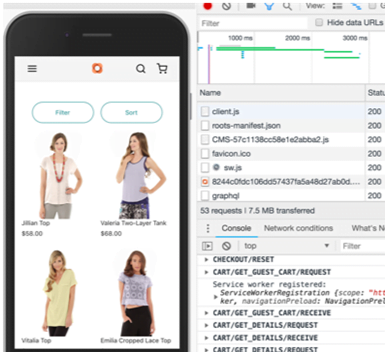
    Deliver app-like shopping experiences in the mobile browser

    PAGE BUILDER

    Creating pages and managing site content using HTML and CSS has become a history now. Available for all our Magento Commerce, Page Builder introduces an intuitive, drag-and-drop interface; a powerful set of content types like images, videos, and banners; and instant preview capabilities that enable non-technical users to take control of their content. So now you can create new pages, enrich products and categories, and launch content updates quickly and easily. All of them can be done without the help of a front-end web developer.

    It has a flexible grid system which lets you to position page elements in a highly customizable way and in-context text editing streamlines the whole process. Even the appearance and behavior of content types can be quickly tuned to accommodate any design.

    Page Builder is completing integrated with existing Magento functionality like media gallery and widgets so now you can incorporate these assets into your pages. You can also use Page Builder to create dynamic content blocks used throughout your site, and also schedule content to go live in the future with content staging and preview.

    Currently, Page Builder has limited availability for our Early Adopter Program. If Magento Commerce customers are interested in being an Early Adopter then they can contact PageBuilderEAP@adobe.com to request access. Page Builder will be Generally Available for all Magento Commerce customers as part of the upcoming Magento 2.3.1 release.
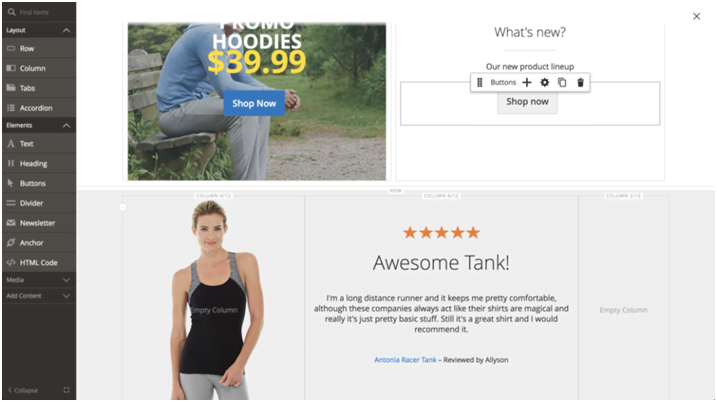
    Now create and manage site content with an intuitive, powerful drag-and-drop.

    Additional Updates

    In addition to these new features included with the latest release, Magento 2.3.0 also delivers updates and enhancements across the entire platform:

    • Magento Shipping: It has an added support for new fulfillment options and expanded global availability.
    • GraphQL: It includes flexible and performant storefront API with rich developer tooling which is integrated into the Magento API ecosystem. Hence, developers can easily query specific data elements from APIs in a single request. GraphQL’s focused responses allow faster and more predictable presentation results that too even on slow networks.
    • Asynchronous & Bulk Web APIs: A New scalable APIs provides better control over the timing and execution visibility of API calls, at a greater volume so now you don’t have to wait for all previous operations to complete thus providing a faster performance.
    • Declarative Schema: Effortless upgrade and installation process by allowing developers to declare the final desired state of the database and have the system adjust to it automatically, without performing redundant operations.
    • Improved indexing performance: Sharding and parallel processing of indexers reduces indexation times by over 60% to support larger sites and quicker product updates.
    • New security tools: A better security for your stores and also prevents fake logins with Google ReCAPTCHA and Two Factor Authentication.

    We are happy to end 2018 with a new set of powerful tools and we are excited to continue growing with your business into the New Year!

    Magento 2: Create New Table in Database

    Follow below step to create a new table in Magento 2 Database.

    1. Create a new file InstallSchema.php,  in your existing module -> Setup folder.
    2. Paste the following code in this new file.
    <?php 
    namespace VenderModulenameSetup;
     
    use MagentoFrameworkSetupInstallSchemaInterface;
    use MagentoFrameworkSetupModuleContextInterface;
    use MagentoFrameworkSetupSchemaSetupInterface;
     
    class InstallSchema implements InstallSchemaInterface
    {
     
        public function install(
            SchemaSetupInterface $setup,
            ModuleContextInterface $context
        ) {
     
            $tableobj = $setup->getConnection()->newTable($setup->getTable('contact_info'));
     
            $tableobj->addColumn(
                'entity_id',
                MagentoFrameworkDBDdlTable::TYPE_INTEGER,
                null,
                ['identity' => true,'nullable' => false,'primary' => true,'unsigned' => true,],
                'Entity ID'
            );
     
            $tableobj->addColumn(
                'first_name',
                MagentoFrameworkDBDdlTable::TYPE_TEXT,
                50,
                [],
                'first_name'
            );
    
            $tableobj->addColumn(
                'last_name',
                MagentoFrameworkDBDdlTable::TYPE_TEXT,
                50,
                [],
                'last_name'
            );
     
            $tableobj->addColumn(
                'phone',
                MagentoFrameworkDBDdlTable::TYPE_TEXT,
                15,
                [],
                'phone'
            );
     
            $tableobj->addColumn(
                'email',
                MagentoFrameworkDBDdlTable::TYPE_TEXT,
                50,
                [],
                'email'
            );
     
            $setup->getConnection()->createTable($tableobj);
        }
    }
    

    How Does Magento Payments Reduce Abandon Rate?

    Online shopping cart dereliction is consistently increasing in the E-commerce industry. As per the recent survey, we can say that almost 8 in 10 customers steer away from the website without purchasing anything.

    But, what are the reasons? Reasons we found apart from perplexing designs, long and confusing checkout, data insecurity, etc., a convoluted payment system can also have a negative impact on conversion issues. So, to have a payment system which will be easy to operate and will open a wide range of payment methods, we have Magento Payments.

    How can Magento Payments increase the conversion rates?

    Magento says, “Magento Payments will influence the industry-leading technology of Braintree and PayPal to entitles the traders to have a wide range of payment methods, including local and region-specific, to improve conversions and eliminate the hurdles concluding an online sale.”

    As per the company, global e-commerce will increase from $2.3 trillion of 2017 to around $4.9 trillion by 2021 which will open good gates of opportunities for online traders. Magento payments give a hassle-free shopping experience as it provides Braintree payment, Signifyd fraud protection, and PayPal Checkout

    Advantages of Magento Payments:

    • It is away more easy to set up and use by the store owners.
    • Directly from Magento Admin panel, you will get a hassle-free payment system and for that, you don’t have to make a third-party account.
    • It gives a clear picture of processed volumes, payment balance and also provides in detail transaction reports all together making it much easier for local traders.
    • One doesn’t have to look for paying to expertise and subscription.
    • The number of manual mistakes which are found between the data mapping will get reduced as everything is automatic.
    • Retailers can manage cash flow easily with a new feature- automatic synchronization of payments and order information in the Magento Admin.

    What about Payment security?

    Magento will link up with Fraud Guarantee to create a strapping security protocol which will alleviate the damage caused by fraudulent acts.

    This indeed is a top-notch service of Magento and it will be up in the market by the beginning of 2019

    How to solve Magento 2 full screen image close button not working in iOS device

    Magento ver. 2.2.2 on an iOS device, go to a product page that contains an image in the fotorama gallery.

    The expected result would be the image for the product in the fotorama gallery box. When I click on the close icon on an iPhone or iPad nothing happens. Hooked the device to my iMac to debug and there are no errors visible in the console.

    I fixed this issue with below steps, let’s check it here.

    Override gallery.js in your custom theme at app/design///web/fotorama/gallery.js. 

    You can copy this file from /lib/web/mage/gallery/gallery.js and replace code as mentioned below.

    From:

    if (this.isTouchEnabled) {
       this.settings.$element.on('tap', '.fotorama__stage__frame', 
       function () {
        var translate = getTranslate($(this).parents('.fotorama__stage__shaft'));
    
        if (translate[1] === '0' && !$(this).hasClass('fotorama-video-container')) {
            self.openFullScreen();
            self.settings.$pageWrapper.hide();
        }
       });
    }

    To:

    if (this.isTouchEnabled && this.settings.isFullscreen) {
                this.settings.$element.on('tap', '.fotorama__stage__frame', function () {
                    var translate = getTranslate($(this).parents('.fotorama__stage__shaft'));
    
                    if (translate[1] === '0' && !$(this).hasClass('fotorama-video-container')) {
                       self.openFullScreen();
                       self.settings.$pageWrapper.hide();
                    }
                });
            }

    This problem is based on lib/web/mage/gallery/gallery.js file.

    Magento 2: Display configurable product attribute value counts on product listing

    Follow below steps to display configurable product specific attribute values count on product listing page in Magento 2.

    First, you need to override vendor/magento/module-catalog/Block/Product/ListProduct.php file in your existing module.

    To override this file:

    Create new file ‘di.xml’ at this path ->  app/code/Vender/Modulename/etc/. Add the following code in this new file:

     <?xml version="1.0"?>
    <config xmlns:xsi="http://www.w3.org/2001/XMLSchema-instance" xsi:noNamespaceSchemaLocation="urn:magento:framework:ObjectManager/etc/config.xsd">
    <preference for="MagentoCatalogBlockProductListProduct" type="VenderModulenameBlockProductListProduct" />
    </config>

    Then create a new file named ‘ListProduct.php’ at app/code/Vender/Modulename/Block/Product/.

    Add the following code in this new file:

    <?php
    namespace VenderModulenameBlockProduct;
    
    class ListProduct extends MagentoCatalogBlockProductListProduct {
    
    public function getProductDetailsHtml(MagentoCatalogModelProduct $product) {
           $html = '';
           $renderer = $this->getDetailsRenderer($product->getTypeId());
            if ($renderer) {
                if ($product->getTypeId() == MagentoConfigurableProductModelProductTypeConfigurable::TYPE_CODE) {
                    $options = array();
                    $productColor = array();
                    $data = $product->getTypeInstance()->getConfigurableOptions($product);
                    foreach ($data as $attr) {
                        foreach ($attr as $p) {
    
                            if ($p['attribute_code'] == 'color') {
                                if (!in_array($p['option_title'], $productColor)) {
                                    $productColor[] = $p['option_title'];
                                }
                            }
                        }
                     }
                    $html = '<p> ' . count($productColor) . ' </p>';
                 }
                 $renderer->setProduct($product);
                 return $html . $renderer->toHtml();
             }
             return '';
         }
    
    }
    
    ?>

    How to Override Model in Magento 2

    Configuration of Module

    Create module.xml file at app/code/Magemonkeys/RewriteProduct/etc and add the following code inside this file:

    <?xml version="1.0"?>
    <config xmlns:xsi="http://www.w3.org/2001/XMLSchema-instance" xsi:noNamespaceSchemaLocation="urn:magento:framework:Module/etc/module.xsd">
    <module name="Magemonkeys_RewriteProduct" setup_version="1.0.1">
    </module>
    </config>


    Registration of Module

    Create registration.php file at app/code/Magemonkeys/RewriteProduct and add the following code inside this file:

    <?php
    
    MagentoFrameworkComponentComponentRegistrar::register(
    MagentoFrameworkComponentComponentRegistrar::MODULE,
    'Magemonkeys_RewriteProduct',
    __DIR__
    );


    Override di.xml

    Create di.xml file at app/code/Magemonkeys/RewriteProduct/etc in order to specify which model to override by using <preference for=””>  and <preference type=””>.

    Add the following code inside dl.xml file: The purpose of creating this file is to override di.xml file

    <?xml version="1.0"?>
    <config xmlns:xsi="http://www.w3.org/2001/XMLSchema-instance" xsi:noNamespaceSchemaLocation="urn:magento:framework:ObjectManager/etc/config.xsd">
    <preference for="MagentoCatalogModelProduct" type="MagemonkeysRewriteProductModelCatalogProduct" />
    </config>

    Override Product.php

    Now, create Product.php file at app/code/Magemonkeys/RewriteProduct/Model/Catalog and add the following code in this file.

    <?php
    
    namespace MagemonkeysRewriteProductModelCatalog;
    
    class Product extends MagentoCatalogModelProduct
    
    {
       public function getName()
       {
           return $this->_getData(self::NAME) . ' + Override Model - Name';
       }
    
    public function getSku()
       {
           return "123-Override Model - Sku";
       }
    }

    Launch SSH and Run Commands

    Run the following commands in the Magento 2 root directory:

    php bin/magento module:enable Magemonkeys_RewriteProduct
    php bin/magento setup:upgrade
    php bin/magento setup:di:compile
    php bin/magento cache:clean
    php bin/magento cache:flush

    Now, it’s time to check the result!

    Go to the product page and you should see as below:

    How to Override Block in Magento 2

    Configure Module

    Create module.xml at app/code/Magemonkeys/RewriteContact/etc and add the following code inside it:

    <?php
    MagentoFrameworkComponentComponentRegistrar::register(
    MagentoFrameworkComponentComponentRegistrar::MODULE,
    'Magemonkeys_RewriteContact',
    __DIR__
    );

    Override di.xml File

    Now, I will override di.xml file. Create di.xml at app/code/Magemonkeys/RewriteContact/etc and add following code in the dl.xml file.

    <?xml version="1.0"?>
    <config xmlns:xsi="http://www.w3.org/2001/XMLSchema-instance" xsi:noNamespaceSchemaLocation="urn:magento:framework:ObjectManager/etc/config.xsd">
    <preference for="MagentoContactBlockContactForm" type="MagemonkeysRewriteContactBlockContactForm" />
    </config>

    Override Contact Form

    It’s time to override contact form. Create ContactForm.php at app/code/Magemonkeys/RewriteContact/Block and add following code in this newly created file:

    <?php
    namespace MagemonkeysRewriteContactBlock;
    use MagentoFrameworkViewElementTemplate;
    class ContactForm extends MagentoContactBlockContactForm{
    
    public function getText() 
    { 
    return "Override Contact Block"; 
    }
    }

    Override contact_index_index.xml

    Create contact_index_index.xml at app/code/Magemonkeys/RewriteContact/view/frontend/layout and add following code in this file:

    <?xml version="1.0"?>
    <page xmlns:xsi="http://www.w3.org/2001/XMLSchema-instance" layout="1column" xsi:noNamespaceSchemaLocation="urn:magento:framework:View/Layout/etc/page_configuration.xsd">    
       <body>     
          <referenceBlock name="contactForm" remove="true"/>   
           <referenceContainer name="content">
               <block class="MagentoContactBlockContactForm" name="customContactForm" template="Magemonkeys_RewriteContact::form.phtml" />
           </referenceContainer>
       </body>
    </page>

    Override form.phtml

    Go to vendor/magento/module-contact/view/frontend/templates from the root directory of your store and copy the form.phtml file to app/code/Magemonkeys/RewriteContact/view/frontend/templates folder.

    Now, you just need to update the form.phtml by adding following code:

    <?php
    /**
    * Copyright © 2013-2017 Magento, Inc. All rights reserved.
    * See COPYING.txt for license details.
    */
    // @codingStandardsIgnoreFile
    ?>
    
    <form class="form contact"
    
         action="<?php /* @escapeNotVerified */ echo $block->getFormAction(); ?>"
    
         id="contact-form"
    
         method="post"
    
         data-hasrequired="<?php /* @escapeNotVerified */ echo __('* Required Fields') ?>"
    
         data-mage-init='{"validation":{}}'>
    
       <fieldset class="fieldset">
           <legend class="legend"><span><?php /* @escapeNotVerified */ echo __('Write Us') ?></span></legend><br />
           <div class="field note no-label"><?php /* @escapeNotVerified */ echo __('Jot us a note and we’ll get back to you as quickly as possible.') ?></div>
    <div class="field note no-label"><?php echo $block->getText(); ?></div>
           <div class="field name required">
               <label class="label" for="name"><span><?php /* @escapeNotVerified */ echo __('Name') ?></span></label>
               <div class="control">
                   <input name="name" id="name" title="<?php /* @escapeNotVerified */ echo __('Name') ?>" value="<?php echo $block->escapeHtml($this->helper('MagentoContactHelperData')->getPostValue('name') ?: $this->helper('MagentoContactHelperData')->getUserName()) ?>" class="input-text" type="text" data-validate="{required:true}"/>
               </div>
           </div>
           <div class="field email required">
               <label class="label" for="email"><span><?php /* @escapeNotVerified */ echo __('Email') ?></span></label>
               <div class="control">
                   <input name="email" id="email" title="<?php /* @escapeNotVerified */ echo __('Email') ?>" value="<?php echo $block->escapeHtml($this->helper('MagentoContactHelperData')->getPostValue('email') ?: $this->helper('MagentoContactHelperData')->getUserEmail()) ?>" class="input-text" type="email" data-validate="{required:true, 'validate-email':true}"/>
               </div>
           </div>
           <div class="field telephone">
               <label class="label" for="telephone"><span><?php /* @escapeNotVerified */ echo __('Phone Number') ?></span></label>
               <div class="control">
                   <input name="telephone" id="telephone" title="<?php /* @escapeNotVerified */ echo __('Phone Number') ?>" value="<?php echo $block->escapeHtml($this->helper('MagentoContactHelperData')->getPostValue('telephone')) ?>" class="input-text" type="text" />
               </div>
           </div>
           <div class="field comment required">
               <label class="label" for="comment"><span><?php /* @escapeNotVerified */ echo __('What’s on your mind?') ?></span></label>
               <div class="control">
                   <textarea name="comment" id="comment" title="<?php /* @escapeNotVerified */ echo __('What’s on your mind?') ?>" class="input-text" cols="5" rows="3" data-validate="{required:true}"><?php echo $block->escapeHtml($this->helper('MagentoContactHelperData')->getPostValue('comment')) ?></textarea>
               </div>
           </div>
           <?php echo $block->getChildHtml('form.additional.info'); ?>
       </fieldset>
       <div class="actions-toolbar">
           <div class="primary">
               <input type="hidden" name="hideit" id="hideit" value="" />
               <button type="submit" title="<?php /* @escapeNotVerified */ echo __('Submit') ?>" class="action submit primary">
                   <span><?php /* @escapeNotVerified */ echo __('Submit') ?></span>
               </button>
           </div>
       </div>
    </form>

    I have added <?php echo $block->getText(); ?>  under <div class=“field note no-label”>  in order to display it in a clear and decent format.

    Run Commands

    Go to the root directory of your store and run the following commands:

    php bin/magento module:enable Magemonkeys_RewriteContact
    php bin/magento setup:upgrade
    php bin/magento setup:di:compile
    php bin/magento setup:static-content:deploy
    php bin/magento cache:clean
    php bin/magento cache:flush

    Result

    Launch your store and go to the contact form.  You will see the desired result as below:

    How Artificial Intelligence Can Revolutionize Magento?

    Magento has powered many ecommerce stores and its popularity is increasing with each passing day. We can say that artificial intelligence technology was relatively primitive in the past but with the passage of time it has matured. Artificial intelligence has the potential to make Magento even more efficient as well as powerful.

    Let’s look at ways how the power of AI makes Magento more effective.

    Virtual shopping assistants

    Chatbots or virtual shopping assistants are demonstrations of AI that transforms as well as improves the online shopping experience. These virtual assistants inform the shoppers regarding the discounts offered and new products and/or services. They even respond to customer’s queries as well as complaints. Experts have predicted that in the future chatbots will fully take over the role of customer case as they work well or even better than human customer care personnel.

    Personalization of mobile shopping

    User experience seamless performance with mobile-only apps and with time better presentation and processing of data will further enhance the mobile shopping experience. AI provides personalize the mobile shopping experience by leveraging the personal data of users and display items based on past requirements, preferences, budget, and geographical location.

    Staves off frauds

    For eCommerce businesses, accepting payments and monetary transactions are very important activities so here AI has the ability to detect fraudulent activities even in a clutter of transactions. Synergistic AI with Magento helps in preventing frauds in an effective as well as the seamless manner and it even results in superior precision as well as augmentation when benchmarked against the human brain. There is a thin line of behavioral as well as purchasing patterns and the dependency on human intervention is brought down resulting in minimal time expended to identify fraudulent transactions.

    Targeted user experience

    User experiences determine + success in the e-commerce arena as customers prefer to choose the vendors who provide them with the right information at the right time. You can leverage machine learning as well as cognitive computing, AI collects the big data of several users and employs it to craft targeted user experiences that compel customers to shop.

    Enabling a seamless shopping experience

    Magento is preferred by both B2B and B2C customers because it has advanced search options and also an array of customized extensions. Though with AI’s sophisticated context-based search, store navigation becomes swifter and much more user-friendly. Now Natural Language Processing (NLP) will power semantics keywords search.

    Technological trends are getting changed day by day. Consult with an experienced Magento development company to leverage tech benefits.