We sacrifice by not doing any other technology, so that you get the best of Magento.

We sacrifice by not doing any other technology, so that you get the best of Magento.

    Magento 2.3.5 Refused to load the script because it violates the following Content Security Policy directive.

    In case if you get titled error, you can follow the below process.

    Please add a file in your module or any existing module in app/code directory

    Create the file app/code/Namespace/Module/etc/csp_whitelist.xml

    <?xml version="1.0"?>
    <!--
    /**
     * Copyright  Magento, Inc. All rights reserved.
     * See COPYING.txt for license details.
     */
    -->
    <csp_whitelist xmlns:xsi="http://www.w3.org/2001/XMLSchema-instance" xsi:noNamespaceSchemaLocation="urn:magento:module:Magento_Csp/etc/csp_whitelist.xsd">
        <policies>
            <policy id="script-src">
                <values>
                    <!--CDN-->
                    <value id="cloudflare" type="host">*.cloudflare.com</value>
    
                    <!--Google-->
                    <value id="google-analytics" type="host">www.google-analytics.com</value>
    
                    <!--Functions-->
                    <value id="trustedshops" type="host">*.trustedshops.com</value>
                    <value id="usercentrics" type="host">*.usercentrics.eu</value>
                </values>
            </policy>
            <policy id="style-src">
                <values>
                    <!--CDN-->
                    <value id="cloudflare" type="host">*.cloudflare.com</value>
    
                    <!--Design-->
                    <value id="typekit" type="host">*.typekit.net</value>
    
                    <!--Functions-->
                    <value id="trustedshops" type="host">*.trustedshops.com</value>
                    <value id="usercentrics" type="host">*.usercentrics.eu</value>
                </values>
            </policy>
            <policy id="img-src">
                <values>
                    <!--CDN-->
                    <value id="cloudflare" type="host">*.cloudflare.com</value>
                    <value id="klarna-base" type="host">https://cdn.klarna.com</value>
    
                    <!--Payments-->
                    <value id="paypal" type="host">*.paypal.com</value>
    
                    <!--Video-->
                    <value id="vimeocdn" type="host">*.vimeocdn.com</value>
                    <value id="youtube-img" type="host">https://s.ytimg.com</value>
    
                    <!--Functions-->
                    <value id="usercentrics" type="host">*.usercentrics.eu</value>
                </values>
            </policy>
            <policy id="connect-src">
                <values>
                    <!--CDN-->
                    <value id="cloudflare" type="host">*.cloudflare.com</value>
    
                    <!--Payments-->
                    <value id="paypal" type="host">*.paypal.com</value>
                </values>
            </policy>
            <policy id="font-src">
                <values>
                    <!--CDN-->
                    <value id="cloudflare" type="host">*.cloudflare.com</value>
    
                    <!--Design-->
                    <value id="typekit" type="host">*.typekit.net</value>
    
                    <!--Functions-->
                    <value id="trustedshops" type="host">*.trustedshops.com</value>
                </values>
            </policy>
        </policies>
    </csp_whitelist>


    Essential Required Features To Make Electronics/Equipment/Tools eCommerce Store Successful

    Enhance your electronics eCommerce store with our below mentioned relevant features.

    Reviews

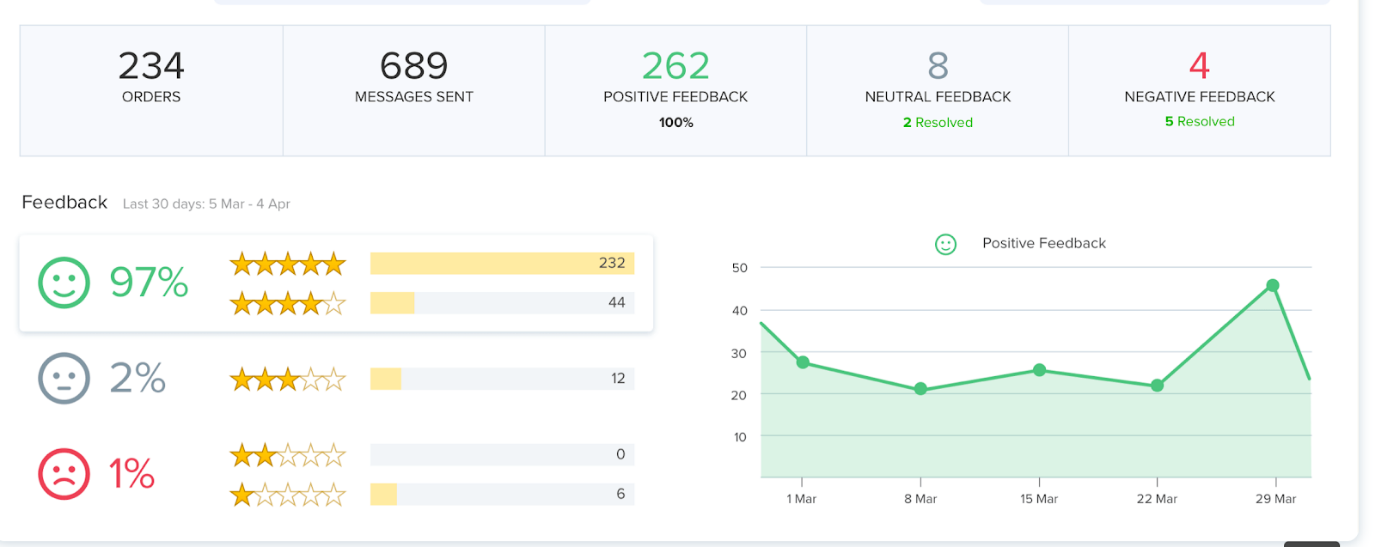
    Reviews are an essential part of any eCommerce store and if you are selling an electronic item/products then reviews can play a major role. Reviews can encourage people to buy your product. Experiences of your past shoppers tell a lot like how your product is different from your competitors if they faced any problem, how was their overall experience with your product. This kind of customer interaction will ultimately lead to enhancing your profits for businesses.

    Happy customers don’t write reviews easily as unhappy customers leave reviews so, as a store owner, you must find ways to make it easier for customers to leave reviews. You can send personalised review request email or text message within a week of the purchase, offer some small gifts or extended warranties. Coupons, discounts, and other rewards are also one of the great ways to encourage your customers to leave reviews.

    Study shows that 90% of consumers are greatly influenced by other people’s experiences. So, the collection of ratings and reviews can help drive higher SEO, generate new customers, and increase sales.
    Naming convention
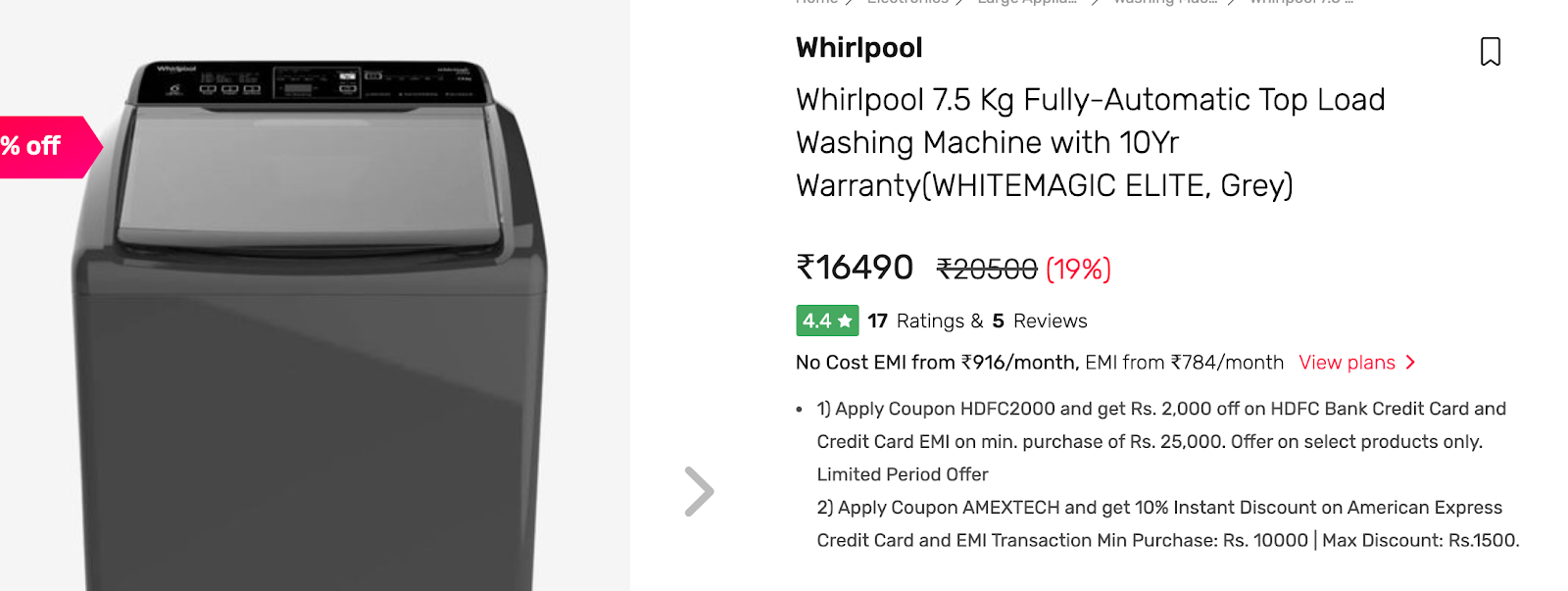
    The product name should clearly and quickly convey exactly what you’re selling. It should be memorable, understandable, findable (mostly on search engines), unique, and relevant.

    There are numerous combinations of how a title can be structured and crafted based on the product and its attributes. For example; take the above picture, the title Whirlpool 7.5 Kg Fully-Automatic Top Load Washing Machine with 10Yr Warranty (WHITEMAGIC ELITE, Grey) describes everything about the product. What the product Brand is (Whirlpool), Capacity (7.5kg), Type (Fully-Automatic Top Load), and Product Category (Washing Machine). It is very important to mention the benefits of products like (10 YR Warranty) in the product name. The more the product is described, the higher are its chances of being sold.

    Delivery schedule for last-mile delivery

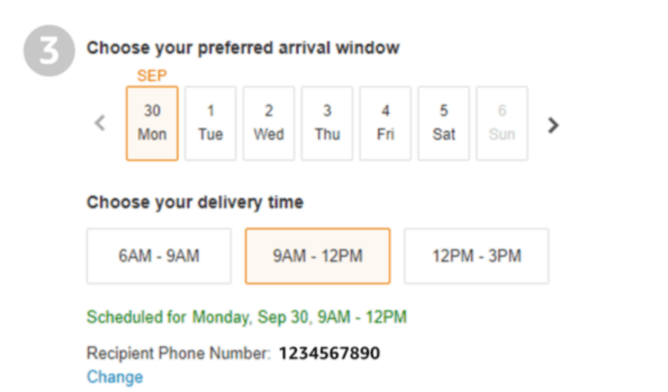
    Most of the electronic products are heavy and expensive. You cannot get it delivered outside the buyer’s home. It is important to add a delivery schedule feature in your site where a customer can select the date and time of the delivery. So, when the delivery is made, a customer is present in the house.

    If the product requires manual installation by a technician, then it becomes easier to ask the customer to choose the time. This way, customers can schedule their availability at home or office as per technicians visit. If the customer is not going to personally receive the product then it is advisable to get the recipient contact number so that technician can get in touch with the concerned person directly.

    Product Feature Comparison
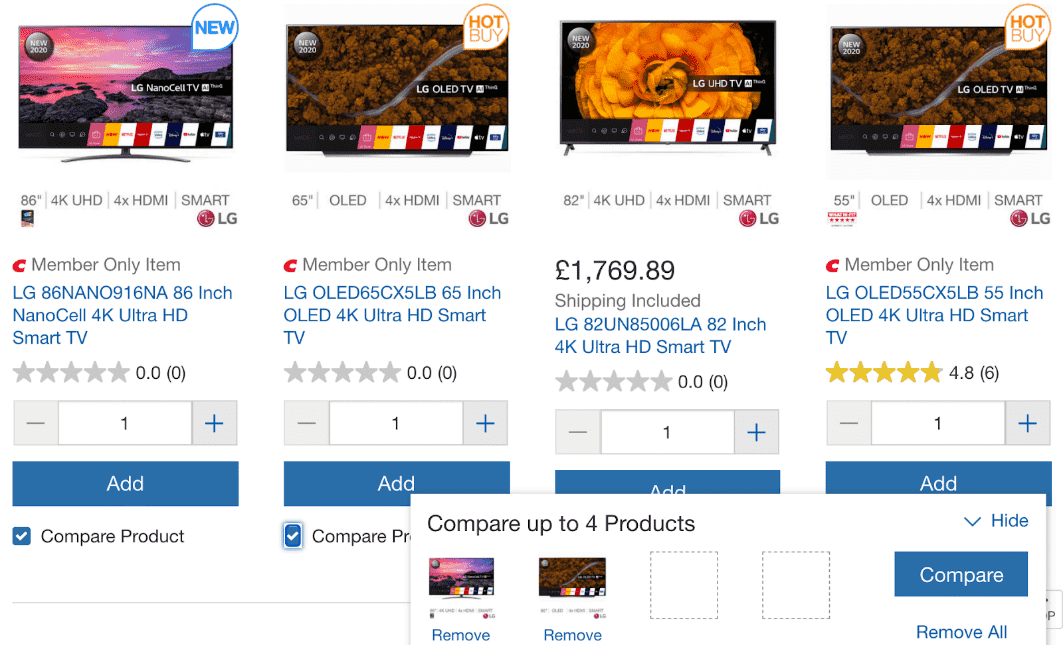
    Apple doesn’t need to specify product features as Apple users are very loyal to the brand but if your online store is having non-Apple products then it’s important to provide product specifications. Electronic items come in an extensive range of different features and aspects. Therefore, it is important to design your backend system in such a way where attributes are defined as category wise. A comparison tool Consumers can make an informed purchase decision based on a comparison tool
    Pricing

    Study says that when it comes to buying electronic products, customers spend more than 10 minutes to find the best deal on the internet. Moreover, customers also compare brick and mortar prices with an online eCommerce site. Stores such as BigBuy provide a price match guarantee.

    When a consumer sees that the company is offering a price match guarantee, it gives them peace of mind and it helps in building trust. If consumers find your site trustworthy it will not research more on the internet.
    Maintain a competitive approach to other brands that offer similar products with a price match guarantee. so whenever the user selects the product name it will show them a highlighted text above the product telling “Best Price Guarantee” and keep more of your hard-won customers.
    Additional Essential Products
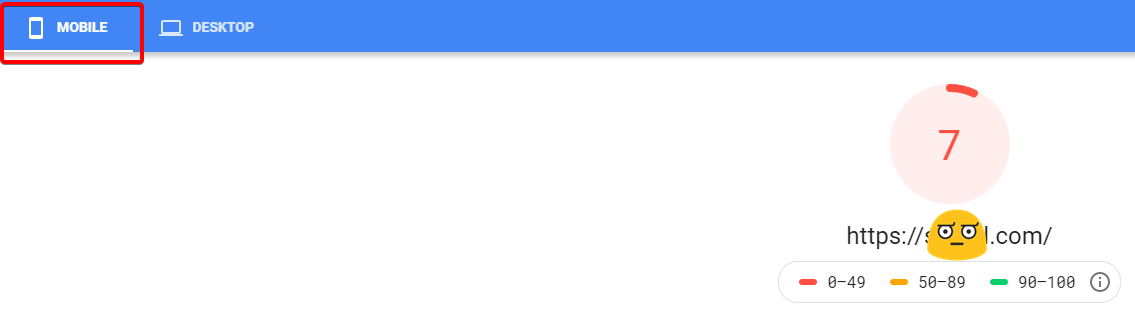
    To boost sales and enhance customer experience, you can offer the customer additional products that will genuinely provide them with added value. For instance, if a customer is buying a computer or laptop you can suggest a scanner and printer with it. Offer your customers relevant products to make sure that they are getting your full range of products and you are getting the best ROI possible.
    Warranties
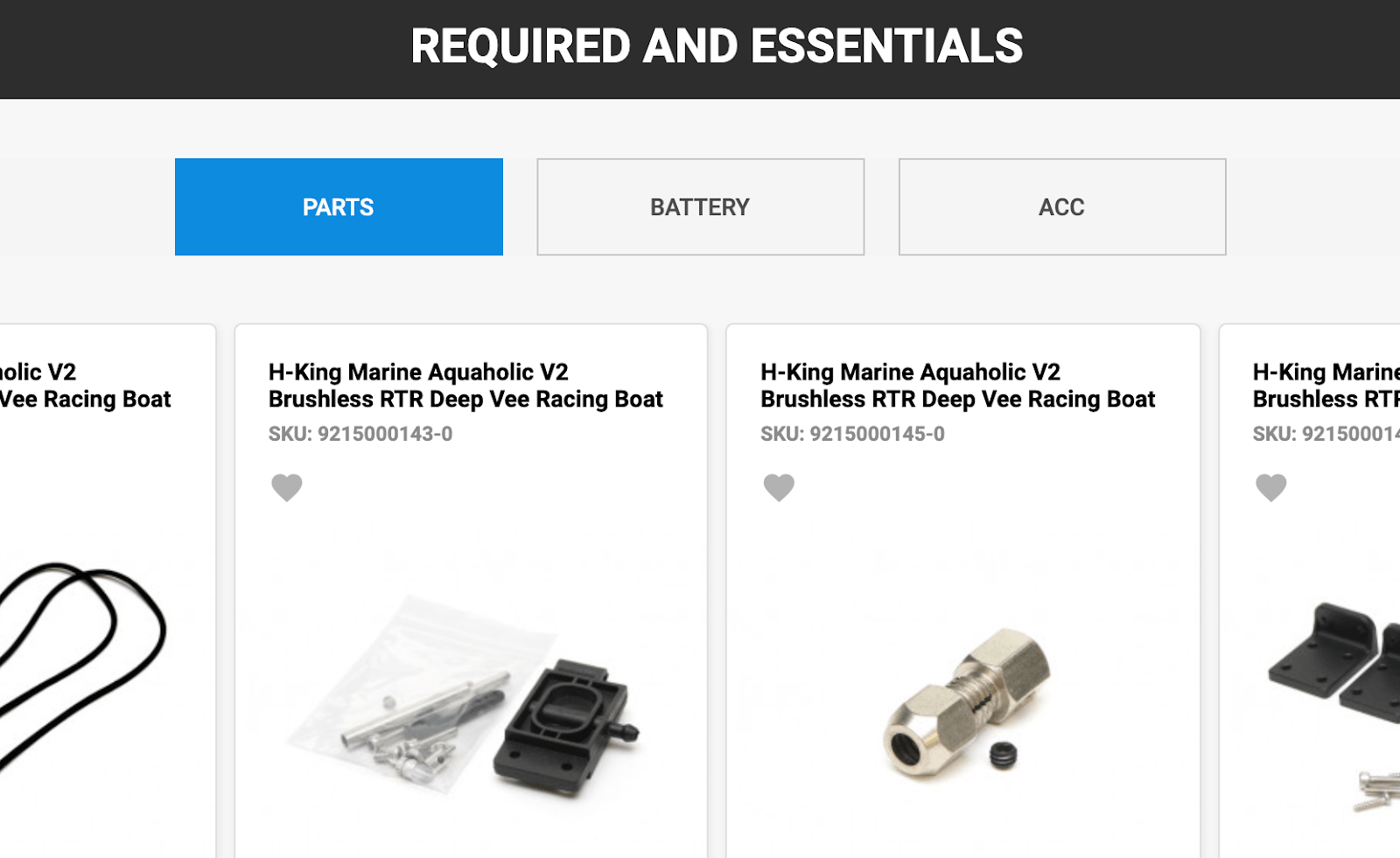
    People are still afraid to buy electronic products online because they think if the product gets damaged after one month or the machine doesn’t work where will they go? Therefore, the Warranty should be given with the electronics product. A warranty for certain years for full product or on certain parts.

    You can use warranties as a marketing tool to give customers assurance that what they are buying is of good quality. There are some parts in your machine which are not going to wear and tear easily so extend the warranty period on that particular part. For example, washing machine companies provide 10 years’ warranty on motors and 2 years’ warranty on other parts. So, they gain customer attention by highlighting 10 years’ warranty on the product.

    Your warranty disclaimer should include:

    • How long the warranty period lasts for (how long can customers get coverage)
    • How a customer can get service under the warranty.
    • What options will be provided for repair and refund if the product is damaged.
    • What parts of a product are covered by the warranty and what parts are not covered.
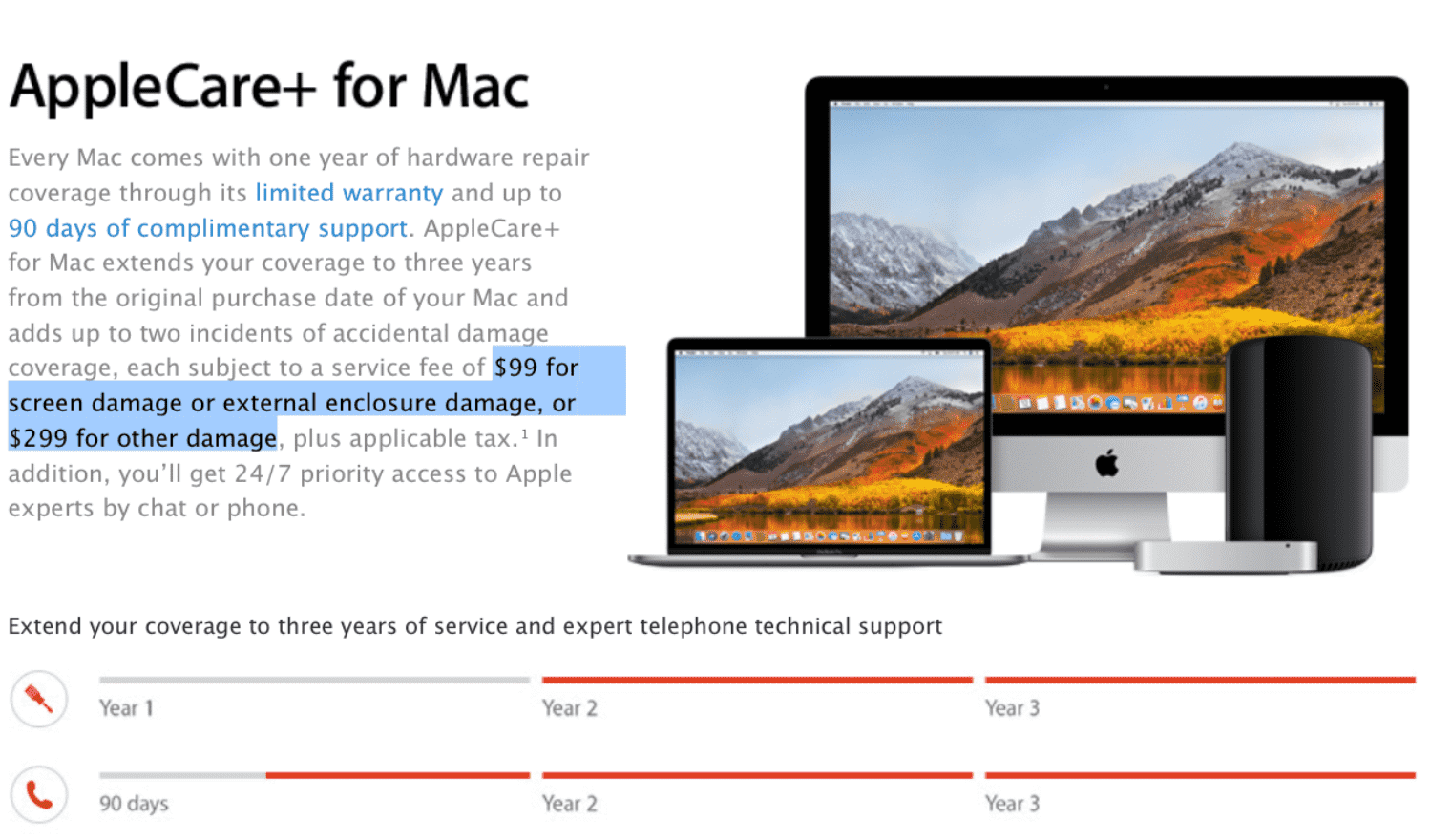
    Apple has a marketing strategy that continues to drive growing sales throughout the globe. it gives long term warranties and even allows people to buy extended warranties for their high range of products. An extended warranty promotes the reliability of a product. It is said that once you use Apple products, you will never prefer any other brand. This is one of the ways how Apple builds up a long-term, profitable relationship with the consumers.

    Logistic and Delivery timings

    There are 2 main reasons why people purchase electronics or equipment. First is necessity and second is happiness (luxury). Necessity is something very crucial where the customer needs to buy that product or some broken part machine which they want to replace. So, in such a situation you as a store owner have to make sure that you deliver the product as per committed time.

    The second reason is happiness where a buyer has placed an order to buy Mobile or T.V. or iWatch. Here the buyer is excited and eagerly waiting for its products so if there is a delay in delivery then it will affect the happiness and satisfaction level of the consumer and it will also harm your brand reputation in the long run.

    The estimated delivery time for such products needs to be between 2 to 7 days as beyond 7 days’ customer is unlikely to wait and then there are chances customers may buy from brick and mortar shops.

    Price Drop notification

    In electronic goods, we tend to see a sharp fall in price over time, and to be precise prices keep decreasing every 6 months. There are several reasons to explain this fall in price:

    • Quantum improvements in technology: When something new comes up the demand for the old product reduces so the price has to go down to sustain the competition.
    • Economies of scale from increasing production: When new electronic products first enter the market, firms have low sales volume and less scope for economies of scale. When more products are sold then production increases which leads to a fall in the price.
    • Increased competition: as more firms enter the market with the same product with lower pricing, you need to drive down prices to remain in the market.
    • An element of price skimming: Some consumers are tech-savvy. They are ready to pay high prices to get the latest electronic goods. When the company has sold products with very inelastic demand then they reduce the price to sell to a wider audience who are more price sensitive.

    Sometimes, shoppers are interested in a product but hoping for a price reduction before they are motivated to buy it. Let your customer register for price drop notification on the website. Send them an alert Email or text message to inform them about the price drop of a product. You can also notify them about the similar products of other brands that are less expensive than the one customer selected.

    Filters

    Product filters can play an important role in affecting the performance of your eCommerce website, you would be surprised to know that only 10% of people know what they want to buy and come to your website with the exact product they want, rest of 90% buy the product using search and most importantly “Filters” and still very fewer eCommerce companies give required attention to the filters.

    • Your site should have category-specific filters. Place these front and center on your category pages.
    • Make sure to add filters in general search based on the category of products coming up in search results. This is the most missed out point in many reputed sites.
    • Remove filter is equally important as an adding filter. So when the filters are added, give an easy option to remove those filters.

    • If your filter has zero results, then the filter must be removed itself. Make sure to offer only those filters which have several products in it.
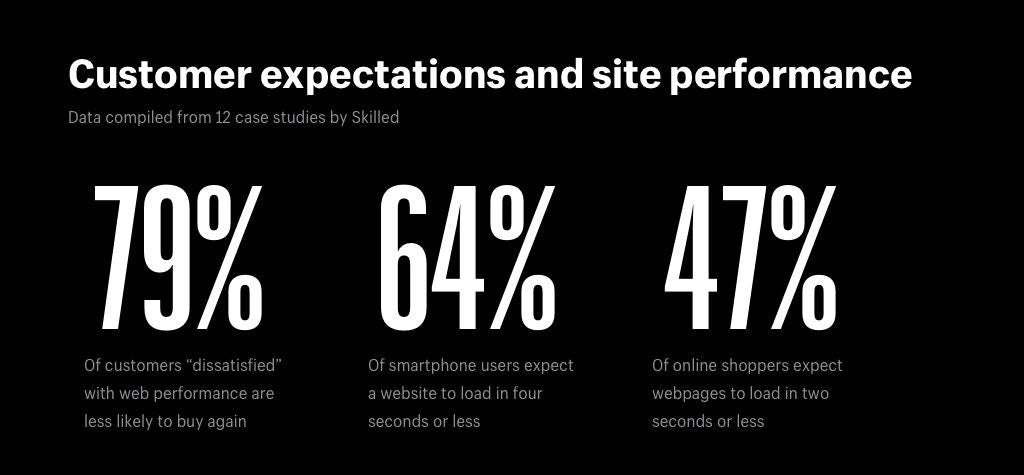
    • Your site speed should not be affected by filters. Ensure that your user gets filtered products in less than 3 seconds.

    Question Answers on product page
    Shoppers can ask numerous questions when considering purchases. Questions can be silly or obvious, you have to answer every question and clear their doubts. Questions like, will this product sync with iPhone? or will this fit into my Sony TV? Sometimes, the buyer can ask you genuine questions that might help you bring a new product to your site.

    Your product page should have Q&A so that you answer common questions about products, literally “once and for all”, this way you resolve their query effectively at one go also your future visitors can read on the same page.

    Thank you page

    Lot of sellers take the “thank you” page as the end of the sales funnel. Squeeze more value out of your customers by creating a unique thank you page. You can use this page to push related products or show off your blog. After making the purchase, customers can visit your social media page to share an overall experience.

    6 unique ways to use Thank you page

    A Sharing Button: Through social media share buttons you can generate more traffic.

    Ask Your Page Visitor to Create an Account: Guest visitor can create an account. Mention how it will reduce time & effort the next time they want to make a purchase.

    Ask for Feedback: Ask the consumer to fill the “Tell us what you think” box at the end of the thank you page to enhance your site.

    Offer a Discount: coupons & discounts can convince them to purchase again in the future.

    Blog: Make the thank you page more user-friendly and customer-centric with blog resources, that can be related to the product; product-related information and Product unboxing.

    Tell a Friend: Run referral program for word-of-mouth marketing.

    Make your customer feel valued by sending personalized “thank you” notes. A happy customer is always a loyal customer.
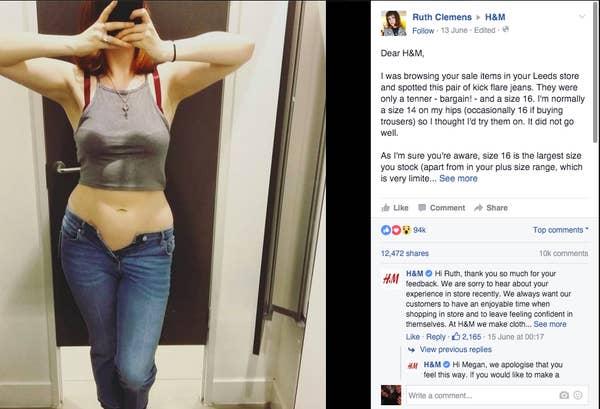
    10 Most important features which are required and missed in the fashion store

    Let us take a look at some of the salient features that you can implement in your online fashion store to make shopping experience-worthy.

    1. Easy & Free Returns

    Shoppers get waylaid by the fear that if they purchase an item and it’s not what they expected or the product didn’t fit, they are stuck with the purchase.

    Allow your customers to return the order within a time limit. Ensure them not only free, but hassle-free return and you will gain the trust of customers.

    2. Size Recommendation Engine

    Take any clothing product, they all come in many different catalog sizes. Though the size chart is universal the manufacturing of each brand differs. You may fit into a size S of one brand and size M of another brand. Hence, provide a brand-specific sizing chart on the product page.

    3. Offers and Discounts

    Offering discounts on purchases is one of the most effective ways to quickly draw people into your store. It can help you to increase revenues. Make sure to have active offers. Highlight offers and discounts for other items in your store, as visitors will check out offers before making a purchase.

    Percent-off sales are far better than the price amount. The percentage off deal (for example 50% off or 70% off) is one the most popular and effective types of promotions. Just slashing the price and showing a discounted price is not going to motivate customers to click the “Buy Now” button. Instead, show the real value of the product and highlight the discount percentage. Now, customers will realize the actual value and the tremendous discount they are getting. Thus, emotionally evoking them to take action and get the product.

    4. Nobody really needs anything.

    If you are in the fashion business, then you must be aware that nobody will keep buying new clothes. You have to use promotional offers to create a sense of exclusivity and surprise the customers with new products every time they step into your online store.

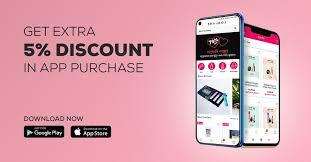
    Apps, SMS (text) and Email marketing are the easiest ways to target buyers with promotions that are catered to their specific needs. You can entice your visitors to join an email subscription or newsletter and ask them to download your app. This way you’re opening the door to myriad possibilities for engaging with them.

    5. Naming Convention of your products

    Your product name needs to fit within your broader umbrella while telling its own unique story to consumers. It also needs to be memorable, findable (particularly on search engines), unique, understandable, and relevant.

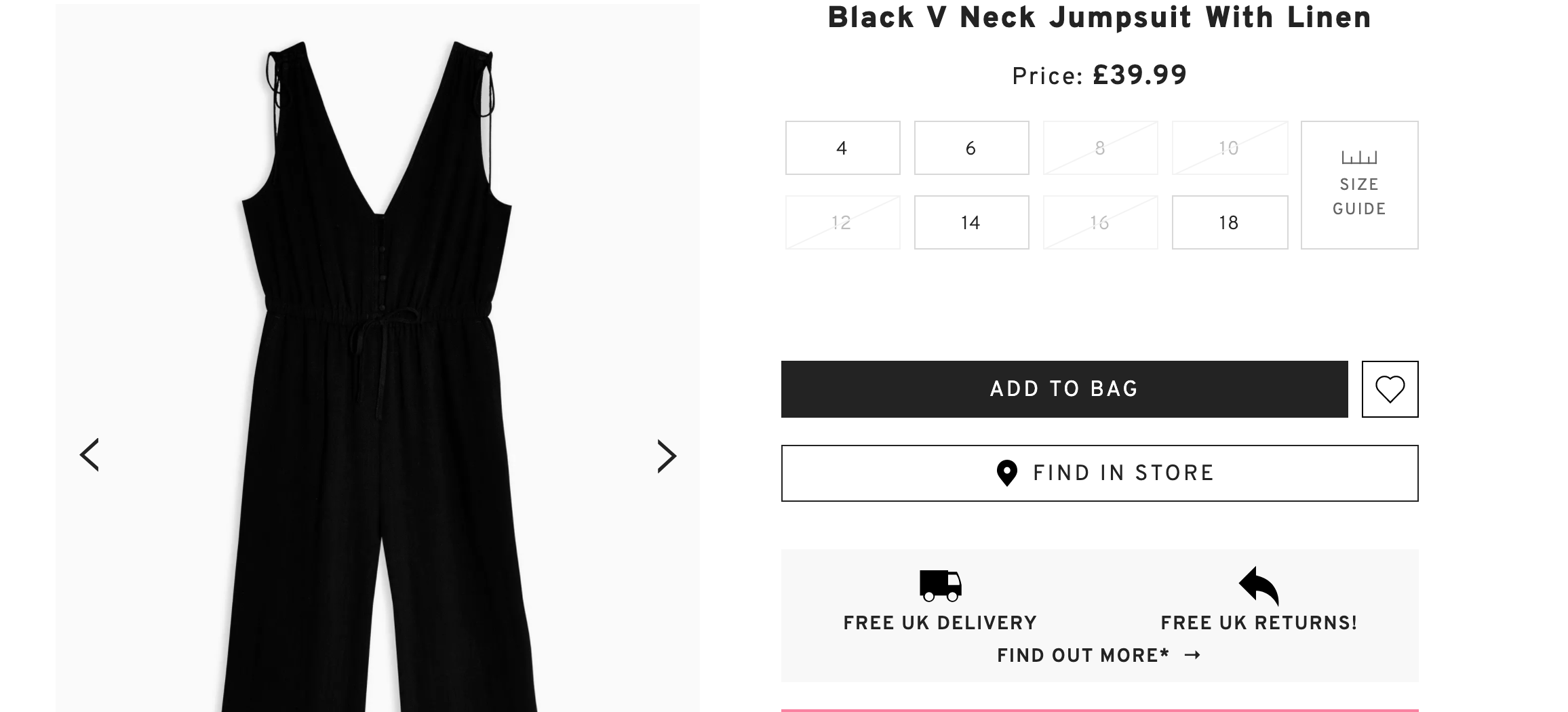
    Name a product in such a way that it describes what the product is. For instance, from the above picture; Black V Neck Jumpsuit with Linen describes everything about the product. What the product is (Jumpsuit), color (black), design (V neck), and material (linen).

    6. Product Detail

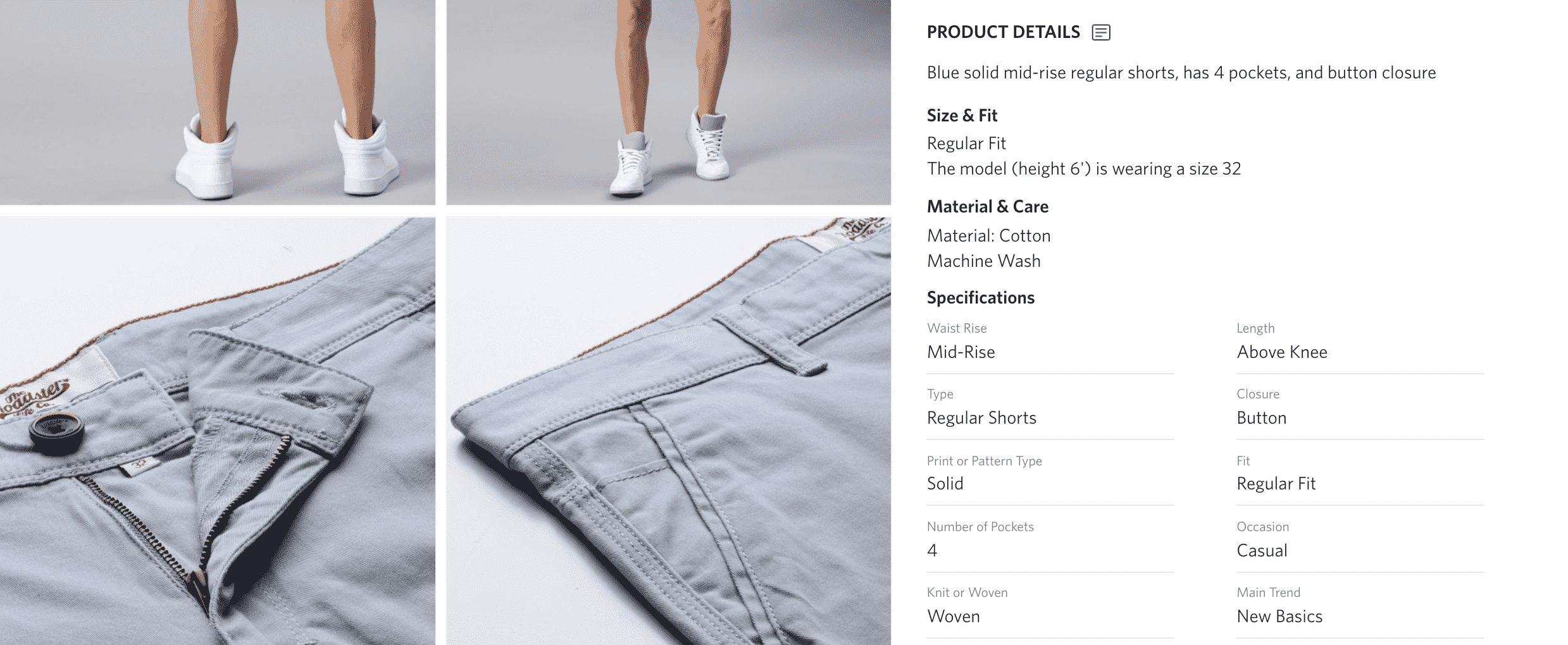
    Some customers are very choosy when it comes to online shopping. They want to know the tiniest detail of a product. Provide complete information to the customer so that they feel comfortable parting with their money.

    Make sure to provide consistent user experience by keeping the length and amount of data in your product descriptions the same across each category. “filters + descriptive product details” will make it easy for a choosy customer to complete the buyer’s journey. If a product doesn’t warrant the same length as others, visitors may jump to the conclusion that your product range is inconsistent. Make sure the product description fits the needs of the customer’s search.

    7. Delivery Details

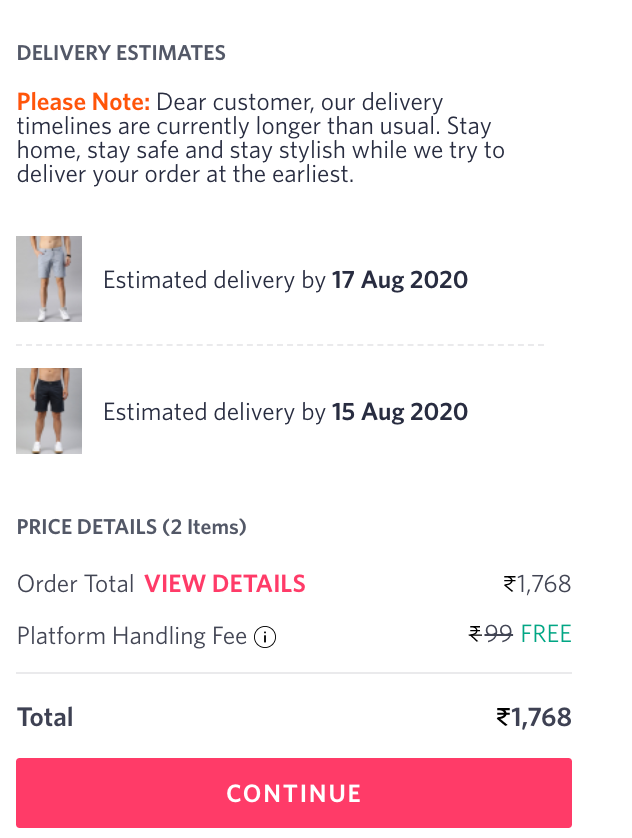
    In the clothing industry, there are chances that customers have purchased for a particular occasion so while placing an order they want an idea about when their product will reach them.

    An estimated date removes the uncertainty that comes along with online shopping. Quick shipping plays an important role in deciding to shop with the fashion store again. Remember, quick shipping builds trust.

    If you are unable to deliver the product on a committed date, then it’s your responsibility to inform customers at least 3 days before the due delivery date so that they make other arrangements if they had planned something for it.

    8. Thank you page

    Just because a customer made a purchase doesn’t your interaction with them has to end. They could be interested in a category of products related to the one they’ve just bought. Or maybe they might read a blog or visit your social media page for feedback. These are all opportunities to continue the conversation with your customers and further develop your relationship.

    6 Thank You Page Best Practices You Need to Know

    Ask For Social Shares: Your Thank you page must have links to your social media pages so that they can follow you and share their experience.

    Ask Your Page Visitor to Create an Account: If your customer has used a guest account for shopping then you can express the benefits of creating an account and how it will reduce time & effort the next time they want to make a purchase.

    Ask for Feedback: You can ask customers to leave a comment about how you’re doing or what could be improved.

    Offer a Discount: A coupon is a great way to drive sales and to show your appreciation. This will make them want to purchase again in the future.

    Blog: A blog is a great tool to keep your business fresh in visitors’ minds, long after they’ve converted. Mention some of the relatable blog links on your Thank You page.

    Tell a Friend: Ask your customer to refer your site to their family & friends and win some exciting gifts.

    Delight your customer with a personalized “Thank you” note. A happy customer will always remember you.

    9. Subscription Doesn’t Work In Fashion Store

    Customers always want something new and trendy which they can try every few months. Send customers newsletters, SMS, app notification to remind them about certain products that they can buy again in the same color, design, shape. However, many remain skeptical about the scalability of subscription services in fashion but this model works with “products that customers can buy every 3 or 5 months.

    • Nightwear
    • Innerwear
    • Swimwear
    • Socks
    • Sportswear
    • Deodorant
    • Perfume

    10. Filters

    Filters make purchasing easy and fast. It helps customers narrow down a product catalog from thousands to few handfuls of products which are as per customer‘s choice and taste.

    Your fashion store should have basic filters as well as some advanced filters to make online shopping seamless.

    Basic Filters are:

    • Size
    • Color
    • Price
    • Brand

    Now add some advance filters in this Basic features

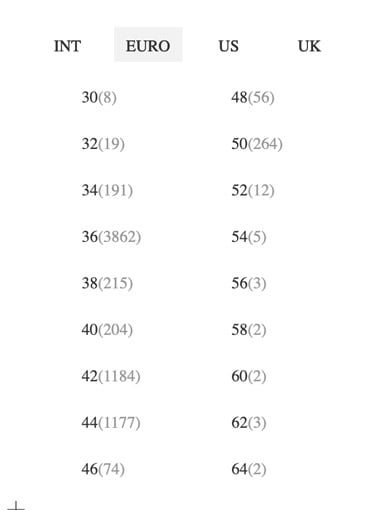
    a) Customers can select size filters based on countries like Euro, US, and the UK.
    b) Price can have both kind of features where you can drag the price or can select from the range
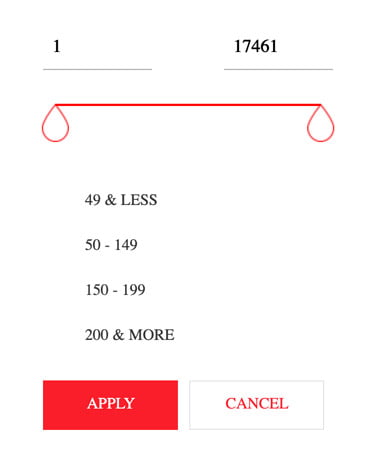
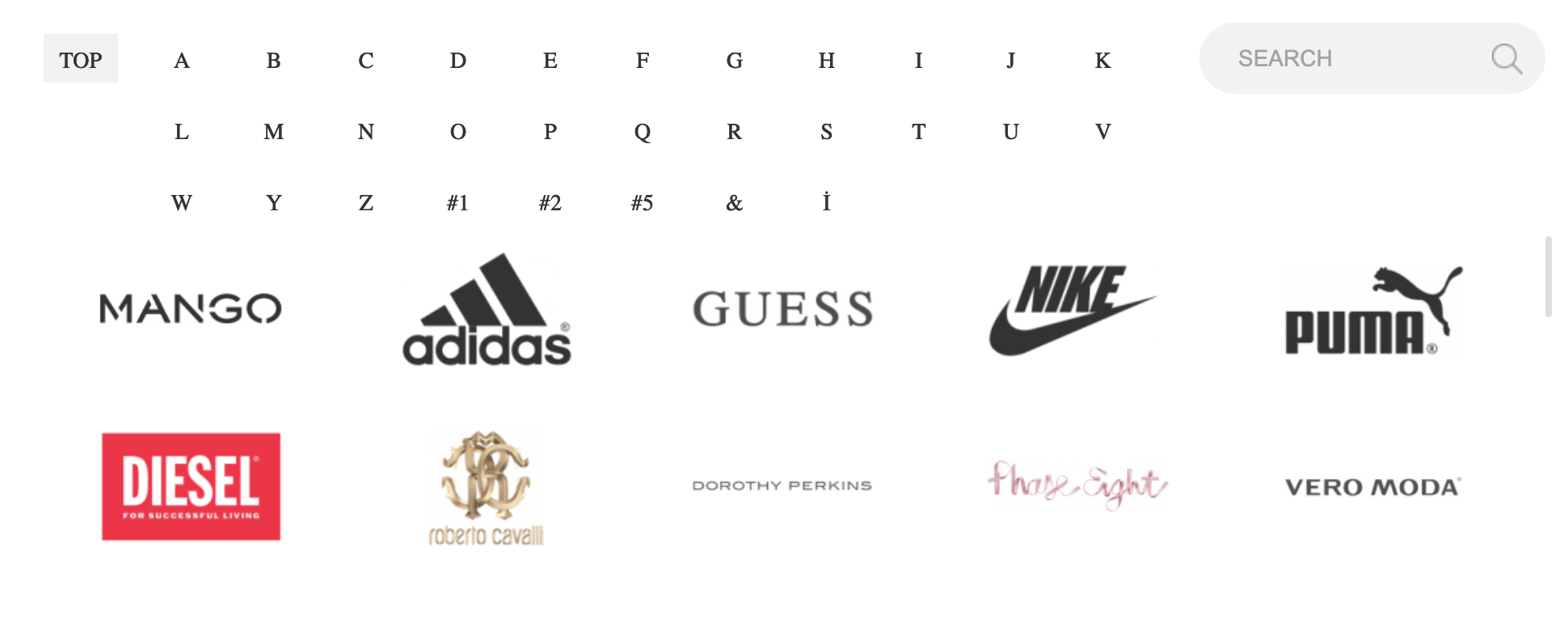
    If you are a multi-brand store, then you must be having certain top brands or famous brands that are liked by customers. Keep new or not so famous brands in one category and list top brands in separate brand filters.

    To Wrap Up… 

    Consult with fashion eCommerce store developers to implement above features. It will help your run your fashion store for years. Create your brand identity, make use of social media, and every effective promotional medium to make your brand stand out. We hope these amazing features will give you more conversions in no time.

    Magento 2: add new custom field in cms pages

    If you need to add custom field in cms pages then follow below steps:

    1, You need to create a module for that so create module folders app/code/Magemonkey/CmspageBanner

    2, Add registration.php file in your module Magemonkey/CmspageBanner

    <?php 
    /**
     * @author Magemonkey Team
     * @package Magemonkey_CmspageBanner
     */
    MagentoFrameworkComponentComponentRegistrar::register(
     MagentoFrameworkComponentComponentRegistrar::MODULE,
     'Magemonkey_CmspageBanner',
     __DIR__
    );

    3, Add module.xml file in your module Magemonkey/CmspageBanner/etc

    <?xml version="1.0"?>
    <config xmlns:xsi="http://www.w3.org/2001/XMLSchema-instance" xsi:noNamespaceSchemaLocation="../../../../../lib/internal/Magento/Framework/Module/etc/module.xsd">
     <module name="Magemonkey_CmspageBanner" setup_version="1.0.1">
     </module>
    </config>

    4, Then create new schema file InstallSchema.php in  Magemonkey/CmspageBanner/setup

    <?php
    namespace MagemonkeyCmspageBannerSetup;
    
    use MagentoFrameworkSetupInstallSchemaInterface;
    use MagentoFrameworkSetupModuleContextInterface;
    use MagentoFrameworkSetupSchemaSetupInterface;
    
    class InstallSchema implements InstallSchemaInterface
    {
     /**
     * Add Secondary Custom Content
     */
     public function install(SchemaSetupInterface $setup, ModuleContextInterface $context)
     {
     $installer = $setup;
    
     $installer->startSetup();
    
     $setup->getConnection()->addColumn(
     $setup->getTable('cms_page'),
     'banner_block',
     [
     'type' => MagentoFrameworkDBDdlTable::TYPE_TEXT,
     'length' => 255,
     'nullable' => true,
     'comment' => 'Banner Block Identifier'
     ]
     );
    
     $installer->endSetup();
     }
    }

    5, Then add your need to add a field in ui_component form file cms_page_form.xml in Magemonkey/CmspageBanner/vew/adminhtml/ui_component

    <?xml version="1.0" encoding="UTF-8"?>
    <form xmlns:xsi="http://www.w3.org/2001/XMLSchema-instance" xsi:noNamespaceSchemaLocation="urn:magento:module:Magento_Ui:etc/ui_configuration.xsd">
     <fieldset name="general">
     <field name="banner_block">
     <argument name="data" xsi:type="array">
     <item name="config" xsi:type="array">
     <item name="dataType" xsi:type="string">text</item>
     <item name="label" xsi:type="string" translate="true">Banner Block Identifier</item>
     <item name="formElement" xsi:type="string">input</item>
     <item name="source" xsi:type="string">page</item>
     <item name="dataScope" xsi:type="string">banner_block</item>
     </item>
     </argument>
     </field>
     </fieldset>
    </form>

    6, Then you need to create one block file for the call that field in the frontend, Banner.php in Magemonkey/CmspageBanner/Block

    <?php
    namespace MagemonkeyCmspageBannerBlock;
    
    use MagentoStoreModelScopeInterface;
    
    class Banner extends MagentoFrameworkViewElementTemplate
    {
     /**
     * @var MagentoCmsModelTemplateFilterProvider
     */
     protected $_filterProvider;
    
     /**
     * @var MagentoCmsModelPage
     */
     protected $_page;
    
     /**
     * Store manager
     *
     * @var MagentoStoreModelStoreManagerInterface
     */
     protected $_storeManager;
    
     /**
     * Page factory
     *
     * @var MagentoCmsModelPageFactory
     */
     protected $_pageFactory;
    
     /**
     * @var MagentoFrameworkViewPageConfig
     */
     protected $pageConfig;
    
     /**
     * Construct
     *
     * @param MagentoFrameworkViewElementTemplate $context
     * @param MagentoCmsModelPage $page
     * @param MagentoCmsModelTemplateFilterProvider $filterProvider
     * @param MagentoStoreModelStoreManagerInterface $storeManager
     * @param MagentoCmsModelPageFactory $pageFactory
     * @param MagentoFrameworkViewPageConfig $pageConfig
     * @param array $data
     */
     public function __construct(
     MagentoFrameworkViewElementTemplateContext $context,
     MagentoCmsModelPage $page,
     MagentoCmsModelTemplateFilterProvider $filterProvider,
     MagentoStoreModelStoreManagerInterface $storeManager,
     MagentoCmsModelPageFactory $pageFactory,
     MagentoFrameworkViewPageConfig $pageConfig,
     array $data = []
     ) {
     // used singleton (instead factory) because there exist dependencies on MagentoCmsHelperPage
     $this->_page = $page;
     $this->_filterProvider = $filterProvider;
     $this->_storeManager = $storeManager;
     $this->_pageFactory = $pageFactory;
     $this->pageConfig = $pageConfig;
     parent::__construct($context);
     }
    
     /**
     * Retrieve Page instance
     *
     * @return MagentoCmsModelPage
     */
     public function getPageData()
     {
     if (!$this->hasData('page')) {
     if ($this->getPageId()) {
     /** @var MagentoCmsModelPage $page */
     $page = $this->_pageFactory->create();
     $page->setStoreId($this->_storeManager->getStore()->getId())->load($this->getPageId(), 'identifier');
     } else {
     $page = $this->_page;
     }
     $this->setData('page', $page);
     }
     return $this->getData('page');
     }
    }

    After that you need to run setup:upgrade command

    Then after you can call that block in your cms page Like:

    <block class="MagemonkeyCmspageBannerBlockBanner" name="page.banner" template="Magemonkey_CmspageBanner::html/banner.phtml" after="-" />

    How to Enable Exception printing in Magento 2?

    This is similar to Magento 1 but file is located in a different folder pub/errorsIn Magento 1 file is located at a different location.

    All you need to do is to rename the following file to enable exception printing:

    Please rename file pub/errors/local.xml.sample to pub/errors/local.xml
    

    By renaming Above File you can see Error without going to check var/report.

    Thank You.

    How mage monkeys’ consultation helped a client to achieve 122% sales growth?

    A client made an inquiry at our site which read,

    We want to increase our sales. Can you help to improve the performance of our site?

    Our tech expert discussed the case with the client and we ran an audit on the client’s website. We found many technical limitations which were stopping the growth of the client’s store. We advised clients to implement them one by one & check the result in the sales graph.

    First process which gave the client a sales growth of 28% was speed.

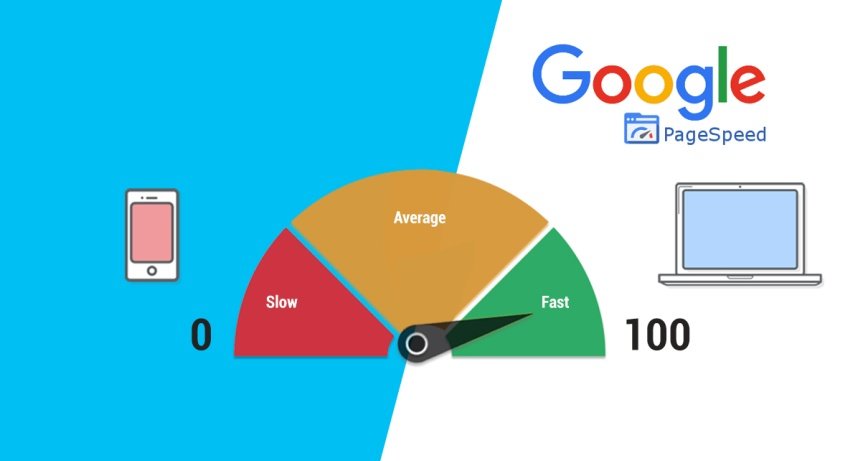
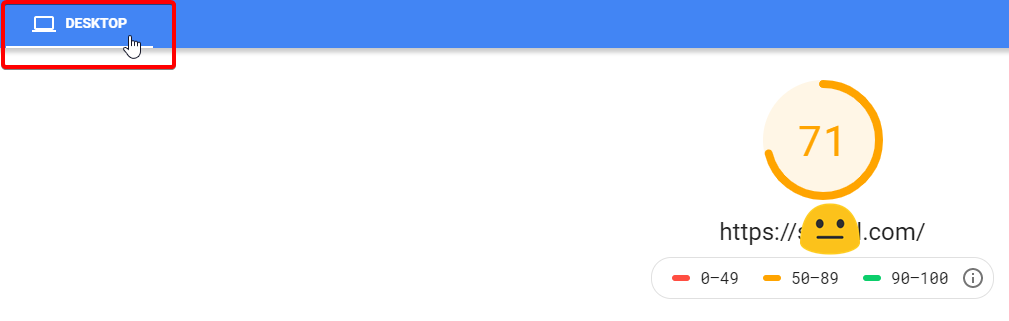
    Web & mobile loading speed of the client’s store was slow according to google page insider. We started working on the same. We did many technical operations such as,

    • Image optimization
    • CSS/JS Minification and Merge
    • Server level changes
    • Code optimization
    • Theme optimization
    • Converting jpg to webp
    • Enable flat categories and products

    After doing speed optimization bounce rate was also decreased.

    The second process was where we introduced our UI/UX advisor who helped us to achieve 50% sales growth for clients.

    The below activities were performed under UI/UX advisor’s consultation.

    • Product placement was rearranged.
    • Necessary changes in theme were performed.
    • Onepage checkout was implemented.
    • Automatic Email & SMS functionalities were implemented for users who dropped shopping at the final stage.
    • A virtual assistant was introduced to the site.
    • Most searched products were added to the homepage.
    • & many more suggestions were processed.

    In the third process, we increased security, solved bugs, and did some maintenance which resulted in 14% of sales growth. This activity helped us to run the site flawlessly.

    This process was handled by our Magento security experts who found that the site was going down twice a month due to server and other issues that were affecting sales. We advised the client to opt for a better hosting provider who guarantees 100% uptime and delivery.

    While performing the site’s historical data audit, we realized that site was previously hacked as it was having security loopholes which were resolved by our security experts.

    Numerous small bugs were there on the data side which was also solved from our end.

    The fourth part of the process was PWA development. It increased reordering from the same clients.

    While having a meeting with a client, he told us that they wanted to develop an app, but they wanted to do it within a limited budget. That’s the point where we introduced Progressive Web App to them.

    We develop PWA for the client from their existing website. This took us only a few days. We also advised our client to ask his customers to download PWA. After a few months that advice helped and the client noticed reordering from his customers.

    The fifth & Final part of the process was to upgrade the store in Magento 2 which gave the client a notable sales growth of 30%

    Actually, it wasn’t our fifth, but first advice to process as the client’s Magento store was in version 1 – But, the client wanted to continue with Magento 1 for the time being and we respected his decision and offered Mage Monkeys M1 Support which helped the client to run his store stably.

    Later on, the client decided to move his Magento store to version 2.4 and our team of migration specialists helped him to perform the task without offering any downtime. After two months, the client noted that he achieved 30% sales growth by opting for the latest version of the Magento store.

    This was the story, not a case study where we helped our client to achieve sales growth of 122% – Day by day, we’re helping more and more web merchants to achieve sales growth by performing technical operations.  Let us know if you want to increase your sales too.

    Magento 2: How to solve the Invalid response line returned from server: HTTP/2 200 error.

    Create the following file:

    lib/internal/Magento/Framework/HTTP/Client/Curl.php

    Add the below code:

    <?php
    /**
     * Copyright © Magento, Inc. All rights reserved.
     * See COPYING.txt for license details.
     */
    namespace MagentoFrameworkHTTPClient;
    
    /**
     * Class to work with HTTP protocol using curl library
     *
     * @author      Magento Core Team <core@magentocommerce.com>
     * @SuppressWarnings(PHPMD.ExcessiveClassComplexity)
     */
    class Curl implements MagentoFrameworkHTTPClientInterface
    {
        /**
         * Max supported protocol by curl CURL_SSLVERSION_TLSv1_2
         * @var int
         */
        private $sslVersion;
    
        /**
         * Hostname
         * @var string
         */
        protected $_host = 'localhost';
    
        /**
         * Port
         * @var int
         */
        protected $_port = 80;
    
        /**
         * Stream resource
         * @var object
         */
        protected $_sock = null;
    
        /**
         * Request headers
         * @var array
         */
        protected $_headers = [];
    
        /**
         * Fields for POST method - hash
         * @var array
         */
        protected $_postFields = [];
    
        /**
         * Request cookies
         * @var array
         */
        protected $_cookies = [];
    
        /**
         * Response headers
         * @var array
         */
        protected $_responseHeaders = [];
    
        /**
         * Response body
         * @var string
         */
        protected $_responseBody = '';
    
        /**
         * Response status
         * @var int
         */
        protected $_responseStatus = 0;
    
        /**
         * Request timeout
         * @var int type
         */
        protected $_timeout = 300;
    
        /**
         * TODO
         * @var int
         */
        protected $_redirectCount = 0;
    
        /**
         * Curl
         * @var resource
         */
        protected $_ch;
    
        /**
         * User overrides options hash
         * Are applied before curl_exec
         *
         * @var array
         */
        protected $_curlUserOptions = [];
    
        /**
         * Header count, used while parsing headers
         * in CURL callback function
         * @var int
         */
        protected $_headerCount = 0;
    
        /**
         * Set request timeout, msec
         *
         * @param int $value
         * @return void
         */
        public function setTimeout($value)
        {
            $this->_timeout = (int)$value;
        }
    
        /**
         * @param int|null $sslVersion
         */
        public function __construct($sslVersion = null)
        {
            $this->sslVersion = $sslVersion;
        }
    
        /**
         * Set headers from hash
         *
         * @param array $headers
         * @return void
         */
        public function setHeaders($headers)
        {
            $this->_headers = $headers;
        }
    
        /**
         * Add header
         *
         * @param string $name name, ex. "Location"
         * @param string $value value ex. "http://google.com"
         * @return void
         */
        public function addHeader($name, $value)
        {
            $this->_headers[$name] = $value;
        }
    
        /**
         * Remove specified header
         *
         * @param string $name
         * @return void
         */
        public function removeHeader($name)
        {
            unset($this->_headers[$name]);
        }
    
        /**
         * Authorization: Basic header
         *
         * Login credentials support
         *
         * @param string $login username
         * @param string $pass password
         * @return void
         */
        public function setCredentials($login, $pass)
        {
            $val = base64_encode("{$login}:{$pass}");
            $this->addHeader("Authorization", "Basic {$val}");
        }
    
        /**
         * Add cookie
         *
         * @param string $name
         * @param string $value
         * @return void
         */
        public function addCookie($name, $value)
        {
            $this->_cookies[$name] = $value;
        }
    
        /**
         * Remove cookie
         *
         * @param string $name
         * @return void
         */
        public function removeCookie($name)
        {
            unset($this->_cookies[$name]);
        }
    
        /**
         * Set cookies array
         *
         * @param array $cookies
         * @return void
         */
        public function setCookies($cookies)
        {
            $this->_cookies = $cookies;
        }
    
        /**
         * Clear cookies
         *
         * @return void
         */
        public function removeCookies()
        {
            $this->setCookies([]);
        }
    
        /**
         * Make GET request
         *
         * @param string $uri uri relative to host, ex. "/index.php"
         * @return void
         */
        public function get($uri)
        {
            $this->makeRequest("GET", $uri);
        }
    
        /**
         * Make POST request
         *
         * String type was added to parameter $param in order to support sending JSON or XML requests.
         * This feature was added base on Community Pull Request https://github.com/magento/magento2/pull/8373
         *
         * @param string $uri
         * @param array|string $params
         * @return void
         *
         * @see MagentoFrameworkHTTPClient#post($uri, $params)
         */
        public function post($uri, $params)
        {
            $this->makeRequest("POST", $uri, $params);
        }
    
        /**
         * Get response headers
         *
         * @return array
         */
        public function getHeaders()
        {
            return $this->_responseHeaders;
        }
    
        /**
         * Get response body
         *
         * @return string
         */
        public function getBody()
        {
            return $this->_responseBody;
        }
    
        /**
         * Get cookies response hash
         *
         * @return array
         */
        public function getCookies()
        {
            if (empty($this->_responseHeaders['Set-Cookie'])) {
                return [];
            }
            $out = [];
            foreach ($this->_responseHeaders['Set-Cookie'] as $row) {
                $values = explode("; ", $row);
                $c = count($values);
                if (!$c) {
                    continue;
                }
                list($key, $val) = explode("=", $values[0]);
                if ($val === null) {
                    continue;
                }
                $out[trim($key)] = trim($val);
            }
            return $out;
        }
    
        /**
         * Get cookies array with details
         * (domain, expire time etc)
         *
         * @return array
         */
        public function getCookiesFull()
        {
            if (empty($this->_responseHeaders['Set-Cookie'])) {
                return [];
            }
            $out = [];
            foreach ($this->_responseHeaders['Set-Cookie'] as $row) {
                $values = explode("; ", $row);
                $c = count($values);
                if (!$c) {
                    continue;
                }
                list($key, $val) = explode("=", $values[0]);
                if ($val === null) {
                    continue;
                }
                $out[trim($key)] = ['value' => trim($val)];
                array_shift($values);
                $c--;
                if (!$c) {
                    continue;
                }
                for ($i = 0; $i < $c; $i++) {
                    list($subkey, $val) = explode("=", $values[$i]);
                    $out[trim($key)][trim($subkey)] = trim($val);
                }
            }
            return $out;
        }
    
        /**
         * Get response status code
         *
         * @see libMagentoFrameworkHTTPClient#getStatus()
         *
         * @return int
         */
        public function getStatus()
        {
            return $this->_responseStatus;
        }
    
        /**
         * Make request
         *
         * String type was added to parameter $param in order to support sending JSON or XML requests.
         * This feature was added base on Community Pull Request https://github.com/magento/magento2/pull/8373
         *
         * @param string $method
         * @param string $uri
         * @param array|string $params - use $params as a string in case of JSON or XML POST request.
         *
         * @return void
         * @SuppressWarnings(PHPMD.CyclomaticComplexity)
         * @SuppressWarnings(PHPMD.NPathComplexity)
         */
        protected function makeRequest($method, $uri, $params = [])
        {
            $this->_ch = curl_init();
            $this->curlOption(CURLOPT_URL, $uri);
            if ($method == 'POST') {
                $this->curlOption(CURLOPT_POST, 1);
                $this->curlOption(CURLOPT_POSTFIELDS, is_array($params) ? http_build_query($params) : $params);
            } elseif ($method == "GET") {
                $this->curlOption(CURLOPT_HTTPGET, 1);
            } else {
                $this->curlOption(CURLOPT_CUSTOMREQUEST, $method);
            }
    
            if (count($this->_headers)) {
                $heads = [];
                foreach ($this->_headers as $k => $v) {
                    $heads[] = $k . ': ' . $v;
                }
                $this->curlOption(CURLOPT_HTTPHEADER, $heads);
            }
    
            if (count($this->_cookies)) {
                $cookies = [];
                foreach ($this->_cookies as $k => $v) {
                    $cookies[] = "{$k}={$v}";
                }
                $this->curlOption(CURLOPT_COOKIE, implode(";", $cookies));
            }
    
            if ($this->_timeout) {
                $this->curlOption(CURLOPT_TIMEOUT, $this->_timeout);
            }
    
            if ($this->_port != 80) {
                $this->curlOption(CURLOPT_PORT, $this->_port);
            }
    
            $this->curlOption(CURLOPT_RETURNTRANSFER, 1);
            $this->curlOption(CURLOPT_HEADERFUNCTION, [$this, 'parseHeaders']);
            if ($this->sslVersion !== null) {
                $this->curlOption(CURLOPT_SSLVERSION, $this->sslVersion);
            }
    
            if (count($this->_curlUserOptions)) {
                foreach ($this->_curlUserOptions as $k => $v) {
                    $this->curlOption($k, $v);
                }
            }
    
            $this->_headerCount = 0;
            $this->_responseHeaders = [];
            $this->_responseBody = curl_exec($this->_ch);
            $err = curl_errno($this->_ch);
            if ($err) {
                $this->doError(curl_error($this->_ch));
            }
            curl_close($this->_ch);
        }
    
        /**
         * Throw error exception
         *
         * @param string $string
         * @return void
         * @throws Exception
         */
        public function doError($string)
        {
            throw new Exception($string);
        }
    
        /**
         * Parse headers - CURL callback function
         *
         * @param resource $ch curl handle, not needed
         * @param string $data
         * @return int
         * @throws Exception
         * @SuppressWarnings(PHPMD.UnusedFormalParameter)
         */
        protected function parseHeaders($ch, $data)
        {
            if ($this->_headerCount == 0) {
                $line = explode(" ", trim($data), 3);
                if (count($line) < 2) {
                    $this->doError("Invalid response line returned from server: " . $data);
                }
                $this->_responseStatus = (int)$line[1];
            } else {
                $name = $value = '';
                $out = explode(": ", trim($data), 2);
                if (count($out) == 2) {
                    $name = $out[0];
                    $value = $out[1];
                }
    
                if (strlen($name)) {
                    if ("Set-Cookie" == $name) {
                        if (!isset($this->_responseHeaders[$name])) {
                            $this->_responseHeaders[$name] = [];
                        }
                        $this->_responseHeaders[$name][] = $value;
                    } else {
                        $this->_responseHeaders[$name] = $value;
                    }
                }
            }
            $this->_headerCount++;
    
            return strlen($data);
        }
    
        /**
         * Set curl option directly
         *
         * @param string $name
         * @param string $value
         * @return void
         */
        protected function curlOption($name, $value)
        {
            curl_setopt($this->_ch, $name, $value);
        }
    
        /**
         * Set curl options array directly
         *
         * @param array $arr
         * @return void
         */
        protected function curlOptions($arr)
        {
            curl_setopt_array($this->_ch, $arr);
        }
    
        /**
         * Set CURL options overrides array
         *
         * @param array $arr
         * @return void
         */
        public function setOptions($arr)
        {
            $this->_curlUserOptions = $arr;
        }
    
        /**
         * Set curl option
         *
         * @param string $name
         * @param string $value
         * @return void
         */
        public function setOption($name, $value)
        {
            $this->_curlUserOptions[$name] = $value;
        }
    }


    Ajax search product on compare page and add it to the comparison list like GSM Arena.

    Let’s say we want the compare page like GSM Arena Smartphone to compare tool in Magento 2.

    So we have fixed the compare column in Magento at 4 as per our requirement. And we have added the search block to compare the list page.

    We have achieved this type of functionality through Mirasvit Search Autocomplete.

    Please follow the below steps.

    Step 1: Add the search block in list.phtml of compare module by overriding the file in your theme or module and add the below code in the for each of compare item.

    <?php echo $this->getLayout()->createBlock('MagentoFrameworkViewElementTemplate')->setTemplate('Magento_Search::form.mini.phtml')->toHtml(); ?>

    Step 2: You have to make the changes for the injection template so you have to add the below code of layout file which is “catalog_product_compare_index.xml”.

    We have created a different injection template for compare list page so when you search the product and click on it it would not redirect so you can make an ajax call from it.

    <referenceContainer name="after.body.start">
                <block class="MirasvitSearchAutocompleteBlockInjection" name="autocomplete.injection.template" as="autocomplete.injection.template"
                       template="Mirasvit_SearchAutocomplete::injection_templates_compare.phtml"/>          
            </referenceContainer>

    Step 3: You have to copy-paste the injection_template.phtml to code into injection_templates_compare.phtml file and remove the href from <a> tag to stop the redirection from search results.

    step 4: Add the below script to list.phtml of compare module by overriding in your theme or module.

    <script type="text/javascript">
            require(['jquery'], function($){
                /* For Add Product using Search on Compare page */
                $(document).on('click', '.general', function(e){
                    
                    var ttd = $(this).closest('td')[0];
                    //alert(ttd.id);
    
                    var removeproductId = ttd.id;     
                    //alert(removeproductId);
                    
                    var productId = $(this).attr("id");  
                    //alert(productId);                    
    
                    var removeaddUrl = "<?php echo $this->getUrl();?>" + 'compareajax/index/addRemoveBoth/product/' + productId + '?isAjax=true';
                    //alert(removeaddUrl);
                    
                    jQuery.ajax({
                        url: removeaddUrl,
                        type: "POST",                
                        dataType: 'json',
                        data: {
                          removeproduct: removeproductId,
                          product: productId
                        },
                        showLoader: true,
                        success: function (response) {
                            if(response.error == false)
                            {
                                // do something here
                                location.reload(true);
                            }
                            else
                            {
                                alert(response.message);
                            }        
                        },
                        error: function (response) {
                            alert(response.message);                    
                        }
                    });
                });
            });
        </script>

    Step 5: To remove the previous product and to add new searched product in the compare list create a front controller named “AddRemoveBoth.php” on this path “app/code/Magemonkeys/Compareajax/Controller/Index”

    <?php
    
    namespace MagemonkeysCompareajaxControllerIndex;
    
    use MagentoCatalogApiProductRepositoryInterface;
    use MagentoFrameworkDataFormFormKeyValidator;
    use MagentoFrameworkViewResultPageFactory;
    use MagentoFrameworkControllerResultJsonFactory;
    use MagentoFrameworkExceptionNoSuchEntityException;
    use MagentoFrameworkEventManagerInterface as EventManager;
    
    class AddRemoveBoth extends MagentoFrameworkAppActionAction
    {
        /**
         * @var JsonFactory
         */
        protected $resultJsonFactory;
    
        /**
        * @var EventManager
        */
        private $eventManager;
    
        /**
         * Customer id
         *
         * @var null|int
         */
        protected $_customerId = null;
    
        /**
         * Catalog session
         *
         * @var MagentoCatalogModelSession
         */
        protected $_catalogSession;
    
        /**
         * Catalog product compare list
         *
         * @var MagentoCatalogModelProductCompareListCompare
         */
        protected $_catalogProductCompareList;
    
        /**
         * Customer visitor
         *
         * @var MagentoCustomerModelVisitor
         */
        protected $_customerVisitor;
    
        /**
         * Customer session
         *
         * @var MagentoCustomerModelSession
         */
        protected $_customerSession;
    
        /**
         * Item collection factory
         *
         * @var MagentoCatalogModelResourceModelProductCompareItemCollectionFactory
         */
        protected $_itemCollectionFactory;
    
        /**
         * Compare item factory
         *
         * @var MagentoCatalogModelProductCompareItemFactory
         */
        protected $_compareItemFactory;
    
        /**
         * @var MagentoStoreModelStoreManagerInterface
         */
        protected $_storeManager;
    
        /**
         * @var Validator
         */
        protected $_formKeyValidator;
    
        /**
         * @var MagentoFrameworkViewResultPageFactory
         */
        protected $resultPageFactory;
    
        /**
         * @var ProductRepositoryInterface
         */
        protected $productRepository;
    
        protected $_compareHelper;
    
        protected $_urlInterface;
    
        protected $_blockFactory;
    
        public function __construct(
            MagentoFrameworkAppActionContext $context,
            MagentoCatalogModelProductCompareItemFactory $compareItemFactory,
            MagentoCatalogModelResourceModelProductCompareItemCollectionFactory $itemCollectionFactory,
            MagentoCustomerModelSession $customerSession,
            MagentoCustomerModelVisitor $customerVisitor,
            MagentoCatalogModelProductCompareListCompare $catalogProductCompareList,
            MagentoCatalogModelSession $catalogSession,
            MagentoStoreModelStoreManagerInterface $storeManager,
            Validator $formKeyValidator,
            PageFactory $resultPageFactory,
            ProductRepositoryInterface $productRepository,
            JsonFactory $resultJsonFactory,
            EventManager $eventManager,
            MagentoCatalogHelperProductCompare $compareHelper,
            MagentoFrameworkUrlInterface $urlInterface,
            MagentoFrameworkViewElementBlockFactory $blockFactory
        ) {
            $this->resultJsonFactory = $resultJsonFactory;
            $this->_storeManager = $storeManager;
            $this->_compareItemFactory = $compareItemFactory;
            $this->_itemCollectionFactory = $itemCollectionFactory;
            $this->_customerSession = $customerSession;
            $this->_customerVisitor = $customerVisitor;
            $this->_catalogProductCompareList = $catalogProductCompareList;
            $this->_catalogSession = $catalogSession;
            $this->_formKeyValidator = $formKeyValidator;
            $this->resultPageFactory = $resultPageFactory;
            $this->productRepository = $productRepository;
            $this->eventManager = $eventManager;
            $this->_compareHelper = $compareHelper;
            $this->_urlInterface = $urlInterface;
            $this->_blockFactory = $blockFactory;
            parent::__construct($context);
        }
    
        public function execute()
        {
            $resultJson = $this->resultJsonFactory->create();
    
            $result = array();
            $error = true;
            $message = '';
    
            // TODO: Validate this is a POST request.
    
            $removeproductId = (int)$this->getRequest()->getParam('removeproduct');
            if ($removeproductId) {
                $storeId = $this->_storeManager->getStore()->getId();
                try {
                    $product = $this->productRepository->getById($removeproductId, false, $storeId);
                } catch (NoSuchEntityException $e) {
                    $product = null;
                    $message = __('Product does not exist');
                    $error = true;
                }
    
                if ($product) {
                    $item = $this->_compareItemFactory->create();
                    if ($this->_customerSession->isLoggedIn()) {
                        $item->setCustomerId($this->_customerSession->getCustomerId());
                    } elseif ($this->_customerId) {
                        $item->setCustomerId($this->_customerId);
                    } else {
                        $item->addVisitorId($this->_customerVisitor->getId());
                    }
    
                    $item->loadByProduct($product);
    
                    if ($item->getId()) {
                        $item->delete();
                        $productName = $this->_objectManager->get(MagentoFrameworkEscaper::class)
                            ->escapeHtml($product->getName());
                        $message = __('You removed product %1 from the comparison list.', $productName);
                        $this->_eventManager->dispatch('catalog_product_compare_remove_product',['product' => $item]);
                        $this->_objectManager->get('MagentoCatalogHelperProductCompare')->calculate();
                    }
    
                    $removehtml = '';
                    if($this->_compareHelper->hasItems()){ 
                        $compItem = $this->_compareHelper->getItemCollection();
                        $i = 1;
                        $responseArray = array();
                        foreach($compItem->getData() as $comitem){
                            $productNew = $this->_objectManager->get('MagentoCatalogModelProduct')->load($comitem['entity_id']);
                            $imageBlock = $this->_blockFactory->createBlock('MagentoCatalogBlockProductListProduct');
                            $productImage = $imageBlock->getImage($productNew, 'product_comparison_list');
                            $imageUrl = $productImage->getImageUrl();
                            $responseArray[$i]['id'] = $comitem["entity_id"];
                            $responseArray[$i]['url'] = $imageUrl;
                            $i++;
                        }
    
                        for ($j = 1; $j <= 4; $j++)
                        {
                            if(isset($responseArray[$j]))
                            {
                                $removehtml .= '<div class="compare-item active" data-itemid="'.$responseArray[$j]['id'].'">
                                    <div class="compare-item-number">'. $j .'</div>
                                    <a class="compare-item-remove removecompareajaxlink" href="javascript:void(0)" data-productid="'.$responseArray[$j]['id'].'" data-url="'. $this->_urlInterface->getUrl().'compareajax/index/removeCompare/product/'.$responseArray[$j]['id'] .'?isAjax=true"><i class="fa fa-remove"></i></a>
                                    <img src="'. $responseArray[$j]['url'] .'" class="imageCompare" />
                                </div>';
                            }
                            else
                            {
                                $removehtml .= '<div class="compare-item active" data-itemid="">
                                    <div class="compare-item-number">'. $j .'</div>
                                </div>';
                            }
                        }
                    }
                    $message = __('You removed product from the comparison list.');
                    $result = array('html'=>$removehtml,'id'=>$removeproductId);
                    $error = false;
                }
    
            }
    
    
            /*************************************************/


            $count = $this->_compareHelper->getItemCount();
            if($count >= 4) {
                $message = __('You can add the compared products under 4 item(s)');
                $error = true;
                return $resultJson->setData([
                    'message' => $message,
                    'data' => $result,
                    'error' => $error
                ]);
            }
    
            $productId = (int)$this->getRequest()->getParam('product');
            if ($productId && ($this->_customerVisitor->getId() || $this->_customerSession->isLoggedIn())) {
                $storeId = $this->_storeManager->getStore()->getId();
                try {
                    $product = $this->productRepository->getById($productId, false, $storeId);
                } catch (NoSuchEntityException $e) {
                    $product = null;
                    $message = __('Product does not exist');
                    $error = true;
                }
    
                if ($product) {
                    $this->_catalogProductCompareList->addProduct($product);
                    $this->_eventManager->dispatch('catalog_product_compare_add_product', ['product' => $product]);
                }
    
                $this->_objectManager->get('MagentoCatalogHelperProductCompare')->calculate();
                $html = '';
                if($this->_compareHelper->hasItems()){ 
                    $compItem = $this->_compareHelper->getItemCollection();
                    $i = 1;
                    $responseArray = array();
                    foreach($compItem->getData() as $comitem){
                        $productNew = $this->_objectManager->get('MagentoCatalogModelProduct')->load($comitem['entity_id']);
                        $imageBlock = $this->_blockFactory->createBlock('MagentoCatalogBlockProductListProduct');
                        $productImage = $imageBlock->getImage($productNew, 'product_comparison_list');
                        $imageUrl = $productImage->getImageUrl();
                        $responseArray[$i]['id'] = $comitem["entity_id"];
                        $responseArray[$i]['url'] = $imageUrl;
                        $i++;
                    }
    
                    for ($j = 1; $j <= 4; $j++)
                    {
                        if(isset($responseArray[$j]))
                        {
                            $html .= '<div class="compare-item active" data-itemid="'.$responseArray[$j]['id'].'">
                                <div class="compare-item-number">'. $j .'</div>
                                <a class="compare-item-remove removecompareajaxlink" href="javascript:void(0)" data-productid="'.$responseArray[$j]['id'].'" data-url="'. $this->_urlInterface->getUrl().'compareajax/index/removeCompare/product/'.$responseArray[$j]['id'] .'?isAjax=true"><i class="fa fa-remove"></i></a>
                                <img src="'. $responseArray[$j]['url'] .'" class="imageCompare" />
                            </div>';
                        }
                        else
                        {
                            $html .= '<div class="compare-item active" data-itemid="">
                                <div class="compare-item-number">'. $j .'</div>
                            </div>';
                        }
                    }
                }
                $message = __('Product successfully added in comparison list');
                $result = array('html'=>$html,'id'=>$productId);
                $error = false;
            }
    
            return $resultJson->setData([
                        'message' => $message,
                        'data' => $result,
                        'error' => $error
            ]);
        }
    }
    ?>

    You can change or modify the above steps as per your requirement.


    How to get category by url key in Magento 2?

    Here is the code for getting category by category URL key.

    The module name is: Magemonkeys_Categorydata

    Create a block file: Categoryurl.php

    <?php
    namespace  MagemonkeysCategorydataBlockIndex;
    
    class Categoryurl extends MagentoFrameworkViewElementTemplate {
    {
     protected $filter;
     public function __construct(
          MagentoCatalogBlockProductContext $context,
          MagentoCatalogModelCategoryFactory $categoryFactory,
          array $data = []
        ) {
         parent::__construct($context, $data);
         $this->categoryFactory = $categoryFactory;
     }
     public function getCategory($urlKey)
     {
       $categories = $this->categoryFactory->create()->getCollection()
                 ->addAttributeToFilter('url_key', $urlKey)
                 ->addAttributeToSelect(['entity_id']);
         return $categories;
     }
    }

    Now you can get category by using this function getCategory($urlKey) in your phtml file

    $urlKey = 'bags';
    $category = $this->getCategory($urlKey);
    print_r($category->getData());

    You can get an array of category data.


    How to set custom tab on product detail page to download and show pdf links?

    If you want to set one more custom tab to show pdf & download them then follow the below steps.

    Step 1: Create a file like  app/code/Magemonkeys/Custompdftab/registration.php

    <?php 
    MagentoFrameworkComponentComponentRegistrar::register(
        MagentoFrameworkComponentComponentRegistrar::MODULE,
        'Magemonkeys_Custompdftab',
        __DIR__
    );
    ?>

    Step 2: Create a file like app/code/Magemonkeys/Custompdftab/etc/module.xml

    <config xmlns:xsi="http://www.w3.org/2001/XMLSchema-instance" xsi:noNamespaceSchemaLocation="urn:magento:framework:Module/etc/module.xsd">
        <module name="Magemonkeys_Custompdftab" setup_version="1.0.0">
            <sequence>
                <module name="Magento_Catalog"/>
            </sequence>
        </module>
    </config>

    Step 3: Create a file like  app/code/Magemonkeys/Custompdftab/Helper/Data.php

    <?php
    
    namespace MagemonkeysCustompdftabHelper;
    
    use MagentoFrameworkAppHelperAbstractHelper;
    use MagentoFrameworkAppHelperContext;
    
    class Data extends AbstractHelper
    {
        public function stringToTable($text, $colSeparator = '|', $rowSeparator = '||')
        {
            $rows = explode($rowSeparator, $text);
            if (!$rows) return false;
            $html = '<table>';
            foreach ($rows as $row) {
                if ($row) {
                    $html .= '<tr>';
                    $columns = explode($colSeparator, $row);
                    $w=count($columns);
                    foreach ($columns as $column) {
                        $html .= '<td style="width:'. 100/$w .'%">' . $column . '</td>';
                    }
                    $html .= '</tr>';
                }
            }
            $html .= '</table>';
    
            return $html;
        }
    
        public function applicationsRender($applications,  $separator = "||"){
    
            //echo 'called';exit;
            if(!$applications)
                return;
    
            $html = '';
            $_elements = '';
    
            if(strpos($applications,':') > 0) {
                $_items = explode('.',$applications);
                natcasesort($_items);
                foreach($_items as $_item){
                    $_item = explode(':',$_item);
    
                    if($_item[0] == '')
                        continue;
    
                    $html .= '<ul class="applications">';
                    $html .= trim($_item[0]).': ';
                    $_elements = @explode($separator,$_item[1]);
    
                    foreach ($_elements as $element){
                        $html .= '<li>'.trim($element).'</li>';
                    }
                    $html .= '</ul>';
                }
            } else {
                $html .= '<ul class="applications">';
                $_items = explode($separator,$applications);
                natcasesort($_items);
                foreach ($_items as $_item){
                    $html .= '<li>'.$_item.'</li>';
                }
                $html .= '</ul>';
            }
    
            return $html;
    
        }
    }

    Step 4: Create a file like  app/code/Magemonkeys/Custompdftab/view/frontend/layout/catalog_product_view.xml

    <?xml version="1.0"?>
    <page xmlns:xsi="http://www.w3.org/2001/XMLSchema-instance" xsi:noNamespaceSchemaLocation="urn:magento:framework:View/Layout/etc/page_configuration.xsd">
        <body>
            <referenceBlock name="product.info.details">
                <block class="MagentoCatalogBlockProductView" name="custom-tab" template="Magemonkeys_Custompdftab::product/view/details/custom_tab.phtml" group="detailed_info">
                    <arguments>
                        <argument name="css_class" xsi:type="string">newtabclass</argument>
                        <argument translate="true" name="title" xsi:type="string">Documentatie</argument>
                        <argument name="sort_order" xsi:type="string">60</argument>
                    </arguments>
                </block>
            </referenceBlock>
        </body>
    </page>

    Step 5 : Create file like  app/code/Magemonkeys/Custompdftab/view/frontend/templates/product/view/details/custom_tab.phtml

    <?php 
        $_product = $block->getProduct();
        $sku = $_product->getSku();
        $file = $_product->getAgreementFile();
        $objectManager = MagentoFrameworkAppObjectManager::getInstance();
    
        $fileSystem = $objectManager->create('MagentoFrameworkFilesystem');
        $mediaPath = $fileSystem->getDirectoryRead(MagentoFrameworkAppFilesystemDirectoryList::MEDIA)->getAbsolutePath();
    
        $dir = '/'.$mediaPath.'/'.'catalog/product/file/'.$file;
        $dir2 = '/'.$mediaPath.'/'.'file/'.$sku;
    
        $flag = FALSE;
        $flag1 = true;
    ?>
    <?php if(file_exists($dir) && $file != ''):{
            $flag1 = false;
            if($file){ $flag = TRUE; } ?>
            <a class="download-file" href="<?php echo $block->getBaseUrl(); ?>pub/media/catalog/product/file/<?php echo basename($file) ?>" target="_blank"><?php echo str_replace('.pdf', '', $file) ?></a>
        <?php } elseif(file_exists($dir2) && $flag1):{
          if ($dh = opendir($dir2)){   
            while (($file = readdir($dh)) !== false){
              if ($file != '.' && $file != '..') {
                if($file){ $flag = TRUE;  }?>
                <a class="download-file1" href="<?php echo $block->getBaseUrl(); ?>pub/media/file/<?php echo $sku.'/'.basename($file) ?>" target="_blank"><?php echo str_replace('.pdf', '', $file) ?></a>
        <?php 
                }     
              }
            }
          }
        ?>
    <?php else: ?>
        <?php echo "There is no file"; ?>
    <?php endif; ?>
    
    <?php if($flag == TRUE): ?>
        <script>
            require(['jquery', 'jquery/ui'], function($){
               $('#tab-label-custom-tab').css('display','block');
            });
        </script>
    <?php endif; ?>

    That’s it…

    Now, you can check your product detail page. Your custom tab will be showing after all default tabs.