We sacrifice by not doing any other technology, so that you get the best of Magento.

We sacrifice by not doing any other technology, so that you get the best of Magento.

    Magento 2 Add Custom Discount Separate Row in Summary

    1) Create a sales.xml file on app/code/Vendor/module/etc

    <config xmlns:xsi="http://www.w3.org/2001/XMLSchema-instance" xsi:noNamespaceSchemaLocation="urn:magento:module:Magento_Sales:etc/sales.xsd">
        <section name="quote">
            <group name="totals">
                <item name="promodiscount" instance="VendorModuleModelQuoteDiscount" sort_order="500"/>
            </group>
        </section>
    </config>

    2) Create file Discount.php on this path appcodeVendorModuleModelQuoteDiscount

    namespace VendorModuleModelQuote;
    
    class Discount extends MagentoQuoteModelQuoteAddressTotalAbstractTotal
    {
    
        public function collect(
            MagentoQuoteModelQuote $quote,
            MagentoQuoteApiDataShippingAssignmentInterface $shippingAssignment,
            MagentoQuoteModelQuoteAddressTotal $total
        ) {
            parent::collect($quote, $shippingAssignment, $total);
    
                $customDiscount = -20;
    
                $total->addTotalAmount('customdiscount', $customDiscount);
                $total->addBaseTotalAmount('customdiscount', $customDiscount);
                $quote->setCustomDiscount($customDiscount);
            }
            return $this;
        }
    
        /**
         * Assign subtotal amount and label to address object
         *
         * @param MagentoQuoteModelQuote $quote
         * @param AddressTotal $total
         * @return array
         * @SuppressWarnings(PHPMD.UnusedFormalParameter)
         */
        public function fetch(MagentoQuoteModelQuote $quote, MagentoQuoteModelQuoteAddressTotal $total)
        {	
        	$customDiscount = 20;
            return [
                'code' => 'Custom_Discount',
                'title' => $this->getLabel(),
                'value' => $customDiscount
            ];
        }
    
        /**
         * get label
         * @return string
         */
        public function getLabel()
        {
            return __('Custom Discount');
        }
    }

    3) Create file checkout_cart_index.xml on path appcodeVendorModuleviewfrontendlayout

    <?xml version="1.0"?>
    <page xmlns:xsi="http://www.w3.org/2001/XMLSchema-instance" layout="1column" xsi:noNamespaceSchemaLocation="urn:magento:framework:View/Layout/etc/page_configuration.xsd">
        <body>
    	<referenceBlock name="checkout.cart.totals">
    	   <arguments>
    	       <argument name="jsLayout" xsi:type="array">
    	           <item name="components" xsi:type="array">
    	               <item name="block-totals" xsi:type="array">
    	                   <item name="children" xsi:type="array">
    	                       <item name="customdiscount" xsi:type="array">
    	                           <item name="component"  xsi:type="string">Vendor_Module/js/view/checkout/summary/custom-discount</item>
    	                           <item name="sortOrder" xsi:type="string">30</item>
    	                           <item name="config" xsi:type="array">
    	                               <item name="customdiscount" xsi:type="string" translate="true">Custom Discount</item>
    	                           </item>
    	                       </item>
    	                   </item>
    	               </item>
    	           </item>
    	       </argument>
    	   </arguments>
    	</referenceBlock>
        </body>
    </page>

    4) Create file checkout_index_index.xml on path appcodeVendorModuleviewfrontendlayout

    <page xmlns:xsi="http://www.w3.org/2001/XMLSchema-instance" layout="1column" xsi:noNamespaceSchemaLocation="urn:magento:framework:View/Layout/etc/page_configuration.xsd">
        <body>
            <referenceBlock name="checkout.root">
                <arguments>
                    <argument name="jsLayout" xsi:type="array">
                        <item name="components" xsi:type="array">
                            <item name="checkout" xsi:type="array">
                                <item name="children" xsi:type="array">
                                    <item name="sidebar" xsi:type="array">
                                        <item name="children" xsi:type="array">
                                            <item name="summary" xsi:type="array">
                                                <item name="children" xsi:type="array">
                                                    <item name="totals" xsi:type="array">
                                                        <item name="children" xsi:type="array">
                                                           <item name="customdiscount" xsi:type="array">
                                                                <item name="component"  xsi:type="string">Vendor_Module/js/view/checkout/cart/totals/custom-discount</item>
                                                                <item name="sortOrder" xsi:type="string">20</item>
                                                                <item name="config" xsi:type="array">
                                                                     <item name="template" xsi:type="string">Vendor_Module/checkout/cart/totals/custom-discount</item>
                                                                    <item name="title" xsi:type="string" translate="true">Custom Discount</item>
                                                                </item>
                                                            </item>
                                                        </item>
                                                    </item>
                                                    <item name="cart_items" xsi:type="array">
                                                        <item name="children" xsi:type="array">
                                                            <item name="details" xsi:type="array">
                                                                <item name="children" xsi:type="array">
                                                                    <item name="subtotal" xsi:type="array">
                                                                        <item name="component" xsi:type="string">Magento_Tax/js/view/checkout/summary/item/details/subtotal</item>
                                                                    </item>
                                                                </item>
                                                            </item>
                                                        </item>
                                                    </item>
                                                </item>
                                            </item>
                                        </item>
                                    </item>
                                </item>
                            </item>
                        </item>
                    </argument>
                </arguments>
            </referenceBlock>
        </body>
    </page>

    5) Create file custom-discount.js on path app/code/Vendor/Module/view/frontend/web/js/view/checkout/cart/totals

    define(
        [
            'Vendor_Module/js/view/checkout/summary/custom-discount'
        ],
        function (Component) {
            'use strict';
    
            return Component.extend({
    
                /**
                 * @override
                 */
                isDisplayed: function () {
                    return true;
                }
            });
        }
    );

    6) Create file custom-discount.html on path app/code/Vendor/Module/view/frontend/web/template/checkout/cart/totals

    <!-- ko if: isDisplayedCustomdiscountTotal() -->
    <tr class="totals customdiscount excl">
        <th class="mark" colspan="1" scope="row" data-bind="text: title"></th>
        <td class="amount">
            <span class="price" data-bind="text: getCustomdiscountTotal()"></span>
        </td>
    </tr>
    <!-- /ko -->

    7) Create file on this path custom-discount.js app/code/Vendor/Module/view/frontend/web/js/view/checkout/summary

    define(
        [
           'jquery',
           'Magento_Checkout/js/view/summary/abstract-total',
           'Magento_Checkout/js/model/quote',
           'Magento_Checkout/js/model/totals',
           'Magento_Catalog/js/price-utils'
        ],
        function ($,Component,quote,totals,priceUtils) {
            "use strict";
            return Component.extend({
                defaults: {
                    template: 'Vendor_Module/checkout/summary/custom-discount'
                },
                totals: quote.getTotals(),
                isDisplayedCustomdiscountTotal : function () {
                    return true;
                },
                getCustomdiscountTotal : function () {
                    var price = totals.getSegment('Custom_Discount').value;
                    return this.getFormattedPrice(price);
                }
             });
        }
    );

    8) Create file custom-discount.html on path app/code/Vendor/Module/view/frontend/web/template/checkout/summary

    <!-- ko if: isDisplayedCustomdiscountTotal() -->
    <tr class="totals coupon-discount excl">
       <th class="mark" colspan="1" scope="row" data-bind="text: customdiscount"></th>
       <td class="amount">
           <span class="price" data-bind="text: getCustomdiscountTotal(), attr: {'data-th': customdiscount}"></span>
       </td>
    </tr>
    <!-- /ko -->
     

    Fix Magento 2.3.5 Content Security Warnings

    I got a solution by removing all the content security warnings by creating a module and adding the csp_whitelist.xml in the etc folder of the module.

    Step 1: Create a module.

    Step 2: Add csp_whitelist.xml in the etc folder of the module and copy-paste the below code in that file.

    <?xml version="1.0"?>
    <csp_whitelist xmlns:xsi="http://www.w3.org/2001/XMLSchema-instance" xsi:noNamespaceSchemaLocation="urn:magento:module:Magento_Csp/etc/csp_whitelist.xsd">
        <policies>
            <policy id="script-src">
                <values>
                    <!--CDN-->
                    <value id="cloudflare" type="host">*.cloudflare.com</value>
                    <!--Google-->
                    <value id="google-analytics" type="host">*.google-analytics.com</value>
                    <value id="googlecom" type="host">*.google.com</value>
                    <value id="googlein" type="host">*.google.co.in</value>
                    <value id="gtmanager" type="host">*.googletagmanager.com</value>
                    <value id="gstatic" type="host">*.gstatic.com</value>
                    <!--Hotjar-->
                    <value id="hotjar" type="host">*.hotjar.com</value>
                    <!--Criteo-->
                    <value id="criteo" type="host">*.criteo.com</value>
                    <value id="criteonet" type="host">*.criteo.net</value>
                    <!--Github-->
                    <value id="github" type="host">*.github.io</value>
                </values>
            </policy>
            <policy id="style-src">
                <values>
                    <!--CDN-->
                    <value id="cloudflare" type="host">*.cloudflare.com</value>
                    <!--Design-->
                    <value id="googlefont" type="host">fonts.googleapis.com</value>
                    <value id="maxcdn" type="host">*.bootstrapcdn.com</value>
                </values>
            </policy>
            <policy id="img-src">
                <values>
                    <!--CDN-->
                    <value id="cloudflare" type="host">*.cloudflare.com</value>
                    <value id="klarna-base" type="host">https://cdn.klarna.com</value>
                    <!--Payments-->
                    <value id="paypal" type="host">*.paypal.com</value>
                    <!--Video-->
                    <value id="vimeocdn" type="host">*.vimeocdn.com</value>
                    <value id="youtube-img" type="host">https://s.ytimg.com</value>
                    <!--Google-->
                    <value id="googlecom" type="host">*.google.com</value>
                    <value id="googlein" type="host">*.google.co.in</value>
                    <!--Data-->
                    <value id="data" type="host">data:</value>
                </values>
            </policy>
            <policy id="connect-src">
                <values>
                    <!--Google-->
                    <value id="google-analytics" type="host">*.google-analytics.com</value>
                    <value id="gtmanager" type="host">*.googletagmanager.com</value>
                    <!--CDN-->
                    <value id="cloudflare" type="host">*.cloudflare.com</value>
                    <!--Payments-->
                    <value id="paypal" type="host">*.paypal.com</value>
                    <!--Double Click-->
                    <value id="doubleclick" type="host">*.doubleclick.net</value>
                </values>
            </policy>
            <policy id="frame-src">
                <values>
                    <!--Criteo-->
                    <value id="criteo" type="host">*.criteo.com</value>
                    <value id="criteonet" type="host">*.criteo.net</value>
                    <!--Hotjar-->
                    <value id="hotjar" type="host">*.hotjar.com</value>
                    <!--Google-->
                    <value id="googlecom" type="host">*.google.com</value>
                    <value id="googlein" type="host">*.google.co.in</value>
                    <!--Github-->
                    <value id="github" type="host">*.github.io</value>
                </values>
            </policy>
            <policy id="font-src">
                <values>
                    <!--CDN-->
                    <value id="cloudflare" type="host">*.cloudflare.com</value>
                    <!--Design-->
                    <value id="googlefont" type="host">fonts.googleapis.com</value>
                    <value id="maxcdn" type="host">*.bootstrapcdn.com</value>
                </values>
            </policy>
        </policies>
    </csp_whitelist>

    Clean the cache and check the site again. Probably all the Content security warnings will be removed by adding the above file in your module.

    I think It will cover most of the domain, but if you face any other content security warnings then you can add the domain in the csp_whitelist.xml file.

    Hope this article will help you to fix Magento 2.3.5 content security warnings.

    Signs that says it’s time when your eCommerce store needs an audit

    eCommerce business is very sensitive when sales don’t flow in the regular interval. Regular orders are the backbone of every business. But when this flow gets disturbed or delayed, it impacts the business cycle.

    Only marketing & sales aren’t the reason. You should also have a completely healthy digital store.

    We received many inquiries from clients stating they have problems in their stores where customers failed to do checkout and vice versa. When we audit their sites we found other symptoms which are.

    1. High bounce rate – Check the bounce rate of your store from Google analytics. If it’s more than 40% then it’s a SERIOUS alarm.

    2. No/Late Indexing from Google – Are you sure that all your product pages are crawled by Google instantly? The more they got delayed the more sales you will lose.

    3. Slow site – Imagine your customer is at the checkout page and your web page will load slower till the checkout page. The order cycle will get a drop.

    4. Presence of Malware – If there is malware present in your site then it won’t allow your site to run flawlessly, but cause you many technical troubles.

    5. Heavy/Outdated theme – When is the last time you updated your site’s theme? Is your theme light & engaging enough?

    Apart from the above, there are numerous points you should focus on. We suggest you fill the form below and Hire a tech expert who can perform a technical audit on your store.

    How to Improve Site Speed & Increase eCommerce Orders?

    The year has changed, but many stores are still struggling to achieve the desired sales target.
    This article is a catch for them. In this article, we’re going to talk about the points which can help you to improve your eCommerce site’s speed.

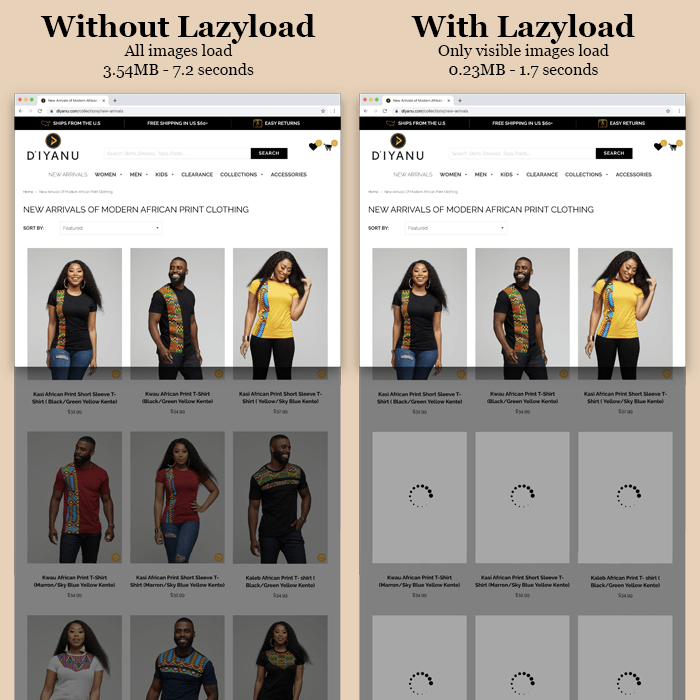
    1. Use Lazy Load so your web page will get loaded faster.


    lazy load eCommerce
    (Source: commandc.com)

    2. Use a Reliable & Flexible server so it won’t make your site down or slow.

    3. Reduce numerous HTTP Requests: A site is nothing, but a bundle of numerous data files. Let’s assume that a separate HTTP is required each time for the browser to catch a file from the server. So if the browser continues this behavior and there are numerous HTTP requests then the site will take a long load.

    4. Use PHP Accelerator: This works like magic for a site. It accelerates site speed.

    5. Remove unwanted apps, plugins & clean the non-required part of code from your side. Just like the way you clean your pc or mobile.

    We can go on and talk about numerous points that can help you to improve the site speed. But, if you perform the above five steps then you’ll not only see the improvement in your site speed but also notice the incremental graph in the numbers of orders.

    We suggest you hire an expert technical developer to do the above and other technical tasks such as leveraging CDN, using browser caching, solving redirection issues, and related tech operations.

    How to visible ‘/pub/media/import’ folder in ‘Insert Images’ section in admin panel of Magento 2?

    Magento 2 is not having this by default setting to see import folder of pub/media in ‘Insert Images’ section under CMS Page or Blocks.

    If you want to show import folder in CMS Page or Blocks then follow below steps.

    Step 1 : Create file : app/code/Magemonkey/ImportFolder/registration.php

    <?php
    MagentoFrameworkComponentComponentRegistrar::register(
        MagentoFrameworkComponentComponentRegistrar::MODULE,
        'Magemonkey_ImportFolder',
        __DIR__
    );

    Step 2 : Create file : app/code/Magemonkey/ImportFolder/etc/module.xml

    <?xml version="1.0"?>
    <config xmlns:xsi="http://www.w3.org/2001/XMLSchema-instance" xsi:noNamespaceSchemaLocation="urn:magento:framework:Module/etc/module.xsd">
        <module name="Magemonkey_ImportFolder" setup_version="1.0.0">    	
        </module>
    </config>

    Step 3 : Create file : app/code/Magemonkey/ImportFolder/etc/di.xml

    <?xml version="1.0"?>
    <config xmlns:xsi="http://www.w3.org/2001/XMLSchema-instance" xsi:noNamespaceSchemaLocation="urn:magento:framework:ObjectManager/etc/config.xsd">
    	<type name="MagentoCmsModelWysiwygImagesStorage">
    	    <arguments>
    	        <argument name="dirs" xsi:type="array">
    	            <item name="include" xsi:type="array">
    	                <item name="import" xsi:type="array">
    	                    <item name="regexp" xsi:type="boolean">true</item>
    	                    <item name="name" xsi:type="string">pub[/\]+media[/\]+import[/\]*$</item>
    	                </item>
    	            </item>
    	        </argument>
    	    </arguments>
    	</type>
    </config>

    Step 4 : Remove or comment .htaccess file under import folder

    After that run below commands

    – php bin/magento setup:upgrade
    – php bin/magento setup:static-content:deploy
    – php bin/magento cache:clean

    Thats it.

    Now clean cache and check in admin side under CMS Page or Blocks ‘Insert Images’ section. Import folder should be visible there.

    You can also use this folder image in CMS Page or Blocks

    Magento2 Form Validation Without Form Submit

    require([
        'jquery',
        'mage/validation'
    ], function($){
    
        var dataForm = $('#form-validate');
        var ignore = null;
    
        dataForm.mage('validation', {
            ignore: ignore ? ':hidden:not(' + ignore + ')' : ':hidden'
        }).find('input:text').attr('autocomplete', 'off');
    
        $('button#my-button').click( function() { //can be replaced with any event
            dataForm.validation('isValid'); //validates form and returns boolean
        });
    });

    #form-validate – Replace with your form id

    #my-button – Replace with your button id


    Magento 2 Guide: Get formatted price with currency

    There is this code which used to get price with currency.  Let’s see how to get it.

    We can use below helper price to get it.

    <?php
    use MagentoFrameworkPricingHelperData
    protected $priceHelper;
    public function __construct(Data $priceHelper)
    {
        $this->priceHelper = $priceHelper;
    }
    public function getFormattedPrice($price)
    {
        return $this->priceHelper->currency($price, true, false);
    }
    ?>

    Also, we can use directly in phtml file

    $this->helper('MagentoFrameworkPricingHelperData')->currency(number_format(50,2),true,false);


    How to add custom text after price on product detail page in Magento 2?

    If you want to show custom text after price on product detail page in product view page, then follow the below steps.

    1. Create catalog_product_view.xml in your custom theme

    app/design/frontend/[Vendor_name]/[theme_name]/Magento_Catalog/layout/catalog_product_view.xml

    <?xml version="1.0" ?>
    <page xmlns:xsi="http://www.w3.org/2001/XMLSchema-instance" xsi:noNamespaceSchemaLocation="urn:magento:framework:View/Layout/etc/page_configuration.xsd">
        <body>
            <referenceContainer name="product.info.main">
                <block class="MagentoFrameworkViewElementTemplate" name="price.after.text" template="Magento_Catalog::view/price_after_text.phtml" after="product.info.price"/>
            </referenceContainer>
        </body>
    </page>

    Now you have to create price_after_text.phtml fle and add your custom text in it

    app/design/frontend/Vendor/theme/Magento_Catalog/templates/view/price_after_text.phtml

    2. If you want to set custom text after price at everywhere then override default final_price.phtml file

    from

    vendor/magento/module-catalog/view/base/templates/product/price/final_price.phtml

    to

    app/design/frontend/[Vendor_name]/[theme_name]/Magento_Catalog/templates/product/price/final_price.phtml

    3.  Most easy way to doing it with some style

    .catalog-product-view .product-info-price .price:after { content: 'per piece'; }

    After doing above task run below commands

    - php bin/magento setup:upgrade
    - php bin/magento setup:static-content:deploy
    - php bin/magento cache:clean

    That’s it.

    Now clean cache and check your product page for custom text after price.

    You are not the owner of your own store

    The tech world is trending with the articles that read –
    “Shopify pulls down Trump’s eCommerce store from their platform.”

    This won’t impact Trump organization a lot, but imagine what would have happened to a small or medium level Shopify store owner if the same action were taken against them.

    The imagination is scary, isn’t it?

    It’s scary because you don’t have,
    – Source code of the store
    – You don’t own the IP of your store
    – Your store is hosted with them

    In other words, you’re trapped & bounded.

    The reason it happened to Trump is that in Shopify, you DON’T own the code or server. The key of your store is ultimately in the hand of Shopify even after paying lots of money & fees to Shopify.

    The Trump organization had never faced this digital loss if their store was built on other platforms such as Magento. Because, Magento is not only open source, but it also gives the authorization of all your digital rights such as codes, IP, etc.

    For Shopify store owners, the thought from Shopify’s action should be, “If Trump (World’s most powerful person in 2020) gets banned on Shopify platform, are they really owning their store? are their stores safe?”

    The better advice is to migrate your store to Magento and be the sole owner of your eCommerce store.

    Contact us today and we can tell you how can we help you.