We sacrifice by not doing any other technology, so that you get the best of Magento.

We sacrifice by not doing any other technology, so that you get the best of Magento.

    How to get product attribute label using attribute code in Magento 2?

    For this we need product object. Either you can use MagentoCatalogModelResourceModelProduct class or you can use product model class MagentoCatalogModelProduct

    You have to add any one class in your construct like below:

    public function __construct(
        MagentoCatalogModelProduct $product,
        array $data = []
    ) {
        $this->product = $product;
    }

    Now you can use product object to get attribute label.

    Get label considering current store view use this :

    $this->product->getResource()->getAttribute($code)->getStoreLabel();

    &

    Get default label use this :

    $this->product->getResource()->getAttribute($code)->getFrontendLabel();


    Why should you migrate your store in Magento?

    There are numerous eCommerce platforms available in the market. Each and every platform has its own pros & cons. But, Magento tops the chart with benefits when compared with other eCommerce platforms. These benefits are the top reasons why you should migrate your store to Magento.

    Let’s understand them.

    1. You can own the source of your store, unlike other eCommerce platforms.
    2. Great B2B features which are not available in other eCommerce platforms.
    3. Magento offers advance level SEO settings.
    4. Build in functionalities such as upsells & cross-sells, Intelligent filtered search for shoppers, etc.
    5. Magento offers multi-website options along with currency and language support which aren’t available in other eCommerce platforms.

    6. Magento is built for sales. With Magento’s segmentation options, you can target customers based on their cart and buying history, plus provide personalized, relevant content.
    7. Magento eCommerce stores load faster.
    8. Magento offers advanced-level reporting. That’s rare.
    9. It’s easy to integrate third-party tools & services compared to other eCommerce platforms.
    10. Magento 2 has improved performance, scalability & checkout process which helps to INCREASE SALES.

    Apart from the above, there are other numerous benefits that give the edge to Magento compare to other eCommerce platforms.
    If you want to increase orders & sales by giving better performance to your web visitors then migrate to Magento today.

    How to remove product attribute programmatically in Magento 2?

    1. Create InstallData.php at the following path and paste the below code.

    appcodeMagemonkeysRemoveAttributeSetupInstallData.php

    <?php
     namespace MagemonkeysRemoveAttributeSetup;
    
     use MagentoEavSetupEavSetup;
     use MagentoEavSetupEavSetupFactory;
     use MagentoFrameworkSetupInstallDataInterface;
     use MagentoFrameworkSetupModuleContextInterface;
     use MagentoFrameworkSetupModuleDataSetupInterface;
    
    class InstallData implements InstallDataInterface
     {
         private $eavSetupFactory;
    
         public function __construct(EavSetupFactory $eavSetupFactory) 
         {
             $this->eavSetupFactory = $eavSetupFactory;
         }
     
         public function install(ModuleDataSetupInterface $setup, ModuleContextInterface $context)
         {
             $eavSetup = $this->eavSetupFactory->create(['setup' => $setup]);
             $eavSetup->removeAttribute(MagentoCatalogModelProduct::ENTITY,
             'custom_attribute_id');
         }
     } ?>


    2. Refresh the cache and deploy the static content command.

    php bin/magento setup:upgrade
    
    php bin/magento setup:static-content:deploy -f
    
    php bin/magento cache:flush


    How to Create Country & State Dropdown in Magento2 Frontend Custom Form?

    First create a file “index.php” at appcodelocalMagemonkeysFormBlock with below code.

    <?php
    namespace MagemonkeysFormBlock;
     
    class Index extends MagentoFrameworkViewElementTemplate
    {
        protected $directoryBlock;
        protected $_isScopePrivate;
        
        public function __construct(
             MagentoFrameworkViewElementTemplateContext $context,
             MagentoDirectoryBlockData $directoryBlock,
             array $data = []
             )
             {
             parent::__construct($context, $data);
             $this->_isScopePrivate = true;
             $this->directoryBlock = $directoryBlock;
             }
     
             public function getCountries()
             {
             $country = $this->directoryBlock->getCountryHtmlSelect();
             return $country;
             }
             public function getRegion()
             {
             $region = $this->directoryBlock->getRegionHtmlSelect();
             return $region;
             }
             public function getCountryAction()
             {
             return $this->getUrl('magemonkeys/form/country', ['_secure' => true]);
             }
        
        
    }

    Now, you need to create another file at appcodelocalMagemonkeysFormviewfrontendlayout with following code and name it as “form_form_index.xml

    <?xml version="1.0"?>
    <page xmlns:xsi="http://www.w3.org/2001/XMLSchema-instance" layout="1column" xsi:noNamespaceSchemaLocation="../../../../../../../lib/internal/Magento/Framework/View/Layout/etc/page_configuration.xsd">
             <head>
             <title>form</title>
             </head>
         <body>     
             <referenceContainer name="content">                 
                         <block class="MagemonkeysFormBlockIndex" name="form" template="form/index.phtml">
                         </block>
             </referenceContainer>       
             </body>
    </page>

    Now create “index.phtml” with following code at appcodelocalMagemonkeysFormviewfrontendtemplatesform

    <?php
    $countryList=$block->getCountries();
    $regionList=$block->getRegion();  ?>
    <form class="form retuns"
             action="<?php /* @escapeNotVerified */ echo $block->getFormAction(); ?>"
             id="return-form"
             method="post"
             data-hasrequired="<?php /* @escapeNotVerified */ echo __('* Required Fields') ?>"
             data-mage-init='{"validation":{}}'>
     
             <div class="field country required">
                           <label class="label" for="country"><span><?php /* @escapeNotVerified */ echo __('Country') ?></span></label>
                           <div class="control">
                                       <?php echo $countryList?>
                           </div>
                   </div>
     
             <div class="field region required">
                           <label class="label" for="state"><span><?php /* @escapeNotVerified */ echo __('State') ?></span></label>
                           <div class="control">
                           <?php echo $regionList?>
                           </div>
                           </div>
                           
                           
                           <div class="field states required" style="display:none">
                           <label class="label" for="states"><span><?php /* @escapeNotVerified */ echo __('State') ?></span></label>
                           <div class="control">
                           <input name="state" id="states" title="<?php /* @escapeNotVerified */ echo __('State') ?>"  class="input-text" type="text" />
                           </div>
                           </div>
     
    </form>
     
    <script>
             jQuery(document).on('change','#country',function() {
             var param = 'country='+jQuery('#country').val();
             jQuery.ajax({
                         showLoader: true,
                         url: '<?php /* @escapeNotVerified */ echo $block->getCountryAction(); ?>',
                         data: param,
                         type: "GET",
                         dataType: 'json'
             }).done(function (data) {
                         jQuery('#state').empty();
                         if(data.value=='')
                         {
                                     jQuery('.field.states.required').show();
                                     jQuery('.field.region.required').hide();
                         }
                         else
                         {
                         jQuery('#state').append(data.value);
                                     jQuery('.field.states.required').hide();
                                     jQuery('.field.region.required').show();
                         }
             });
        });
    </script>

    Lastly, you need to create “Country.php” in your form folder at appcodelocalMagemonkeysFormControllerForm with following code.

    <?php
    namespace MagemonkeysFormControllerForm;
     
    class Country extends MagentoFrameworkAppActionAction
    {
             protected $resultJsonFactory;
        
        protected $regionColFactory;
     
             public function __construct(
             MagentoFrameworkAppActionContext $context,
             MagentoFrameworkControllerResultJsonFactory $resultJsonFactory,
             MagentoDirectoryModelRegionFactory $regionColFactory)
        {     
             $this->regionColFactory     = $regionColFactory;
             $this->resultJsonFactory     = $resultJsonFactory;
             parent::__construct($context);
             }
     
             public function execute()
             {
             $this->_view->loadLayout();
             $this->_view->getLayout()->initMessages();
             $this->_view->renderLayout();
     
             $result           = $this->resultJsonFactory->create();
             $regions=$this->regionColFactory->create()->getCollection()->addFieldToFilter('country_id',$this->getRequest()->getParam('country'));
             
             $html = '';
             
             if(count($regions) > 0)
             {
                         $html.='<option selected="selected" value="">Please select a region, state or province.</option>';
                         foreach($regions as $state)
                         {
                                     $html.=    '<option  value="'.$state->getName().'">'.$state->getName().'.</option>';
                         }
             }
             return $result->setData(['success' => true,'value'=>$html]);
       }
    }


    How to rewrite customer controller in Magento 2?

    We can do it by using preference if we need to add or edit some information in createPost controller.

    To do that we will need a module : Magemonkeys_General

    We have need two files.

    Create di.xml file in this folder app/code/Magemonkeys/General/etc/

    <?xml version="1.0"?>
    <config xmlns:xsi="http://www.w3.org/2001/XMLSchema-instance" xsi:noNamespaceSchemaLocation="urn:magento:framework:ObjectManager/etc/config.xsd">
        <preference for="MagentoCustomerControllerAccountCreatePost" type="MagemonkeysGeneralControllerMagentoCustomerAccountCreatePost" />
    </config>

    Create CreatePost.php in this folder app/code/Magemonkeys/General/Controller/Magento/Customer/Account/

    <?php
    
    namespace MagemonkeysGeneralControllerMagentoCustomerAccount;
    use MagentoCustomerApiCustomerRepositoryInterface as CustomerRepository;
    use MagentoFrameworkAppActionHttpPostActionInterface as HttpPostActionInterface;
    use MagentoCustomerModelAccountRedirect as AccountRedirect;
    use MagentoCustomerApiDataAddressInterface;
    use MagentoFrameworkApiDataObjectHelper;
    use MagentoFrameworkAppActionContext;
    use MagentoCustomerModelSession;
    use MagentoFrameworkAppConfigScopeConfigInterface;
    use MagentoFrameworkAppCsrfAwareActionInterface;
    use MagentoFrameworkAppObjectManager;
    use MagentoFrameworkAppRequestInvalidRequestException;
    use MagentoFrameworkAppRequestInterface;
    use MagentoFrameworkControllerResultRedirect;
    use MagentoFrameworkExceptionLocalizedException;
    use MagentoFrameworkPhrase;
    use MagentoStoreModelStoreManagerInterface;
    use MagentoCustomerApiAccountManagementInterface;
    use MagentoCustomerHelperAddress;
    use MagentoFrameworkUrlFactory;
    use MagentoCustomerModelMetadataFormFactory;
    use MagentoNewsletterModelSubscriberFactory;
    use MagentoCustomerApiDataRegionInterfaceFactory;
    use MagentoCustomerApiDataAddressInterfaceFactory;
    use MagentoCustomerApiDataCustomerInterfaceFactory;
    use MagentoCustomerModelUrl as CustomerUrl;
    use MagentoCustomerModelRegistration;
    use MagentoFrameworkEscaper;
    use MagentoCustomerModelCustomerExtractor;
    use MagentoFrameworkExceptionStateException;
    use MagentoFrameworkExceptionInputException;
    use MagentoFrameworkDataFormFormKeyValidator;
    use MagentoCustomerControllerAbstractAccount;
    
    class CreatePost extends MagentoCustomerControllerAccountCreatePost
    {
    	/**
         * @var Validator
         */
        private $formKeyValidator;
        protected $inlineTranslation;
    
        /**
         * @var MagentoFrameworkStdlibCookiePhpCookieManager
         */
        private $cookieMetadataManager;
    
        /**
         * @var MagentoFrameworkStdlibCookieCookieMetadataFactory
         */
        private $cookieMetadataFactory;
    
        public function __construct(
        	Context $context,
            Session $customerSession,
            ScopeConfigInterface $scopeConfig,
            StoreManagerInterface $storeManager,
            AccountManagementInterface $accountManagement,
            Address $addressHelper,
            UrlFactory $urlFactory,
            FormFactory $formFactory,
            SubscriberFactory $subscriberFactory,
            RegionInterfaceFactory $regionDataFactory,
            AddressInterfaceFactory $addressDataFactory,
            CustomerInterfaceFactory $customerDataFactory,
            CustomerUrl $customerUrl,
            Registration $registration,
            Escaper $escaper,
            CustomerExtractor $customerExtractor,
            DataObjectHelper $dataObjectHelper,
            AccountRedirect $accountRedirect,
            CustomerRepository $customerRepository,
            Validator $formKeyValidator = null
        ) {
        	$this->formKeyValidator = $formKeyValidator ?: ObjectManager::getInstance()->get(Validator::class);
            $this->accountRedirect = $accountRedirect;
        	return parent::__construct($context,$customerSession,$scopeConfig,$storeManager,$accountManagement,$addressHelper,$urlFactory,$formFactory,$subscriberFactory,$regionDataFactory,$addressDataFactory,$customerDataFactory,$customerUrl,$registration,$escaper,$customerExtractor,$dataObjectHelper,$accountRedirect,$customerRepository,$formKeyValidator);
        }
    
    	public function execute()
        {          
            /** @var Redirect $resultRedirect */
            $resultRedirect = $this->resultRedirectFactory->create();
            if ($this->session->isLoggedIn() || !$this->registration->isAllowed()) {
                $resultRedirect->setPath('*/*/');
                return $resultRedirect;
            }
    
            // We can write our login here
        }
    }

    we will also need to add private function in this file as we used execute method.

    /**
         * Retrieve cookie manager
         *
         * @deprecated 100.1.0
         * @return MagentoFrameworkStdlibCookiePhpCookieManager
         */
        private function getCookieManager()
        {
            if (!$this->cookieMetadataManager) {
                $this->cookieMetadataManager = ObjectManager::getInstance()->get(
                    MagentoFrameworkStdlibCookiePhpCookieManager::class
                );
            }
            return $this->cookieMetadataManager;
        }

    That’s it.

    Patch for the Credit Memo custom template don’t include the returned items in the email

    I have faced the issue while trying to override the Credit Memo Email template from the admin. The email template doesn’t include the item list in the email. So, I have made a small plugin for that.

    Step 1: You have to add this line in the Magemonkeys/SalesEmails/etc/di.xml

    <?xml version="1.0" ?>
    <config xmlns:xsi="http://www.w3.org/2001/XMLSchema-instance" xsi:noNamespaceSchemaLocation="urn:magento:framework:ObjectManager/etc/config.xsd">
    	<type name="MagentoEmailModelTemplate">
    		<plugin disabled="false" name="Magemonkeys_SalesEmailTemplate_Plugin_Sales_Email_Model_Template" sortOrder="10" type="MagemonkeysSalesEmailTemplatePluginSalesEmails"/>
    	</type>
    </config>

    Step 2: Add the SalesEmails.php file on this ‘Magemonkeys/SalesEmailTemplate/Plugin’ location and add the below code in it.

    <?php
    declare(strict_types=1);
    
    namespace MagemonkeysSalesEmailTemplatePlugin;
    
    class SalesEmails 
    {
    
        public function beforeBeforeSave(MagentoEmailModelTemplate $subject)
        {
        	$subject->setData('is_legacy', 1);
            return [];
        }
    }
    

    That’s it.

    After executing above tech codes,  run the required command to see the effect.

    Note : Please delete the old custom template entry and made the new one.

    How to solve cluster_block_exception [TOO_MANY_REQUESTS/12/disk usage exceeded flood-stage watermark, index has read-only-allow-delete block] in Magento 2?

    If you get below type indexer related error in command line and want to resolve,

    user1234@user1234-pc /var/www/html/magento241 $ php bin/magento indexer:reindex
    Design Config Grid index has been rebuilt successfully in 00:00:04
    Customer Grid index has been rebuilt successfully in 00:00:04
    Category Products index has been rebuilt successfully in 00:00:01
    Product Categories index has been rebuilt successfully in 00:00:00
    Catalog Rule Product index has been rebuilt successfully in 00:00:06
    Product EAV index has been rebuilt successfully in 00:00:01
    Stock index has been rebuilt successfully in 00:00:01
    Inventory index has been rebuilt successfully in 00:00:00
    Catalog Product Rule index has been rebuilt successfully in 00:00:00
    Product Price index has been rebuilt successfully in 00:00:01
    Catalog Search index process unknown error:
    {"error":{"root_cause":[{"type":"cluster_block_exception","reason":"index [magento2_product_1_v1] blocked by: [TOO_MANY_REQUESTS/12/disk usage exceeded flood-stage watermark, index has read-only-allow-delete block];"}],"type":"cluster_block_exception","reason":"index [magento2_product_1_v1] blocked by: [TOO_MANY_REQUESTS/12/disk usage exceeded flood-stage watermark, index has read-only-allow-delete block];"},"status":429}

    Then follow below steps:

    Step 1 : Go to your root project in command line

    Step 2 : Run below mentioned command

    curl -XPUT -H "Content-Type: application/json" http://localhost:9200/_cluster/settings -d '{ "transient": { "cluster.routing.allocation.disk.threshold_enabled": false } }'

    Step 3 : After running above command successfully, run another below mentioned command

    curl -XPUT -H "Content-Type: application/json" http://localhost:9200/_all/_settings -d '{"index.blocks.read_only_allow_delete": null}'

    After running above codes, run below mentioned commands

    – php bin/magento setup:upgrade
    – php bin/magento setup:static-content:deploy
    – php bin/magento indexer:reindex
    – php bin/magento cache:clean

    That’s it.

    Now, your reindexer related issue should be resolved.

    CONTACT US to get Magento programming solutions by hiring a certified Magento expert.

    How our eCommerce client’s sales revenue increased after migrating from Shopify to Magento?

    At Mage monkeys, we received an inquiry that read,

    Hello, I’m interested to learn about migrating my Shopify store to Magento. Will it be beneficial? Let’s discuss this over a call. Ring me at XXX-XXX-XXXX.

    Our sales team took the technical head to the conference and we explained to the client
    what we will be doing for them.

    After fetching all technical details from the client. Our tech team did a migration process in such a way that the site didn’t go down. The benefit client achieve with Magento
    migration were:

    Speed improvement: Unlike in Shopify, the source code of the site was handled by our team easily. Our team minimized the programmatic code size along with the media which resulted in a fast site
    and more order.

    Good SEO Result: The SEO works like a charm after migrating to Magento.
    Our client was losing $500/day due to bad SEO settings! 

    Hosting Options: With Magento, a business is not obligated to stay with hosting that is bundled with the platform. Magento allows an eCommerce store to freely select any hosting company of their choice. It’s been observed many times that Shopify stores go down due to hosting problems which led to a crash in the sales graph. That’s not the case you will face with Magento.

    Add-Ons that helped on saving tech budget.

    No More FEES on EVERY ORDER: Earlier the client used to pay fees on every order which was saved after migrating in Magento. After migration FULL order amount started going into the client’s pocket.

    More functionalities: The client’s store was leveraging more advanced functionalities which were giving ease to their business operations.

    FREE Extensions: The extensions for which the client was paying in Shopify were available as FOC in Magento. That cost was also reduced.

    Apart from the above, the client achieved many other business benefits. Their sales increased like never before. If you also want to increase your sales then leverage the benefits of Magento technology by migrating your store to Magento.

    Magento 2: Add Customer Attribute Programmatically Using Setup Script

    Create setup file InstallData.php

    File: app/code/Magemonkeys/Customer/Setup/InstallData.php

    <?php
    
    namespace MagemonkeysCustomerSetup;
    
    use MagentoEavSetupEavSetup;
    use MagentoEavSetupEavSetupFactory;
    use MagentoFrameworkSetupInstallDataInterface;
    use MagentoFrameworkSetupModuleContextInterface;
    use MagentoFrameworkSetupModuleDataSetupInterface;
    use MagentoEavModelConfig;
    use MagentoCustomerModelCustomer;
    
    class InstallData implements InstallDataInterface
    {
    	private $eavSetupFactory;
    
    	public function __construct(EavSetupFactory $eavSetupFactory, Config $eavConfig)
    	{
    		$this->eavSetupFactory = $eavSetupFactory;
    		$this->eavConfig       = $eavConfig;
    	}
    
    	public function install(ModuleDataSetupInterface $setup, ModuleContextInterface $context)
    	{
    		$eavSetup = $this->eavSetupFactory->create(['setup' => $setup]);
    		$eavSetup->addAttribute(
    			MagentoCustomerModelCustomer::ENTITY,
    			'sample_attribute',
    			[
    				'type'         => 'varchar',
    				'label'        => 'Sample Attribute',
    				'input'        => 'text',
    				'required'     => false,
    				'visible'      => true,
    				'user_defined' => true,
    				'position'     => 999,
    				'system'       => 0,
    			]
    		);
    		$sampleAttribute = $this->eavConfig->getAttribute(Customer::ENTITY, 'sample_attribute');
    
    		// more used_in_forms ['adminhtml_checkout','adminhtml_customer','adminhtml_customer_address','customer_account_edit','customer_address_edit','customer_register_address']
    		$sampleAttribute->setData(
    			'used_in_forms',
    			['adminhtml_customer']
    
    		);
    		$sampleAttribute->save();
    	}
    }

    Run command line to install the module: php bin/magento setup:upgrade and php bin/magento setup:static-content:deploy

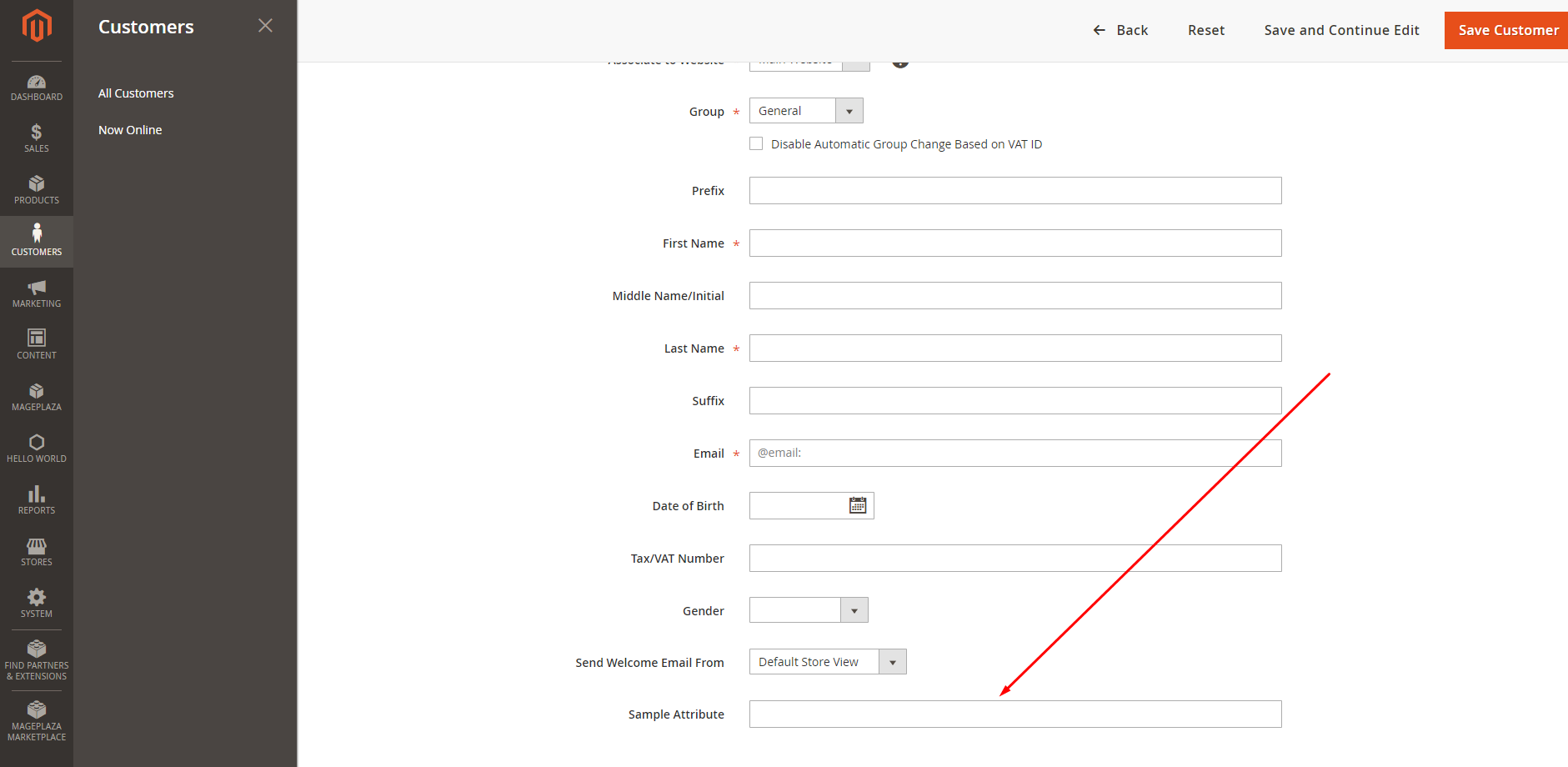
    Then check the result. It will show like this:

    How to Add Colour Picker in Magento 2 System Configuration?

    Le’ts add a color picker to textbox through system.xml file located at
    appcodeVendorExtensionetcadminhtml

    <system>
    	<section>
        	<group id="my_color_group" ...>
            	<field id="my_color_option" translate="label" type="text" sortOrder="10" showInDefault="1" showInWebsite="1" showInStore="1">
                    <label>Background Color</label>
                    <comment><![CDATA[Background color]]></comment>
                    <frontend_model>VendorExtensionBlockColor</frontend_model>                     
                </field>
        	</group>
    	</section>
    </system>

    Now we have to create one Color.php file at below location under the hood of extension
    appcodeVendorExtensionBlock

    <?php
    namespace VendorExtensionBlock; 
    class Color extends MagentoConfigBlockSystemConfigFormField { 
    	public function __construct(
        MagentoBackendBlockTemplateContext $context, array $data = []
    	) {
            parent::__construct($context, $data);
    	}
     
    	protected function _getElementHtml(MagentoFrameworkDataFormElementAbstractElement $element) {
        	$html = $element->getElementHtml();
        	$value = $element->getData('value');
     
        	$html .= '<script type="text/javascript">
                require(["jquery","jquery/colorpicker/js/colorpicker"], function ($) {
                    $(document).ready(function () {
                    	var $el = $("#' . $element->getHtmlId() . '");
                        $el.css("backgroundColor", "'. $value .'");
     
                    	// Attach the color picker
                        $el.ColorPicker({
                        	color: "'. $value .'",
                            onChange: function (hsb, hex, rgb) {
                                $el.css("backgroundColor", "#" + hex).val("#" + hex);
                        	}
                    	});
                	});
            	});
    	        </script>';
        	return $html;
    	}
     
    }


    We need to implement JavaScript color picker library to adminhtml_system_config_edit.xml file available at appcodeVendorExtensionviewadminhtmllayout

    <?xml version="1.0" encoding="UTF-8"?>
    <page xmlns:xsi="http://www.w3.org/2001/XMLSchema-instance" layout="admin-2columns-left" xsi:noNamespaceSchemaLocation="../../../../../../../lib/internal/Magento/Framework/View/Layout/etc/page_configuration.xsd">
    	<head>
        	<css src="jquery/colorpicker/css/colorpicker.css"/>
        	<link src="jquery/colorpicker/js/colorpicker.js"/>
    	</head>
    </page>