We sacrifice by not doing any other technology, so that you get the best of Magento.

We sacrifice by not doing any other technology, so that you get the best of Magento.

    Best Project Management Practices for eCommerce project Discussion with Gabriel Lascano, CTO of Bit Space Development Ltd.

    It was quite an interactive conversation with Gabriel Lascano the CTO of Bit Space Development Ltd.

    We started the conversation with a few technical issues with Zoom and Google Meet and shared the challenges on both Video Conferencing Tools, though it was not as per the planned conversation, it was quite fun to change the track and talk about something you use on daily basis.

    While moving forward with the Best Project Management Practices for E-commerce project, Gabriel said, clients did some research at the initial stage and came to us asking some suggestion on it, and choosing a platform also depends on the customer budget as they don’t need much customization or complex store, Gabriel suggested that the platform we choose must have strong flexibility when we need to add some customization when business grow and keep track on new trends, and 2nd priority while choosing the platform is Integration, having plug-in with different tools.

    We moved forward with the next common topic which is getting the right Software Development Methodologies in e-commerce is difficult, but Agile came up with good flexibility where it is easy to make a short-term sprint of 2 weeks as the ultimate goal is to satisfy the client. So sticking to the sort-term development phase is quite needed in e-commerce project development.

    Gabriel shared that the major challenges on the e-commerce, scope of the work is never pre-defined so it is always hard to find out what they need because the clients know what they want and don’t know what they need! So we need to know the business vision and predict few things at the beginning and plan according to it.

    While talking about the Checklist before going live, they prefer to check all the technical needs, check all the features are in line, transaction link should be working, server sized should be on the predicated order size and server won’t crash in season time.

    Send email on order cancellation in Magento 2

    Magento 2 has many templates to send when the customer changes the order process like an invoice, shipment, credit memo, etc. But the same isn’t available on the cancellation process.

    Today, we’re going to show you how to set it up for the cancelation process.

    Module name: Magemonkeys_Cancelledorder

    Create events.xml at app/code/Magemonkeys/Cancelledorder/etc/

    <?xml version="1.0"?>
    <config xmlns:xsi="http://www.w3.org/2001/XMLSchema-instance"
            xsi:noNamespaceSchemaLocation="urn:magento:framework:Event/etc/events.xsd">
        <event name="sales_order_save_after">
            <observer name="sales_order_save_after"
                      instance="MagemonkeysCancelledorderObserverOrderSaveAfter"/>
        </event>
    </config>

    Then Create OrderSaveAfter.php at app/code/Magemonkeys/Cancelledorder/Observer/

    <?php
    namespace MagemonkeysCancelledorderObserver;
    
    use MagentoFrameworkEventObserverInterface;
    use MagentoSalesModelOrderEmailSenderOrderCommentSender;
    
    class OrderSaveAfter implements ObserverInterface
    {
    
        protected $orderCommentSender;
    
        public function __construct(
            OrderCommentSender $orderCommentSender
        )
        {
            $this->orderCommentSender = $orderCommentSender;
        }
    
        public function execute(MagentoFrameworkEventObserver $observer)
        {
            $order = $observer->getEvent()->getOrder();
            if ($order->getState() == 'canceled') {
                $this->orderCommentSender->send($order, true);
            }
        }
    }

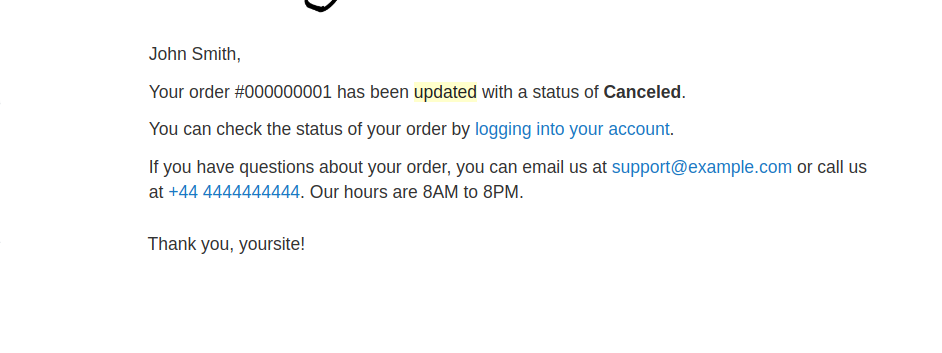
    The mail will look something like the below.

    Hope that helps.

    Magento 1.x create customer after place order using order details

    Create app/code/local/Namespace/Module/etc/config.xml  file and add below code

    <events>
      <checkout_onepage_controller_success_action> <!-- identifier of the event we want to catch -->
        <observers>
          <checkout_onepage_controller_success_action_handler> <!-- identifier of the event handler -->
            <type>singleton</type> <!-- class method call type; valid are model, object and singleton -->
            <class>createcustomer/observer</class> <!-- observers class alias -->
            <method>Aftersuccess</method>  <!-- observer's method to be called -->
            <args></args> <!-- additional arguments passed to observer -->
          </checkout_onepage_controller_success_action_handler>
        </observers>
      </checkout_onepage_controller_success_action>
    </events>

    Create app/code/local/Namespace/Module/Model/Observer.php file and add the below code.

    <?php
    class Namespace_Module_Model_Observer
    {
    
    	public function Aftersuccess(Varien_Event_Observer $observer)
    	{
    		$orderIds = $observer->getData('order_ids');
         	        foreach($orderIds as $_orderId){
    			$order = Mage::getModel('sales/order')->load($_orderId);
    			$storeId = Mage::app()->getStore()->getId();
    			$store = Mage::getModel('core/store')->load($order->getData('store_id'));
    			$websiteId = $store->getWebsiteId();
    			$billingaddress = $order->getBillingAddress();
    			$customer = Mage::getModel('customer/customer')->setWebsiteId($websiteId);
    			$customer->loadByEmail($order->getCustomerEmail());
    
    			if(!$customer->getId()) {
    				$customer = Mage::getModel("customer/customer");
    				$customer   ->setWebsiteId($websiteId)
    				            ->setStore($store)
    				            ->setFirstname($billingaddress->getFirstname())
    				            ->setLastname($billingaddress->getLastname())
    				            ->setEmail($billingaddress->getEmail());
    				try{
    				    $customer->save();
    				}
    				catch (Exception $e) {
    				    Zend_Debug::dump($e->getMessage());
    				}
    
    				$address = Mage::getModel("customer/address");
    				$address->setCustomerId($customer->getId())
    				        ->setFirstname($customer->getFirstname())
    				        ->setMiddleName($customer->getMiddlename())
    				        ->setLastname($customer->getLastname())
    				        ->setCountryId($billingaddress->getCountryId())
    						->setRegionId($billingaddress->getRegionId()) //state/province, only needed if the country is USA
    				        ->setPostcode($billingaddress->getPostcode())
    				        ->setCity($billingaddress->getCity())
    				        ->setTelephone($billingaddress->getTelephone())
    				        ->setFax($billingaddress->getFax())
    				        ->setCompany($billingaddress->getCompany())
    				        ->setStreet($billingaddress->getStreet())
    				        ->setIsDefaultBilling('1')
    				        ->setIsDefaultShipping('1')
    				        ->setSaveInAddressBook('1');
    				 
    				try{
    				    $address->save();
    				}
    				catch (Exception $e) {
    				    Zend_Debug::dump($e->getMessage());
    				}
    			}
    		}
    	}	
    }


    Magento 2: Popup minicart after adding product to the cart

    Override the minicart.js on your theme from vendor/magento/module-checkout/view/frontend/web/js/view/minicart.js

    Under the initialize: function () you will see the below code

    $('[data-block="minicart"]').on('contentLoading', function () {
        addToCartCalls++;
        self.isLoading(true);
    });

    Replace with below code

    $('[data-block="minicart"]').on('contentLoading', function () {
        addToCartCalls++;
        self.isLoading(true);
        $('[data-block="minicart"]').on('contentUpdated', function ()  {
            $('[data-block="minicart"]').find('[data-role="dropdownDialog"]').dropdownDialog("open");       
            setTimeout(function() {
                $('[data-block="minicart"]').find('[data-role="dropdownDialog"]').dropdownDialog("close");
                }, 4000);
        });
    });


    Magento 2: How to open all product tabs in mobile view by default?

    Follow the below steps to override default.phtml  in your theme.

    Create an default.phtml in : app/design/frontend/Vendor/Themename/Magento_Catalog/templates/product/view

    <?php if ($detailedInfoGroup = $block->getGroupSortedChildNames('detailed_info', 'getChildHtml')):?>
        <div class="product info detailed">
            <?php $layout = $block->getLayout(); ?>        
                <div class="product data items" id="accordion" data-mage-init='{"accordion":{"openedState": "opened", "collapsible": true,  "multipleCollapsible": true}}'>
                <?php foreach ($detailedInfoGroup as $name):?>
                    <?php
                        $html = $layout->renderElement($name);
                        if (!trim($html)) {
                            continue;
                        }
                        $alias = $layout->getElementAlias($name);
                        $label = $block->getChildData($alias, 'title');
                    ?>
                    <div class="data item title"
                         aria-labeledby="tab-label-<?= /* @escapeNotVerified */ $alias ?>-title"
                         data-role="collapsible" id="tab-label-<?= /* @escapeNotVerified */ $alias ?>">
                        <a class="data switch"
                           tabindex="-1"
                           data-toggle="switch"
                           href="#<?= /* @escapeNotVerified */ $alias ?>"
                           id="tab-label-<?= /* @escapeNotVerified */ $alias ?>-title">
                            <?= /* @escapeNotVerified */ $label ?>
                        </a>
                    </div>
                    <div class="data item content" id="<?= /* @escapeNotVerified */ $alias ?>" data-role="content">
                        <?= /* @escapeNotVerified */ $html ?>
                    </div>
                <?php endforeach;?>
            </div>
        </div>
    <?php endif; ?>
    
    
    <script type="text/javascript">
            require(['jquery', 'matchMedia', 'accordion'], function($, mediaCheck) {
    
                var detailsTabs = $('.product.data.items');
    
                mediaCheck({
                    media: '(min-width: 768px)',
                    // Switch to Desktop Version
                    entry: function () {
                        detailsTabs.accordion({
                            openedState: "opened",
                            collapsible: false                        
                        });
                    },
                    // Switch to Mobile Version
                    exit: function () {
                        detailsTabs.accordion({
                            openedState: "opened",
                            collapsible: true,
                            active: [0,1,2,3,4],
                            multipleCollapsible: true
    
                        });
                    }
                });
            })
    </script>


    How to show FromDate and ToDate on detail page from assigned catalog price rule?

    The default Magento 2 does not show FromDate or ToDate on the detail page from the assigned catalog price rule. If you want to show these dates on the detail page then follow the below steps.

    Step 1: Create a registration file like Magemonkeys/Catalogrule/registration.php

    <?php
    MagentoFrameworkComponentComponentRegistrar::register(
    MagentoFrameworkComponentComponentRegistrar::MODULE,
    'Magemonkeys_Catalogrule',
    __DIR__
    );


    Step 2: Create module file like Magemonkeys/Catalogrule/etc/module.xml

    <?xml version="1.0"?>
    <config xmlns:xsi="http://www.w3.org/2001/XMLSchema-instance" xsi:noNamespaceSchemaLocation="urn:magento:framework:Module/etc/module.xsd">
    <module name="Magemonkeys_Catalogrule" setup_version="1.0.0"/>
    </config>


    Step 3: Create block file like Magemonkeys/Catalogrule/Block/Rule.php

    <?php
        namespace MagemonkeysCatalogruleBlock;
        use MagentoFrameworkViewElementTemplate;
        use MagentoFrameworkRegistry;
        use MagentoCatalogModelProduct;
        use MagentoFrameworkExceptionLocalizedException;
    
        class Rule extends MagentoFrameworkViewElementTemplate
        {
            protected $_registry;
    
            public function __construct(
                MagentoBackendBlockTemplateContext $context,
                MagentoCatalogRuleModelResourceModelRuleCollectionFactory $ruleFactory,
                MagentoFrameworkRegistry $registry,
                array $data = []
            ) {
                $this->_registry = $registry;
                $this->_ruleFactory = $ruleFactory;
                parent::__construct($context, $data);
        }
    
        public function getCatalogRuleId()
        {
            //die('aaaaa');
            $catalogRuleCollection = $this->_ruleFactory->create()
                ->addFieldToFilter('is_active',1);
    
            return $catalogRuleCollection;
    
            $resultProductIds = [];
    
            foreach ($catalogRuleCollection as $catalogRule) {
                $productIdsAccToRule = $catalogRule->getMatchingProductIds();
    
                //echo json_encode($productIdsAccToRule); exit;
    
                $websiteId = $this->_storeManager->getStore()->getWebsiteId();
    
                foreach ($productIdsAccToRule as $productId => $ruleProductArray) {
                    if (!empty($ruleProductArray[$websiteId])) {
                        $resultProductIds[$productId] = $catalogRule->getData();
                    }
                }
    
                return $resultProductIds;
            }
        }
    
        public function getCurrentProduct()
        {        
            return $this->_registry->registry('current_product');
        } 
    
        public function getCatalogPriceRuleProductIds()
        {
            $storeManager = MagentoFrameworkAppObjectManager::getInstance()->create(
                 'MagentoStoreModelStoreManagerInterface'
            );
            $catalogRule = MagentoFrameworkAppObjectManager::getInstance()->create(
                 'MagentoCatalogRuleModelRuleFactory'
            );
            
            $websiteId = $storeManager->getStore()->getWebsiteId();//current Website Id
    
            $resultProductIds = [];
            $catalogRuleCollection = $catalogRule->create()->getCollection();
            $catalogRuleCollection->addIsActiveFilter(1);//filter for active rules only
            foreach ($catalogRuleCollection as $catalogRule) {
                $productIdsAccToRule = $catalogRule->getMatchingProductIds();
                foreach ($productIdsAccToRule as $productId => $ruleProductArray) {
                    if (!empty($ruleProductArray[$websiteId])) {
                        $resultProductIds[$productId]['rulename'] = $catalogRule->getName();
                        $resultProductIds[$productId]['fromdate'] = $catalogRule->getFromDate();
                        $resultProductIds[$productId]['todate'] = $catalogRule->getToDate();
                    }
                }
            }
            return $resultProductIds;
        }
    }


    Step 4: Create layout file like Magemonkeys/Catalogrule/view/frontend/layout/catalog_product_view.xml

    <?xml version="1.0"?>
    <!--
    /**
     * Copyright © 2018 Porto. All rights reserved.
     * See COPYING.txt for license details.
     */
    -->
    <page layout="2columns-right" xmlns:xsi="http://www.w3.org/2001/XMLSchema-instance" xsi:noNamespaceSchemaLocation="urn:magento:framework:View/Layout/etc/page_configuration.xsd">
        <body>
             <referenceContainer name="product.info.main">
                <block class="MagemonkeysCatalogruleBlockRule" name="rule_dates" template="Magemonkeys_Catalogrule::product/view/rule.phtml"/>
            </referenceContainer>
            <move element="rule_dates" destination="product.info.main" before="product.info.price"/>
        </body>
    </page>


    Step 5 : Create template file like Magemonkeys/Catalogrule/view/frontend/templates/product/view/rule.phtml

    <?php
        $result=$block->getCatalogRuleId();
        $product=$block->getCurrentProduct();
        $collection=$block->getCatalogPriceRuleProductIds();
        $fromdate = '';
        $todate = '';
        $flag = false;
        foreach ($collection as $key => $collectionnew) {
            if ($product->getId() == $key) {
                $fromdate = $collectionnew['fromdate'];
                $todate = $collectionnew['todate'];
                $flag = true;
                break;
            }
        }
    ?>
    <?php if($flag){ ?>
        <div class="promotions-date">
            <h3 class="promotions"><?php echo __("Promotion"); ?></h3>
            <span class="fromdate"><?php echo __("Start Date : "); ?><?php echo $fromdate; ?></span>
            <span class="todate"><?php echo __("End Date : "); ?><?php echo $todate; ?></span>
        </div>
    <?php } ?>
    <style type="text/css">
        .promotions-date { margin-bottom: 20px; }
        .promotions-date .promotions { margin-top: 0; color: #333; }
        .promotions-date span { display: block; }
    </style>


    Step 6: Then run the below commands.

    php bin/magento setup:upgrade
    php bin/magento setup:static-content:deploy
    php bin/magento cache:flush


    That’s it.

    Now clean cache and check your product detail page. Now your catalog price rule FromDate and ToDate should be visible.

    Magento 2: How to resolve category save error ‘Something went wrong while saving the category’?

    Sometimes Magento 2.3.6 upgrade after fetching this issue, then run below SQL query inside the direct database to get the solution.

    INSERT INTO `eav_attribute` (`entity_type_id`, `attribute_code`, `attribute_model`, `backend_model`, `backend_type`, `backend_table`, `frontend_model`, `frontend_input`, `frontend_label`, `frontend_class`, `source_model`, `is_required`, `is_user_defined`, `default_value`, `is_unique`, `note`) VALUES
    
    (4, 'custom_layout_update_file', NULL, 'Magento\Catalog\Model\Product\Attribute\Backend\LayoutUpdate', 'varchar', NULL, NULL, 'select', 'Custom Layout Update', NULL, 'Magento\Catalog\Model\Product\Attribute\Source\LayoutUpdate', 0, 0, NULL, 0, NULL),
    (3, 'custom_layout_update_file', NULL, 'Magento\Catalog\Model\Category\Attribute\Backend\LayoutUpdate', 'varchar', NULL, NULL, 'select', 'Custom Layout Update', NULL, 'Magento\Catalog\Model\Category\Attribute\Source\LayoutUpdate', 0, 0, NULL, 0, NULL);


    Top Magento Development Companies for Hire

    Magento is the most popular choice for eCommerce brands.  It has revolutionised the way merchants serve their customers. It has crossed millions of downloads and is considered as the most search engine friendly eCommerce platform. Magento has a number of features that an eCommerce marketer would want to have on the online shopping platforms like it supports different currencies and languages, highly secure in terms of order security and product management, and simple payment gateways.

    Magento can be used by startups, medium-sized and big businesses to manage their business-oriented website. Designing and developing a unique Magento solution needs best and certified Magento developers. So, the most frequently asked question by a newbie or a  start-ups company is “How do I find a Magento Developer or how to find the best Magento development company?

    Below-mentioned are some of the best companies which are offering unique solutions to their clients.

    Introduction of Best Magento Development Companies

    Here are the top 3 Magento development companies that can provide you with a customized eCommerce solutions.

    1. Abbacus Technologies
    2. Your Cloud Team
    3. E-com.dev

    Use our top list as your go-to resource for Magento developers. Read review of each company, feedback from former clients, and other general company information to determine which company best fits your needs.

    1.     Abbacus Technologies

    Abbacus Technologies is a top notch company when it comes to Magento Development. The company has rich experience in managing every stage of Magento development right from analysing to designing to development to integration and to final eCommerce store delivery.

    Abbacus Technologies focuses on building solutions that are cost-effective and also add value to the client’s business. They provide weekly as well as daily reports through Skype, messenger, chat, call and they will never ask you for any hidden cost.

    Abbacus Technologies also provide seamless migration or upgradation from previous Magento versions to the latest ones with advanced features.  The company offers constant support during the project execution.

    The Magento Development services offered by Abbacus Technologies include:

    • Mobile App Development
    • Web Development
    • iOS development
    • Android Development
    • iPhone Development
    • Windows Development
    • iPad Development
    • Cross-platform development
    • App integration
    • User preferences
    • Support and maintenance
    • Reusable components
    • Server-side APIs

    Abbacus having Magento’s client from USA, UK, Australia, Europe, Canada, Hong Kong.

    Website: www.abbacustechnologies.com

    Email: contact@abbacustechnologies.com

    1.     Your Cloud Team

    At Your Cloud Team, they have expert Magento developers for Magento eCommerce development. Their Magento techies provide constant support during the project execution.   

    Your Cloud Team focuses on the usage of digital trends and the latest web technologies for the growing business. They deliver high performance, optimized and bug-free web solutions within estimated time and budget. The company has served hundreds of clients with unique solutions based on the Magento platform.  

    Your Cloud Team has more than 100 employees (globally). You can hire your cloud team at your ease and flexibility and can stay rest assured about the quality of mobile apps. 

    The Magento Development services offered by Your Cloud Team include:

    • Conversion: PSD to Magento
    • Theme development
    • Website development
    • Web development: customized
    • E-commerce solutions: customized
    • Secure payment integration
    • Responsive sites
    • Custom extension development
    •  Module & shopping cart development
    •  App testing
    •  App store optimization
    •  Code development
    •  UI/UX design
    • App update and optimization

    YourCloud.Team having Magento’s clientele from USA, Sweden, Dubai, Ireland, Kuwait, Oman, Netherland etc.

    Website: www.yourcloud.team

    Email: Hire@YourCloud.Team

    3 E-com.dev

    eCom Dev is one of the best Magento Development Companies where you can find Magento developers skills at an expert level. Developers are good at developing customized and feature rich solutions.  

    eCom Dev have utilized the benefits of Magento at its best. Their first priority is quality and features of the website along with customer satisfaction. They make sure to deliver and deploy the highest quality projects within the assured deadline.

    If you are looking for an amazing mobile app with out-of-the-box features, then eCom Dev is the best option.  The company has the best developers and designers who profoundly understand the project and come up with the solution. They also provide support service even after the project has been delivered.

    The Magento Development services offered by eCom Dev include:

    • Magento eCommerce Consulting
    • Custom Magento Development
    • Magento 2 Migration Service
    • Magento B2B Development services
    • Magento Enterprise Solution
    • Magento Performance Optimization
    • Magento Extension Development & Integration
    • Magento Support & Maintenance

    e-Com.Dev having Magento’s clientele from USA, UAE, UK, Europe, Dubai, Kuwait, Oman, etc.

    Website: www.e-com.dev

    Email: contact@e-com.dev

    Conclusion

    The companies mentioned above are well-recognized Magento Mobile App Development Companies. So, if you want to build a robust and scalable Magento eCommerce website or simply want to enhance your online store’s functionality, and rank high in a competitive niche, then go through these 3 companies and select the one which fits best as per your requirements.

     

    How to add external CSS and JS in Magento 2?

    Today we are going to discuss that how to add third-party js and CSS in our Magento 2 via layout XML.

    We have to add CSS and JS in layout via layout.

    The syntax for CSS in layout

    <head>
    <css src="https://cloudflare.com/assets/owl.carousel.css" src_type="url" />
    </head>

    The syntax for JS in layout

    <head>
    <script src="https://cloudflare.com/assets/owl.carousel.js" src_type="url" />
    </head>

    as per above, we can add this in our layout file

    That’s it.

    Fix Magento 2.3.5 Content Security Warnings

    I got a solution by removing all the content security warnings by creating a module and adding the csp_whitelist.xml in the etc folder of the module.

    Step 1: Create a module.

    Step 2: Add csp_whitelist.xml in the etc folder of the module and copy-paste the below code in that file.

    <?xml version="1.0"?>
    <csp_whitelist xmlns:xsi="http://www.w3.org/2001/XMLSchema-instance" xsi:noNamespaceSchemaLocation="urn:magento:module:Magento_Csp/etc/csp_whitelist.xsd">
        <policies>
            <policy id="script-src">
                <values>
                    <!--CDN-->
                    <value id="cloudflare" type="host">*.cloudflare.com</value>
                    <!--Google-->
                    <value id="google-analytics" type="host">*.google-analytics.com</value>
                    <value id="googlecom" type="host">*.google.com</value>
                    <value id="googlein" type="host">*.google.co.in</value>
                    <value id="gtmanager" type="host">*.googletagmanager.com</value>
                    <value id="gstatic" type="host">*.gstatic.com</value>
                    <!--Hotjar-->
                    <value id="hotjar" type="host">*.hotjar.com</value>
                    <!--Criteo-->
                    <value id="criteo" type="host">*.criteo.com</value>
                    <value id="criteonet" type="host">*.criteo.net</value>
                    <!--Github-->
                    <value id="github" type="host">*.github.io</value>
                </values>
            </policy>
            <policy id="style-src">
                <values>
                    <!--CDN-->
                    <value id="cloudflare" type="host">*.cloudflare.com</value>
                    <!--Design-->
                    <value id="googlefont" type="host">fonts.googleapis.com</value>
                    <value id="maxcdn" type="host">*.bootstrapcdn.com</value>
                </values>
            </policy>
            <policy id="img-src">
                <values>
                    <!--CDN-->
                    <value id="cloudflare" type="host">*.cloudflare.com</value>
                    <value id="klarna-base" type="host">https://cdn.klarna.com</value>
                    <!--Payments-->
                    <value id="paypal" type="host">*.paypal.com</value>
                    <!--Video-->
                    <value id="vimeocdn" type="host">*.vimeocdn.com</value>
                    <value id="youtube-img" type="host">https://s.ytimg.com</value>
                    <!--Google-->
                    <value id="googlecom" type="host">*.google.com</value>
                    <value id="googlein" type="host">*.google.co.in</value>
                    <!--Data-->
                    <value id="data" type="host">data:</value>
                </values>
            </policy>
            <policy id="connect-src">
                <values>
                    <!--Google-->
                    <value id="google-analytics" type="host">*.google-analytics.com</value>
                    <value id="gtmanager" type="host">*.googletagmanager.com</value>
                    <!--CDN-->
                    <value id="cloudflare" type="host">*.cloudflare.com</value>
                    <!--Payments-->
                    <value id="paypal" type="host">*.paypal.com</value>
                    <!--Double Click-->
                    <value id="doubleclick" type="host">*.doubleclick.net</value>
                </values>
            </policy>
            <policy id="frame-src">
                <values>
                    <!--Criteo-->
                    <value id="criteo" type="host">*.criteo.com</value>
                    <value id="criteonet" type="host">*.criteo.net</value>
                    <!--Hotjar-->
                    <value id="hotjar" type="host">*.hotjar.com</value>
                    <!--Google-->
                    <value id="googlecom" type="host">*.google.com</value>
                    <value id="googlein" type="host">*.google.co.in</value>
                    <!--Github-->
                    <value id="github" type="host">*.github.io</value>
                </values>
            </policy>
            <policy id="font-src">
                <values>
                    <!--CDN-->
                    <value id="cloudflare" type="host">*.cloudflare.com</value>
                    <!--Design-->
                    <value id="googlefont" type="host">fonts.googleapis.com</value>
                    <value id="maxcdn" type="host">*.bootstrapcdn.com</value>
                </values>
            </policy>
        </policies>
    </csp_whitelist>

    Clean the cache and check the site again. Probably all the Content security warnings will be removed by adding the above file in your module.

    I think It will cover most of the domain, but if you face any other content security warnings then you can add the domain in the csp_whitelist.xml file.

    Hope this article will help you to fix Magento 2.3.5 content security warnings.