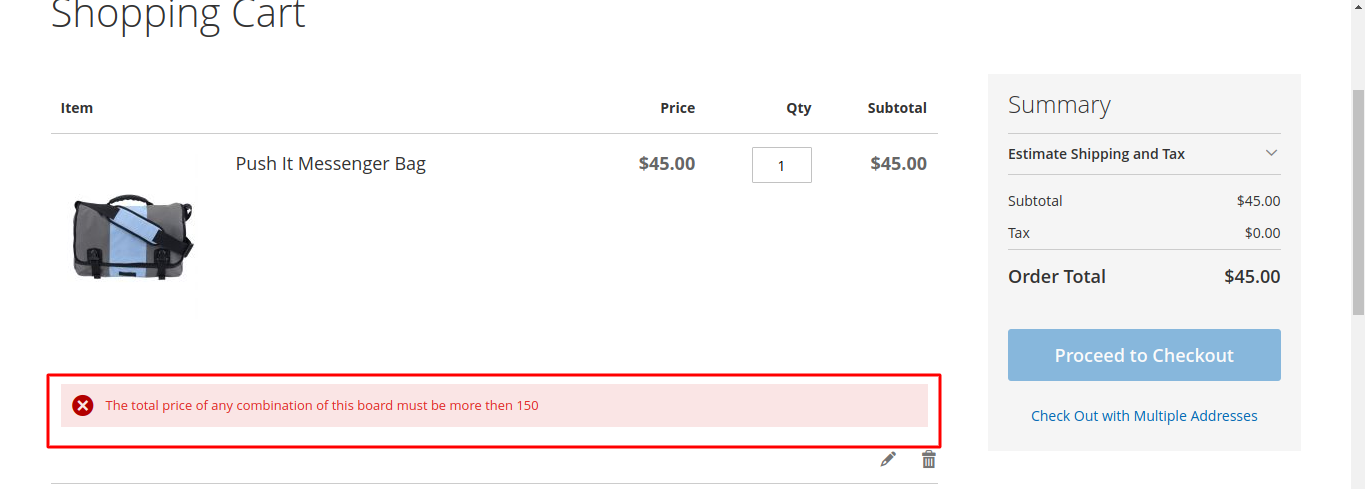
If you want restrict customer to checkout based on your min product amount, then here are the steps to create module.
Here we are using Magemonkeys as Vendor name and CheckoutRestriction as the name of a module. You can change this according to your Vendor and Module name.
Step 1: Create Registration
Create registration.php file in the app/code/Magemonkeys/CheckoutRestriction folder with the following code.
<?php
MagentoFrameworkComponentComponentRegistrar::register(
    MagentoFrameworkComponentComponentRegistrar::MODULE,
    'Magemonkeys_CheckoutRestriction',
    __DIR__
);
Step 2: Create a module
Create a module.xml file in the app/code/Magemonkeys/CheckoutRestriction/etc folder with the following code.
<?xml version="1.0" ?>
<config xmlns:xsi="http://www.w3.org/2001/XMLSchema-instance" xsi:noNamespaceSchemaLocation="urn:magento:framework:Module/etc/module.xsd">
    <module name="Magemonkeys_CheckoutRestriction" setup_version="1.0.0">
        <sequence>
            <module name="Magento_Checkout"/>
        </sequence>
    </module>
</config>
Step 3: Create a helper
Create a Restriction.php file in the app/code/Magemonkeys/CheckoutRestriction/Helper folder with the following code.
<?php
namespace MagemonkeysCheckoutRestrictionHelper;

use MagentoFrameworkRegistry;

class Restriction extends MagentoFrameworkAppHelperAbstractHelper
{

    protected $cart;
    protected $product;

    public function __construct(
        MagentoFrameworkAppHelperContext $context,
        MagentoCheckoutModelCart $cart,
        MagentoCatalogModelProductFactory $product
    ) {
        $this->cart = $cart;
        $this->product = $product;

        parent::__construct($context);
    }

    public function getProductMinPrice()
    {
        $grandTotal = $this->cart->getQuote()->getGrandTotal();
        $items = $this->cart->getQuote()->getAllItems();

        $itemData = array();
        foreach($items as $item) {
            $product = $this->getLoadProduct($item->getProduct()->getId());

            if ($allow_flag = $product->getCustomAttribute("min_order_allow_amount")){
                if((int)$product->getCustomAttribute("min_order_allow_amount")->getValue() > 0) {
                    $rowTotal = $item->getQty() * $item->getPriceInclTax();
                    if(isset($itemData[$product->getSku()]['row_total'])){
                        $itemData[$product->getSku()]['row_total'] += $rowTotal;
                    }else{
                        $itemData[$product->getSku()]['row_total'] = $rowTotal;
                        $itemData[$product->getSku()]['p_name'] = $product->getName();
                    }
                    $itemData[$product->getSku()]['allow_checkout'] = 0;
                    $itemData[$product->getSku()]['min_amt'] = 0;
                    if ($allow_amount = $product->getCustomAttribute("min_order_allow_amount")){
                        $itemData[$product->getSku()]['min_amt'] = $product->getCustomAttribute("min_order_allow_amount")->getValue();
                        $itemData[$product->getSku()]['min_amount_meaasge'] = "The total price of any combination of this board must be more then ".$itemData[$product->getSku()]['min_amt'];
                        if($product->getCustomAttribute("min_order_allow_amount")->getValue() <= $itemData[$product->getSku()]['row_total']) {
                            $itemData[$product->getSku()]['allow_checkout'] = 1;
                        }
                    }
                }
            }
        }

        $message_checkout = "";
        $message_checkout_flag = 0;
        if(!empty($itemData)){
            foreach($itemData as $it => $d){
                if($d['allow_checkout'] == 0){
                    $message_checkout_flag = 1;
                    $message_checkout .= "Min amount <b>$".$d['min_amt']."</b> require for Product <b>".$d['p_name']."</b><br>";
                }
            }
        }
        return array('message_checkout' =>$message_checkout , 'message_checkout_flag' =>$message_checkout_flag, 'itemData' => $itemData);
    }

    public function getLoadProduct($id)
    {
        return $this->product->create()->load($id);
    }

    public function checkMinAmountByProductID($p_id)
    {
        $product = $this->getLoadProduct($p_id);
        $restric_data = $this->getProductMinPrice();

        if(!empty($restric_data) && isset($restric_data['message_checkout_flag']) && $restric_data['message_checkout_flag'] == 1 && array_key_exists($product->getSku(), $restric_data['itemData'])){
            return $restric_data['itemData'][$product->getSku()]['min_amount_meaasge'];
        }
        return '';
    }
}
Step 4: Create a Plugin file
Create a Restrict.php file in the app/code/Magemonkeys/CheckoutRestriction/Plugin/Checkout/Controller with the following code.
<?php

namespace MagemonkeysCheckoutRestrictionPluginCheckoutController;

use MagentoFrameworkControllerResultRedirectFactory;
use MagentoFrameworkMessageManagerInterface;
use MagentoFrameworkUrlFactory;
use MagentoCheckoutControllerIndexIndex;
use MagemonkeysCheckoutRestrictionHelperRestriction;

class Restrict
{
    private $urlModel;
    private $resultRedirectFactory;
    private $messageManager;

    public function __construct(
        UrlFactory $urlFactory,
        RedirectFactory $redirectFactory,
        ManagerInterface $messageManager,
        Restriction $checkout_helper
    ) {

        $this->urlModel = $urlFactory;
        $this->resultRedirectFactory = $redirectFactory;
        $this->messageManager = $messageManager;
        $this->checkout_helper = $checkout_helper;
    }

    public function aroundExecute(
        Index $subject,
        Closure $proceed
    ) {

        $this->urlModel = $this->urlModel->create();

        //add your logic here
        $restrict_data = $this->checkout_helper->getProductMinPrice();
        if(!empty($restrict_data) && isset($restrict_data['message_checkout_flag']) && $restrict_data['message_checkout_flag'] == 1){
            $this->messageManager->addErrorMessage(__("Unable to checkout as one or more products have not met their minimum purchase theshold."));
            $defaultUrl = $this->urlModel->getUrl('checkout/cart/', ['_secure' => true]);
            $resultRedirect = $this->resultRedirectFactory->create();
            return $resultRedirect->setUrl($defaultUrl);
        }

        return $proceed();
    }
}
Step 5: Override checkout_cart_item_renderers.xml
Create a checkout_cart_item_renderers.xml file in the app/code/Magemonkeys/CheckoutRestriction/view/frontend/layout folder with the following code.
<?xml version="1.0"?>
<page xmlns:xsi="http://www.w3.org/2001/XMLSchema-instance" xsi:noNamespaceSchemaLocation="urn:magento:framework:View/Layout/etc/page_configuration.xsd">
    <update handle="checkout_item_price_renderers"/>
    <body>
        <referenceBlock name="checkout.cart.item.renderers">
            <block class="MagentoCheckoutBlockCartItemRenderer" name="checkout.cart.item.renderers.simple" as="simple" template="Magemonkeys_CheckoutRestriction::cart/item/default.phtml">
                <block class="MagentoCheckoutBlockCartItemRendererActions" name="checkout.cart.item.renderers.simple.actions" as="actions">
                    <block class="MagentoCheckoutBlockCartItemRendererActionsEdit" name="checkout.cart.item.renderers.simple.actions.edit" template="Magento_Checkout::cart/item/renderer/actions/edit.phtml"/>
                    <block class="MagentoCheckoutBlockCartItemRendererActionsRemove" name="checkout.cart.item.renderers.simple.actions.remove" template="Magento_Checkout::cart/item/renderer/actions/remove.phtml"/>
                </block>
            </block>
        </referenceBlock>
    </body>
</page>
Step 6: Override default.phtml
Create a default.phtml file in the app/code/Magemonkeys/CheckoutRestriction/view/frontend/templates/cart/item folder with the following code.
<?php
/**
 * Copyright © Magento, Inc. All rights reserved.
 * See COPYING.txt for license details.
 */

/** @var $block MagentoCheckoutBlockCartItemRenderer */

$_item = $block->getItem();
$product = $_item->getProduct();
$isVisibleProduct = $product->isVisibleInSiteVisibility();
/** @var MagentoMsrpHelperData $helper */
$helper = $this->helper(MagentoMsrpHelperData::class);
$canApplyMsrp = $helper->isShowBeforeOrderConfirm($product) && $helper->isMinimalPriceLessMsrp($product);

$checkout_helper = $this->helper('MagemonkeysCheckoutRestrictionHelperRestriction');
$min_amount_message = $checkout_helper->checkMinAmountByProductID($product->getId());
?>
<tbody class="cart item">
    <tr class="item-info">
        <td data-th="<?= $block->escapeHtmlAttr(__('Item')) ?>" class="col item">
            <?php if ($block->hasProductUrl()) :?>
                <a href="<?= $block->escapeUrl($block->getProductUrl()) ?>"
                   title="<?= $block->escapeHtmlAttr($block->getProductName()) ?>"
                   tabindex="-1"
                   class="product-item-photo">
            <?php else :?>
                <span class="product-item-photo">
            <?php endif;?>
            <?= $block->getImage($block->getProductForThumbnail(), 'cart_page_product_thumbnail')->toHtml() ?>
            <?php if ($block->hasProductUrl()) :?>
                </a>
            <?php else :?>
                </span>
            <?php endif; ?>
            <div class="product-item-details">
                <strong class="product-item-name">
                    <?php if ($block->hasProductUrl()) :?>
                        <a href="<?= $block->escapeUrl($block->getProductUrl()) ?>"><?= $block->escapeHtml($block->getProductName()) ?></a>
                    <?php else :?>
                        <?= $block->escapeHtml($block->getProductName()) ?>
                    <?php endif; ?>
                </strong>
                <?php if ($_options = $block->getOptionList()) :?>
                    <dl class="item-options">
                        <?php foreach ($_options as $_option) :?>
                            <?php $_formatedOptionValue = $block->getFormatedOptionValue($_option) ?>
                            <dt><?= $block->escapeHtml($_option['label']) ?></dt>
                            <dd>
                                <?php if (isset($_formatedOptionValue['full_view'])) :?>
                                    <?= $block->escapeHtml($_formatedOptionValue['full_view']) ?>
                                <?php else :?>
                                    <?= $block->escapeHtml($_formatedOptionValue['value'], ['span', 'a']) ?>
                                <?php endif; ?>
                            </dd>
                        <?php endforeach; ?>
                    </dl>
                <?php endif;?>
                <?php if ($messages = $block->getMessages()) :?>
                    <?php foreach ($messages as $message) :?>
                        <div class= "cart item message <?= $block->escapeHtmlAttr($message['type']) ?>">
                            <div><?= $block->escapeHtml($message['text']) ?></div>
                        </div>
                    <?php endforeach; ?>
                <?php endif; ?>
                <?php $addInfoBlock = $block->getProductAdditionalInformationBlock(); ?>
                <?php if ($addInfoBlock) :?>
                    <?= $addInfoBlock->setItem($_item)->toHtml() ?>
                <?php endif;?>
            </div>
        </td>

        <?php if ($canApplyMsrp) :?>
            <td class="col msrp" data-th="<?= $block->escapeHtmlAttr(__('Price')) ?>">
                <span class="pricing msrp">
                    <span class="msrp notice"><?= $block->escapeHtml(__('See price before order confirmation.')) ?></span>
                    <?php $helpLinkId = 'cart-msrp-help-' . $_item->getId(); ?>
                    <a href="#" class="action help map"
                       id="<?= ($block->escapeHtmlAttr($helpLinkId)) ?>"
                       data-mage-init='{"addToCart":{
                                            "helpLinkId": "#<?= $block->escapeJs($block->escapeHtml($helpLinkId)) ?>",
                                            "productName": "<?= $block->escapeJs($block->escapeHtml($product->getName())) ?>",
                                            "showAddToCart": false
                                            }
                                        }'
                    >
                        <span><?= $block->escapeHtml(__("What's this?")) ?></span>
                    </a>
                </span>
            </td>
        <?php else :?>
            <td class="col price" data-th="<?= $block->escapeHtmlAttr(__('Price')) ?>">
                <?= $block->getUnitPriceHtml($_item) ?>
            </td>
        <?php endif; ?>
        <td class="col qty" data-th="<?= $block->escapeHtmlAttr(__('Qty')) ?>">
            <div class="field qty">
                <div class="control qty">
                    <label for="cart-<?= $block->escapeHtmlAttr($_item->getId()) ?>-qty">
                        <span class="label"><?= $block->escapeHtml(__('Qty')) ?></span>
                        <input id="cart-<?= $block->escapeHtmlAttr($_item->getId()) ?>-qty"
                               name="cart[<?= $block->escapeHtmlAttr($_item->getId()) ?>][qty]"
                               data-cart-item-id="<?= $block->escapeHtmlAttr($_item->getSku()) ?>"
                               value="<?= $block->escapeHtmlAttr($block->getQty()) ?>"
                               type="number"
                               size="4"
                               step="any"
                               title="<?= $block->escapeHtmlAttr(__('Qty')) ?>"
                               class="input-text qty"
                               data-validate="{required:true,'validate-greater-than-zero':true}"
                               data-role="cart-item-qty"/>
                    </label>
                </div>
            </div>
        </td>

        <td class="col subtotal" data-th="<?= $block->escapeHtmlAttr(__('Subtotal')) ?>">
            <?php if ($canApplyMsrp) :?>
                <span class="cart msrp subtotal">--</span>
            <?php else :?>
                <?= $block->getRowTotalHtml($_item) ?>
            <?php endif; ?>
        </td>
    </tr>
    <?php if(!empty($min_amount_message)){ ?>
        <tr class="min-amount-message-box">
            <td colspan="4">
                <div role="alert" class="messages">
                    <div class="message-error error message" data-ui-id="message-error">
                        <div><?= $min_amount_message ?></div>
                    </div>
                </div>
            </td>
        </tr>
    <?php } ?>
    <tr class="item-actions">
        <td colspan="4">
            <div class="actions-toolbar">
                <?= /* @noEscape */ $block->getActions($_item) ?>
            </div>
        </td>
    </tr>
</tbody>
After adding above files here are some extra step
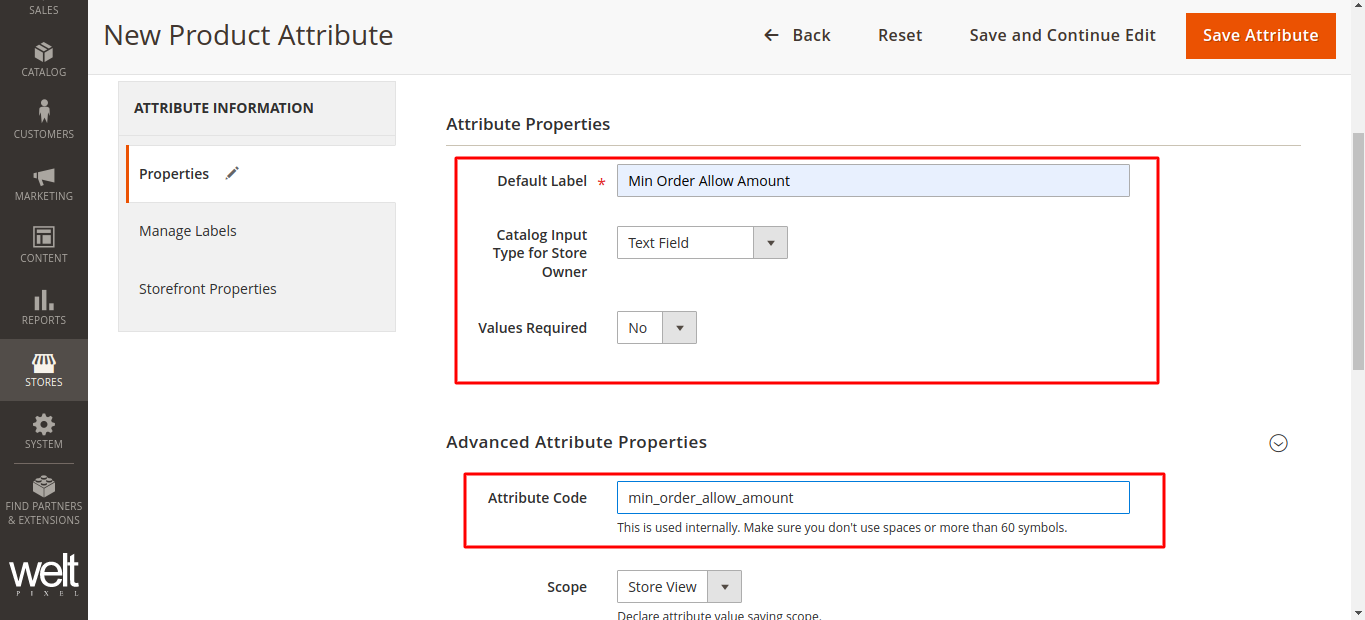
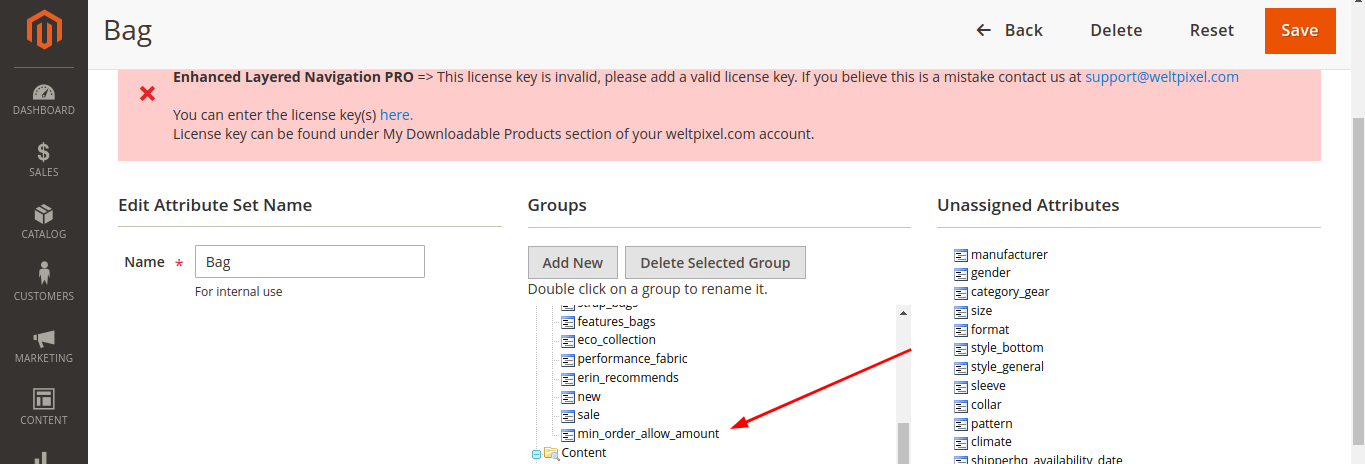
1. You need to create product attribute from admin and assign it to attribute set.
2. Add product min amount to validate.

Note: Attribute code must be “min_order_allow_amount”
Here is the screenshot which shows error message for product min amount.