We sacrifice by not doing any other technology, so that you get the best of Magento.

We sacrifice by not doing any other technology, so that you get the best of Magento.

    Magento 2: create new category layout for specific category

    If you want to set a different look for a specific category, then you can make new layout for that category like below.

    First you need to create new file under your theme Magento_Cataloglayoutcatalog_category_view_id_{{id of category}}.xml

    then you can move and add your block which you need to require like below

    <?xml version="1.0"?>
    <!--
    /**
    * Copyright © Magento, Inc. All rights reserved.
    * See COPYING.txt for license details.
    */
    -->
    <page xmlns:xsi="http://www.w3.org/2001/XMLSchema-instance" layout="2columns-left" xsi:noNamespaceSchemaLocation="urn:magento:framework:View/Layout/etc/page_configuration.xsd">
    <body>
    <referenceContainer name="columns.top">
    <container name="category.view.custom" htmlTag="div" htmlClass="newconwrap" after="-"/>
    </referenceContainer>
    <move element="category.image" destination="category.view.custom" before="-"/>
    <move element="category.view.container" destination="category.view.custom"/>
    </body>
    </page>

    Note: I have tried this way with Magento 2.4.3
    How our consultation helped to achieve extra 92% sales growth for a client?

    A client made an inquiry at our site which read,

    We want to increase our sales. Can you help to improve the performance of our site?

    Our tech expert discussed the case with the client. Then, we ran an audit on the client’s website and execute solution in three processes.

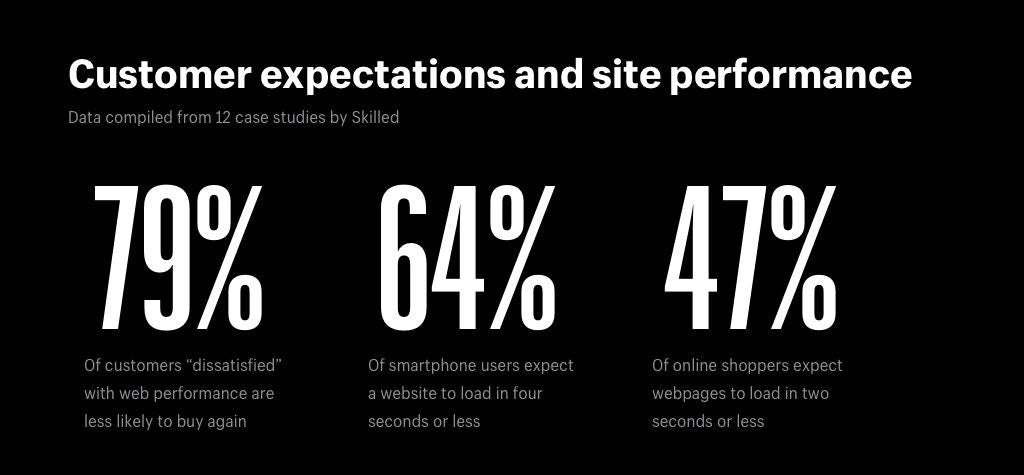
    First process which gave the client a sales growth of 28% was speed.

    Web & mobile loading speed of the client’s store was slow according to google page insider. To improve it we did below activities.

    • Image optimization
    • CSS/JS Minification and Merge
    • Server level changes
    • Code optimization
    • Theme optimization
    • Converting jpg to webp
    • Enable flat categories and products

    After doing speed optimization bounce rate was also decreased.

    The second process was where we introduced our UI/UX advisor who helped us to achieve 50% sales growth for clients.

    The below activities were performed under UI/UX advisor’s consultation.

    • Product placement was rearranged.
    • Necessary changes in theme were performed.
    • One-page checkout was implemented.
    • Automatic Email & SMS functionalities were implemented for users who dropped shopping at the final stage.
    • A virtual assistant was introduced to the site.
    • Most searched products were added to the homepage.
    • & many more suggestions were processed.

    In the third process, we increased security, solved bugs, and did some maintenance which resulted in 14% of sales growth. This activity helped us to run the site flawlessly.

    This was the story, not a case study where we helped our client to achieve sales growth of 92% – Day by day, we’re helping more and more web merchants to achieve sales growth by performing technical operations.  Let us know if you want to increase your sales too.

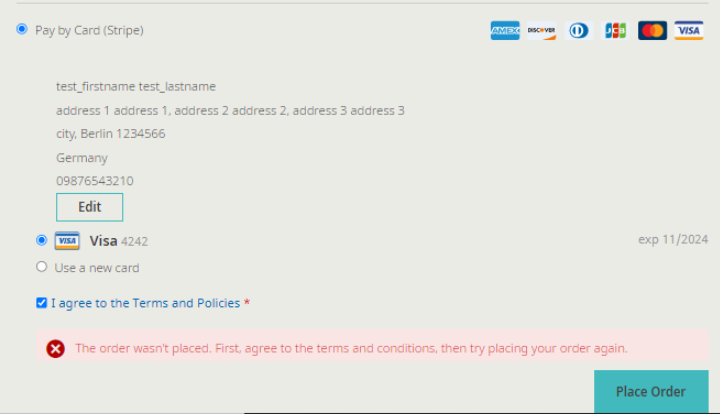
    How to solve “The Order wasn’t placed. First, agree to the terms and…” error?

    If you are facing error as per the below,
    Then the first step is to override the purchase order mixin js file on your theme and add the below code.
    /**
     * Copyright © Magento, Inc. All rights reserved.
     * See COPYING.txt for license details.
     */
    define([
        'mage/utils/wrapper',
        'Magento_PurchaseOrder/js/action/place-order-purchase-quote',
        'jquery'
    ], function (wrapper, placeOrderPurchaseQuote,$) {
        'use strict';
    
        return function (placeOrder) {
            return wrapper.wrap(placeOrder, function (originalAction, paymentData, messageContainer) {
                if (window.checkoutConfig.isPurchaseOrder) {
                    var agreementsConfig = window.checkoutConfig.checkoutAgreements;
                    if (agreementsConfig.isEnabled) {
                        var agreementForm,
                            agreementData,
                            agreementIds;
                        agreementForm = $('.payment-method._active div[data-role=checkout-agreements] .checkout-agreement input');
                        agreementData = agreementForm.serializeArray();
                        agreementIds = [];
    
                        agreementData.forEach(function (item) {
                            agreementIds.push(item.value);
                        });
    
                        if (paymentData['extension_attributes'] === undefined) {
                            paymentData['extension_attributes'] = {};
                        }
    
                        paymentData['extension_attributes']['agreement_ids'] = agreementIds;
                    }
                    return placeOrderPurchaseQuote(paymentData, messageContainer);
                }
    
                return originalAction(paymentData, messageContainer);
            });
        };
    });
    

    at

    app/design/frontend/Vendor/Theme/Magento_PurchaseOrder/web/js/action/place-order-mixin.js

    That’s it.

    Add your layout updates for particular store using xml

    I’ve to add custom CSS for particular store on checkout page, so I’ve updated a layout using observer.

    Please follow the below method. you need to copy the below event in your module.

    <?xml version="1.0" encoding="UTF-8" ?>
    <config xmlns:xsi="http://www.w3.org/2001/XMLSchema-instance" xsi:noNamespaceSchemaLocation="urn:magento:framework:Event/etc/events.xsd">
        <event name="layout_load_before">
            <observer name="magemonkeys_customshipping_addcustomcheckouthandle" instance="MagemonkeysCustomshippingObserverAddCheckoutLayoutUpdateHandleObserver" />
        </event>
    </config>

    And you can copy the below code for add the layout handle in Observer class.

    <?php
    
    namespace MagemonkeysCustomshippingObserver;
    
    use MagentoCatalogModelCategory as CategoryModel;
    use MagentoFrameworkEvent;
    use MagentoFrameworkEventObserver as EventObserver;
    use MagentoFrameworkEventObserverInterface;
    use MagentoFrameworkRegistry;
    use MagentoFrameworkViewLayout as Layout;
    use MagentoFrameworkViewLayoutProcessorInterface as LayoutProcessor;
    
    /**
     *  AddCheckoutLayoutUpdateHandleObserver
     */
    class AddCheckoutLayoutUpdateHandleObserver implements ObserverInterface
    {
       
        const LAYOUT_HANDLE_NAME = 'checkout_index_index_emp';
        const LAYOUT_HANDLE_NAME_CUSTOMER = 'customer_account_emp';
    
        public $storeManager;
    	public $customerSession;
    
        public function __construct(
            MagentoStoreModelStoreManagerInterface $storeManager,
    		MagentoCustomerModelSession $customer
        ) {
            $this->storeManager = $storeManager;        
            $this->customerSession = $customer;        
        }
    	
    	public function getStoreCode()
    	{
    		return $this->storeManager->getStore()->getCode();
    	}
    
        /**
         * @param EventObserver $observer
         *
         * @return void
         */
        public function execute(EventObserver $observer)
        {
            /** @var Event $event */
            $event = $observer->getEvent();
            $actionName = $event->getData('full_action_name');
    		
            if ($actionName === 'checkout_index_index') {
                /** @var Layout $layout */
                $layout = $event->getData('layout');
    
                /** @var LayoutProcessor $layoutUpdate */
                $layoutUpdate = $layout->getUpdate();
    
                // check if Category Display Mode is "Mixed"
                if($this->getStoreCode() == 'abc_store' && $this->customerSession->isLoggedIn())
    			{
                    $layoutUpdate->addHandle(static::LAYOUT_HANDLE_NAME);
                }
            }
        }
    }

    That’s it. Now you can use the checkout_index_index_emp.xml file in your view/frontend/layout directory and make the changes as per your requirement.

    Magento 2 : Special character in category name issue during CSV import of products

    I have recently faced an issue during CSV import as below.:

    In ‘Categories ‘ column. Category name is like ‘Default Category/Motorola/E Series/Moto E6 (XT2005,XT2005-3,XT2005-5)

    While I am importing this category, it’s creating three categories despite one. Due to comma(,), Magento’s default functionality considers a new category after comma(,).

    It will create categories like :
    1) Moto E6 (XT2005
    2) XT2005-3
    3) XT2005-5)

    To fix the comma issue in categories name follow the below solutions :

    To fix the issue you can use # code by replacing comma (,) 
    
    - Hash code for ',' is ,  using this code you can replace comma in category name.
    
    For example :


    So, by replacing the comma with Html character code, the issue will be fixed and created a category same as expected.

    Let me know if this article is helpful to you.

    How to create magento 2 patch?

    If you want any of your customization changes, then you can do it in core file let’s say Block.php which will be at

    vendor/magento/module-cms/Block/Block.php.

    1. Create a copy of that file with your changes on it.

    2. Rename that file BlockModified.php.

    3. Run the following command:
    diff -u Block.php Block.php > cmsblock.patch.

    4. Delete the BlockModified.php.

    5. Move cmsblock.patch to root of magento in folder custompatches

    6. Here comes the tricky part, you will need to do some manual modification. When you open the cmsblock.patch , you will get something like this on the top :

    --- Block.php 2022-02-21 04:26:16.000000000 -0500
    +++ BlockModified.php 2022-03-03 09:57:47.326011737 -0500

    Replace those line with this one:

    diff --git a/Block/Block.php .php b/Block/BlockModified.php
    index 3ee2rd..8349152 111644
    --- a/Block/CustomerData.php
    +++ b/Block/CustomerData.php

    7. Next Step is to add it in the composer.json n root of magento.Add the extra section.

    "extra": {
    "magento-force": "override",
    "patches": {
    "magento/module-cms": {
    "some description about issue applying this patch":"custompatches/cmsblock.patch"
    }
    }
    }

    8. Run “composer install” to apply the patch

    Magento 2 : How to add customer child menu and reindex only customer grid programmatically?

    If you want customer grid reindex programmatically, you can use the below step.

    1. Create file menu.xml on app/code/Magemonkeys/CustomerReindex/etc/adminhtml

    <?xml version="1.0"?>
    <config xmlns:xsi="http://www.w3.org/2001/XMLSchema-instance" xsi:noNamespaceSchemaLocation="urn:magento:module:Magento_Backend:etc/menu.xsd">
        <menu>
            <add id="Magemonkeys_CustomerReindex::customer_reindex" title="Eagle Rocket" translate="title" module="Magemonkeys_CustomerReindex"
                 sortOrder="50" resource="Magemonkeys_CustomerReindex::manage_customer_reindex" parent="Magento_Customer::customer"/>
            <add id="Magemonkeys_CustomerReindex::customer_manage" title="Customer Reindex" translate="title" module="Magemonkeys_CustomerReindex"
                 sortOrder="10" parent="Magemonkeys_CustomerReindex::customer_reindex" action="customerreindex/customerindexer/index" resource="Magemonkeys_CustomerReindex::manage_customer_reindex"/>      
        </menu>
    </config>

    2. Create file routes.xml on app/code/Magemonkeys/CustomerReindex/etc/adminhtml

    <?xml version="1.0"?>
    
    <config xmlns:xsi="http://www.w3.org/2001/XMLSchema-instance" xsi:noNamespaceSchemaLocation="urn:magento:framework:App/etc/routes.xsd">
        <router id="admin">
            <route id="customerreindex" frontName="customerreindex">
                <module name="Magemonkeys_CustomerReindex" before="Magento_Backend" />
            </route>
        </router>
    </config>

    3. Create file Index.php on app/code/Magemonkeys/CustomerReindex/Controller/Adminhtml/Customerindexer

    <?php
    namespace MagemonkeysCustomerReindexControllerAdminhtmlCustomerindexer;
    class Index extends MagentoBackendAppAction
    {
        protected $indexFactory;
        protected $indexCollection;
        protected $resultRedirectFactory;
    
        public function __construct(
            MagentoBackendAppActionContext $context,
            MagentoIndexerModelIndexerFactory $indexFactory,
            MagentoIndexerModelIndexerCollectionFactory $indexCollection,
            MagentoFrameworkControllerResultRedirectFactory $resultRedirectFactory,
            MagentoFrameworkMessageManagerInterface $messageManager 
        )
        {
            parent::__construct($context);
            $this->indexFactory = $indexFactory;
            $this->indexCollection = $indexCollection;
            $this->resultRedirectFactory = $resultRedirectFactory;
            $this->_messageManager = $messageManager;
        }
    
        public function execute()
        {
            $indexerCollection = $this->indexCollection->create();
            $indexids = $indexerCollection->getAllIds();
    
            $indexid = 'customer_grid';
            $indexidarray = $this->indexFactory->create()->load($indexid);
            $indexidarray->reindexAll($indexid);
    
            $resultPage = $this->resultRedirectFactory->create();        
            $resultPage->setPath('customer/index/index');
            $this->_messageManager->addSuccess(__("Customer Reindex Successfully."));
            return $resultPage;            
        }    
    }

    4. Output

    Magento 2 : How to override Product Pricing file?

    If you need to set our custom price or to perform any customization in price, them follow below steps.

    Create di.xml under etc folder in module

    <?xml version="1.0"?>
    <config xmlns:xsi="http://www.w3.org/2001/XMLSchema-instance" xsi:noNamespaceSchemaLocation="urn:magento:framework:ObjectManager/etc/config.xsd">
    	<virtualType name="MagentoConfigurableProductPricingPricePool" type="MagentoFrameworkPricingPricePool">
            <arguments>
                <argument name="prices" xsi:type="array">
                    <item name="regular_price" xsi:type="string">MagemonkeysPricesortingPricingConfigurableRegularPrice</item>
                    <item name="final_price" xsi:type="string">MagentoConfigurableProductPricingPriceFinalPrice</item>
                </argument>
                <argument name="target" xsi:type="object">MagentoCatalogPricingPricePool</argument>
            </arguments>
        </virtualType>
        <type name="MagemonkeysPricesortingPricingConfigurableRegularPrice">
            <arguments>
                <argument name="priceResolver" xsi:type="object">ConfigurableRegularPriceResolver</argument>
            </arguments>
        </type>
    </config>
    

    We need to create file under module Pricesorting/Pricing/ConfigurableRegularPrice.php

    <?php
    /**
     * Copyright © Magento, Inc. All rights reserved.
     * See COPYING.txt for license details.
     */
    
    namespace MagemonkeysPricesortingPricing;
    
    use MagentoCatalogModelProduct;
    use MagentoFrameworkAppObjectManager;
    use MagentoFrameworkPricingPriceAbstractPrice;
    use MagentoConfigurableProductPricingPriceConfigurableRegularPriceInterface;
    use MagentoConfigurableProductPricingPriceLowestPriceOptionsProviderInterface;
    use MagentoConfigurableProductPricingPricePriceResolverInterface;
    
    /**
     * Class RegularPrice
     */
    class ConfigurableRegularPrice extends AbstractPrice implements ConfigurableRegularPriceInterface
    {
        const ATTRIBUTE_CODE = 333;
        const PRICE_TABLE = 'catalog_product_index_price';
        const ENTITY_TABLE = 'catalog_product_entity_int';
        /**
         * Price type
         */
        const PRICE_CODE = 'regular_price';
    
        /**
         * @var MagentoFrameworkPricingAmountAmountInterface
         */
        protected $maxRegularAmount;
    
        /**
         * @var MagentoFrameworkPricingAmountAmountInterface
         */
        protected $minRegularAmount;
    
        /**
         * @var array
         */
        protected $values = [];
    
        /**
         * @var MagentoConfigurableProductPricingPricePriceResolverInterface
         */
        protected $priceResolver;
    
        /**
         * @var ConfigurableOptionsProviderInterface
         */
        private $configurableOptionsProvider;
    
        /**
         * @var LowestPriceOptionsProviderInterface
         */
        private $lowestPriceOptionsProvider;
    
        protected $resource;
    
        /**
         * @param MagentoFrameworkPricingSaleableInterface $saleableItem
         * @param float $quantity
         * @param MagentoFrameworkPricingAdjustmentCalculatorInterface $calculator
         * @param MagentoFrameworkPricingPriceCurrencyInterface $priceCurrency
         * @param PriceResolverInterface $priceResolver
         * @param LowestPriceOptionsProviderInterface $lowestPriceOptionsProvider
         * @param MagentoFrameworkAppResourceConnection $resource
         */
        public function __construct(
            MagentoFrameworkPricingSaleableInterface $saleableItem,
            $quantity,
            MagentoFrameworkPricingAdjustmentCalculatorInterface $calculator,
            MagentoFrameworkPricingPriceCurrencyInterface $priceCurrency,
            PriceResolverInterface $priceResolver,
            LowestPriceOptionsProviderInterface $lowestPriceOptionsProvider = null,
            MagentoFrameworkAppResourceConnection $resource
        ) {
            parent::__construct($saleableItem, $quantity, $calculator, $priceCurrency);
            $this->priceResolver = $priceResolver;
            $this->lowestPriceOptionsProvider = $lowestPriceOptionsProvider ?:
                ObjectManager::getInstance()->get(LowestPriceOptionsProviderInterface::class);
            $this->resource = $resource;
        }
    
        /**
         * @inheritdoc
         */
        public function getMinRegularAmount()
        {
            if (null === $this->minRegularAmount) {
                $this->minRegularAmount = $this->doGetMinRegularAmount() ?: parent::getAmount();
            }
            return $this->minRegularAmount;
        }
    
        /**
         * Get min regular amount
         *
         * @return MagentoFrameworkPricingAmountAmountInterface
         */
        protected function doGetMinRegularAmount()
        {
            $minAmount = null;
            foreach ($this->lowestPriceOptionsProvider->getProducts($this->product) as $product) {
                $parentId = $this->product->getId();
                $connection = $this->resource->getConnection();
                $tableName = $connection->getTableName(self::ENTITY_TABLE);
                $table2 = $connection->getTableName(self::PRICE_TABLE);
                $select = $connection->select()
                ->from(
                    ['c' => $tableName],
                    ['*']
                )
                ->joinLeft(
                    ['ca' => $table2],
                    'c.value = ca.entity_id',
                    ['*']
                )
                ->where('c.attribute_id = ?', self::ATTRIBUTE_CODE)
                ->where('c.row_id = ?', $parentId);
                $result = $connection->fetchRow($select);
                if ($result) {
                    $priceValue = $result['price'];
                    $product->setPriceCalculation(false);
                    $product->setPrice($priceValue);
                    $minAmount = $product->getPriceInfo()->getPrice('regular_price')->getAmount();
                } else {
                    $childPriceAmount = $product->getPriceInfo()->getPrice(self::PRICE_CODE)->getAmount();
                    if (!$minAmount || ($childPriceAmount->getValue() < $minAmount->getValue())) {
                        $minAmount = $childPriceAmount;
                    }
                }
            }
            return $minAmount;
        }
    
        
    }
    

    That’s it.


    How to set phtml file through html via Ajax call in Magento 2?

    Sometime we need to set html data without load or set it via ajax.

    Then create a module name : Magemonkey:Ajaxcall

    create index.phtml in Magemonkey/Ajaxcall/view/frontend/templates/

    <div id="ajaxresponsedata"></div>
    <?php
    $ajaxurl = $block->getAjaxUrl();
    ?>
    <script type="text/x-magento-init">
            {
                "*": {
                    "Magemonkey_Ajaxcall/js/call": {
                        "AjaxUrl": "<?php echo $ajaxurl; ?>",
                    }
                }
            }
    </script>

    Create js file Magemonkey/Ajaxcall/view/frontend/web/js/

    define([
        "jquery",
        "jquery/ui"
    ], function($){
        "use strict";
     
        function main(config, element) {
            var $element = $(element);
            var AjaxUrl = config.AjaxUrl;
            var CurrentProduct = productid;
             
            $(document).ready(function(){
                setTimeout(function(){
                    $.ajax({
                        context: '#ajaxresponsedata',
                        url: AjaxUrl,
                        type: "POST",
                        data: {currentproduct:CurrentProduct},
                    }).done(function (data) {
                        $('#ajaxresponse').html(data.output);
                        return true;
                    });
                },1000);
            }); 
        };
        return main;
    });

    Create Index.php file in Magemonkey/Ajaxcall/Controller/Index/

    <?php
    namespace MagemonkeyCustomControllerIndex;
    
    use MagentoFrameworkAppActionAction;
    use MagentoFrameworkAppActionContext;
    use MagentoFrameworkControllerResultJsonFactory;
    use MagentoFrameworkViewResultPageFactory; 
     
    class View extends Action
    {
        public function __construct(Context $context, PageFactory $resultPageFactory, JsonFactory $resultJsonFactory)
        { 
            $this->_resultPageFactory = $resultPageFactory;
            $this->_resultJsonFactory = $resultJsonFactory;
     
            parent::__construct($context);
        }
        public function execute()
        {
            $result = $this->_resultJsonFactory->create();
            $resultPage = $this->_resultPageFactory->create();
            $currentProductId = $this->getRequest()->getParam('currentproduct');        
     
            $data = array('currentproductid'=>$currentProductId);
     
            $block = $resultPage->getLayout()
                    ->createBlock('MagemonkeyAjaxcallBlockIndexIndex')
                    ->setTemplate('Magemonkey_Ajaxcall::index.phtml')
                    ->setData('data',$data)
                    ->toHtml();
     
            $result->setData(['output' => $block]);
            return $result;
        }
     
    }

    That’s it.

    Magento 2 : How to add watermark to the specific product image programmatically?

    If you want to add watermark to the specific product image programmatically, then use below script.

    <?php 
    /*
    * @ custom script to add watermark image on the product image that has -f in the product image name
    */
    use MagentoFrameworkAppBootstrap;
    
    require __DIR__ . '/../app/bootstrap.php';
     
    $bootstrap = Bootstrap::create(BP, $_SERVER);
    $objectManager = $bootstrap->getObjectManager();
     
    $state = $objectManager->get('MagentoFrameworkAppState');
    $state->setAreaCode('frontend');
     
    try
    {   
        $objectManager = MagentoFrameworkAppObjectManager::getInstance(); 
        $categoryFactory = $objectManager->get('MagentoCatalogModelCategoryFactory');
        $category = $categoryFactory->create()->load(4); //Parent category
        
        /*
        * @ $cateid array of category IDs
        */
    
        $cateid = $category->getAllChildren(true); // get all subcategory id
    
        $cateinstance = $objectManager->create('MagentoCatalogModelResourceModelProductCollectionFactory');
        $allcategoryproduct = $cateinstance->create()->addAttributeToSelect('*')->addCategoriesFilter(['in' => $cateid]);
    
        $fileSystem = $objectManager->create('MagentoFrameworkFilesystem');
        $mediaPath = $fileSystem->getDirectoryRead(MagentoFrameworkAppFilesystemDirectoryList::MEDIA)->getAbsolutePath();    
    
        $productimages = array();
        foreach ($allcategoryproduct as $products) {
    
            $product = $objectManager->create('MagentoCatalogModelProduct')->load($products->getEntityId());
    
            $productimages = $product->getMediaGalleryImages();
            
    
            if(!empty($productimages)){             
                foreach($productimages as $productimage)
                {   
                    $imgname = substr(strrchr(rtrim($productimage['file'], '/'), '/'), 1); // Get specific image name
                    if(strpos($imgname, '-f') !== false){
                        $fullpath = $mediaPath.'catalog/product'.$productimage['file'];
                        if(file_exists($fullpath)){
                            watermark_image($fullpath, dirname(__FILE__)'/watermark-f.png', $fullpath);
                            echo $productimage['file']."n";
                        }
                    
                    }
                    
                }
            }
        }    
     
    }
    catch (Exception $e)
    {
        echo $e->getMessage();
        exit;
    }
    
    /*
    * @ watermark_image function for merge watermark image to the product image
    */
    function watermark_image($target, $wtrmrk_file, $newcopy) {
        $watermark = imagecreatefrompng($wtrmrk_file);
        imagealphablending($watermark, false);
        imagesavealpha($watermark, true);
        $img = imagecreatefromjpeg($target);
        $img_w = imagesx($img);
        $img_h = imagesy($img);
        $wtrmrk_w = imagesx($watermark);
        $wtrmrk_h = imagesy($watermark);
        
        imagecopy($img, $watermark, $img_w - $wtrmrk_w, $img_h - $wtrmrk_h, 0, 0, $wtrmrk_w, $wtrmrk_h);
    
        imagejpeg($img, $newcopy, 100);
        imagedestroy($img);
        imagedestroy($watermark);
    }
    
    ?>