We sacrifice by not doing any other technology, so that you get the best of Magento.

We sacrifice by not doing any other technology, so that you get the best of Magento.

    Importance Of Having A Mobile App For Your eCommerce Business

    If we look at the statistics of Pew Research, the majority of the people around the world possess a smartphone now and 90% of them belong to the age group of 18 and 49.

    With more people using smartphones to access various services, it offers a greater opportunity for businesses to utilize this scenario in their favors and make profits on the go.

    Investing in such a ecommerce mobile app development has its own perks and they are:   

    • More sales
    • Get more control over the business
    • Offer more value to the business 
    • Invest in brand building
    • Be visible to your customers round the clock
    • Build a better connection with the target customers
    • Offer great promotions 
    • Offer better support 
    • Boost engagement levels
    • Offer value to customers through loyalty /reward programs
    • Stay ahead of the competition
    • Helps you build a direct communication channel

    Just building any mobile application is not enough if you are expecting greater success for your eCommerce business. You need to invest in the right mobile app development services that focus on your business vision and for that, you need to choose a skilled and experienced eCommerce mobile app development partner like Mage Monkeys who is well experienced in eCommerce Magento technology. 

    Designing and building a mobile app for eCommerce is not something simple! It includes having a number of complicated features and Mage Monkeys experts will take care of it seamlessly.

    So, if you have an app project in mind for your eCommerce project then simply choose the Mage Monkeys team for successful app development. 

    To meet our team and discuss your requirements, simply fill out the form mentioned below and our experts will reach out to you soon. 

    Magento 2 Checkout redirect on basket page

    If you want to restrict customer to checkout based on your criteria (condition), then this article is your answer.

    For example if you want to restrict customer when cart total less then $300, this method is worth to give a try.

    Here we are using Magemonkeys as Vendor name and CheckoutRestriction as the name of a module. You can change this according to your Vendor and Module name.

    Step 1: Create Registration

    Create registration.php file in the app/code/Magemonkeys/CheckoutRestriction folder with the following code.

    <?php
    MagentoFrameworkComponentComponentRegistrar::register(
        MagentoFrameworkComponentComponentRegistrar::MODULE,
        'Magemonkeys_CheckoutRestriction',
        __DIR__
    );

    Step 2: Create a module

    Create a module.xml file in the app/code/Magemonkeys/CheckoutRestriction/etc folder with the following code.

    <?xml version="1.0" ?>
    <config xmlns:xsi="http://www.w3.org/2001/XMLSchema-instance" xsi:noNamespaceSchemaLocation="urn:magento:framework:Module/etc/module.xsd">
        <module name="Magemonkeys_CheckoutRestriction" setup_version="1.0.0">
            <sequence>
                <module name="Magento_Checkout"/>
            </sequence>
        </module>
    </config>

    Step 3: Create a di.xml for front-end

    Create a di.xml file in the app/code/Magemonkeys/CheckoutRestriction/etc/frontend folder with the following code.

    <?xml version="1.0"?>
    <config xmlns:xsi="http://www.w3.org/2001/XMLSchema-instance" xsi:noNamespaceSchemaLocation="urn:magento:framework:ObjectManager/etc/config.xsd">
        // plugin restrict checkout
        <type name="MagentoCheckoutControllerIndexIndex">
            <plugin name="restrictcheckout" type="MagemonkeysCheckoutRestrictionPluginCheckoutControllerRestrict"/>
        </type>
    </config>

    Step 4: Create a Plugin file

    Create a Restrict.php file in the app/code/Magemonkeys/CheckoutRestriction/Plugin/Checkout/Controller with the following code.

    <?php
     
    namespace MagemonkeysCheckoutRestrictionPluginCheckoutController;
     
    use MagentoFrameworkControllerResultRedirectFactory;
    use MagentoFrameworkMessageManagerInterface;
    use MagentoFrameworkUrlFactory;
    use MagentoCheckoutControllerIndexIndex;
    use MagentoCheckoutModelCart;
     
    class Restrict
    {
        private $urlModel;
        private $resultRedirectFactory;
        private $messageManager;
     
        public function __construct(
            UrlFactory $urlFactory,
            RedirectFactory $redirectFactory,
            ManagerInterface $messageManager,
            Cart $cart
        ) {
        
            $this->urlModel = $urlFactory;
            $this->resultRedirectFactory = $redirectFactory;
            $this->messageManager = $messageManager;
            $this->cart = $cart;
        }
     
        public function aroundExecute(
            Index $subject,
            Closure $proceed
        ) {
        
            $this->urlModel = $this->urlModel->create();
    
            
            //add your logic here
            $subTotal = $this->cart->getQuote()->getSubtotal();
    
            if(!empty($subTotal) && $subTotal < 300){
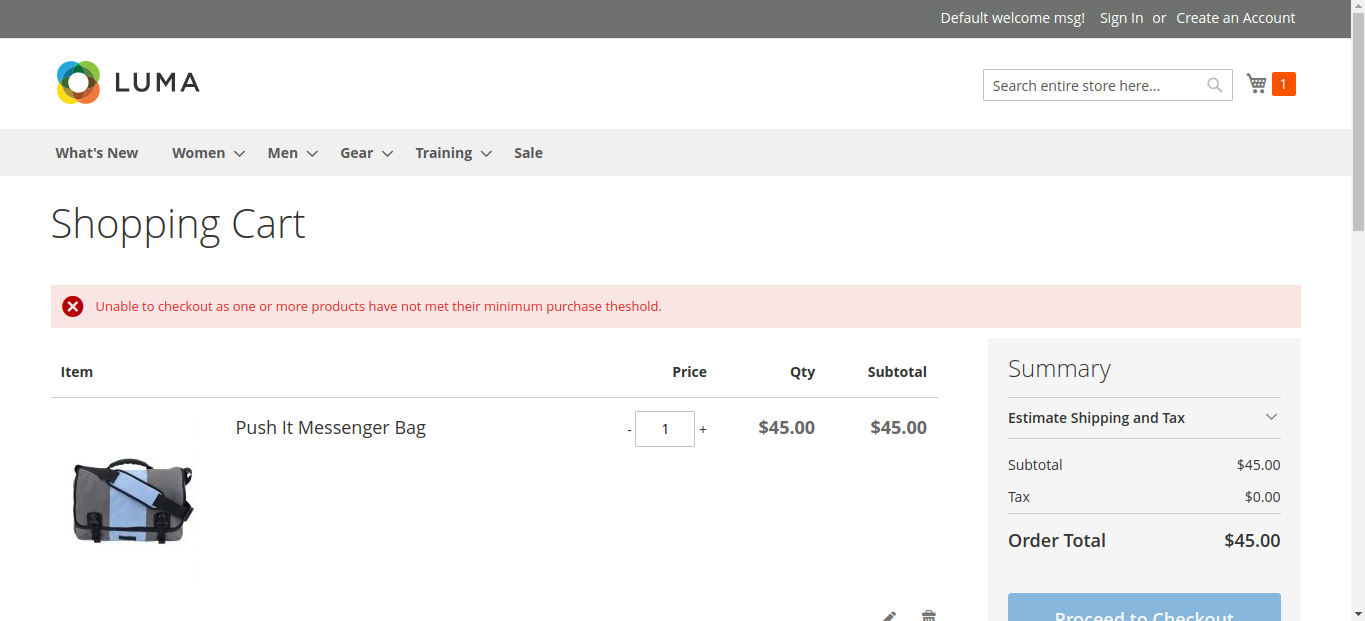
                $this->messageManager->addErrorMessage(__("Unable to checkout as one or more products have not met their minimum purchase theshold."));
                $defaultUrl = $this->urlModel->getUrl('checkout/cart/', ['_secure' => true]);
                $resultRedirect = $this->resultRedirectFactory->create();
                return $resultRedirect->setUrl($defaultUrl);
            }
              
            return $proceed();
        }
    }

    Here is screenshot which shows error message when some one trying to click on checkout and subtotal less then $300

    You can replace 300$ with your favorable amount and use accordingly.

    How to change your Magento developer?

    Magento merchants generally change their Magento developers when

    – Developers are costly.
    – Developers aren’t professional.
    – Developers aren’t skilled or certified.
    – Developers failed to perform the task.
    – & due to many other reasons.

    But, there are some unofficial rules website owners can follow which can deliver hassle-free migration from an old developer to a new developer.

    Our certified Magento developer always takes the backup of the entire system first before taking things in hand. We keep taking backup weekly (daily if needed), so the chances of data loss will be almost null.

    We change passwords in the entire system. So old login credentials will fail. Apart from that we do code audits and remove malicious scripts. This will help your store technically at so many levels. It will also remove bad codes added by any of your coder, by chance.

    By adopting all Magento industry standards, we help our clients to pass us all the Magento credentials without making their sites GO DOWN.

    If you are looking for a change, and want to hire affordable certified Magento developer then fill out the below form.

    Magento 2.4.4 – The Latest Version You Should Upgrade

    The latest version Magento 2.4.4 was released for the public on April 12, 2022. The release comes with some major updates and includes around 250 small and big enhancements and fixes.

    Some of the major takes from the release are:

    Support for PHP 8.1

    Magento 2.4.4 now offers support for PHP 8.1 which means it has upgraded its support from PHP 7.3 version. Moreover, to match with the functions on PHP 8.1, majority of the dependencies and libraries have been updated too.

    PHP 8.1 update brings a number of new features to the language and that includes Enums, Fibers, Readonly properties, Intersection types, and First-class callable syntax.

    With this new version, the support for PHP 7.3 has been removed.

    Security enhancements

    Magento 2.4.4 version upgrade includes some of the major security enhancements like default secure URLs for admin and storefront. Now database has encryption of password reset tokens and OAuth access tokens. Moreover, now Magento database no longer stores session IDs.

    Platform enhancements

    The Magento 2.4.4 version will have upgraded Adobe Composer dependencies. Additionally, the PHPUnit will be upgraded to the version 9.5.x. It will have an upgraded JS library and will offer support for TinyMCE 5 too.

    GraphQL

    For storeconfig queries, the latest version comes with better storage performance configuration. When it comes to B2B eCommerce operations, here you will get a full range of negotiable quote tasks. Here improvements have also been made in terms of core library, request caching, and language translation.

    Performance enhancements

    The latest Magento version offers order validation processes and improvements in cart operations. It will include the OpenSearch 1.1 and the latest ElasticSearch version.

    PayPal payment enhancements

    The latest version fixes the display of error with PayPal Express during the checkout process.

    Vendor-Bundled extensions

    These extensions have been removed with the codebase of Adobe Commerce, but with an exception of Braintree.

    Cart and checkout update

    The issue with minimum advertised price-link will be solved with Magento 2.4.4. The new update will offer a proper process for free shipping threshold. The version also offers support for checkout option to guest shoppers.

    Page Builder

    The latest Magento version offers improvement in terms of Insert/Edit pop-up windows and Insert/Edit image. Issues like Text Editor for banner have been fixed here.

    So, if you are planning to move your Magento store to its latest version, our experts at Mage Monkeys can help you.

    So, all you have to do is to fill up the form below and our team will get back to you soon.

    Small technical issues with your store?
    We got it covered for you.

    eCommerce merchants meet with numerous bugs while operating their eCommerce sites.

    When these store owners consult external eCommerce development agencies for solutions, agencies BIND merchants with LONG and COSTLY contracts.

    This is not a solution for store owners, but a sweet deal for a development agency where eCommerce merchants end up paying high.

    To solve this issue, Mage Monkeys come up with a plan where we focus on solutions.

    WE DON’T BIND CUSTOMERS WITH LONG AND COSTLY CONTRACT.

    Just share us your technical problem and we will give charge you to solve that problem only.

    Pay for whatever is troubling you. Don’t pay any extra penny.

    Make sense? Let’s talk about technical issues on your site. We are ready to offer QUICK and PERMENENT solution.

    Fill out the below form to connect with us with technical issues that are bugging you.

    How to add custom column in product grid with a condition?

    If you want to add custom column in product grid, then follow below step to create custom module to add custom column in grid.

    Step 1) app/code/Magemonkeys/SalesordercreategridCustomattr/registration.php

    <?php
    MagentoFrameworkComponentComponentRegistrar::register(
        MagentoFrameworkComponentComponentRegistrar::MODULE,
        'Magemonkeys_SalesordercreategridCustomattr',
        __DIR__
    );

    Step 2) app/code/Magemonkeys/SalesordercreategridCustomattr/etc/module.xml

    <?xml version="1.0"?>
    <config xmlns:xsi="http://www.w3.org/2001/XMLSchema-instance" xsi:noNamespaceSchemaLocation="urn:magento:framework:Module/etc/module.xsd">
        <module name="Magemonkeys_SalesordercreategridCustomattr" setup_version="1.0.0">
        </module>
    </config>

    Step 3) app/code/Magemonkeys/SalesordercreategridCustomattr/etc/di.xml

    <?xml version="1.0"?>
    <config xmlns:xsi="http://www.w3.org/2001/XMLSchema-instance" xsi:noNamespaceSchemaLocation="urn:magento:framework:ObjectManager/etc/config.xsd">
        <preference for="MagentoSalesBlockAdminhtmlOrderCreateSearchGrid" type="MagemonkeysSalesordercreategridCustomattrBlockAdminhtmlOrderCreateSearchGrid" />
    </config>

    Step 4) app/code/Magemonkeys/SalesordercreategridCustomattr/Block/Adminhtml/Order/Create/Search/Grid.php

    <?php
    namespace MagemonkeysSalesordercreategridCustomattrBlockAdminhtmlOrderCreateSearch;
    
    class Grid extends MagentoSalesBlockAdminhtmlOrderCreateSearchGrid
    {
        /**
         * @param MagentoBackendBlockTemplateContext $context
         * @param MagentoBackendHelperData $backendHelper
         * @param MagentoCatalogModelProductFactory $productFactory
         * @param MagentoCatalogModelConfig $catalogConfig
         * @param MagentoBackendModelSessionQuote $sessionQuote
         * @param MagentoSalesModelConfig $salesConfig
         * @param array $data
         */
        public function __construct(
            MagentoBackendBlockTemplateContext $context,
            MagentoBackendHelperData $backendHelper,
            MagentoCatalogModelProductFactory $productFactory,
            MagentoCatalogModelConfig $catalogConfig,
            MagentoBackendModelSessionQuote $sessionQuote,
            MagentoSalesModelConfig $salesConfig,
            array $data = []
        )
        {
            $this->_productFactory = $productFactory;
            $this->_catalogConfig = $catalogConfig;
            $this->_sessionQuote = $sessionQuote;
            $this->_salesConfig = $salesConfig;
            parent::__construct($context, $backendHelper, $productFactory, $catalogConfig, $sessionQuote, $salesConfig, $data);
        }
    
        /**
         * Prepare collection to be displayed in the grid
         *
         * @return $this
         */
        protected function _prepareCollection()
        {
            $attributes = $this->_catalogConfig->getProductAttributes();
            /* @var $collection MagentoCatalogModelResourceModelProductCollection */
            $collection = $this->_productFactory->create()->getCollection();
            $collection->setStore(
                $this->getStore()
            )->addAttributeToSelect(
                $attributes
            )->addAttributeToSelect(
                'sku'
            )->addStoreFilter()->addAttributeToFilter(
                'type_id',
                $this->_salesConfig->getAvailableProductTypes()
            )->addAttributeToSelect(
                'gift_message_available'
            );
    
            $collection->joinField(
                'qty_in_stock',
                'cataloginventory_stock_item',
                'qty',
                'product_id=entity_id',
                '{{table}}.stock_id=1 AND {{table}}.website_id=0',
                'left'
            );
    
            $this->setCollection($collection);
    
            $parent = get_parent_class($this);
            $parentclass = get_parent_class($parent);
            return $parentclass::_prepareCollection();
        }
    
        /**
         * Prepare columns
         *
         * @return $this
         */
        protected function _prepareColumns()
        {
            $this->addColumn(
                'entity_id',
                [
                    'header' => __('ID'),
                    'sortable' => true,
                    'header_css_class' => 'col-id',
                    'column_css_class' => 'col-id',
                    'index' => 'entity_id'
                ]
            );
            $this->addColumn(
                'name',
                [
                    'header' => __('Product'),
                    'renderer' => MagentoSalesBlockAdminhtmlOrderCreateSearchGridRendererProduct::class,
                    'index' => 'name'
                ]
            );
            $this->addColumn('sku', ['header' => __('SKU'), 'index' => 'sku']);
            $this->addColumn('customsku', ['header' => __('Custom SKU'), 'index' => 'customsku']);
            $this->addColumn(
                'price',
                [
                    'header' => __('Price'),
                    'column_css_class' => 'price',
                    'type' => 'currency',
                    'currency_code' => $this->getStore()->getCurrentCurrencyCode(),
                    'rate' => $this->getStore()->getBaseCurrency()->getRate($this->getStore()->getCurrentCurrencyCode()),
                    'index' => 'price',
                    'renderer' => MagentoSalesBlockAdminhtmlOrderCreateSearchGridRendererPrice::class
                ]
            );
    
            $this->addColumn(
                'in_products',
                [
                    'header' => __('Select'),
                    'type' => 'checkbox',
                    'name' => 'in_products',
                    'values' => $this->_getSelectedProducts(),
                    'index' => 'entity_id',
                    'sortable' => false,
                    'header_css_class' => 'col-select',
                    'column_css_class' => 'col-select'
                ]
            );
    
            $this->addColumn(
                'qty',
                [
                    'filter' => false,
                    'sortable' => false,
                    'header' => __('Quantity'),
                    'renderer' => MagentoSalesBlockAdminhtmlOrderCreateSearchGridRendererQty::class,
                    'name' => 'qty',
                    'inline_css' => 'qty',
                    'type' => 'input',
                    'validate_class' => 'validate-number',
                    'index' => 'qty'
                ]
            );
    
            $this->addColumn(
                'qty_in_stock',
                [
                    'header' => __('Stock'),
                    'type' => 'number',
                    'index' => 'qty_in_stock'
                ]
            );
    
            $parent = get_parent_class($this);
            $parentclass = get_parent_class($parent);
            return $parentclass::_prepareColumns();
        }
    }

    Step 5 : After place above code, please run below mentioned commands

    - php bin/magento setup:upgrade
    - php bin/magento setup:static-content:deploy
    - php bin/magento cache:clean


    That’s it…

    Now refresh your sales order, create grid page and see that your custom column will be reflecting there.
    Magento 2: How to detect user is from mobile or desktop? A way to display content based on device

    If you want to show the different contents for Mobile and Desktop devices.
    Please follow the below code.

    Create a controller in your custom module and add the below code.
    <?php
    namespace VendorModuleControllerIndex;
    
    use MagentoFrameworkAppActionContext;
    use MagentoFrameworkViewResultPageFactory;
    
    class Devicedetect extends MagentoFrameworkAppActionAction
    {
        /**
         * @var PageFactory
         */
        protected $_pageFactory;
    
        /**
         * initialization
         *
         * @param Context $context
         * @param PageFactory $pageFactory
         */
        public function __construct(
            Context $context,
            PageFactory $pageFactory
        ) {
            $this->_pageFactory = $pageFactory;
            parent::__construct($context);
        }
        
        /**
         * Execute method
         */
        public function execute()
        {
            $resultPage = $this->_pageFactory->create();
            $userAgent  = $this->getRequest()->getHeader('useragent');
            $server     = $this->getRequest()->getServer();
             
            //Check device is Desktop
            $isDesktopDevice = Zend_Http_UserAgent_Desktop::match($userAgent, $server);
            if ($isDesktopDevice) {
                $resultPage->getConfig()->getTitle()->set(__("Desktop Detect"));
            }
            //Check device is Mobile
            $isMobileDevice = Zend_Http_UserAgent_Mobile::match($userAgent, $server);
            if ($isMobileDevice) {
                $resultPage->getConfig()->getTitle()->set(__("Mobile Detect"));
            }  
            return $resultPage;
        }
    }


    Why you should hire Magento Developer from India?

    India is an IT hub for many reasons. With the growth of IT industry in India, number of certified Magento experts are increasing day-by-day.  This supply helps Magento store merchants to fulfill their development goals.

    Below are the reasons why eCommerce and IT companies are hiring Magento developer from India.

    1) Cost-effectiveness:

    Various onshore Magento companies charges more than the developers in India. So, the main and the most important reason why companies like to outsource in India is the cost factor. Indian developers are cheaper, yet offers the quality in development.

    2) Easily Access to the Skilled & Experienced Magento Developer:

    There are numerous expert agencies like Mage monkeys who has pool of certified and experience developers. These agencies spent on trainings to develop the skills of their developers. That is how Indian Magento developers stays updated with Magento Industry.

    3) By pass Hiring, Firing, HR Operations:

    When you hire a developer inhouse, then you have to follow hierarchy and other operations. But, when you outsource them from India, you can hire one immediately and fire existing as the replacement is always just a call away.

    4) Communication is the key:

    Indian Magento developers are well communicators. They are pro in using Skype, Email, Phone, Gtalk, BaseCamp or really any communication style you want.

    5) Creativity, Business Focused Approach & Many more:

    Indian Magento developers think from business prospective while writing the codes. They write codes creatively.

    Apart from above listed there are numerous benefits you can avail by hiring Indian Magento developers. With Mage Monkeys, you can hire developers for as low as 25 hours without doing any kind of long contract. So, hire Indian Magento developer for your next Magento development need.

    Thinking to change your Magento developer? Let’s talk

    Every Magento store is built and managed by a Magento developer or agency.

    Many merchants come to us due to the below-mentioned reasons.

    – Their existing developers charge HIGH
    – Their existing developers failed to update them regularly.
    – Their existing developers aren’t professional.
    – Their existing developers aren’t skilled or experienced.
    – & many more reasons.

    There are numerous reasons why a merchant wanted to change the existing developer.

    As an experienced Magento agency, we understand the situation of Merchants and set it as our top priority to offer them the solution which they failed to get from their existing developer.

    We are experienced in migrating work from an external agency or external developer with ease, and without losing any kind of data.

    If you are having any trouble with your existing developer, we are here to help 24*7. Let’s talk and discuss the problems of your business.

    Upgrade with Magento 2.4.4 to improve Speed, Security & Operations

    The latest Magento version 2.4.4 is released on 12 April 2022 . Majorly all Magento stores haven’t upgraded to the latest version yet.

    Not using Magento’s latest version is like using an old operating system version on your premium mobile.

    In short, YOU ARE NOT LEVERAGING FULL TECH BENEFITS.

    Using the latest Magento version can help you with,

    – Improved speed
    – Improved security
    – More operational benefits
    – & many more.

    The cost to upgrade your Magento store also depends on SKU, number of clients, number of products, Orders & such data.

    So, share your website URL, and let’s together discuss how you can avail upgrade benefits in your store from us.