We sacrifice by not doing any other technology, so that you get the best of Magento.

We sacrifice by not doing any other technology, so that you get the best of Magento.

    FOUR IMPROVEMENTS YOU WILL SEE AFTER SWITCHING TO MAGENTO 2

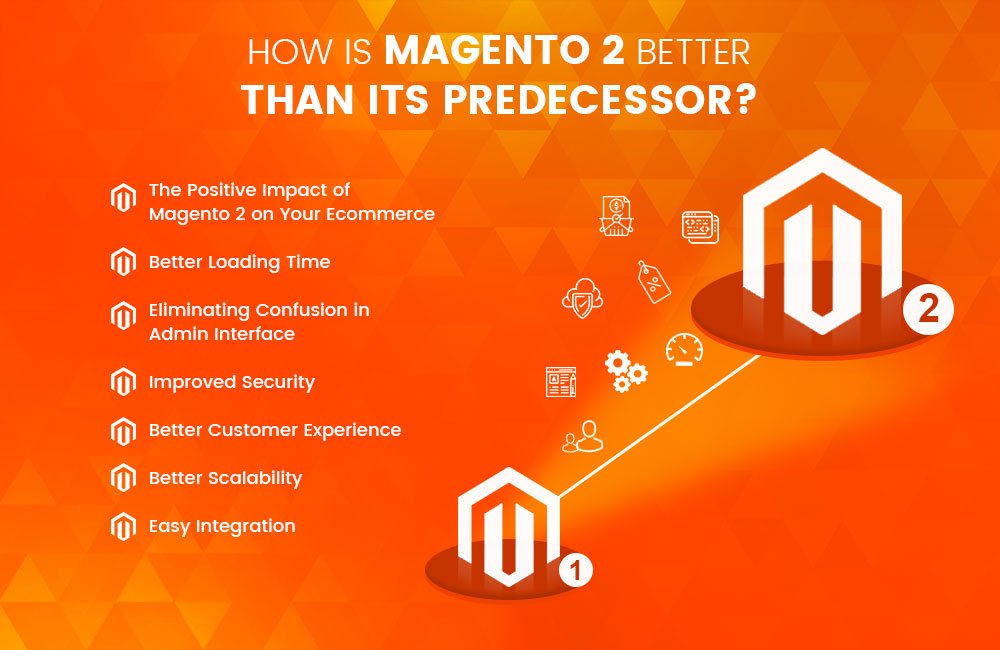
    Magento 2 is considered to be the best eCommerce website that supports multi vendors’ marketplace. After upgrading to Magento 2, you will notice your eCommerce site is working much better and faster than before.

    In this post, we will share with you some key benefits of migrating to Magento 2 and the performance enhancement that you will see soon after the migration.
    Increase in Conversions

    In order to increase the conversion rate, you have to reach the right audience, examine their behavior when they visit your online store.

    The checkout process in Magento 2 is much advance than Magento 1x as the entire process is very smooth, fast, easy, and secure for all the customers. It has one-page checkout that includes two steps where you can see shipping, review, and payment modes. These two steps make the checkout process simple and improve the customer experience. Magento 2 does not force visitors to register which means they can check out as guests without having to go through any registration process.

    Magento 2 increases the load speed by removing the temporary malfunction. Though, it automatically identifies the registered customers based on their email ID. Magento 2 makes it easy for the users to see everything they have ordered even before placing an order. All the up-gradation features reduce the checkout friction which causes cart abandonment rates.

    Page Load Speed

    As per research, 40 percent of visitors leave the website if it takes more than ten seconds because customers expect a site to load within seconds and in this way, you lose almost all the visitors before they turn into customers.

    Without a doubt, Magento 2 is better than Magento 1. It comes with improved features that increase the performance speed of a store. Magento uses Varnish cache and HTTP to cache common requests. This makes the task easy for the admin

    users to create and edit eCommerce about the product details without any clash in Magento 2. Magento 2 is 50 percent faster than Magento 1 when it comes to page loading speed.

    Caching boosts the site performance but it can only happen when it is done correctly. Full-Page Caching (FPC) is available in both community and enterprise editions. Admin users will find it easier to create and edit eCommerce product information. Thus, it improves the scalability by increasing conversion of your site, enhances server response time, and making the backend process stronger.

    Increase in mobile traffic

    As per the recent survey, more than 80 percent of internet traffic comes from mobile devices. Magento 1 does not completely support such kinds of users whereas Magento 2 is optimized for mobile use for different screen sizes. A well-optimized mobile site and a user-friendly device will encourage users to browse more and buy a desired product or service. With Magento 2 you can design a mobile-specific theme that provides easy navigation. For easy access, you can also optimize the admin panel. So now you don’t have to sit at a desk and manage your store – you can do it quickly with your smartphone.

    Increase in SEO performance

    As stated above, the page loading speed in Magento is much lesser than Magento 1. It also helps in optimizing your SEO ranks. Search engines like Google; give utmost importance to page loading speed. This is backed up by the fact that today’s generation of users tends to lose interest exponentially with an increase of each second of page loading speed.

    When you upgrade your store to Magento 2, you will see that your page loading speed has decreased to a great extent even without using an extension. In addition, you can always install an advanced extension for better optimization.
    Final Thought

    Migrating to Magento 2 will increase your conversion rates; reduce cart abandonment and gives a better shopping experience to your customers. You can contact us if you need help or expert advice regarding migration.

    You can talk to the Magento developers at Mage Monkeys. Our migration expert will seamlessly handle the entire responsibility for the transition and guide you on which extension you may use in your Magento 2 store.
     

    Upgrade To Magento 2.3 For Smooth Operations And Higher Sales

    Magento 2.3 has made back office functioning very smooth. Its added features make this platform easier for retailers. The changes can be done at less cost and time. It has changed the way you work.

    What will you get from Magento 2.3?

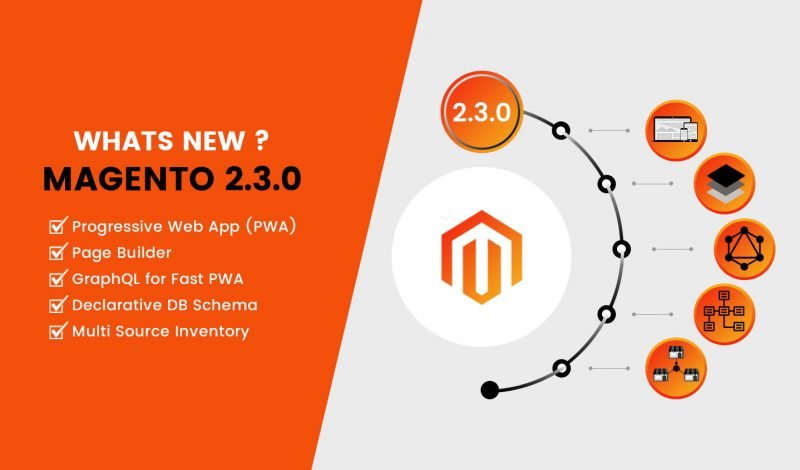
    With the release of Magento 2.3, managing e-commerce store has become easier. To fulfil different sales channels, retailers can control inventory effectively. One of the hottest topics in the Magento community is Multi-Source Inventory (MSI) feature. Stock control has become easier to manage with order and inventory information stored in one place. Also, Magento 2.3 comes with an enhanced security system. A number of security strengthening options like Cache management which control what level of cache management a team member can perform. You can protect your site against malicious attempts by using Google reCAPTCHA and two-factor authentication

    Upgrading to Magento 2.3 will give you Magento-native POS which is a data in real time WITHOUT a single mouse click (100% automatic sync!). Since data from this native POS goes directly to your Magento backend without any 3rd party, you also find everything you need in one place. No effort wasted in running around different platforms for analysis. (Not mentioning higher security, too).

    MSI can handle the inventory of each sales channel separately thus gives you ways to boost your store efficiency by using the barcode as an add-on to simplify stock control. You can easily generate barcode and optimize the layout for printing by using the extension available for Magento 2.3. Retailers also use picked/packed items twice before shipping just to reduce errors.

    • Pick Items: You can print picking list for various orders at the same time and scan the barcode to cross-check the picked items.
    • Pack Items: here you have to scan the barcode again and then add packing slips.

    To improve the shopping experience of the website, Magento 2.3 provides you with many tools.

    Search Engine: finding one product on various eCommerce channels can be cumbersome. Elastic Search option in Magento 2.3 provides filtering by attributes. With this customer can get an easier way to find what they are looking for and this way sellers can get a higher chance of closing deals.

    Page Builder: Building a Magento website has become friendlier with this feature. It is easy and fast even for a non-tech savvy.

    PWA (Progressive Web App) is trending on mobile devices. It gives more power to boost sales.

    Can you get smooth operations and high sales at the same time?

    Magento 2.3 is a complete package to boost your store efficiency and revenue. Google progressive WebApp (PWA) technology is used for a robust point of sale which ensures fast checkout and real-time data update with Magento backend.

    Reward Points & Gift Card: Attract your potential customer with irresistible incentives on all sales channels to increase your sales.

    Barcode Generator/Printer & Purchase Order Management: you can manage your warehouse stock and purchases in one place with no error.

    Enhance Performance will give you higher sales – All in one solution for Magento 2.3

    Magento 2.3 will provide you with not just one product but a complete solution for your retail.

    Customers love omnichannel and Magento 2.3 with POS professional edition allows you an omnichannel transformation. Magento 2.3 gives you great additional benefits which are hard to find in any other platform.

    Seeking an eCommerce website development company for support with Magento 2.3?

    Magento 2.3.0 has open a new chapter in the eCommerce industry. Magento 2.3 has new features and upgrades to the existing components and makes this platform even better for merchants as well as visitors. It will boost Magento’s market share.

    Well, you’re in the right place. Magemonkeys has a team of expert Magento e-commerce developers with years of experience, and a high reputation in the industry. We possess all the experience, knowledge and expertise to serve to the best of your project needs.

    Why Your E-commerce Store Needs A Latest Magento Version?

    Are you still using the older Magento version?

    If yes, then you may face problems with extensions and new themes certainly need you to have the latest Magento version.

    For the upgrade, you need services that thoroughly understand the sensitivity of Magento upgrade and offer professional upgrade service for Magento. A professional upgrade service would offer you improved checkout, shopping cart, speed as well as performance.

    Magento 2 is pretty simple to use giving the right platform to attract huge traffic to your site. The professional will offer Magento 1 to 2 upgrade services flawlessly. You will also get the theme transferred to the latest version. The service filters database and updates all the extensions that help your eCommerce run seamlessly and also integrate security patches required in the market to assist your E-commerce store theme and then carry out in-depth quality assurance testing before your ECommerce site goes live.

    But Why Upgrade from Magento 1 to Magento 2?

    By using the older version you may risk losing your important business data within no time. Your database with customer data will vanish.

    The Latest Magento version will give you below mentioned benefits:

    • Enhanced and strong security
    • Supports current USPS shipping changes
    • Improved ACL control making cache management flexible, faster, and effective.
    • Better security with the integration of 35 added improvements to product security.
    • Improved usability
    • Copyright update
    • Improved scalability

    What are the steps involved in migration from Magento 1 to Magento 2?

    Migration of SEO & indexed pages

    It is an important aspect that is considered during the migration process. The Magento 2 upgrade service recreates the essential Magento 2 features.

    Migration of your store database – orders, customers, products, CMS content, and store configuration

    Migration of your store database includes data related to your orders, inventory, customers and it is taken care of on a high priority basis. At this stage migration of store configuration, orders, customers, CMS content, SEO eCommerce setup, products, is taken care of.

    All your data from Magento 1 is transferred securely to Magento 2 during the installation without any data loss. When your site is all set to go live the final data transfer is carried out so that everything remains intact when the site goes live with Magento 2.

    Store design migration

    Well, it is not possible to migrate the front-end design from your older Magneto 1 version to 2 but it is possible to rebuild it on the new version- Magento 2 or you can plan to buy a new theme.

    Transfer custom-built features & 3rd party extensions

    It is not possible to make use of an extension of Magento 1 on Magento 2. Well, migration is the right time to eliminate the clutter and delete the extensions you do not use, and keep the ones you need in your store. If you want to use a certain extension on your Magento 2 platform, get in touch with your extension company and buy the latest version of the extension compatible with Magento 2.

    What do you get from Magento 2 migration services?

    Magento 2 is a completely new platform through the migration process is a bit complicated. It needs ample time and resources to carry out the upgrade. Thus you need a professional and experienced team to do the migration.

    • Updates to Magento main database with customers, orders, products, etc.
    • The errors are resolved during the migration process itself.
    • The store theme is updated and minor errors are fixed during the process.
    • Upgrade/install any of the extensions
    • Upgrade 3rdparty extensions related to your store.

    When you upgrade your store from Magento 1 to 2 it brings in new features, security enhances, improved functionality, error fixes that lets you give your store customers a wonderful shopping experience. Of course, if you upgrade your Magento store on a regular basis it gives you a more stable platform and error-free experience to enhance the store performance.

    Quality testing is the most important part of Magento upgrade that lets developers trace errors if any so that they are no hassles after the upgrade. At this stage, a Magento 1 to 2 upgrade service will closely investigate the errors and fix them as quickly as possible. The upgrade is monitored under the supervision of expert programmers so that there are no issues left unresolved before your site goes live.

    Once the migration is completed successfully you can enjoy

    • Faster loading of your site
    • Higher conversion rates
    • Experience secure payment gateways
    • Seamless checkout process
    • Reduced shopping cart abandonment rate

    Only Magento Professionals can help you perform a successful migration. Certainly, you wouldn’t want to lose your customer database and other important business data during the migration. In order to get the store database intact after the upgrade approach a professional Magento Developers.

    WHAT ARE THE PROS, CONS & RISKS OF MIGRATING TO MAGENTO 2?

    We all know, support for Magento 1.x will soon come to an end. Though it has been pushed off to June 2019 so sooner or later thousands of business owners have to migrate to Magento 2. But migrating to the latest version will not be that easy it has its own security threats and risks.
    Today, in this article we will put some light on within and around Migration and also whether or not you should consider doing it.

    Who All Are Likely to Suffer Due to End of M1?

    Today more than 420,000 websites run on Magento and only 4% out of these (less than 20,000) are on Magento 2 so it means approx. 95% of the business owner has to make up their mind whether to opt for Magento migration services or not. The entire migration takes at least 3 to 6 months hence Magento will provide support for Magento 1 for some more months to come.

    Should You Consider Upgrading to Magento 2?

    Magento 1 comes with a limited number of functionalities and on the other hand, Magneto 2 has better enhancements such as:

    • New B2C and B2B features
    • Better security rendered through different payment gateways
    • Higher responsiveness to devices
    • 50% faster loading time
    • User-friendly and intuitive admin panel
    • Easy extension updates
    • Enhanced flexibility for personalized features

    Although Magento 2 has its own benefits but to move your entire store to a new platform is difficult. Let’s take a look at some of the drawbacks you might face.

    Invest in Migration

    Migrating your store from Magento 1 to Magento 2 will demand you to get in touch with an eCommerce web development company. Experts will help you make necessary changes and required adjustments.

    New Themes

    Magento 1 themes are not portable with Magento 2, therefore, you need to build new themes from scratch.

    Mismatch Extension

    You cannot integrate Magento 1 extensions with Magento 2.

    What will happen if I don’t migrate to Magento 2?

    Well, if you don’t migrate to the latest version then be ready to face the consequences.
    When the support for Magento 1 will come to an end; then the websites which are running on Magento 1 might become vulnerable to spam attacks, server attacks, and also leaking of payments information.

    Your Website performance will get affected which will harm your site traffic ultimately resulting in low sales. So what we conclude is sooner or later you have to migrate your store.

    Steps to keep in mind before you approach a company for Magento Migration service:

      • Consider Time

    Migrating from Magento 1 to Magento 2 will take time so you have to set aside other tasks until the migration gets completed.

      • Be Ready with your Have Migration Plan

    Check all the themes and extensions on your current version. Pen down everything you want to see on your upgraded site. Think about all the changes and what all you need and the ones you want to get rid of.

      • Consider Features & Functionalities

    You should have a checklist mentioning all the new features you want to have and also old features you want to fix.

      • Installation of Magento 2 Hardware System

    Set up a Magento 2 hardware system that is compatible with your current system. For this, you can use the Data Migration tool.

      • Testing is must

    Once everything is up and working then it time to run and test the website thoroughly before you go live.

    Thoughts Before Migrating…

    You might be thinking about the right time for migration. Well, it totally depends on the kind of considerations you want to make and even other merchants wouldn’t be able to help you.

    For example:

    If your current Magento store has a number of issues and needs support then you should go for migrating at the earliest. Or if it’s working fine without any glitches then it would be better to wait until Magento 2 receives further updates. Nevertheless, you can start planning for migration. Make a note of general considerations such as features, business objective, and time required as all this will make your migration smooth and easy.

    What to do?

    You need to contact an eCommerce web development company and have a meeting with them and also with marketing teams. Discuss your migration plan in detail; let them know all your requirements first. You also need to consider aspects like business disruption, downtime, and sales loss while the migration is in process.

    We Make Magento Migrations Seamless…

    The Professionals at Magemonkeys understand that migrations can be perplexing. If you want to migrate to Magento 2 then sit back and relax as we would make your Magento migrations as smooth as silk. All you have to do is to contact us with your wish list and we will make sure that the rest is taken care of.

    Want to know the 7 Easy Steps to a Winning Magento-2 Specific strategy?

    Magento 2 is not just an upgrade but a completely new platform. Before you migrate to a new version you need a full-scale re-platforming exercise. It requires detailed planning and efficient execution else it can harm the functionality of the site.

    In this article, we will tell 7 easy steps to keep in mind for Magento 2 strategy.

    1. Record Stock of what you have:

    the very first step towards the transition to a better version of the Magento is to check your current installation. It means it should have the functional definition of all the operations and identify the areas where Magento can be improved to meet the business’s needs and add functionality to it. You will also need to identify any new business requirements that will be influenced by the transition to Magento 2. It also is a good opportunity to restructure your product catalog setup. Remove the things you don’t need and add new attributes for merchandising and even use them to support more specific products.

    2. Make a project team

    In any transitional or development project, it is important to obtain a commitment from all major stakeholders, from the management who will be assigning and approving the budgets all the way to the operations staff who will have to work on the new interface and be able to use it in order for the change to work. Depending on the size and expertise needed for the project, you might even need an expert or a solutions architect on your side to manage the project. When a project team is created, the staff will feel more involved and will be committed to the venture being a success.

    3. Inspect every third-party extension installed

    The next step should be identifying all third-party extensions or custom nodules that might be installed in your existing Magento store. If you do not have any internal records that are up to date, you can get an idea of the extensions you are using by going to system>config>admin>advanced>disable module in the administration. Programming experts have said that in Magento 2’s core there is not much possibility for improvement in the core code. But the extensions that you use can slow down the site. In order to find the troubling extensions, you will need to perform a 3rd party extension audit.

    Turn every module on and off and check the changes in the site’s speed. This could help you in finding the defaulters. Once you have removed the defaulters and know which ones you will keep, you will have to check their compatibility with Magento 2 as all extensions do now work in the newer version. You might have to bear extra licensing costs in order to make them work in the new interface. Magento 2 is a new platform, you cannot ‘upgrade’ your existing Magento store to it automatically.

    4. Start using the system early

    Magento 2’s technical architecture is very different from Magento 1 and it will take time for all relevant members to get a hold of and completely understand the new Magento Framework. That is why it will be best to start working on the new processes early. This will help in reducing overhead costs once it’s launched.

    5. Choose the fastest host possible

    You can’t go cheap on hosting. Your hosting plan will play a significant role in the website’s performance. Choose either Servebolt Magento 2 plan or if that is not possible buy as much as RAM, CPU, and SSD you can afford on other hosts.

    6. Do not use JS bundling

    JS bundling is a special feature of Magento 2 and its main purpose is to cut down the number of HTTP requests to load a page. It meant to enhance performance, but it does not. It creates a huge 5-10MB file with JavaScript code that negatively impacts the loading time of the page.

    7. Production mode should be on

    Magento 2 consists of three modes of operation. The first one is Default, the second one is Developer and the third one is Production. The fastest one among them is Production. Default and developer are basically used for debugging purposes and will not be able to work on a live site. Uses SSH from your host provider to find the more you are working in now.

    Final Thoughts:

    Having said all of the above, the adoption and deployment of a new platform would require the help of experts and professionals. Building a proper process would help simplify the execution process.
    Get in touch with us to know whether there is a need to migrate your online store from Magento 1 platform to Magento 2?

    Need a tip to keep your DB clean before Migrating from Magento 1 to 2?

    Migrating from Magento 1 to Magento 2 needs a lot of preparation and a few things are very common like the theme, an old data structure (sometimes). Together these factors can cause some worry. Here are a few examples that we have experienced

    Saving a product and creating a new URL nothing happens and the URL won’t change

    A lot of times it happens that the client would get the error “The from date is not greater than the to date”. You cannot view these on the product edit page and still, you will get the error. This takes place due to Magento New from and to dates are differently used in some places.

    Even, special price from and to dates seems to continue but yet you cannot edit it. In this case, the client would change the price as they were added to the cart here; the product page does not make the changes, and also the cart ignores the changes.

    At the time of upgrades, the data structure faces few errors based on fields that are loaded with what seems like spam.

    Let’s understand through an example:

    One of our clients was unable to create a new URL for a product. In simple words, any time the product was saved it was simply using the existing URL. The reason was that the url_path field was no longer used and or even shown in the Magneto 2 UI, however, the value was present in the DB so whenever save the product it uses that field. Although our was a little different with the attribute.

    DELETE FROM catalog_product_entity_varchar WHERE attribute_id = 87

    Using this if you save a product key then you immediately receive the new URL in the frontend.

    You may wish to validate the url_path attribute ID before you go deleting anything though.

    SELECT * FROM `eav_attribute` WHERE `attribute_code` = ‘url_path’

    Make a note that all your systems must have the same ID numbers.

    This one is similar to another EAV type of data issue we have seen. The sale_price_from and the sale_price_to dates were deprecated from Magento Commerce Edition, in favor of using the scheduler to schedule the changes. Well, either something went wrong or but in the past we had one client where the prices were changing in the carts because the dates were there, but now one could manage them. And one place in the front end used them, while others did not.

    So, now to the point of the article. The other day we wanted to migrate someone from Woo Commerce to Magento 2. So we started to investigate this based on using Cart2Cart. This tool allows you to migrate via various cart API user accounts, passwords, orders as well as products.

    Then we came up with the idea!

    why don’t we start doing our Magento 2 migrations this way, use the software to cleans the DB if you will, and make sure we start with a fresh new Magneto 2 specific DB, then migrate you one data with Cart2Cart.

    Well, this is exactly what we will be doing for a long and to make sure to carry over as little “legacy problems” in the data as possible. If you are at all familiar with the Magento EAV data structure you will likely know what we are talking about, its a tremendously flexible data model, but it does seem to be prone to lots of issues where data structures are referenced in the code base, they are no longer intended to be used.

    Take Away

    You should at the very least, consider a Magento 1 to Magento 2 migration plan that opts to use data migrations through API layers and native imports, rather than through a database “upgrade” script. The upgrade script can keep some stuff around you may not want or need.

    Why to migrate your shopify shop to Magento 2?

    Let’s understand the main reasons which you can consider for your eCommerce migration.

    • Popularity

    Magento is a licensed platform with a “most popular & widely used eCommerce platform” tag and that is the main reason to migrate to Magento 2, on the other hand, Shopify is a hosted eCommerce platform.

    • Tremendously Elastic

    Being an open-source platform Magento allows you to do modification as per your specific requirements in its existing features.

    • Advanced Customization Opportunities

    Magento 2 lets you set up multiple languages and currencies and also different prices for different customer groups. You can manage different stores from one admin panel.

    • Ownership of Code

    In Magento, you will have all ownership of your code which is not available with Shopify.

    • Numerous Third-Party Extensions

    Magento is rich in providing third party extensions so you can expand your online stores’ by enabling these extensions

    • Pricing

    Magento mainly comes in three editions Magento Commerce (free), Magento Go (hosted), Magento Enterprise (paid). So can select one from these editions as per your budget and specific business needs. In Magento, you won’t be charged for every transaction like Shopify and that’s a big relief.

    • Regular updates from Magento Community

    Magento itself is a large community so you can expect new releases in every few months. The latest versions are completely packed with bug fixes, better features, and other improvements. Apart from this, the Magento community gives you extensive technical support.

    Magento is the most advanced eCommerce platform having more than 500+ free extensions.

    So now you have enough reasons to migrate to Magento 2 from Shopify

    How to migrate?

    People find the migration process quite confusing especially those who don’t possess any technical skills. But it is not at all tedious or complicated. It also depends on your selection.

    We suggest you go for manual migration as the store contains several entities that are very important and you need to do it correctly else you might end up losing your data. The best is to hire Magento developer who will make your data transfer easy. Although this might cost you a little bit be you will have fewer problems with migration accuracy.

    All You Need To Know About Magento 2.2.2

    Magento released 2.2.2 version of its Commerce and Open Source platforms on 12th December. It comes with a unique feature and great performance

    New Features included in Magento 2.2.2 are:

    • Optimized Shipping
    • New Marketing Automation Software
    • Merchants will be provided with a detailed and actionable analytics insight
    • Streamline Important Store Operations

    (In detail, Magento 2.2.2)

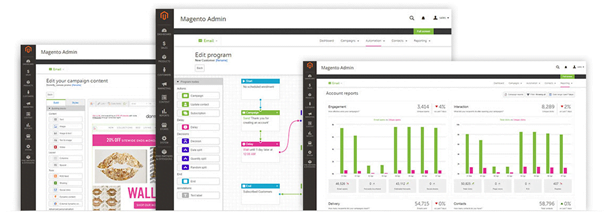
    Email Marketing Automation

    Email marketing automation feature gets integrated with dotmailer for generating email marketing with B2B and B2C businesses. Now merchants can draft highly personalized email campaigns by using different types of store data.

    New Functionalities are:

    Within your Magento 2 site, you can analyze the effectiveness of marketing efforts and can also calculate and track ROI of your campaigns.

    Better communication and engagement with new and existing store customer.

    It will recover lost revenue by creating highly targeted and personalized cart emails.

    It will take order data with the database from your campaigns to synchronize all customer.

    Instant Purchase Checkout

    Amazon uses an exclusive one-click checkout patent which has expired last year in September. So, the new technology is now available to all the E-commerce solution providers. Magento is the 1st Ecommerce platform that has incorporated this ‘Amazon-like’ experience in its primary product.

    An instant purchase checkout feature store previously entered payment and shipping details and then uses them for any future purchases. This lets shoppers skip few steps in the checkout process which results in faster checkout experience and better conversion rates.

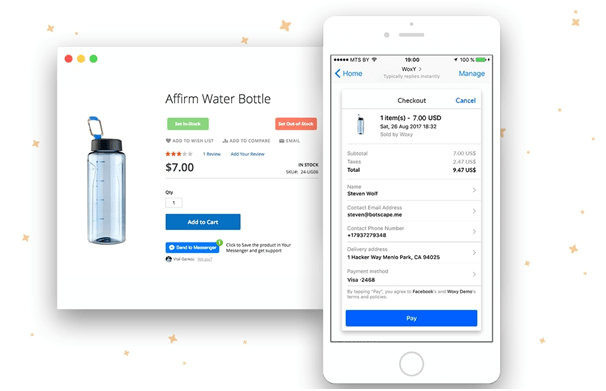
    You can also use Woxy- Messenger Shopping Assistant which is a One-Tap feature offers native and secure integration of your store payment environment with Facebook Messenger.

    When you enable this feature then customers can place orders in messenger with a one mouse click.

    Sales Analytics

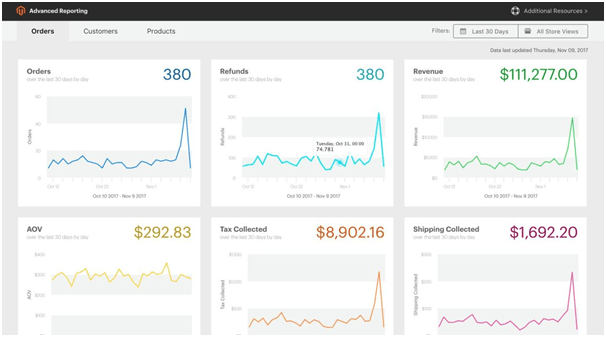
    Now, merchants can get 20 insightful reports on order data, product sales, and customer behavior. Magento Business Intelligence creates reports and delivers data for:

    • Store Revenue, #of orders, AOV, shipping fees, and taxes.
    • Key Metrics by customer (registered accounts, returning customer, etc.)
    • Key metrics by product (best/worst selling products, revenue each product generates, and so on)

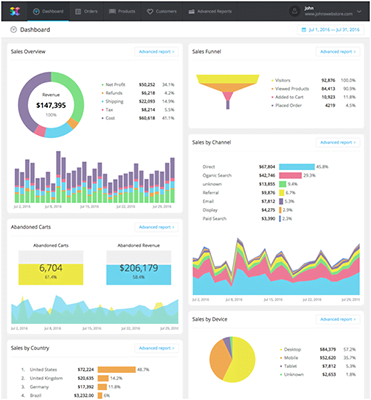
    If in case you are running the community version of Magento 2 then you can fetch data with SavvyCube – E-commerce Analytics Software for Magento.

    Moreover, you will also learn about:

    • You will come to know about your customers’ shipping behavior like who have spent the most in your store, who are the most loyal and even more.
    • It will show you details regarding sales, the product which sell more, profit, which are often refunded and also the product which doesn’t sell at all.
    • You will now know in detail about the amount of revenue, net profit of each product, category, and region.

    In addition, the software also works with the Enterprise version of Magento 2.

    Optimized Shipping

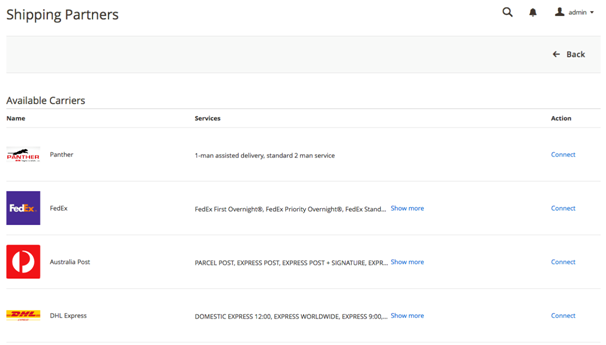
    With multi-carrier shipping and fulfillment capabilities, Magento 2.2.2 is best in providing shipping service. With new functionality, merchants can now easily handle multiple shipping activities
    Such As:

    • Adding & Configuring 11 shipping carriers (including FedEx, DHL Express, UPS, etc.)
    • To make shipping fulfillment rules
    • Comparing shipping rates and more.

    Magento shipping package starts at $99 per month. There is also a 30 day trial period which got number of limitations for carriers, locations, stores and shipment per month)

    Magento is on a right track by making some major strides in improving the newer 2.0 version and the release of the B2B functionality is a major step to the many B2B E-commerce businesses on Magento. This will help many companies in providing both B2B and B2C on Magento. If you’re looking a get Magento B2B implemented in your store then you can contact Mage Monkeys.

    Magento 2.2.2 version is much faster than ever before so move your store to the latest version of Magento 2.2.2 and experience all the new features.

    6 Signs You May Be Ready to Upgrade to Magento Commerce

    Substantial growth in your business is exciting, but scaling that growth usually means you have to make some difficult decisions. One of these choices is whether to build up your current eCommerce website or upgrade to one that grows more effectively alongside you.

    Magento Open Source (formerly Community Edition) is often a starting point for smaller businesses on the Magento platform, and success with the product could mean you’re ready for a move to Magento Commerce (formerly Enterprise Edition).

    While we recommend you consult a Magento Partner before making your final decision, here are our 6 signs that your business can benefit from upgrading to the enterprise product:

    1. VISITORS ARE STRESSING YOUR CURRENT WEBSITE

    When you gain popularity, it’s normal for the increasing number of simultaneous visitors to push the limits of your website. However, it’s important to remember that a poor experience—whether it is slow performance, broken pages, or a crash caused by too much traffic—can damage your reputation in the eyes of potential customers. Because of this, you need to be sure to increase your bandwidth or upgrade your website before the visitor count becomes too high for your systems to handle properly.

    Magento Commerce’s enhanced caching and databasing capabilities can help your business operate more efficiently in serving your increasing number of customers. It also gives you exclusive options, such as cloud hosting, to deliver extra muscle during high-traffic times.

    2. CONVERSION RATES HAVE PLATEAUED

    A telling way to measure the success and effectiveness of your website is the conversion rate. A high rate is a strong sign that you’re marketing to the proper audience, have the right products, and are selling at a reasonable price. However, if you’re operating on Magento Open Source, your store still isn’t using Magento’s best conversion-driving features, which are available to Magento Commerce customers.

    Magento Commerce delivers improved performance for you to retain more visitors once they reach your site. It also offers you more opportunities to entice customer purchases and increase the order value of your transactions. Some of the enhanced features include:

    • Ability to create segmented marketing messages and storefronts
    • Gift wrapping options
    • Built-in gift card functionality
    • Tailored cross-sells and up-sells
    • Access to 100+ promotion types

    3. You’re Ready To Serve New Markets

    Reaching a point of growth at which you can introduce new products or start selling to new customers in new markets is a milestone for any business. However, it is important that your eCommerce foundation is built to support these initiatives and help get them off the ground.

    Whether your expansion is from B2B to B2C, introducing a new vertical, or jumping into a new geographic area, Magento Commerce has the capabilities to serve as the backbone for your next move. Multi-site capabilities allow you to build different webpages and stores for different subsets of customers, so you can showcase and sell the appropriate products to the right visitors as soon as you launch your new offering.

    4. ON-PAGE CONTENT ISN’T DRIVING SALES

    It makes sense for a growing Magento merchant to upgrade to Magento Commerce, but in other cases, Magento Commerce features can catalyze growth for those that are struggling. Some of the features that can help businesses better connect with and sell to customers are those related to website content and presentation.

    With Magento Commerce’s modular content, preview, staging, and scheduling tools, you can update your layouts and designs without the help of a developer. Further, Magento Commerce’s automated segmentation functionality helps you identify which customers are looking for which items and from where they’re looking. You can use this information to build pages tailored to these segments, using different imagery, content, and strategies to most effectively sell your products.

    5. Fulfillment is Becoming a Challenge

    An increase in customers and orders can lead to a number of fulfillment challenges, and you need to be prepared to conquer them all. It is important to forecast customer demand and the load placed on your store before your fulfillment chain is pushed beyond its limit in the live eCommerce environment.

    While many fulfillment challenges reside outside of Magento (such as warehousing, carriers, and staffing), you need to prepare your systems to handle the increased capacity and push orders to internal and external fulfillment modules. A few features from Magento Commerce that can help you accommodate the increased demand for more orders, customers, and products include:

    • Improved database support – Create a faster, more productive environment, both on the front and back ends with Magento’s multiple databases.
    • Streamlined admin experience – Manage orders, customers, and workflows more effectively from the upgraded Magento admin interface.
    • Customer-initiated returns – Make returns easier. By allowing customers to initiate their own returns, you free up administrative time and reduce costs.
    • Broadened Magento Marketplace – Access Marketplace extensions that are only available to merchants operating on Magento Commerce.

    6. KPIs are dropping

    One frustrating situation you can encounter is when all internal factors remain constant, but your business goes from successful to struggling in a relatively short period of time. In a rapidly changing eCommerce environment, if your business isn’t implementing new technologies, you could be surpassed as customers migrate toward competitors that offer lower prices, faster shipping, better customer service, and personalized user experiences.

    While we generally recommend a new site be built every two to three years to stay relevant with the latest consumer demands, you should constantly tweak your website and processes as the market changes. Aside from new features and improved customer experiences, Magento Commerce can help your website draw and retain more customers with personalized offers, faster load times, and improved security.

    The Magento Upgrade Guide

    It is important to keep the Magento up to date with the latest stable releases because it allows a user to leverage all the newest E-commerce functionality by avoiding issues and vulnerabilities from the older version.

    However, upgrading your Magento install can be a complicated process especially with sites which uses many community extensions and other customizations.

    In this Magento upgrade guide, we will provide a complete checklist for an E-commerce merchant to follow before and after upgrading their install. We have also mentioned a guide for developers with the steps involved in performing a successful upgrade.

    Before you initiate :

    Make sure to note plan your Magento upgrade. There are many things which might go out of place with the actual upgrade itself, in addition to site performance following the upgrade. For that matter, you should be prepared and informed as possible going into the upgrade and willing to test extensively before going to the upgraded site live.

    The upgrade should always take place in a test environment with a test database before it is executed on the production site. Keep an hour or two of downtime when you perform that performs on your live store. We suggest doing it in the morning so that you face low traffic and the minimize any loss of sales. If the testing is done properly then it would take about 15-20 minutes of downtime.

    Enter Stock :

    Now, when you are ready for the upgrade, it’s time to take inventory of your site. Below are some answers which will help you in the upgrade process.

    Q: Which version of Magento is currently running?
    A: The version number is shown in the footer of the backend admin panel.

    Q: How many extensions are installed on the site?
    A: Have a developer take stock of what’s been installed into the app/etc/modules/ directory

    Q: Which of these extensions are being used in an integral manner (crucial to the day-to-day operations of the web store)?
    A: Any extensions which affect your store product display, promotions, checkout, shipping, payment should be noted carefully.

    Q: Have any of the extensions been customized by your developer?
    A: If so, try to determine if they modified the extension directly or (better practice) added customizations in a separate module.

    Q: Which patches, if any, have been applied to the Magento core?
    A: Have a developer compare the app/code/core directory with the base install of your version.

    Once your doubts are solved then you can begin to get a good idea of how challenging the upgrade might be…

    You may come across few issues if your Magento is very old compared to the current one. If there are a number of extensions installed on your site and they were not tested with the new version then your E-commerce site could run into trouble at the time of upgrading moreover in case of extensions which can alter the functionality of Magento processes such as checkout and promotions. Hence, it is important to know which extensions are causing issues. If you are running a recent version of Magento with limited customization and minimal extensions then you will see the upgrade will be a whole lot cleaner than the older version.

    Now the last step is to do a complete run-through of the currently installed site. Clear all the issues you are facing. Further, add products to cart and do a test purchase, test out the sales rules, category pages, go through the backend and load all the configuration pages and test other custom functionality. Always ask a developer to provide the most recent version which is compatible with the new version of Magento. Make sure you check all the freely available extensions that are installed for updates on Magento.

    When you are done with the complete inspection of your site and know all the challenges then it’s time to contact us.

    Conducting the Upgrade

    Before You Begin:

    • The upgrade should always be run on a local platform.
    • Ensure you to use Version Control in case anything goes wrong
    • Use a local copy of the store database.
    • Before running anything, run testing on the frontend and backend of the site.
    • Grab a copy of the current Magento version
    • Get a copy of the newer Magento version

    Start your migration

    1. Make sure that the Data Migration Tool has a network access to connect to databases. Open ports in your firewall.
    2. Stop running all the activities in the Magento 1.x Admin Panel except order management, such as shipping, creating the invoice, credit memos etc.
    3. Stop all Magento 1.x cron jobs.
    4. Use the migration tool to migrate settings and websites.
    5. Copy your Magento 1.x media files to Magento 2.x.
    6. Use Data Migration Tool to migrate your data from Magento 1 database to Magento 2.x database. If some of your extensions have data you want to migrate, you might need to install these extensions adapted for Magento 2.x. In case the extensions have a different structure in Magento 2.x database, use the mapping files provided with the Data Migration Tool.
    7. Use the Magento indexer: reindex command to reindex all indexers.
    8. Thoroughly test your Magento 2.x site.

    Test your site

    • Now that the upgrade is done successfully, you must test to ensure the core functionality of the Magento site is still running as expected.
    • Start with critical path testing. Go to the homepage, navigate to a category page, and subsequently to a product page.
    • Make sure you add all product types to your cart. If the store sells configurable products, simple products, groups, bundles, downloadable etc. then they must be tested to ensure the add to cart functionality is working properly.
    • Once your cart is filled, conduct a full test checkout to ensure nothing is broken in the most vital area of your site. Place a test order and fulfill it in the backend to ensure everything is running smoothly. (Ensure you are using test credentials for the payment method and shipping methods being tested)
    • Test additional functionality such as price rules and product relations. Ensure these modules are functional.
    • Now it’s time to test the extensions that are vital to the site. If these extensions are not working, you will either need to disable them or upgrade them from the developer with a version that is compatible with your upgraded version of Magento.

    Go live

    If your Magento 2.x site is updated and functioning normally.

    The following steps will guide to cut over to the new site:

    1. Put on maintenance mode your current Magento system. (DOWNTIME STARTS).
    2. Now, Press Control+C in the migration tool command window to stop incremental updates.
    3. Start your Magento 2.x cron jobs.
    4. In your Magento 2.x system, reindex the stock indexer using the command Magento indexer: reindex cataloginventory_stock.
    5. Use tool of your choice, hit pages in your Magento 2.x system to cache pages in advance of customers using your storefront.
    6. Perform a final verification of your Magento 2.x site.
    7. Lastly, change DNS, load balancers, and so on to point to new production hardware (DOWNTIME ENDS)
    8. Magento 2.x store is ready to use. You and Your customers can resume all activities.

    A few words at the end

    For those of you who are determined to move to Magento 2.x. You will run on the most flexible shopping cart framework ever made. Any feature you could possibly think of could be implemented with Magento 2.x.