We sacrifice by not doing any other technology, so that you get the best of Magento.

We sacrifice by not doing any other technology, so that you get the best of Magento.

    Everything you should know about Magento Migration

    If you’re still on Magento 1, take notice that Adobe officially announced it will stop Magento 1 support at the end of June 2020. After that, your eCommerce store could be more vulnerable to security violations, performance problems, and module updates as you maintain it on your own.

    OVERVIEW OF THE MIGRATION PROCESS
    The process of Magento 1 to Magento 2 migration includes three major steps: pre-migration, migration, and post-migration.

    Pre-migration: During this stage, we review the website’s data and content to get a clear idea of how much manual labor should be performed, prepare design specifications, and write a project outline with major stages and deadlines for each phase.

    Migration: The migration process starts with setting up a testing environment by moving Magento 2 to a new server. Then themes, extensions, plugins, data, and content are moved from Magento 1 to Magento 2.

    Post-migration: Last but not least is synchronizing your order history and customer data to perform a smooth shift from Magento 1 to Magento 2.

    Breakdown of Magento Migration Timeline

    1. Drawing up a migration plan: 3 weeks
    2. Preparing a test environment: 1-2 days
    3. Implementing extensions and custom development: 3 weeks
    4. Migrating data: 1-2 days
    5. Creating a design for Magento 2: 2-4 weeks
    6. Additional database synchronization: 1-2 days
    7. Magento 2 store launch on a live server: ~1 week

    Why do you need a certified agency to perform migration?

    MIGRATION IS NOT COPY-PASTE:

    Magento 2 data migration is the crucial stage in the transfer process. One needs to have sufficient technical knowledge and extensive experience to react quickly in case you lose database assets — specifically, the customer and product data. Moreover, your blog content, meta titles, and customer orders should be transported inseparably.

    MESSY CODE AND SHODDY DATA STRUCTURE:

    During the migration period, one can face numerous problems related to the data structure. For example, if the core Magento 1 code is messy or inappropriately configured, then the standard Migration Tool and scripts won’t work. There may be a number of situations where the data structure was so screwed up that we had to reinstall Magento 1 to structure the data properly before starting Magento 2 migration. A certified Magento expert knows how to handle such situations.

    SEO:

    If migration doesn’t perform by any expert then there are chances that your store’s URL may get changed which could create a disaster for your site’s current ranking. An expert knows how to handle such situations.

    Apart from the above three, there are many technical reasons why migration should be done by expert agencies only. Magento 2 users are availing sales benefits after migration, so if you are still on Magento 1 then don’t delay it further and migrate it today.
    FAQ(s) you should know before upgrading your Magento store

    Thinking to upgrade your Magento store? Have a look at the below questions before you do it.

    Q1. How much time does it take to upgrade a Magento store to the latest version?

    A1. It depends on how big your site is, but on average, it can take between 1 to 3 months.

    Q2. Will my web store speed get affected after upgrading Magento?

    A2. It will get affected, but positively. Speed will improve.

    Q3. Will my store’s extension work the same way after upgrading the Magento store?

    A3. Majorly every Magento extension in the market is compatible, but if your store’s any specific extension won’t be compatible, then we’ll share alternatives in advance.

    Q4. Will my store face downtime during the upgrade process?

    A4. No, we’ll run the process on our local server so your live web store won’t get affected.

    Q5. How frequently will I need to upgrade?

    A5. Adobe acquired Magento frequently and launched an upgrade. If your store is not in Magento 2, then we suggest you do it once. Upgradation in internal versions of Magento 2 can wait.

    Q6. What if I don’t want to upgrade and still want my store to secure?

    A6. Well, in that case, we suggest you opt for Mage Monkeys M1 Support

    2 new reasons that make migration an urgency

    The end of support for Magento 1 is almost here. For both Magento Commerce (formerly Magento Enterprise) and Magento Open Source (formerly Magento Community) the final bell is just 2-3 months away.

    For eCommerce stores still depending on this soon-to-be-discontinued version of Magento, here are two factors that need immediate attention –

    (i) PCI Compliance and
    (ii) Magento Agency bottleneck.

    #1 – PCI compliance

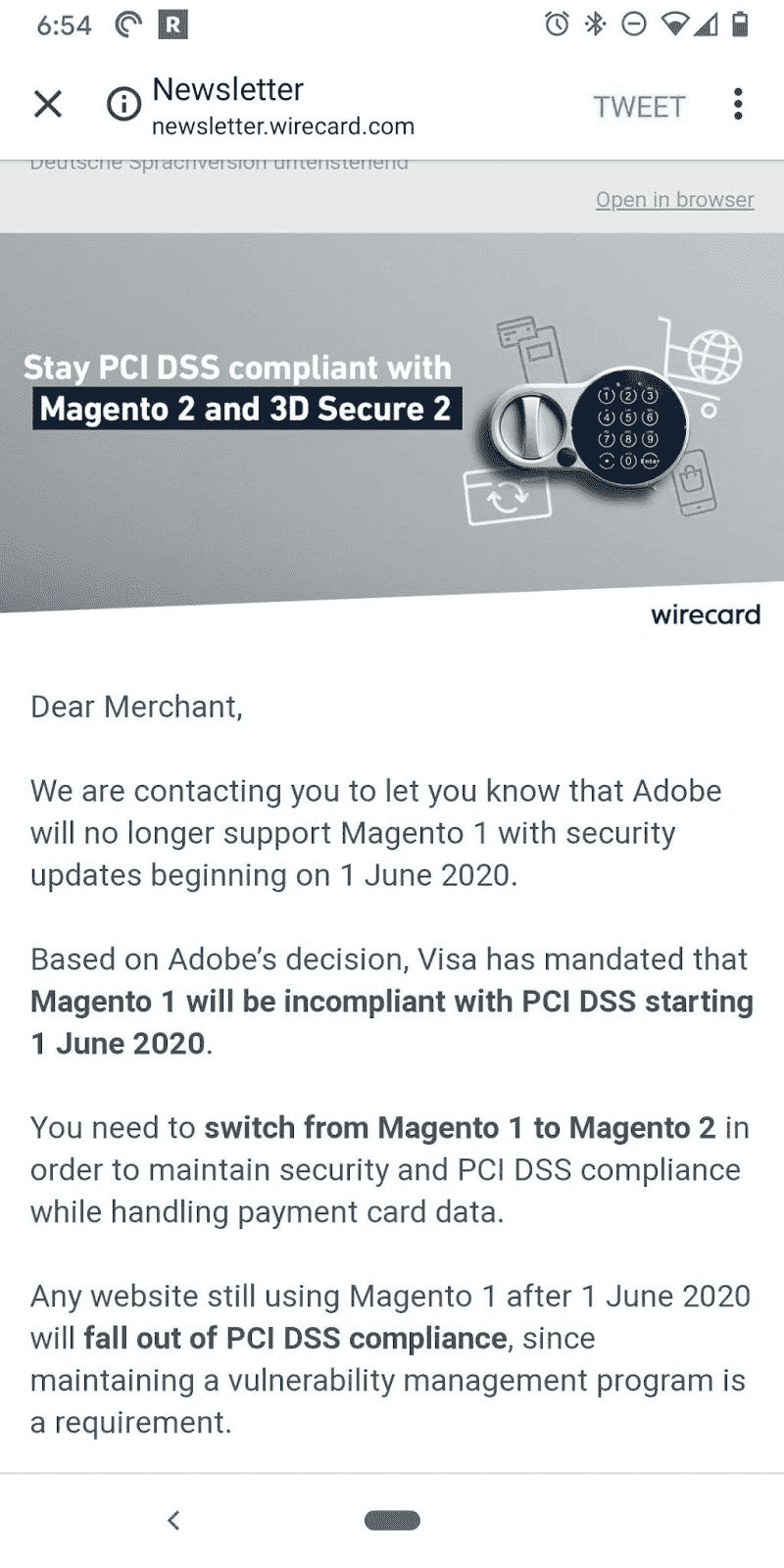
    Your store is Magento PCI compliant for now. But, after June 2020, by using a version that’s no longer supported by Magento, your store might violate PCI compliance.

    The PCI (Payment Card Industry) insists an eCommerce business owner to review (annually) both hardware and software technologies used by the store.

    As the support for Magento 1.x ends with June 2020, stores operating on Magento 1 will not pass the PCI rules due to lack of new security updates.

    A store that’s not Magento PCI compliant might face multiple issues like:

    • Unable to accept credit card payments 90 days after the support ends.
    • Non-compliance attracts penalties ranging from $5,000 to $100,000.
    • Additional penalties may be levied until compliance is met.
    • Penalties if users’ credit card data is compromised.
    • Compensating with the customer whose data has been compromised.

    #2 – The Magento agency bottleneck

    The rush hour is almost here. If you postpone your decision to migrate, you might join the long list of eCommerce brands waiting for a Magento development agency to take up their project.

    Here is the math. According to data from BuiltWith, the number of companies currently using Magento 1.x would be almost 180,000. But, there are just about 350+ Magento agencies equipped to handle Magento 2 migration.

    Any migration project takes a few months based on the complexities involved. If you still shelve the idea of migrating it would be too late to get migrated before the deadline as agencies may not be available to take up your project.

    Plan your move to Magento 2 now!

    Magento PCI compliance and agency bottleneck will soon become major challenges for brands using Magento 1.x. It’s better to act immediately and migrate Magento 1 to 2. Our Magento-certified developers can help you plan for a smooth migration.

    What Is New In The Latest Version Of Magento 2? (Magento 2.3.4)

    What’s new in Magento 2?

    Magento released the latest upgrade of the Magento 2, which is Magento 2.3.4. The upgraded version has several security updates, improved PSD2-compliant core payment methods, 220 functional fixes, and more than 30 security enhancements.

    Now, let’s explore new features of Magento 2.3.4:

    Security improvements:

    This version upgrade has over 30 security enhancements.

    • The changes will help in removing the remote code vulnerabilities and will stop cross-site scripting. With no confirmed records of hackers’ pertaining to this version, Magento has identified this vulnerability, which can exploit and gain access to customer information via administrative controls.
    • Magento has advised using two-factor authentication, VPNs, IP Whitelisting, and unique solution instead of/admin and strong password to make hackers unable to access the administration panel.
    • The latest version comes with some fixes to core codes like the elimination of the custom layout, enhanced remote application execution.
    • Now you can add whitelisted factors in the template as Magento has redesigned its features of the content template.

    Enhanced Performance:

    • Through bundling mechanism, PHTML files are refactored to identify all dependencies on Javascript.
    • The latest version gives enhanced cache logic, which eliminates non-cached demands and the invalidation of the consumer section.
    • A new default has been introduced that will allow store owners to disable static collecting for report modules. You can go to System configuration > General>Reports>General Options; to enable it for better performance and turn it off when not needed.

    Platform Updates:

    Magento has performed several updates for enhancing website safety and compliance with PCI.

    • The latest third-party technology version of RabbitMQ V3.8 improves the message queue framework.
    • Magento 2.3.4 will not support Authorize.net payment methods; therefore, you need to use the official payment integration, which is available in the market.
    • The latest version of Redis V5.0.6 will give you enhanced page caching and session storage
    • Magento has developed support to employ a declarative scheme with MariaDB 10.2 and MYSQL.

    Improved Infrastructure: 

    • There are 250 enhancements to core quality in the Magento 2.3.4, which improves functionality, the quality of the framework and catalog, sales. Elasticsearch, PayPal, CMS, B2B, and import.

    Improvements in Merchant tools:

    • Magento 2 has integrated a new Adobe Stock integration extension, which will allow merchants to add high-quality images and videos to the web pages.

    Inventory Management:

    There are several enhancements made in inventory management performance:

    • Shopping cart problem has been resolved that caused higher than expected loads on the database server.
    • Inventory Reservations CLI command has been updated to minimize memory usage.
    • Multiple quality issues are solved like credit memos, stock mass, and grouped commodity,

    Improvements in GraphQL:

    Magento has released numerous enhancements in GraphQL to improve cart functionality, layered navigation, and other attributes.

    • Now, you can link carts to customers and render them on different services.
    • GraphQL users can easily do price rendering on the storefront with the improved method of returning price.
    • A cart can have promotional details.
    • Layered navigation will now have custom filters.
    • The issue related to product tax and product discount information is fixed.
    • The category data can be obtained by name, slug, or ID.

    CONCLUSION:

    There are significant improvements in Magento 2.3.4, and you can download and install the latest version in a plethora of ways. But, first, you need to understand your business requirements and join hands with a professional Magento development company that can handle the entire process seamlessly.

    What Do You Need To Know About The Most Awaited Magento 2.4 Release Expected Soon?

    Its official, Magento 2.4 to be released in the next couple of months in 2020. But this time it’s bigger and advanced.

    Magento has always been the talk of the town concerning its robustness, security, reliability, scalability, and capability to provide amazing features for both B2C & B2B businesses. And why would it be not so popular when it holds a prestigious place in the global market.

    If we look around Magento over the years, it has emerged to be one of the most promising hand-held solutions for businesses for several reasons.

    It was May 21, 2018, when Adobe acquired the Magento and from there it has gained momentum regularly releasing updates for security and quality to give utmost benefits for the whole Magento Community along with the Magento Commerce edition.

    There has been a lot of discussion and excitement when all the people and developers within Magento Community were rattled with the most awaited news of the updated release of Magento 2 to Magento 2.4 in the next couple of months.

    The Big News is here!!!

    We are well-versed with the fact that Magento regularly releases updates every quarter bringing in new features emphasized more on enhancing performance and security patches.

    The recent news of Magento 2.4 update about to be released soon will also have a lot of new features and improvements.

    The real thing was now when Magento’s engineer team worked in-depth consistently for a couple of months to focus on improving the performance of Magento and the interesting functionalities of GraphQL.

    Magento R & D team hinted along with the upcoming release of Magento 2.4 that developers will experience better GraphQL performance this time around along with a new concept of storefront API to be a show stopper for all. This particular update will have a lot of new features, improvement in performance, core components upgrade, product stability, etc.

    Magento Community has always been power-packed with dedicated contributors and high-performing that leads to consistent improvement as a popular open-source platform.

    This strengthened community support; we will be able to experience the improved core features, front-end framework, and a lot of tireless efforts to eliminate 100+ bugs right away.

    Remember, this time community has worked so hard that the subsequent announcement of additional features is yet to be revealed that may surprise us all to the next level.

    It is interesting to see Magento invite contributors to join the community project while they open new code repositories on GitHub about Magento 2.4 soon. This will be a platform where every individual contributor will be able to share their contribution with other Magento community members.

    There also have been planning by the Magento team to stop all the contribution-level work for their existing GitHub repository.

    As per the announcement of the new upgraded version Magento 2.4, other additional improvements are to be expected in the following directions:

    • Improvements in the functionality of GraphQL
    • Expected to include “shiny new API” together with tons of awesome new features, product stability, component upgrades, store performance, etc.
    • Better Progressive Web App technology for B2B and B2C types
    • Provide Full coverage to the admins in Magento Open Source, Commerce Edition, and Cloud-Based technology
    • Expected to introduce a new concept of the Storefront API
    • Better functionality for Admin UX
    • Improvements in the frontend framework
    • Improvements in Asynchronous Import functionality
    • Improvements in Magento 2 Commerce Cloud deployment process
    • Improvements in Page Builder and other extensions
    • Latest upgrades and updates in security patches
    • Hundreds of Bug fixes and tests

    This short but particular update from Magento has engraved enthusiasm into the minds of every beloved community member of Magento waiting to explore all the new features as early as possible

    By now, we assure you that your excitement would be at a peak, therefore, stay tuned for more detailed news of updates along with every bulletin of Magento 2.4 release. In case, if you want to upgrade your Magento store, contact certified upgrade experts to get the task done.

    Upgrade Your Magento Store ASAP To Prevent Attacks

    Magento is one of the most popular platforms that businesses use to build and manage their websites. That makes them an enticing target for hackers. Magneto stores experience malicious attacks in the wild which can harm critical remote code-execution vulnerability. So, security is a serious concern.

    Since Magento powers a significant portion of online eCommerce, it is no surprise that hackers and skimmers often target it. Cybercriminals attack websites built on the unpatched eCommerce platform to access confidential data. The scripts steal customers’ payment card details, and other sensitive information entered on the page.

    There is a vulnerability (CVE-2019-8144) that holds a severity ranking of 10 out 10 on the CVSS v.3 scales, which can enable an unauthenticated user to insert a malicious payload into a merchant’s site via Page Builder template methods and then execute it. The Page Builder lets websites design content updates preview them live and schedule them to be published, and the bug exists explicitly in the preview function.

    This flaw affected Magento 2.3 and patched in Magento Commerce 2.3.3 and with the security-only patch 2.3.3-p2 released in October. The company has already stated that patching will have the side effect of “blocking administrators from viewing previews for products, blocks and dynamic blocks but they have assured that it will re-enable the preview functionality as soon as possible.

    Piotr Kaminski of the Magento security team wrote in a posting on Monday “We recommend that all merchants, even those who have already upgraded to 2.3.3 or applied security-only patch 2.3.2-p2, review the security of their Magento site to confirm that it was not potentially compromised before the upgrade,” Further he added “Applying this hotfix or upgrading…will help defend your store against potential attacks going forward, but will not address the effects of an earlier attack. The same update patches several other critical emote-execution flaws with a CVSS v.3 scores of 9 and above, as well as cross-site scripting (CSS) issues.”

    According to RiskIQ, there are 573 known command-and-control (C2) domains for the group and nearly 10000 hosts actively loading those domains. RiskIQ has detected almost 2 million instances of Magcart’s javaScript binaries with more than 18,000 eCommerce hosts directly breached.

    Some of the crucial measures to secure your Magento store from Magecart attacks:

    • Audit Magento Third-Party Extensions and Plugins
    • Database Logging in Magento Enterprise
    • Web Log Analysis and Monitoring
    • Perform Regular Penetration Tests
    • Implement Code Integrity Checks
    • Regular Updates and Patching
    • Implement a Web Application Firewall
    • Set Strict File Permissions
    • Use Two-Factor Authentication

    Conclusion

    Magento is a fantastic platform for creating a thriving website. It has a 24*7 support team that works consistently on maintenance and security updates. We recommend Magento store owners stay current on the best security practices. As the old saying goes, “it’s better to be safe than sorry”. Talk with a trusted Magento upgrade service provider to upgrade your Magento store before it’s too late.

    Consider These 3 Important Points Before Migrating Your Magento Store

    Today we’re going to discuss three important points which are followed by a certified Magento development agency before migrating your store.

    Review your old code

    It is vital to look at the extensions and data on your current site. Determine what features are being used and which extension requires fewer customizations on Magento 2. Upgrading your Magento to the latest version removes outdated and unused extensions and redundant data from your Magento 1 site.

    Make sure you always clean up the old code

    The process of migration becomes simple if you leave unnecessary things behind. But it is also essential to have a detailed plan about the commodity features that may act as a differentiator for your business like a store locator, store pickup, etc.

    Draft The Requirements Of Your New System 

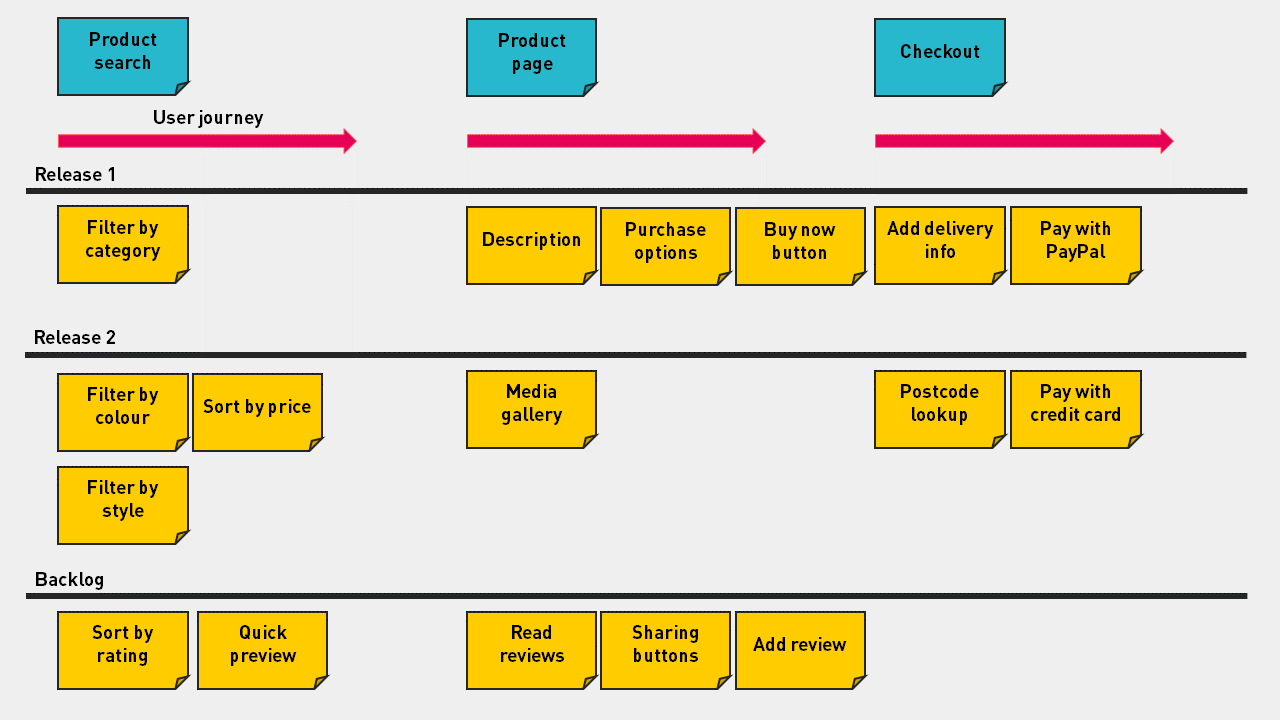
    One of the effective ways to shape your new platform and maximize the value for users of the system is through building a smooth user journey. To put in simple words, identify your user goals from which you obtain activities, tasks, and user stories. This process helps you understand what the MVP go-live version of your new platform looks like.

    Capture A User Journey On Your Site

    After you have a user story map, your next task is to analyze the map and come to a conclusion by asking the below questions:

    • Does this functionality be included in the new platform?
    • If not, do you need to customize to meet your business processes?
    • How is the return for that feature compared with the investment?

    Answering these questions will help you in focusing on doing valuable things, and also you can limit the amount of unnecessary customization which occurs in your business.

    Review Ecommerce SEO And Technical Optimization

    Your site undergoes structural changes when you migrate from Magento 1 to Magento2. So, it would best if you run an eCommerce SEO checklist to overcome any issue that impacts the organic traffic of your site.

    Here are some factors that need your concern:

    • Meta tags for products and categories;
    • SEO-friendly URLs;
    • Prefixes and suffixes for title tags;
    • Images and media are optimized;
    • On-page content is optimized correctly;
    • Internal links are used appropriately.

    7 Major Pitfalls You May Face With Magento Migration

    Effective technology is the most important thing behind any eCommerce store. Migrating from Magento 1 to Magento 2 is now the most important step for your online business. Magento 2 is far better than Magento 1. It like running your estore on an entirely new platform that has enhanced search, secure checkout, effort-less store management, faster page loading.

    Migration is a process that takes time and migrating from Magento 1 to Magento 2 takes three to five months. Still, this time can be longer if the site is complex or highly customized and especially if you run into some pitfalls.

    To make migration easy for you, Mage Monkeys have compiled a list of the most common pitfalls and how you can avoid them.

    Pitfall 1: Magento 2 data migration is not as simple as dragging and dropping

    You cannot simply copy-paste Magento 1 data into Magento 2. First, you will prepare a Magento 2 platform for custom data. Next, you can merge custom migration scripts in which the official data migration tool and manual migration are used to migrate Magento settings and bulk data.

    Pitfall 2: Messy code and a shoddy data structure may lead to a lot of custom development

    It may happen that during migration, some problems might arise related to data structure depending on how old your site is and who built it. Migration becomes difficult if code is messy as shifting through disorganized code is time-consuming. To ease this pitfall, you need to audit your site first as it will conclude that custom migration scripts are required or not or the developer can begin with a clean installation of Magento.

    Pitfall 3: Sometimes Magento Migration leads to poor SEO performance

    Search Engine Optimization is essential for your business. It needs to be done correctly else your site might come across the following issues:

    Lower search engine ranking

    Redirects that don’t work

    Broken URLs

    You have to map out your old site architecture and match it up with the new site as this will keep your SEO healthy after migration. The migration will retain your ranking, and you will not lose traffic because of unavailable or broken pages.

    Pitfall 4: Magento 1 extensions cannot be used in Magento 2

    Your Magento 1 extensions won’t work in Magento 2 over during migration. But, if your Magento 1 extensions have Magento 2 versions then it quite easy to migrate settings and data, and this way your business will not be affected.

    Pitfall 5: Store Theme and Design have to be redone from scratch

    Same like extensions, theme, and design won’t work after the migration because Magento 2 uses a modern architecture and has different frontend and backend requirements. Mobile phones are used more compared to other devices, so it is necessary to take advantage of Magento 2’s mobile-friendly responsive design features.

    Pitfall 6: The process takes time

    Migrating to Magento 2 is a significant upgrade, and it will give you numerous benefits like enhanced performance and scalability, easy checkout, mobile-friendly, advanced reporting and much more. Magento 2 is very different from Magento 1, steps like planning, custom development, redesign, and extension installation need the right amount of time.

    Auditing your site will give you a better picture of the entire migration process (in terms of time).

    Pitfall 7: Craft your Definition of Done correctly

    Definition of Done (DoD) is a predetermined set of criteria where the development team agrees that the project will be completed with a high level of quality.

    Why is DoD critical in Magento migration?

    Before the migration process starts, a proper timeline, plan, and understanding are required; otherwise, the project can go indefinitely. Preferably, we want to migrate as fast as possible, along with keeping DoD in mind.

    Takeaways

    Upgrading your store to Magento 2 is a huge step, a step that will enhance user experience and also generate more revenue. Your Magento migration needs to happen soon because Magento has officially declared that Magento 1 will reach the end of life on June 1, 2020, so we recommend you to contact Professional Magento Developer soon.

    Why is December month the best time to start your Magento upgrade?

    After the latest updates from Magento ending its support for Magento 1 after June 2020, there has been a lot of turnarounds. For the store owners, merchants, what will be the consequences if they do not upgrade Magento? Well, it is a matter of the fact that security & functionalities always need to be updated to safeguard sensitive data of the users.

    But before there is second thought on upgrading Magento,

    What’s there in December month?

    According to one research, the eight busiest days for in-store foot traffic this year will be:

    December 21, the last Saturday before Christmas
    December 26, the day after Christmas
    December 14, two Saturdays before Christmas
    December 22, the last Sunday before Christmas
    December 23, the Monday before Christmas
    December 28, the Saturday after Christmas
    December 27, the Friday after Christmas
    December 7, the first Saturday in December

    These are the days when the eCommerce sales market will go on hype.

    But what will happen after these dates?

    The short answer is – “The sales graph will go down.”

    It’s undeniable. Right?

    Then, why should you start to upgrade your Magento store in December?

    Magento upgradation is not a one-two days task. It takes a minimum of a month. So if you’ll opt upgradation process in December, then your tech team can deliver you upgraded Magento store by January.

    January is the time when sales go down. But, if your Magento store is upgraded at the latest version by January, then your store can leverage the advantages of Magento 2.3 which are,

    1. PWA features
    2. Improved speed and scalability
    3. Enhanced checkout system
    4. Page Builder
    5. Search engine friendly
    6. Upgraded add-to-cart
    7. Better security
    8. Multi-Source Inventory (MSI)
    9. Database segmentation

    It’s been noted repeatedly that after the migration, Magento store’s sales go high. As per a survey, it’s been recorded that to newer version provides you an ability to speed up the process of checkout by 38%, which is quite good.

    Why should you plan a month early? 

    – Magento offers a long list of features & functionalities, but if you take time and decide features you require that provide you much time to think, plan & implement them.

    – You know very well that your eCommerce store will have thousands of media files about products, features, etc. You will need time to manually change or upgrade to a newer version keeping the data intact.

    – Each and every version of Magento has a different database structure & architecture. Here, you will need adequate time to upgrade to a newer version taking care of the database, file structures, media files, etc.

    – When you get space to work upon your eCommerce store, it allows removing all unwanted files or redundant files from the existing database of your store. This will help you to free up space and help to manage data very well.

    – It is often experienced by Magento developers that not every extension & functionality can be upgraded at a time very easily. Some of them might not be compatible with a newer version; in that case, you need to recreate those extensions & class files.

    Big Question: Won’t it affect our December sales if the site will be passed through technical migration?

    No, your tech partner needs to sure that they run migration procedures offline and live your site with 0% downtime. By adopting this methodology, your migration will get live post-December, and it won’t affect your live tech or sales operations.

    Conclusion

    The best advice is to start planning, looking for relevant features, and implement them as early as possible before the December month ends. It will help you to manage your sales and your site will be technically healthy in 2020.

    All You Need To Know About Magento 1 End Of Life

    When is the Magento 1 End of Life date?

    Nothing is confirmed yet but the official end of life date given by Magento is June 2020. After June 2020, Magento 1 websites will no longer get any support, security patches or updates. Further, merchants will not receive any new functionalities or extension in terms of security and customer requirements.

    Why it is important to migrate from Magento 1?

    You should migrate from Magento 1 as from June 2020 there will not be any further support and to remain on Magento 1 will not give you further development. No further updates and patches will be released so this will increase the risk of security breaches for your Magento 1 website.

    Are there any issues of staying on Magento 1 after the end of life?

    Yes, there are several issues of staying on Magento 1 after the end of life.

    Security risks

    After June 2020, Magento 1 Community and Enterprise editions will no longer have patch updates which means your website will have no protection against vulnerabilities. This will put your website as well as your customers’ data at risk of falling into the wrong hands.

    Out of date modules

    Developers in the community give more focus on optimising modules and plugins for Magento 2 and the modules built particularly for Magento 1 may be unsupported and go out of date. This will harm the performance of your Magento 1 website.

    Lack of resources

    You will have fewer options in terms of developers if you stay on Magento 1 for long. The most in-demand agencies will have clients on their books well in advance of the end of life date. There are chances that some agencies will not opt for problematic Magento 1 sites instead they will allow developers to gain more experience on Magento 2.

    Increased liability

    If you continue to use Magento 1 after June 2020 then there are chances that your agency will no longer maintain or host your website as it may become a liability to them. As a result, your website will become your responsibility for keeping it updated and secure which is even more difficult with the absence of any official updates.

    Time’s running out

    Migrating from Magento 1 to Magento 2 is a time-consuming process as it takes on average between 3 and 6 months. (It depends on the complexity of your website’s functionality and the depth of your product catalogue) Considering the availability of developers, seasonal trends and peak period, time is the most important factor here.

    What are the key benefits of Magento 2?

    Better performance

    Full-page caching, allowing for better site speed

    Improved server response time

    Minified JavaScript, CSS and HTML as well as image compression to provide faster load speeds

    Ease of purchase

    Easily integrated upsell, cross-sell and recommendations functionality

    Reduced risk of basket abandonment thanks to a shortened checkout process

    Integration with the world’s leading payment gateways, couriers and third party fulfilment software

    Mobile-first design

    Responsive and mobile-friendly designs adaptable to any screen resolution

    Dedicated content management sections to provide customised mobile designs

    Improved mobile usability for both front-end customers and back-end administrators

    Integrated marketing functionality

    Easy creation of landing pages through the CMS and PageBuilder

    Improved on-site search and SEO functionality

    Including metadata, category descriptions and search engine friendly URLs

    Third-party module integrations

    Easily integrated omnichannel selling with the likes of Amazon and eBay

    Improved retargeting, marketing messaging and abandoned basket functionality through Dotdigital

    Easier to manage admin

    Improved admin panel layout provides a better experience for merchants

    Customisable dashboard show metrics that matter to you – including recent orders, best-sellers and AOV

    Product catalogues, SKUs and uploads are much easier to manage

    Enhanced B2B functionality

    Allow customers to submit quote requests, based on uploading a list of SKUs via CSV

    Easy re-ordering functionality for repeat customers

    Customised pricing and catalogues for B2B customers behind a password-protected gateway

    How do you prepare for a Magento 1 to Magento 2 migration?

    Migrating from Magento 1 to Magento 2 is not at all an easy task. To make the best choice for your business, you have to consider multiple variables. Magento 1 and Magento 2 work on completely separate systems. So migrating to Magento 2 will be more straightforward but there are few risks to keep in mind.

    First, you have to be clear about your business needs. Migrating to Magento 2 is a large financial investment; therefore your resources should ready to help out with day-to-day operations.

    What if as a merchant one wants to stick with Magento 1 only?

    Magento development agencies like Mage Monkeys offers M1 Support. You should opt for it to avoid any trouble.

    Hire the right Magento agency for a smooth migration

    If you want professional help with 100% satisfaction, you can always ask for Magento 1 to Magento 2 Migration Service that guarantees Magento 2 migration with zero downtime and no data loss!