We sacrifice by not doing any other technology, so that you get the best of Magento.

We sacrifice by not doing any other technology, so that you get the best of Magento.

    Enable COD payment method for some products using programming in Magento 2

    If you want to Enable COD Payment Method for Particular Products, Follow below steps

    You need to create an extension for this,

    Here I have created extension : Magemonkeys_CodRestrict

    1. Add new YES/NO product attribute i.e enable_cod_payment and set in Attribute Set which you are using for products

    2. Create registration.php file in app/code/Magemonkeys/CodRestrict and add below code

    <?php
    MagentoFrameworkComponentComponentRegistrar::register(
    MagentoFrameworkComponentComponentRegistrar::MODULE,
    'Magemonkeys_CodRestrict',
    __DIR__
    );

    3. Create module.xml file in app/code/Magemonkeys/CodRestrict/etc and add below code

    <?xml version="1.0"?>
    <config xmlns:xsi="http://www.w3.org/2001/XMLSchema-instance" xsi:noNamespaceSchemaLocation="../../../../../lib/internal/Magento/Framework/Module/etc/module.xsd">
    	<module name="Magemonkeys_CodRestrict" setup_version="1.0">
    	</module>
    </config>

    3. Create module.xml file in app/code/Magemonkeys/CodRestrict/etc and add below code

    <?xml version="1.0"?>
    <config xmlns:xsi="http://www.w3.org/2001/XMLSchema-instance" xsi:noNamespaceSchemaLocation="../../../../../lib/internal/Magento/Framework/Module/etc/module.xsd">
    	<module name="Magemonkeys_CodRestrict" setup_version="1.0">
    	</module>
    </config>

    4. Create events.xml file in app/code/Magemonkeys/CodRestrict/etc and add below code

    <?xml version="1.0"?>
    <config xmlns:xsi="http://www.w3.org/2001/XMLSchema-instance" xsi:noNamespaceSchemaLocation="urn:magento:framework:Event/etc/events.xsd">
        <event name="payment_method_is_active">
            <observer name="codpayment" instance="MagemonkeysCodRestrictObserverCodAvailable" />
        </event>
    </config>

    5. Create CodAvailable.php file in app/code/Magemonkeys/CodRestrict/Observer and add below code

    <?php
     
    namespace MagemonkeysCodRestrictObserver;
     
    use MagentoFrameworkEventObserverInterface;
     
    class CodAvailable implements ObserverInterface
    {
    	/**
         * payment_method_is_active event handler.
         *
         * @param MagentoFrameworkEventObserver $observer
         */
        public function execute(MagentoFrameworkEventObserver $observer)
        {
            $objectManager = MagentoFrameworkAppObjectManager::getInstance();
    
    		$cartObj = $objectManager->get('MagentoCheckoutModelCart');
    
    		$cartItemsCollection = $cartObj->getQuote()->getItemsCollection(); 
    
    		$cartItemsVisible = $cartObj->getQuote()->getAllVisibleItems(); 
    
    		$itemsArray = $cartObj->getQuote()->getAllItems();
    		$enable_cod_payment = array();
    		foreach($itemsArray as $item) {
    			$productid = $item->getProductId();
    			$product = $objectManager->create('MagentoCatalogModelProduct')->load($productid);
       			$enable_cod_payment[] = $product->getData('enable_cod_payment');   			
    		}
    
    
            if($observer->getEvent()->getMethodInstance()->getCode()=="cashondelivery"){
    			if(in_array(0, $enable_cod_payment)){
    	            $checkResult = $observer->getEvent()->getResult();
    	            $checkResult->setData('is_available', false);
    	        }
        	}
        }
    }
    

    You can change payment method condition as per your need.
    How to display out of stock product at last on catalog page in Magento 2?

    Check below step If you want to display out of stock products at last on product listing page in Magento 2.

    You need to develop a custom extension (Here, I’m assuming that you know how to create custom extension in Magento 2).

    We need to use MagentoCatalogSearchModelResourceModelFulltextCollection for product collection.

    1. Create app/code/Magemonkeys/OutOfStockAtLast/etc/di.xml and add below code.

    <?xml version="1.0"?>
    <config xmlns:xsi="http://www.w3.org/2001/XMLSchema-instance" xsi:noNamespaceSchemaLocation="urn:magento:framework:ObjectManager/etc/config.xsd">
        <type name="MagentoCatalogSearchModelResourceModelFulltextCollection">
            <plugin name="Magemonkeys_OutOfStockAtLast::OutofstockLast" type="MagemonkeysOutOfStockAtLastPluginProductProductListToolbar"/>
        </type>
    </config>

    2. Create app/code/Magemonkeys/OutOfStockAtLast/Plugin/Product/ProductList/Toolbar.php and add below code.

    <?php
    namespace MagemonkeysOutOfStockAtLastPluginProductProductList;
    class Toolbar
    {
        
        public function beforeLoad(
            MagentoCatalogSearchModelResourceModelFulltextCollection $subject, 
            $printQuery = false, 
            $logQuery = false
        )
        {
            $order = $subject->getSelect()->getPart(Zend_Db_Select::ORDER);
            $oosorder = array('is_salable DESC');
            $subject->getSelect()->reset(Zend_Db_Select::ORDER);
            $subject->getSelect()->order($oosorder);
            return [$printQuery, $logQuery];
        }
    }

    There you go. I hope following above steps will let you display out of stock product at last on catalog page in Magento 2.

    Happy coding!

    How to display product price programmatically after quantity box in product page?

    If you want to display product final price after quantity box then you have to follow below instruction.

    You need to overwrite addtocart.phtml file in your theme.

    Then put below code after quantity input.

    <?php 
    echo $this->getLayout()
     ->createBlock('MagentoCatalogPricingRender',
     "product.price.final.clone",
     [
     'data' => [
     'price_render' => 'product.price.render.default',
     'price_type_code' => 'final_price',
     'zone' => 'item_view'
     ]
     ]
     )
     ->toHtml();
    ?>

    Anything more? Nopes, that’s it. Try the given code and you will able to display product price programmatically.

    Composer update not working while repository not exists in git – Magento 2 [resolved]

    We were working on a project where we needed to upgrade a Magento store along with plugins.

    We came on the stage where we were working on the composer command.

    For those who are not aware with the role of composer command, let us share that in magento 2 you have to use composer command to update the version of Magento system and plugins.

    While working on the same we faced an issue.

    Some plugin repositories were not getting cloned.

    For example:

    medialounge_repo/magento2-share-my-basket.git

    To solve the problem, we removed below line from composer.json:

    git@bitbucket.org:medialounge_repo/magento2-share-my-basket.git

    Then we removed magento-2-share-my-basket section from repositories,

    From:

    "repositories": {
    	"0": {
    		"type": "composer",
    		"url": "https://repo.magento.com/"
    	},
    	"magento-2-share-my-basket": {
    		"type": "vcs",
    		"url": "git@bitbucket.org:medialounge_repo/magento2-share-my-basket.git"
    	},
    	"xtento": {
    		"type": "composer",
    		"url": "https://repo.xtento.com"
    	}
    }

    Replace:

    "repositories": {
    	"0": {
    		"type": "composer",
    		"url": "https://repo.magento.com/"
    	},
    	"xtento": {
    		"type": "composer",
    		"url": "https://repo.xtento.com"
    	}
    }

    Things worked for us when we chose this as solution.

    If you ever face such problem then you can use this trick. We’re sure this Magento hack will work for you.

    How to insert and update product prices using MySQL query?

    Today, we are going to talk about MySQL query for product pricing in Magento 2.

    If you ever wanted to insert and update product pricing using MySQL in Magento 2 then you landed to the right page.

    You can use below code to insert and update the product prices in Magento 2 through MySQL query. We have made the code as per our requirements. But you can always change it as per your needs.

    <?php
    ini_set('display_errors', 1);
    ini_set('display_startup_errors', 1);
    error_reporting(E_ALL);
    
    
    require __DIR__ . '/app/bootstrap.php';
    $bootstrap = MagentoFrameworkAppBootstrap::create(BP, $_SERVER);
    $obj = $bootstrap->getObjectManager();
    $state = $obj->get('MagentoFrameworkAppState');
    $state->setAreaCode('adminhtml');
    
    
    function readCsvRows($csvFile)
    {
        $rows = [];
        $fileHandle = fopen($csvFile, 'r');
        while(($row = fgetcsv($fileHandle, 0, ',', '"', '"')) !== false) {
            $rows[] = $row;
        }
        fclose($fileHandle);
        return $rows;
    }
    
    function _getResourceConnection()
    {
        global $obj;
        return $obj->get('MagentoFrameworkAppResourceConnection');
    }
    
    function _getReadConnection()
    {
        return _getConnection('core_read');
    }
    
    function _getWriteConnection()
    {
        return _getConnection('core_write');
    }
    
    function _getConnection($type = 'core_read')
    {
        return _getResourceConnection()->getConnection($type);
    }
    
    function _getTableName($tableName)
    {
        return _getResourceConnection()->getTableName($tableName);
    }
    
    function _getAttributeId($attributeCode)
    {
        $connection = _getReadConnection();
        $sql = "SELECT attribute_id FROM " . _getTableName('eav_attribute') . " WHERE entity_type_id = ? AND attribute_code = ?";
        return $connection->fetchOne(
            $sql,
            [
                _getEntityTypeId('catalog_product'),
                $attributeCode
            ]
        );
    }
    
    function _getEntityTypeId($entityTypeCode)
    {
        $connection = _getConnection('core_read');
        $sql        = "SELECT entity_type_id FROM " . _getTableName('eav_entity_type') . " WHERE entity_type_code = ?";
        return $connection->fetchOne(
            $sql,
            [
                $entityTypeCode
            ]
        );
    }
    
    $writeConnection = _getWriteConnection();
    try {
        $csvFile        = 'csv/priceinevntory.CSV';
        $csvDatas        = readCsvRows($csvFile);
        $headers        = array_shift($csvData);
        foreach($csvDatas as $data) {
            $count   = 0;
            
            $entity_id = $data[0];
            
            $weightValue = $data[1];
    
            $itemQuntity = $data[2];
            $itemISInStock = 0;
            if($itemQuntity > 0)
            {
                $itemISInStock = 1;
            }
            
            $price1Value = number_format($data[3],4,'.','');
            $price2Value = number_format($data[4],4,'.','');
            $price3Value = number_format($data[5],4,'.','');
            $price4Value = number_format($data[6],4,'.','');
    
    
            $storeId = 0;
            $entity_id = $record;
    
    
            /* Price */
            $priceAttributeId = _getAttributeId('price');
            $priceSql = "INSERT INTO catalog_product_entity_decimal (attribute_id, store_id, entity_id, value) VALUES (". $priceAttributeId .", ". $storeId .", ". $entity_id .", ". $price1Value .") ON DUPLICATE KEY UPDATE value=".$price1Value;
            $writeConnection->query($priceSql);
    
    
            /* Customer Group Price */
            $quntity = number_format(1,4,'.','');
            
            $customerGroupPrice1Sql = "INSERT INTO catalog_product_entity_tier_price ( entity_id, all_groups, customer_group_id, qty, value, website_id) VALUES (". $entity_id .", 0, 1, ". $quntity .",  ". $price1Value .", 0) ON DUPLICATE KEY UPDATE value=".$price1Value;
            $writeConnection->query($customerGroupPrice1Sql);
    
            $updateCustomerGroupPrice1Sql = "UPDATE catalog_product_index_price cpip SET  cpip.tier_price = ".$price1Value." WHERE  cpip.customer_group_id = 1 AND cpip.entity_id = ".$entity_id;
            $writeConnection->query($updateCustomerGroupPrice1Sql);


            $customerGroupPrice2Sql = "INSERT INTO catalog_product_entity_tier_price ( entity_id, all_groups, customer_group_id, qty, value, website_id) VALUES (". $entity_id .", 0, 2, ". $quntity .",  ". $price2Value .", 0) ON DUPLICATE KEY UPDATE value=".$price2Value;
            $writeConnection->query($customerGroupPrice2Sql);
    
            $updateCustomerGroupPrice2Sql = "UPDATE catalog_product_index_price cpip SET  cpip.tier_price = ".$price2Value." WHERE  cpip.customer_group_id = 2 AND cpip.entity_id = ".$entity_id;
            $writeConnection->query($updateCustomerGroupPrice2Sql);


            $customerGroupPrice3Sql = "INSERT INTO catalog_product_entity_tier_price ( entity_id, all_groups, customer_group_id, qty, value, website_id) VALUES (". $entity_id .", 0, 3, ". $quntity .",  ". $price3Value .", 0) ON DUPLICATE KEY UPDATE value=".$price3Value;
            $writeConnection->query($customerGroupPrice3Sql);
    
            $updateCustomerGroupPrice3Sql = "UPDATE catalog_product_index_price cpip SET  cpip.tier_price = ".$price3Value." WHERE  cpip.customer_group_id = 3 AND cpip.entity_id = ".$entity_id;
            $writeConnection->query($updateCustomerGroupPrice3Sql);


            $customerGroupPrice4Sql = "INSERT INTO catalog_product_entity_tier_price ( entity_id, all_groups, customer_group_id, qty, value, website_id) VALUES (". $entity_id .", 0, 4, ". $quntity .",  ". $price4Value .", 0) ON DUPLICATE KEY UPDATE value=".$price4Value;
            $writeConnection->query($customerGroupPrice4Sql);
    
            $updateCustomerGroupPrice4Sql = "UPDATE catalog_product_index_price cpip SET  cpip.tier_price = ".$price4Value." WHERE  cpip.customer_group_id = 4 AND cpip.entity_id = ".$entity_id;
            $writeConnection->query($updateCustomerGroupPrice4Sql);


            /* weight */
            $weightAttributeId = _getAttributeId('weight');
            $weightSql = "INSERT INTO catalog_product_entity_decimal (attribute_id, store_id, entity_id, value) VALUES (". $weightAttributeId .", ". $storeId .", ". $entity_id .", ". $weightValue .") ON DUPLICATE KEY UPDATE value=". $weightValue;
            $writeConnection->query($weightSql);
    
    
            /* Stock */
            $stockSql = "UPDATE cataloginventory_stock_item item_stock, cataloginventory_stock_status status_stock SET item_stock.qty = '$itemQuntity', item_stock.is_in_stock = IF('$itemQuntity'>0, 1,0), status_stock.qty = '$itemQuntity', status_stock.stock_status = IF('$itemQuntity'>0, 1,0) WHERE item_stock.product_id = '$entity_id' AND item_stock.product_id = status_stock.product_id";
            $writeConnection->query($stockSql);
    
    
            echo $entity_id ." - Successfully Updated <br/>";
        }
    } catch (Exception $e) {
        $e->getTraceAsString();
    }

    I hope this code will give you fruitful result. Tell us by commenting if you face any trouble.

    How to add sale product label Magento 2?

    Add module.xml file in app/code/Magemonkeys/ProductLabels/etc and copy the following code in it:

    <?xml version="1.0"?>
                <config xmlns:xsi="http://www.w3.org/2001/XMLSchema-instance" xsi:noNamespaceSchemaLocation="urn:magento:framework:Module/etc/module.xsd">
                            <module name="Magemonkeys_ProductLabels" setup_version="1.0.1">
                            </module>
                </config>

    Add registration.php in app/code/Magemonkeys/ProductLabels and copy the following code in it:

    <?php
    MagentoFrameworkComponentComponentRegistrar::register(
    MagentoFrameworkComponentComponentRegistrar::MODULE,
    'Magemonkeys_ProductLabels',
    __DIR__
    );

    Now add Labels.php file in app/code/Magemonkeys/ProductLabels/Helper and copy the following code in it:

    <?php
    
    
    namespace MagemonkeysProductLabelsHelper;
    
    use MagentoCatalogModelProduct as ModelProduct;
    
    class Labels extends MagentoFrameworkUrlHelperData
    {
    
    	
        public function __construct(
            MagentoFrameworkAppHelperContext $context
    	) {
    		parent::__construct($context);
        }
    
       
      public function isProductSale(ModelProduct $product)
      {
          $_finalPrice = $product->getPriceInfo()->getPrice('final_price')->getAmount()->getValue();
          $_regularPrice = $product->getPriceInfo()->getPrice('regular_price')->getAmount()->getValue();
          
          if ($_regularPrice != $_finalPrice && $_finalPrice>0 && $_regularPrice>0)
          {
             return true;
          }    
          return false;
      }
    	
    	
    }

    Override list.phtml

    Now go to vendor/magento/module-catalog/view/frontend/templates/product from the root directory of your store and you will see the list.phtml file. Copy the file and paste it into app/code/Magemonkeys/ProductLabels/view/frontend/templates/catalog/product.

    <?php
    /**
     * Copyright © Magento, Inc. All rights reserved.
     * See COPYING.txt for license details.
     */
    use MagentoFrameworkAppActionAction;
    
    // @codingStandardsIgnoreFile
    
    ?>
    <?php
    /**
     * Product list template
     *
     * @var $block MagentoCatalogBlockProductListProduct
     */
    ?>
    <?php
    $_productCollection = $block->getLoadedProductCollection();
    $_helper = $this->helper('MagentoCatalogHelperOutput');
    ?>
    <?php if (!$_productCollection->count()): ?>
        <div class="message info empty"><div><?= /* @escapeNotVerified */ __('We can't find products matching the selection.') ?></div></div>
    <?php else: ?>
        <?= $block->getToolbarHtml() ?>
        <?= $block->getAdditionalHtml() ?>
        <?php
        if ($block->getMode() == 'grid') {
            $viewMode = 'grid';
            $imageDisplayArea = 'category_page_grid';
            $showDescription = false;
            $templateType = MagentoCatalogBlockProductReviewRendererInterface::SHORT_VIEW;
        } else {
            $viewMode = 'list';
            $imageDisplayArea = 'category_page_list';
            $showDescription = true;
            $templateType = MagentoCatalogBlockProductReviewRendererInterface::FULL_VIEW;
        }
        /**
         * Position for actions regarding image size changing in vde if needed
         */
        $pos = $block->getPositioned();
        ?>
        <div class="products wrapper <?= /* @escapeNotVerified */ $viewMode ?> products-<?= /* @escapeNotVerified */ $viewMode ?>">
            <ol class="products list items product-items">
                <?php /** @var $_product MagentoCatalogModelProduct */ ?>
                <?php foreach ($_productCollection as $_product): ?>
                <li class="item product product-item">
                    <div class="product-item-info" data-container="product-<?= /* @escapeNotVerified */ $viewMode ?>">
                        <?php
                        $productImage = $block->getImage($_product, $imageDisplayArea);
                        if ($pos != null) {
                            $position = ' style="left:' . $productImage->getWidth() . 'px;'
                                . 'top:' . $productImage->getHeight() . 'px;"';
                        }
                        ?>
    <?php
    $labels = $this->helper('MagemonkeysProductLabelsHelperLabels');
    ?>
    <?php if($labels->isProductSale($_product)){ ?>
    	<div class="label-sale sale_label"><p><?php echo __('Sale'); ?></p></div>
    <?php }
                        <?php // Product Image ?>
                        <a href="<?= /* @escapeNotVerified */ $_product->getProductUrl() ?>" class="product photo product-item-photo" tabindex="-1">
                            <?= $productImage->toHtml() ?>
                        </a>
                        <div class="product details product-item-details">
                            <?php
                                $_productNameStripped = $block->stripTags($_product->getName(), null, true);
                            ?>
                            <strong class="product name product-item-name">
                                <a class="product-item-link"
                                   href="<?= /* @escapeNotVerified */ $_product->getProductUrl() ?>">
                                    <?= /* @escapeNotVerified */ $_helper->productAttribute($_product, $_product->getName(), 'name') ?>
                                </a>
                            </strong>
                            <?= $block->getReviewsSummaryHtml($_product, $templateType) ?>
                            <?= /* @escapeNotVerified */ $block->getProductPrice($_product) ?>
                            <?= $block->getProductDetailsHtml($_product) ?>
    
                            <div class="product-item-inner">
                                <div class="product actions product-item-actions"<?= strpos($pos, $viewMode . '-actions') ? $position : '' ?>>
                                    <div class="actions-primary"<?= strpos($pos, $viewMode . '-primary') ? $position : '' ?>>
                                        <?php if ($_product->isSaleable()): ?>
                                            <?php $postParams = $block->getAddToCartPostParams($_product); ?>
                                            <form data-role="tocart-form" data-product-sku="<?= $block->escapeHtml($_product->getSku()) ?>" action="<?= /* @NoEscape */ $postParams['action'] ?>" method="post">
                                                <input type="hidden" name="product" value="<?= /* @escapeNotVerified */ $postParams['data']['product'] ?>">
                                                <input type="hidden" name="<?= /* @escapeNotVerified */ Action::PARAM_NAME_URL_ENCODED ?>" value="<?= /* @escapeNotVerified */ $postParams['data'][Action::PARAM_NAME_URL_ENCODED] ?>">
                                                <?= $block->getBlockHtml('formkey') ?>
                                                <button type="submit"
                                                        title="<?= $block->escapeHtml(__('Add to Cart')) ?>"
                                                        class="action tocart primary">
                                                    <span><?= /* @escapeNotVerified */ __('Add to Cart') ?></span>
                                                </button>
                                            </form>
                                        <?php else: ?>
                                            <?php if ($_product->isAvailable()): ?>
                                                <div class="stock available"><span><?= /* @escapeNotVerified */ __('In stock') ?></span></div>
                                            <?php else: ?>
                                                <div class="stock unavailable"><span><?= /* @escapeNotVerified */ __('Out of stock') ?></span></div>
                                            <?php endif; ?>
                                        <?php endif; ?>
                                    </div>
                                    <div data-role="add-to-links" class="actions-secondary"<?= strpos($pos, $viewMode . '-secondary') ? $position : '' ?>>
                                        <?php if ($addToBlock = $block->getChildBlock('addto')): ?>
                                            <?= $addToBlock->setProduct($_product)->getChildHtml() ?>
                                        <?php endif; ?>
                                    </div>
                                </div>
                                <?php if ($showDescription):?>
                                    <div class="product description product-item-description">
                                        <?= /* @escapeNotVerified */ $_helper->productAttribute($_product, $_product->getShortDescription(), 'short_description') ?>
                                        <a href="<?= /* @escapeNotVerified */ $_product->getProductUrl() ?>" title="<?= /* @escapeNotVerified */ $_productNameStripped ?>"
                                           class="action more"><?= /* @escapeNotVerified */ __('Learn More') ?></a>
                                    </div>
                                <?php endif; ?>
                            </div>
                        </div>
                    </div>
                </li>
                <?php endforeach; ?>
            </ol>
        </div>
        <?= $block->getToolbarHtml() ?>
        <?php if (!$block->isRedirectToCartEnabled()) : ?>
            <script type="text/x-magento-init">
            {
                "[data-role=tocart-form], .form.map.checkout": {
                    "catalogAddToCart": {
                        "product_sku": "<?= /* @NoEscape */ $_product->getSku() ?>"
                    }
                }
            }
            </script>
        <?php endif; ?>
    <?php endif; ?>
    

    Run CLI Commands

    rm -rf var/di/* var/generation/* var/cache/* var/log/* var/page_cache/* var/session/* var/view_preprocessed/* pub/static/*
    php bin/magento setup:upgrade
    php bin/magento setup:upgrade
    php bin/magento setup:static-content:deploy -f
    php bin/magento cache:clean
    php bin/magento cache:flush

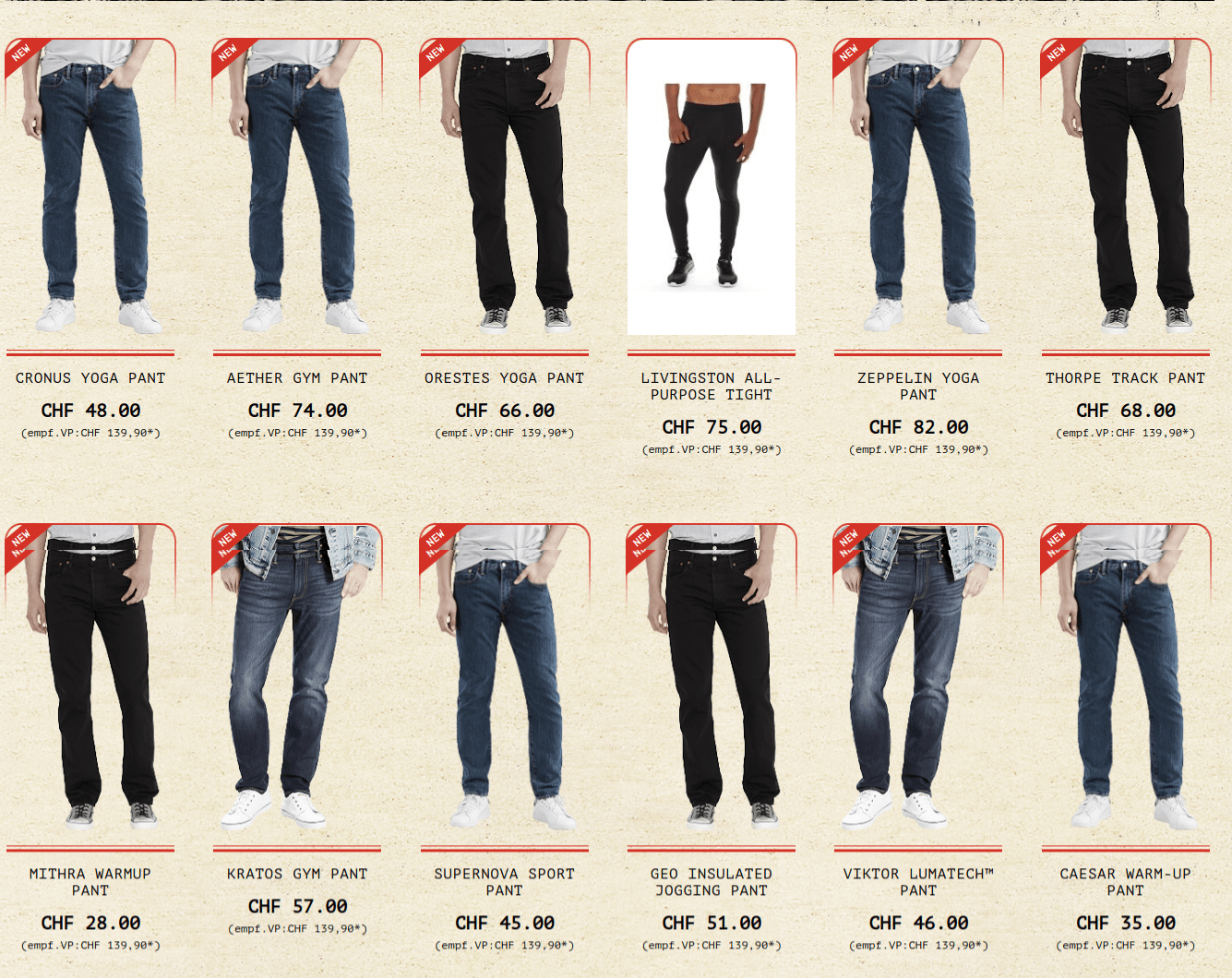
    Now go to the product list page of your store, you will see the desired result:


    How to add new product label in Magento 2?

    Add module.xml file in app/code/Magemonkeys/ProductLabels/etc and copy the following code in it:

    <?xml version="1.0"?>
                <config xmlns:xsi="http://www.w3.org/2001/XMLSchema-instance" xsi:noNamespaceSchemaLocation="urn:magento:framework:Module/etc/module.xsd">
                            <module name="Magemonkeys_ProductLabels" setup_version="1.0.1">
                            </module>
                </config>

    Add registration.php in app/code/Magemonkeys/ProductLabels and copy the following code in it:

    <?php
    MagentoFrameworkComponentComponentRegistrar::register(
    MagentoFrameworkComponentComponentRegistrar::MODULE,
    'Magemonkeys_ProductLabels',
    __DIR__
    );

    Now add Labels.php file in app/code/Magemonkeys/ProductLabels/Helper and copy the following code in it:

    <?php
    
    
    namespace MagemonkeysProductLabelsHelper;
    
    use MagentoCatalogModelProduct as ModelProduct;
    use MagentoStoreModelScopeInterface;
    
    use Zend_Date;
    
    
    class Labels extends MagentoFrameworkUrlHelperData
    {
    
    	
        public function __construct(
            MagentoFrameworkAppHelperContext $context,
    		MagentoFrameworkStdlibDateTimeDateTime $date
    	) {
           
    		
    		$this->date = $date;
    
    		parent::__construct($context);
        }
    
       
        public function isProductNew(ModelProduct $product)
        {
    		
    			
    		$from = new Zend_Date($product->getNewsFromDate());
    		$to = new Zend_Date($product->getNewsToDate());
    		$now = new Zend_Date($this->date->gmtTimestamp());
    		
    		if(!empty($product->getNewsFromDate()) && empty($product->getNewsToDate()))
    		{
    			return $from->isEarlier($now);
    		}	
    		else
    		{
    			 return ($from->isEarlier($now) && $to->isLater($now));
    		}	
               
            return (boolean) false;
        }
    	
    	
    }

    Override list.phtml

    Now go to vendor/magento/module-catalog/view/frontend/templates/product from the root directory of your store and you will see the list.phtml file. Copy the file and paste it into app/code/Magemonkeys/ProductLabels/view/frontend/templates/catalog/product.

    <?php
    /**
     * Copyright © Magento, Inc. All rights reserved.
     * See COPYING.txt for license details.
     */
    use MagentoFrameworkAppActionAction;
    
    // @codingStandardsIgnoreFile
    
    ?>
    <?php
    /**
     * Product list template
     *
     * @var $block MagentoCatalogBlockProductListProduct
     */
    ?>
    <?php
    $_productCollection = $block->getLoadedProductCollection();
    $_helper = $this->helper('MagentoCatalogHelperOutput');
    ?>
    <?php if (!$_productCollection->count()): ?>
        <div class="message info empty"><div><?= /* @escapeNotVerified */ __('We can't find products matching the selection.') ?></div></div>
    <?php else: ?>
        <?= $block->getToolbarHtml() ?>
        <?= $block->getAdditionalHtml() ?>
        <?php
        if ($block->getMode() == 'grid') {
            $viewMode = 'grid';
            $imageDisplayArea = 'category_page_grid';
            $showDescription = false;
            $templateType = MagentoCatalogBlockProductReviewRendererInterface::SHORT_VIEW;
        } else {
            $viewMode = 'list';
            $imageDisplayArea = 'category_page_list';
            $showDescription = true;
            $templateType = MagentoCatalogBlockProductReviewRendererInterface::FULL_VIEW;
        }
        /**
         * Position for actions regarding image size changing in vde if needed
         */
        $pos = $block->getPositioned();
        ?>
        <div class="products wrapper <?= /* @escapeNotVerified */ $viewMode ?> products-<?= /* @escapeNotVerified */ $viewMode ?>">
            <ol class="products list items product-items">
                <?php /** @var $_product MagentoCatalogModelProduct */ ?>
                <?php foreach ($_productCollection as $_product): ?>
                <li class="item product product-item">
                    <div class="product-item-info" data-container="product-<?= /* @escapeNotVerified */ $viewMode ?>">
                        <?php
                        $productImage = $block->getImage($_product, $imageDisplayArea);
                        if ($pos != null) {
                            $position = ' style="left:' . $productImage->getWidth() . 'px;'
                                . 'top:' . $productImage->getHeight() . 'px;"';
                        }
                        ?>
    <?php
    $labels = $this->helper('MagemonkeysProductLabelsHelperLabels');
    ?>
    <?php if($labels->isProductNew($_product)){ ?>
    	<div class="label-new new_label"><p><?php echo __('New'); ?></p></div>
    <?php }
                        <?php // Product Image ?>
                        <a href="<?= /* @escapeNotVerified */ $_product->getProductUrl() ?>" class="product photo product-item-photo" tabindex="-1">
                            <?= $productImage->toHtml() ?>
                        </a>
                        <div class="product details product-item-details">
                            <?php
                                $_productNameStripped = $block->stripTags($_product->getName(), null, true);
                            ?>
                            <strong class="product name product-item-name">
                                <a class="product-item-link"
                                   href="<?= /* @escapeNotVerified */ $_product->getProductUrl() ?>">
                                    <?= /* @escapeNotVerified */ $_helper->productAttribute($_product, $_product->getName(), 'name') ?>
                                </a>
                            </strong>
                            <?= $block->getReviewsSummaryHtml($_product, $templateType) ?>
                            <?= /* @escapeNotVerified */ $block->getProductPrice($_product) ?>
                            <?= $block->getProductDetailsHtml($_product) ?>
    
                            <div class="product-item-inner">
                                <div class="product actions product-item-actions"<?= strpos($pos, $viewMode . '-actions') ? $position : '' ?>>
                                    <div class="actions-primary"<?= strpos($pos, $viewMode . '-primary') ? $position : '' ?>>
                                        <?php if ($_product->isSaleable()): ?>
                                            <?php $postParams = $block->getAddToCartPostParams($_product); ?>
                                            <form data-role="tocart-form" data-product-sku="<?= $block->escapeHtml($_product->getSku()) ?>" action="<?= /* @NoEscape */ $postParams['action'] ?>" method="post">
                                                <input type="hidden" name="product" value="<?= /* @escapeNotVerified */ $postParams['data']['product'] ?>">
                                                <input type="hidden" name="<?= /* @escapeNotVerified */ Action::PARAM_NAME_URL_ENCODED ?>" value="<?= /* @escapeNotVerified */ $postParams['data'][Action::PARAM_NAME_URL_ENCODED] ?>">
                                                <?= $block->getBlockHtml('formkey') ?>
                                                <button type="submit"
                                                        title="<?= $block->escapeHtml(__('Add to Cart')) ?>"
                                                        class="action tocart primary">
                                                    <span><?= /* @escapeNotVerified */ __('Add to Cart') ?></span>
                                                </button>
                                            </form>
                                        <?php else: ?>
                                            <?php if ($_product->isAvailable()): ?>
                                                <div class="stock available"><span><?= /* @escapeNotVerified */ __('In stock') ?></span></div>
                                            <?php else: ?>
                                                <div class="stock unavailable"><span><?= /* @escapeNotVerified */ __('Out of stock') ?></span></div>
                                            <?php endif; ?>
                                        <?php endif; ?>
                                    </div>
                                    <div data-role="add-to-links" class="actions-secondary"<?= strpos($pos, $viewMode . '-secondary') ? $position : '' ?>>
                                        <?php if ($addToBlock = $block->getChildBlock('addto')): ?>
                                            <?= $addToBlock->setProduct($_product)->getChildHtml() ?>
                                        <?php endif; ?>
                                    </div>
                                </div>
                                <?php if ($showDescription):?>
                                    <div class="product description product-item-description">
                                        <?= /* @escapeNotVerified */ $_helper->productAttribute($_product, $_product->getShortDescription(), 'short_description') ?>
                                        <a href="<?= /* @escapeNotVerified */ $_product->getProductUrl() ?>" title="<?= /* @escapeNotVerified */ $_productNameStripped ?>"
                                           class="action more"><?= /* @escapeNotVerified */ __('Learn More') ?></a>
                                    </div>
                                <?php endif; ?>
                            </div>
                        </div>
                    </div>
                </li>
                <?php endforeach; ?>
            </ol>
        </div>
        <?= $block->getToolbarHtml() ?>
        <?php if (!$block->isRedirectToCartEnabled()) : ?>
            <script type="text/x-magento-init">
            {
                "[data-role=tocart-form], .form.map.checkout": {
                    "catalogAddToCart": {
                        "product_sku": "<?= /* @NoEscape */ $_product->getSku() ?>"
                    }
                }
            }
            </script>
        <?php endif; ?>
    <?php endif; ?>
    

    Run CLI Commands

    rm -rf var/di/* var/generation/* var/cache/* var/log/* var/page_cache/* var/session/* var/view_preprocessed/* pub/static/*
    php bin/magento setup:upgrade
    php bin/magento setup:upgrade
    php bin/magento setup:static-content:deploy -f
    php bin/magento cache:clean
    php bin/magento cache:flush

    Now go to the product list page of your store, you will see the desired result:

    Magento 2: How to create custom form with email template using custom module?

    You need to create module like below:

    1. Create module directories Magemonkey/Customform in app/code.

    2. Create registration.php file in app/code/Magemonkey/Customform/ and put below code.

    <?php 
    MagentoFrameworkComponentComponentRegistrar::register(
        MagentoFrameworkComponentComponentRegistrar::MODULE,
        'Magemonkey_Customform',
        __DIR__
    );
    

    3. Create module.xml file in app/code/Magemonkey/Customform/etc/ and put below code.

    <pre class="lang:default decode:false"><?xml version="1.0"?>
    <config xmlns:xsi="http://www.w3.org/2001/XMLSchema-instance" xsi:noNamespaceSchemaLocation="../../../../../lib/internal/Magento/Framework/Module/etc/module.xsd">
     <module name="Magemonkey_Customform" setup_version="1.0.0"></module>
    </config></pre>

    4. Create routes.xml in app/code/Magemonkey/Customform/etc/frontend/ and put below code.

    <config xmlns:xsi="http://www.w3.org/2001/XMLSchema-instance" xsi:noNamespaceSchemaLocation="../../../../../../lib/internal/Magento/Framework/App/etc/routes.xsd">
     <router id="standard">
     <route id="customform" frontName="customform">
     <module name="Magemonkey_Customform" />
     </route>
     </router>
    </config>

    5. Create email_templates.xml in app/code/Magemonkey/Customform/etc/ and put below code.

    <?xml version="1.0"?>
    <config xmlns:xsi="http://www.w3.org/2001/XMLSchema-instance" xsi:noNamespaceSchemaLocation="urn:magento:module:Magento_Email:etc/email_templates.xsd">
     <template id="customform" label="custom form" file="customform.html" type="html" module="Magemonkey_Customform" area="frontend"/>
    </config>

    6. Create Index.php file under app/code/Magemonkey/Customform/Controller/ and put below code.

    <?php 
    namespace MagemonkeyCustomformControllerIndex; 
    class Index extends MagentoFrameworkAppActionAction
    {
     public function execute()
     { 
     $this->_view->loadLayout();
     $this->_view->getLayout()->initMessages();
     $this->_view->renderLayout();
     }
    }

    7. Create customform.xml layout file in app/code/Magemonkey/Customform/view/frontend/layout/ and put below code.

    <page xmlns:xsi="http://www.w3.org/2001/XMLSchema-instance" layout="1column" xsi:noNamespaceSchemaLocation="../../../../../../../lib/internal/Magento/Framework/View/Layout/etc/page_configuration.xsd">
    <body> 
     <referenceContainer name="content">
     <block class="MagemonkeyCustomformBlockIndexIndex" name="customform" template="Magemonkey_Customform::customform.phtml"/>
     </referenceContainer> 
    </body>
    </page>

    8. Create template file customform.phtml in app/code/Magemonkey/Customform/view/templates/ and put below code.

    <form action="<?php echo $block->getBaseUrl().'customform/index/post/';?>" name="customform" method="post" id="customform" data-hasrequired="<?php echo __('* Required Fields') ?>" data-mage-init='{"validation":{}}'>
     <fieldset class="fieldset">
     <div class="form-group general-form">
     <div class="field-list">
     <div class="field name required">
     <div class="control">
     <input name="name" id="name" placeholder="<?php echo __('Full Name*') ?>" title="<?php echo __('Name') ?>" class="input-text" type="text" data-validate="{required:true}"/>
     </div>
     </div>
     <div class="field company required">
     <div class="control">
     <input name="company" id="company" placeholder="<?php echo __('Company Name*') ?>" title="<?php echo __('Company Name*') ?>" class="input-text" type="text" data-validate="{required:true}"/>
     </div>
     </div>
     <div class="field email required">
     <div class="control">
     <input name="email" id="email" placeholder="<?php echo __('Email Address*') ?>" title="<?php echo __('Email Address*') ?>" class="input-text" type="email" data-validate="{required:true, 'validate-email':true}"/>
     </div>
     </div> 
     </div> 
     </div>
     </fieldset>
     <div class="actions-toolbar">
     <div class="primary primary-group">
     <input type="hidden" name="hideit" id="hideit" value="">
     <button type="submit" title="<?php echo __('Submit Entry') ?>" class="action submit primary">
     <span><?php echo __('Submit Entry') ?></span>
     </button>
     </div>
     </div>
    </form>

    9. Create customform.html under app/code/Magemonkey/Customform/view/frontend/email/ and put below code.

    <!--@subject Customform Notification @-->
    <!--@vars
    {"store url=""":"Store Url",
    "skin url="images/logo_email.gif" _area='frontend'":"Email Logo Image"}
    @-->
    <!--@styles
    body,td { color:#2f2f2f; font:11px/1.35em Verdana, Arial, Helvetica, sans-serif; }
    @-->
    {{template config_path="design/email/header_template"}}
    <table>
     <tr class="email-intro">
     <th>Full Name</th><td>{{var name}}</td>
     </tr>
     <tr class="email-intro">
     <th>Company Name</th><td>{{var company}}</td>
     </tr>
     <tr class="email-intro">
     <th>Email Address</th><td>{{var email}}</td>
     </tr>
     </table>
     
    {{template config_path="design/email/footer_template"}}

    10. Now create file for submitting data to post action so Create Post.php under app/code/Magemonkey/Customform/Controller/post/ and put below code.

    <?php namespace MagemonkeyCustomformControllerIndex; use MagentoFrameworkControllerResultFactory; use MagentoFrameworkAppActionAction; use MagentoFrameworkAppActionContext; use MagentoFrameworkAppRequestDataPersistorInterface; use MagentoFrameworkViewElementMessages; class Post extends Action { protected $_inlineTranslation; protected $_transportBuilder; protected $_scopeConfig; protected $_logLoggerInterface; public function __construct( MagentoFrameworkAppActionContext $context, MagentoFrameworkTranslateInlineStateInterface $inlineTranslation, MagentoFrameworkMailTemplateTransportBuilder $transportBuilder, MagentoFrameworkAppConfigScopeConfigInterface $scopeConfig, PsrLogLoggerInterface $loggerInterface, array $data = [] ) { $this->_inlineTranslation = $inlineTranslation;
            $this->_transportBuilder = $transportBuilder;
            $this->_scopeConfig = $scopeConfig;
            $this->_logLoggerInterface = $loggerInterface;
            $this->messageManager = $context->getMessageManager();
             
             
            parent::__construct($context);
             
             
        }
         
        public function execute()
        {
            $post = $this->getRequest()->getPost();
            try
            {
                // Send Mail
                $storeScope = MagentoStoreModelScopeInterface::SCOPE_STORE;                          
                $sentToEmail = $this->_scopeConfig ->getValue('trans_email/ident_general/email',MagentoStoreModelScopeInterface::SCOPE_STORE);             
                $sentToName = $this->_scopeConfig ->getValue('trans_email/ident_general/name',MagentoStoreModelScopeInterface::SCOPE_STORE);
               
    				$fromEmail = $post['email'];
    				$fromName = $post['name'];
    				$templateOptions = array('area' => MagentoFrameworkAppArea::AREA_FRONTEND, 'store' => MagentoStoreModelStore::DEFAULT_STORE_ID);		
    
    				$templateVars = array(
    									'store' => MagentoStoreModelStore::DEFAULT_STORE_ID,
    									'name'  => $post['name'],
    									'company'  => $post['company'],
    									'position'  => $post['position'],
    									'telephone'  => $post['telephone'],
    									'email'  => $post['email'],
    									'type_of_business'  => $post['type_of_business'],
    									'access_industry'  => $post['access_industry'],
    									'series'  => $post['series'],
    									'agree_administration'  => $post['agree_administration'],
    									'agree_communications'  => $post['agree_communications']
    								);
    				$from = array('email' => $fromEmail, 'name' => $fromName);
    				$this->_inlineTranslation->suspend();
    				$to = $sentToEmail;     /* Set admin email here */
    				$transport = $this->_transportBuilder->setTemplateIdentifier('Competitionform')
    								->setTemplateOptions($templateOptions)
    								->setTemplateVars($templateVars)
    								->setFrom($from)
    								->addTo($to)
    								->getTransport();
    				$transport->sendMessage();
    				$this->_inlineTranslation->resume();
                    $this->messageManager->addSuccess('Email has been sent successfully');
                    $this->_redirect('customform');
                     
            } catch(Exception $e){
                $this->messageManager->addError($e->getMessage());
                $this->_logLoggerInterface->debug($e->getMessage());
                exit;
            }
             
        }
    }

    Magento 1.9 set “Use default value” for product images in admin using script

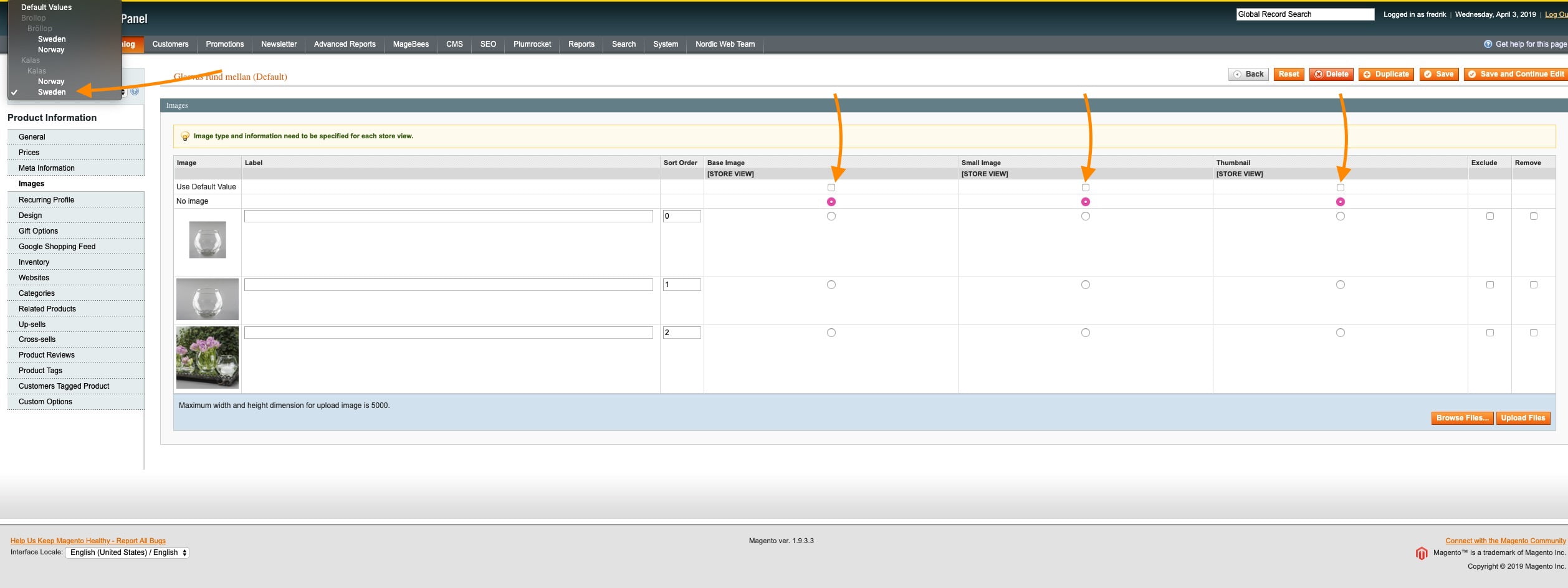
    In magento 1.9 multiple store product images are not showing the default base image.  You can check when going into a specific store view in the image settings Use default value is not checked.

    Here I give you script for set that settings for all product:

    try {
        $count = 0; //Check total count for how many products are update Store Wise
        $products = Mage::getModel('catalog/product')->getCollection();
         echo 'Time Start : '.Mage::getModel('core/date')->gmtDate('Y-m-d H:i:s'); //Start time tracking here 
         echo '<br>';
            $setStoreIds = array(1,7); //Put here multiple store ids run one by one store products 
            foreach ($setStoreIds as $setStoreId) {
                echo 'Start Store ID : '.$setStoreId; //Display store id which store is running now
                echo '<br>';
                foreach($products as $prod) {
                    $product = Mage::getModel('catalog/product')
                        ->load($prod->getId())
                        ->setStoreId($setStoreId)
                        ->setData('image', false)
                        ->setData('small_image', false)
                        ->setData('thumbnail', false)
                        ->save();
    
                        $count++;
                }
            }
    
        echo 'Time End : '.Mage::getModel('core/date')->gmtDate('Y-m-d H:i:s');
        echo '<br>';
        echo 'Total Products Counts : '.$count; //Display total time script taken
    } catch (Exception $exception) {
        var_dump($exception);
        die('Exception Thrown');
    }


    How to create System.xml configuration in Magento 2?

    Today, we are going to see how to create system.xml, step-by-step.

    Step 1: Create System.xml

    We can do it by creating a system.xml file in the
    app/code/MageMonkeys/HelloWorld/etc/adminhtml/
    directory.

    <?xml version="1.0"?>
    <config xmlns:xsi="http://www.w3.org/2001/XMLSchema-instance" xsi:noNamespaceSchemaLocation="urn:magento:module:Magento_Config:etc/system_file.xsd">
        <system>
            <tab id="magemonkeys" translate="label" sortOrder="10">
                <label>MageMonkeys</label>
            </tab>
            <section id="helloworld" translate="label" sortOrder="130" showInDefault="1" showInWebsite="1" showInStore="1">
                <class>separator-top</class>
                <label>Hello World</label>
                <tab>magemonkeys</tab>
                <resource>MageMonkeys_HelloWorld::helloworld_config</resource>
                <group id="general" translate="label" type="text" sortOrder="10" showInDefault="1" showInWebsite="0" showInStore="0">
                    <label>General Configuration</label>
                    <field id="enable" translate="label" type="select" sortOrder="1" showInDefault="1" showInWebsite="0" showInStore="0">
                        <label>Module Enable</label>
                        <source_model>MagentoConfigModelConfigSourceYesno</source_model>
                    </field>
                    <field id="display_text" translate="label" type="text" sortOrder="1" showInDefault="1" showInWebsite="0" showInStore="0">
                        <label>Display Text</label>
                        <comment>This text will display on the frontend.</comment>
                    </field>
                </group>
            </section>
        </system>
    </config

    Step 2: Set default value

    We can do it by creating a config.xml file in the
    app/code/MageMonkeys/HelloWorld/etc/ directory.

    <?xml version="1.0"?>
    <config xmlns:xsi="http://www.w3.org/2001/XMLSchema-instance" xsi:noNamespaceSchemaLocation="urn:magento:module:Magento_Store:etc/config.xsd">
        <default>
            <helloworld>
                <general>
                    <enable>1</enable>
                    <display_text>Hello World</display_text>
                </general>
            </helloworld>
        </default>
    </config>

    Step 3: Flush Magento Cache

    php bin/magento cache:clean
    

    Result