We sacrifice by not doing any other technology, so that you get the best of Magento.

We sacrifice by not doing any other technology, so that you get the best of Magento.

    A step by step guide to create custom API in Magento 2

    Magento as default provide API, but if you want to manage different data or you want to add a custom field, then Magento API will not be able to attain your requirement. That generates the demand to develop custom API through which you will able to manage your data and fields.

    In this article, I will explain you the process of creating API(Application Program Interface) in Magento 2.

    Add module.xml file in app/code/Magemonkeys/CustomApi/etc and copy the following code in it:

    <?xml version="1.0"?>
    <config xmlns:xsi="http://www.w3.org/2001/XMLSchema-instance" xsi:noNamespaceSchemaLocation="urn:magento:framework:Module/etc/module.xsd">
        <module name="Magemonkeys_CustomApi" setup_version="1.0.0" />
    </config>

    Add registration.php in app/code/Magemonkeys/CustomApi and copy the following code in it:

    <?php
    MagentoFrameworkComponentComponentRegistrar::register(
        MagentoFrameworkComponentComponentRegistrar::MODULE,
        'Magemonkeys_CustomApi',
        __DIR__
    );

    Add webapi.xml file in app/code/Magemonkeys/CustomApi/etc and copy the following code in it:

    <?xml version="1.0"?>
    <routes xmlns:xsi="http://www.w3.org/2001/XMLSchema-instance" xsi:noNamespaceSchemaLocation="urn:magento:module:Magento_Webapi:etc/webapi.xsd">
        <route url="/V1/hello/name/:name" method="GET">
            <service class="MagemonkeysCustomApiApiHelloInterface" method="name"/>
            <resources>
                <resource ref="anonymous"/>
            </resources>
        </route>
    </routes>

    Add di.xml file in app/code/Magemonkeys/CustomApi/etc and copy the following code in it:

    <?xml version="1.0"?>
    <config xmlns:xsi="http://www.w3.org/2001/XMLSchema-instance" xsi:noNamespaceSchemaLocation="urn:magento:framework:ObjectManager/etc/config.xsd">
        <preference for="MagemonkeysCustomApiApiHelloInterface"
                    type="MagemonkeysCustomApiModelHello" />
    </config>

    Add HelloInterface.php file in app/code/Magemonkeys/CustomApi/Api and copy the following code in it:

    <?php
    namespace MagemonkeysCustomApiApi;
     
    interface HelloInterface
    {
        /**
         * Returns greeting message to user
         *
         * @api
         * @param string $name Users name.
         * @return string Greeting message with users name.
         */
        public function name($name);
    }

    Add Hello.php file in app/code/Magemonkeys/CustomApi/Model and copy the following code in it:

    <?php
    namespace MagemonkeysCustomApiModel;
    use MagemonkeysCustomApiApiHelloInterface;
     
    class Hello implements HelloInterface
    {
        /**
         * Returns greeting message to user
         *
         * @api
         * @param string $name Users name.
         * @return string Greeting message with users name.
         */
        public function name($name) {
            return "Hello, " . $name;
        }
    }

    To test REST you can go to http://{domain_name}/rest/V1/{method}/{attribute}/{value}.

    Example: http://magento2.loc/rest/V1/hello/name/Jayesh.

    This is how the response should look like for this example:

    <response>Hello, Jayesh</response>

    Hope this guide helped you understand the procedure of creating custom API in Magento 2. If you have any queries regarding the blog, please comment below.

    How to show multi-select attribute in layer navigation after Magento Migration?

    Magento 2 layered navigation feature can help you to enhance the user experience of your store while handling onsite navigation with the attribute like price, dropdown and multiple select. Recently one of our client was facing an issue that some of its attribute (multiple select) is not showing in layered navigation after migration.

    If you are facing this problem, then follow the below steps to resolve it.

    f some of the attributes(multiple select) not showing in layered navigation. then follow the below steps to resolve it.

    1. Open your Magento database and find attribute id in eav_attribute

    2. run below query in your Magento database for change attribute backend_type  text to varchar

    INSERT INTO catalog_product_entity_varchar
    (store_id, attribute_id, entity_id, value)
     SELECT store_id, attribute_id, entity_id, value
     FROM catalog_product_entity_text
     WHERE catalog_product_entity_text.attribute_id = {{your-attribute-id}}
     AND catalog_product_entity_text.value is not null;

    3. After inserting your attribute record, You need to delete the data from the text table

    DELETE FROM `catalog_product_entity_text`
    WHERE `attribute_id` = {{your-attribute-id}}


    I hope I explained the problem and solution well enough :).If you too are facing problem while your Magento migration process then feel free to message in the comment box.

    Magento 2: How to change register link in header links?

    If you are wondering that ‘how to change register link in header links?’, you’ve landed at correct place.

    Follow the below instructions to change register link in top header links.

    Please add below code in Magento_Customer/layout/default.xml file in your theme.

    <referenceBlock name="top.links">
     <block class="MagentoFrameworkViewElementHtmlLink" name="register-link">
     <arguments>
     <argument name="path" xsi:type="string" translate="true">customer/account/login</argument>
     </arguments>
     </block>
    </referenceBlock>

    How to export each order into csv file when it will be placed?

    This functionality will be done by and event observer. And Event is “checkout_onepage_controller_success_action”.

    In this event you can get the current order data and you will be able to export this data in to csv.

    Step 1: For add the event you have to make a events.xml in your module and paste the below code into it.

    <?xml version="1.0"?>
    <config xmlns:xsi="http://www.w3.org/2001/XMLSchema-instance" xsi:noNamespaceSchemaLocation="urn:magento:framework:Event/etc/events.xsd">
        <event name="checkout_onepage_controller_success_action">
            <observer name="customorderexport" instance="MagemonkeysCustomexportObserverOrderexport" />
        </event>
    </config>

    Step 2: Now you have to create a Orderexport.php file in Observer folder and place the below code into it.

    <?php
    
    namespace MagemonkeysCustomexportObserver;
    
    use MagentoFrameworkEventObserverInterface;
    use MagentoFrameworkAppFilesystemDirectoryList;
    use MagentoFrameworkFilesystem;
    use MagentoFrameworkFilesystemDirectoryWriteInterface;
    use MagentoStoreModelScopeInterface;
    
    class Orderexport implements ObserverInterface
    {
    	protected $_request;
    	protected $_order;
    	protected $_productRepository;
    	protected $_scopeConfig;
    	protected $_customer;
    	protected $_storemanager;
    
    	public function __construct(
    	    MagentoFrameworkAppRequestInterface $request,
    	    MagentoSalesModelOrder $order,
         	MagentoFrameworkAppResponseHttpFileFactory $fileFactory,
    		Filesystem $filesystem,
            MagentoFrameworkAppConfigScopeConfigInterface $scopeConfig,
            MagentoCustomerModelCustomerFactory $customer,
        	MagentoStoreModelStoreManagerInterface $storemanager,
    		MagentoCatalogModelProductRepository $productRepository
    	) { 
    		$this->_scopeConfig = $scopeConfig;
    		$this->_customer = $customer;
    		$this->_storemanager = $storemanager;
    	    $this->_request = $request;
    	    $this->_order = $order;
    	   	$this->_fileFactory = $fileFactory;
            $this->directory = $filesystem->getDirectoryWrite(DirectoryList::VAR_DIR);
            $this->_productRepository = $productRepository;
     	}
    
    	public function execute(MagentoFrameworkEventObserver $observer) {
    		
    		$post = $this->_request->getPost();
    		
    		$orderids = $observer->getEvent()->getOrderIds();
    
    
    	  	foreach($orderids as $orderid){
    
            	$order = $this->_order->load($orderId);
    
    
            	$websiteID = $this->_storemanager->getStore()->getWebsiteId();
    			$customer = $this->_customer->create()->setWebsiteId($websiteID)->loadByEmail($order->getCustomerEmail());
            	$customerId = $customer->getId(); // using this 
            	$customerPoNumber = $customer->getCustomerNumber(); // using this 
    
    
    			$headers = array('Magento_Account_Number','Back_Office_Account_Number','Transaction_Date','Transaction_Time','Magento_Transaction_Number','Client_Reference_Number','Item_Number','Quantity_Sold','Selling_Price','Discount');
    
    			$name = strtotime("now");
    		    $file = 'customorderexport/'.$name.'_detailed_orderexport.csv';
    		    $this->directory->create('customorderexport');
    		    $stream = $this->directory->openFile($file, 'w+');
    		    $stream->lock();
    		    $stream->writeCsv($headers);


    	        $items = $order->getAllItems();
    			foreach ($items as $item) {
    				$orderdetail['Magento_Account_Number'] = $orderdata->getData('created_at');
    		        $orderdetail['Order_Number'] = $orderdata->getData('increment_id');
    		        $orderdetail['Transaction_Date'] = date('Y-m-d',strtotime($order->getCreatedAt()));
    		        $orderdetail['Transaction_Time'] = date('h:i A',strtotime($order->getCreatedAt()));
    		        $orderdetail['Magento_Transaction_Number'] = $order->getIncrementId();
    		        $orderdetail['Client_Reference_Number'] = $customerPoNumber;
    				$id = $item->getProdcutId();
    				$product = $this->_productRepository->getById($id);
    		        $orderdetail['Item_Number'] = $product->getAutoKoolNumber();
    		        $orderdetail['Quantity_Sold'] = $item->getQtyOrdered();
    		        $orderdetail['Selling_Price'] = $item->getPrice();
    	        	$orderdetail['Discount'] = $order->getDiscountAmount();
    	        	$stream->writeCsv($orderdetail);
    		    }
    
    		    $stream->unlock();
    		    $stream->close();
            }
    	}
    
    }
    ?>

    That’s it.

    Note- I have use the field and data as per my requirements. You will change this as per your requirements.

    How to display customer location on the admin order page in Magento 2?

    In Magento 2 customer IP is generally getting displayed at the admin order page, But not the customer location.

    So today we are going to talk about displaying customer location on the admin order page by using a location API.

    Follow the below tutorial step wise to get it done:

    1. Create {{Your Vendor name}}/{{Extension Name}}/registration.php
    For Example : Magemonkey/CustomerLocation/registration.php

    <?php
    
    MagentoFrameworkComponentComponentRegistrar::register(
        MagentoFrameworkComponentComponentRegistrar::MODULE,
        'Magemonkey_CustomerLocation',
        __DIR__
    );

    2. Create {{Your Vendor name}}/{{Extension Name}}/composer.json
    For Example : Magemonkey/CustomerLocation/composer.json

    {
    	"name": "magemonkey/customerlocation",
    	"version": "1.0.0",
    	"description": "Display Customer Location on admin order page",
    	"type": "magento2-module",
    	"license": [
            "OSL-3.0",
            "AFL-3.0"
        ],
        "autoload": {"files": ["registration.php"], "psr-4": {"Magemonkey\CustomerLocation\": ""}},
        "keywords": [
    		"eCommerce"
    		,"freegeoip.net"
    		,"Geolocation"
    		,"Magento"
    		,"Magento 2"
    		,"Magento extension"
    	]
    }

    3. Create {{Your Vendor name}}/{{Extension Name}}/etc/module.xml
    For Example : Magemonkey/CustomerLocation/etc/module.xml

    <?xml version='1.0'?>
    <configxmlns:xsi='http://www.w3.org/2001/XMLSchema-instance' xsi:noNamespaceSchemaLocation='urn:magento:framework:Module/etc/module.xsd'>
    	<module name='Magemonkey_CustomerLocation' setup_version='1.0.0'/>
    </config>

    4. Create {{Your Vendor name}}/{{Extension Name}}/view/adminhtml/layout/sales_order_view.xml
    For Example : Magemonkey/CustomerLocation/view/adminhtml/layout/sales_order_view.xml

    <?xml version="1.0"?>
    <page xmlns:xsi="http://www.w3.org/2001/XMLSchema-instance" xsi:noNamespaceSchemaLocation="urn:magento:framework:View/Layout/etc/page_configuration.xsd">
    	<head><script src='Magemonkey_CustomerLocation::general.js' defer='defer'/></head>
    </page>

    5. Create {{Your Vendor name}}/{{Extension Name}}/view/adminhtml/web/general.js
    For Example : Magemonkey/CustomerLocation/view/adminhtml/web/general.js

    require([
    	'jquery'
    	], function($) {$(function() {
    		var $ipAddressCell = $('.order-information-table td').filter(function() {
    			return /d+.d+.d+.d+/.test(this.innerHTML);
    		});
    		if ($ipAddressCell.length) {
    			var address = $ipAddressCell.html();
    			if ('127.0.0.1' !== address) {
    				$.get('https://freegeoip.app/json/' + address, function(data) {
    					var location =
    						[data['country_name'], data['region_name'], data['city']]
    							.filter(function(item) {return !!item;})
    							.join(', ')
    					;
    					var $ipAddressRow = $ipAddressCell.closest('tr');
    					var $geoRow = $('<tr>')
    						.append($('<th>').append($.mage.__('Customer Location')))
    						.append($('<td>').append(location))
    					;
    					$ipAddressRow.after($geoRow);
    				});
    			}
    		}
    	});
    });

    After follow above steps run below commands:

    - php bin/magento setup:upgrade
    - php bin/magento cache:flush

    Once you’ll execute above steps, you’ll able to see the location at the admin order view page as shown below:

    How to change product price on front-end using plugin in Magento? [Step-by-step Guide]

    Step 1: Create di.xml file in etc/frontend. Put below content in it.

    <?xml version="1.0"?>
    <config xmlns:xsi="http://www.w3.org/2001/XMLSchema-instance" xsi:noNamespaceSchemaLocation="urn:magento:framework:ObjectManager/etc/config.xsd">
        <type name="MagentoCatalogModelProduct">
    		<plugin name="change_product" type="MagemonkeysChangepricePluginChangeProductPrice" sortOrder="1" disabled="false" />
      	</type>
    </config>

    Step 2: Create di.xml file in etc/webapi_rest. Put below content in it.

    <?xml version="1.0"?>
    <config xmlns:xsi="http://www.w3.org/2001/XMLSchema-instance" xsi:noNamespaceSchemaLocation="urn:magento:framework:ObjectManager/etc/config.xsd">
        <type name="MagentoCatalogModelProduct">
    		<plugin name="change_product" type="MagemonkeysChangepricePluginChangeProductPrice" sortOrder="1" disabled="false" />
      	</type>
    </config>

    If you add this plugin only in front-end area then the change price functionality will not work on checkout and cart page. So you have to create another di.xml file in etc/webapi_rest folder.

    Step 3: Create Plugin Folder and Create ChangeProductPrice.php in it. Put Below content in it.

    <?php
    namespace MagemonkeysChangepricePlugin;
     
    class ChangeProductPrice
    {
        public function afterGetPrice(MagentoCatalogModelProduct $subject, $result)
        {
            /* Put your logic here and return the $result */
            return $result+10;
        }
    }

    Step 4: After that run the upgrade, compile, static-content deploy and flush cache command through the terminal as below. And you can check now.

    php -dmemory_limit=6G bin/magento setup:upgrade
    php -dmemory_limit=6G bin/magento setup:di:compile
    php -dmemory_limit=6G bin/magento setup:static-content:deploy -f
    php -dmemory_limit=6G bin/magento cache:flush

    Magento 2: How to remove “Estimate shipping costs and tax” block form cart page?

    Follow below steps to remove “Estimate shipping costs and tax” block in cart page Magento 2.

    1. Override “checkout_cart_index.xml” file in your theme or your module and add below code.

    <body>
    <referenceBlock name="checkout.cart.shipping">
     <arguments>
     <argument name="jsLayout" xsi:type="array">
     <item name="components" xsi:type="array">
     <item name="block-summary" xsi:type="array">
     <item name="config" xsi:type="array">
     <item name="componentDisabled" xsi:type="boolean">true</item>
     </item>
     </item>
     </item>
     </argument>
     </arguments>
    </referenceBlock>
    </body>

    2. Override template file checkout/cart/shipping.phtml in your theme or module and comment below code in this file.

    <div class="title" data-role="title">
     <strong id="block-shipping-heading" role="heading" aria-level="2">
     <?php /* @escapeNotVerified */ echo $block->getQuote()->isVirtual() ? __('Estimate Tax') : __('Estimate Shipping and Tax') ?>
     </strong>
    </div>

    3. Run cache:flush command then check your cart page.

    CONTACT US to get Magento programming solutions by hiring a certified Magento expert.

    Magento 2: How to resolve Item with the same ID “ID” already exists error?

    When you get error like: Item (MagentoCatalogModelProductInterceptor) with the same ID “<id>” already exists.

    Then you can use below module to resolve above error.

    1. Create new folders Magemonkey/DuplicateEntry in app/code magento folder.
    2. add new file registration.php in DuplicateEntry folder and put below code.

    <?php
    
    MagentoFrameworkComponentComponentRegistrar::register(
     MagentoFrameworkComponentComponentRegistrar::MODULE,
     'Magemonkey_DuplicateEntry',
     __DIR__
    );

    3. add new file etc/module.xml in DuplicateEntry folder and put below code.

    <?xml version="1.0"?>
    
    <config xmlns:xsi="http://www.w3.org/2001/XMLSchema-instance" xsi:noNamespaceSchemaLocation="urn:magento:framework:Module/etc/module.xsd">
     <module name="Magemonkey_DuplicateEntry" setup_version="1.0.1"></module>
    </config>

    4. add new file etc/di.xml in DuplicateEntry folder and put below code.

    <?xml version="1.0"?>
    
    <config xmlns:xsi="http://www.w3.org/2001/XMLSchema-instance" xsi:noNamespaceSchemaLocation="urn:magento:framework:ObjectManager/etc/config.xsd">
     <type name="MagentoEavModelEntityCollectionAbstractCollection">
        <plugin name="find_duplicate_entry" type="MagemonkeyDuplicateEntrypluginCollection" sortOrder="20"/>
     </type>
    </config>

    5. add new file plugin/Collection.php in DuplicateEntry folder and put below code.

    <?php
    /**
     * Copyright © Magento, Inc. All rights reserved.
     */
    namespace MagemonkeyDuplicateEntryplugin;
    use MagentoFrameworkDataCollectionEntityFactoryInterface;
    use MagentoFrameworkOptionArrayInterface;
    
    class Collection
    {
        /**
         * @param MagentoEavModelEntityCollectionAbstractCollection $subject
         * @param Closure $process
         * @param MagentoFrameworkDataObject $dataObject
         * @return $this
         */
        public function aroundAddItem(MagentoEavModelEntityCollectionAbstractCollection $subject, Closure $process, MagentoFrameworkDataObject $dataObject)
        {
            try{
                return $process($dataObject);
            }catch ( Exception $e){
                return $this;
            }
        }
    }

    Hides any other shipping methods if free shipping is available in Magento 2

    Add module.xml file in app/code/Magemonkeys/ShippingHide/etc and copy the following code in it:

    <?xml version="1.0"?>
    <config xmlns:xsi="http://www.w3.org/2001/XMLSchema-instance" 
    	xsi:noNamespaceSchemaLocation="../../../../../lib/internal/Magento/Framework/Module/etc/module.xsd">
        <module name="Magemonkeys_ShippingHide" setup_version="2.0.10">
            <sequence>
                <module name="Magento_Shipping"/>
            </sequence>
        </module>	
    </config>
    

    Add registration.php in app/code/Magemonkeys/ShippingHide and copy the following code in it:

    <?php
    MagentoFrameworkComponentComponentRegistrar::register(
        MagentoFrameworkComponentComponentRegistrar::MODULE,
        'Magemonkeys_ShippingHide',
        __DIR__
    );
    

    Add Uninstall.php file in app/code/Magemonkeys/ShippingHide/Setup and copy the following code in it:

    <?php
    
    namespace MagemonkeysShippingHideSetup;
    
    use MagentoFrameworkSetupUninstallInterface;
    use MagentoFrameworkSetupModuleContextInterface;
    use MagentoFrameworkSetupSchemaSetupInterface;
    use MagentoConfigModelResourceModelConfigDataCollectionFactory as ConfigCollectionFactory;
    
    /**
     * ShippingHide Uninstall
     */
    class Uninstall implements UninstallInterface
    {
        /**
         * Config Collection Factory
         *
         * @var MagentoConfigModelResourceModelConfigDataCollectionFactory
         */
        private $_configCollectionFactory;
    
        /**
         * Initialize Setup
         *
         * @param ConfigCollectionFactory $configCollectionFactory
         */
        public function __construct(
    		ConfigCollectionFactory $configCollectionFactory
    	) {
            $this->_configCollectionFactory = $configCollectionFactory;
        }
        
        /**
         * Uninstall DB Schema
         *
         * @param SchemaSetupInterface $setup
         * @param ModuleContextInterface $context
         * @return void
         */
        public function uninstall(SchemaSetupInterface $setup, ModuleContextInterface $context)
        {
            $setup->startSetup();
            $this->removeConfig();	
            $setup->endSetup();
        }
    
        /**
         * Remove Config
         *
         * @return void
         */
        private function removeConfig()
        {
            $path = 'shipping/behavior';
            /** @var MagentoConfigModelResourceModelConfigDataCollection $collection */
            $collection = $this->_configCollectionFactory->create(); 
            $collection->addPathFilter($path);
    
            foreach ($collection as $config) {
    			$config->delete(); 	
            }
        }    
    }

    Add config.xml file in app/code/Magemonkeys/ShippingHide/etc and copy the following code in it:

    <?xml version="1.0"?>
    <config xmlns:xsi="http://www.w3.org/2001/XMLSchema-instance" 
    	xsi:noNamespaceSchemaLocation="urn:magento:module:Magento_Store:etc/config.xsd">
        <default>
            <shipping>
                <behavior>
                    <hide>1</hide>
                </behavior>
            </shipping>		
        </default>
    </config>
    

    Add di.xml file in app/code/Magemonkeys/ShippingHide/etc and copy the following code in it:

    <?xml version="1.0"?>
    <config xmlns:xsi="http://www.w3.org/2001/XMLSchema-instance" 
    	xsi:noNamespaceSchemaLocation="../../../../../lib/internal/Magento/Framework/ObjectManager/etc/config.xsd">
    	<!-- plugin -->		
        <type name="MagentoShippingModelRateResult">
            <plugin name="Magemonkeys_ShippingHide" type="MagemonkeysShippingHidePluginShippingModelRateResult" />
        </type>
    </config>
    

    Add system.xml file in app/code/Magemonkeys/ShippingHide/etc/adminhtml and copy the following code in it:

    <?xml version="1.0"?>
    <config xmlns:xsi="http://www.w3.org/2001/XMLSchema-instance" 
    	xsi:noNamespaceSchemaLocation="urn:magento:module:Magento_Config:etc/system_file.xsd">
        <system>
            <section id="shipping">
    	   <group id="behavior" translate="label" showInDefault="1" showInWebsite="1" showInStore="1" sortOrder="310">
                    <label>Behavior of Methods</label>
                    <field id="hide" translate="label comment" type="select" sortOrder="10" showInDefault="1" showInWebsite="1" showInStore="1" canRestore="1">
                        <label>Hide Mode</label>
                        <comment>Hides any other shipping methods if free shipping is available.</comment>
                        <source_model>MagentoConfigModelConfigSourceYesno</source_model>
                    </field>
                </group>
            </section>
        </system>
    </config>
    

    Add Data.php file in app/code/Magemonkeys/ShippingHide/Helper and copy the following code in it:

    <?php
    
    namespace MagemonkeysShippingHideHelper;
    
    use MagentoStoreModelScopeInterface;
    use MagentoFrameworkAppHelperAbstractHelper;
    
    /**
     * Shipping Hide Helper
     */
    class Data extends AbstractHelper
    {
        /**
         * Enabled Config Path
         */
        const XML_CONFIG_ENABLED = 'shipping/behavior/hide';
     	
        /**
         * Check Hide mode Functionality Should be Enabled
         *
         * @return bool
         */
        public function isEnabled()
        {
            return $this->_getConfig(self::XML_CONFIG_ENABLED);
        } 
    
        /**
         * Retrieve Store Configuration Data
         *
         * @param   string $path
         * @return  string|null
         */
        protected function _getConfig($path)
        {
            return $this->scopeConfig->getValue($path, ScopeInterface::SCOPE_STORE);
        }      
    }
    

    Add Result.php file in app/code/Magemonkeys/ShippingHide/Plugin/Shipping/Model/Rate and copy the following code in it:

    <?php
    
    namespace MagemonkeysShippingHidePluginShippingModelRate; 
    
    use MagemonkeysShippingHideHelperData as ShippingHideHelper;
    
    /**
     * Shipping Result Plugin
     */
    class Result
    {   
        /**
         * Helper
         *
         * @var MagemonkeysShippingHideHelperData
         */
        protected $_helper;
        
        /**
         * Initialize Plugin
         * 
         * @param ShippingHideHelper $helper
         */
        public function __construct(
            ShippingHideHelper $helper
        ) {
            $this->_helper = $helper;
        }
            	
        /**
         * Return all Rates in the Result
         *
         * @param Result $subject
         * @param Method[] $result
         * @return Method[]
         */	
        public function afterGetAllRates($subject, $result) 
        {
            if (!$this->_helper->isEnabled()) {
                return $result;
            }       		
    		$rates = $this->getAllFreeRates($result);              
            return (count($rates) > 0) ? $rates : $result;
        }	
            	
        /**
         * Return all free Rates in the Result
         *
         * @param Method[] $result
         * @return Method[]
         */	
        public function getAllFreeRates($result) 
        {	
    		$rates = [];
            foreach ($result ?: [] as $rate) {
                if ($rate->getPrice() < 0.0001) {
                    $rates[] = $rate;
                }
            }               
            return $rates;
        }	    
    }
    

    Run CLI Commands

    rm -rf var/di/* var/generation/* var/cache/* var/log/* var/page_cache/* var/session/* var/view_preprocessed/* pub/static/*
    php bin/magento setup:upgrade
    php bin/magento setup:upgrade
    php bin/magento setup:static-content:deploy -f
    php bin/magento cache:clean
    php bin/magento cache:flush

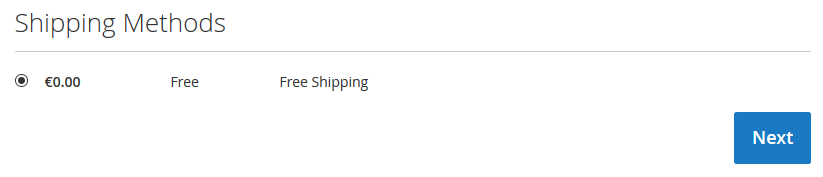
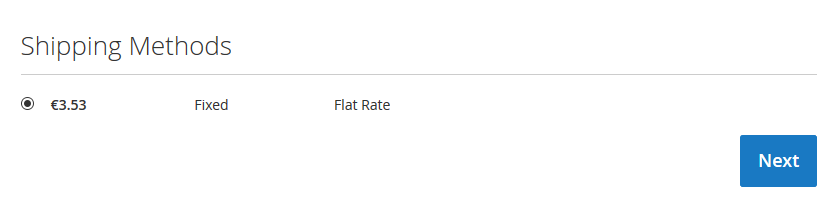
    Result

    No method of free shipping

    There is a method of free shipping


    Save Simple Product Using Programming in Magento 2

    If you want to save simple product using programming use below code

    1. Create file in magento 2 root named saveproduct.php

    2. Put below code in saveproduct.php file

    <?php
    
    	use MagentoFrameworkAppBootstrap;
    	include('app/bootstrap.php');
    
    	// add bootstrap
    	$bootstraps = Bootstrap::create(BP, $_SERVER);
    	$object_Manager = $bootstraps->getObjectManager();
    
    	$app_state = $object_Manager->get('MagentoFrameworkAppState');
    	$app_state->setAreaCode('frontend');
    
    	// get date 
    	$today_date = date("m/d/Y");
    	$added_date = date('m/d/Y',strtotime("+17 day"));
    
    	$set_product = $object_Manager->create('MagentoCatalogModelProduct');
    
        $set_product->setWebsiteIds(array(1));
        $set_product->setAttributeSetId(9);
        $set_product->setTypeId('simple');
        $set_product->setCreatedAt(strtotime('now')); 
        // time of product creation
        $set_product->setName('Test Sample Product 2'); 
        // add Name of Product
        $set_product->setSku('add-sku-2');
        // add sku hear
        $set_product->setWeight(1.0000);
        // add weight of product
        $set_product->setStatus(1);
        $category_id = array(4,5);
        // add your catagory id
        $set_product->setCategoryIds($category_id); 
        // Product Category
        $set_product->setTaxClassId(0); 
        // type of tax class 
        // (0 - none, 1 - default, 2 - taxable, 4 - shipping)
        $set_product->setVisibility(4); 
        // catalog and search visibility
        $set_product->setManufacturer(28); 
        // manufacturer id
        $set_product->setColor(24);
        //print_r($_product);die;
        $set_product->setNewsFromDate($today_date); 
        // product set as new from
        $set_product->setNewsToDate($added_date); 
        // add image path hear
        $imagePath = "img/sony.png"; // path of the image (e.g pub/media/<image folder>)
        $set_product->addImageToMediaGallery($imagePath, array('image', 'small_image', 'thumbnail'), false, false);
        // product set as new to    
        $set_product->setCountryOfManufacture('IN'); 
        // country of manufacture (2-letter country code)
        $set_product->setPrice(100.99) ;
        // price in form 100.99
        $set_product->setCost(88.33); 
        // price in form 88.33
        $set_product->setSpecialPrice(99.85); 
        // special price in form 99.85
        $set_product->setSpecialFromDate('06/1/2016'); 
        // special price from (MM-DD-YYYY)
        $set_product->setSpecialToDate('06/30/2018'); 
        // special price to (MM-DD-YYYY)
        $set_product->setMsrpEnabled(1); 
        // enable MAP
        $set_product->setMsrpDisplayActualPriceType(1); 
        // display actual price 
        // (1 - on gesture, 2 - in cart, 3 - before order confirmation, 4 - use config)
        $set_product->setMsrp(99.99); 
        // Manufacturer's Suggested Retail Price
        $set_product->setMetaTitle('test meta title 2');
        $set_product->setMetaKeyword('test meta keyword 2');
        $set_product->setMetaDescription('test meta description 2');
        $set_product->setDescription('This is a long description');
        $set_product->setShortDescription('This is a short description');
        $set_product->setStockData(
            array(
            'use_config_manage_stock' => 0, 
            // checkbox for 'Use config settings' 
            'manage_stock' => 1, // manage stock
            'min_sale_qty' => 1, // Shopping Cart Minimum Qty Allowed 
            'max_sale_qty' => 2, // Shopping Cart Maximum Qty Allowed
            'is_in_stock' => 1, // Stock Availability of product
            'qty' => 100 // qty of product
            )
        );
    
        $attr1 = $set_product->getResource()->getAttribute('manufacturer');
        $avid1 = $attr1->getSource()->getOptionId('Sony'); //name in Default Store View
        $set_product->setData('manufacturer', $avid1);
    
        $attr2 = $set_product->getResource()->getAttribute('color');
        $avid2 = $attr2->getSource()->getOptionId('White'); //name in Default Store View
        $set_product->setData('color', $avid2);
        
        $years = array('India','Dubai','London', 'America', 'Indonesia');
        $attr3 = $set_product->getResource()->getAttribute('available_in')->getSource();
        $valuesIds = array_map(array($attr3, 'getOptionId'), $years);
        $set_product->setData('available_in', $valuesIds);
    
    
        $set_product->save();
        // get id of product
        $get_product_id = $set_product->getId();
        echo "Upload simple product id :: ".$get_product_id."n";
    
    ?>

    Here I have used attributes and category as per my requirement, So you should use attributes and category as per your requirements.