We sacrifice by not doing any other technology, so that you get the best of Magento.

We sacrifice by not doing any other technology, so that you get the best of Magento.

    Magento 2 : Get bundle child product description on bundle parent product detail page

    If you want to get bundle child product description on bundle parent product detail page in ‘DETAILS’ tab.

    You can override attribute.phtml file in your theme and put below code at bottom of the file

    <?php 
    if($_product->getTypeId() === 'bundle'){ 
     $objectManager = MagentoFrameworkAppObjectManager::getInstance();
     $product = $objectManager->get('MagentoCatalogModelProduct')->load($_product->getId()); 
     $selectionCollection = $product->getTypeInstance(true)->getSelectionsCollection($product->getTypeInstance(true)->getOptionsIds($product),$product);
     foreach ($selectionCollection as $proselection) { 
     $option_product = $objectManager->get('MagentoCatalogModelProduct')->load($proselection->getId()); ?>
     <div class="bundle-item-description"> 
     <h3><?php echo $option_product->getName() ?></h3>
     <p><?php echo $option_product->getDescription(); ?></p>
     </div>
     <?php }
    } ?>
    How to override block in Magento 2 using the plugin?

    In this article, I will guide you on how to use a plugin to block Override in Magento 2.

    Add di.xml file in app/code/Magemonkeys/HelloWorld/etc/ and copy the following code in it:

    <?xml version="1.0"?>
     
    <config xmlns:xsi="http://www.w3.org/2001/XMLSchema-instance" xsi:noNamespaceSchemaLocation="urn:magento:framework:ObjectManager/etc/config.xsd">
        <type name="MagentoCatalogBlockProductView">
            <plugin name="magemonkeys-helloworld-product-block" type="MagemonkeysHelloWorldPluginProductPlugin" sortOrder="5" />
        </type>
    </config>


    Here enable all the methods containing before, after, and around methods.

    • Firstly, beforeGetProduct method will be active.
    • Next, aroundGetPrduct will be active.
    • Finally, afterGetProduct method will be active. You can look into the var/log/debug.log and confirm the method execution sequence.

    Add ProductPlugin.php file in app/code/Magemonkeys/HelloWorld/Plugin/ and copy the following code in it:

    <?php
     
    namespace MagemonkeysHelloWorldPlugin;
     
    class ProductPlugin
    {    
        public function beforeGetProduct(MagentoCatalogBlockProductView $subject)
        {
            // logging to test override    
            $logger = MagentoFrameworkAppObjectManager::getInstance()->get('PsrLogLoggerInterface');
            $logger->debug(__METHOD__ . ' - ' . __LINE__);        
        }
        
        public function afterGetProduct(MagentoCatalogBlockProductView $subject, $result)
        {
            // logging to test override    
            $logger = MagentoFrameworkAppObjectManager::getInstance()->get('PsrLogLoggerInterface');
            $logger->debug(__METHOD__ . ' - ' . __LINE__);
            
            return $result;
        }
        
        public function aroundGetProduct(MagentoCatalogBlockProductView $subject, Closure $proceed)
        {
            // logging to test override    
            $logger = MagentoFrameworkAppObjectManager::getInstance()->get('PsrLogLoggerInterface');
            $logger->debug(__METHOD__ . ' - ' . __LINE__);
            
            // call the core observed function
            $returnValue = $proceed(); 
            
            // logging to test override        
            $logger->debug(__METHOD__ . ' - ' . __LINE__);
            
            return $returnValue;
        }    
    }
    ?>


    Hope this guide helped you to understand the process to block override using plugin. If you have any queries regarding the blog, please comment below. We will assist you as soon as possible.

    How to Configure Varnish cache for Magento 2?

    Caching technology has become of any web server because it helps to increase the performance the website which make them load faster in shorter time period.It is essentail for the web appliaction like Magento where the main concern is reduce the load time of the store and speed up the page response time to provide better user experience to the user and increase the revenue.

    One of the popular option availabe in the market for magento is varnish  to make your store more profitable.

    Varnish cache is an HTTP accelerator designed specifically for the websites which has heavy content like Magento 2 for speeding up of server.With Magento 2  (both CE & EE) you get varnish integrated by default  with the support for Full page caching it not like previous version where you require to install plugin like Turpentine Varnish Cache for integarting Magento with varnish.It just need some changes to make it work for your Magento store

    Things needed for performing setup

    • a user with sudo privileges 
    • apache installed on your virtual private server.

    After successfulling integrating varnish with apache 2 ,we are ready for Magento 2 varnish setup for which we need to follow following steps.

    The first thing we need to do is install varnish package

    (https://www.linode.com/docs/websites/varnish/getting-started-with-varnish-cache/)

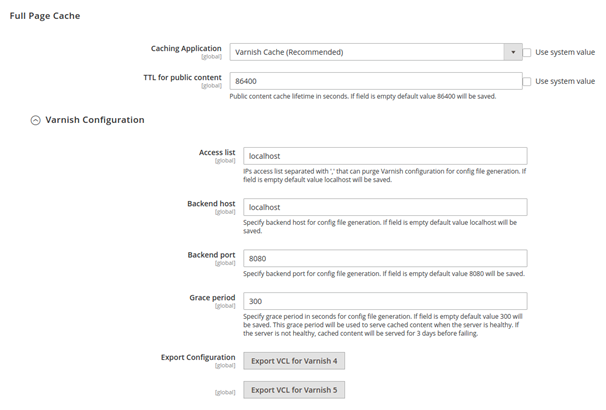
    1. Go to Magento 2 cache configurations:

    Store -> Configuration -> System -> Full Page Cache


    1. Fill out Backend Host and Backend Port fields in accordance with your Varnish configurations. For example, if you performed all steps from this manual, your settings will look like the screen below.

    1. Press the “Save” button in the right corner.
    1. Then, click “Export VCL for Varnish 4”for Varnish generation with your Magento 2 Varnish version.
    1. After that, you should replace the default Varnish configuration /etc/varnish/default.vcl with configuration exported from your Magento 2 store. Run the following commands:
    1. Finally, restart varnish with the command:

    service varnish restart

    service apache2 restart

    Magento 2 magnifier hover not disappear when mouse leaves media box

    When you check image zoom functionality in the product page, normally it should work with the entire section.

    Well, let’s talk about what to do when the magnifier on an image works fine in some places, but it will get disappear from a corner before you leaves the cursor out.

    For that we need to change in a magnifier library file like below,

    For that we need to change in a magnifier library file like below,

    You have to change in lib/web/magnifier/magnifier.js file:

    Add below code after line:556

            /**
    	 * Hide magnifier when mouse exceeds image bounds.
    	 */
    	function onMouseLeave() {
    	    onThumbLeave();
    	    isOverThumb = false;
    	    $magnifierPreview.addClass(MagnifyCls.magnifyHidden);
    	}

    Another change is some code needs to be removed and add around line:575

    Remove Code:

    if (inBounds && isOverThumb) {
        if(gMode === 'outside'){
            $magnifierPreview.removeClass(MagnifyCls.magnifyHidden);
        }

    Add Code:

    if (inBounds && isOverThumb && gMode === 'outside') {
                    $magnifierPreview.removeClass(MagnifyCls.magnifyHidden);

    Also remove:

          } else {
            onThumbLeave();
            isOverThumb = false;
            $magnifierPreview.addClass(MagnifyCls.magnifyHidden);

    Now the last change of this file is:

    Add below line after $box.on(‘mousemove’, onMousemove) code:

    $box.on('mouseleave', onMouseLeave);

    After all changes are applied, please run below commands and check.

    php bin/magento cache:flush
    php bin/magento setup:di:compile


    Magento 2.3 admin product view not working after migration

    I faced a problem after migration from Magento 1,

    When I go to the admin product page, I can’t see the product view just reloading the loader.

    When I check the log files gives me error like: PHP Fatal error: Method Magento\Ui\TemplateEngine\Xhtml\Result::__toString() must not throw an exception, caught TypeError: Argument 1 passed to Magento\InventorySalesAdminUi\Model\GetSalableQuantityDataBySku::execute() must be of the type string, null given, called in…

    After debugging I found the issue that stated SKU should be empty for migration products.

    As you know, in Magento, the SKU is a required field when you create a new product. So in migration, it might happened that store product SKU was blanked or not a string due to corrupted data.

    To resolve this issue, we need to run below query:

    UPDATE catalog_product_entity SET sku='' WHERE sku IS NULL;

    Simply, we set SKU as NULL and fix that where any SKU’s are store blank in the database.

    Error Solved : DateTime::__construct(): Failed to parse time string (11/08/2019) at position 0 (2): Unexpected char

    If you ever get below error  :
    DateTime::__construct(): Failed to parse time string (11/08/2019) at position 0 (2): Unexpected char

    Here is the solution

    Update this file : /vendor/magento/module-catalog/Controller/Adminhtml/Product/Initialization/Helper.php

    Add one line code :

    private function convertSpecialFromDateStringToObject($productData)
    {
        if (isset($productData['special_from_date']) && $productData['special_from_date'] != '')
        {
            $productData['special_from_date'] = $this->dateFilter->filter($productData['special_from_date']); /* Add this line */
        	$productData['special_from_date'] = new DateTime($productData['special_from_date']);
        }
        ...

    Hope my post is helpful. If you are facing problem during this process, then feel free to comment.

    Guide to remove or delete products of a particular attribute set in Magento 2.

    In this guide, I am going to show you, how to remove the product of a particular attribute set in Magento 2 programmatically?

    First of all, you have to create a file called “deleteProducts.php” on Magento 2 root directory.

    And then paste the below code into that file.

    <?php
    set_time_limit(0);
    ini_set('display_errors', 1);
    ini_set('memory_limit', -1);
    use MagentoFrameworkAppBootstrap;
    require __DIR__ . '/app/bootstrap.php';
    
    $bootstraps = Bootstrap::create(BP, $_SERVER);
    $objectManager = $bootstraps->getObjectManager();
    
    
    deleteAllProducts($objectManager);
     
    function deleteAllProducts($objectManager) {
     
        $objectManager->get('MagentoFrameworkRegistry')->register('isSecureArea', true);
    
        $attrSetName = 'Dress'; // Atribute set name
        $attribute_set_factoryCollection = $objectManager->get('MagentoEavModelResourceModelEntityAttributeSetCollectionFactory');
    
        $attribute_set_collection = $attribute_set_factoryCollection->create();
    
        $attribute_set_collection
        ->addFieldToFilter('entity_type_id',4)
        ->addFieldToFilter('attribute_set_name',$attrSetName);
    
        $att_set = current($attribute_set_collection->getData());
        $attribute_set_id = $att_set["attribute_set_id"];
    
        $productCollection = $objectManager->create('MagentoCatalogModelResourceModelProductCollectionFactory');
        $collection = $productCollection->create()->addAttributeToSelect('*')->addFieldToFilter('attribute_set_id',$attribute_set_id)->load();
        $app_state = $objectManager->get('MagentoFrameworkAppState');
        $app_state->setAreaCode('frontend');
    
        foreach ($collection as $product){
            try {
                echo 'Deleted '.$product->getName().PHP_EOL;
                $product->delete();
            } catch (Exception $e) {
                echo 'Failed to remove product '.$product->getName() .PHP_EOL;
                echo $e->getMessage() . "n" .PHP_EOL;
            }
        }      
    }

    And now you can run this file through cronjob and URL.

    So the URL will be like this : http://yourdomainname/deleteProducts.php

    That’s it.

    I hope my post is helpful. If you still need any assistance about that, please comment below.

    How to add extension attribute for quote field in Magento 2?

    Define the extension attribute in XML

    app/code/Vendor/Module/etc/extension_attributes.xml

    <?xml version="1.0"?>
    <config xmlns:xsi="http://www.w3.org/2001/XMLSchema-instance" xsi:noNamespaceSchemaLocation="urn:magento:framework:Api/etc/extension_attributes.xsd">
        <extension_attributes for="MagentoCheckoutApiDataShippingInformationInterface">
            <attribute code="address_two" type="string"/>
        </extension_attributes>
    </config>
    

    Assigning the value for extension attributes in knockout js 

    app/code/Vendor/Module/view/frontend/web/js/shipping-save-processor-default.js

    saveShippingInformation: function () {
                    var payload;
    
                    payload = {
                        addressInformation: {
                            shipping_address: quote.shippingAddress(),
                            billing_address: quote.billingAddress(),
                            shipping_method_code: quote.shippingMethod().method_code,
                            shipping_carrier_code: quote.shippingMethod().carrier_code,
                            extension_attributes: {
                                address_two: $('form.form-shipping-address input[name="address2"]').val()
                            }
                        }
                    };
    
                    return storage.post(
                        resourceUrlManager.getUrlForSetShippingInformation(quote),
                        JSON.stringify(payload)
                    ).done(
                        function (response) {
                            quote.setTotals(response.totals);
                            paymentService.setPaymentMethods(methodConverter(response.payment_methods));
                        }
                    ).fail(
                        function (response) {
                            errorProcessor.process(response);
                        }
                    );
                }

    Save Extension Attribute to quote table using beforeSaveAddressInformation method using Plugin

    app/code/Vendor/Module/Model/Checkout/ShippingInformationManagementPlugin.php


    namespace VendorModuleModelCheckout;
    /**
     * Class ShippingInformationManagementPlugin
     * @package OyeDeliverydateModelCheckout
     */
    class ShippingInformationManagementPlugin
    {
    
        protected $quoteRepository;
    
        /**
         * @param MagentoQuoteModelQuoteRepository $quoteRepository
         */
        public function __construct(
            MagentoQuoteModelQuoteRepository $quoteRepository
        ) {
            $this->quoteRepository = $quoteRepository;
        }
    
        /**
         * @param MagentoCheckoutModelShippingInformationManagement $subject
         * @param $cartId
         * @param MagentoCheckoutApiDataShippingInformationInterface $addressInformation
         */
        public function beforeSaveAddressInformation(
            MagentoCheckoutModelShippingInformationManagement $subject,
            $cartId,
            MagentoCheckoutApiDataShippingInformationInterface $addressInformation
        ) {
            $extAttributes = $addressInformation->getExtensionAttributes();
            $address2=$extAttributes->getAddressTwo();
    
            $quote = $this->quoteRepository->getActive($cartId);
            
            $quote->setShippingAddressTwo($shippngaddress2);    
            $this->quoteRepository->save($quote);;
    
        }
    }


    CONTACT US to get Magento programming solutions by hiring a certified Magento expert.

    Magento 2 Add dynamic drop down options in admin grid Filter

    Please follow below steps to add drop-down option in admin grid filter :

    Step 1: 
    Below is my module file path.

    File Path is : NikGridfilterBlockAdminhtmlGrid.php

    protected function _prepareColumns() {
     $this->addColumn(
     'mobile_type', [
     'header' => __('Status'),
     'index' => 'status',
     'width' => '50px',
     'type' => 'options',
     'options' => Status::getAvailableStatus(), //get dropdown result
     ] );
     }

    Step : 2  Below is my render class which will convert a numeric value to string value (You can Modify as per your requirements)

    File path is: NikGridfilterBlockAdminhtmlRendererStatus.php

    <?php
     namespace NikGridfilterBlockAdminhtmlRenderer;
    class Status extends MagentoBackendBlockWidgetGridColumnRendererAbstractRenderer
     {
    protected $_storeManager;
    public function __construct(
     MagentoBackendBlockContext $context,
     MagentoStoreModelStoreManagerInterface $storeManager,
     array $data = []
     ) {
     parent::__construct($context, $data);
     $this->_storeManager = $storeManager;
     }
    public function render(MagentoFrameworkDataObject $row) {
     return [
     array("1" => "Status-Yes" , "2" => "Status-No")
     ]
     }
     }


    How to limit one product per order in Magento 2 for customers?

    As a Magento 2 store owner, in the event of a limited number of stocks or while trying a new selling strategy, you may want to limit the number of items to be purchased per order to market it among the more massive audience.

    Magento 2 doesn’t provide you this option; this functionality has to be configured programmatically.

    If you want to implement Only One Product Per Order in Magento 2 functionality for the customer, then follow the below steps to create a custom module.

    Step 1: Create event.xml

    <?xml version="1.0"?>
    <config xmlns:xsi="http://www.w3.org/2001/XMLSchema-instance" xsi:noNamespaceSchemaLocation="urn:magento:framework:Event/etc/events.xsd">
    	<event name="controller_action_predispatch_checkout_cart_add">
    		<observer name="magemonkeys_restrictitem_tocart" instance="MagemonkeysRestrictitemtocartObserverProductadd" />
    	</event>
    </config>

    Step 2: Create a Productadd.php Observer in Observer Folder.

    <?php
    namespace MagemonkeysRestrictitemtocartObserver;
    use MagentoFrameworkEventObserverInterface;
    use MagentoFrameworkAppRequestDataPersistorInterface;
    use MagentoFrameworkAppObjectManager;
    
    class Productadd implements ObserverInterface {
    
        protected $urlManager;
        protected $checkoutSession;
        protected $cart;
        protected $messageManager;
        protected $redirect;
        protected $request;
        protected $response;
        protected $responseFactory;
        protected $resultFactory;
        protected $scopeConfig;
        protected $product;
    
        public function __construct(
    		MagentoFrameworkUrlInterface $urlManager,
    		MagentoCheckoutModelSession $checkoutSession,
    		MagentoFrameworkAppResponseRedirectInterface $redirect,
    		MagentoCheckoutModelCart $cart,
    		MagentoFrameworkMessageManagerInterface $messageManager,
    		MagentoFrameworkAppRequestInterface $request,
    		MagentoFrameworkAppResponseInterface $response,
    		MagentoFrameworkAppConfigScopeConfigInterface $scopeConfig,
    		MagentoCatalogModelProduct $product,
    		MagentoFrameworkAppResponseFactory $responseFactory,
    		MagentoFrameworkControllerResultFactory $resultFactory
        ) {
    
            $this->urlManager = $urlManager;
            $this->checkoutSession = $checkoutSession;
            $this->redirect = $redirect;
            $this->cart = $cart;
            $this->messageManager = $messageManager;
            $this->request = $request;
            $this->response = $response;
            $this->responseFactory = $responseFactory;
            $this->resultFactory = $resultFactory;
            $this->scopeConfig = $scopeConfig;
            $this->product = $product;
        }
    
        public function execute(MagentoFrameworkEventObserver $observer) {
    
            $controller = $observer->getControllerAction();
            $postValues = $this->request->getPostValue();
            $cartQuote = $this->cart->getQuote()->getData();
            $cartItemsCount = $this->cart->getQuote()->getItemsCount();
            $cartItemsAll = $this->cart->getQuote()->getAllItems();
    
            if($cartItemsCount > 0)
            {
                $observer->getRequest()->setParam('product', false);
                $observer->getRequest()->setParam('return_url', $this->redirect->getRefererUrl());
                $observer->getRequest()->setParam('backUrl', $this->redirect->getRefererUrl());
                $this->messageManager->addError(__('Only 1 item is allowed to purchase or add.'));
            }
    
        }
    
    }


    After creating the above module, please run the upgrade, decompile and static:content:deploy command to implement this module.

    Hope you find this guide useful and may it helps you to limit the product quantity per user. If you are facing problem during this process, then feel free to comment.