We sacrifice by not doing any other technology, so that you get the best of Magento.

We sacrifice by not doing any other technology, so that you get the best of Magento.

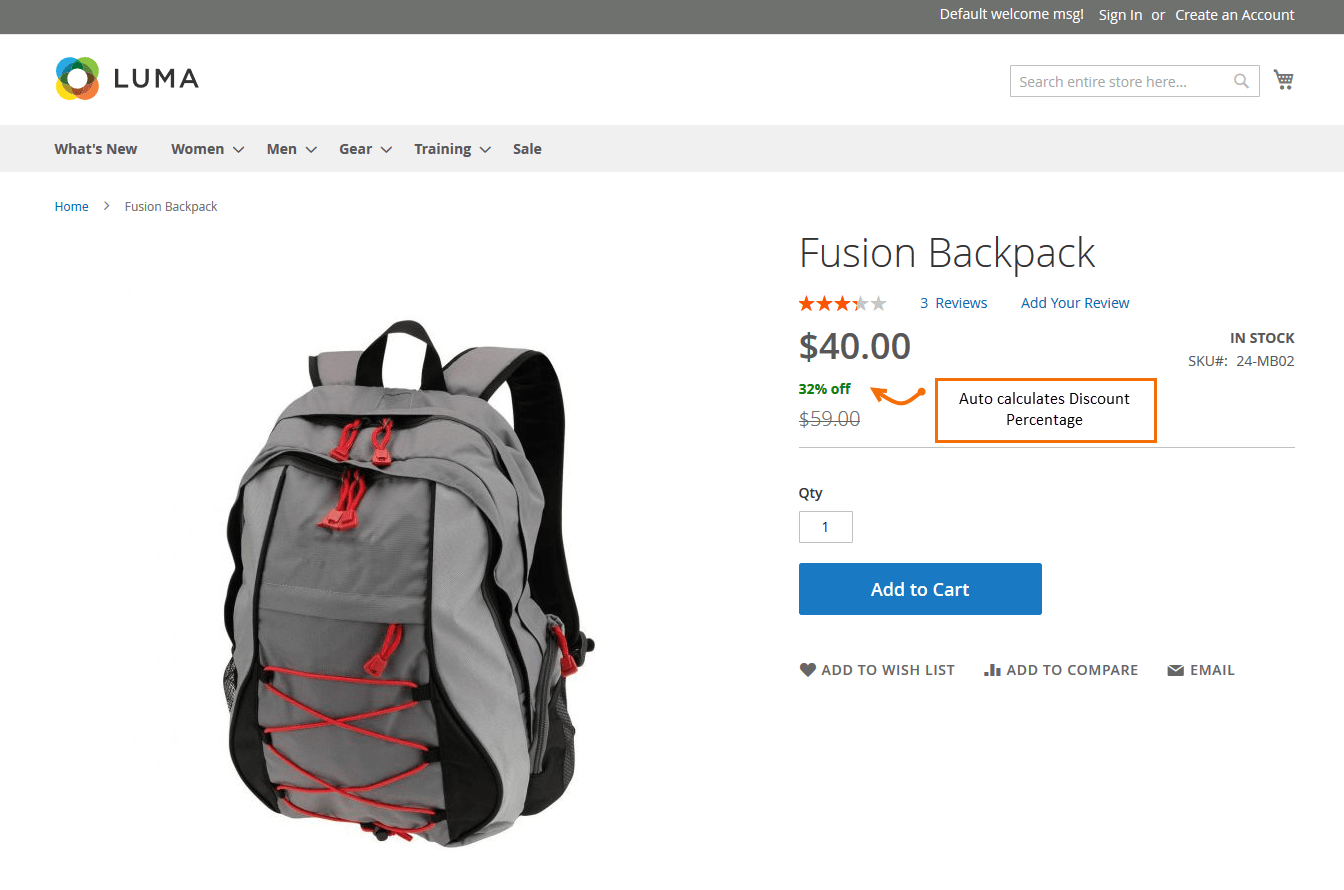
    How to display product discount percent on product details page in Magento2?

    First we need to create ‘catalog_product_prices.xml’ at below location using the given code.

    appcodeMagemonkeysDiscountpercentageviewbaselayoutcatalog_product_prices.xml

    <?xml version="1.0" encoding="UTF-8"?>
    <layout xmlns:xsi="http://www.w3.org/2001/XMLSchema-instance" xsi:noNamespaceSchemaLocation="urn:magento:framework:View/Layout/etc/layout_generic.xsd">
        <referenceBlock name="render.product.prices">
            <arguments>
                <argument name="default" xsi:type="array">
                    <item name="prices" xsi:type="array">
                    <item name="final_price" xsi:type="array">
                        <item name="render_class" xsi:type="string">MagentoCatalogPricingRenderFinalPriceBox</item>
                        <item name="render_template" xsi:type="string">Magemonkeys_Discountpercentage::product/price/final_price.phtml</item>
                    </item>
                    </item>
                </argument>
            </arguments>
        </referenceBlock>
    </layout>

    And create one more file to display the price and discount percentage on the product detail page.

    appcodeMagemonkeysDiscountpercentageviewbasetemplatesproductpricefinal_price.phtml

    <?php
    $priceModel = $block->getPriceType('regular_price');
    $finalPriceModel = $block->getPriceType('final_price');
    $idSuffix = $block->getIdSuffix() ? $block->getIdSuffix() : '';
    $schema = ($block->getZone() == 'item_view') ? true : false;
    ?>
    <?php if ($block->hasSpecialPrice()): ?>
    	<span class="special-price">
            <?php  echo $block->renderAmount($finalPriceModel->getAmount(), [
                'display_label' 	=> __('Special Price'),
                'price_id'      	=> $block->getPriceId('product-price-' . $idSuffix),
        	    'price_type'    	=> 'finalPrice',
                'include_container' => true,
                'schema' => $schema
        	]); ?>
        </span>
    	<span>
    	<?php
    	$item = $block->getSaleableItem();
        $_savePercent = 100 - round(((float)$item->getFinalPrice() / (float)$item->getPrice()) * 100);
    	echo '<b style="color:#008000">'.$_savePercent . '% off </b>';
    	?>
        </span>
    	<span class="old-price">
            <?php  echo $block->renderAmount($priceModel->getAmount(), [
            	'display_label' 	=> __('Regular Price'),
                'price_id'      	=> $block->getPriceId('old-price-' . $idSuffix),
                'price_type'    	=> 'oldPrice',
                'include_container' => true,
                'skip_adjustments'  => true
    	    ]); ?>
        </span>
    <?php else: ?>
        <?php  echo $block->renderAmount($finalPriceModel->getAmount(), [
            'price_id'      	=> $block->getPriceId('product-price-' . $idSuffix),
            'price_type'    	=> 'finalPrice',
            'include_container' => true,
        	'schema' => $schema
    	]); ?>
    <?php endif; ?>
     
    <?php if ($block->showMinimalPrice()): ?>
    	<?php if ($block->getUseLinkForAsLowAs()):?>
        	<a href="<?=  $block->getSaleableItem()->getProductUrl() ?>" class="minimal-price-link">
                <?= $block->renderAmountMinimal() ?>
            </a>
    	<?php else:?>
        	<span class="minimal-price-link">
                <?=  $block->renderAmountMinimal() ?>
            </span>
    	<?php endif?>
    <?php endif; ?>

    Output :

    How to remove unnecessary customer account links in Magento2?

    Create a custom extension or theme and then override customer layout file

    app/design/frontend/Magemonkeys/Theme/Magento_Customer/layout/customer_account.xml

    use remove to remove any extra link from my account

    <page xmlns:xsi="http://www.w3.org/2001/XMLSchema-instance" xsi:noNamespaceSchemaLocation="urn:magento:framework:View/Layout/etc/page_configuration.xsd">
    
    <body>
    
       <!-- Remove unwanted account navigation links -->
    
       <!-- Put this file in: app/design/frontend/Magemonkeys/Theme/Magento_Customer/layout/customer_account.xml -->
    
       <!-- Store credit -->
    
       <referenceBlock name="customer-account-navigation-customer-balance-link" remove="true"/>
    
       <!-- Downloadable product link -->
    
       <referenceBlock name="customer-account-navigation-downloadable-products-link" remove="true"/>
    
       <!-- Subscription link -->
    
       <referenceBlock name="customer-account-navigation-newsletter-subscriptions-link" remove="true"/>
    
       <!-- Billing agreement link -->
    
       <referenceBlock name="customer-account-navigation-billing-agreements-link" remove="true"/>
    
       <!-- Product review link -->
    
       <referenceBlock name="customer-account-navigation-product-reviews-link" remove="true"/>
    
       <!-- My credit card link -->
    
       <referenceBlock name="customer-account-navigation-my-credit-cards-link" remove="true"/>
    
       <!-- Account link -->
    
       <referenceBlock name="customer-account-navigation-account-link" remove="true"/>
    
       <!-- Account edit link -->
    
       <referenceBlock name="customer-account-navigation-account-edit-link" remove="true"/>
    
       <!-- Address link -->
    
       <referenceBlock name="customer-account-navigation-address-link" remove="true"/>
    
       <!-- Orders link -->
    
       <referenceBlock name="customer-account-navigation-orders-link" remove="true"/>
    
       <!-- Wish list link -->
    
       <referenceBlock name="customer-account-navigation-wish-list-link" remove="true"/>
    
       <!-- Gift card link -->
    
       <referenceBlock name="customer-account-navigation-gift-card-link" remove="true"/>
    
       <!-- Order by SKU -->
    
       <referenceBlock name="customer-account-navigation-checkout-sku-link" remove="true"/>
    
       <!-- Gift registry -->
    
       <referenceBlock name="customer-account-navigation-giftregistry-link" remove="true"/>
    
       <!-- Reward points -->
    
       <referenceBlock name="customer-account-navigation-reward-link" remove="true"/>
    
    </body>
    
    </page>

    Clear cache and verify the My Account page the links will be removed.


    Magento 2 : Remove State/Province dropdown from estimate shipping on cart page

    You can create checkout_cart_index.xml in your Magento_Checkout custom theme.

    Visit below path –

    app/design/frontend/Vendor/theme/Magento_Checkout/layout/checkout_cart_index.xml

    And add the below code:

    <?xml version="1.0"?>
    <page xmlns:xsi="http://www.w3.org/2001/XMLSchema-instance" layout="1column" xsi:noNamespaceSchemaLocation="urn:magento:framework:View/Layout/etc/page_configuration.xsd">
        <body>
            <referenceBlock name="checkout.cart.shipping">
                <arguments>
                    <argument name="jsLayout" xsi:type="array">
                        <item name="components" xsi:type="array">
                            <item name="block-summary" xsi:type="array">
                                <item name="children" xsi:type="array">
                                    <item name="block-shipping" xsi:type="array">
                                        <item name="children" xsi:type="array">
                                            <item name="address-fieldsets" xsi:type="array">
                                                <item name="children" xsi:type="array">
                                                    <item name="region_id" xsi:type="array">
                                                        <item name="config" xsi:type="array">
                                                            <item name="componentDisabled" xsi:type="boolean">true</item>
                                                        </item>
                                                    </item>
                                                    <item name="region" xsi:type="array">
                                                        <item name="config" xsi:type="array">
                                                            <item name="componentDisabled" xsi:type="boolean">true</item>
                                                        </item>
                                                    </item>
                                                </item>
                                            </item>
                                        </item>
                                    </item>
                                </item>
                            </item>
                        </item>
                    </argument>
                </arguments>
            </referenceBlock>
        </body>
    </page>


    Magento 2 Create the product attribute programmatically

    If you want to create a product attribute programmatically, but not by admin then this blog post is right the solution for you.

    Create file app/code/Magemonkey/CustomAttribute/Setup/InstallData.php

    <?php
    namespace MagemonkeyCustomAttributeSetup;
    
    use MagentoEavSetupEavSetup;
    use MagentoEavSetupEavSetupFactory;
    use MagentoFrameworkSetupInstallDataInterface;
    use MagentoFrameworkSetupModuleContextInterface;
    use MagentoFrameworkSetupModuleDataSetupInterface;
    
    class InstallData implements InstallDataInterface
    {
    	private $eavSetupFactory;
    
    	public function __construct(EavSetupFactory $eavSetupFactory)
    	{
    		$this->eavSetupFactory = $eavSetupFactory;
    	}
    	public function install(ModuleDataSetupInterface $setup, ModuleContextInterface $context)
    	{
    		$eavSetup = $this->eavSetupFactory->create(['setup' => $setup]);
    		$eavSetup->addAttribute(
    			MagentoCatalogModelProduct::ENTITY,
    			'custom_attribute',
    			[
    				'type' => 'text',
    				'backend' => '',
    				'frontend' => '',
    				'label' => 'Custom Atrribute',
    				'input' => 'text',
    				'class' => '',
    				'source' => '',
    				'visible' => true,
    				'required' => true,
    				'global' => MagentoEavModelEntityAttributeScopedAttributeInterface::SCOPE_GLOBAL,
    				'user_defined' => false,
    				'default' => '',
    				'visible_on_front' => false,
    				'used_in_product_listing' => true,
    				'unique' => false,
    				'apply_to' => '',
    				'searchable' => false,
    				'filterable' => false,
    				'comparable' => false
    			]
    		);
    	}
    	
    }


    Magento 2 bundle product image not showing if child product added in cart programmatically

    If you want to show the bundle product image when the child product added in the cart programmatically, please follow the below step.

    Step 1). Create file app/code/Magemonkeys/Cart/etc/di.xml

    <?xml version="1.0"?>
    <config xmlns:xsi="http://www.w3.org/2001/XMLSchema-instance" xsi:noNamespaceSchemaLocation="urn:magento:framework:ObjectManager/etc/config.xsd">
    	<type name="MagentoCheckoutCustomerDataAbstractItem">
    	     <plugin name="Change_Product_Image_In_Minicart" type="MagemonkeysCartPluginMinicartImage" sortOrder="1"/>
    	</type>
    </config>

    Step 2). Create file app/code/Magemonkeys/Cart/Plugin/Minicart/Image.php

    <?php
    namespace MagemonkeysCartPluginMinicart;
    class Image
    {
        public function aroundGetItemData($subject, $proceed, $item)
        {
            $result = $proceed($item);
            $objectManager = MagentoFrameworkAppObjectManager::getInstance();
            $product = $objectManager->create('MagentoCatalogModelProduct')->load($result['product_id']);
            $parentId = $objectManager->create('MagentoGroupedProductModelProductTypeGrouped')->getParentIdsByChild($result['product_id']);
    
            /* thumb url */ 
            $storeManager = $objectManager->create('MagentoStoreModelStoreManagerInterface'); 
            $currentStore = $storeManager->getStore();
            $mediaUrl = $currentStore->getBaseUrl(MagentoFrameworkUrlInterface::URL_TYPE_MEDIA);
    
            if (isset($parentId[0])) {
                $id = $parentId[0];
                $productdata = $objectManager->create('MagentoCatalogModelProduct')->load($id);
                $result['product_image']['src'] = $mediaUrl."catalog/product".$productdata->getThumbnail();
            }else{
                $result['product_image']['src'];
            }
            return $result;
        }
    }


    How to overriding cart default.phtml in custom module via plugin base in Magento 2?

    Please find below steps to override default.phtml by using plugin

    1. Create an di.xml in : /app/code/Vendor/ModuleName/etc

    <?xml version="1.0"?>
    <config xmlns:xsi="http://www.w3.org/2001/XMLSchema-instance" xsi:noNamespaceSchemaLocation="urn:magento:framework:ObjectManager/etc/config.xsd">    
        <!-- override cart/item/default.phtml file -->
        <type name="MagentoCheckoutBlockCartAbstractCart">
            <plugin name="change_template_for_default" type="VendorModuleNamePluginCartAbstractCart" sortOrder="1"/>
        </type>    
    </config>

    2. Create an AbstractCart.php in : app/code/Vendor/ModuleName/Plugin/Cart

    <?php
    namespace VendorModuleNamePluginCart;
    class AbstractCart
    {
        /*
        *   Override cart/item/default.phtml file
        *   MagentoCheckoutBlockCartAbstractCart $subject
        *   $result
        */
        public function afterGetItemRenderer(MagentoCheckoutBlockCartAbstractCart $subject, $result)
        {
            $result->setTemplate('Vendor_ModuleName::cart/item/default.phtml');
            return $result;
        }
    } ?>

    You can change below file as per requirement your custom module base

    3. Create an default.phtml in : /app/code/Vendor/ModuleName/view/frontend/templates/cart/item

    How to check customer is authenticated(login) or not in Magento 2?

    Customer Authentication in Magento 2 is required when we have to check the customer is a guest user or a login user.

    There are many occasions when we have to check the customer is login or not, and based on the login customer, only we have to show a specific page; otherwise, redirect it to the login page.

    To verify whether it’s a login customer or not,
    use MagentoCustomerModelSession Class and add the Customer Session class to the
     __construct() method of your Controller.

    <?php
    
    namespace MagemonkeysFavoriteListControllerIndex;
    
    use MagentoFrameworkAppAction;
    use MagentoCustomerModelSession;
    use MagentoFrameworkViewResultPage;
    use MagentoFrameworkAppActionContext;
    use MagentoFrameworkControllerResultFactory;
    
    class Index extends Action
    {
        /**
         * @var Session
         */
        protected $customerSession;
    
        public function __construct(
            Context $context,
            Session $customerSession
        ) {
            $this->customerSession = $customerSession;
            parent::__construct($context);
        }
    
        /**
         * Prepare wishlist for share
         *
         * @return ResultInterface
         */
        public function execute()
        {
            if (!$this->customerSession->authenticate()) {
                /** @var Page $resultPage */
                $result = $this->resultFactory->create(ResultFactory::TYPE_REDIRECT);
                $result->setPath('customer/account/login');
                return $result;
            }
    
            // do your logic here
        }
    }

    Using this approach, we can check the customer is a login customer or not.

    Is Dropshipping still profitable in 2023, or Dropshipping is dead in 2023?

    Mage Monkeys have helped numerous merchants to implement drop shipping ecommerce solutions for their business. From the development trend, we can say that dropshipping trend continues even in 2023. It’s not dead yet. This method of business has long to go.

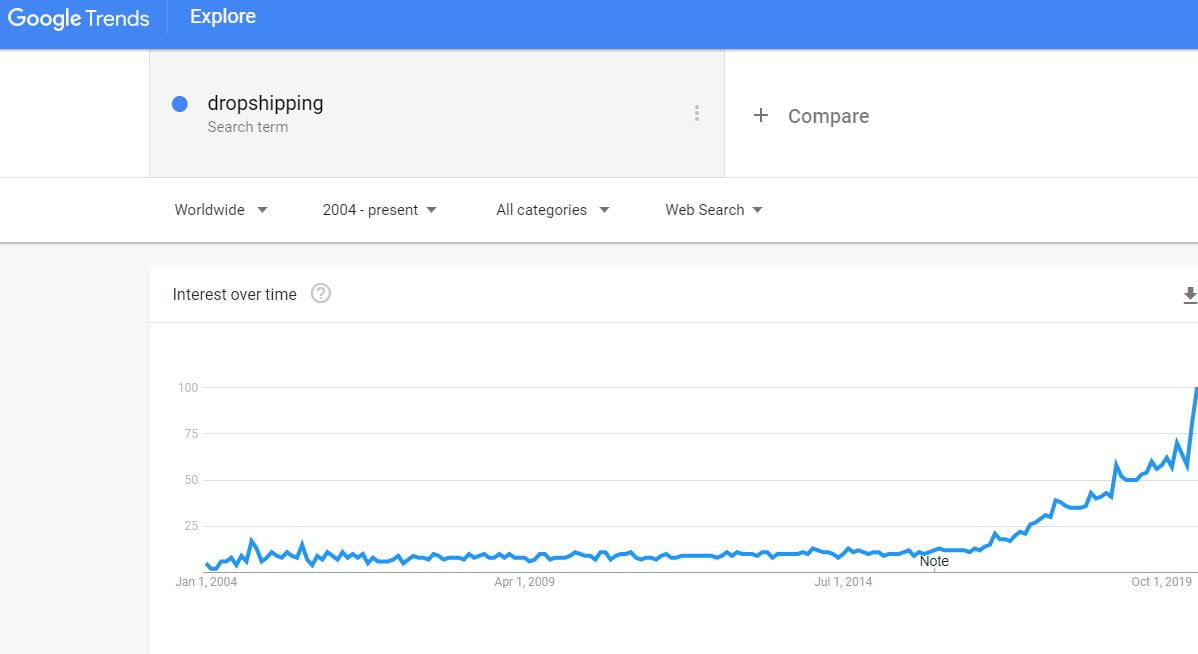
    Dropshipping business is growing year by year. Below Google trend is a good proof to add.

    dropshipping 2023 trend

    The above trend clearly answers that dropshipping is not dead, but growing with time by time.

    So far, 2023 has been a year full of business achievements. However, there has been a persistent question among the wanna be dropshipping merchants, which remains a mystery:

    – Is dropshipping dead?

    – Does dropshipping still work in 2023? Can’t you turn it into a successful business by 2023?

    The business is estimated to be dead and has reached a stage where it is no longer can make you a fortune.

    In light of the above questions, we can summarize the fundamental problems that individuals often have with a dropshipping model for eCommerce:

    • Delivering the product can take several weeks, which makes customers sad.
    • In general, only unbranded products are accessible
    • No restraint over your services
    • Chinese products and packaging identified as inexpensive/substandard quality
    • The process of returns or refunds is excessively lengthy

    According to the above remarks, one can conclude that dropshipping isn’t, in fact, the eCommerce world’s outstanding business model. Rather, you can assume that dropshipping isn’t deceased.

    Let’s dig into why dropshipping can still be believed as a successful business in 2020 and beyond.

    1. Dropshipping is getting more ambitious, not dead yet.  Dropshipping is still profitable in 2023

    The dropshipping business model has witnessed a massive increase over the last few years. The world has become a global community with such understanding and intelligence at the palm of our hands.

    As dropshipping has proceeded for several years now, a significant number of people have been jumping the ship in the last couple of years. However, dropshipping has undeniably become too challenging to control on a small scale.

    Therefore, individuals don’t see dropshipping as a meaningful action plan to continue with things as simplistic as claiming that the dropshipping business is dead.

    Something you should take into consideration while doing business through dropshipping:

    Individuals don’t order products from various stores that have an extended delivery period they need. They order the products they desire!

    This factor itself justifies that dropshipping isn’t just a terrible model, as a business. You need to sell the products people don’t need but want them!

    Therefore, if someone enters your store’s category of ‘consumer electronics.’ and orders any product, the odds are that they might not need it immediately. They can wait, and it is not as expensive as other products, so it’s all fine.

    2. It’s a tough job, but it yields good results

    As we understood that dropshipping is profitable in 2023 and works well. Now let’s discuss the process. The reason is that it’s a tough job relative to years ago is probably it’s far more competitive.

    Now let’s discuss how will that be paying off?

    Since it’s an inexpensive and business with higher returns, a dropshipping store doesn’t take much investment to set up because you don’t have to hold a stock, you don’t have to deliver any product, and mostly you don’t have to employ a lot of staff. Everything you need to do is pick a niche. Otherwise, your store will look like every other store, and you can not project.

    Choosing a niche indicates you’ll have to spend much time targeting the market and passing the message through. After doing appropriate marketing, you’ll be selling a whole lot beyond a non-focused online store that tries to enter all the range of products that’s out there.

    You can also enhance your business appeal by getting a small lot in your space that you can sell for a value price as ‘Immediate Shipping.’ So, with the elegance of not waiting, you can attract your customers, but for those who don’t want to pay extra, the price and wait would seem like a good deal.

    Remember, the entire thing is about the tactic that you use.

    3. So is it an ideal alternative for the business in 2023?

    Unconditionally it’s a perfect pick without any single doubt. Yet not necessarily if you’re about to mention products in your Magento stores and are thinking about starting selling without much tough work. Ecommerce is not an easy peasy, the Internet is more than ever a busy area, and no one will notice your message until you work hard.

    In 2023, effective Dropshipping involves a few primary changes by picking the dropshipping companies selectively that you want to use.

    No one can invalidate a brilliant business opportunity like dropshipping by 2023, or any year for that matter. So take your step forward and start working on it and if you win, you will make a lot of money.

    Q&A:

    A. Is dropshipping still beneficial in 2023? 

    Dropshipping is unquestionably still beneficial in 2023. But if you consider you can sell and get business only by listing products in your store and without making lots of attempts, then you can’t succeed. You need to understand profitable dropshipping products and all the marketing strategies for your store to use them effectively.

    B. Can you name the best dropshipping companies?

    There are many companies around the world, but there are few that are doing tremendous work in the field.

    Worldwide Brands, Salehoo, Oberlo, Wholesale2b, Megagoods, Dropship Direct, Sunrise Wholesale, Dropship Design, Doba, and Inventory Source, are some of the best dropshipping companies.

    C. Can you give a list of niches that makes dropshipping successful?

    Electrical devices, Electronic Devices, Wireless devices, Mobile Bars, Sportwear, Wearable devices, Baby Care Products, Smartwatch accessories, Men’s Grooming and Personal Care, and Pet Products, and many more niches are there where dropshipping is successful.

    D. Can you name the best dropshipping companies?

    We at Mage Monkeys have a separate department that develops only dropshipping-related sites & apps. We understand how it works and what you need to grow. Consult with us today to discuss more your drop shipping idea.

    5 secret tips to increase sales conversion of your Magento shop

    Magento is an exclusive shopping cart that provides all the highlights, features, and facilities that a company or entrepreneur wants to sustain the success path of their businesses. It’s quick, secure and perfect with a different scope of applications, platforms, and devices.

    This is an important activity for the company that the user monitors via your website or application.

    Ultimately, conversion does not refer exclusively to profit. You can separate these conversions, considering the objectives of your business.

    Now the concern is, what parameters can you define them?

    The solution lies in the conversion of micro and macro.

    In such an online business, for example, a webshop, a great deal of information is retrieved daily, and we separate micro and macro conversions to the extent that our objective is important.

    Now the question arises as to how

    to decide what counts as micro or macro?

    It relies upon what’s the principle motivation behind the website and what objectives you set up in the phases of your conversion funnel.

    A micro conversion is a progression of steps which aim to update the macro conversion. Banner scope, minimum blog time, newsletter signups, video views and PDF downloads are some of the examples.

    This brings to the assumption that the aim of a macro conversion can be accomplished as a paying subscription, clicking on advertisements, transactions and donations.

    Here comes the conversion optimization in the picture, one of the longest marketing processes. With its assistance, you can reserve a large amount of cash for marketing communication.

    In many cases, it is sufficient to make minor changes, such as new, different messages, different shapes, coloured CTAs and A / B tests.

    Now let’s see some stuff to help you increase your conversion rate.

    1. Pleasant User Experience:

    Regardless of how helpful a site is, if your visitors can’t find out what they’re looking for or are not ready to look at the alternatives offered, there’s a decent chance that they’ll leave the site regardless of whether they’ve been there to make a purchase. There are special web analytics tools that help you increase your conversion rates by collecting a significant visitor. This way, you can make a decision based on real-time user interactions.

    A. Landing Page:

    ‘Conversion Optimization’ starts when the visitor appears on the landing page. The high active click factor for your ads is not justified, despite any potential benefits on the off chance that you won’t be able to catch a visitor’s eye with a well-placed CTA, form or box.

    B. Product Page:

    It has an incredible expansion of the gallery, measuring white-space, top-notch 360-degree product photographs, and accurate descriptions.

    C. Loading Speed:

    In addition to the content, there is a significant technical factor that has an incredible impact on visitors’ choices: speed. The speed of page loading is in no way, shape or form that is increasingly imperative for Google. It basically influences the conversion rate on how fast pages are loaded. It is generally accepted that the site should be loaded for about 2 seconds to refrain from losing potential purchasers.

    D. Search Box:

    The best part is that if the search engine works perfectly by itself. It will improve the search functionality of the Magento website with Instant Search and Suggest.

    2. Optimizing the checkout process:

    It’s a half-hit when the visitor has placed the item(s) in the basket, but we can’t lie back in spite of everything. Not thinking about human components (which we could make up a stand-alone section) the overall result can depend on the simplicity and speed of the checkout process.

    Remember, you need strategies on the checkout page to enhance the conversion rates on your eCommerce site.

    When arranging your funnel you need to remember three significant objectives.

    Not to be more confused than would normally be appropriate, with as meagre exertion as you can, with minimal measure of information you can find a good visitor.

    This incorporates purchases without enlistment. Visitors hate to round out forms, and confirmation e-mails. It won’t do any great on the off chance that you begin assaulting them with requests.

    If you follow a visitor’s moment on your website, there is no doubt that many people will slow down and reconsider when confronting a registration form. They leave the website in the most pessimistic scenario. This creates a huge side gap in your conversion funnel. Unless registration is basic, you can give an alternative to checkout without it. If your customers are happy with the service, trust it, they will return to the site and register on purpose.

    In any event, where registration is a requirement, it is essential to consistently show which fields are compulsory. This is commonly recognized as * (ideally in red). If conceivably possible, apply quick approval to fill in each field, however, it is important for error messages to be clear and as close to the faulty field as possible.

    It is important but anticipated, to duplicate the billing address to the delivery address so that customers do not need to copy something very similar twice when making a purchase.

    It is equally important for the customer to have the option of looking at any payment method that could be expected under the circumstances and to find the usual method among them.

    Remember, try not to lose costumers in light of the fact that there are insufficient choices for online credit card payments.

    3. Costumer journey mapping:

    The ultimate goal of a business is to understand the behavior of the customer. This requires a thorough analysis of the journey and the funnel. How did they discover the website, what their activities prompted a deal, and how could they change from a lead to a buyer? In addition, you need to understand what content has led them to become leads. Make different kinds of content for different types of costumers and funnel areas.

    To solve your problems and avoid the riddle, there are tools that allow you to track the movement of the visitor. These include solutions such as mouse motion tracking, heatmaps section, click heatmaps, funnel optimization, and much more. These online platforms provide an immense and simple approach to track customer specific problems and see where changes are necessary to make visitors more likely throughout the process.

    This engine offers a lot of plug-ins. You can compare Magento’s marketplace with Aladdin’s cave, where you can browse free or paid content. Capturly’s plugin allows you to upgrade your Magento-based eCommerce store with visual analytics intensity. So you can ensure that each piece is the place it ought to be.

    4. Dynamic search ads:

    Dynamic Search Ads or DSA for short is one of the most fulfilling and successful Google advertising forms for webshops because it does not require you to seek out new keywords per product or write ad text. These are done by Google by evaluating the text for your landing page and by creating a title bar for a user search. From the perspective of your online campaigns, it’s essential to do the proper thing.

    5. Remarketing campaigns:

    The most important step in the process of becoming a buyer (or changing over) is to speak to users who are past a specific level of interest.

    Google AdWords and Facebook are the two tools in your pocket for your campaign.

    Remember about the customers coming back. An exceptional group of customers can be recognized. Individuals who put the products in the shopping cart but did not complete the shopping process. It’s wise to put away the contents of their cart, so if they return to the page later, they won’t need to look for the ideal products again. They may just need time to reconsider or want to look around somewhere before they settle for a selection. Make it easier for them to save the contents of the basket for at least 2 weeks.

    Upon completion of the purchase, they may be offered to register at the end of the purchase. That way, they can buy even more advantages and get their data faster without re-emerging them next time. You can obviously set up a ton of loyalty programs and discount schemes for repeat customers, but there’s a lot of options for technical, content and marketing optimization available in the basic system. It is beneficial to bite via these soles to maintain the creation and use of moderately progressively confused loyalty solutions.

    It’s probably the biggest myth out there, that AdWords ads with top positions obviously mean you’re converting more people. The position itself is nothing and will not lead to insane bounces in the conversion rate. If by any possibility that you might invest an excessive amount of money and energy in it while feeling that you have a KPI yourself, you’re making a mistake. As a general rule, you can also have higher conversion rates at a reduced cost in any event that the position drops.

    Remember that every visitor and every web store is special; it’s important that you measure the different levels of your conversion funnel with fewer things. Take as long as you need and test each change a few times, do not stir up traffic flow, or separate the sources and test them individually. This will lead to an all-round organized and adjusted flow conversion funnel.
    Know Progressive Web App – A Modern Era of App for eCommerce Stores

    Have you ever wished? Websites run like native mobile apps. Well, the answer is yes.

    PWA can make that happen.

    A fully functional and responsive website can expose to a lot of limitations when being accessed on mobile devices like slow page load speed, unnecessary URL bar, etc. Due to which business owners and merchants needed an alternative and they found the Progressive Web App (PWA).

    Now let’s gain some knowledge about this technology.

    What is Progressive Web App (PWA)?

    PWA combines the best technologies used in mobile and web applications. To put in simple words, it’s like a website that acts like an application. It offers the user with excellent experience for users across devices, especially on smartphones.

    • Fully responsiveness
      One of the most important features of the PWA is the responsive ability. PWA can work across browsers and in any kind of device whatever the screen size. It will give the same stable experience to tablet, mobile, and desktop users. Thus, it fills the gap between the native app and the website.
    • Zero installation
      With Progressive Web App, users can easily access the site from their mobile. The icon is just like a normal mobile native application. They function like apps, but you use them through a web browser on any device.
    • Push notification
      One of the best features of PWA is that they can push notifications to engage users. Users can be notified about the best deal, the last updates, the new arrivals or remind them about their incomplete cart. This way you can increase the value of the offering and make them visit the site more often.
    • Offline mode
      PWA works smoothly in an offline mode which means you can continue browsing when the connection suddenly drops. Users can access any page that has been viewed before. Technically, the customer can out when there is no internet connection and the order will be processed when the connection is back.

    According to DataReportal, 5.19 billion is the number of mobile internet users in Jan 2020.

    One of the most frequently asked questions about PWA is “How Much Does A Progressive App Cost”?

    Usually, PWA costs from $5,000 in Asia and will cost up to five times in the US and the UK. The pricing will differ depending on the complexion of the original website (including design and functionality requirements) and the web platform. This cost does not include app support and maintenance fees. The cost of creating a Progressive Web Apps seems to be higher than the website development but its worth as PWA brings a lot more amazing features to compare to the website.

    Though, the cost of developing PWA is much lower than the cost of native app development. Because you don’t have to create separate apps for iOS and Android. When the native app is released, the developer has to submit it to the app store, further has to wait for approvals and then developers must pay the fee for publishing the apps which range from $25 to $99. Whereas in the case of PWA you don’t have to publish it in any app store thus it saves your submission cost.

    Is It Worth The Investment?

    PWA investment might not be a big deal for big companies but for small firms or start-ups, this investment can be huge. Therefore, they should consider everything before deciding to build a PWA or not.

    Let’s figure out what exactly you will get in return for your investment:

    • Enhanced Performance
      With its underlying cache technology, PWA dramatically decreases load speed making it way much faster than all websites.
      Without PWA, If the website owner wants to increase the site speed then they need to find some page speed up optimizer or performance optimization extensions that on average will cost about $100- 300 and also need extra $50-100 for the installation fee. Nonetheless, most of those plugins cannot meet the expectations of the merchants. It only helps to merge JavaScript and CSS files, minify HTML codes, add lazy load or resize the images.
    • Higher traffic and site rankings on search engines
      PWA is a website having URLs that can be indexed by the search engines. Progressive web apps naturally come with SEO benefits. So, all websites that are upgraded to PWAs will have advantages when being indexed by Google or another search engine.
      Generally, a company spends $75-1500 every month in SEO which is significant in the long run. But by developing PWA companies can minimize SEO fees.
    • No e-mail marketing cost
      PWA comes with push notification that helps merchants to keep their customers engaged. If there is no PWA then there will not be push notification which means you have to use the traditional e-mail marketing channel to notify users about promotions, news or abandoned carts.
      As we all know, e-mail marketing costs $300-500 per month. Fortunately, PWA integration cuts down this cost.
    • Improved conversions
      Progressive Web App has amazing features like instant access on the mobile home screen, less data use, fast loading speed, and offline mode which provides seamless experiences for users. Ultimately, increases user engagement which leads to more conversions and revenue.

    Takeaway:

    Undoubtedly, the Progressive Web App is beneficial and to create a PWA you have to invest a certain amount of money. It’s worth it since you get the best site performance without using any third-party extension, effective marketing campaigns without paying for e-mail marketing fees, organic site traffic, and rankings.

    We embrace PWA technologies and we can’t ignore the outstanding experience offered by it. Let’s take your place within the PWA Movement and transform the way your eCommerce does business.