We sacrifice by not doing any other technology, so that you get the best of Magento.

We sacrifice by not doing any other technology, so that you get the best of Magento.

    How to render phtml code using ajax in magento 2?

    create phtml file at

    app/code/Magemonkeys/Custom/view/frontend/templates/index.phtml

    <div id="ajax-response-id"></div>
    <?php
    $ajaxurl = $block->getAjaxUrl();
    ?>
    <script type="text/x-magento-init">
            {
                "*": {
                    "Magemonkeys_Custom/js/custom": {
                        "AjaxUrl": "<?php echo $ajaxurl; ?>",
                        "CurrentProduct": "<?php echo $currentProductId; ?>",
                    }
                }
            }
    </script>

    create js file at

    app/code/Magemonkeys/Custom/view/frontend/web/js/custom.js

    define([
    "jquery",
    "jquery/ui"
    ], function($){
    "use strict";
    
    function main(config, element) {
    var $elementvar = $(element);
    var AjaxUrlcall = config.AjaxUrl;
    var CurrentProduct = config.CurrentProduct;
    
    $(document).ready(function(){
    setTimeout(function(){
    $.ajax({
    context: '#ajax-response-id',
    url: AjaxUrlcall,
    type: "POST",
    data: {currentproduct:CurrentProduct},
    }).done(function (data) {
    $('#ajax-response-id').html(data.output);
    return true;
    });
    },1000);
    });
    };
    return main;
    });

    Create a controller file at

    app/code/Magemonkeys/Custom/Controller/Index/View.php

    <?php
    namespace MagemonkeysCustomControllerIndex; 
     
    use MagentoFrameworkAppActionAction;
    use MagentoFrameworkAppActionContext;
    use MagentoFrameworkControllerResultJsonFactory;
    use MagentoFrameworkViewResultPageFactory; 
     
    class View extends Action
    { 
        protected $_resultPageFactory;
        protected $_resultJsonFactory;
     
        public function __construct(Context $context, PageFactory $resultPageFactory, JsonFactory $resultJsonFactory)
        { 
            $this->_resultPageFactory = $resultPageFactory;
            $this->_resultJsonFactory = $resultJsonFactory; 
            parent::__construct($context);
        }
     
        public function execute()
        {
            $result = $this->_resultJsonFactory->create();
            $resultPage = $this->_resultPageFactory->create();
            $currentProductId = $this->getRequest()->getParam('currentproduct');
             
            $data = array('currentproductid'=>$currentProductId);
     
            $block = $resultPage->getLayout()
                    ->createBlock('MagemonkeysCustomBlockIndexView')
                    ->setTemplate('Magemonkeys_Custom::view.phtml')
                    ->setData('data',$data)
                    ->toHtml();
     
            $result->setData(['output' => $block]);
            return $result;
        }
    }

    create block file at app/code/Magemonkeys/Custom/Block/Index/View.php

    <?php
    namespace MagemonkeysCustomBlockIndex;
     
    use MagentoFrameworkViewElementTemplate;
     
    class View extends Template
    {
      public function __construct(TemplateContext $context, array $data = [])
        {
            parent::__construct($context, $data);
        }
     
      protected function _prepareLayout()
        {
            return parent::_prepareLayout(); 
        }
     
      public function getProducts($productId)
      {
         return;
      }
    }

    create phtml file  at app/code/Magemonkeys/Custom/view/frontend/templates/view.phtml

    <?php
    $productData = $block->getData();
    $productId = $productData['data']['currentproductid'];
    $products = $block->getProducts($productId);
    ?>
    <div>
      <div>HTML codes</div>
    </div>

    that’s it.
     

    Big change coming in Google algorithm from 2021, is your site ready for it?

    Google has already announced OFFICIALLY that page experience signals would be included in Google Search ranking.

    Let’s see what Google has said in its blog word-to-word,

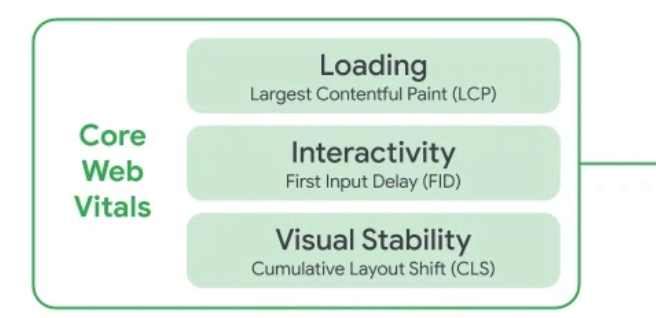
    Today we’re announcing that the page experience signals in ranking will roll out in 2021. The new page experience signals combine Core Web Vitals with our existing search signals including mobile-friendliness, safe-browsing, HTTPS-security, and intrusive interstitial guidelines.”

    That means if your SEO sales may go down if it won’t follow CORE WEB VITALS.
    The question is what are these Core Web Vitals.
    Check out the image below to understand them.

    Improving the above factors won’t only help you to lead your SEO games, but it will also help you to get better ROI on other marketing campaigns.

    How can you bypass the situation?

    Google Search’s mission is to help users find the most relevant and quality sites on the web.

    All you need to do is to hire a certified tech expert who can integrate your site with Google’s official tools and make your site follow Google’s technical guidelines.

    What benefit will you achieve by delivering the best page experience to your users?
    – You will see your keywords going upwards in SEO. (This means business)
    – Sharing from your site will increase.
    – You will be a step ahead of your competitors.
    – Your site’s performance will increase.
    – Needless to say, sales will increase.

    Other technical outcomes will be such as below:
    – Your site will run faster as per the Google page speed checker.
    – Your site will become user-friendly.
    – Your site will become more secure
    – Your site will become mobile-friendly.
    – Your site will deliver a safe browsing experience.

    Having a live site isn’t enough for business. Sites are like plants. You need to keep watering them so they can give you fruits called sales for the rest of your life.

    Tech implementation that will help you to win sales game in 2021

    As an eCommerce merchant, you have to understand that marketing is not only the one player which can help you to win the game. But, performing below PROVEN technical implementations can give you impressive results.

    Let’s discuss them:

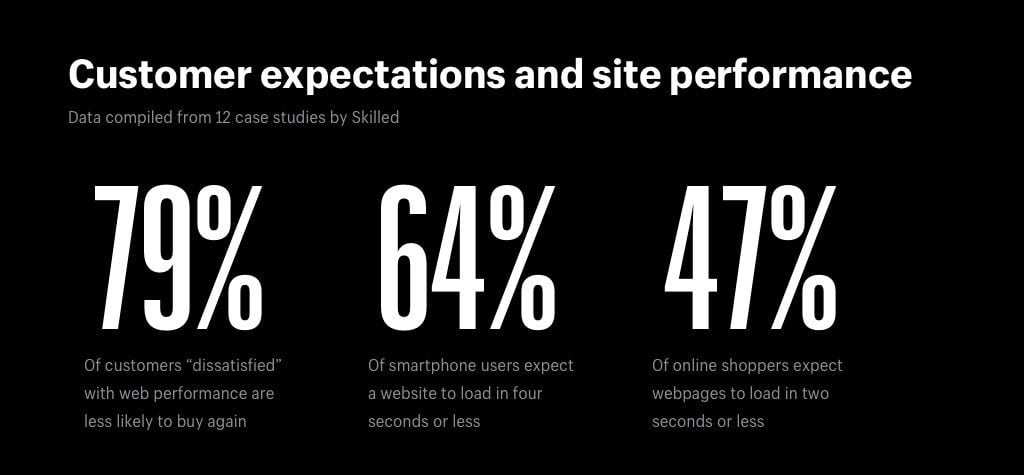
    1. Improve your store’s speed: In one tech research, the outcome came that 74% of web stores are not as fast as they should be. They ended up bouncing potential customers and lost sales. Don’t repeat this mistake in 2021. Improve your store’s web & mobile load speed today.

    2. Adopt PWA or Mobile App for your business: Check your mobile now & you will find apps from those businesses whose sites you rarely visit, but still you engage with them via an app. Because it’s easy & convenient. Give the same experience to your customers. Imagine your sales when your store’s app will be installed on your all customers’ devices. If you don’t have an app, design one.

    3. Do UI/UX Consultation: A professional UI/UX consultation audit report can undoubtedly help you to increase your sales. It will help to solve all bugs in your store’s site & also helps you to offer a seamless user experience.

    4. Upgrade Theme/Site/App/Extensions: Tech world is upgrading every day. You shouldn’t use older versions of Theme/Site/App/Extensions. Upgradation should be standard practice that can help you to leverage trending tech benefits and puts you a step ahead of your competitors.

    These are the four top changes we recommend eCommerce store owners perform.  We have a list of other many changes which can help your store to increase sales. Contact us today or fill the below form if you want to improve your sales by doing such technical changes.

    How our eCommerce client achieved 116% sales growth?

    A client made an inquiry at our site which read,

    “We want to increase our sales. Can you help to improve the performance of our site?”

    Our tech expert discussed the case with the client and we ran an audit on the client’s website.

    We found many technical limitations which were stopping the growth of the client’s store. We advised clients to implement them one-by-one & check the result in the sales graph.

    First process which gave the client a sales growth of 38% was speed.

    Web & mobile loading speed of the client’s store was slow according to google page insider. We started working on the same. We did many technical operations such as,

    • Image optimisation
    • CSS/JS Minification and Merge
    • Server level changes
    • Code optimization
    • Theme optimization
    • Converting jpg to webp
    • Enable flat categories and products

    After doing speed optimization bounce rate was also decreased.

    The second process was where we introduced our UI/UX advisor who helped us to achieve a 50% sales growth for clients.

    The below activities were performed under UI/UX advisor’s consultation.

    • Product placement was rearranged.
    • Necessary changes in theme were performed.
    • Onepage checkout was implemented.
    • Automatic Email & SMS functionalities were implemented for users who dropped shopping at the final stage.
    • A virtual assistant was introduced to the site.
    • Most searched products were added to the homepage.
    • & many more suggestions were processed.

    In the third process, we increased security, solved bugs, and did some maintenance which resulted in 28% of sales growth. This activity helped us to run the site flawlessly.

    This process was handled by our security experts who found that the site was going down twice a month due to servers and other issues that were affecting sales. We advised the client to opt for a better hosting provider who guarantees 100% uptime and delivery.

    While performing the site’s historical data audit, we realized that site was previously hacked as it was having security loop-holes which was resolved by our security experts.

    Numerous small bugs were there on the data side which was also solved from our end.

    This is a true tech story, not a case study where we helped our client to achieve sales growth of 116% – Day by day, we’re helping more and more web merchants to achieve sales growth by performing technical operations.

    Why should you consider tech auditing your eCommerce store?

    For an eCommerce store’s growth, tech auditing is an essential part to execute on a regular interval.

    Technical audits help to identify numerous tech issues & helps to accelerate your store’s performance.

    You can leverage the below benefits by performing tech audits in your eCommerce store.

    1. Speed-up your store: Technical audit helps to reduce unnecessary codes & media which will eventually make your eCommerce store light weighted.

    2. More Sales: Technical audit helps to perform better with SEO and technical marketing.

    3. User friendly: Technical audit can help your site to deliver a flawless user experience. The more you improve on the UI/UX segments, the better your site performs.

    4. Save Tech Budget: Technical audit can list unnecessary add-ons which are used by you. Apart from them, it can give alternative free versions of many add-ons. It also helps you to reduce server costing. In case, if you’re using a high-end server for your small business, the technical audit can help you to choose the right server that fits your needs at the right budget.

    5. Gives you Data: Technical audit will give you data about consumer/customer who visits your site. Let’s say If you find the most searched product in your store. Then, all you will need to do is to put that product on the homepage. The technical audit will give you tons of information like this about your web visitors’ interests.

    Although your store is doing well, you still need a technical audit to do better. Ignoring technical audits means stopping your business growth. And no one wants that. Thus, hire a technical audit expert and get the technical audit done today.

    Magento 2.4.x : How to install Elasticsearch on Linux in localhost?

    In Magento 2.4.x, You have to install and configure Elasticsearch before setting up a new project.

    If you want to know how to install Elasticsearch then follow below steps.

    Step 1 – Install Java jdk – Its necessary for magento 2.4.x

    – sudo apt-get update

    – sudo apt install openjdk-8-jdk

    – java -version (For check java version. It’s show something like below)

    openjdk version "1.8.0_272"
    OpenJDK Runtime Environment (build 1.8.0_272-8u272-b10-0ubuntu1~16.04-b10)
    OpenJDK 64-Bit Server VM (build 25.272-b10, mixed mode)

    Step 2 – Install from the APT repository

    – sudo apt install apt-transport-https

    Step 3 – After Install Elasticsearch using below commands

    – sudo apt-get update

    – sudo apt-get install elasticsearch

    Step 4 – After Install Elasticsearch, Start it’s service using below commands

    – systemctl daemon-reload

    – systemctl enable elasticsearch.service (For enable service)

    – systemctl start elasticsearch.service (For start service)

    – service elasticsearch status (For check it’s status)

    That’s it.

    Now, Elasticsearch has been installed for your Magento 2.4.x projects.


    Why does your fashion store need an app?

    It’s no longer a secret that mobile users have surpassed web users. Thus, if you’re still not having an app then you are missing many leverages.

    Listing some of them as below:

    1. Personalized Push Notification: Having an app will allow you to send personalized notifications to your app users. For example – You can send tee-shirt sales events to young audiences.

    2. Apps help to scan the body to get the apt size: Apps are not only advanced but smarter too. It will provide an enhanced tech experience to all users. It will also help to reduce the number of return orders.

    3. More Orders: Apps will help you to get more and more orders as users will have your app installed on their devices. Thus, reordering will increase.

    4. User Friendliness & Convenience: For fashion product buyers, apps are more user-friendly & convenient compared to websites.

    5. Big brands & your competitors have one: If you won’t have an app for your fashion store then you will allow your competitor to take away the business which you are supposed to get.

    Having an app will explore numerous business opportunities. Thus, don’t cap your eBusiness. Get an app today.

    Why does your Magento store needs maintenance service?

    Many eCommerce businesses fail as they don’t maintain their store. Running a business is a different thing and running an eCommerce site flawlessly is another.

    A vehicle can run on gas/diesel or petrol, but eventually, it needs maintenance so that it offers the best performance and runs for a long race. Like those vehicles, an eCommerce site also needs maintenance service so that your ebusiness can work & grow flawlessly.

    To keep the sales cycle grow, you need to do the below tech exercises at the regular interval:

    – Store Load Speed Testing
    – Version Upgradation
    – Extension Upgradation
    – Basic UX/UI changes
    – Server Maintenance
    – Browser Compatibility Testing
    – Store Troubleshooting
    – Monthly Store Backup
    – Monthly Store Analysis
    – Product Editing
    – Theme Upgradation
    – Traffic Stats and Analysis
    – Store content updates
    – Form Testing
    – Link checking
    – 404 checking
    – Store Image Replacement
    – New Extension Installation
    – Regular Backup
    – Security Patch Setup
    – & many more.

    Just having an eCommerce store won’t give you the desired success, you need to perform the above technical exercises on a regular interval so that your store can help you to draw the hike in your business sales graph.

    It may look like a long list of tech exercises, but it’s just a piece of cake for a Magento certified developer. We suggest you hire a Magento certified developer for your store.

    How to add custom link in top navigation menu in Magento 2?

    1) To define plugin, add below code

    <?xml version="1.0"?>
    <config xmlns:xsi="http://www.w3.org/2001/XMLSchema-instance" xsi:noNamespaceSchemaLocation="urn:magento:framework:ObjectManager/etc/config.xsd">
        <type name="MagentoThemeBlockHtmlTopmenu">
            <plugin name="custom_menu_item" type="MagemonkeysAddCustomeMenuPluginTopmenu" sortOrder="10" disabled="false"/>
        </type>
    </config>

    in your app/code/Magemonkeys/AddCustomeMenu/etc/frontend/di.xml file.

    2) Now, Create Topmenu.php Plugin file at app/code/Magemonkeys/AddCustomeMenu/Plugin/ and paste the below code :

    <?php
    namespace MagemonkeysAddCustomeMenuPlugin;
    use MagentoFrameworkDataTreeNodeFactory;
    use MagentoFrameworkUrlInterface;
    
    class Topmenu {
        /**
         * @var NodeFactory
         */
        protected $nodeFactory;
        /**
         * @var UrlInterface
         */
        protected $urlBuilder;
        /**
         * @param NodeFactory  $nodeFactory
         * @param UrlInterface $urlBuilder
         */
        public function __construct(
            NodeFactory $nodeFactory,
            UrlInterface $urlBuilder
        ) {
            $this->nodeFactory = $nodeFactory;
            $this->urlBuilder = $urlBuilder;
        }
        public function beforeGetHtml(
            MagentoThemeBlockHtmlTopmenu $subject,
            $outermostClass = '',
            $childrenWrapClass = '',
            $limit = 0
        ) {
            /**
             * Parent Menu
             */
            $menuNode = $this->nodeFactory->create(
                [
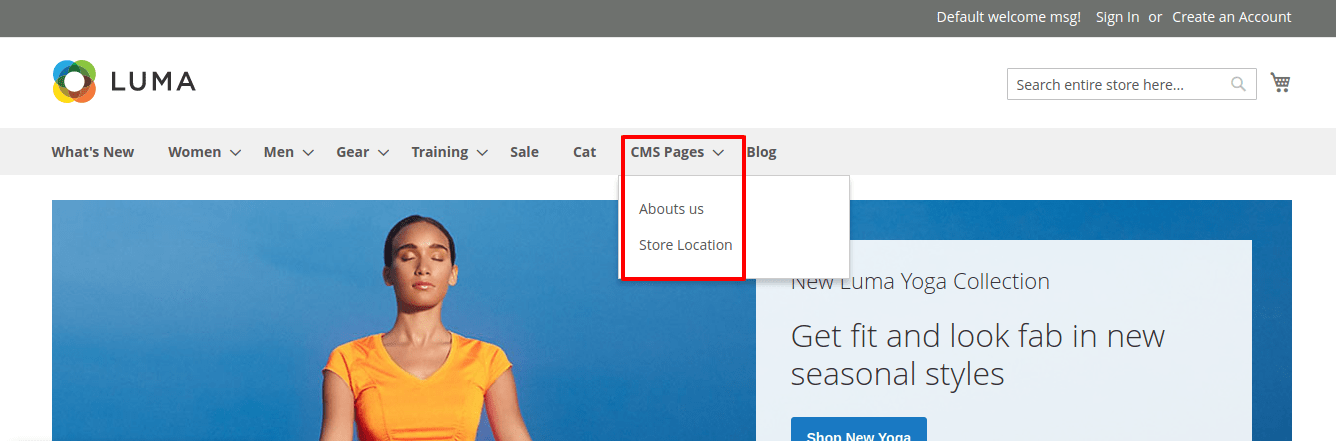
                    'data' => $this->getNodeAsArray("CMS Pages", "cms-page"),
                    'idField' => 'id',
                    'tree' => $subject->getMenu()->getTree(),
                ]
            );
            /**
             * Add Child Menu
             */
            $menuNode->addChild(
                $this->nodeFactory->create(
                    [
                        'data' => $this->getNodeAsArray("Abouts us", "abouts-us"),
                        'idField' => 'id',
                        'tree' => $subject->getMenu()->getTree(),
                    ]
                )
            );
    
            $menuNode->addChild(
                $this->nodeFactory->create(
                    [
                        'data' => $this->getNodeAsArray("Store Location", "store-location"),
                        'idField' => 'id',
                        'tree' => $subject->getMenu()->getTree(),
                    ]
                )
            );
    
            $subject->getMenu()->addChild($menuNode);
        }
        protected function getNodeAsArray($name, $id) {
            $url = $this->urlBuilder->getUrl($id);
            return [
                'name' => __($name),
                'id' => $id,
                'url' => $url,
                'has_active' => false,
                'is_active' => false,
            ];
        }
    }

    3) Output :

    Magento 2.3.3 Version issue – Store Switcher not working when customer is logged in

    This tutorial is a solution if your store switcher is not working when customer is logged in Magento.

    It happens because there is a difference between 2.3-develop and 2.3.3 for the di.xml file of the store module.

    Check the following changes to resolve this issue :

    First of all override the following file :

    magento2/app/code/Magento/Store/etc/di.xml

    & Replace the following code : 

     <type name="MagentoStoreModelStoreSwitcher"> 
         <arguments> 
             <argument name="storeSwitchers" xsi:type="array"> 
                 <item name="cleanTargetUrl" xsi:type="object">MagentoStoreModelStoreSwitcherCleanTargetUrl</item> 
                 <item name="manageStoreCookie" xsi:type="object">MagentoStoreModelStoreSwitcherManageStoreCookie</item> 
                 <item name="managePrivateContent" xsi:type="object">MagentoStoreModelStoreSwitcherManagePrivateContent</item> 
                 <item name="hashGenerator" xsi:type="object">MagentoStoreModelStoreSwitcherHashGenerator</item> 
             </argument> 
         </arguments> 
     </type>

    With 

     <type name="MagentoStoreModelStoreSwitcher"> 
         <arguments> 
             <argument name="storeSwitchers" xsi:type="array"> 
                 <item name="cleanTargetUrl" xsi:type="object">MagentoStoreModelStoreSwitcherCleanTargetUrl</item> 
                 <item name="manageStoreCookie" xsi:type="object">MagentoStoreModelStoreSwitcherManageStoreCookie</item> 
                 <item name="managePrivateContent" xsi:type="object">MagentoStoreModelStoreSwitcherManagePrivateContent</item> 
             </argument> 
         </arguments> 
     </type>

    We deleted the following line and the store switcher started working for logged in customers.

    <item name="hashGenerator" xsi:type="object">MagentoStoreModelStoreSwitcherHashGenerator</item>

    Please let us know if this article is helpful to you or not.