We sacrifice by not doing any other technology, so that you get the best of Magento.

We sacrifice by not doing any other technology, so that you get the best of Magento.

    How to remove custom option price from the dropdown in Magento 2?

    To remove custom option pricing from the dropdown, you need to add below small piece of code to “select.pthml” file

    Location of “select.pthml” file:

    appdesignfrontendThemesyourthemeMagento_Catalogtemplatesproductviewoptionstypeselect.phtml

    <script>
      require([
        'jquery',
        'domReady!'
    ], function($) {
        $(document).ready(function() {
            $('select.product-custom-option').change(function() {
                $('option').each(function() {
                    var selectedOption = $(this).text();
                    if (selectedOption.indexOf('+') > -1) {
                        selectedOption = selectedOption.substring(0, selectedOption.indexOf('+'));
                        $(this).text(selectedOption);
                    } else if (selectedOption.indexOf('-') > -1) {
                        selectedOption = selectedOption.substring(0, selectedOption.indexOf('-'));
                        $(this).text(selectedOption);
                    }
                });
            });
        });
    });
    </script>


    Why does your store need real-time technical support?

    Web & App technologies are changing day by day. New eCommerce trends offer numerous benefits to businesses. To implement & leverage them in ASAP mode you need to have a real-time technical team who can be ready when you give them tasks to do.

    Having real-time technical support offers many other benefits listed below.

    1. Helps your store from getting hacked: If your eCommerce store will get hacked then it will be a troublesome situation for your business which can be avoided if you have a capable tech team.

    2. Sales improvement: An indirect benefit of having a tech team is improvement in the sales cycle. Tech teams make your site run flawlessly which leads to sales improvement.

    3. Bugs & Error solving: Tech team will solve bugs in the realtime. Let’s say your one visitor faced a problem during his order journey then the tech team can read the logs and make sure that same bug never appears again.

    4. Your business ideas never go into pause mode when you have something new to try: If you find anything worth improving right away, your tech team can do it for you in asap mode. You don’t need to worry about numerous “hows”, “whys”, & “whens”. You will not only have answers but solutions to all your planning & questions.

    5. It reduces your development cost: Once your tech team will get familiar with your system’s structure, they will take 1 hr to execute a normal task which can take 10 hrs by any other developers. Because your tech team knows where to hit. This will save tons of development hours which means cost benefits.

    There are many other benefits you can leverage if you have a capable & experienced tech team partner like Mage Monkeys who offers developers whenever you need. We don’t impose numerous conditions on hiring, but offer flexibility as that’s our USP. Fill the below form and let’s discuss taking your eCommerce business to the next stage.

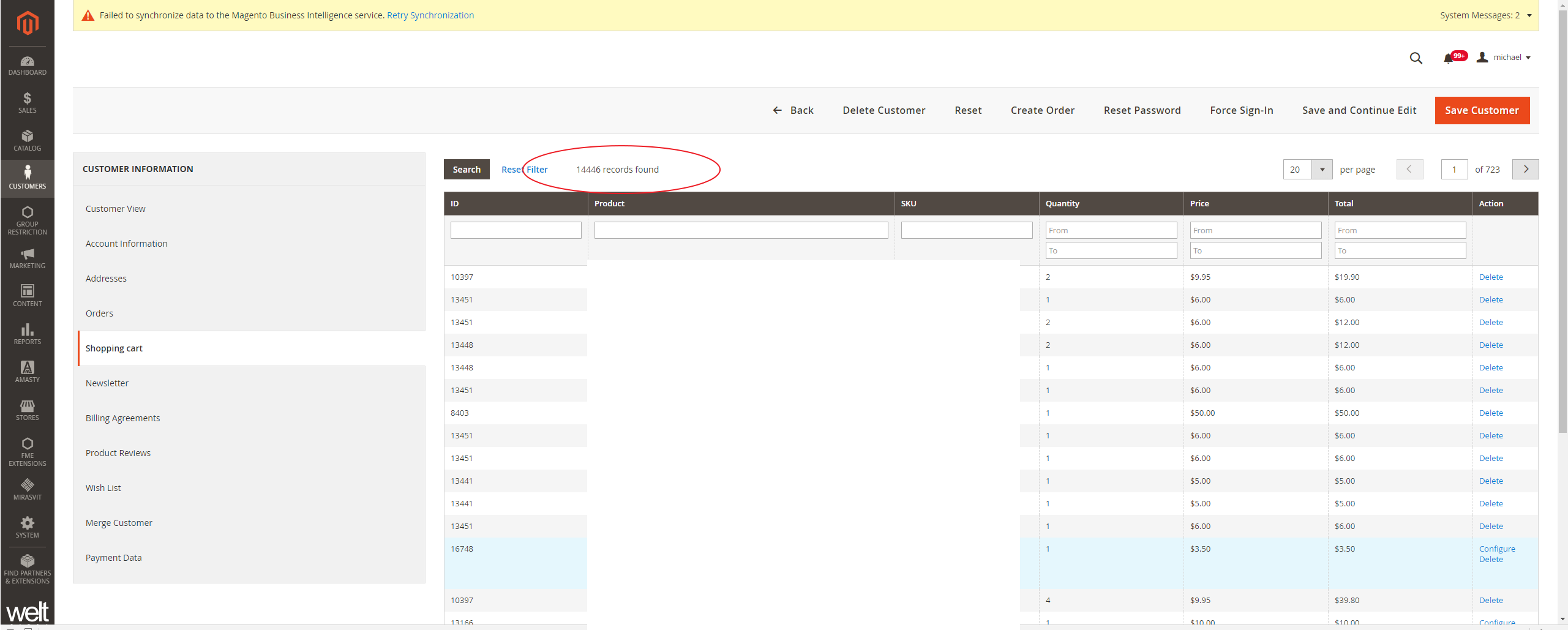
    Magento 2.3.3 Admin shows thousands of cart items for customers inflammation shopping cart tab

    I am facing this issue in the backend admin, in the customer Information, & Shopping Cart tab. It looks like the getQuote() function returns all cart items if no active quote is found for customer id.

    Screenshot :

    Please follow the below steps to fix this issue :=>

    Please create the following extension with a plugin

    1) Vendor/Module/etc/adminhtml/di.xml

    <?xml version="1.0"?>
    <config xmlns:xsi="http://www.w3.org/2001/XMLSchema-instance" xsi:noNamespaceSchemaLocation="urn:magento:framework:ObjectManager/etc/config.xsd">
        <preference for="MagentoCustomerBlockAdminhtmlEditTabCart" type="VendorModuleRewriteCustomerBlockAdminhtmlEditTabCart"/>
        <type name="MagentoSalesBlockAdminhtmlShoppingCartsTab">
            <plugin sortOrder="1" name="FixShoppingCartsTab"
                    type="VendorModulePluginBlockSalesShoppingCartsTab"/>
        </type>
    </config>
    

    2)Vendor/Module/Rewrite/Customer/Block/Adminhtml/Edit/Tab/Cart.php

    <?php
    namespace VendorModuleRewriteCustomerBlockAdminhtmlEditTab;
    
    use MagentoBackendBlockWidgetGridExtended;
    use MagentoFrameworkExceptionNoSuchEntityException;
    
    class Cart extends MagentoCustomerBlockAdminhtmlEditTabCart
    {
        /**
         * Added fix when customer do not have any active quote
         * Magento 2 issue: https://github.com/magento/magento2/issues/26437
         * Pull request: https://github.com/magento/magento2/pull/26489
         */
        protected function _prepareCollection()
        {
            $quote = $this->getQuote();
    
            if ($quote && $quote->getId()) {
                $collection = $quote->getItemsCollection(false);
                $collection->addFieldToFilter('parent_item_id', ['null' => true]);
            } else {
                $collection = $this->_dataCollectionFactory->create();
            }
    
            $this->setCollection($collection);
    
            return Extended::_prepareCollection();
        }
    
        protected function getQuote()
        {
            if (null === $this->quote) {
                $customerId = $this->getCustomerId();
                $storeIds = $this->_storeManager->getWebsite($this->getWebsiteId())->getStoreIds();
    
                try {
                    $this->quote = $this->quoteFactory->create()->setSharedStoreIds($storeIds)->loadByCustomer($customerId);
                } catch (NoSuchEntityException $e) {
                    $this->quote = $this->quoteFactory->create()->setSharedStoreIds($storeIds);
                }
            }
            return $this->quote;
        }
    }
    

    3)  Vendor/Module/Plugin/Block/SalesShoppingCartsTab.php

    <?php
    namespace VendorModulePluginBlock;
    
    use MagentoSalesBlockAdminhtmlShoppingCartsTab;
    
    class SalesShoppingCartsTab
    {
        public function afterGetTabUrl(ShoppingCartsTab $subject, $result)
        {
            return $subject->getUrl('customer/*/carts', ['_current' => true]);
        }
    }

    That’s it! You are done.

    Note:  This will only work for Magento 2.3.3 and higher.

    Please share your thoughts if this article helpful to you.

    Thanks.

    Magento 2: set layer navigation on advance search result page

    If you want to get layer navigation on the advance search result page, then you need to override on layout file in your theme which I have mentioned below.

    1, Create a new folder in your theme Magento_CatalogSearch/layout

    2. Then, create catalogsearch_advanced_result.xml file in Magento_CatalogSearch/layout folder and paste the below code.

    <?xml version="1.0"?>
    <!--
    /**
    * Copyright © Magento, Inc. All rights reserved.
    * See COPYING.txt for license details.
    */
    -->
    <page xmlns:xsi="http://www.w3.org/2001/XMLSchema-instance" layout="2columns-left" xsi:noNamespaceSchemaLocation="urn:magento:framework:View/Layout/etc/page_configuration.xsd">
    <body>
    <referenceBlock name="page.main.title">
    <action method="setPageTitle">
    <argument translate="true" name="title" xsi:type="string">Search Result</argument>
    </action>
    </referenceBlock>
    </body>
    </page>

    Magento 2: How to create a custom console command and run code using the command?

    Here is a simple hello world command run using the command

    – Please create the following module for command :

    app/code/Vendor/Module/registration.php

    <?xml version="1.0"?>
    <config xmlns:xsi="http://www.w3.org/2001/XMLSchema-instance" xsi:noNamespaceSchemaLocation="urn:magento:framework:Module/etc/module.xsd">
        <module name="Vendor_Module" setup_version="0.1.0"/>
    </config>
    • Create a new model class, it will contain the options, description, and logic of your command.

      app/code/Vendor/Module/Model/Generation.php

      namespace VendorModuleModel;
      
      use SymfonyComponentConsoleCommandCommand;
      use SymfonyComponentConsoleInputInputInterface;
      use SymfonyComponentConsoleOutputOutputInterface;
      
      class Generation extends Command
      {
          protected function configure()
          {
              $this->setName('custom:create')
                   ->setDescription('The description of you command here!');
      
              parent::configure();
          }
      
          protected function execute(InputInterface $input, OutputInterface $output)
          {
              $output->writeln('Hello World!');
          }
      }

      app/code/Andre/Tools/etc/di.xml

      <?xml version="1.0"?>
      <config xmlns:xsi="http://www.w3.org/2001/XMLSchema-instance" xsi:noNamespaceSchemaLocation="urn:magento:framework:ObjectManager/etc/config.xsd">
          <type name="MagentoFrameworkConsoleCommandList">
              <arguments>
                  <argument name="commands" xsi:type="array">
                      <item name="create" xsi:type="object">VendorModuleModelGeneration</item>
                  </argument>
              </arguments>
          </type>
      </config>

      Now, run upgrade command to register module : bin/magento setup:upgrade

      To run the command, just create :

      bin/magento custom:create.

    Then add your own logic under the execute() method.

    Please let us know if this article is helpful to you.

    Magento 2: Redirect Url with query string parameters

    If you want to redirect link with query string parameters using Magento ResultFactory, then you can use below script.

    You can make a link with a query string using  MagentoFrameworkUrlInterface;

    Here I have used that in the controller file.

    <?php
    namespace VendernameModulenameControllerIndex;
    use MagentoFrameworkControllerResultFactory;
    use MagentoFrameworkAppActionAction;
    use MagentoFrameworkAppActionContext;
    use MagentoFrameworkAppRequestDataPersistorInterface;
    use MagentoFrameworkViewElementMessages;
    use MagentoFrameworkDataObject;
    use MagentoFrameworkUrlInterface;
    
    class Post extends Action
    {
    
    
    protected $_inlineTranslation;
    protected $_transportBuilder;
    protected $_scopeConfig;
    protected $_logLoggerInterface;
    protected $urlBuilder;
    protected $_attributeRepository;
    
    public function __construct(
    MagentoFrameworkAppActionContext $context,
    MagentoFrameworkTranslateInlineStateInterface $inlineTranslation,
    MagentoFrameworkMailTemplateTransportBuilder $transportBuilder,
    MagentoFrameworkAppConfigScopeConfigInterface $scopeConfig,
    PsrLogLoggerInterface $loggerInterface,
    UrlInterface $urlBuilder,
    MagentoCatalogModelProductAttributeRepository $AttributeRepository,
    array $data = []
    
    )
    {
    $this->_inlineTranslation = $inlineTranslation;
    $this->_transportBuilder = $transportBuilder;
    $this->_scopeConfig = $scopeConfig;
    $this->_logLoggerInterface = $loggerInterface;
    $this->messageManager = $context->getMessageManager();
    $this->urlBuilder = $urlBuilder;
    $this->_attributeRepository = $AttributeRepository;
    
    
    parent::__construct($context);
    
    
    }
    
    public function execute()
    {
    $argument = array('q' => 'test');
    $redirecturl = $this->urlBuilder->getUrl('set-your-redirect-path', ['_current' => true,'_use_rewrite' => true, '_query' => $argument]);
    return $this->resultRedirectFactory->create()->setUrl($redirecturl);
    }
    
    
    }

    Note: I have tried this code with Magento 2.3.5 version.

    Magento 2: How to reload shipping rates on cart page using JS?

    Sometime when we reload cart page or add custom discount, the applied shipping rates doesn’t updates properly.

    Here I’m sharing the solution for it.

    We can reload shipping rates section in summary using JS. For that we have to add below JS script in our custom JS or cart page operation JS,

    For Example – We are using gift-card.js while applying gift card in cart page.  To reload shipping rates again:

    define([
        'Magento_Checkout/js/model/quote',
        'Magento_Checkout/js/model/shipping-rate-registry'
    ], function(mainQuote, rateReg){
        
    	var address = mainQuote.shippingAddress();
        rateReg.set(address.getKey(), null);
        rateReg.set(address.getCacheKey(), null);
        mainQuote.shippingAddress(address);
    });

    Now shipping rates will reload after your JS op ration and total should be display properly in summary section.

    How to connect/configure Magento 2 and RabbitMQ?

    Install the RabbitMQ on Ubuntu by using below command.

    sudo apt install -y rabbitmq-server

    Install Magento with RabbitMQ. And connect to Magento Open Source or Magento Commerce.

    --amqp-host="<hostname>" --amqp-port="5672" --amqp-user="<user_name>" --amqp-password="<password>" --amqp-virtualhost="/"

    Connect RabbitMQ

    If you already had Magento installed and you want to connect it to RabbitMQ, add a queue section in the <install_directory>/app/etc/env.php file

    'queue' =>
      array (
        'amqp' =>
        array (
          'host' => 'localhost',
          'port' => '5672',
          'user' => 'example',
          'password' => 'example',
          'virtualhost' => '/'
         ),
      ),

    Then, run bin/magento setup:upgrade to apply the changes & create the required queues in RabbitMQ.

    To enable RabbitMQ:

    Add the required name, type, and disk value (in MB) to the .magento/services.yaml file along with the installed RabbitMQ version.

    rabbitmq:
        type: rabbitmq:<version>
        disk: 1024

    Configure the relationships in the .magento.app.yaml file.

    relationships:
        rabbitmq: "rabbitmq:rabbitmq"

    Add, commit, and push your code changes.

    git add -A
    git commit -m "Enable RabbitMQ service"
    git push origin <branch-name>

    Verify the service relationships.

    Retrieve the RabbitMQ connection details :

    php -r 'print_r(json_decode(base64_decode($_ENV["MAGENTO_CLOUD_RELATIONSHIPS"])));'


    How to build an eCommerce Website in 2023?

    Looking at the current scenario people have created a habit of buying things online by sitting at ease at home and this habit is going to remain permanent.

    I am assuming that you already know what is eCommerce and have landed on this page as you have made the decision to join the world of eCommerce by selling something online. It could be your existing products or you may be buying from multiple sources and selling online(What most people do).

    Here I will try to explain what are essentials you should work on to start an eCommerce website and what best technological platform will be useful for that.

    Let’s see some statistics here so you can make the right decision on if it is wise for you to jump into eCommerce or not.
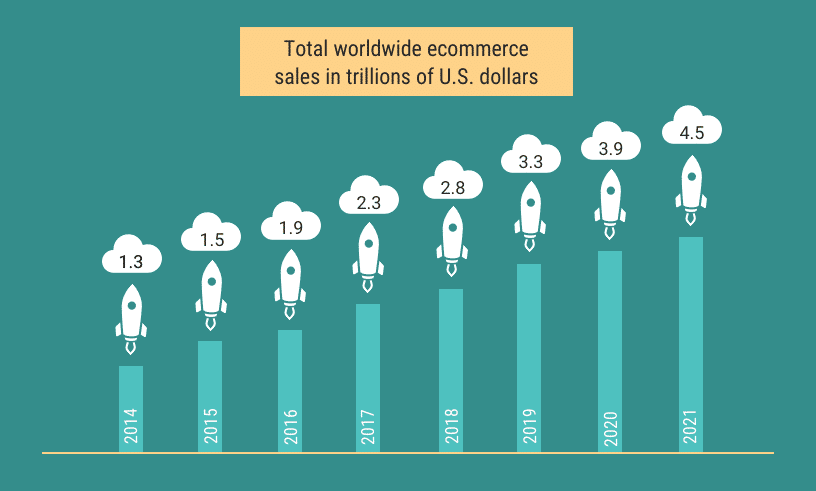
    Worldwide ecommerce sales

    Worldwide eCommerce sales (Image source: Shopify)

    eCommerce Statistics to consider while building a website in 2023
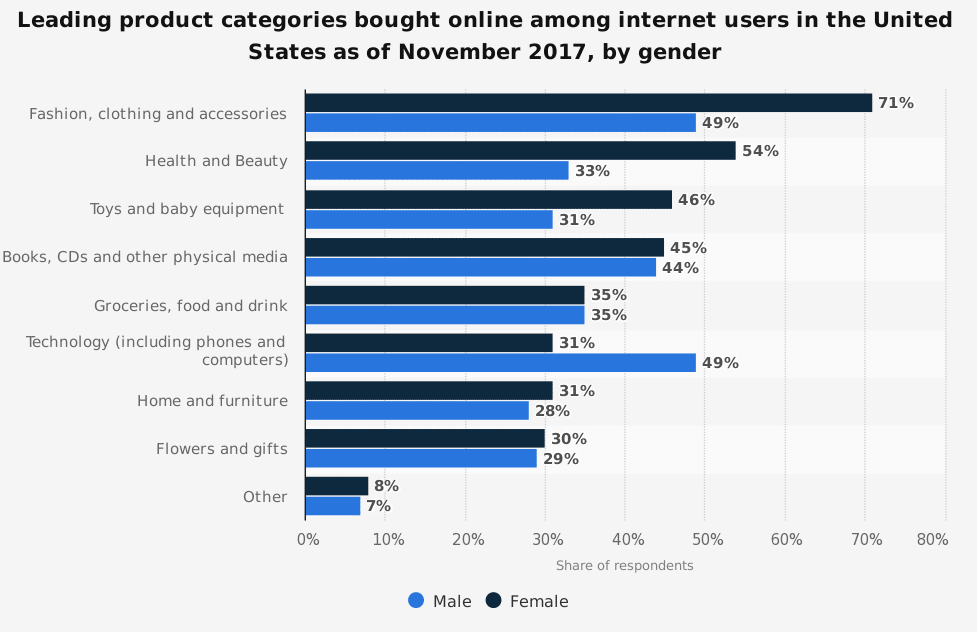
    U.S. online shopping categories overview
    Source: Statista

    1. 61% of eCommerce purchases in the world have been based on recommendations from a blog and influencers. (Content Marketing Institute)
    2. First online shopping purchase of almost 59% of Millennials is through Amazon, that makes Amazon one of the biggest eCommerce store in the world. (Inviqa)
    3. Statistics says it is the best time to start an eCommerce right now, by the year 2040 almost 95% of all the purchase made in the world will be through eCommerce. (Nasdaq)
    4. In 2020,  Amazon accounted for 47% of all US eCommerce sales, which will touch 50% in the year 2021. Statista
    5. There is a very high amount (55%) of customers who buy things online tell friends and family when they are dissatisfied with their eCommerce service or product they consumed. (UPS)
    6. Out of the total people using the internet, 93.5% of them have purchased have done eCommerce transactions at least once as of now. (OptinMonster)
    7. The average growth of the eCommerce industry from the last 10 years is at 23% but still, around 50% of businesses in the USA don’t have eCommerce websites. (BigCommerce)
    8. The Next Boom in the eCommerce industry is going to come in B2B business and 69% of B2B businesses say they are going to stop printing the marketing material in the next 2-5 years. (B2XPartners)
    9. Only 2.86% of eCommerce website visits convert into a purchase, so if your site is converting more than this than consider yourself very lucky and give a bonus to your digital marketing team (Invesp)
    10. A survey has found that No. 1 reason people do online shopping as they can shop anytime in the day without any time restrictions. (KPMG)

    Now let’s go through the points which you need to consider before you start building an eCommerce website, these points will help you to list features and functionalities required to build your website.

    Here I am assuming that you have done good research on what products you want to sell online as without having good products to sell thinking about eCommerce is waste of time.

    Initial research and strategies for your eCommerce store:

    • Whom to sell – Your Target Audience

    It is imperative to define your target audience as per the products you are trying to sell, If you are trying to sell baby products than mothers are the most suitable target audience than fathers. If you are trying to sell gifting products then emotion plays a major role in gifting and women should be your major target. If you are trying to sell Electronic products then men are making a major decision and if they are white goods then women are the decision-maker.

    • How to reach your Target audience?

    After the advancement of social media like Facebook, Instagram, Twitter, Snapchat reaching your target audience has become very easy. You can create an advertisement and target the exact age, sex, city, marital status, and interest of your target audience. Not only that in these advertisements you can even set on what time you want to showcase your advertisements. It is been known that if you want to get maximum sell then you need to target your advertisement at night time after 8 pm when people are just passing time on social media and have enough time to make a decision and purchase your product.

    • Use your competitors to your advantage

    Why reinvent the wheel, before you make your marketing plan you need to thoroughly research your competitors and their marketing activities, you need to research the tone of their text, what kind of blogs they are writing, what kind of content they are publishing on social media, now if you go to the Facebook page of your competitor you can even know all the advertisements they are running currently on Facebook. You can analyze their keywords and source of traffic with tools like SpyFu, QuickSprout, and SimilarWeb, and target the people they’re targeting.

    • Where and how you are managing the stock or you planning dropshipping?

    It is very important to have an effective plan to manage the stock or have a dropshipping model. You have to ensure your business has sufficient stock in hand to meet customer demand. If you are a newbie in the eCommerce industry and want to save money on warehouse and storage then Dropshipping is best for you as you don’t have to handle the product directly.

    • How are you going to manage shipping and returns?

    Another big part of knowing how to start an online store is deciding how you’ll be shipping your products, AKA where you’ll be doing business. You have to consider various aspects of shipping like methods & rates, packaging, shipping solutions. According to research, every year 30% of orders get returned. Renowned eCommerce stores offer return options with the required flexibility and precautions.

    • What are your marketing strategies and if you are going to have a budget to spend on marketing?

    Some of the effective marketing strategies are:
    – Email Marketing
    – Content Marketing
    – PPC
    – Social Media Marketing
    – Search Engine Optimization
    – Influencer Marketing
    – Affiliate Marketing

    Try and find out which strategy will give you the best impact. Determine your budget, whether it’s based on a fixed income or a percentage of revenue, This way it will be easier for you to allocate resources and measure the results of your campaigns.

    • How are your costs and your markups?

    When pricing a product for your eCommerce store consider these 4 angles:

      • Your costs: Your costs will be a prime consideration of your pricing to have a sustainable business.

      • Your competition: know your competitors’ pricing model.

      • Psychology of your buyer: Understand your customer and learn what they are looking for (budget option: priced cheaper than your competitor)

      • The market. Once your business met the costs, how much more do you want to have of surplus

    There are multiple points you should consider for products:

    • How many different SKU’s you will have?
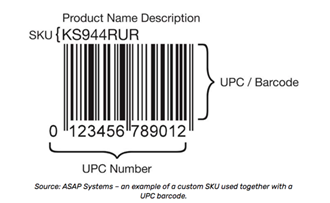
    https://lh4.googleusercontent.com/QiZ9U2ugI0CIQnJgZlhi166HBe2ctQ89c2jZqiIzHDCD4CbS1PL6oWgM435yXPQyAOqP4ltqBbNHZuu9AQrhenga4lCsIemDzyU4jeFvPPGvrCuelZfrcHyXSByscm2hqnz7k-3l

    Each company assigns its own SKU numbers. SKU’s are used to uniquely identify inventory (“What is it?”), track inventory (“Where is it?”), replenish inventory (“Do I have enough of it?”) and manage inventory in terms of turnover rates and profitability (“Do I have enough of it to keep selling or is it just wasting my money?”)

    • Is your product consumable and can you offer a subscription service? 

    Consumable products offer a better opportunity and also generate repeat business from your previous one. Offer subscription service to build your lifetime customer value and keep easing them towards that buy button.

    • What is your product weight and size?

    Sales are greatly affected by the size and weight of your product. Your potential buyer may abundant the cart as shipping expense increases due to oversized and heavy product Size.

    • The durability of your product

    A durable product is always more ideal. Product durability will reduce your overall shipping costs and prevent breakage during shipping. It is important to design the package for durability, safe transport, cost savings, and attractiveness.  If your packaging is not done correctly then it’s prone to damage during transit which may undo all the efforts that you put into the product before then.

    • Is your product a Luxury or a Need?

    Customers’ wants, needs, and motivations are very different from the standard retail shopper. There is a huge difference in how these kinds of products are marketed and sold through a website. The customer may be looking either for the basic necessities products or luxurious products. For example, as per the latest trends, the needy products will be sanitizers, masks, gloves, blankets, and other such items. On the other hand, the luxurious products will include fashion apparel such as clothes, jewelry, branded mobile phones, etc.

    Now once you do initial research your actual eCommerce building should start.

    Steps to be taken for building an eCommerce website

    • Book a domain

    Secure your business domain name as early as you can.  It will lead to avoiding being forced to adopt a moniker or web address that is similar to a competitor. Pick a domain name that customers can relate to the nature of your venture. Give priority to the .com extension as it’s good for SEO, if you don’t get the .com extension to try for your country extension like if you are in the UK try for .co.UK and in Australia try for .co.au

    • Select an eCommerce platform (Shopify, WooCommerce, Magento)
      • If you are a start-up and with a very limited budget and want to sell simple non-complicated products and you don’t want customizations in your eCommerce then Shopify is a good option to start with.  You can connect with http://www.shopysquad.com/ to build your Shopify eCommerce site, they have cost-effective solutions for start-ups and are expert in the field.

      • If you are a start-up with some budget than WooCommerce from WordPress is one good option, creating a site in WooCommerce will not only help you with eCommerce but it has a good CMS platform which will help you to publish good SEO friendly content. You can connect with http://www.wordpresswolves.com/ to build your WooCommerce eCommerce site, they are a leader in giving the solution on WordPress and have good experience in building WooCommerce based eCommerce websites.

      • If you are an existing merchant and want to start selling goods online and have proper plans of making a successful eCommerce store then Magento is the best solution, being an open-source software you can own the store and it has a wide range of plugins available in the market to make any kind of customizations in your store easy to implement. If you are going for Magento based solution then there is no better company than www.magemonkeys.com they have a dedicated pool of expert certified Magento developers who can launch your store successfully

    • List the features you want in your eCommerce website

    Create a spreadsheet and make a list of the features and capabilities that you want in your eCommerce store. Examples of features :

    1. Do you want integration of your website with third-party software?
    2. Do you want to manage inventory on the website?
    3. Do you want a multicurrency Multilanguage website?
    4. Do you want a module to manage the return of the goods?
    5. Do you want abandon cart automated email

    There are such 100’s of features that are not default in eCommerce but are of prime importance in your category of products and you must study these features beforehand and let your developer know about these features.

    • Register for your payment gateway

    To operate independently, it is crucial to integrate multiple payment options (net banking, credit/debit card, mobile wallets, PayPal, etc.) into your online website that can provide a smooth transaction experience to the customers. Take all necessary steps to ensure the entire payment process is completely secure and compliant with the relevant information security policies.

    •  Register your shipping partner

    Get in touch with various shipping services nationally and internationally to meet the different needs of shipping as per the products/goods to deliver. Most of the eCommerce platforms are integrated with shipping calculators which confer the shipping rates before generating a final invoice for payment.

    • Look for a professional agency who Is master in your selected platform

    A professional agency will help you with the challenges ahead and overcome any existing problems. While you focus on increasing your business, they will handle the technical challenges aiding that growth. So, find a professional agency that is best suited for your business needs. The success of your eCommerce website is largely dependent on your agency partner. Choose wisely.

    •  Create social media channels

    https://lh3.googleusercontent.com/quo3I5y8TA1IGATbF6wJlyRx3-hAuDgRQ-pOabj28hX_--yQwICEa3tTuiRLC9O0qvUSfZNjapV7Mci59jfyTxNnO7VZDha1zFLNCbCEDuV_kYdlQBhgCkxIVNGhTEy0B5Bo0vpD

    Social media is the most influential tool for eCommerce websites. It can connect with direct shoppers and also attract them towards the new product. It can engage with them and create a sense of community which is incredibly useful. eCommerce websites can create brand awareness and can also bring traffic to your site.

    • Hire a marketing agency

    The eCommerce marketing agency will create untapped revenue from PPC campaigns, SEO, email marketing campaigns, and more. The top-notched marketing agencies are updated with the latest tools and technologies to assist their clients to boost up their marketing efforts. They know what works and what doesn’t and can provide custom-made recommendations that meet your business needs. This will enhance your marketing productivity and save your time.

    Here are the certain features for specific categories which should be essential If you want to make your eCommerce site successful

    Fashion
    Electronic
    Cosmetic/healthcare
    How to get configuration settings values in web .html file in Magento 2?

    In Magento 2, there are two types of template files. One is .phtml and second one is .html files under web/template directory.

    In .phtml we easily get the config value, but it’s tricky to get config value in web template files which we are going to cover in this article.

    You have to follow below steps :

    Step 1 : Add below code to your web .js file:

    app/code/[Vendor]/[ModuleName]/view/frontend/web/js/[DirectoryName]/[JsFileName].js
    define([
        'ko',
        'jquery',
        'uiComponent',
        'mage/storage',
        'mage/url'
    ], function (ko, $, Component, storage, url) {
        'use strict';
    
        return Component.extend({
            defaults: {
                template: 'Vendor_ModueName/[DirectoryName]/[TemplateFileName]'
            },
            getconfigSettingValue: function () {
                var serviceUrl = url.build('modulename/configsetting/settingfieldid');
    
                storage.get(serviceUrl).done(
                    function (response) {
                        if (response.success) {
                            return response.value
                        }
                    }
                ).fail(
                    function (response) {
                        return response.value
                    }
                );
                return false;
            }
        });
    });

    Step 2 : Create controller

    app/code/[Vendor]/[ModuleName]/Controller/[DirectoryName]/ControllerFileName.php

    Add below code

    namespace [Vendor][ModuleName]Controller[DirectoryName];
    
    class ControllerFileName extends MagentoFrameworkAppActionAction
    {
    
        protected $resultJsonFactory;
    
        protected $storeManager;
    
        protected $scopeConfig;
    
        public function __construct(
            MagentoFrameworkAppActionContext $context,
            MagentoFrameworkControllerResultJsonFactory $resultJsonFactory,
            MagentoStoreModelStoreManagerInterface $storeManager,
            MagentoFrameworkAppConfigScopeConfigInterface $scopeConfig
        ) {
            $this->resultJsonFactory = $resultJsonFactory;
            $this->storeManager = $storeManager;
            $this->scopeConfig = $scopeConfig;
            parent::__construct($context);
        }
    
        /**
         * Execute view action
         *
         * @return MagentoFrameworkControllerResultInterface
         */
        public function execute()
        {
            $response = [];
            try {
                $configValue = $this->scopeConfig->getValue(
                    'your/path/config',
                    MagentoStoreModelScopeInterface::SCOPE_STORE
                );
                $response = [
                    'success' => true,
                    'value' => __($configValue)
                ];
    
            } catch (Exception $e) {
                $response = [
                    'success' => false,
                    'value' => __($e->getMessage())
                ];
                $this->messageManager->addError($e->getMessage());
            }
            $resultJson = $this->resultJsonFactory->create();
            return $resultJson->setData($response);
        }
    
    }

    Step 3 : Get config value as per below code in .html file.

    <div class="config-setting-value" data-bind="html: getconfigSettingValue"></div>