We sacrifice by not doing any other technology, so that you get the best of Magento.

We sacrifice by not doing any other technology, so that you get the best of Magento.

    Create Admin Theme in Magento 2

    Here we will explain how to create admin theme and how to apply the admin theme in Magento 2.

    First we need to switch the Magento 2 application to the developer mode.

    php bin/magento deploy:mode:set developer

    Create Admin Theme

    Now, we will explain step-by-step that what should be done.

    Step 1: First create a <VendorName>/<theme name> folder at the app/design/adminhtml path for the new Magento admin theme.

    Here we use Magemonkeys as VendorName and backend as theme name so path would be like this app/design/adminhtml/Magemonkeys/backend/

    Step 2: In order to define Magento themes in the theme root folder create a theme.xml file at app/design/adminhtml/Magemonkeys/backend/ and paste the below code:

    <?xml version="1.0"?>
    <theme xmlns:xsi="http://www.w3.org/2001/XMLSchema-instance" xsi:noNamespaceSchemaLocation="urn:magento:framework:Config/etc/theme.xsd">
        <title>Magemonkeys Admin Theme</title>
        <parent>Magento/backend</parent>
    </theme>

    Step 3: In order to register a theme in the system & theme folder create a registration.php file at app/design/adminhtml/Magemonkeys/backend/ and paste the below code :

    <?php
    MagentoFrameworkComponentComponentRegistrar::register(
        MagentoFrameworkComponentComponentRegistrar::THEME,
        'adminhtml/Magemonkeys/Backend',
        __DIR__
    );

    Step 4: Now we changed the logo on the admin login page and in the dashboard.  So put your images in the app/design/adminhtml/Magemonkeys/backend/web/images folder to save the media file.

    Create a Module to apply an admin theme

    Step 1: The theme has already been created, but it is still unconnected. We create a specialised <VendorName>/<ModuleName> module in the app/code/ folder to connect the admin theme.

    We will show you an example of a Magemonkeys/Backend module for the following path: app/code/Magemonkeys/Backend

    Step 2: create a registration.php file in the app/code/Magemonkeys/Backend folder with the following code:

    <?php
        MagentoFrameworkComponentComponentRegistrar::register(
        MagentoFrameworkComponentComponentRegistrar::MODULE,
        'Magemonkeys_Backend',
        __DIR__
    );

    Step 3: Create a module.xml and di.xml file in the app/code/Magemonkeys/Backend/etc folder.

    copy below code and add in module.xml

    <?xml version="1.0"?>
    <config xmlns:xsi="http://www.w3.org/2001/XMLSchema-instance" xsi:noNamespaceSchemaLocation="urn:magento:framework:Module/etc/module.xsd">
        <module name="Magemonkeys_Backend" setup_version="0.0.1">
            <sequence>
                <module name="Magento_Theme"/>
            </sequence>
        </module>
    </config>

    copy below code and add in di.xml

    <?xml version="1.0"?>
    <config xmlns:xsi="http://www.w3.org/2001/XMLSchema-instance" xsi:noNamespaceSchemaLocation="urn:magento:framework:ObjectManager/etc/config.xsd">
        <type name="MagentoThemeModelViewDesign">
            <arguments>
                <argument name="themes" xsi:type="array">
                    <item name="adminhtml" xsi:type="string">Magemonkeys/Backend</item>
                </argument>
            </arguments>
        </type>
    </config>

    Step 4: Create a admin_login.xml file in the app/code/Magemonkeys/Backend/view/adminhtml/layout/ folder with the following code:

    <?xml version="1.0"?>
    <page xmlns:xsi="http://www.w3.org/2001/XMLSchema-instance" layout="admin-login" xsi:noNamespaceSchemaLocation="urn:magento:framework:View/Layout/etc/page_configuration.xsd">
        <update handle="styles" />
        <body>
            <referenceBlock name="logo">
                <arguments>
                    <argument name="logo_image_src" xsi:type="string">images/dws_logo.jpg</argument>
                </arguments>
            </referenceBlock>
        </body>
    </page>

    Step 5: Create a default.xml file in the app/code/Magemonkeys/Backend/view/adminhtml/layout/ folder with the following code:

    <?xml version="1.0"?>
    <page xmlns:xsi="http://www.w3.org/2001/XMLSchema-instance" layout="admin-1column" xsi:noNamespaceSchemaLocation="urn:magento:framework:View/Layout/etc/page_configuration.xsd">
        <body>
            <referenceContainer name="header">
                <block class="MagentoBackendBlockPageHeader" name="logo" before="-">
                    <arguments>
                        <argument name="show_part" xsi:type="string">logo</argument>
                        <argument name="logo_image_src" xsi:type="string">images/dws_admin.png</argument>
                    </arguments>
                </block>
            </referenceContainer>
        </body>
    </page>

    Step 5: Now run the following command:

    php bin/magento setup:upgrade
    php bin/magento setup:static-content:deploy –f
    php bin/magento cache:clean


    How to get public key for phpseclib version 3 using public key loader?

    Please check the difference between Phpseclib versions 2 and 3 for getting the public key.
    For Phpseclib version 2:
    <?php
    use phpseclibCryptRSA;
    use FirebaseJWTJWT;
    use phpseclibMathBigInteger;
    
    $rsa = new RSA();
    $rsa->loadKey([
        'e' => new BigInteger(JWT::urlsafeB64Decode($e), 256),
        'n' => new BigInteger(JWT::urlsafeB64Decode($n),  256)
    ]);
    echo $rsa->getPublicKey(); //get the Public Key
    ?>
    For Phpseclib version 3:
    <?php
    use phpseclib3CryptRSA;
    use phpseclib3CryptPublicKeyLoader;
    use phpseclib3MathBigInteger;
    use FirebaseJWTJWT;
    
    $key = PublicKeyLoader::load([
        'e' => new BigInteger(JWT::urlsafeB64Decode($e), 256),
        'n' => new BigInteger(JWT::urlsafeB64Decode($n),  256)
    ]);
    
    echo $key; //get the Public Key
    ?>


    How to remove leading zero’s from the order, invoice and shipment number in Magento 2?

    If you want to remove all leading zero’s from order, invoice and shipment number in Magento 2 then follow below steps

    Step 1: Create Registration

    Create registration.php file in the app/code/Magemonkeys/Ordersequence folder with the following code.

    <?php
    MagentoFrameworkComponentComponentRegistrar::register(
        MagentoFrameworkComponentComponentRegistrar::MODULE,
        'Magemonkeys_Ordersequence',
        __DIR__
    );

    Step 2: Create a module

    Create a module.xml file in the app/code/Magemonkeys/Ordersequence/etc folder with the following code.

    <?xml version="1.0"?>
     
    <config xmlns:xsi="http://www.w3.org/2001/XMLSchema-instance" xsi:noNamespaceSchemaLocation="urn:magento:framework:Module/etc/module.xsd">
        <module name="Magemonkeys_Ordersequence" setup_version="1.0.0"></module>
    </config>

    Step 3: Create a di

    Create a di.xml file in the app/code/Magemonkeys/Ordersequence/etc folder with the following code.

    <?xml version="1.0"?>
    <config xmlns:xsi="http://www.w3.org/2001/XMLSchema-instance" xsi:noNamespaceSchemaLocation="urn:magento:framework:ObjectManager/etc/config.xsd">
        <type name="MagentoFrameworkDBSequenceSequenceInterface">
            <arguments>
                <argument name="pattern" xsi:type="string">%s%'.06d%s</argument>
            </arguments>
        </type>
    </config>

    Step 4 : After place above code, please run below mentioned commands

    - php bin/magento setup:upgrade
    
    - php bin/magento setup:static-content:deploy
    
    - php bin/magento cache:clean

    That’s it.

    Now refresh your admin order page and see that leading zero’s should be removed.

    Magento 2 : Override the Category view block file

    Override view block using di.xml and add the below code into that file
    <preference for="MagentoCatalogBlockCategoryView" type="VendorModuleBlockCategoryView"/>

    Create the View.php file under your custom module with this path Vendor/Module/Block/Category/View.php and add the below code.

    <?php
    
    namespace VendorModuleBlockCategory;
    
    use MagentoCatalogApiProductRepositoryInterface;
    use MagentoCatalogModelCategory;
    
    class View extends MagentoCatalogBlockCategoryView
    {
        protected $_urlInterface;
    
        public function __construct(
            MagentoFrameworkViewElementTemplateContext $context,
            MagentoCatalogModelLayerResolver $layerResolver,
            MagentoFrameworkRegistry $registry,
            MagentoCatalogHelperCategory $categoryHelper,
            MagentoFrameworkUrlInterface $urlInterface,
            array $data = []
        ) {
            $this->_urlInterface = $urlInterface;
            $this->_categoryHelper = $categoryHelper;
            $this->_catalogLayer = $layerResolver->get();
            $this->_coreRegistry = $registry;
            parent::__construct($context, $layerResolver, $registry, $categoryHelper, $data);
        }
    
        protected function _prepareLayout()
        {
            parent::_prepareLayout();
    
            $this->getLayout()->createBlock(MagentoCatalogBlockBreadcrumbs::class);
    
            $category = $this->getCurrentCategory();
            if ($category) {
                $title = $category->getMetaTitle();
                if ($title) {
                    $this->pageConfig->getTitle()->set($title);
                }
                $description = $category->getMetaDescription();
                if ($description) {
                    $this->pageConfig->setDescription($description);
                }
                $keywords = $category->getMetaKeywords();
                if ($keywords) {
                    $this->pageConfig->setKeywords($keywords);
                }
                if ($this->_categoryHelper->canUseCanonicalTag()) {
                    $this->pageConfig->addRemotePageAsset(
                        $category->getUrl(),
                        'canonical',
                        ['attributes' => ['rel' => 'canonical']]
                    );
                }
    
                $pageMainTitle = $this->getLayout()->getBlock('page.main.title');
                if ($pageMainTitle) {
                    $pageMainTitle->setPageTitle($this->getCurrentCategory()->getName());
                }
            }
    
            return $this;
        }
    }


    Magento 2 : Setup PWA from Scratch

    Follow the below steps to install and set up PWA in 2.3 :

    Prerequisite :
    You must have a version of  NodeJS >=10.14.1 , and Yarn > = 1.13.0. I suggest using the Latest versions of both are recommended.

    1 ) Use the following command :

    composer create-project --repository-url=https://repo.magento.com/ magento/project-community-edition /var/www/html/m23

    /var/www/html/m23 is a Magento installation directory.

    2 ) Install Magento by Command Line:

    php bin/magento setup:install --base-url=http://localhost/m23 --db-host=localhost --db-name=nik_m23 --db-user=root --db-password=webkul --admin-firstname=John --admin-lastname=Doe --admin-email=test@webkul.com --admin-user=admin --admin-password=admin123 --backend-frontname=admin_magento --language=en_US --currency=USD --timezone=Asia/Tbilisi --cleanup-database --use-rewrites=1

    While you have completed with Magento installation, Now
    3 ) Now clone pwa-studio repository :

    https://github.com/magento-research/pwa-studio.git
    git clone https://github.com/magento-research/pwa-studio.git

    I have cloned this repository in magento root directory ex: /var/www/html/m23
    4 ) You will see the pwa-studio directory in /var/www/html/m23.
    Enter into this directory :

    cd pwa-studio/

    5 ) Run :

    yarn install

    6 ) Specify the Magento backend server in .env file. you can see the .env.dist file in
    /var/www/html/m23/pwa-studio/packages/venia-concept/ direcoty. If you are not
    able see, enable show hidden files. Now create .env file from this env.dist

    cp packages/venia-concept/.env.dist packages/venia-concept/.env

    7 ) Open this .env file and find MAGENTO_BACKEND_URL. Here configure your
    local Magento 2.3 instance, my case it is :

    MAGENTO_BACKEND_URL="https://magento2-pwa.com/"

    7.1 Generate SSL certificate because PWA features require an HTTPS Secure Domain. From the root directory of PWA (/PWA-studio) run the below command:

    yarn buildpack create-custom-origin packages/venia-concept

    Note: 7.1 Feature requires administrative access.

    8 ) Now let’s install sample data for venia-theme to make it good-looking.

    9 ) Run the following command in the Magento root directory setup the repository for the sample data in https://repo.magento.com: composer config –no-interaction –ansi repositories.venia-sample-data composer https://repo.magento.com

    9 )  Require in the sample data :

    composer require --no-interaction --ansi magento/venia-sample-data:*
    

    10 ) Now go back to pwa-studio directory /var/www/html/m23/pwa-studio and start Server.

    yarn run build

    The above command maybe gives the permission error, so run the below command with sudo.

    sudo yarn run build

    12 ) Run the server, Use any of the following commands from the project root directory to start the server:

    yarn run watch:venia
    yarn run watch:all
    yarn run build && yarn run stage:venia

    Last steps to run the following commands :

    bin/magento setup:upgrade 
    
    bin/magento indexer:reindex
    
    bin/magento cache:flush

    You are Done! 🙂


    Add an image programmatically from any url in Magento 2

    <?php
    /**
     * file location:
     * app/code/VendorName/ExtensionName/Service/ImportImageService.php
     */
    
    namespace VendorNameExtensionNameService;
    
    use MagentoCatalogModelProduct;
    use MagentoFrameworkAppFilesystemDirectoryList;
    use MagentoFrameworkFilesystemIoFile;
    
    /**
     * Class ImportImageService
     * assign images to products by image URL
     */
    class ImportImageService
    {
        /**
         * Directory List
         *
         * @var DirectoryList
         */
        protected $directoryList;
    
        /**
         * File interface
         *
         * @var File
         */
        protected $file;
    
        /**
         * ImportImageService constructor
         *
         * @param DirectoryList $directoryList
         * @param File $file
         */
        public function __construct(
            DirectoryList $directoryList,
            File $file
        ) {
            $this->directoryList = $directoryList;
            $this->file = $file;
        }
    
        /**
         * Main service executor
         *
         * @param Product $product
         * @param string $imageUrl
         * @param array $imageType
         * @param bool $visible
         *
         * @return bool
         */
        public function execute($product, $imageUrl, $visible = false, $imageType = [])
        {
            /** @var string $tmpDir */
            $tmpDir = $this->getMediaDirTmpDir();
            /** create folder if it is not exists */
            $this->file->checkAndCreateFolder($tmpDir);
            /** @var string $newFileName */
            $newFileName = $tmpDir . baseName($imageUrl);
            /** read file from URL and copy it to the new destination */
            $result = $this->file->read($imageUrl, $newFileName);
            if ($result) {
                /** add saved file to the $product gallery */
                $product->addImageToMediaGallery($newFileName, $imageType, true, $visible);
            }
    
            return $result;
        }
    
        /**
         * Media directory name for the temporary file storage
         * pub/media/tmp
         *
         * @return string
         */
        protected function getMediaDirTmpDir()
        {
    
            return $this->directoryList->getPath(DirectoryList::MEDIA) . DIRECTORY_SEPARATOR . 'tmp' . DIRECTORY_SEPARATOR;
        }
    }

    Using above fucntion Images can be imported directly from external url.

    How to check list of Layout XML called for a specific page in Magento 2?

    You can check a list of called layout XML for specific pages by MagentoFrameworkAppView class.

    Call getLayout() method from MagentoFrameworkAppView.php class.

    getLayout()->getUpdate()->getHandles() is used for getting all the handles of a page.

    You need to add the following code at the end of root index.php file to check XML files.

    $objectManager = MagentoFrameworkAppObjectManager::getInstance();
    $xmlLayout = $objectManager->get(MagentoFrameworkAppView::class);
    var_dump($xmlLayout->getLayout()->getUpdate()->getHandles());

    To check for a specific page, You need to call the function as below:

    public function __construct(
        MagentoFrameworkAppViewInterface $view
    ) {
        $this->view = $view;
    }

    Call Inside a function,
    $loadedHandles = $this->view->getLayout()->getUpdate()->getHandles();

    Now you can print the result $loadedHandles from above expression.

    Magento 2 : How to override quote merge file?

    Use this tutorial to override quote merge file. Using this tutorial, you can customize quote merge while adding any custom code at the time of customer and guest quote merge

    Module Name : Magemonkeys:Quotemerge

    Create di.xml in /etc folder

    <?xml version="1.0"?>
    <config xmlns:xsi="http://www.w3.org/2001/XMLSchema-instance" xsi:noNamespaceSchemaLocation="urn:magento:framework:ObjectManager/etc/config.xsd">
    <preference for="MagentoCheckoutModelSession" type="MagemonkeysQuotemergeModelSession" />
    </config>

    Create Session.php in /Model folder

    <?php
    /**
     * Copyright © Magento, Inc. All rights reserved.
     * See COPYING.txt for license details.
     */
    namespace MagemonkeysQuotemergeModel;
    
    use MagentoCustomerApiDataCustomerInterface;
    use MagentoFrameworkAppObjectManager;
    use MagentoFrameworkExceptionNoSuchEntityException;
    use MagentoQuoteApiDataCartInterface;
    use MagentoQuoteModelQuote;
    use MagentoQuoteModelQuoteIdMaskFactory;
    use PsrLogLoggerInterface;
    
    /**
     * Represents the session data for the checkout process
     *
     * @api
     * @SuppressWarnings(PHPMD.CouplingBetweenObjects)
     * @SuppressWarnings(PHPMD.CookieAndSessionMisuse)
     * @SuppressWarnings(PHPMD.TooManyFields)
     * @since 100.0.2
     */
    class Session extends MagentoCheckoutModelSession
    {
        const CHECKOUT_STATE_BEGIN = 'begin';
    
        /**
         * Quote instance
         *
         * @var Quote
         */
        protected $_quote;
    
        /**
         * Customer Data Object
         *
         * @var CustomerInterface|null
         */
        protected $_customer;
    
        /**
         * Whether load only active quote
         *
         * @var bool
         */
        protected $_loadInactive = false;
    
        /**
         * A flag to track when the quote is being loaded and attached to the session object.
         *
         * Used in trigger_recollect infinite loop detection.
         *
         * @var bool
         */
        private $isLoading = false;
    
        /**
         * Loaded order instance
         *
         * @var MagentoSalesModelOrder
         */
        protected $_order;
    
        /**
         * @var MagentoSalesModelOrderFactory
         */
        protected $_orderFactory;
    
        /**
         * @var MagentoCustomerModelSession
         */
        protected $_customerSession;
    
        /**
         * @var MagentoQuoteApiCartRepositoryInterface
         */
        protected $quoteRepository;
    
        /**
         * @var MagentoFrameworkHTTPPhpEnvironmentRemoteAddress
         */
        protected $_remoteAddress;
    
        /**
         * @var MagentoFrameworkEventManagerInterface
         */
        protected $_eventManager;
    
        /**
         * @var MagentoStoreModelStoreManagerInterface
         */
        protected $_storeManager;
    
        /**
         * @var MagentoCustomerApiCustomerRepositoryInterface
         */
        protected $customerRepository;
    
        /**
         * @param QuoteIdMaskFactory
         */
        protected $quoteIdMaskFactory;
    
        /**
         * @param bool
         */
        protected $isQuoteMasked;
    
        /**
         * @var MagentoQuoteModelQuoteFactory
         */
        protected $quoteFactory;
    
        /**
         * @var LoggerInterface|null
         */
        private $logger;
    
        /**
         * @param MagentoFrameworkAppRequestHttp $request
         * @param MagentoFrameworkSessionSidResolverInterface $sidResolver
         * @param MagentoFrameworkSessionConfigConfigInterface $sessionConfig
         * @param MagentoFrameworkSessionSaveHandlerInterface $saveHandler
         * @param MagentoFrameworkSessionValidatorInterface $validator
         * @param MagentoFrameworkSessionStorageInterface $storage
         * @param MagentoFrameworkStdlibCookieManagerInterface $cookieManager
         * @param MagentoFrameworkStdlibCookieCookieMetadataFactory $cookieMetadataFactory
         * @param MagentoFrameworkAppState $appState
         * @param MagentoSalesModelOrderFactory $orderFactory
         * @param MagentoCustomerModelSession $customerSession
         * @param MagentoQuoteApiCartRepositoryInterface $quoteRepository
         * @param MagentoFrameworkHTTPPhpEnvironmentRemoteAddress $remoteAddress
         * @param MagentoFrameworkEventManagerInterface $eventManager
         * @param MagentoStoreModelStoreManagerInterface $storeManager
         * @param MagentoCustomerApiCustomerRepositoryInterface $customerRepository
         * @param QuoteIdMaskFactory $quoteIdMaskFactory
         * @param MagentoQuoteModelQuoteFactory $quoteFactory
         * @param LoggerInterface|null $logger
         * @throws MagentoFrameworkExceptionSessionException
         * @SuppressWarnings(PHPMD.ExcessiveParameterList)
         */
        public function __construct(
            MagentoFrameworkAppRequestHttp $request,
            MagentoFrameworkSessionSidResolverInterface $sidResolver,
            MagentoFrameworkSessionConfigConfigInterface $sessionConfig,
            MagentoFrameworkSessionSaveHandlerInterface $saveHandler,
            MagentoFrameworkSessionValidatorInterface $validator,
            MagentoFrameworkSessionStorageInterface $storage,
            MagentoFrameworkStdlibCookieManagerInterface $cookieManager,
            MagentoFrameworkStdlibCookieCookieMetadataFactory $cookieMetadataFactory,
            MagentoFrameworkAppState $appState,
            MagentoSalesModelOrderFactory $orderFactory,
            MagentoCustomerModelSession $customerSession,
            MagentoQuoteApiCartRepositoryInterface $quoteRepository,
            MagentoFrameworkHTTPPhpEnvironmentRemoteAddress $remoteAddress,
            MagentoFrameworkEventManagerInterface $eventManager,
            MagentoStoreModelStoreManagerInterface $storeManager,
            MagentoCustomerApiCustomerRepositoryInterface $customerRepository,
            QuoteIdMaskFactory $quoteIdMaskFactory,
            MagentoQuoteModelQuoteFactory $quoteFactory,
            MagentoCatalogHelperProductConfiguration $configuration,
            LoggerInterface $logger = null
        ) {
            $this->_orderFactory = $orderFactory;
            $this->_customerSession = $customerSession;
            $this->quoteRepository = $quoteRepository;
            $this->_remoteAddress = $remoteAddress;
            $this->_eventManager = $eventManager;
            $this->_storeManager = $storeManager;
            $this->customerRepository = $customerRepository;
            $this->quoteIdMaskFactory = $quoteIdMaskFactory;
            $this->quoteFactory = $quoteFactory;
            $this->configuration = $configuration;
            parent::__construct(
                $request,
                $sidResolver,
                $sessionConfig,
                $saveHandler,
                $validator,
                $storage,
                $cookieManager,
                $cookieMetadataFactory,
                $appState,
                $orderFactory,
                $customerSession,
                $quoteRepository,
                $remoteAddress,
                $eventManager,
                $storeManager,
                $customerRepository,
                $quoteIdMaskFactory,
                $quoteFactory,
                $logger
            );
            $this->logger = $logger ?: ObjectManager::getInstance()
                ->get(LoggerInterface::class);
        }
    
        /**
         * Load data for customer quote and merge with current quote
         *
         * @return $this
         */
        public function loadCustomerQuote()
        {
            //we can write custom code
        }
    
    }

    That’s it.

    How to Show Additional Price, Main Price and Special Price with On Sale Price for Category and Product Detail Page?

    1) Create a Additional Price attribute from admin area and assign into attribute sets as per your requirement.

    Store->Configuration->Attributes: Product->Add New Attribute(Additional Price)

    Assign into:

    Store->Configuration->Attributes: Attribute Sets(Assign Under Groups->Product Details:additional_price)

    2) Then you have to override final price value with following custom module:

    app/code/Magemonkeys/SpecialPriceSave/view/frontend/templates/product/price/final_price.phtml

    <?php
    // @var MagemonkeysSpecialPriceSavePricingRenderChangePriceBox $block
    $priceChange = $block->getPriceChange();
    
    
    // @var MagentoFrameworkPricingPricePriceInterface $priceModel
    $priceModel = $block->getPriceType('regular_price');
    
    // @var MagentoFrameworkPricingPricePriceInterface $finalPriceModel
    
    $finalPriceModel = $block->getPriceType('final_price');
    $idSuffix = $block->getIdSuffix() ? $block->getIdSuffix() : '';
    $schema = ($block->getZone() == 'item_view') ? true : false;
    $products = $block->getProduct();
    ?>
    
    <?php if ($block->hasSpecialPrice() || $block->getFormatedPrice($products->getRrpPrice())): ?>
        
        <span class="special-price">
            <?= /* @escapeNotVerified */ $block->renderAmount($finalPriceModel->getAmount(), [
                'display_label'     => __('On Sale'),
                'price_id'          => $block->getPriceId('product-price-' . $idSuffix),
                'price_type'        => 'finalPrice',
                'include_container' => true,
                'schema' => $schema
            ]); ?>
        </span>
        <span class="next-price">
            <?php 
                $products = $block->getProduct();
                if($products->getRrpPrice()){ ?>
                    <span class="rrp-price">
                    <?php echo 'RRP'.$block->getFormatedPrice($products->getRrpPrice()); ?>
                    </span>
                    <span class="all-price-wrp">
                    <span class="change-price">
                        <span class="change-price-label"><?= __('save'); ?> </span>
                        <?php $_savePercent = 100 - round(((float)$products->getFinalPrice() / (float)$products->getPrice()) * 100);
                            echo '<b style="color:#ec0101">'.$_savePercent . '% </b>';
                        ?>
                    </span> 
                    <span class="old-price">
                    <?= /* @escapeNotVerified */ $block->renderAmount($priceModel->getAmount(), [
                        'display_label'     => __('WAS'),
                        'price_id'          => $block->getPriceId('old-price-' . $idSuffix),
                        'price_type'        => 'oldPrice',
                        'include_container' => true,
                        'skip_adjustments'  => true
                    ]); ?>
                </span>
                </span>
    
                <?php }else{ ?>
                <span class="all-price-wrp">    
                    <span class="change-price">
                            <span class="change-price-label"><?= __('save'); ?> </span>
                                <?= $priceChange; ?>
                        </span>     
                    <span class="old-price">
                        <?= /* @escapeNotVerified */ $block->renderAmount($priceModel->getAmount(), [
                            'display_label'     => __('RRP'),
                            'price_id'          => $block->getPriceId('old-price-' . $idSuffix),
                            'price_type'        => 'oldPrice',
                            'include_container' => true,
                            'skip_adjustments'  => true
                        ]); ?>
                    </span>
                </span>
            <?php  } ?>
        </span>    
    
    </span>
    
    <?php else: ?>
        <?= /* @escapeNotVerified */ $block->renderAmount($finalPriceModel->getAmount(), [
            'price_id'          => $block->getPriceId('product-price-' . $idSuffix),
            'price_type'        => 'finalPrice',
            'include_container' => true,
            'schema' => $schema
        ]); ?>
        <span class="next-price">
            <span class="change-price">
                <span class="change-price-label"><?= __('save'); ?> </span>
                <?= $priceChange; ?>
            </span>
    
            <span class="old-price">
                <?= /* @escapeNotVerified */ $block->renderAmount($priceModel->getAmount(), [
                    'display_label'     => __('RRP'),
                    'price_id'          => $block->getPriceId('old-price-' . $idSuffix),
                    'price_type'        => 'oldPrice',
                    'include_container' => true,
                    'skip_adjustments'  => true
                ]); ?>
            </span>
        </span>
        
    <?php endif; ?>
    
    <?php if ($block->showMinimalPrice()): ?>
        <?php if ($block->getUseLinkForAsLowAs()):?>
            <a href="<?= /* @escapeNotVerified */ $block->getSaleableItem()->getProductUrl(); ?>"
               class="minimal-price-link">
                <?= /* @escapeNotVerified */ $block->renderAmountMinimal(); ?>
            </a>
        <?php else:?>
            <span class="minimal-price-link">
                <?= /* @escapeNotVerified */ $block->renderAmountMinimal(); ?>
            </span>
        <?php endif; ?>
    <?php endif; ?>


    app/code/Magemonkeys/SpecialPriceSave/Pricing/Render/ChangePriceBox.php

    <?php
    namespace MagemonkeysSpecialPriceSavePricingRender;
    
    use MagentoCatalogPricingRenderFinalPriceBox;
    use MagentoCatalogPricingPrice;
    use MagentoCatalogModelProductPricingRendererSalableResolverInterface;
    use MagentoFrameworkViewElementTemplateContext;
    use MagentoFrameworkPricingSaleableInterface;
    use MagentoFrameworkPricingPricePriceInterface;
    use MagentoFrameworkPricingRenderRendererPool;
    use MagentoCatalogPricingPriceMinimalPriceCalculatorInterface;
    use MagentoFrameworkPricingPriceCurrencyInterface;
    use MagentoFrameworkPricingHelperData as Pricehelper;
    
    /**
     * Catalog category helper
     * @SuppressWarnings(PHPMD.CouplingBetweenObjects)
     */
    class ChangePriceBox extends FinalPriceBox
    {
        protected $currency;
        protected $priceHelper;
    
        /**
         * @param Context $context
         * @param SaleableInterface $saleableItem
         * @param PriceInterface $price
         * @param RendererPool $rendererPool
         * @param array $data
         * @param SalableResolverInterface $salableResolver
         * @param MinimalPriceCalculatorInterface $minimalPriceCalculator
         * @param PriceCurrencyInterface $currency
         * @param Pricehelper $priceHelper
         */
        public function __construct(
            Context $context,
            SaleableInterface $saleableItem,
            PriceInterface $price,
            RendererPool $rendererPool,
            PriceCurrencyInterface $currency,
            array $data = [],
            SalableResolverInterface $salableResolver = null,
            MinimalPriceCalculatorInterface $minimalPriceCalculator = null,
            Pricehelper $priceHelper
        ) {
            parent::__construct($context,
                $saleableItem,
                $price,
                $rendererPool,
                $data,
                $salableResolver,
                $minimalPriceCalculator
            );
    
            $this->currency = $currency;
            $this->priceHelper = $priceHelper;
        }
        /**
         * Return difference in original price and final price
         * @return float
         */
        public function getPriceChange()
        {
            $regularPrice = $this->getPriceType(PriceRegularPrice::PRICE_CODE)->getValue();
            $finalPrice = $this->getPriceType(PriceFinalPrice::PRICE_CODE)->getValue();
            $changePrice = $regularPrice - $finalPrice;
    
            return  $this->currency->format($changePrice);
        }
        public function getProduct()
        {
            $product = $this->getSaleableItem();  
            return $product;
        }
        public function getFormatedPrice($price)
        {
            return $this->priceHelper->currency($price, true, false);
        }
        
    }


    3) Create a Catalog Rule for Discount Price with Percentage format:

    Marketing->Promotions->Catalog Price Rule

    See attached screenshot:
    https://tinyurl.com/244sf59t

    4) See this results, finally it shows on Category Page and Product Detail Page on frontend side with Saving Different Price:

    Category Page:

    Product Detail Page:

    Secret tips to improve eCommerce sales

    Let’s discuss some secret practices that should be adopted to increase your eCommerce sales.

    Customized Sections : Amazon use this trick. Homepage or most viewed pages in your store shouldn’t have general/regular products .

    Dynamically, user favorable products should be displayed. Like having products that are visited by user makes the best fit on such sections. It will encourage users to shop quickly.

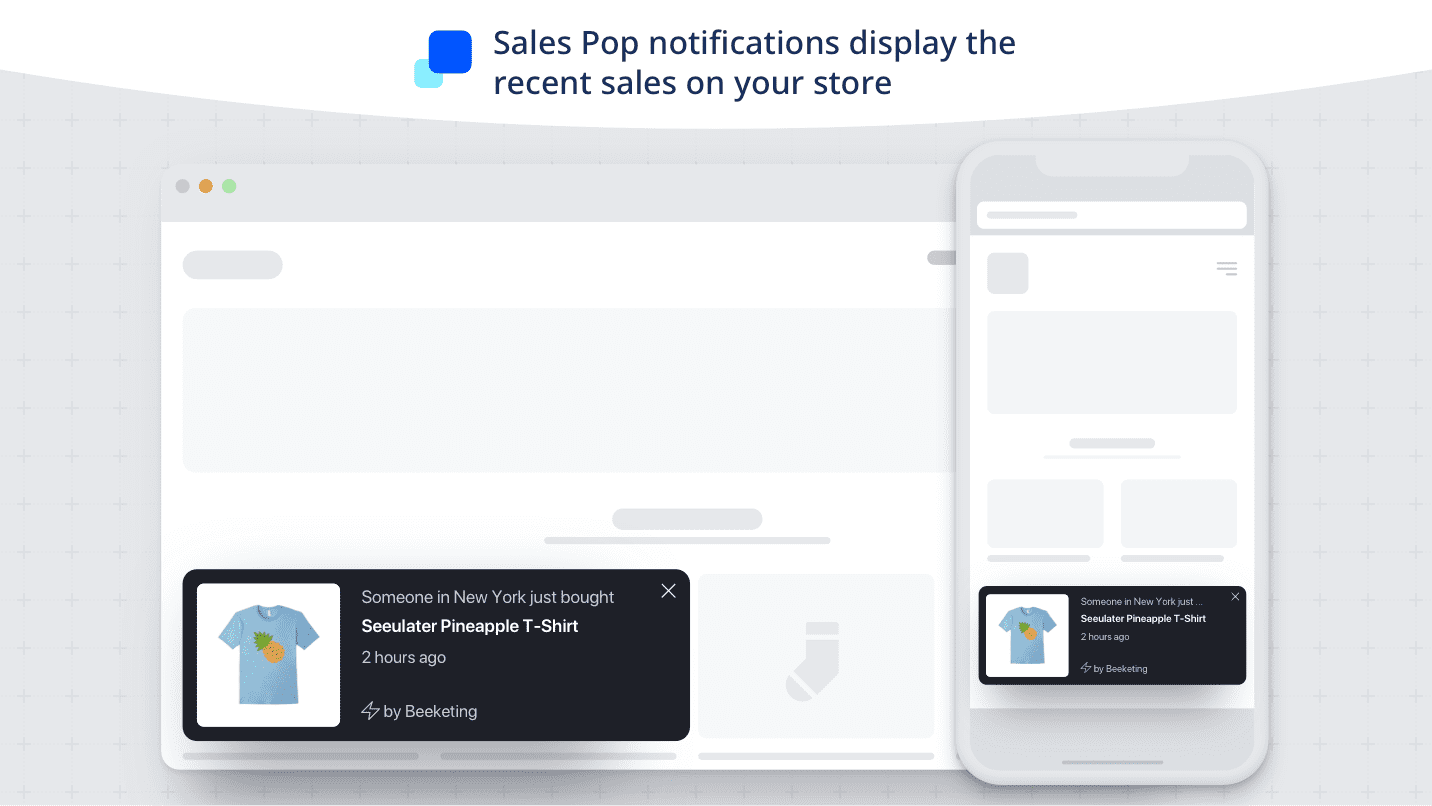
    Live Sales Notification – Installing it at product page can increases the sales.

    Imaging you are at a product page & you read a notification that someone from your town/city has bought the product. It will encourage you to press add to the cart button.

    Before you checkout – 

    The checkout page should have well placed customized section that reads ‘Products you may be missing‘ or “Before you Checkout” where products are fetched from historical orders of users.

    It is very comman when users buy same products from merchant again and again. This functionality will definitely increase the order value.

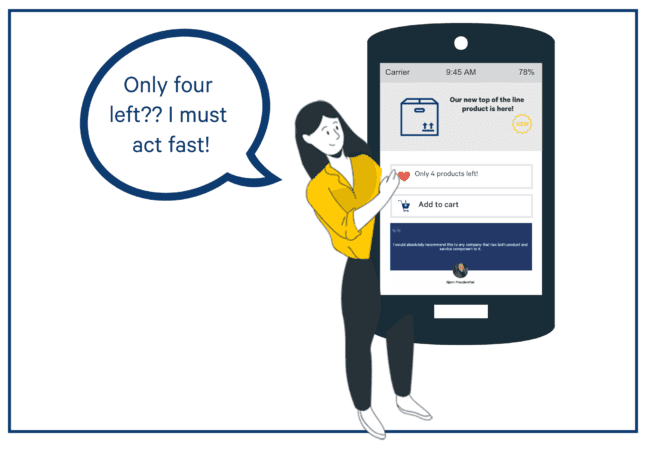
    Fear of Missing Out –  This encourage users to purchase quickly. You can display that “only (any digits between 1-9) products left!”

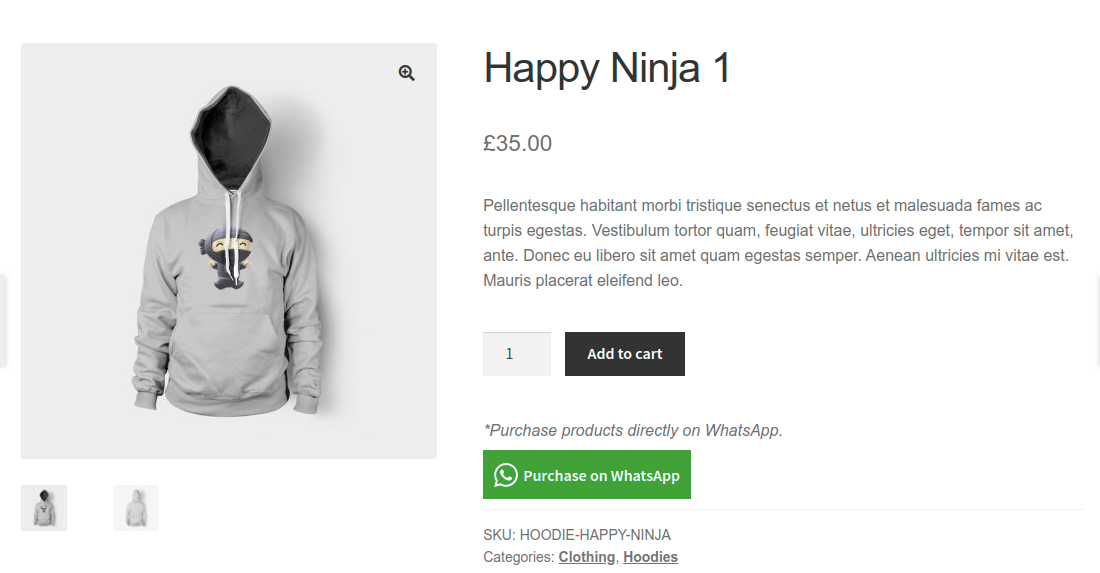
    Purchase on Whatsapp -If you setup ‘Buy with WhatsApp’ button at product page, then user will directly ping you at whatsapp number and order can be deal via whatsapp.

    Apart from above, there are tons of points which we guided to our ecommerce customers to increase sales. If you want to take your sales to the next level, then fill the below form to discuss more.