We sacrifice by not doing any other technology, so that you get the best of Magento.

We sacrifice by not doing any other technology, so that you get the best of Magento.

    Quick Way to Hire Right Magento Developer for your Store

    Anyone can hire Magento developer by searching from the web, but we offer our clients a proper hiring flow. This helps us to assign the right Magento developer, not any random developer. The flow is as per below.

    1. INQUIRY
      To begin with, you can come to us to inquire about your project. Our team will filter the set of Magento developers according to your requirement and then with sufficient date, sales team will contact you .
    2. INTERVIEW
      We will assign you dedicated developers whom you can interview based on different parameters. You can take as many interviews as you wish until you don’t find the right candidate.
    3. SELECTION
      The resource will be hired once you are satisfied with the interview process. No money will be taken for any interview. Selection will be as per your choice and criteria.
    4. PAYMENT
      After the selection process, we can discuss the payment terms and finalize it based on project needs.
    5. GET STARTED
      Together we can work towards creating an exceptional eCommerce experience for your users. Our team will work towards coming up with eCommerce solutions for your business that will help you to achieve your business goals through technical expertise.

    Being a reputed Magento development agency, Mage Monkeys has served a lot of businesses with effective eCommerce solutions. Here we have a huge talent pool comprising of skilled Magento experts whom you can hire as per your project requirements.

    Are Your eCommerce Sales Targets Achieved?

    Competition in eCommerce industry is increasing day by day, That’s why many eCommerce stores are struggling to meet their sales target. Failing to do so affects their profit margins dearly.

    An eCommerce store can fail to achieve its sales target for a number of reasons like:

    • Not auditing website on regular interval
    • Not having SEO friendly site
    • Poor UI-UX for eCommerce store
    • Low website speed
    • Having a complicated web structure
    • Not having Google friendly store.
    • Focusing only on one-time purchases
    • Not having diverse revenue streams
    • Not working on TECHNICAL MARKETING 

    At Mage Monkeys, our efforts have helped our eCommerce business partners in terms of better traffic and improved user experience that together have contributed towards improved sales.

    Fill up the form below if you if you too are struggling to achieve your eCommerce sales targets.

    Is Your Magento Store Healthy?

    Having a functional Magento store doesn’t mean it’s healthy. You never know the the number of bugs faced by your web visitors while doing online shopping through your store. Such bugs can directly impact on the sales of your website. That’s why it is necessary to handle them.

    A healthy Magento store means,

    – Bug free store
    – A store that loads faster
    – A user friendly store
    – A secure store
    – Mobile friendly store
    – Error free store

    Unfortunately, around 60% stores aren’t healthy and this gives a big impact on their sales. Store owners blindly trust on their store until and unless they don’t run an audit.

    At Mage monkeys, we run some audits that helps eCommerce merchant to identify the HIDDEN issues with their store.

    If your sales is not up to the point or you want to solve issues with your store, then connect with our Magento experts today.

    Why Should You Have AMC Contract For Your Magento Store?

    If you think investing in Magento store development is just one-time affair then you are completely wrong.

    An eCommerce store will lag behind its competitors if it fails to keep itself updated on regular basis. A poor performing eCommerce store means compromised user experience that will lead to less traffic, increased cart abandonments, and decrease in sales which can be tackled by going for Magento store AMC contracts.

    An ideal Magento store AMC(Annual Maintenance Contact) covers:

    – UI/UX improvements
    – Security updates
    – Upgrade service
    – Bug fixes and error resolution
    – Web content updates
    – Speed improvement service
    – Regular store backups
    – Server performance check-ups
    – New feature/functionality implementation
    – Third-party app integrations

    Mage Monkeys have served many eCommerce clients to be at their best through yearly AMC contracts. Our experts conduct site audit for Magento stores to look for issues and areas for improvement, and take necessary action at the earliest.  Fill the below form if you want to improve your sales by doing AMC contract at affordable rates.

    Magento2 : Add Dynamic Payment Methods list in system configuration with multi-select

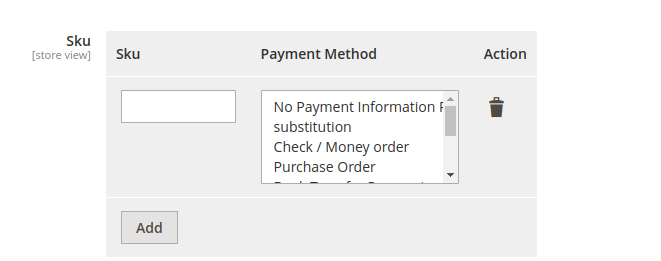
    As per the requirement, we can add dynamic payment methods list with multi select in the system configuration in admin.

    For this, first we need to create system.xml file – it is located in directory Magemonkeys/Payment/etc/adminhtml/system.xml where we need to add below code.

    <field id="payment_methods" translate="label" sortOrder="20" showInDefault="1" showInWebsite="1"
                           showInStore="1">
        <label>Sku</label>
        <frontend_model>MagemonkeysPaymentBlockSystemConfigFormFieldFields</frontend_model>
        <backend_model>MagentoConfigModelConfigBackendSerializedArraySerialized</backend_model>
        <comment>Dynamic Payment methods list</comment>
    </field>

    Second thing we need to do is to create Magemonkeys/Payment/Block/System/Config/Form/Field/Fields.php to render multi select field in system configuration.

    <?php
    declare(strict_types=1);
    namespace MagemonkeysPaymentBlockSystemConfigFormField;
    
    use MagentoConfigBlockSystemConfigFormFieldFieldArrayAbstractFieldArray;
    use MagemonkeysPaymentBlockAdminhtmlFormFieldPaymentSkuColumn;
    use MagentoFrameworkDataObject;
    use MagentoFrameworkExceptionLocalizedException;
    
    class Fields extends AbstractFieldArray
    {    
        /**
         * @var bool
         */
        protected $_addAfter = false;
    
        /**
         * @var
         */
        protected $_addButtonLabel;
    
        /**
         * Rows cache
         *
         * @var array|null
         */
        private $_arrayRowsCache;
    
        /**
         * @var TaxColumn
         */
        private $paymentRenderer;
    
        /**
         * Construct
         */
        protected function _construct()
        {
            parent::_construct();
            $this->_addButtonLabel = __('Add');
        }
    
        /**
         * Prepare to render the columns
         */
        protected function _prepareToRender()
        {
            $label = 'label';
            $this->addColumn('sku', [$label => __('Sku')]);
            $this->addColumn('payment_method', [
                'label' => __('Payment Method'),
                'renderer' => $this->getPaymentRenderer(),
                'extra_params' => 'multiple="multiple"'
            ]);
            $this->_addAfter = false;
            $this->_addButtonLabel = __('Add');
        }


        /**
         * Prepare existing row data object
         *
         * @param DataObject $row
         * @throws LocalizedException
         */
        protected function _prepareArrayRow(DataObject $row): void
        {
            $options = [];
            $payment = $row->getPaymentMethod();
            if ($payment !== null) {
                foreach ($payment as $country) {
                    $options['option_' . $this->getPaymentRenderer()->calcOptionHash($country)] = 'selected="selected"';
                }
            }
    
            $row->setData('option_extra_attrs', $options);
        }
        /**
         * @return TaxColumn
         * @throws LocalizedException
         */
        private function getPaymentRenderer()
        {
            if (!$this->paymentRenderer) {
                $this->paymentRenderer = $this->getLayout()->createBlock(
                    PaymentSkuColumn::class,
                    '',
                    ['data' => ['is_render_to_js_template' => true]]
                );
            }
            return $this->paymentRenderer;
        }
    }
    

    Then, we need to create Magemonkeys/Payment/Block/Adminhtml/Form/Field/PaymentSkuColumn.php where file returns payment methods list.

    <?php
    declare(strict_types=1);
    namespace MagemonkeysPaymentBlockAdminhtmlFormField;
    
    use MagentoPaymentHelperData;
    use MagentoFrameworkViewElementContext;
    use MagentoFrameworkViewElementHtmlSelect;
     
    class PaymentSkuColumn extends Select
    {
        private $paymentHelper;
     
        public function __construct(
            Context $context,
            Data $paymentHelper,
            array $data = []
        ) {
            parent::__construct($context, $data);
            $this->paymentHelper = $paymentHelper;
        }
     
        public function setInputName($value)
        {
            return $this->setName($value . '[]');
        }
     
        public function _toHtml(): string
        {
            $options = [];
            $paymentMethod = $this->paymentHelper->getPaymentMethods();
            foreach ($paymentMethod as $key => $payment) {
                if(isset($payment['title'])){
                    $options[] = ['label' => $payment['title'], 'value' => $key];
                }else{
                    $options[] = ['label' => $key, 'value' => $key];
                }   
            }
    
            if (!$this->getOptions()) {
                $this->setOptions($options);
            }
            $this->setExtraParams('multiple="multiple"');
            return parent::_toHtml();
        }
    }

    It will look something like this.

    Core Web Vitals – A way to Improve eCommerce Speed & Sales

    Google’s core web vitals valuates different metrics related to the website like stability, responsiveness, and speed so as to boost rankings.

    Do you know that optimizing your eCommerce store for Google’s Core web vitals is important to rank higher on search results? Let’s discuss more on core web vitals.

    Key areas covered by Core web vitals

    • LCP (Large Contentful Paint) – LCP mainly focuses on large body parts of the webpage which is expected to load quickly. LCP should be less than 2.5 second
    • FID (First Input Delay) – With FID it will become possible to know how quickly a user can interact with the webpage. Ideally FID has to be less than 100 milliseconds.
    • CLS (Cumulative Layout Shift) – Objects on the eCommerce store shifts when any large object comes up. CLS focuses on it. Ideally, CLS must be less than 0.1.

    Ways To Improve Core Web Vitals of eCommerce Store

    • Optimize images and videos
    • Get rid of unused CSS
    • Reduce initial server response time
    • Reduce layout shifts
    • Get rid of render blocking resources

    Above tasks aren’t easy to implement technically. You need a technical expert to execute it.

    At Mage Monkeys, our experts will check issues related to FIC, CLS, & LCP, and make improvements keeping this Google’s algorithm in mind.


    Have google penalized your site for Core Web Vitals yet?

    WHAT ARE CORE WEB VITALS?
    Google’s aim is to make sure that all the websites included in their index are offering the best experience for their searchers. By making Core Web Vitals a ranking factor, Google is leveraging search visibility to encourage website owners and developers to focus on UX. 

    In short Core web vitals are just not important for SEO but they are User Experience(UX) standards set by google to make your visitors experience wonderful in your website.

    What does it mean to not pass the Core Web Vitals assessment?
    If your site does not have a passing score on the different Core Web Vitals metrics, signifies that your website has poor user experience. Having strong UX is critical for ecommerce sites in particular; those that take a long time to load, have slow-acting CTA buttons, or page content that jumps around are problematic now and repercussions will increase with the Core Web Vitals rollout. Having a strong user experience, and, therefore, passing the Core Web Vitals assessment can help increase conversion rates.

    Google has created tool to check your core web vitals, which helps to generate the report of your core web vitals.

    Restrict Magento customer login using custom customer attribute

    Step :1 Creat a custom attribute of boolean type which will be used to block customer login.

    <?php
    
    declare(strict_types=1);
    
    namespace VendorModuleSetupPatchData;
    
    use MagentoCustomerModelCustomer;
    use MagentoCustomerSetupCustomerSetup;
    use MagentoCustomerSetupCustomerSetupFactory;
    use MagentoEavModelEntityAttributeSet;
    use MagentoEavModelEntityAttributeSetFactory;
    use MagentoFrameworkSetupModuleDataSetupInterface;
    use MagentoFrameworkSetupPatchDataPatchInterface;
    use MagentoFrameworkSetupPatchPatchRevertableInterface;
    
    class AddBlockedCustomerAttribute implements DataPatchInterface, PatchRevertableInterface
    {
    
        /**
         * @var ModuleDataSetupInterface
         */
        private $moduleDataSetup;
        /**
         * @var CustomerSetup
         */
        private $customerSetupFactory;
        /**
         * @var SetFactory
         */
        private $attributeSetFactory;
    
        /**
         * Constructor
         *
         * @param ModuleDataSetupInterface $moduleDataSetup
         * @param CustomerSetupFactory $customerSetupFactory
         * @param SetFactory $attributeSetFactory
         */
        public function __construct(
            ModuleDataSetupInterface $moduleDataSetup,
            CustomerSetupFactory $customerSetupFactory,
            SetFactory $attributeSetFactory
        ) {
            $this->moduleDataSetup = $moduleDataSetup;
            $this->customerSetupFactory = $customerSetupFactory;
            $this->attributeSetFactory = $attributeSetFactory;
        }
    
        /**
         * {@inheritdoc}
         */
        public function apply()
        {
            $this->moduleDataSetup->getConnection()->startSetup();
            /** @var CustomerSetup $customerSetup */
            $customerSetup = $this->customerSetupFactory->create(['setup' => $this->moduleDataSetup]);
            $customerEntity = $customerSetup->getEavConfig()->getEntityType(Customer::ENTITY);
            $attributeSetId = $customerEntity->getDefaultAttributeSetId();
            
            /** @var $attributeSet Set */
            $attributeSet = $this->attributeSetFactory->create();
            $attributeGroupId = $attributeSet->getDefaultGroupId($attributeSetId);
            
            $customerSetup->addAttribute(
                Customer::ENTITY,
                'blocked',
                [
                    'label' => 'Blocked',
                    'input' => 'boolean',
                    'type' => 'static',
                    'source' => '',
                    'required' => false,
                    'position' => 333,
                    'visible' => true,
                    'system' => false,
                    'is_used_in_grid' => true,
                    'is_visible_in_grid' => true,
                    'is_filterable_in_grid' => true,
                    'is_searchable_in_grid' => false,
                    'backend' => ''
                ]
            );
            
            $attribute = $customerSetup->getEavConfig()->getAttribute(Customer::ENTITY, 'blocked');
            $attribute->addData([
                'used_in_forms' => [
                    'adminhtml_customer',
                    'adminhtml_checkout',
                    'customer_account_create',
                    'customer_account_edit'
                ]
            ]);
            $attribute->addData([
                'attribute_set_id' => $attributeSetId,
                'attribute_group_id' => $attributeGroupId
            
            ]);
            $attribute->save();
    
            $this->moduleDataSetup->getConnection()->endSetup();
        }
    
        public function revert()
        {
            $this->moduleDataSetup->getConnection()->startSetup();
            /** @var CustomerSetup $customerSetup */
            $customerSetup = $this->customerSetupFactory->create(['setup' => $this->moduleDataSetup]);
            $customerSetup->removeAttribute(MagentoCustomerModelCustomer::ENTITY, 'blocked');
    
            $this->moduleDataSetup->getConnection()->endSetup();
        }
    
        /**
         * {@inheritdoc}
         */
        public function getAliases()
        {
            return [];
        }
    
        /**
         * {@inheritdoc}
         */
        public static function getDependencies()
        {
            return [
            
            ];
        }
    }
    
    Step 2: Observer to restrict customer from login depending upon the custom attribute created in Step 1.
    <?php
    
    declare(strict_types=1);
    
    namespace VendorModuleObserverFrontendCustomer;
    
    class Login implements MagentoFrameworkEventObserverInterface
    {
    
        /**
         * @var MagentoFrameworkAppResponseFactory
         */
        private $responseFactory;
    
        /**
         * @var MagentoFrameworkUrlInterface
         */
    
        private $url;
    
        /**
         * @var MagentoCustomerModelSessionFactory
         */
    
        private $customerSession;
    
        /**
         * @var MagentoFrameworkMessageManagerInterface
         */
    
        private $messageManager;
    
        /** 
         * @var MagentoCustomerApiCustomerRepositoryInterface 
         */
        private $customerRepositoryInterface;
    
        /**
         * Observer Constructor
         *
         * @param MagentoFrameworkAppResponseFactory $responseFactory
         * @param MagentoFrameworkUrlInterface $url
         * @param MagentoCustomerModelSession $customerSession
         * @param MagentoFrameworkMessageManagerInterface $messageManager
         * @param MagentoCustomerApiCustomerRepositoryInterface $customerRepositoryInterface
         */
        public function __construct(
            MagentoFrameworkAppResponseFactory $responseFactory,
            MagentoFrameworkUrlInterface $url,
            MagentoCustomerModelSession $customerSession,
            MagentoFrameworkMessageManagerInterface $messageManager,
            MagentoCustomerApiCustomerRepositoryInterface $customerRepositoryInterface
        ) {
            $this->responseFactory = $responseFactory;
            $this->url = $url;
            $this->customerSession= $customerSession;
            $this->messageManager = $messageManager;
            $this->customerRepositoryInterface = $customerRepositoryInterface;
        }
        /**
         * Execute observer
         *
         * @param MagentoFrameworkEventObserver $observer
         * @return void
         */
        public function execute(
            MagentoFrameworkEventObserver $observer
        ) {
            $customer = $observer->getEvent()->getCustomer();
            $blocked = $customer->getData('blocked');       
            if($blocked==1){
                $this->customerSession->logout();
                $this->messageManager->addErrorMessage(__('Your account has been blocked'));
                $redirectionUrl = $this->url->getUrl('customer/account/login');
                $this->responseFactory->create()->setRedirect($redirectionUrl)->sendResponse();
                return $this;
            }
        }
    }


    Magento 2: create new page layout for specific cms page

    If you want to set different blocks, content, or design for a specific page, then you can do that like below.

    First you need to create new file under your theme Magento_Cmslayoutcms_page_view_id_{{identifier of page}}.xml

    then you can move and add your block which you want like below.

    <?xml version="1.0"?>
    <!--
    /**
    * Copyright © Magento, Inc. All rights reserved.
    * See COPYING.txt for license details.
    */
    -->
    <page xmlns:xsi="http://www.w3.org/2001/XMLSchema-instance" xsi:noNamespaceSchemaLocation="urn:magento:framework:View/Layout/etc/page_configuration.xsd">
    <head>
    <script async="async" src="Magento_Cms::js/custom.js"/>
    </head>
    </page>

    Note: Here I have added custom js only for a specific page like cms_page_view_id_about-us.xml

    Create Admin Theme in Magento 2

    Here we will explain how to create admin theme and how to apply the admin theme in Magento 2.

    First we need to switch the Magento 2 application to the developer mode.

    php bin/magento deploy:mode:set developer

    Create Admin Theme

    Now, we will explain step-by-step that what should be done.

    Step 1: First create a <VendorName>/<theme name> folder at the app/design/adminhtml path for the new Magento admin theme.

    Here we use Magemonkeys as VendorName and backend as theme name so path would be like this app/design/adminhtml/Magemonkeys/backend/

    Step 2: In order to define Magento themes in the theme root folder create a theme.xml file at app/design/adminhtml/Magemonkeys/backend/ and paste the below code:

    <?xml version="1.0"?>
    <theme xmlns:xsi="http://www.w3.org/2001/XMLSchema-instance" xsi:noNamespaceSchemaLocation="urn:magento:framework:Config/etc/theme.xsd">
        <title>Magemonkeys Admin Theme</title>
        <parent>Magento/backend</parent>
    </theme>

    Step 3: In order to register a theme in the system & theme folder create a registration.php file at app/design/adminhtml/Magemonkeys/backend/ and paste the below code :

    <?php
    MagentoFrameworkComponentComponentRegistrar::register(
        MagentoFrameworkComponentComponentRegistrar::THEME,
        'adminhtml/Magemonkeys/Backend',
        __DIR__
    );

    Step 4: Now we changed the logo on the admin login page and in the dashboard.  So put your images in the app/design/adminhtml/Magemonkeys/backend/web/images folder to save the media file.

    Create a Module to apply an admin theme

    Step 1: The theme has already been created, but it is still unconnected. We create a specialised <VendorName>/<ModuleName> module in the app/code/ folder to connect the admin theme.

    We will show you an example of a Magemonkeys/Backend module for the following path: app/code/Magemonkeys/Backend

    Step 2: create a registration.php file in the app/code/Magemonkeys/Backend folder with the following code:

    <?php
        MagentoFrameworkComponentComponentRegistrar::register(
        MagentoFrameworkComponentComponentRegistrar::MODULE,
        'Magemonkeys_Backend',
        __DIR__
    );

    Step 3: Create a module.xml and di.xml file in the app/code/Magemonkeys/Backend/etc folder.

    copy below code and add in module.xml

    <?xml version="1.0"?>
    <config xmlns:xsi="http://www.w3.org/2001/XMLSchema-instance" xsi:noNamespaceSchemaLocation="urn:magento:framework:Module/etc/module.xsd">
        <module name="Magemonkeys_Backend" setup_version="0.0.1">
            <sequence>
                <module name="Magento_Theme"/>
            </sequence>
        </module>
    </config>

    copy below code and add in di.xml

    <?xml version="1.0"?>
    <config xmlns:xsi="http://www.w3.org/2001/XMLSchema-instance" xsi:noNamespaceSchemaLocation="urn:magento:framework:ObjectManager/etc/config.xsd">
        <type name="MagentoThemeModelViewDesign">
            <arguments>
                <argument name="themes" xsi:type="array">
                    <item name="adminhtml" xsi:type="string">Magemonkeys/Backend</item>
                </argument>
            </arguments>
        </type>
    </config>

    Step 4: Create a admin_login.xml file in the app/code/Magemonkeys/Backend/view/adminhtml/layout/ folder with the following code:

    <?xml version="1.0"?>
    <page xmlns:xsi="http://www.w3.org/2001/XMLSchema-instance" layout="admin-login" xsi:noNamespaceSchemaLocation="urn:magento:framework:View/Layout/etc/page_configuration.xsd">
        <update handle="styles" />
        <body>
            <referenceBlock name="logo">
                <arguments>
                    <argument name="logo_image_src" xsi:type="string">images/dws_logo.jpg</argument>
                </arguments>
            </referenceBlock>
        </body>
    </page>

    Step 5: Create a default.xml file in the app/code/Magemonkeys/Backend/view/adminhtml/layout/ folder with the following code:

    <?xml version="1.0"?>
    <page xmlns:xsi="http://www.w3.org/2001/XMLSchema-instance" layout="admin-1column" xsi:noNamespaceSchemaLocation="urn:magento:framework:View/Layout/etc/page_configuration.xsd">
        <body>
            <referenceContainer name="header">
                <block class="MagentoBackendBlockPageHeader" name="logo" before="-">
                    <arguments>
                        <argument name="show_part" xsi:type="string">logo</argument>
                        <argument name="logo_image_src" xsi:type="string">images/dws_admin.png</argument>
                    </arguments>
                </block>
            </referenceContainer>
        </body>
    </page>

    Step 5: Now run the following command:

    php bin/magento setup:upgrade
    php bin/magento setup:static-content:deploy –f
    php bin/magento cache:clean