We sacrifice by not doing any other technology, so that you get the best of Magento.

We sacrifice by not doing any other technology, so that you get the best of Magento.

    How to create magento 2 patch?

    If you want any of your customization changes, then you can do it in core file let’s say Block.php which will be at

    vendor/magento/module-cms/Block/Block.php.

    1. Create a copy of that file with your changes on it.

    2. Rename that file BlockModified.php.

    3. Run the following command:
    diff -u Block.php Block.php > cmsblock.patch.

    4. Delete the BlockModified.php.

    5. Move cmsblock.patch to root of magento in folder custompatches

    6. Here comes the tricky part, you will need to do some manual modification. When you open the cmsblock.patch , you will get something like this on the top :

    --- Block.php 2022-02-21 04:26:16.000000000 -0500
    +++ BlockModified.php 2022-03-03 09:57:47.326011737 -0500

    Replace those line with this one:

    diff --git a/Block/Block.php .php b/Block/BlockModified.php
    index 3ee2rd..8349152 111644
    --- a/Block/CustomerData.php
    +++ b/Block/CustomerData.php

    7. Next Step is to add it in the composer.json n root of magento.Add the extra section.

    "extra": {
    "magento-force": "override",
    "patches": {
    "magento/module-cms": {
    "some description about issue applying this patch":"custompatches/cmsblock.patch"
    }
    }
    }

    8. Run “composer install” to apply the patch

    Magento 2 : How to add customer child menu and reindex only customer grid programmatically?

    If you want customer grid reindex programmatically, you can use the below step.

    1. Create file menu.xml on app/code/Magemonkeys/CustomerReindex/etc/adminhtml

    <?xml version="1.0"?>
    <config xmlns:xsi="http://www.w3.org/2001/XMLSchema-instance" xsi:noNamespaceSchemaLocation="urn:magento:module:Magento_Backend:etc/menu.xsd">
        <menu>
            <add id="Magemonkeys_CustomerReindex::customer_reindex" title="Eagle Rocket" translate="title" module="Magemonkeys_CustomerReindex"
                 sortOrder="50" resource="Magemonkeys_CustomerReindex::manage_customer_reindex" parent="Magento_Customer::customer"/>
            <add id="Magemonkeys_CustomerReindex::customer_manage" title="Customer Reindex" translate="title" module="Magemonkeys_CustomerReindex"
                 sortOrder="10" parent="Magemonkeys_CustomerReindex::customer_reindex" action="customerreindex/customerindexer/index" resource="Magemonkeys_CustomerReindex::manage_customer_reindex"/>      
        </menu>
    </config>

    2. Create file routes.xml on app/code/Magemonkeys/CustomerReindex/etc/adminhtml

    <?xml version="1.0"?>
    
    <config xmlns:xsi="http://www.w3.org/2001/XMLSchema-instance" xsi:noNamespaceSchemaLocation="urn:magento:framework:App/etc/routes.xsd">
        <router id="admin">
            <route id="customerreindex" frontName="customerreindex">
                <module name="Magemonkeys_CustomerReindex" before="Magento_Backend" />
            </route>
        </router>
    </config>

    3. Create file Index.php on app/code/Magemonkeys/CustomerReindex/Controller/Adminhtml/Customerindexer

    <?php
    namespace MagemonkeysCustomerReindexControllerAdminhtmlCustomerindexer;
    class Index extends MagentoBackendAppAction
    {
        protected $indexFactory;
        protected $indexCollection;
        protected $resultRedirectFactory;
    
        public function __construct(
            MagentoBackendAppActionContext $context,
            MagentoIndexerModelIndexerFactory $indexFactory,
            MagentoIndexerModelIndexerCollectionFactory $indexCollection,
            MagentoFrameworkControllerResultRedirectFactory $resultRedirectFactory,
            MagentoFrameworkMessageManagerInterface $messageManager 
        )
        {
            parent::__construct($context);
            $this->indexFactory = $indexFactory;
            $this->indexCollection = $indexCollection;
            $this->resultRedirectFactory = $resultRedirectFactory;
            $this->_messageManager = $messageManager;
        }
    
        public function execute()
        {
            $indexerCollection = $this->indexCollection->create();
            $indexids = $indexerCollection->getAllIds();
    
            $indexid = 'customer_grid';
            $indexidarray = $this->indexFactory->create()->load($indexid);
            $indexidarray->reindexAll($indexid);
    
            $resultPage = $this->resultRedirectFactory->create();        
            $resultPage->setPath('customer/index/index');
            $this->_messageManager->addSuccess(__("Customer Reindex Successfully."));
            return $resultPage;            
        }    
    }

    4. Output

    Magento 2 : How to override Product Pricing file?

    If you need to set our custom price or to perform any customization in price, them follow below steps.

    Create di.xml under etc folder in module

    <?xml version="1.0"?>
    <config xmlns:xsi="http://www.w3.org/2001/XMLSchema-instance" xsi:noNamespaceSchemaLocation="urn:magento:framework:ObjectManager/etc/config.xsd">
    	<virtualType name="MagentoConfigurableProductPricingPricePool" type="MagentoFrameworkPricingPricePool">
            <arguments>
                <argument name="prices" xsi:type="array">
                    <item name="regular_price" xsi:type="string">MagemonkeysPricesortingPricingConfigurableRegularPrice</item>
                    <item name="final_price" xsi:type="string">MagentoConfigurableProductPricingPriceFinalPrice</item>
                </argument>
                <argument name="target" xsi:type="object">MagentoCatalogPricingPricePool</argument>
            </arguments>
        </virtualType>
        <type name="MagemonkeysPricesortingPricingConfigurableRegularPrice">
            <arguments>
                <argument name="priceResolver" xsi:type="object">ConfigurableRegularPriceResolver</argument>
            </arguments>
        </type>
    </config>
    

    We need to create file under module Pricesorting/Pricing/ConfigurableRegularPrice.php

    <?php
    /**
     * Copyright © Magento, Inc. All rights reserved.
     * See COPYING.txt for license details.
     */
    
    namespace MagemonkeysPricesortingPricing;
    
    use MagentoCatalogModelProduct;
    use MagentoFrameworkAppObjectManager;
    use MagentoFrameworkPricingPriceAbstractPrice;
    use MagentoConfigurableProductPricingPriceConfigurableRegularPriceInterface;
    use MagentoConfigurableProductPricingPriceLowestPriceOptionsProviderInterface;
    use MagentoConfigurableProductPricingPricePriceResolverInterface;
    
    /**
     * Class RegularPrice
     */
    class ConfigurableRegularPrice extends AbstractPrice implements ConfigurableRegularPriceInterface
    {
        const ATTRIBUTE_CODE = 333;
        const PRICE_TABLE = 'catalog_product_index_price';
        const ENTITY_TABLE = 'catalog_product_entity_int';
        /**
         * Price type
         */
        const PRICE_CODE = 'regular_price';
    
        /**
         * @var MagentoFrameworkPricingAmountAmountInterface
         */
        protected $maxRegularAmount;
    
        /**
         * @var MagentoFrameworkPricingAmountAmountInterface
         */
        protected $minRegularAmount;
    
        /**
         * @var array
         */
        protected $values = [];
    
        /**
         * @var MagentoConfigurableProductPricingPricePriceResolverInterface
         */
        protected $priceResolver;
    
        /**
         * @var ConfigurableOptionsProviderInterface
         */
        private $configurableOptionsProvider;
    
        /**
         * @var LowestPriceOptionsProviderInterface
         */
        private $lowestPriceOptionsProvider;
    
        protected $resource;
    
        /**
         * @param MagentoFrameworkPricingSaleableInterface $saleableItem
         * @param float $quantity
         * @param MagentoFrameworkPricingAdjustmentCalculatorInterface $calculator
         * @param MagentoFrameworkPricingPriceCurrencyInterface $priceCurrency
         * @param PriceResolverInterface $priceResolver
         * @param LowestPriceOptionsProviderInterface $lowestPriceOptionsProvider
         * @param MagentoFrameworkAppResourceConnection $resource
         */
        public function __construct(
            MagentoFrameworkPricingSaleableInterface $saleableItem,
            $quantity,
            MagentoFrameworkPricingAdjustmentCalculatorInterface $calculator,
            MagentoFrameworkPricingPriceCurrencyInterface $priceCurrency,
            PriceResolverInterface $priceResolver,
            LowestPriceOptionsProviderInterface $lowestPriceOptionsProvider = null,
            MagentoFrameworkAppResourceConnection $resource
        ) {
            parent::__construct($saleableItem, $quantity, $calculator, $priceCurrency);
            $this->priceResolver = $priceResolver;
            $this->lowestPriceOptionsProvider = $lowestPriceOptionsProvider ?:
                ObjectManager::getInstance()->get(LowestPriceOptionsProviderInterface::class);
            $this->resource = $resource;
        }
    
        /**
         * @inheritdoc
         */
        public function getMinRegularAmount()
        {
            if (null === $this->minRegularAmount) {
                $this->minRegularAmount = $this->doGetMinRegularAmount() ?: parent::getAmount();
            }
            return $this->minRegularAmount;
        }
    
        /**
         * Get min regular amount
         *
         * @return MagentoFrameworkPricingAmountAmountInterface
         */
        protected function doGetMinRegularAmount()
        {
            $minAmount = null;
            foreach ($this->lowestPriceOptionsProvider->getProducts($this->product) as $product) {
                $parentId = $this->product->getId();
                $connection = $this->resource->getConnection();
                $tableName = $connection->getTableName(self::ENTITY_TABLE);
                $table2 = $connection->getTableName(self::PRICE_TABLE);
                $select = $connection->select()
                ->from(
                    ['c' => $tableName],
                    ['*']
                )
                ->joinLeft(
                    ['ca' => $table2],
                    'c.value = ca.entity_id',
                    ['*']
                )
                ->where('c.attribute_id = ?', self::ATTRIBUTE_CODE)
                ->where('c.row_id = ?', $parentId);
                $result = $connection->fetchRow($select);
                if ($result) {
                    $priceValue = $result['price'];
                    $product->setPriceCalculation(false);
                    $product->setPrice($priceValue);
                    $minAmount = $product->getPriceInfo()->getPrice('regular_price')->getAmount();
                } else {
                    $childPriceAmount = $product->getPriceInfo()->getPrice(self::PRICE_CODE)->getAmount();
                    if (!$minAmount || ($childPriceAmount->getValue() < $minAmount->getValue())) {
                        $minAmount = $childPriceAmount;
                    }
                }
            }
            return $minAmount;
        }
    
        
    }
    

    That’s it.


    How to set phtml file through html via Ajax call in Magento 2?

    Sometime we need to set html data without load or set it via ajax.

    Then create a module name : Magemonkey:Ajaxcall

    create index.phtml in Magemonkey/Ajaxcall/view/frontend/templates/

    <div id="ajaxresponsedata"></div>
    <?php
    $ajaxurl = $block->getAjaxUrl();
    ?>
    <script type="text/x-magento-init">
            {
                "*": {
                    "Magemonkey_Ajaxcall/js/call": {
                        "AjaxUrl": "<?php echo $ajaxurl; ?>",
                    }
                }
            }
    </script>

    Create js file Magemonkey/Ajaxcall/view/frontend/web/js/

    define([
        "jquery",
        "jquery/ui"
    ], function($){
        "use strict";
     
        function main(config, element) {
            var $element = $(element);
            var AjaxUrl = config.AjaxUrl;
            var CurrentProduct = productid;
             
            $(document).ready(function(){
                setTimeout(function(){
                    $.ajax({
                        context: '#ajaxresponsedata',
                        url: AjaxUrl,
                        type: "POST",
                        data: {currentproduct:CurrentProduct},
                    }).done(function (data) {
                        $('#ajaxresponse').html(data.output);
                        return true;
                    });
                },1000);
            }); 
        };
        return main;
    });

    Create Index.php file in Magemonkey/Ajaxcall/Controller/Index/

    <?php
    namespace MagemonkeyCustomControllerIndex;
    
    use MagentoFrameworkAppActionAction;
    use MagentoFrameworkAppActionContext;
    use MagentoFrameworkControllerResultJsonFactory;
    use MagentoFrameworkViewResultPageFactory; 
     
    class View extends Action
    {
        public function __construct(Context $context, PageFactory $resultPageFactory, JsonFactory $resultJsonFactory)
        { 
            $this->_resultPageFactory = $resultPageFactory;
            $this->_resultJsonFactory = $resultJsonFactory;
     
            parent::__construct($context);
        }
        public function execute()
        {
            $result = $this->_resultJsonFactory->create();
            $resultPage = $this->_resultPageFactory->create();
            $currentProductId = $this->getRequest()->getParam('currentproduct');        
     
            $data = array('currentproductid'=>$currentProductId);
     
            $block = $resultPage->getLayout()
                    ->createBlock('MagemonkeyAjaxcallBlockIndexIndex')
                    ->setTemplate('Magemonkey_Ajaxcall::index.phtml')
                    ->setData('data',$data)
                    ->toHtml();
     
            $result->setData(['output' => $block]);
            return $result;
        }
     
    }

    That’s it.

    Magento 2 : How to add watermark to the specific product image programmatically?

    If you want to add watermark to the specific product image programmatically, then use below script.

    <?php 
    /*
    * @ custom script to add watermark image on the product image that has -f in the product image name
    */
    use MagentoFrameworkAppBootstrap;
    
    require __DIR__ . '/../app/bootstrap.php';
     
    $bootstrap = Bootstrap::create(BP, $_SERVER);
    $objectManager = $bootstrap->getObjectManager();
     
    $state = $objectManager->get('MagentoFrameworkAppState');
    $state->setAreaCode('frontend');
     
    try
    {   
        $objectManager = MagentoFrameworkAppObjectManager::getInstance(); 
        $categoryFactory = $objectManager->get('MagentoCatalogModelCategoryFactory');
        $category = $categoryFactory->create()->load(4); //Parent category
        
        /*
        * @ $cateid array of category IDs
        */
    
        $cateid = $category->getAllChildren(true); // get all subcategory id
    
        $cateinstance = $objectManager->create('MagentoCatalogModelResourceModelProductCollectionFactory');
        $allcategoryproduct = $cateinstance->create()->addAttributeToSelect('*')->addCategoriesFilter(['in' => $cateid]);
    
        $fileSystem = $objectManager->create('MagentoFrameworkFilesystem');
        $mediaPath = $fileSystem->getDirectoryRead(MagentoFrameworkAppFilesystemDirectoryList::MEDIA)->getAbsolutePath();    
    
        $productimages = array();
        foreach ($allcategoryproduct as $products) {
    
            $product = $objectManager->create('MagentoCatalogModelProduct')->load($products->getEntityId());
    
            $productimages = $product->getMediaGalleryImages();
            
    
            if(!empty($productimages)){             
                foreach($productimages as $productimage)
                {   
                    $imgname = substr(strrchr(rtrim($productimage['file'], '/'), '/'), 1); // Get specific image name
                    if(strpos($imgname, '-f') !== false){
                        $fullpath = $mediaPath.'catalog/product'.$productimage['file'];
                        if(file_exists($fullpath)){
                            watermark_image($fullpath, dirname(__FILE__)'/watermark-f.png', $fullpath);
                            echo $productimage['file']."n";
                        }
                    
                    }
                    
                }
            }
        }    
     
    }
    catch (Exception $e)
    {
        echo $e->getMessage();
        exit;
    }
    
    /*
    * @ watermark_image function for merge watermark image to the product image
    */
    function watermark_image($target, $wtrmrk_file, $newcopy) {
        $watermark = imagecreatefrompng($wtrmrk_file);
        imagealphablending($watermark, false);
        imagesavealpha($watermark, true);
        $img = imagecreatefromjpeg($target);
        $img_w = imagesx($img);
        $img_h = imagesy($img);
        $wtrmrk_w = imagesx($watermark);
        $wtrmrk_h = imagesy($watermark);
        
        imagecopy($img, $watermark, $img_w - $wtrmrk_w, $img_h - $wtrmrk_h, 0, 0, $wtrmrk_w, $wtrmrk_h);
    
        imagejpeg($img, $newcopy, 100);
        imagedestroy($img);
        imagedestroy($watermark);
    }
    
    ?>


    Magento 2 : Product minimum amount which restrict customer to proceed checkout

    If you want restrict customer to checkout based on your min product amount, then here are the steps to create module.

    Here we are using Magemonkeys as Vendor name and CheckoutRestriction as the name of a module. You can change this according to your Vendor and Module name.

    Step 1: Create Registration

    Create registration.php file in the app/code/Magemonkeys/CheckoutRestriction folder with the following code.

    <?php
    MagentoFrameworkComponentComponentRegistrar::register(
        MagentoFrameworkComponentComponentRegistrar::MODULE,
        'Magemonkeys_CheckoutRestriction',
        __DIR__
    );

    Step 2: Create a module

    Create a module.xml file in the app/code/Magemonkeys/CheckoutRestriction/etc folder with the following code.

    <?xml version="1.0" ?>
    <config xmlns:xsi="http://www.w3.org/2001/XMLSchema-instance" xsi:noNamespaceSchemaLocation="urn:magento:framework:Module/etc/module.xsd">
        <module name="Magemonkeys_CheckoutRestriction" setup_version="1.0.0">
            <sequence>
                <module name="Magento_Checkout"/>
            </sequence>
        </module>
    </config>

    Step 3: Create a helper

    Create a Restriction.php file in the app/code/Magemonkeys/CheckoutRestriction/Helper folder with the following code.

    <?php 
    namespace MagemonkeysCheckoutRestrictionHelper;
    
    use MagentoFrameworkRegistry;
    
    class Restriction extends MagentoFrameworkAppHelperAbstractHelper
    {
    
        protected $cart;
        protected $product;
        
        public function __construct(
            MagentoFrameworkAppHelperContext $context,
            MagentoCheckoutModelCart $cart,
            MagentoCatalogModelProductFactory $product
        ) {
            $this->cart = $cart;
            $this->product = $product;
            
            parent::__construct($context);
        }
        
        public function getProductMinPrice()
        {
            $grandTotal = $this->cart->getQuote()->getGrandTotal();
            $items = $this->cart->getQuote()->getAllItems();
    
            $itemData = array();
            foreach($items as $item) {
                $product = $this->getLoadProduct($item->getProduct()->getId());
    
                if ($allow_flag = $product->getCustomAttribute("min_order_allow_amount")){
                    if((int)$product->getCustomAttribute("min_order_allow_amount")->getValue() > 0) {
                        $rowTotal = $item->getQty() * $item->getPriceInclTax();
                        if(isset($itemData[$product->getSku()]['row_total'])){
                            $itemData[$product->getSku()]['row_total'] += $rowTotal;
                        }else{
                            $itemData[$product->getSku()]['row_total'] = $rowTotal;
                            $itemData[$product->getSku()]['p_name'] = $product->getName();
                        }
                        $itemData[$product->getSku()]['allow_checkout'] = 0;
                        $itemData[$product->getSku()]['min_amt'] = 0;
                        if ($allow_amount = $product->getCustomAttribute("min_order_allow_amount")){
                            $itemData[$product->getSku()]['min_amt'] = $product->getCustomAttribute("min_order_allow_amount")->getValue();
                            $itemData[$product->getSku()]['min_amount_meaasge'] = "The total price of any combination of this board must be more then ".$itemData[$product->getSku()]['min_amt'];
                            if($product->getCustomAttribute("min_order_allow_amount")->getValue() <= $itemData[$product->getSku()]['row_total']) {
                                $itemData[$product->getSku()]['allow_checkout'] = 1;
                            }
                        }
                    }
                }
            }
    
            $message_checkout = "";
            $message_checkout_flag = 0;
            if(!empty($itemData)){
                foreach($itemData as $it => $d){
                    if($d['allow_checkout'] == 0){
                        $message_checkout_flag = 1;
                        $message_checkout .= "Min amount <b>$".$d['min_amt']."</b> require for Product <b>".$d['p_name']."</b><br>";
                    }
                }
            }
            return array('message_checkout' =>$message_checkout , 'message_checkout_flag' =>$message_checkout_flag, 'itemData' => $itemData);
        }
    
        public function getLoadProduct($id)
        {
            return $this->product->create()->load($id);
        }
    
        public function checkMinAmountByProductID($p_id)
        {
            $product = $this->getLoadProduct($p_id);
            $restric_data = $this->getProductMinPrice();
    
            if(!empty($restric_data) && isset($restric_data['message_checkout_flag']) && $restric_data['message_checkout_flag'] == 1 && array_key_exists($product->getSku(), $restric_data['itemData'])){
                return $restric_data['itemData'][$product->getSku()]['min_amount_meaasge'];
            }
            return '';
        }
    }

    Step 4: Create a Plugin file

    Create a Restrict.php file in the app/code/Magemonkeys/CheckoutRestriction/Plugin/Checkout/Controller with the following code.

    <?php
     
    namespace MagemonkeysCheckoutRestrictionPluginCheckoutController;
     
    use MagentoFrameworkControllerResultRedirectFactory;
    use MagentoFrameworkMessageManagerInterface;
    use MagentoFrameworkUrlFactory;
    use MagentoCheckoutControllerIndexIndex;
    use MagemonkeysCheckoutRestrictionHelperRestriction;
     
    class Restrict
    {
        private $urlModel;
        private $resultRedirectFactory;
        private $messageManager;
     
        public function __construct(
            UrlFactory $urlFactory,
            RedirectFactory $redirectFactory,
            ManagerInterface $messageManager,
            Restriction $checkout_helper
        ) {
        
            $this->urlModel = $urlFactory;
            $this->resultRedirectFactory = $redirectFactory;
            $this->messageManager = $messageManager;
            $this->checkout_helper = $checkout_helper;
        }
     
        public function aroundExecute(
            Index $subject,
            Closure $proceed
        ) {
        
            $this->urlModel = $this->urlModel->create();
    
            //add your logic here
            $restrict_data = $this->checkout_helper->getProductMinPrice();
            if(!empty($restrict_data) && isset($restrict_data['message_checkout_flag']) && $restrict_data['message_checkout_flag'] == 1){
                $this->messageManager->addErrorMessage(__("Unable to checkout as one or more products have not met their minimum purchase theshold."));
                $defaultUrl = $this->urlModel->getUrl('checkout/cart/', ['_secure' => true]);
                $resultRedirect = $this->resultRedirectFactory->create();
                return $resultRedirect->setUrl($defaultUrl);
            }
              
            return $proceed();
        }
    }

    Step 5: Override checkout_cart_item_renderers.xml

    Create a checkout_cart_item_renderers.xml file in the app/code/Magemonkeys/CheckoutRestriction/view/frontend/layout folder with the following code.

    <?xml version="1.0"?>
    <page xmlns:xsi="http://www.w3.org/2001/XMLSchema-instance" xsi:noNamespaceSchemaLocation="urn:magento:framework:View/Layout/etc/page_configuration.xsd">
        <update handle="checkout_item_price_renderers"/>
        <body>
            <referenceBlock name="checkout.cart.item.renderers">
                <block class="MagentoCheckoutBlockCartItemRenderer" name="checkout.cart.item.renderers.simple" as="simple" template="Magemonkeys_CheckoutRestriction::cart/item/default.phtml"> 
                    <block class="MagentoCheckoutBlockCartItemRendererActions" name="checkout.cart.item.renderers.simple.actions" as="actions">
                        <block class="MagentoCheckoutBlockCartItemRendererActionsEdit" name="checkout.cart.item.renderers.simple.actions.edit" template="Magento_Checkout::cart/item/renderer/actions/edit.phtml"/>
                        <block class="MagentoCheckoutBlockCartItemRendererActionsRemove" name="checkout.cart.item.renderers.simple.actions.remove" template="Magento_Checkout::cart/item/renderer/actions/remove.phtml"/>
                    </block>
                </block>
            </referenceBlock>
        </body>
    </page>

    Step 6: Override default.phtml

    Create a default.phtml file in the app/code/Magemonkeys/CheckoutRestriction/view/frontend/templates/cart/item folder with the following code.

    <?php
    /**
     * Copyright © Magento, Inc. All rights reserved.
     * See COPYING.txt for license details.
     */
    
    /** @var $block MagentoCheckoutBlockCartItemRenderer */
    
    $_item = $block->getItem();
    $product = $_item->getProduct();
    $isVisibleProduct = $product->isVisibleInSiteVisibility();
    /** @var MagentoMsrpHelperData $helper */
    $helper = $this->helper(MagentoMsrpHelperData::class);
    $canApplyMsrp = $helper->isShowBeforeOrderConfirm($product) && $helper->isMinimalPriceLessMsrp($product);
    
    $checkout_helper = $this->helper('MagemonkeysCheckoutRestrictionHelperRestriction');
    $min_amount_message = $checkout_helper->checkMinAmountByProductID($product->getId());
    ?>
    <tbody class="cart item">
        <tr class="item-info">
            <td data-th="<?= $block->escapeHtmlAttr(__('Item')) ?>" class="col item">
                <?php if ($block->hasProductUrl()) :?>
                    <a href="<?= $block->escapeUrl($block->getProductUrl()) ?>"
                       title="<?= $block->escapeHtmlAttr($block->getProductName()) ?>"
                       tabindex="-1"
                       class="product-item-photo">
                <?php else :?>
                    <span class="product-item-photo">
                <?php endif;?>
                <?= $block->getImage($block->getProductForThumbnail(), 'cart_page_product_thumbnail')->toHtml() ?>
                <?php if ($block->hasProductUrl()) :?>
                    </a>
                <?php else :?>
                    </span>
                <?php endif; ?>
                <div class="product-item-details">
                    <strong class="product-item-name">
                        <?php if ($block->hasProductUrl()) :?>
                            <a href="<?= $block->escapeUrl($block->getProductUrl()) ?>"><?= $block->escapeHtml($block->getProductName()) ?></a>
                        <?php else :?>
                            <?= $block->escapeHtml($block->getProductName()) ?>
                        <?php endif; ?>
                    </strong>
                    <?php if ($_options = $block->getOptionList()) :?>
                        <dl class="item-options">
                            <?php foreach ($_options as $_option) :?>
                                <?php $_formatedOptionValue = $block->getFormatedOptionValue($_option) ?>
                                <dt><?= $block->escapeHtml($_option['label']) ?></dt>
                                <dd>
                                    <?php if (isset($_formatedOptionValue['full_view'])) :?>
                                        <?= $block->escapeHtml($_formatedOptionValue['full_view']) ?>
                                    <?php else :?>
                                        <?= $block->escapeHtml($_formatedOptionValue['value'], ['span', 'a']) ?>
                                    <?php endif; ?>
                                </dd>
                            <?php endforeach; ?>
                        </dl>
                    <?php endif;?>
                    <?php if ($messages = $block->getMessages()) :?>
                        <?php foreach ($messages as $message) :?>
                            <div class= "cart item message <?= $block->escapeHtmlAttr($message['type']) ?>">
                                <div><?= $block->escapeHtml($message['text']) ?></div>
                            </div>
                        <?php endforeach; ?>
                    <?php endif; ?>
                    <?php $addInfoBlock = $block->getProductAdditionalInformationBlock(); ?>
                    <?php if ($addInfoBlock) :?>
                        <?= $addInfoBlock->setItem($_item)->toHtml() ?>
                    <?php endif;?>
                </div>
            </td>
    
            <?php if ($canApplyMsrp) :?>
                <td class="col msrp" data-th="<?= $block->escapeHtmlAttr(__('Price')) ?>">
                    <span class="pricing msrp">
                        <span class="msrp notice"><?= $block->escapeHtml(__('See price before order confirmation.')) ?></span>
                        <?php $helpLinkId = 'cart-msrp-help-' . $_item->getId(); ?>
                        <a href="#" class="action help map"
                           id="<?= ($block->escapeHtmlAttr($helpLinkId)) ?>"
                           data-mage-init='{"addToCart":{
                                                "helpLinkId": "#<?= $block->escapeJs($block->escapeHtml($helpLinkId)) ?>",
                                                "productName": "<?= $block->escapeJs($block->escapeHtml($product->getName())) ?>",
                                                "showAddToCart": false
                                                }
                                            }'
                        >
                            <span><?= $block->escapeHtml(__("What's this?")) ?></span>
                        </a>
                    </span>
                </td>
            <?php else :?>
                <td class="col price" data-th="<?= $block->escapeHtmlAttr(__('Price')) ?>">
                    <?= $block->getUnitPriceHtml($_item) ?>
                </td>
            <?php endif; ?>
            <td class="col qty" data-th="<?= $block->escapeHtmlAttr(__('Qty')) ?>">
                <div class="field qty">
                    <div class="control qty">
                        <label for="cart-<?= $block->escapeHtmlAttr($_item->getId()) ?>-qty">
                            <span class="label"><?= $block->escapeHtml(__('Qty')) ?></span>
                            <input id="cart-<?= $block->escapeHtmlAttr($_item->getId()) ?>-qty"
                                   name="cart[<?= $block->escapeHtmlAttr($_item->getId()) ?>][qty]"
                                   data-cart-item-id="<?= $block->escapeHtmlAttr($_item->getSku()) ?>"
                                   value="<?= $block->escapeHtmlAttr($block->getQty()) ?>"
                                   type="number"
                                   size="4"
                                   step="any"
                                   title="<?= $block->escapeHtmlAttr(__('Qty')) ?>"
                                   class="input-text qty"
                                   data-validate="{required:true,'validate-greater-than-zero':true}"
                                   data-role="cart-item-qty"/>
                        </label>
                    </div>
                </div>
            </td>
    
            <td class="col subtotal" data-th="<?= $block->escapeHtmlAttr(__('Subtotal')) ?>">
                <?php if ($canApplyMsrp) :?>
                    <span class="cart msrp subtotal">--</span>
                <?php else :?>
                    <?= $block->getRowTotalHtml($_item) ?>
                <?php endif; ?>
            </td>
        </tr>
        <?php if(!empty($min_amount_message)){ ?>
            <tr class="min-amount-message-box">
                <td colspan="4">
                    <div role="alert" class="messages">
                        <div class="message-error error message" data-ui-id="message-error">
                            <div><?= $min_amount_message ?></div>
                        </div>
                    </div>
                </td>
            </tr>
        <?php } ?>
        <tr class="item-actions">
            <td colspan="4">
                <div class="actions-toolbar">
                    <?= /* @noEscape */ $block->getActions($_item) ?>
                </div>
            </td>
        </tr>
    </tbody>

    After adding above files here are some extra step

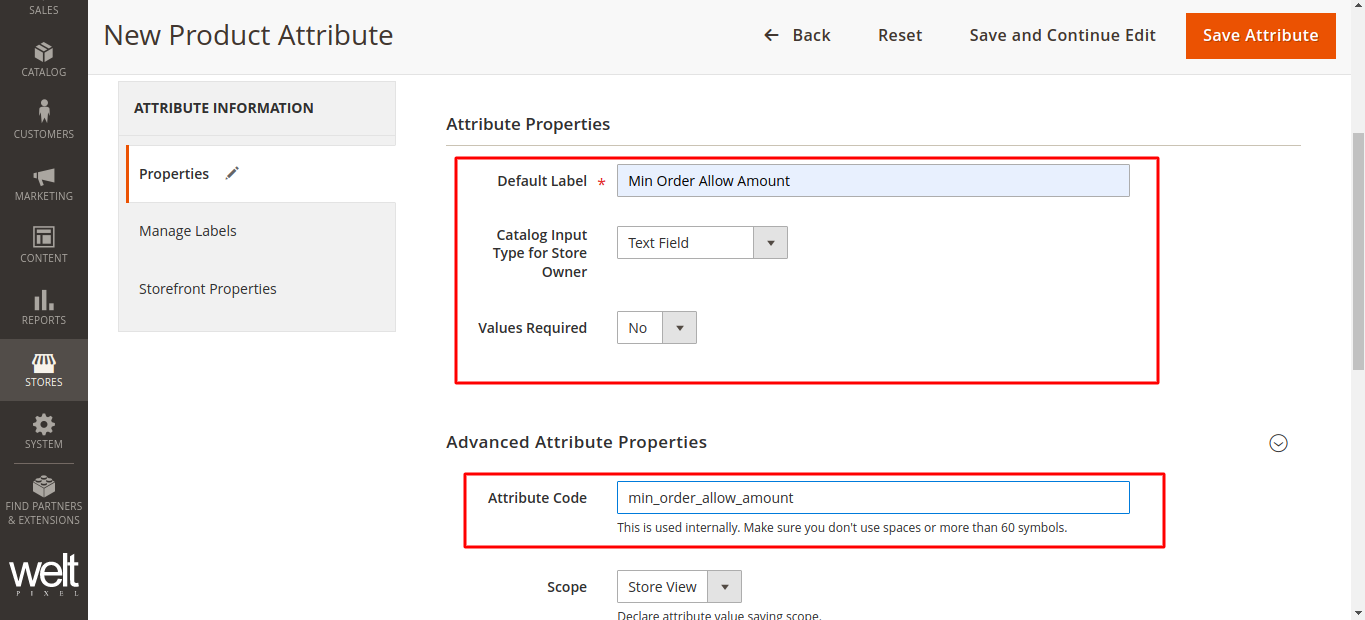
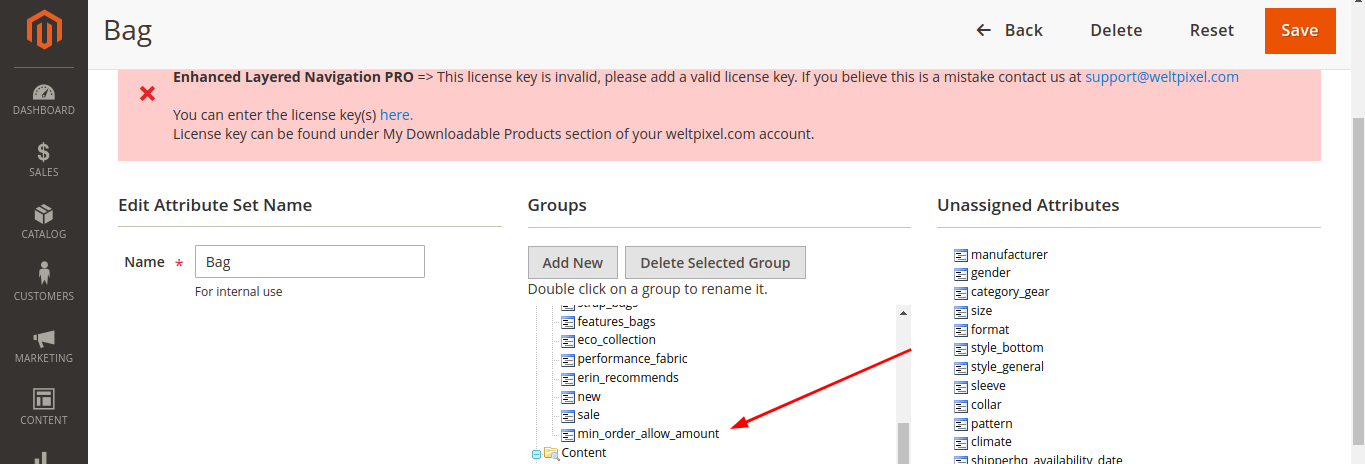
    1. You need to create product attribute from admin and assign it to attribute set.

    2. Add product min amount to validate.

    Note: Attribute code must be “min_order_allow_amount”

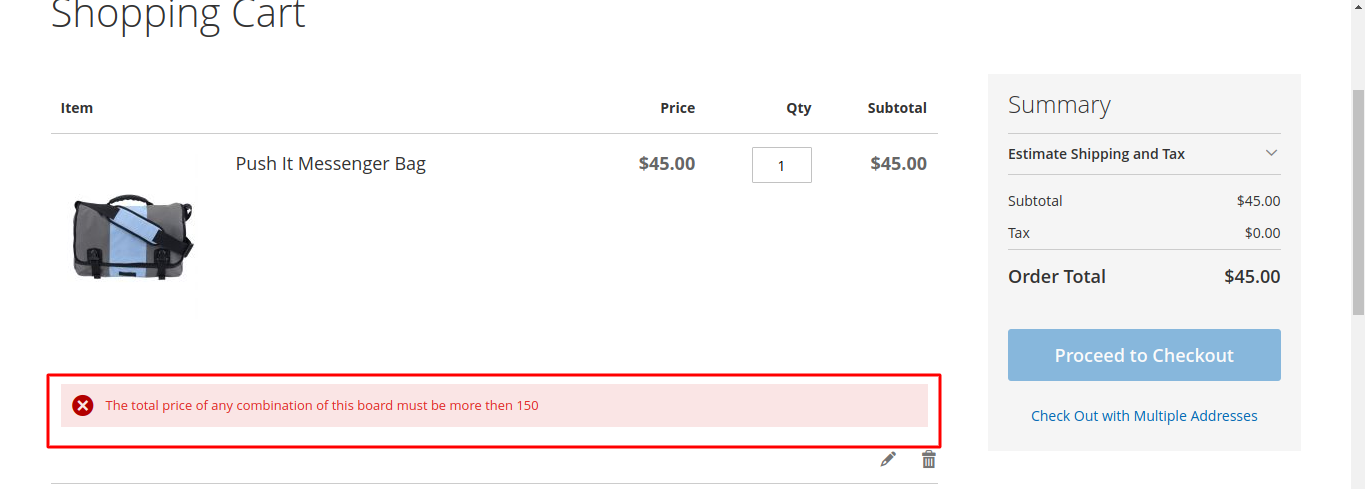
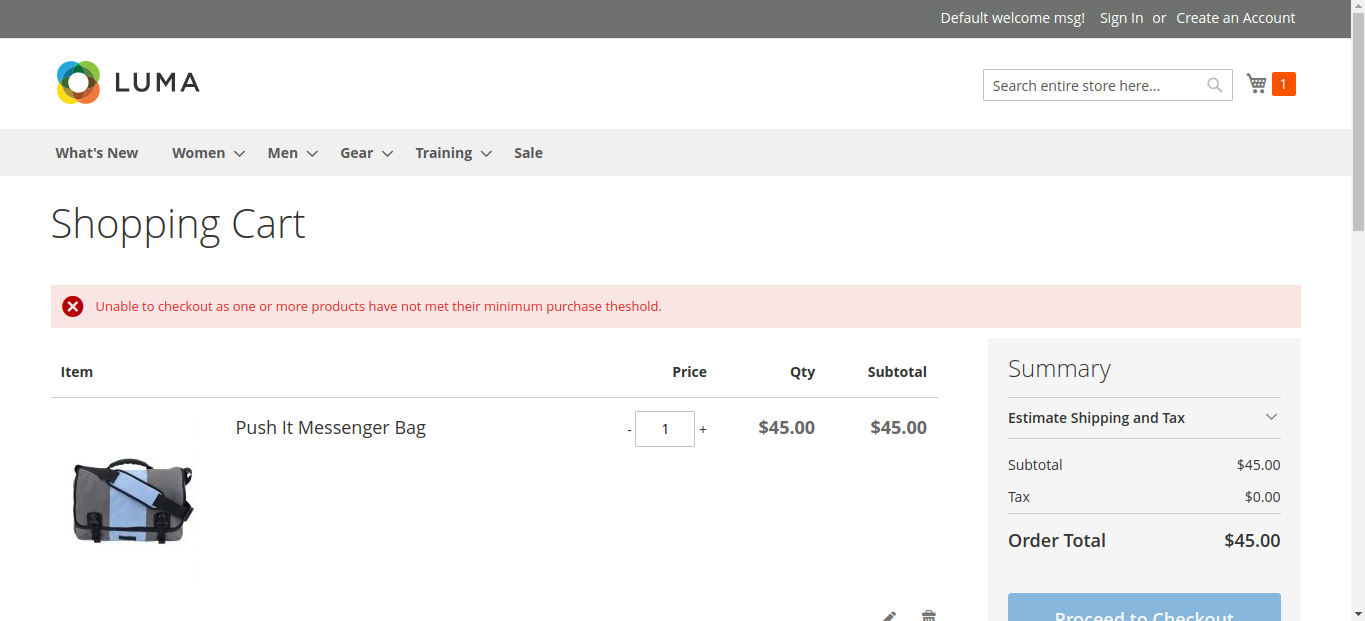
    Here is the screenshot which shows error message for product min amount.

    How to mass update product attribute pragmatically?

    Update product attribute value programmatically in Magento 2 .

    <?php
    
    namespace VendoreModuleHelper;
    
    use MagentoCatalogModelProductAction as ProductAction;
    use MagentoCatalogModelResourceModelProductCollectionFactory;
    use MagentoFrameworkAppHelperAbstractHelper;
    use MagentoFrameworkAppHelperContext;
    use MagentoStoreModelStoreManagerInterface;
    
    class Data extends AbstractHelper
    {
        protected $messageManager;
        private $productCollection;
        private $productAction;
        private $storeManager;
    
        public function __construct(
            Context $context,
            CollectionFactory $collection,
            ProductAction $action,
            StoreManagerInterface $storeManager
        )
        {
            $this->productCollection = $collection;
            $this->productAction = $action;
            $this->storeManager = $storeManager;
            parent::__construct($context);
        }
    
        public function setcustomAttributeData($param)
        {
            try {
                $collection = $this->productCollection->create()->addFieldToFilter('*');
                $storeId = $this->storeManager->getStore()->getId();
                $ids = [];
                $i = 0;
                foreach ($collection as $item) {
                    $ids[$i] = $item->getEntityId();
                    $i++;
                }
                $this->productAction->updateAttributes($ids, array('attribute' => $param), $storeId);
    
            } catch (Exception $e) {
                $this->messageManager->addError($e->getMessage());
            }
        }
    }


    Get Particular Attribute Options Values from Specific Store

    Please follow the below methods to get the attribute options values from a particular store in Magento.

    I’ve used my code and logic for implementation. You can use your way to implement this thing.

    <?php
    namespace MagemonkeysOptionsBlock;
    
    class Options extends MagentoFrameworkViewElementTemplate
    {    
        protected $eavConfig;
            
        public function __construct(
            .....
            MagentoEavModelConfig $eavConfig,
            .....
        )
        {    
            .......
            $this->eavConfig = $eavConfig;
            .......
        }
        
        public function getAttributeOptionsCollection()
        {
            $attribute = $this->eavConfig->getAttribute('catalog_product', 'Attribute Code Here');
            $attribute->setStoreId(3); // Set Store ID to get options from Particular store.
            $allOptions = $attribute->getSource()->getAllOptions();
    
        }
    }
    ?>

    You can add another classes as per your requirement in the construct method and use them in the same class.

    Magento 2 Checkout redirect on basket page

    If you want to restrict customer to checkout based on your criteria (condition), then this article is your answer.

    For example if you want to restrict customer when cart total less then $300, this method is worth to give a try.

    Here we are using Magemonkeys as Vendor name and CheckoutRestriction as the name of a module. You can change this according to your Vendor and Module name.

    Step 1: Create Registration

    Create registration.php file in the app/code/Magemonkeys/CheckoutRestriction folder with the following code.

    <?php
    MagentoFrameworkComponentComponentRegistrar::register(
        MagentoFrameworkComponentComponentRegistrar::MODULE,
        'Magemonkeys_CheckoutRestriction',
        __DIR__
    );

    Step 2: Create a module

    Create a module.xml file in the app/code/Magemonkeys/CheckoutRestriction/etc folder with the following code.

    <?xml version="1.0" ?>
    <config xmlns:xsi="http://www.w3.org/2001/XMLSchema-instance" xsi:noNamespaceSchemaLocation="urn:magento:framework:Module/etc/module.xsd">
        <module name="Magemonkeys_CheckoutRestriction" setup_version="1.0.0">
            <sequence>
                <module name="Magento_Checkout"/>
            </sequence>
        </module>
    </config>

    Step 3: Create a di.xml for front-end

    Create a di.xml file in the app/code/Magemonkeys/CheckoutRestriction/etc/frontend folder with the following code.

    <?xml version="1.0"?>
    <config xmlns:xsi="http://www.w3.org/2001/XMLSchema-instance" xsi:noNamespaceSchemaLocation="urn:magento:framework:ObjectManager/etc/config.xsd">
        // plugin restrict checkout
        <type name="MagentoCheckoutControllerIndexIndex">
            <plugin name="restrictcheckout" type="MagemonkeysCheckoutRestrictionPluginCheckoutControllerRestrict"/>
        </type>
    </config>

    Step 4: Create a Plugin file

    Create a Restrict.php file in the app/code/Magemonkeys/CheckoutRestriction/Plugin/Checkout/Controller with the following code.

    <?php
     
    namespace MagemonkeysCheckoutRestrictionPluginCheckoutController;
     
    use MagentoFrameworkControllerResultRedirectFactory;
    use MagentoFrameworkMessageManagerInterface;
    use MagentoFrameworkUrlFactory;
    use MagentoCheckoutControllerIndexIndex;
    use MagentoCheckoutModelCart;
     
    class Restrict
    {
        private $urlModel;
        private $resultRedirectFactory;
        private $messageManager;
     
        public function __construct(
            UrlFactory $urlFactory,
            RedirectFactory $redirectFactory,
            ManagerInterface $messageManager,
            Cart $cart
        ) {
        
            $this->urlModel = $urlFactory;
            $this->resultRedirectFactory = $redirectFactory;
            $this->messageManager = $messageManager;
            $this->cart = $cart;
        }
     
        public function aroundExecute(
            Index $subject,
            Closure $proceed
        ) {
        
            $this->urlModel = $this->urlModel->create();
    
            
            //add your logic here
            $subTotal = $this->cart->getQuote()->getSubtotal();
    
            if(!empty($subTotal) && $subTotal < 300){
                $this->messageManager->addErrorMessage(__("Unable to checkout as one or more products have not met their minimum purchase theshold."));
                $defaultUrl = $this->urlModel->getUrl('checkout/cart/', ['_secure' => true]);
                $resultRedirect = $this->resultRedirectFactory->create();
                return $resultRedirect->setUrl($defaultUrl);
            }
              
            return $proceed();
        }
    }

    Here is screenshot which shows error message when some one trying to click on checkout and subtotal less then $300

    You can replace 300$ with your favorable amount and use accordingly.

    How to add custom column in product grid with a condition?

    If you want to add custom column in product grid, then follow below step to create custom module to add custom column in grid.

    Step 1) app/code/Magemonkeys/SalesordercreategridCustomattr/registration.php

    <?php
    MagentoFrameworkComponentComponentRegistrar::register(
        MagentoFrameworkComponentComponentRegistrar::MODULE,
        'Magemonkeys_SalesordercreategridCustomattr',
        __DIR__
    );

    Step 2) app/code/Magemonkeys/SalesordercreategridCustomattr/etc/module.xml

    <?xml version="1.0"?>
    <config xmlns:xsi="http://www.w3.org/2001/XMLSchema-instance" xsi:noNamespaceSchemaLocation="urn:magento:framework:Module/etc/module.xsd">
        <module name="Magemonkeys_SalesordercreategridCustomattr" setup_version="1.0.0">
        </module>
    </config>

    Step 3) app/code/Magemonkeys/SalesordercreategridCustomattr/etc/di.xml

    <?xml version="1.0"?>
    <config xmlns:xsi="http://www.w3.org/2001/XMLSchema-instance" xsi:noNamespaceSchemaLocation="urn:magento:framework:ObjectManager/etc/config.xsd">
        <preference for="MagentoSalesBlockAdminhtmlOrderCreateSearchGrid" type="MagemonkeysSalesordercreategridCustomattrBlockAdminhtmlOrderCreateSearchGrid" />
    </config>

    Step 4) app/code/Magemonkeys/SalesordercreategridCustomattr/Block/Adminhtml/Order/Create/Search/Grid.php

    <?php
    namespace MagemonkeysSalesordercreategridCustomattrBlockAdminhtmlOrderCreateSearch;
    
    class Grid extends MagentoSalesBlockAdminhtmlOrderCreateSearchGrid
    {
        /**
         * @param MagentoBackendBlockTemplateContext $context
         * @param MagentoBackendHelperData $backendHelper
         * @param MagentoCatalogModelProductFactory $productFactory
         * @param MagentoCatalogModelConfig $catalogConfig
         * @param MagentoBackendModelSessionQuote $sessionQuote
         * @param MagentoSalesModelConfig $salesConfig
         * @param array $data
         */
        public function __construct(
            MagentoBackendBlockTemplateContext $context,
            MagentoBackendHelperData $backendHelper,
            MagentoCatalogModelProductFactory $productFactory,
            MagentoCatalogModelConfig $catalogConfig,
            MagentoBackendModelSessionQuote $sessionQuote,
            MagentoSalesModelConfig $salesConfig,
            array $data = []
        )
        {
            $this->_productFactory = $productFactory;
            $this->_catalogConfig = $catalogConfig;
            $this->_sessionQuote = $sessionQuote;
            $this->_salesConfig = $salesConfig;
            parent::__construct($context, $backendHelper, $productFactory, $catalogConfig, $sessionQuote, $salesConfig, $data);
        }
    
        /**
         * Prepare collection to be displayed in the grid
         *
         * @return $this
         */
        protected function _prepareCollection()
        {
            $attributes = $this->_catalogConfig->getProductAttributes();
            /* @var $collection MagentoCatalogModelResourceModelProductCollection */
            $collection = $this->_productFactory->create()->getCollection();
            $collection->setStore(
                $this->getStore()
            )->addAttributeToSelect(
                $attributes
            )->addAttributeToSelect(
                'sku'
            )->addStoreFilter()->addAttributeToFilter(
                'type_id',
                $this->_salesConfig->getAvailableProductTypes()
            )->addAttributeToSelect(
                'gift_message_available'
            );
    
            $collection->joinField(
                'qty_in_stock',
                'cataloginventory_stock_item',
                'qty',
                'product_id=entity_id',
                '{{table}}.stock_id=1 AND {{table}}.website_id=0',
                'left'
            );
    
            $this->setCollection($collection);
    
            $parent = get_parent_class($this);
            $parentclass = get_parent_class($parent);
            return $parentclass::_prepareCollection();
        }
    
        /**
         * Prepare columns
         *
         * @return $this
         */
        protected function _prepareColumns()
        {
            $this->addColumn(
                'entity_id',
                [
                    'header' => __('ID'),
                    'sortable' => true,
                    'header_css_class' => 'col-id',
                    'column_css_class' => 'col-id',
                    'index' => 'entity_id'
                ]
            );
            $this->addColumn(
                'name',
                [
                    'header' => __('Product'),
                    'renderer' => MagentoSalesBlockAdminhtmlOrderCreateSearchGridRendererProduct::class,
                    'index' => 'name'
                ]
            );
            $this->addColumn('sku', ['header' => __('SKU'), 'index' => 'sku']);
            $this->addColumn('customsku', ['header' => __('Custom SKU'), 'index' => 'customsku']);
            $this->addColumn(
                'price',
                [
                    'header' => __('Price'),
                    'column_css_class' => 'price',
                    'type' => 'currency',
                    'currency_code' => $this->getStore()->getCurrentCurrencyCode(),
                    'rate' => $this->getStore()->getBaseCurrency()->getRate($this->getStore()->getCurrentCurrencyCode()),
                    'index' => 'price',
                    'renderer' => MagentoSalesBlockAdminhtmlOrderCreateSearchGridRendererPrice::class
                ]
            );
    
            $this->addColumn(
                'in_products',
                [
                    'header' => __('Select'),
                    'type' => 'checkbox',
                    'name' => 'in_products',
                    'values' => $this->_getSelectedProducts(),
                    'index' => 'entity_id',
                    'sortable' => false,
                    'header_css_class' => 'col-select',
                    'column_css_class' => 'col-select'
                ]
            );
    
            $this->addColumn(
                'qty',
                [
                    'filter' => false,
                    'sortable' => false,
                    'header' => __('Quantity'),
                    'renderer' => MagentoSalesBlockAdminhtmlOrderCreateSearchGridRendererQty::class,
                    'name' => 'qty',
                    'inline_css' => 'qty',
                    'type' => 'input',
                    'validate_class' => 'validate-number',
                    'index' => 'qty'
                ]
            );
    
            $this->addColumn(
                'qty_in_stock',
                [
                    'header' => __('Stock'),
                    'type' => 'number',
                    'index' => 'qty_in_stock'
                ]
            );
    
            $parent = get_parent_class($this);
            $parentclass = get_parent_class($parent);
            return $parentclass::_prepareColumns();
        }
    }

    Step 5 : After place above code, please run below mentioned commands

    - php bin/magento setup:upgrade
    - php bin/magento setup:static-content:deploy
    - php bin/magento cache:clean


    That’s it…

    Now refresh your sales order, create grid page and see that your custom column will be reflecting there.