We sacrifice by not doing any other technology, so that you get the best of Magento.

We sacrifice by not doing any other technology, so that you get the best of Magento.

    How to check list of Layout XML called for a specific page in Magento 2?

    You can check a list of called layout XML for specific pages by MagentoFrameworkAppView class.

    Call getLayout() method from MagentoFrameworkAppView.php class.

    getLayout()->getUpdate()->getHandles() is used for getting all the handles of a page.

    You need to add the following code at the end of root index.php file to check XML files.

    $objectManager = MagentoFrameworkAppObjectManager::getInstance();
    $xmlLayout = $objectManager->get(MagentoFrameworkAppView::class);
    var_dump($xmlLayout->getLayout()->getUpdate()->getHandles());

    To check for a specific page, You need to call the function as below:

    public function __construct(
        MagentoFrameworkAppViewInterface $view
    ) {
        $this->view = $view;
    }

    Call Inside a function,
    $loadedHandles = $this->view->getLayout()->getUpdate()->getHandles();

    Now you can print the result $loadedHandles from above expression.

    Magento 2 : How to override quote merge file?

    Use this tutorial to override quote merge file. Using this tutorial, you can customize quote merge while adding any custom code at the time of customer and guest quote merge

    Module Name : Magemonkeys:Quotemerge

    Create di.xml in /etc folder

    <?xml version="1.0"?>
    <config xmlns:xsi="http://www.w3.org/2001/XMLSchema-instance" xsi:noNamespaceSchemaLocation="urn:magento:framework:ObjectManager/etc/config.xsd">
    <preference for="MagentoCheckoutModelSession" type="MagemonkeysQuotemergeModelSession" />
    </config>

    Create Session.php in /Model folder

    <?php
    /**
     * Copyright © Magento, Inc. All rights reserved.
     * See COPYING.txt for license details.
     */
    namespace MagemonkeysQuotemergeModel;
    
    use MagentoCustomerApiDataCustomerInterface;
    use MagentoFrameworkAppObjectManager;
    use MagentoFrameworkExceptionNoSuchEntityException;
    use MagentoQuoteApiDataCartInterface;
    use MagentoQuoteModelQuote;
    use MagentoQuoteModelQuoteIdMaskFactory;
    use PsrLogLoggerInterface;
    
    /**
     * Represents the session data for the checkout process
     *
     * @api
     * @SuppressWarnings(PHPMD.CouplingBetweenObjects)
     * @SuppressWarnings(PHPMD.CookieAndSessionMisuse)
     * @SuppressWarnings(PHPMD.TooManyFields)
     * @since 100.0.2
     */
    class Session extends MagentoCheckoutModelSession
    {
        const CHECKOUT_STATE_BEGIN = 'begin';
    
        /**
         * Quote instance
         *
         * @var Quote
         */
        protected $_quote;
    
        /**
         * Customer Data Object
         *
         * @var CustomerInterface|null
         */
        protected $_customer;
    
        /**
         * Whether load only active quote
         *
         * @var bool
         */
        protected $_loadInactive = false;
    
        /**
         * A flag to track when the quote is being loaded and attached to the session object.
         *
         * Used in trigger_recollect infinite loop detection.
         *
         * @var bool
         */
        private $isLoading = false;
    
        /**
         * Loaded order instance
         *
         * @var MagentoSalesModelOrder
         */
        protected $_order;
    
        /**
         * @var MagentoSalesModelOrderFactory
         */
        protected $_orderFactory;
    
        /**
         * @var MagentoCustomerModelSession
         */
        protected $_customerSession;
    
        /**
         * @var MagentoQuoteApiCartRepositoryInterface
         */
        protected $quoteRepository;
    
        /**
         * @var MagentoFrameworkHTTPPhpEnvironmentRemoteAddress
         */
        protected $_remoteAddress;
    
        /**
         * @var MagentoFrameworkEventManagerInterface
         */
        protected $_eventManager;
    
        /**
         * @var MagentoStoreModelStoreManagerInterface
         */
        protected $_storeManager;
    
        /**
         * @var MagentoCustomerApiCustomerRepositoryInterface
         */
        protected $customerRepository;
    
        /**
         * @param QuoteIdMaskFactory
         */
        protected $quoteIdMaskFactory;
    
        /**
         * @param bool
         */
        protected $isQuoteMasked;
    
        /**
         * @var MagentoQuoteModelQuoteFactory
         */
        protected $quoteFactory;
    
        /**
         * @var LoggerInterface|null
         */
        private $logger;
    
        /**
         * @param MagentoFrameworkAppRequestHttp $request
         * @param MagentoFrameworkSessionSidResolverInterface $sidResolver
         * @param MagentoFrameworkSessionConfigConfigInterface $sessionConfig
         * @param MagentoFrameworkSessionSaveHandlerInterface $saveHandler
         * @param MagentoFrameworkSessionValidatorInterface $validator
         * @param MagentoFrameworkSessionStorageInterface $storage
         * @param MagentoFrameworkStdlibCookieManagerInterface $cookieManager
         * @param MagentoFrameworkStdlibCookieCookieMetadataFactory $cookieMetadataFactory
         * @param MagentoFrameworkAppState $appState
         * @param MagentoSalesModelOrderFactory $orderFactory
         * @param MagentoCustomerModelSession $customerSession
         * @param MagentoQuoteApiCartRepositoryInterface $quoteRepository
         * @param MagentoFrameworkHTTPPhpEnvironmentRemoteAddress $remoteAddress
         * @param MagentoFrameworkEventManagerInterface $eventManager
         * @param MagentoStoreModelStoreManagerInterface $storeManager
         * @param MagentoCustomerApiCustomerRepositoryInterface $customerRepository
         * @param QuoteIdMaskFactory $quoteIdMaskFactory
         * @param MagentoQuoteModelQuoteFactory $quoteFactory
         * @param LoggerInterface|null $logger
         * @throws MagentoFrameworkExceptionSessionException
         * @SuppressWarnings(PHPMD.ExcessiveParameterList)
         */
        public function __construct(
            MagentoFrameworkAppRequestHttp $request,
            MagentoFrameworkSessionSidResolverInterface $sidResolver,
            MagentoFrameworkSessionConfigConfigInterface $sessionConfig,
            MagentoFrameworkSessionSaveHandlerInterface $saveHandler,
            MagentoFrameworkSessionValidatorInterface $validator,
            MagentoFrameworkSessionStorageInterface $storage,
            MagentoFrameworkStdlibCookieManagerInterface $cookieManager,
            MagentoFrameworkStdlibCookieCookieMetadataFactory $cookieMetadataFactory,
            MagentoFrameworkAppState $appState,
            MagentoSalesModelOrderFactory $orderFactory,
            MagentoCustomerModelSession $customerSession,
            MagentoQuoteApiCartRepositoryInterface $quoteRepository,
            MagentoFrameworkHTTPPhpEnvironmentRemoteAddress $remoteAddress,
            MagentoFrameworkEventManagerInterface $eventManager,
            MagentoStoreModelStoreManagerInterface $storeManager,
            MagentoCustomerApiCustomerRepositoryInterface $customerRepository,
            QuoteIdMaskFactory $quoteIdMaskFactory,
            MagentoQuoteModelQuoteFactory $quoteFactory,
            MagentoCatalogHelperProductConfiguration $configuration,
            LoggerInterface $logger = null
        ) {
            $this->_orderFactory = $orderFactory;
            $this->_customerSession = $customerSession;
            $this->quoteRepository = $quoteRepository;
            $this->_remoteAddress = $remoteAddress;
            $this->_eventManager = $eventManager;
            $this->_storeManager = $storeManager;
            $this->customerRepository = $customerRepository;
            $this->quoteIdMaskFactory = $quoteIdMaskFactory;
            $this->quoteFactory = $quoteFactory;
            $this->configuration = $configuration;
            parent::__construct(
                $request,
                $sidResolver,
                $sessionConfig,
                $saveHandler,
                $validator,
                $storage,
                $cookieManager,
                $cookieMetadataFactory,
                $appState,
                $orderFactory,
                $customerSession,
                $quoteRepository,
                $remoteAddress,
                $eventManager,
                $storeManager,
                $customerRepository,
                $quoteIdMaskFactory,
                $quoteFactory,
                $logger
            );
            $this->logger = $logger ?: ObjectManager::getInstance()
                ->get(LoggerInterface::class);
        }
    
        /**
         * Load data for customer quote and merge with current quote
         *
         * @return $this
         */
        public function loadCustomerQuote()
        {
            //we can write custom code
        }
    
    }

    That’s it.

    Magento 2 : Override the Category view block file

    Override view block using di.xml and add the below code into that file
    <preference for="MagentoCatalogBlockCategoryView" type="VendorModuleBlockCategoryView"/>

    Create the View.php file under your custom module with this path Vendor/Module/Block/Category/View.php and add the below code.

    <?php
    
    namespace VendorModuleBlockCategory;
    
    use MagentoCatalogApiProductRepositoryInterface;
    use MagentoCatalogModelCategory;
    
    class View extends MagentoCatalogBlockCategoryView
    {
        protected $_urlInterface;
    
        public function __construct(
            MagentoFrameworkViewElementTemplateContext $context,
            MagentoCatalogModelLayerResolver $layerResolver,
            MagentoFrameworkRegistry $registry,
            MagentoCatalogHelperCategory $categoryHelper,
            MagentoFrameworkUrlInterface $urlInterface,
            array $data = []
        ) {
            $this->_urlInterface = $urlInterface;
            $this->_categoryHelper = $categoryHelper;
            $this->_catalogLayer = $layerResolver->get();
            $this->_coreRegistry = $registry;
            parent::__construct($context, $layerResolver, $registry, $categoryHelper, $data);
        }
    
        protected function _prepareLayout()
        {
            parent::_prepareLayout();
    
            $this->getLayout()->createBlock(MagentoCatalogBlockBreadcrumbs::class);
    
            $category = $this->getCurrentCategory();
            if ($category) {
                $title = $category->getMetaTitle();
                if ($title) {
                    $this->pageConfig->getTitle()->set($title);
                }
                $description = $category->getMetaDescription();
                if ($description) {
                    $this->pageConfig->setDescription($description);
                }
                $keywords = $category->getMetaKeywords();
                if ($keywords) {
                    $this->pageConfig->setKeywords($keywords);
                }
                if ($this->_categoryHelper->canUseCanonicalTag()) {
                    $this->pageConfig->addRemotePageAsset(
                        $category->getUrl(),
                        'canonical',
                        ['attributes' => ['rel' => 'canonical']]
                    );
                }
    
                $pageMainTitle = $this->getLayout()->getBlock('page.main.title');
                if ($pageMainTitle) {
                    $pageMainTitle->setPageTitle($this->getCurrentCategory()->getName());
                }
            }
    
            return $this;
        }
    }


    Magento 2 : Setup PWA from Scratch

    Follow the below steps to install and set up PWA in 2.3 :

    Prerequisite :
    You must have a version of  NodeJS >=10.14.1 , and Yarn > = 1.13.0. I suggest using the Latest versions of both are recommended.

    1 ) Use the following command :

    composer create-project --repository-url=https://repo.magento.com/ magento/project-community-edition /var/www/html/m23

    /var/www/html/m23 is a Magento installation directory.

    2 ) Install Magento by Command Line:

    php bin/magento setup:install --base-url=http://localhost/m23 --db-host=localhost --db-name=nik_m23 --db-user=root --db-password=webkul --admin-firstname=John --admin-lastname=Doe --admin-email=test@webkul.com --admin-user=admin --admin-password=admin123 --backend-frontname=admin_magento --language=en_US --currency=USD --timezone=Asia/Tbilisi --cleanup-database --use-rewrites=1

    While you have completed with Magento installation, Now
    3 ) Now clone pwa-studio repository :

    https://github.com/magento-research/pwa-studio.git
    git clone https://github.com/magento-research/pwa-studio.git

    I have cloned this repository in magento root directory ex: /var/www/html/m23
    4 ) You will see the pwa-studio directory in /var/www/html/m23.
    Enter into this directory :

    cd pwa-studio/

    5 ) Run :

    yarn install

    6 ) Specify the Magento backend server in .env file. you can see the .env.dist file in
    /var/www/html/m23/pwa-studio/packages/venia-concept/ direcoty. If you are not
    able see, enable show hidden files. Now create .env file from this env.dist

    cp packages/venia-concept/.env.dist packages/venia-concept/.env

    7 ) Open this .env file and find MAGENTO_BACKEND_URL. Here configure your
    local Magento 2.3 instance, my case it is :

    MAGENTO_BACKEND_URL="https://magento2-pwa.com/"

    7.1 Generate SSL certificate because PWA features require an HTTPS Secure Domain. From the root directory of PWA (/PWA-studio) run the below command:

    yarn buildpack create-custom-origin packages/venia-concept

    Note: 7.1 Feature requires administrative access.

    8 ) Now let’s install sample data for venia-theme to make it good-looking.

    9 ) Run the following command in the Magento root directory setup the repository for the sample data in https://repo.magento.com: composer config –no-interaction –ansi repositories.venia-sample-data composer https://repo.magento.com

    9 )  Require in the sample data :

    composer require --no-interaction --ansi magento/venia-sample-data:*
    

    10 ) Now go back to pwa-studio directory /var/www/html/m23/pwa-studio and start Server.

    yarn run build

    The above command maybe gives the permission error, so run the below command with sudo.

    sudo yarn run build

    12 ) Run the server, Use any of the following commands from the project root directory to start the server:

    yarn run watch:venia
    yarn run watch:all
    yarn run build && yarn run stage:venia

    Last steps to run the following commands :

    bin/magento setup:upgrade 
    
    bin/magento indexer:reindex
    
    bin/magento cache:flush

    You are Done! 🙂


    Add an image programmatically from any url in Magento 2

    <?php
    /**
     * file location:
     * app/code/VendorName/ExtensionName/Service/ImportImageService.php
     */
    
    namespace VendorNameExtensionNameService;
    
    use MagentoCatalogModelProduct;
    use MagentoFrameworkAppFilesystemDirectoryList;
    use MagentoFrameworkFilesystemIoFile;
    
    /**
     * Class ImportImageService
     * assign images to products by image URL
     */
    class ImportImageService
    {
        /**
         * Directory List
         *
         * @var DirectoryList
         */
        protected $directoryList;
    
        /**
         * File interface
         *
         * @var File
         */
        protected $file;
    
        /**
         * ImportImageService constructor
         *
         * @param DirectoryList $directoryList
         * @param File $file
         */
        public function __construct(
            DirectoryList $directoryList,
            File $file
        ) {
            $this->directoryList = $directoryList;
            $this->file = $file;
        }
    
        /**
         * Main service executor
         *
         * @param Product $product
         * @param string $imageUrl
         * @param array $imageType
         * @param bool $visible
         *
         * @return bool
         */
        public function execute($product, $imageUrl, $visible = false, $imageType = [])
        {
            /** @var string $tmpDir */
            $tmpDir = $this->getMediaDirTmpDir();
            /** create folder if it is not exists */
            $this->file->checkAndCreateFolder($tmpDir);
            /** @var string $newFileName */
            $newFileName = $tmpDir . baseName($imageUrl);
            /** read file from URL and copy it to the new destination */
            $result = $this->file->read($imageUrl, $newFileName);
            if ($result) {
                /** add saved file to the $product gallery */
                $product->addImageToMediaGallery($newFileName, $imageType, true, $visible);
            }
    
            return $result;
        }
    
        /**
         * Media directory name for the temporary file storage
         * pub/media/tmp
         *
         * @return string
         */
        protected function getMediaDirTmpDir()
        {
    
            return $this->directoryList->getPath(DirectoryList::MEDIA) . DIRECTORY_SEPARATOR . 'tmp' . DIRECTORY_SEPARATOR;
        }
    }

    Using above fucntion Images can be imported directly from external url.

    Magento 2 : How to reload order summary total by using JS?

    If we use the quote collectTotal() method in our custom requirement then it’s possible that total won’t get loaded in the cart summary and checkout summary.

    So how to reload summary total by using JS.

    You have to use Magento_Checkout/js/action/get-totals to update the summary.

    define([
        'uiComponent',
        'jquery',
        'Magento_Checkout/js/action/get-totals',
        'ko',
    
    ], function (Component, $, getTotalsAction, ko) {
        'use strict';
        return Component.extend({
                var newUrl = baseUrl+'/loadSummary';
                $.ajax({
                    url: newUrl,
    
                    data:  {
                    },
                    type: "post",
                    cache: false,
                    success: function (data) {
                        var deferred = $.Deferred();
                        getTotalsAction([], deferred);
                    }
                });
            
        });
    });

    Magento 2: create new category layout for specific category

    If you want to set a different look for a specific category, then you can make new layout for that category like below.

    First you need to create new file under your theme Magento_Cataloglayoutcatalog_category_view_id_{{id of category}}.xml

    then you can move and add your block which you need to require like below

    <?xml version="1.0"?>
    <!--
    /**
    * Copyright © Magento, Inc. All rights reserved.
    * See COPYING.txt for license details.
    */
    -->
    <page xmlns:xsi="http://www.w3.org/2001/XMLSchema-instance" layout="2columns-left" xsi:noNamespaceSchemaLocation="urn:magento:framework:View/Layout/etc/page_configuration.xsd">
    <body>
    <referenceContainer name="columns.top">
    <container name="category.view.custom" htmlTag="div" htmlClass="newconwrap" after="-"/>
    </referenceContainer>
    <move element="category.image" destination="category.view.custom" before="-"/>
    <move element="category.view.container" destination="category.view.custom"/>
    </body>
    </page>

    Note: I have tried this way with Magento 2.4.3

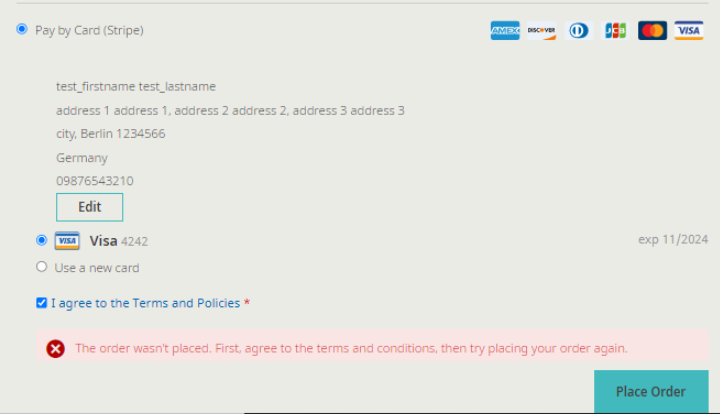
    How to solve “The Order wasn’t placed. First, agree to the terms and…” error?

    If you are facing error as per the below,
    Then the first step is to override the purchase order mixin js file on your theme and add the below code.
    /**
     * Copyright © Magento, Inc. All rights reserved.
     * See COPYING.txt for license details.
     */
    define([
        'mage/utils/wrapper',
        'Magento_PurchaseOrder/js/action/place-order-purchase-quote',
        'jquery'
    ], function (wrapper, placeOrderPurchaseQuote,$) {
        'use strict';
    
        return function (placeOrder) {
            return wrapper.wrap(placeOrder, function (originalAction, paymentData, messageContainer) {
                if (window.checkoutConfig.isPurchaseOrder) {
                    var agreementsConfig = window.checkoutConfig.checkoutAgreements;
                    if (agreementsConfig.isEnabled) {
                        var agreementForm,
                            agreementData,
                            agreementIds;
                        agreementForm = $('.payment-method._active div[data-role=checkout-agreements] .checkout-agreement input');
                        agreementData = agreementForm.serializeArray();
                        agreementIds = [];
    
                        agreementData.forEach(function (item) {
                            agreementIds.push(item.value);
                        });
    
                        if (paymentData['extension_attributes'] === undefined) {
                            paymentData['extension_attributes'] = {};
                        }
    
                        paymentData['extension_attributes']['agreement_ids'] = agreementIds;
                    }
                    return placeOrderPurchaseQuote(paymentData, messageContainer);
                }
    
                return originalAction(paymentData, messageContainer);
            });
        };
    });
    

    at

    app/design/frontend/Vendor/Theme/Magento_PurchaseOrder/web/js/action/place-order-mixin.js

    That’s it.

    Add your layout updates for particular store using xml

    I’ve to add custom CSS for particular store on checkout page, so I’ve updated a layout using observer.

    Please follow the below method. you need to copy the below event in your module.

    <?xml version="1.0" encoding="UTF-8" ?>
    <config xmlns:xsi="http://www.w3.org/2001/XMLSchema-instance" xsi:noNamespaceSchemaLocation="urn:magento:framework:Event/etc/events.xsd">
        <event name="layout_load_before">
            <observer name="magemonkeys_customshipping_addcustomcheckouthandle" instance="MagemonkeysCustomshippingObserverAddCheckoutLayoutUpdateHandleObserver" />
        </event>
    </config>

    And you can copy the below code for add the layout handle in Observer class.

    <?php
    
    namespace MagemonkeysCustomshippingObserver;
    
    use MagentoCatalogModelCategory as CategoryModel;
    use MagentoFrameworkEvent;
    use MagentoFrameworkEventObserver as EventObserver;
    use MagentoFrameworkEventObserverInterface;
    use MagentoFrameworkRegistry;
    use MagentoFrameworkViewLayout as Layout;
    use MagentoFrameworkViewLayoutProcessorInterface as LayoutProcessor;
    
    /**
     *  AddCheckoutLayoutUpdateHandleObserver
     */
    class AddCheckoutLayoutUpdateHandleObserver implements ObserverInterface
    {
       
        const LAYOUT_HANDLE_NAME = 'checkout_index_index_emp';
        const LAYOUT_HANDLE_NAME_CUSTOMER = 'customer_account_emp';
    
        public $storeManager;
    	public $customerSession;
    
        public function __construct(
            MagentoStoreModelStoreManagerInterface $storeManager,
    		MagentoCustomerModelSession $customer
        ) {
            $this->storeManager = $storeManager;        
            $this->customerSession = $customer;        
        }
    	
    	public function getStoreCode()
    	{
    		return $this->storeManager->getStore()->getCode();
    	}
    
        /**
         * @param EventObserver $observer
         *
         * @return void
         */
        public function execute(EventObserver $observer)
        {
            /** @var Event $event */
            $event = $observer->getEvent();
            $actionName = $event->getData('full_action_name');
    		
            if ($actionName === 'checkout_index_index') {
                /** @var Layout $layout */
                $layout = $event->getData('layout');
    
                /** @var LayoutProcessor $layoutUpdate */
                $layoutUpdate = $layout->getUpdate();
    
                // check if Category Display Mode is "Mixed"
                if($this->getStoreCode() == 'abc_store' && $this->customerSession->isLoggedIn())
    			{
                    $layoutUpdate->addHandle(static::LAYOUT_HANDLE_NAME);
                }
            }
        }
    }

    That’s it. Now you can use the checkout_index_index_emp.xml file in your view/frontend/layout directory and make the changes as per your requirement.

    Magento 2 : Special character in category name issue during CSV import of products

    I have recently faced an issue during CSV import as below.:

    In ‘Categories ‘ column. Category name is like ‘Default Category/Motorola/E Series/Moto E6 (XT2005,XT2005-3,XT2005-5)

    While I am importing this category, it’s creating three categories despite one. Due to comma(,), Magento’s default functionality considers a new category after comma(,).

    It will create categories like :
    1) Moto E6 (XT2005
    2) XT2005-3
    3) XT2005-5)

    To fix the comma issue in categories name follow the below solutions :

    To fix the issue you can use # code by replacing comma (,) 
    
    - Hash code for ',' is ,  using this code you can replace comma in category name.
    
    For example :


    So, by replacing the comma with Html character code, the issue will be fixed and created a category same as expected.

    Let me know if this article is helpful to you.
