We sacrifice by not doing any other technology, so that you get the best of Magento.

We sacrifice by not doing any other technology, so that you get the best of Magento.

    How to change default tab in product page in Magento 2?

    In Magento 2, the product detail page’s default name is “Details”

    Let’s say if we want to change this tab name from “Details” to “Product Information”

    What we have to do is to override layout xml file from Vendor to theme.

    We need to create catalog_product_view.xml file in our custom theme on app/design/frontend/Magemonkeys/mytheme/Magento_Catalog/layout  and add below code

    <?xml version="1.0"?>
    <page layout="1column" xmlns:xsi="http://www.w3.org/2001/XMLSchema-instance" xsi:noNamespaceSchemaLocation="urn:magento:framework:View/Layout/etc/page_configuration.xsd">
        <body>
            <referenceBlock name="product.info.details">    
                <referenceBlock name="product.info.description">
                    <arguments>
                        <argument name="title" translate="true" xsi:type="string">Product Information</argument>
                    </arguments>
                </referenceBlock>
            </referenceBlock>
        </body>
    </page>
    

    Now we need to flush the cache and check-in product detail page.

    That’s it.

    CONTACT US to get Magento programming solutions by hiring a certified Magento expert.

    Upgrate to Magento 2 & Streamlines the Checkout Process

    The benefits of Magento 2 are not hidden anymore. But, a straightforward benefit of Magento 2 is that it adopts a streamlined checkout process.

    Magento 1 is having a long six-step checkout process which is as below:

    Step 1: Checkout Method
    Step 2: Billing
    Step 3: Shipping
    Step 4: Shipping Method
    Step 5: Payment Method
    Step 6: Order Review

    This isn’t long but frustrating for customers. It isn’t delivering a great user experience. Chances of your shopping cart’s abandonment are increased due to it.

    Magento 2 delivers a concrete solution to this six-step checkout problem. It launched a streamlined one-page checkout process with two steps:

    Step 1: Shipping
    Step 2: Payment Confirmation

    That’s all you need with Magento 2. The process is not only faster, but it delivers the best user experience. It helps Magento eCommerce store owners to increase the sales of their store.

    If you’re still stuck with Magento 1 then It’s the right time to upgrade to Magento 2 & start increasing your sales.

    How to create cron job in Magento 2?

    Cron job is one type of feature in magento 2. The cron job will create a command or a script that is appropriate with the task you want to do. Instead of manual working, the cronjob allows running automatically at time and we can perform some code based on cron job

    Module name : Magemonkeys_Magecron

    for we can create crontab.xml in moduleapp/code/Magemonkeys/Magecron/etc/crontab.xml

    <?xml version="1.0" ?>
    <config xmlns:xsi="http://www.w3.org/2001/XMLSchema-instance" xsi:noNamespaceSchemaLocation="urn:magento:module:Magento_Cron:etc/crontab.xsd">
    	<group id="default">
    		<job instance="MagemonkeysMagecronCronMycron" method="execute" name="magemonkeys_cron_mycron">
    			<schedule>* * * * *</schedule>
    		</job>
    	</group>
    </config>

    also here we have explain schedule start based an above code

    *   *  *  *  * command to be executed
    |  |  |  |  |
    |  |  |  |  +—– Day of week (0 – 7) (Sunday=0 or 7)
    |  |  |  +——- Month (1 – 12)
    |  |  +——— Day of month (1 – 31)
    |  +———– Hour (0 – 23)
    +————- Minute (0 – 59)

    and create Mycron.php file in module with relevant location app/code/Magemonkeys/Magecron/Cron/Mycron.php

    <?php
    namespace MagemonkeysMagecronCron;
    class Mycron
    {
        public function execute()
        {
    	$writer = new ZendLogWriterStream(BP . '/var/log/mycron.log');
    	$logger = new ZendLogLogger();
    	$logger->addWriter($writer);
    	$logger->info(__METHOD__);
    	return $this;
        }
    }

    after that cache flush and check

    If cron is not install in magento 2

    php bin/magento cron:install

    and then run cron

    php bin/magento cron:run

    Now you can check your cron schedule
    that’s it.

    Magento 2 : How to hide whole website product price via plugin method?

    If you want to hide the whole website’s product price and want to make it appear only for login users then this article is a catch for you.

    1. Create file di.xml on app/code/Magemonkeys/Hideproductprice/etc

    <?xml version="1.0" encoding="UTF-8"?>
    
    <config xmlns:xsi="http://www.w3.org/2001/XMLSchema-instance" xsi:noNamespaceSchemaLocation="urn:magento:framework:ObjectManager/etc/config.xsd">
        <type name="MagentoCatalogPricingRenderFinalPriceBox">
            <plugin name="price_hide" type="MagemonkeysHideproductpricePluginHidePriceBox" sortOrder="1" disabled="false"/>
        </type>    
    </config>

    2. Create file HidePriceBox.php on app/code/Magemonkeys/Hideproductprice/Plugin

    <?php
    
    namespace MagemonkeysHideproductpricePlugin;
    
    class HidePriceBox
    {
        protected $_customerSession;
        public function __construct(        
            MagentoCustomerModelSession $customerSession    
        ) {
            $this->_customerSession = $customerSession;        
        }
    	
        function afterToHtml(MagentoCatalogPricingRenderFinalPriceBox $subject, $result)
        {    
        	if($this->_customerSession->getCustomer()->getGroupId()) {
        		return $result;    		
        	}else{
            	return '<h3>PLEASE DO LOGIN AND SHOW THE PRICE</h3>';
            }        
        }
    }

    3. Result

    Magento 2: Add Canonical Url in all pages

    Canonical URL is basically a URL which will help you to let Google and search engine know that your existing page is a copy of the canonical page.

    To add canonical URL you need to put the below code in your theme any of default.xml file

    <head>
    <link rel="canonical" src="https://magemonkeys.com" src_type="url" />
    </head>

    Clear the cache and check the result.

    Magento 2.3.4 – Date showing wrong on invoice

    Please find the Timezone.php file in the vendor directory.

    vendor/magento/framework/Stdlib/DateTime/Timezone.php

    you can find the scopeDate function in that file.

    Replace the below code

    public function scopeDate($scope = null, $date = null, $includeTime = false)
    {
        $timezone = new DateTimeZone(
            $this->_scopeConfig->getValue($this->getDefaultTimezonePath(), $this->_scopeType, $scope)
        );
        switch (true) {
            case (empty($date)):
                $date = new DateTime('now', $timezone);
                break;
            case ($date instanceof DateTime):
            case ($date instanceof DateTimeImmutable):
                $date = $date->setTimezone($timezone);
                break;
            case (!is_numeric($date)):
                $timeType = $includeTime ? IntlDateFormatter::SHORT : IntlDateFormatter::NONE;
                $formatter = new IntlDateFormatter(
                    $this->_localeResolver->getLocale(),
                    IntlDateFormatter::SHORT,
                    $timeType,
                    $timezone
                );
                $timestamp = $formatter->parse($date);
                $date = $timestamp
                    ? (new DateTime('@' . $timestamp))->setTimezone($timezone)
                    : new DateTime($date, $timezone);
                break;
            case (is_numeric($date)):
                $date = new DateTime('@' . $date);
                $date = $date->setTimezone($timezone);
                break;
            default:
                $date = new DateTime($date, $timezone);
                break;
        }
    
        if (!$includeTime) {
            $date->setTime(0, 0, 0);
        }
    
        return $date;
    }

    with the below code

    public function scopeDate($scope = null, $date = null, $includeTime = false)
    {
        $timezone = new DateTimeZone(
            $this->_scopeConfig->getValue($this->getDefaultTimezonePath(), $this->_scopeType, $scope)
        );
        switch (true) {
            case (empty($date)):
                $date = new DateTime('now', $timezone);
                break;
            case ($date instanceof DateTime):
            case ($date instanceof DateTimeImmutable):
                $date = $date->setTimezone($timezone);
                break;
            default:
                $date = new DateTime(is_numeric($date) ? '@' . $date : $date);
                $date->setTimezone($timezone);
                break;
        }
    
        if (!$includeTime) {
            $date->setTime(0, 0, 0);
        }
    
        return $date;
    }


    Image resize through programmatically for only one particular product

    I faced an issue with one particular product that wasn’t generating the cache & resized images. And there is Magento’s default command to generate the catalog images, but it only generates all the product images at that time so that procedure wasn’t an option to choose.

    So to solve the problem, I created one script file on the root of the Magento directory and added the static product id in that script, so it could generate the resized Images as per theme images for that particular product.

    Step 1: Create a resize_image.php on the root directory of Magento and add the below code in the file.

    <?php
    
    /**
     * Script For resize images for a particular product.
     * @author Magemonkeys
     */
    
    /**
     * For Development Purpose (Error Displaying)
     */
    //ini_set('display_errors', 1);
    //error_reporting(E_ALL);
    
    /**
     * If server value is not compatible
     */
    ini_set('memory_limit', '1024M');
    ini_set('max_execution_time', '18000');
    
    /**
     * If your external file is in root folder
     */
    require __DIR__ . '/app/bootstrap.php';
    
    use MagentoFrameworkAppBootstrap;
    
    $params = $_SERVER;
    $bootstrap = Bootstrap::create(BP, $params);
    $obj = $bootstrap->getObjectManager();
    $state = $obj->get('MagentoFrameworkAppState');
    $state->setAreaCode('frontend');
    
    /**
     * Start Script Execution Time
     */
    $time_start = microtime(true);
    
    /**
     * Declare objects using ObjectManager
     */
    $objectManager = MagentoFrameworkAppObjectManager::getInstance();
     
    $resizeImage = $objectManager->get('MagentoMediaStorageServiceImageResize');
    
    $product_id=20;
    $objectManager = MagentoFrameworkAppObjectManager::getInstance();
    $_product = $objectManager->get('MagentoCatalogModelProduct')->load($product_id);
    
     
    $galleryImages = $_product->getMediaGalleryImages();
     
    if ($galleryImages) 
    {
    	foreach ($galleryImages as $image) {
    		$resizeImage->resizeFromImageName($image->getFile());
    	}
    }
    

    Now, you have to run this file through a browser e.g. http://example.com/resize_image.php and you can see that all the images of that product are resized as per the theme images.

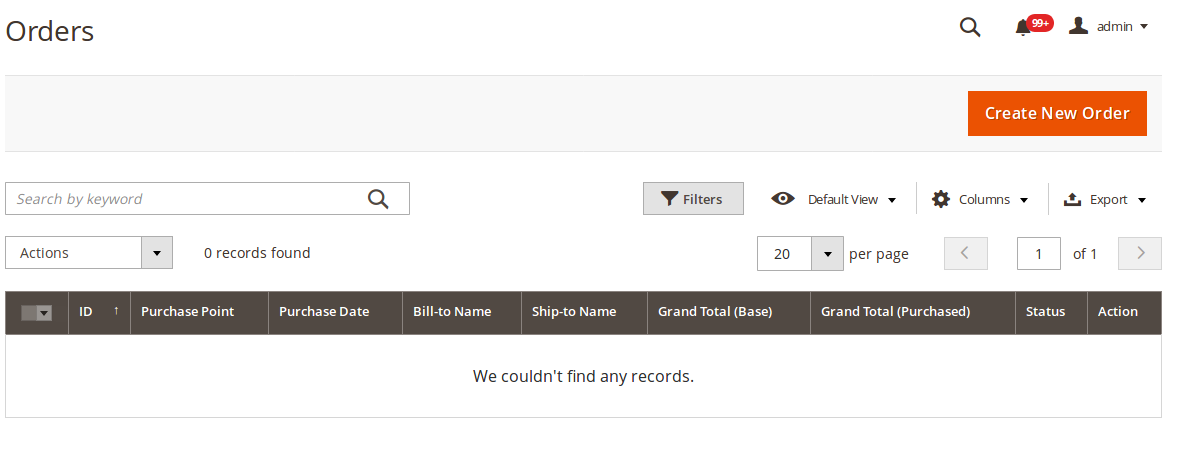
    Magento 2 Sales orders not displayed in admin panel sales order grid.

    Sometime after migration,  you will see that orders data is not displayed in the Magento admin sales grid.  Also, newly placed orders not showing in the sales grid.

    Screenshot :
    Please follow the below settings to fix this issue :

    Disable Asynchronous indexing under Store > Configuration > Advance > Developer > Grid Settings

    Clear the cache and you are done!

    Please share your thoughts if this article helpful to you.

    Thanks.

    How to add email cc field to customer account area in admin panel Magento 2

    If you want to send transnational emails for another cc mail to the customer, then follow below steps.

    Step 1: Create a registration file like Magemonkey/EmailCC/registration.php

    <?php
    MagentoFrameworkComponentComponentRegistrar::register(
        MagentoFrameworkComponentComponentRegistrar::MODULE,
        'Magemonkey_EmailCC',
        __DIR__
    );

    Step 2: Create di file like Magemonkey/EmailCC/etc/di.xml

    <?xml version="1.0" ?>
    <config xmlns:xsi="http://www.w3.org/2001/XMLSchema-instance" xsi:noNamespaceSchemaLocation="urn:magento:framework:ObjectManager/etc/config.xsd">
        <type name="MagentoFrameworkMailTemplateTransportBuilder">
            <plugin disabled="false" name="Magemonkey_EmailCC_Plugin_Magento_Framework_Mail_Template_TransportBuilder" sortOrder="10" type="MagemonkeyEmailCCPluginMagentoFrameworkMailTemplateTransportBuilder"/>
        </type>
    </config>

    Step 3: Create module file like Magemonkey/EmailCC/etc/module.xml

    <?xml version="1.0" ?>
    <config xmlns:xsi="http://www.w3.org/2001/XMLSchema-instance" xsi:noNamespaceSchemaLocation="urn:magento:framework:Module/etc/module.xsd">
        <module name="Magemonkey_EmailCC" setup_version="1.1.0">
            <sequence>
                <module name="Magento_Customer"/>
                <module name="Magento_Framework"/>
            </sequence>
        </module>
    </config>

    Step 4: Create extension attributes file like Magemonkey/EmailCC/etc/extension_attributes.xml

    <?xml version="1.0" ?>
    <config xmlns:xsi="http://www.w3.org/2001/XMLSchema-instance" xsi:noNamespaceSchemaLocation="urn:magento:framework:Api/etc/extension_attributes.xsd">
        <extension_attributes for="MagentoCustomerApiDataCustomerInterface">
            <attribute code="mm_emailcc" type="string"/>
        </extension_attributes>
    </config>

    Step 5: Create plugin file like Magemonkey/EmailCC/Plugin/Magento/Framework/Mail/Template/TransportBuilder.php

    <?php
    
    namespace MagemonkeyEmailCCPluginMagentoFrameworkMailTemplate;
    
    /**
     * Plugin to add customer email cc
     */
    class TransportBuilder
    {
        /**
         * @var MagentoCustomerApiCustomerRepositoryInterface
         */
        protected $customerRepositoryInterface;
    
        /**
         * @var MagentoCustomerModelSession
         */
        protected $customerSession;
    
        /**
         * @var PsrLogLoggerInterface
         */
        protected $logger;
    
        public function __construct(
            MagentoCustomerApiCustomerRepositoryInterface $customerRepositoryInterface,
            MagentoCustomerModelSession $customerSession,
            PsrLogLoggerInterface $logger
        ) {
            $this->customerRepositoryInterface = $customerRepositoryInterface;
            $this->customerSession = $customerSession;
            $this->logger = $logger;
        }
    
        public function beforeGetTransport(
            MagentoFrameworkMailTemplateTransportBuilder $subject
        ) {
            try {
                $ccEmailAddresses = $this->getEmailCopyTo();
                if (!empty($ccEmailAddresses)) {
                    foreach ($ccEmailAddresses as $ccEmailAddress) {
                        $subject->addCc(trim($ccEmailAddress));
                        $this->logger->debug((string) __('Added customer CC: %1', trim($ccEmailAddress)));
                    }
                }
            } catch (Exception $e) {
                $this->logger->error((string) __('Failure to add customer CC: %1', $e->getMessage()));
            }
            return [];
        }
    
        /**
         * Get customer id from session
         */
        public function getCustomerIdFromSession()
        {
            if ($customer = $this->customerSession->getCustomer()) {
                return $customer->getId();
            }
            return null;
        }
    
        /**
         * Return email copy_to list
         * @return array|bool
         */
        public function getEmailCopyTo()
        {
            $customerId = $this->getCustomerIdFromSession();
            if (!$customerId) {
                return false;
            }
    
            $customer = $this->getCustomerById($customerId);
            if (!$customer) {
                return false;
            }
    
            $emailCc = $customer->getCustomAttribute('mm_emailcc');
            $customerEmailCC = $emailCc ? $emailCc->getValue() : null;
    
            if (!empty($customerEmailCC)) {
                return explode(',', trim($customerEmailCC));
            }
    
            return false;
        }
    
        /**
         * Get customer by Id.
         * @param int $customerId
         * @return MagentoCustomerModelDataCustomer
         */
        public function getCustomerById($customerId)
        {
            try {
                return $this->customerRepositoryInterface->getById($customerId);
            } catch (Exception $e) {
                $this->logger->critical($e);
                return false;
            }
        }
    }

    Step 6: Create a setup file like Magemonkey/EmailCC/Setup/Patch/Data/AddEmailCcCustomerAttribute.php

    <?php
    
    declare(strict_types=1);
    
    namespace MagemonkeyEmailCCSetupPatchData;
    
    use MagentoCustomerModelCustomer;
    use MagentoCustomerSetupCustomerSetup;
    use MagentoCustomerSetupCustomerSetupFactory;
    use MagentoEavModelEntityAttributeSet;
    use MagentoEavModelEntityAttributeSetFactory;
    use MagentoFrameworkSetupModuleDataSetupInterface;
    use MagentoFrameworkSetupPatchDataPatchInterface;
    use MagentoFrameworkSetupPatchPatchRevertableInterface;
    
    class AddEmailCcCustomerAttribute implements DataPatchInterface, PatchRevertableInterface
    {
    
        /**
         * @var ModuleDataSetupInterface
         */
        private $moduleDataSetup;
        /**
         * @var CustomerSetup
         */
        private $customerSetupFactory;
        /**
         * @var SetFactory
         */
        private $attributeSetFactory;
    
        /**
         * Constructor
         *
         * @param ModuleDataSetupInterface $moduleDataSetup
         * @param CustomerSetupFactory $customerSetupFactory
         * @param SetFactory $attributeSetFactory
         */
        public function __construct(
            ModuleDataSetupInterface $moduleDataSetup,
            CustomerSetupFactory $customerSetupFactory,
            SetFactory $attributeSetFactory
        ) {
            $this->moduleDataSetup = $moduleDataSetup;
            $this->customerSetupFactory = $customerSetupFactory;
            $this->attributeSetFactory = $attributeSetFactory;
        }
    
        /**
         * {@inheritdoc}
         */
        public function apply()
        {
            $this->moduleDataSetup->getConnection()->startSetup();
            /** @var CustomerSetup $customerSetup */
            $customerSetup = $this->customerSetupFactory->create(['setup' => $this->moduleDataSetup]);
            $customerEntity = $customerSetup->getEavConfig()->getEntityType(Customer::ENTITY);
            $attributeSetId = $customerEntity->getDefaultAttributeSetId();
            
            /** @var $attributeSet Set */
            $attributeSet = $this->attributeSetFactory->create();
            $attributeGroupId = $attributeSet->getDefaultGroupId($attributeSetId);
            
            $customerSetup->addAttribute(
                Customer::ENTITY,
                'mm_emailcc',
                [
                    'type' => 'varchar',
                    'label' => 'Email CC',
                    'input' => 'text',
                    'source' => '',
                    'required' => false,
                    'visible' => true,
                    'position' => 500,
                    'system' => false,
                    'backend' => '',
                    'is_used_in_grid' => true,
                    'is_visible_in_grid' => true,
                    'is_filterable_in_grid' => true,
                    'is_searchable_in_grid' => false,
                    'note' => __("Comma separated"),
                ]
            );
            
            $attribute = $customerSetup->getEavConfig()->getAttribute(Customer::ENTITY, 'mm_emailcc');
            $attribute->addData([
                'used_in_forms' => [
                    'adminhtml_customer',
                    'adminhtml_checkout',
                    'customer_account_create',
                    'customer_account_edit'
                ]
            ]);
            $attribute->addData([
                'attribute_set_id' => $attributeSetId,
                'attribute_group_id' => $attributeGroupId
            
            ]);
            $attribute->save();
    
            $this->moduleDataSetup->getConnection()->endSetup();
        }
    
        public function revert()
        {
            $this->moduleDataSetup->getConnection()->startSetup();
            /** @var CustomerSetup $customerSetup */
            $customerSetup = $this->customerSetupFactory->create(['setup' => $this->moduleDataSetup]);
            $customerSetup->removeAttribute(Customer::ENTITY, 'mm_emailcc');
            $this->moduleDataSetup->getConnection()->endSetup();
        }
    
        /**
         * {@inheritdoc}
         */
        public function getAliases()
        {
            return [];
        }
    
        /**
         * {@inheritdoc}
         */
        public static function getDependencies()
        {
            return [];
        }
    }

    Step 7: Create layout file like Magemonkey/EmailCC/view/frontend/layout/customer_account_edit.xml

    <?xml version="1.0"?>
    <page xmlns:xsi="http://www.w3.org/2001/XMLSchema-instance" xsi:noNamespaceSchemaLocation="urn:magento:framework:View/Layout/etc/page_configuration.xsd">
        <update handle="customer_account"/>
        <body>
            <referenceContainer name="content">
                <block class="MagentoCustomerBlockFormEdit" name="customer_edit" template="Magento_Customer::form/edit.phtml" cacheable="false">
                    <container name="form.additional.info" as="form_additional_info">
                        <block class="MagentoCustomerBlockFormEdit" as="customer_edit_cc" name="customer.edit.css" template="Magemonkey_EmailCC::form/mm_emailcc.phtml"/>
                    </container>
                </block>
            </referenceContainer>
        </body>
    </page>

    Step 8 : Create template file like Magemonkey/EmailCC/view/frontend/templates/form/mm_emailcc.phtml

    <?php
    $emailCc = $block->getCustomer()->getCustomAttribute('mm_emailcc');
    $customerEmailCC = $emailCc ? $emailCc->getValue() : null;
    ?>
    <fieldset class="fieldset create account" >
        <legend class="legend">
            <span><?=$block->escapeHtmlAttr(__('Email Copy To'))?></span>
        </legend>
        <br>
        <div class="field mm_emailcc">
            <label for="mm_emailcc" class="label">
                <span><?=$block->escapeHtmlAttr(__('Email Address (Comma separated)'));?></span>
            </label>
            <div class="control">
                <input id="mm_emailcc" 
                       class="input-text" 
                       name="mm_emailcc" 
                       value="<?=$block->escapeHtmlAttr($customerEmailCC);?>" 
                       title="<?=$block->escapeHtmlAttr(__('Email Copy To'));?>" 
                       type="text" 
                       autocomplete="off" />
            </div>
        </div>
    </fieldset>

    Step 9: Then after run the below commands.

    php bin/magento setup:upgrade
    php bin/magento setup:static-content:deploy
    php bin/magento cache:flush

    That’s it…

    Now clean cache and check  “Admin > CUSTOMERS > Customers > All Customers > Edit any customer”. Your new email address cc field option should appear here in the last.

    How to add BCC or other email address field option to General & Contacts in Magento 2 admin panel?

    If, you want to send another contact mail copy to another email address as a BCC? Then follow the below steps.

    Step 1: Create a registration file like Magemonkeys/ContactCc/registration.php

    <?php
    MagentoFrameworkComponentComponentRegistrar::register(
        MagentoFrameworkComponentComponentRegistrar::MODULE,
        'Magemonkey_ContactCc',
        __DIR__
    );

    Step 2: Create di file like Magemonkeys/ContactCc/etc/di.xml

    <?xml version="1.0" ?>
    <config xmlns:xsi="http://www.w3.org/2001/XMLSchema-instance" xsi:noNamespaceSchemaLocation="urn:magento:framework:ObjectManager/etc/config.xsd">
        <preference for="MagentoContactControllerIndexPost" type="MagemonkeyContactCcRewriteMagentoContactControllerIndexPost"/>
    </config>

    Step 3: Create module file like Magemonkeys/ContactCc/etc/module.xml

    <?xml version="1.0" ?>
    <config xmlns:xsi="http://www.w3.org/2001/XMLSchema-instance" xsi:noNamespaceSchemaLocation="urn:magento:framework:Module/etc/module.xsd">
        <module name="Magemonkey_ContactCc" setup_version="1.0.2"/>
    </config>

    Step 4: Create a system file like Magemonkeys/ContactCc/etc/adminhtml/system.xml

    <?xml version="1.0"?>
    <config xmlns:xsi="http://www.w3.org/2001/XMLSchema-instance" xsi:noNamespaceSchemaLocation="urn:magento:module:Magento_Config:etc/system_file.xsd">
        <system>
            <section id="contact" translate="label" type="text" sortOrder="100" showInDefault="1" showInWebsite="1" showInStore="1">
                <tab>general</tab>
                <group id="email" translate="label" type="text" sortOrder="50" showInDefault="1" showInWebsite="1" showInStore="1">
                    <label>Email Options</label>
                    <field id="copy_to" translate="label comment" type="text" sortOrder="200" showInDefault="1" showInWebsite="1" showInStore="1">
                        <label>Send Contact Us Email Copy To</label>
                        <comment>Comma-separated</comment>
                    </field>                
                </group>
            </section>
        </system>
    </config>

    Step 5: Create helper file like Magemonkeys/ContactCc/Helper/Email.php

    <?php
    
    namespace MagemonkeyContactCcHelper;
    
    use MagentoFrameworkAppHelperAbstractHelper;
    use MagentoFrameworkAppHelperContext;
    use MagentoStoreModelStoreManagerInterface;
    use MagentoFrameworkAppConfigScopeConfigInterface;
    
    /**
     * Class Email
     * @package MagemonkeyContactCcHelper
     */
    class Email extends AbstractHelper
    {
        const XML_PATH_EMAIL_COPY_METHOD = 'contact/email/copy_method';
        const XML_PATH_EMAIL_COPY_TO = 'contact/email/copy_to';
    
        /**
         * @var StoreManagerInterface
         */
        private $storeManager;
    
        /**
         * @var ScopeConfigInterface
         */
        protected $scopeConfig;
    
        /**
         * Email constructor.
         * @param Context $context
         * @param StoreManagerInterface $storeManager
         * @param ScopeConfigInterface $scopeConfig
         */
        public function __construct(
            Context $context,
            StoreManagerInterface $storeManager,
            ScopeConfigInterface $scopeConfig
        ) {
            $this->storeManager = $storeManager;
            $this->scopeConfig = $scopeConfig;
            parent::__construct($context);
        }
    
        /**
         * @return array|bool
         * @throws MagentoFrameworkExceptionNoSuchEntityException
         */
        public function getEmailCopyTo()
        {
            $data = $this->getConfigValue(self::XML_PATH_EMAIL_COPY_TO, $this->storeManager->getStore()->getId());
            if (!empty($data)) {
                return explode(',', $data);
            }
            return false;
        }
    
        /**
         * @return mixed
         * @throws MagentoFrameworkExceptionNoSuchEntityException
         */
        public function getCopyMethod()
        {
            return $this->getConfigValue(self::XML_PATH_EMAIL_COPY_METHOD, $this->storeManager->getStore()->getId());
        }
    
        /**
         * @param $xmlPath
         * @param null $storeId
         * @return mixed
         */
        public function getConfigValue($xmlPath, $storeId = null)
        {
            return $this->scopeConfig->getValue(
                $xmlPath,
                MagentoStoreModelScopeInterface::SCOPE_STORE,
                $storeId
            );
        }
    }

    Step 6: Create PHP file like Magemonkey/ContactCc/Rewrite/Magento/Contact/Controller/Index/Post.php

    <?php
    
    namespace MagemonkeyContactCcRewriteMagentoContactControllerIndex;
    
    use MagentoFrameworkAppArea;
    use MagentoContactModelConfigInterface;
    use MagentoFrameworkAppActionContext;
    use MagentoFrameworkDataObject;
    use MagentoFrameworkAppRequestDataPersistorInterface;
    use MagemonkeyContactCcHelperEmail;
    use PsrLogLoggerInterface;
    use MagentoFrameworkExceptionLocalizedException;
    use MagentoContactModelMailInterface;
    use MagentoFrameworkAppObjectManager;
    use MagentoFrameworkTranslateInlineStateInterface;
    use MagentoStoreModelStoreManagerInterface;
    use MagentoFrameworkMailTemplateTransportBuilder;
    
    /**
     * Class Post
     * @package MagemonkeyContactCcRewriteMagentoContactControllerIndex
     */
    class Post extends MagentoContactControllerIndexPost
    {
        /**
         * @var Context
         */
        private $context;
    
        /**
         * @var ConfigInterface
         */
        private $contactsConfig;
    
        /**
         * @var MailInterface
         */
        private $mail;
    
        /**
         * @var DataPersistorInterface
         */
        private $dataPersistor;
    
        /**
         * @var LoggerInterface
         */
        private $logger;
    
        /**
         * @var Email
         */
        private $helper;
    
        /**
         * @var StateInterface
         */
        private $inlineTranslation;
    
        /**
         * @var TransportBuilder
         */
        private $transportBuilder;
    
        /**
         * @var StoreManagerInterface
         */
        private $storeManager;
    
        /**
         * Post constructor.
         * @param Context $context
         * @param ConfigInterface $contactsConfig
         * @param MailInterface $mail
         * @param DataPersistorInterface $dataPersistor
         * @param Email $helper
         * @param LoggerInterface|null $logger
         * @param TransportBuilder $transportBuilder
         * @param StateInterface $inlineTranslation
         * @param StoreManagerInterface|null $storeManager
         */
        public function __construct(
            Context $context,
            ConfigInterface $contactsConfig,
            MailInterface $mail,
            DataPersistorInterface $dataPersistor,
            Email $helper,
            LoggerInterface $logger = null,
            TransportBuilder $transportBuilder,
            StateInterface $inlineTranslation,
            StoreManagerInterface $storeManager = null
        ) {
            $this->context = $context;
            $this->contactsConfig = $contactsConfig;
            $this->mail = $mail;
            $this->dataPersistor = $dataPersistor;
            $this->logger = $logger ?: ObjectManager::getInstance()->get(LoggerInterface::class);
            $this->helper = $helper;
            $this->transportBuilder = $transportBuilder;
            $this->inlineTranslation = $inlineTranslation;
            $this->storeManager = $storeManager ?: ObjectManager::getInstance()->get(StoreManagerInterface::class);
            parent::__construct($context, $contactsConfig, $mail, $dataPersistor, $logger);
        }
    
        /**
         * Contact store
         * @return MagentoFrameworkControllerResultRedirect
         */
        public function execute()
        {
            if (!$this->getRequest()->isPost()) {
                return $this->resultRedirectFactory->create()->setPath('*/*/');
            }
            try {
                $this->sendEmail($this->validatedParams());
                $this->messageManager->addSuccessMessage(
                    __('Thanks for contacting us with your comments and questions. We'll respond to you very soon.')
                );
                $this->dataPersistor->clear('contact_us');
            } catch (LocalizedException $e) {
                $this->messageManager->addErrorMessage($e->getMessage());
                $this->dataPersistor->set('contact_us', $this->getRequest()->getParams());
            } catch (Exception $e) {
                $this->logger->critical($e);
                $this->messageManager->addErrorMessage(
                    __('An error occurred while processing your form. Please try again later.')
                );
                $this->dataPersistor->set('contact_us', $this->getRequest()->getParams());
            }
            return $this->resultRedirectFactory->create()->setPath('contact/index');
        }
    
        /**
         * Send email
         * @param array $post
         * @throws MagentoFrameworkExceptionMailException
         * @throws MagentoFrameworkExceptionNoSuchEntityException
         */
        public function sendEmail($post)
        {
            $this->send(
                $post['email'],
                ['data' => new DataObject($post)]
            );
        }
    
        /**
         * Send email
         * @param $replyTo
         * @param array $variables
         * @throws MagentoFrameworkExceptionMailException
         * @throws MagentoFrameworkExceptionNoSuchEntityException
         */
        public function send($replyTo, array $variables)
        {
            $replyToName = !empty($variables['data']['name']) ? $variables['data']['name'] : null;
    
            $this->inlineTranslation->suspend();
    
            try {
                $this->configureEmailTemplate($replyTo, $replyToName, $variables);
                $this->transportBuilder->addTo($this->contactsConfig->emailRecipient());
    
                $copyTo = $this->helper->getEmailCopyTo();
                if (!empty($copyTo) && $this->helper->getCopyMethod() == 'bcc') {
                    foreach ($copyTo as $email) {
                        $this->transportBuilder->addBcc($email);
                    }
                }
    
                $transport = $this->transportBuilder->getTransport();
                $transport->sendMessage();
    
                $this->sendCopyTo($replyTo, $replyToName, $variables);
            } catch (Exception $e) {
                $this->logger->error($e->getMessage());
            } finally {
                $this->inlineTranslation->resume();
            }
        }
    
        /**
         * Prepare and send copy email message
         * @param string $replyTo
         * @param string $replyToName
         * @param array $variables
         * @return void
         */
        public function sendCopyTo($replyTo, $replyToName, $variables)
        {
            $copyTo = $this->helper->getEmailCopyTo();
            if (!empty($copyTo) && $this->helper->getCopyMethod() == 'copy') {
                foreach ($copyTo as $email) {
                    $this->configureEmailTemplate($replyTo, $replyToName, $variables);
                    $this->transportBuilder->addTo($email);
                    $transport = $this->transportBuilder->getTransport();
                    $transport->sendMessage();
                }
            }
        }
    
        /**
         * Configure email template
         * @param string $replyTo
         * @param string $replyToName
         * @param array $variables
         * @return void
         */
        protected function configureEmailTemplate($replyTo, $replyToName, $variables)
        {
            $this->transportBuilder->setTemplateIdentifier($this->contactsConfig->emailTemplate());
            $this->transportBuilder->setTemplateOptions([
                'area' => Area::AREA_FRONTEND,
                'store' => $this->storeManager->getStore()->getId()
            ]);
            $this->transportBuilder->setTemplateVars($variables);
            $this->transportBuilder->setFrom($this->contactsConfig->emailSender());
            $this->transportBuilder->setReplyTo($replyTo, $replyToName);
        }
    
        /**
         * Validate form params
         * @return array
         * @throws Exception
         */
        private function validatedParams()
        {
            $request = $this->getRequest();
            if (trim($request->getParam('name')) === '') {
                throw new LocalizedException(__('Name is missing'));
            }
            if (trim($request->getParam('comment')) === '') {
                throw new LocalizedException(__('Comment is missing'));
            }
            if (false === strpos($request->getParam('email'), '@')) {
                throw new LocalizedException(__('Invalid email address'));
            }
            if (trim($request->getParam('hideit')) !== '') {
                throw new LocalizedException(__('Error'));
            }
            return $request->getParams();
        }
    }

    Step 7: Then after run the below commands.

    php bin/magento setup:upgrade
    php bin/magento setup:static-content:deploy
    php bin/magento cache:flush

    That’s it…

    Now clean cache and check in Admin > STORES > Settings > Configuration > GENERAL > Contacts. Your new email address field option appear here.