We sacrifice by not doing any other technology, so that you get the best of Magento.

We sacrifice by not doing any other technology, so that you get the best of Magento.

    How to remove custom option price from the dropdown in Magento 2?

    To remove custom option pricing from the dropdown, you need to add below small piece of code to “select.pthml” file

    Location of “select.pthml” file:

    appdesignfrontendThemesyourthemeMagento_Catalogtemplatesproductviewoptionstypeselect.phtml

    <script>
      require([
        'jquery',
        'domReady!'
    ], function($) {
        $(document).ready(function() {
            $('select.product-custom-option').change(function() {
                $('option').each(function() {
                    var selectedOption = $(this).text();
                    if (selectedOption.indexOf('+') > -1) {
                        selectedOption = selectedOption.substring(0, selectedOption.indexOf('+'));
                        $(this).text(selectedOption);
                    } else if (selectedOption.indexOf('-') > -1) {
                        selectedOption = selectedOption.substring(0, selectedOption.indexOf('-'));
                        $(this).text(selectedOption);
                    }
                });
            });
        });
    });
    </script>
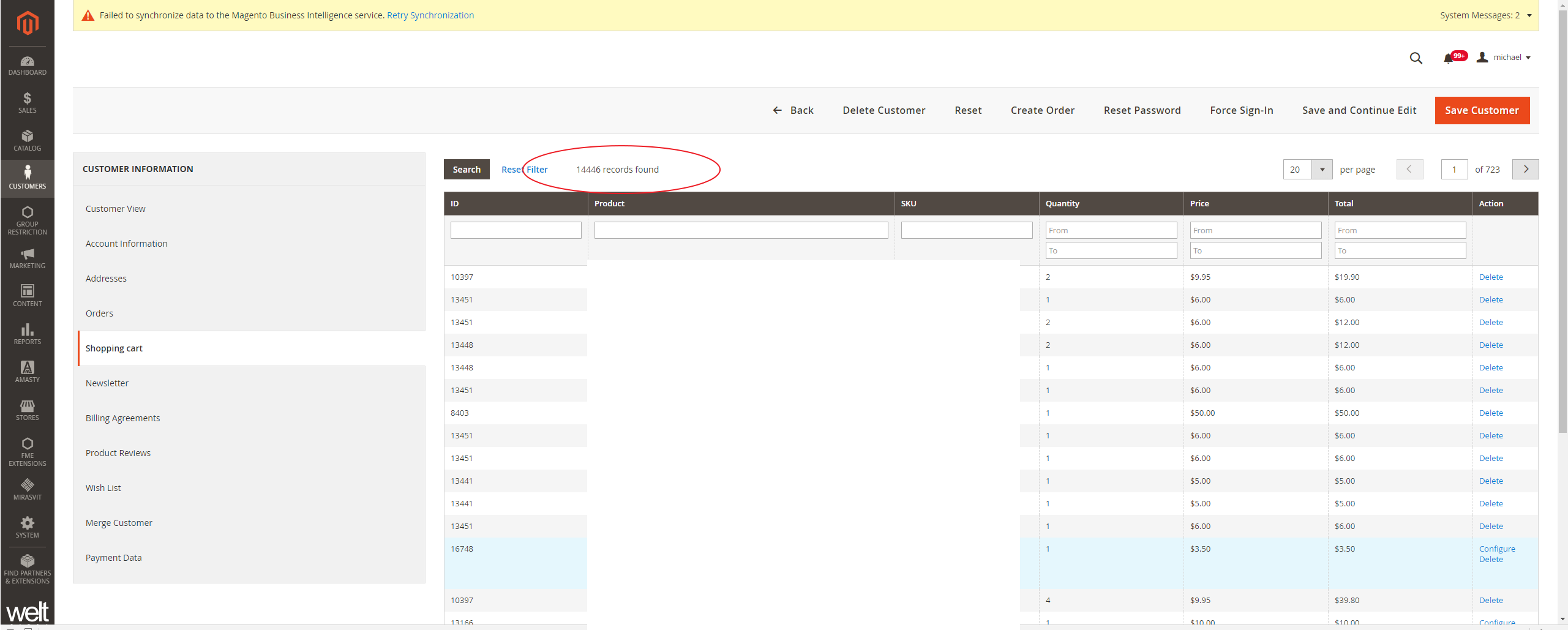
     

    Magento 2.3.3 Admin shows thousands of cart items for customers inflammation shopping cart tab

    I am facing this issue in the backend admin, in the customer Information, & Shopping Cart tab. It looks like the getQuote() function returns all cart items if no active quote is found for customer id.

    Screenshot :

    Please follow the below steps to fix this issue :=>

    Please create the following extension with a plugin

    1) Vendor/Module/etc/adminhtml/di.xml

    <?xml version="1.0"?>
    <config xmlns:xsi="http://www.w3.org/2001/XMLSchema-instance" xsi:noNamespaceSchemaLocation="urn:magento:framework:ObjectManager/etc/config.xsd">
        <preference for="MagentoCustomerBlockAdminhtmlEditTabCart" type="VendorModuleRewriteCustomerBlockAdminhtmlEditTabCart"/>
        <type name="MagentoSalesBlockAdminhtmlShoppingCartsTab">
            <plugin sortOrder="1" name="FixShoppingCartsTab"
                    type="VendorModulePluginBlockSalesShoppingCartsTab"/>
        </type>
    </config>
    

    2)Vendor/Module/Rewrite/Customer/Block/Adminhtml/Edit/Tab/Cart.php

    <?php
    namespace VendorModuleRewriteCustomerBlockAdminhtmlEditTab;
    
    use MagentoBackendBlockWidgetGridExtended;
    use MagentoFrameworkExceptionNoSuchEntityException;
    
    class Cart extends MagentoCustomerBlockAdminhtmlEditTabCart
    {
        /**
         * Added fix when customer do not have any active quote
         * Magento 2 issue: https://github.com/magento/magento2/issues/26437
         * Pull request: https://github.com/magento/magento2/pull/26489
         */
        protected function _prepareCollection()
        {
            $quote = $this->getQuote();
    
            if ($quote && $quote->getId()) {
                $collection = $quote->getItemsCollection(false);
                $collection->addFieldToFilter('parent_item_id', ['null' => true]);
            } else {
                $collection = $this->_dataCollectionFactory->create();
            }
    
            $this->setCollection($collection);
    
            return Extended::_prepareCollection();
        }
    
        protected function getQuote()
        {
            if (null === $this->quote) {
                $customerId = $this->getCustomerId();
                $storeIds = $this->_storeManager->getWebsite($this->getWebsiteId())->getStoreIds();
    
                try {
                    $this->quote = $this->quoteFactory->create()->setSharedStoreIds($storeIds)->loadByCustomer($customerId);
                } catch (NoSuchEntityException $e) {
                    $this->quote = $this->quoteFactory->create()->setSharedStoreIds($storeIds);
                }
            }
            return $this->quote;
        }
    }
    

    3)  Vendor/Module/Plugin/Block/SalesShoppingCartsTab.php

    <?php
    namespace VendorModulePluginBlock;
    
    use MagentoSalesBlockAdminhtmlShoppingCartsTab;
    
    class SalesShoppingCartsTab
    {
        public function afterGetTabUrl(ShoppingCartsTab $subject, $result)
        {
            return $subject->getUrl('customer/*/carts', ['_current' => true]);
        }
    }

    That’s it! You are done.

    Note:  This will only work for Magento 2.3.3 and higher.

    Please share your thoughts if this article helpful to you.

    Thanks.

    Magento 2: set layer navigation on advance search result page

    If you want to get layer navigation on the advance search result page, then you need to override on layout file in your theme which I have mentioned below.

    1, Create a new folder in your theme Magento_CatalogSearch/layout

    2. Then, create catalogsearch_advanced_result.xml file in Magento_CatalogSearch/layout folder and paste the below code.

    <?xml version="1.0"?>
    <!--
    /**
    * Copyright © Magento, Inc. All rights reserved.
    * See COPYING.txt for license details.
    */
    -->
    <page xmlns:xsi="http://www.w3.org/2001/XMLSchema-instance" layout="2columns-left" xsi:noNamespaceSchemaLocation="urn:magento:framework:View/Layout/etc/page_configuration.xsd">
    <body>
    <referenceBlock name="page.main.title">
    <action method="setPageTitle">
    <argument translate="true" name="title" xsi:type="string">Search Result</argument>
    </action>
    </referenceBlock>
    </body>
    </page>

    Magento 2: How to create a custom console command and run code using the command?

    Here is a simple hello world command run using the command

    – Please create the following module for command :

    app/code/Vendor/Module/registration.php

    <?xml version="1.0"?>
    <config xmlns:xsi="http://www.w3.org/2001/XMLSchema-instance" xsi:noNamespaceSchemaLocation="urn:magento:framework:Module/etc/module.xsd">
        <module name="Vendor_Module" setup_version="0.1.0"/>
    </config>
    • Create a new model class, it will contain the options, description, and logic of your command.

      app/code/Vendor/Module/Model/Generation.php

      namespace VendorModuleModel;
      
      use SymfonyComponentConsoleCommandCommand;
      use SymfonyComponentConsoleInputInputInterface;
      use SymfonyComponentConsoleOutputOutputInterface;
      
      class Generation extends Command
      {
          protected function configure()
          {
              $this->setName('custom:create')
                   ->setDescription('The description of you command here!');
      
              parent::configure();
          }
      
          protected function execute(InputInterface $input, OutputInterface $output)
          {
              $output->writeln('Hello World!');
          }
      }

      app/code/Andre/Tools/etc/di.xml

      <?xml version="1.0"?>
      <config xmlns:xsi="http://www.w3.org/2001/XMLSchema-instance" xsi:noNamespaceSchemaLocation="urn:magento:framework:ObjectManager/etc/config.xsd">
          <type name="MagentoFrameworkConsoleCommandList">
              <arguments>
                  <argument name="commands" xsi:type="array">
                      <item name="create" xsi:type="object">VendorModuleModelGeneration</item>
                  </argument>
              </arguments>
          </type>
      </config>

      Now, run upgrade command to register module : bin/magento setup:upgrade

      To run the command, just create :

      bin/magento custom:create.

    Then add your own logic under the execute() method.

    Please let us know if this article is helpful to you.

    Magento 2: Redirect Url with query string parameters

    If you want to redirect link with query string parameters using Magento ResultFactory, then you can use below script.

    You can make a link with a query string using  MagentoFrameworkUrlInterface;

    Here I have used that in the controller file.

    <?php
    namespace VendernameModulenameControllerIndex;
    use MagentoFrameworkControllerResultFactory;
    use MagentoFrameworkAppActionAction;
    use MagentoFrameworkAppActionContext;
    use MagentoFrameworkAppRequestDataPersistorInterface;
    use MagentoFrameworkViewElementMessages;
    use MagentoFrameworkDataObject;
    use MagentoFrameworkUrlInterface;
    
    class Post extends Action
    {
    
    
    protected $_inlineTranslation;
    protected $_transportBuilder;
    protected $_scopeConfig;
    protected $_logLoggerInterface;
    protected $urlBuilder;
    protected $_attributeRepository;
    
    public function __construct(
    MagentoFrameworkAppActionContext $context,
    MagentoFrameworkTranslateInlineStateInterface $inlineTranslation,
    MagentoFrameworkMailTemplateTransportBuilder $transportBuilder,
    MagentoFrameworkAppConfigScopeConfigInterface $scopeConfig,
    PsrLogLoggerInterface $loggerInterface,
    UrlInterface $urlBuilder,
    MagentoCatalogModelProductAttributeRepository $AttributeRepository,
    array $data = []
    
    )
    {
    $this->_inlineTranslation = $inlineTranslation;
    $this->_transportBuilder = $transportBuilder;
    $this->_scopeConfig = $scopeConfig;
    $this->_logLoggerInterface = $loggerInterface;
    $this->messageManager = $context->getMessageManager();
    $this->urlBuilder = $urlBuilder;
    $this->_attributeRepository = $AttributeRepository;
    
    
    parent::__construct($context);
    
    
    }
    
    public function execute()
    {
    $argument = array('q' => 'test');
    $redirecturl = $this->urlBuilder->getUrl('set-your-redirect-path', ['_current' => true,'_use_rewrite' => true, '_query' => $argument]);
    return $this->resultRedirectFactory->create()->setUrl($redirecturl);
    }
    
    
    }

    Note: I have tried this code with Magento 2.3.5 version.

    Magento 2: How to reload shipping rates on cart page using JS?

    Sometime when we reload cart page or add custom discount, the applied shipping rates doesn’t updates properly.

    Here I’m sharing the solution for it.

    We can reload shipping rates section in summary using JS. For that we have to add below JS script in our custom JS or cart page operation JS,

    For Example – We are using gift-card.js while applying gift card in cart page.  To reload shipping rates again:

    define([
        'Magento_Checkout/js/model/quote',
        'Magento_Checkout/js/model/shipping-rate-registry'
    ], function(mainQuote, rateReg){
        
    	var address = mainQuote.shippingAddress();
        rateReg.set(address.getKey(), null);
        rateReg.set(address.getCacheKey(), null);
        mainQuote.shippingAddress(address);
    });

    Now shipping rates will reload after your JS op ration and total should be display properly in summary section.

    How to connect/configure Magento 2 and RabbitMQ?

    Install the RabbitMQ on Ubuntu by using below command.

    sudo apt install -y rabbitmq-server

    Install Magento with RabbitMQ. And connect to Magento Open Source or Magento Commerce.

    --amqp-host="<hostname>" --amqp-port="5672" --amqp-user="<user_name>" --amqp-password="<password>" --amqp-virtualhost="/"

    Connect RabbitMQ

    If you already had Magento installed and you want to connect it to RabbitMQ, add a queue section in the <install_directory>/app/etc/env.php file

    'queue' =>
      array (
        'amqp' =>
        array (
          'host' => 'localhost',
          'port' => '5672',
          'user' => 'example',
          'password' => 'example',
          'virtualhost' => '/'
         ),
      ),

    Then, run bin/magento setup:upgrade to apply the changes & create the required queues in RabbitMQ.

    To enable RabbitMQ:

    Add the required name, type, and disk value (in MB) to the .magento/services.yaml file along with the installed RabbitMQ version.

    rabbitmq:
        type: rabbitmq:<version>
        disk: 1024

    Configure the relationships in the .magento.app.yaml file.

    relationships:
        rabbitmq: "rabbitmq:rabbitmq"

    Add, commit, and push your code changes.

    git add -A
    git commit -m "Enable RabbitMQ service"
    git push origin <branch-name>

    Verify the service relationships.

    Retrieve the RabbitMQ connection details :

    php -r 'print_r(json_decode(base64_decode($_ENV["MAGENTO_CLOUD_RELATIONSHIPS"])));'


    How to get configuration settings values in web .html file in Magento 2?

    In Magento 2, there are two types of template files. One is .phtml and second one is .html files under web/template directory.

    In .phtml we easily get the config value, but it’s tricky to get config value in web template files which we are going to cover in this article.

    You have to follow below steps :

    Step 1 : Add below code to your web .js file:

    app/code/[Vendor]/[ModuleName]/view/frontend/web/js/[DirectoryName]/[JsFileName].js
    define([
        'ko',
        'jquery',
        'uiComponent',
        'mage/storage',
        'mage/url'
    ], function (ko, $, Component, storage, url) {
        'use strict';
    
        return Component.extend({
            defaults: {
                template: 'Vendor_ModueName/[DirectoryName]/[TemplateFileName]'
            },
            getconfigSettingValue: function () {
                var serviceUrl = url.build('modulename/configsetting/settingfieldid');
    
                storage.get(serviceUrl).done(
                    function (response) {
                        if (response.success) {
                            return response.value
                        }
                    }
                ).fail(
                    function (response) {
                        return response.value
                    }
                );
                return false;
            }
        });
    });

    Step 2 : Create controller

    app/code/[Vendor]/[ModuleName]/Controller/[DirectoryName]/ControllerFileName.php

    Add below code

    namespace [Vendor][ModuleName]Controller[DirectoryName];
    
    class ControllerFileName extends MagentoFrameworkAppActionAction
    {
    
        protected $resultJsonFactory;
    
        protected $storeManager;
    
        protected $scopeConfig;
    
        public function __construct(
            MagentoFrameworkAppActionContext $context,
            MagentoFrameworkControllerResultJsonFactory $resultJsonFactory,
            MagentoStoreModelStoreManagerInterface $storeManager,
            MagentoFrameworkAppConfigScopeConfigInterface $scopeConfig
        ) {
            $this->resultJsonFactory = $resultJsonFactory;
            $this->storeManager = $storeManager;
            $this->scopeConfig = $scopeConfig;
            parent::__construct($context);
        }
    
        /**
         * Execute view action
         *
         * @return MagentoFrameworkControllerResultInterface
         */
        public function execute()
        {
            $response = [];
            try {
                $configValue = $this->scopeConfig->getValue(
                    'your/path/config',
                    MagentoStoreModelScopeInterface::SCOPE_STORE
                );
                $response = [
                    'success' => true,
                    'value' => __($configValue)
                ];
    
            } catch (Exception $e) {
                $response = [
                    'success' => false,
                    'value' => __($e->getMessage())
                ];
                $this->messageManager->addError($e->getMessage());
            }
            $resultJson = $this->resultJsonFactory->create();
            return $resultJson->setData($response);
        }
    
    }

    Step 3 : Get config value as per below code in .html file.

    <div class="config-setting-value" data-bind="html: getconfigSettingValue"></div>


    Magento 2.4.x : How to install Elasticsearch on Linux in localhost?

    In Magento 2.4.x, You have to install and configure Elasticsearch before setting up a new project.

    If you want to know how to install Elasticsearch then follow below steps.

    Step 1 – Install Java jdk – Its necessary for magento 2.4.x

    – sudo apt-get update

    – sudo apt install openjdk-8-jdk

    – java -version (For check java version. It’s show something like below)

    openjdk version "1.8.0_272"
    OpenJDK Runtime Environment (build 1.8.0_272-8u272-b10-0ubuntu1~16.04-b10)
    OpenJDK 64-Bit Server VM (build 25.272-b10, mixed mode)

    Step 2 – Install from the APT repository

    – sudo apt install apt-transport-https

    Step 3 – After Install Elasticsearch using below commands

    – sudo apt-get update

    – sudo apt-get install elasticsearch

    Step 4 – After Install Elasticsearch, Start it’s service using below commands

    – systemctl daemon-reload

    – systemctl enable elasticsearch.service (For enable service)

    – systemctl start elasticsearch.service (For start service)

    – service elasticsearch status (For check it’s status)

    That’s it.

    Now, Elasticsearch has been installed for your Magento 2.4.x projects.


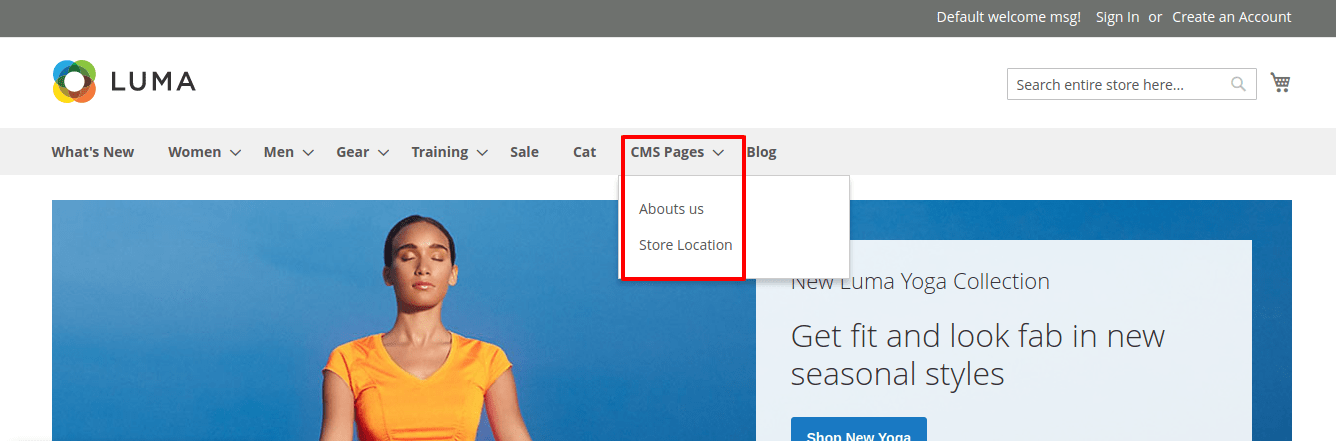
    How to add custom link in top navigation menu in Magento 2?

    1) To define plugin, add below code

    <?xml version="1.0"?>
    <config xmlns:xsi="http://www.w3.org/2001/XMLSchema-instance" xsi:noNamespaceSchemaLocation="urn:magento:framework:ObjectManager/etc/config.xsd">
        <type name="MagentoThemeBlockHtmlTopmenu">
            <plugin name="custom_menu_item" type="MagemonkeysAddCustomeMenuPluginTopmenu" sortOrder="10" disabled="false"/>
        </type>
    </config>

    in your app/code/Magemonkeys/AddCustomeMenu/etc/frontend/di.xml file.

    2) Now, Create Topmenu.php Plugin file at app/code/Magemonkeys/AddCustomeMenu/Plugin/ and paste the below code :

    <?php
    namespace MagemonkeysAddCustomeMenuPlugin;
    use MagentoFrameworkDataTreeNodeFactory;
    use MagentoFrameworkUrlInterface;
    
    class Topmenu {
        /**
         * @var NodeFactory
         */
        protected $nodeFactory;
        /**
         * @var UrlInterface
         */
        protected $urlBuilder;
        /**
         * @param NodeFactory  $nodeFactory
         * @param UrlInterface $urlBuilder
         */
        public function __construct(
            NodeFactory $nodeFactory,
            UrlInterface $urlBuilder
        ) {
            $this->nodeFactory = $nodeFactory;
            $this->urlBuilder = $urlBuilder;
        }
        public function beforeGetHtml(
            MagentoThemeBlockHtmlTopmenu $subject,
            $outermostClass = '',
            $childrenWrapClass = '',
            $limit = 0
        ) {
            /**
             * Parent Menu
             */
            $menuNode = $this->nodeFactory->create(
                [
                    'data' => $this->getNodeAsArray("CMS Pages", "cms-page"),
                    'idField' => 'id',
                    'tree' => $subject->getMenu()->getTree(),
                ]
            );
            /**
             * Add Child Menu
             */
            $menuNode->addChild(
                $this->nodeFactory->create(
                    [
                        'data' => $this->getNodeAsArray("Abouts us", "abouts-us"),
                        'idField' => 'id',
                        'tree' => $subject->getMenu()->getTree(),
                    ]
                )
            );
    
            $menuNode->addChild(
                $this->nodeFactory->create(
                    [
                        'data' => $this->getNodeAsArray("Store Location", "store-location"),
                        'idField' => 'id',
                        'tree' => $subject->getMenu()->getTree(),
                    ]
                )
            );
    
            $subject->getMenu()->addChild($menuNode);
        }
        protected function getNodeAsArray($name, $id) {
            $url = $this->urlBuilder->getUrl($id);
            return [
                'name' => __($name),
                'id' => $id,
                'url' => $url,
                'has_active' => false,
                'is_active' => false,
            ];
        }
    }

    3) Output :