We sacrifice by not doing any other technology, so that you get the best of Magento.

We sacrifice by not doing any other technology, so that you get the best of Magento.

    How to Improve Site Speed & Increase eCommerce Orders?

    The year has changed, but many stores are still struggling to achieve the desired sales target.
    This article is a catch for them. In this article, we’re going to talk about the points which can help you to improve your eCommerce site’s speed.

    1. Use Lazy Load so your web page will get loaded faster.


    lazy load eCommerce
    (Source: commandc.com)

    2. Use a Reliable & Flexible server so it won’t make your site down or slow.

    3. Reduce numerous HTTP Requests: A site is nothing, but a bundle of numerous data files. Let’s assume that a separate HTTP is required each time for the browser to catch a file from the server. So if the browser continues this behavior and there are numerous HTTP requests then the site will take a long load.

    4. Use PHP Accelerator: This works like magic for a site. It accelerates site speed.

    5. Remove unwanted apps, plugins & clean the non-required part of code from your side. Just like the way you clean your pc or mobile.

    We can go on and talk about numerous points that can help you to improve the site speed. But, if you perform the above five steps then you’ll not only see the improvement in your site speed but also notice the incremental graph in the numbers of orders.

    We suggest you hire an expert technical developer to do the above and other technical tasks such as leveraging CDN, using browser caching, solving redirection issues, and related tech operations.

    How can you make your eCommerce store completely bug-free?

    According to Wikipedia, a bug is an error, flaw, or fault in a technical system that causes it to produce an incorrect or unexpected result, or to behave in unintended ways.

    Thus, if your eCommerce system faces such bugs then it directly affects the performance and sales of your eCommerce store.

    Drafting some examples of bugs in the eCommerce system.

    – eCommerce sites take a lot to load or go down due to some technical bugs from the server’s end.
    – Due to some designing bugs the responsive view in mobile and tablets might look messy.
    – Mismatched order records, mathematical calculation faults in product pricing, discounts, deals, or invoice due to development bugs.

    As mentioned above, there can be numerous bugs in any eCommerce store.

    When we shared the audit report on the website, we found that most of the time, store owners are unaware of bugs in their system.
    This happens because store owners are not technical people. A technical person has enough skills to test websites in multiple ways. In short, the auditor knows where to hammer.

    It may be possible that your store is having bugs about which you are still not aware. The question is what should you do about it?

    The answer is ‘Perform a technical audit”.

    Benefits you can achieve by doing a technical audit:
    – Speed up your store
    – Sales improvement
    – Give more insights about how customers are using your store
    – Saves your technical budget
    – Your store’s performance will improve

    Technical audit won’t only help you to make your store bug-free, but it will help you to overcome numerous technical issues and helps you to shape your eCommerce store better than the best. Make your store completely bug-free by hiring a experienced technical auditor today.

    32% sales hike – That’s what our client achieved with our page speed improvement service

    It was another day when we received an inquiry at MageMonkeys.com which read.

    I’ve an eCommerce store in Magento which is pretty slow. Can you help to make it faster?

    Our Magento expert reached the customer and heard his problem. We realized that their sales were down for last three month. Thus, we checked the technical history of the site & found that three months ago some technical changes were performed which were unaudited.

    We ran an audit on all technical tasks and found that they installed a new theme four months ago and it made their site run slow.

    Our developer discussed the case with an in-house experienced designer and they concluded that the theme was heavy and customization was needed.

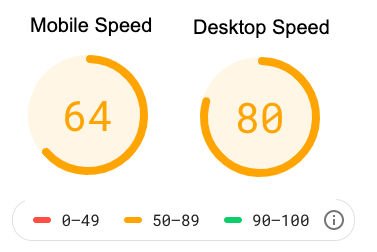
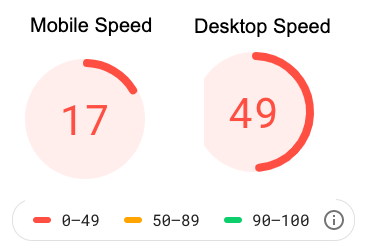
    Earlier the speed of their Magento store was

    In today’s era, the number of people who use the internet from Mobile are higher than the number of people who use the internet from desktop/laptop. Like many other digital sites, our client was also not focused more on mobile. His store’s mobile speed was mere 17 which is very poor.

    We found the problem and executed the solutions below.

    1. Image optimization – The client used images of 1-2 MB in size. Our designer reduced the size of those images WITHOUT IMPACTING ON QUALITY.

    2. CSS-JS Optimization – Our HTML developer performed an audit on CSS-JS files and removed unwanted JS & CSS.

    3. Code optimization – Multiple unnecessary codes were duplicated. We resolved the issues by making a master code.

    4. Unnecessary Extension – The client had numerous unwanted extensions that were extending the site’s load time. We turned all of them off.

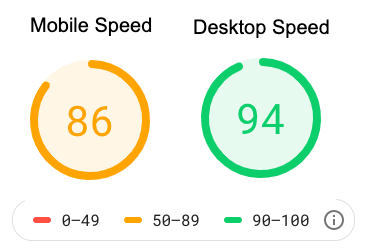
    Before proceeding ahead, we thought to give speed test another try and check the result of our half-done work and we found below improvement in speed.

    It wasn’t our BEST, but we were happy as we were making progress.

    5. CDN/AWS Hosting – We advised clients if they could adopt hosting and it also gave us good results.

    6. Other technical changes – We perform many other technical changes such as

    • Reducing redirections,
    • Removing render-blocking
    • Clearing cache
    • Improving server time
    • And other technical activities which we know due to our experience.

    The final result was,

    Amazing. Isn’t it?

    Client get below result after adopting our speed improvement service –

    • The bounce rate reduced.
    • SEO results improved.
    • Social sharing from his blog increased.
    • Last, but not least – 32% HIKES IN SALES.

    The client got good sales & we got a client for a lifetime.

    Let us know if you want to double your sell-by improving your store’s speed.

    How To Increase The Speed Of Your Magento Store And What Should Be Google Speed Test Rank?

    One of the crucial factors of your eCommerce website is loading speed. A fast-loading website converts more visitors into customers and increases your sales.

    In this post, we have discussed some of the steps on how to increase the speed of your Magento 2 website.

    1. Update to the Latest Magento Version 

    Ensure you are running the latest version of Magento. New releases often include performance improvements and other patches which affect performance. Hire Magento upgrade service provider if you don’t know how to upgrade the store.

    2. Enable all Magento caches

    Enable caching to reduce the number of database operations required for each page request.

    Where: System -> Cache Management

    3. Optimize your images

    Compress the images before you add in your Magento 2 store. For products, you can use JPEG images, whereas PNG/SVG can be used for other images. Use a photo editor such as Adobe Photoshop to reduce file size.

    4. Use a fast hosting server

    Your hosting server needs to focus on time to first byte (TTFB) as it provides information on how fast the response from the server is passed to a browser request. In simple words, how speedily your server implements a PHP code. A good TTFB should be around 1s.

    5. Make sure your third-party extension is up to date.

    Keep the number of third/community extensions to a minimum. Many extensions introduce extra processing and database queries which harm the overall performance

    6. Enable flat categories and products

    Enable the Flat Catalog module for products and categories in the Magento Admin Panel. We have seen quite significant improvements by turning on this feature, especially on large catalogs.

    Where: System -> Configuration -> Catalog

    7. CSS/JS Minification and Merge

    A JS/CSS “minifier” such as the Minify Javascript / CSS, which is made by a leading provider of Magento extensions. Minify JS / CSS will combine, compress, and cache Javascript and CSS files. Also, it will even add expiry tags forever to the data to ensure the fastest browser loading.

    Why Should You Check Your Site Through Google Pagespeed Insights?

    PageSpeed Insights shows the real-world performance of a page for mobile and desktop devices and also provide suggestions on how you can improve the page loading speed.

    A Magento site with an excellent performance can also get an average PageSpeed Insights score. Though, one needs to understand that these metrics are not 100 percent accurate because Google doesn’t see your site the same way as your customers do. It does not consider the subtleties of eCommerce user experience and many other Magento quirks that deal regularly.

    However, PageSpeed Insights is doing its best to analyze the store and accordingly provide actionable suggestions for any page.

    As per PageSpeed Insights, What should be an ideal page speed score?

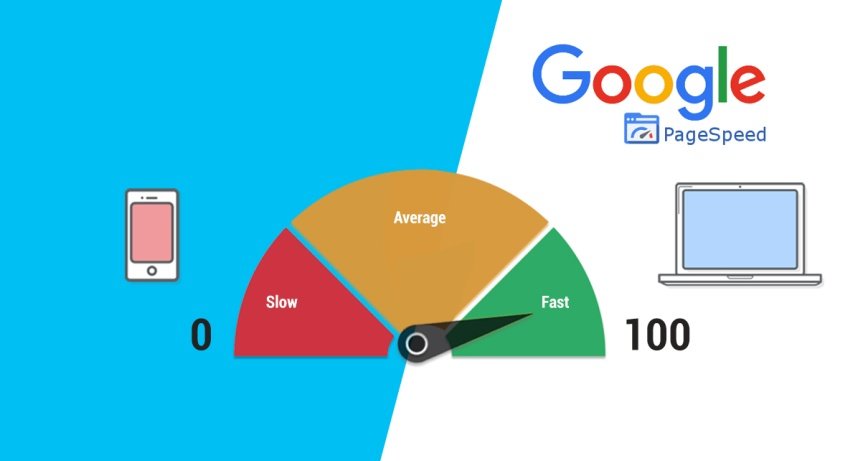
    The score is displayed at the top of your PageSpeed Insights, and this report is generated by running Lighthouse, which collects and analyzes lab data about the page.
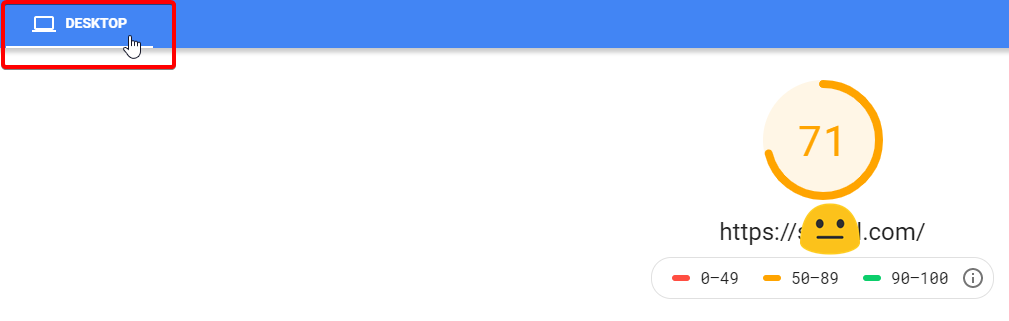

     

    A score of 90 or above is considered fast, and score between 50 and 90 is moderate and below 50 is slow. You should take quick action if you get a score below 50.

    What Can You Do To Improve The Pagespeed Of Your Magento Store?

    Speed is essential to your sales and conversions, as explained above. If you want to get the best result, then you should invest quite of your time into analyzing, fixing, and debugging every Google page speed opportunity. We advise you to get in touch with a technical person as this process needs an expert level of technical knowledge.

    How Will Make Your Magento Website Faster?

    Magento is owned by eBay and it is widely used eCommerce website which people use to enhance their online business. As it a heavy eCommerce CMS system so it can run a bit slow from time to time especially when you have not optimized store properly. Magento is a very robust platform which has the high level of functionality and customizability; therefore, a lot of businesses choose this platform for increasing their sales. Another feature is that it’s highly scalable so even if in future if you scale up then also you don’t need to change to any other different platform.

    Magento is facing speed issues and due to which their performance is degrading over time. For speed, you can do simple things which will boost the speed of the website.

    Latest Version:
    Make sure that you are running the latest version of Magento because new releases often include performance improvements and other features. The latest upgradation of Magento is not one click upgradation. So we suggest you hire Magento upgrade specialist to do it.

    Enable Flat Catalog:
    The bottleneck of Magento is always the database and if you have more than 1000 products then you need to enable Flat Catalog in Magento by going under System -> Configuration ->Catalog -> Frontend. Cautious is that the Standard EAV database setup gives a little more flexibility when looking for a particular data and attributes.

    Utilize Caching:
    Magento has an internal cache for its configuration, blocks, and layouts. Cache entries are stored in the file system and as the request increases from visitors then it takes time to read and write to Magento’s file system because it slows down your site. To enable caching you need to navigate to System -> Cache Management

    Image Compression:
    Images are to be blamed for slowing down the load time as 56 percent of a website’s page weight is made up of images. Make sure to compress images before uploading them by using a tool like Adobe Photoshop. If you want to go for simple compression solution then you can use Smush it which compresses batches of images.

    Optimize MySQL Configuration:
    MySQL has its own “query cache” which is used in Magento to generate dynamic pages and content along with improving performance. Magento uses a lot of indexes and joins due to which it will need adequate memory.

    Remove Third-Party/ Community extensions:
    Always keep the extensions to a minimum. Nearly 50% of all the store performance issues are caused by poorly created extensions. Compile the extensions that you actually need and disable Magento modules which you don’t need. By cleaning them, you are using resources to run your store and increasing the speed of the website. To disable modules, navigate to Stores -> Configuration -> Advanced -> Advanced -> select “Disable” from the drop-down box.

    Enable System Compilation:
    Magento can combine PHP files so that it uses less disk access. Sometimes compilation can boost up to 50% of the performance. By default, application files are searched in a particular order every time the page load which leads to a lot of file system reads thus these reads can be reduced by copying files into a single directory. To enable this feature you can navigate to System -> Tools -> compilation and then click on “Run Compilation Process”.

    Merge JS/CSS:
    Magento stores possess a large number of CSS and JavaScript files and this number goes on increasing as and when you add extensions. Magento version Tools -> compilation and then click on “Run Compilation Process”.

    Install PHP OpCode Cache:
    It is another form of caching. They help in increasing the performance of PHP scripts by caching them when they are in a compiled state. You can install APC, eAccelerator, ZendOptimizer+ or Xcache. This feature is important if you are not using hosting with SSD disks.

    Select Better Web Hosting:
    Choose a reliable and fast web host as it will improve your Magento performance. To prevent your resources from hundreds of people our suggestion is to go for VPS like Digital Ocean, Linode or Vultr. With this, you will be in complete control of your resources.