We sacrifice by not doing any other technology, so that you get the best of Magento.

We sacrifice by not doing any other technology, so that you get the best of Magento.

    Special price date issue in Magento 2 [resolved]


    Today, I was working on a Magento 2 project.

    Everything was going smoothly, until I tried to add a product.

    I thought code was installed properly so I was expecting a positive acknowledgement.

    But instead, I faced an error which was saying:

    DateTime::__construct(): Failed to parse time string (28/11/2019) at position 0 (2): Unexpected char

    I had a discussion with my colleagues about it and we came with this solution.

    We made an update in this file :

    app/code/Magento/Catalog/Controller/Adminhtml/Product/Initialization/Helper.php

    The update we are talking about is nothing, but below one line code.

    private function convertSpecialFromDateStringToObject($productData)
    {
    	if (isset($productData['special_from_date']) && $productData['special_from_date'] != '')
    	{
        	$productData['special_from_date'] = $this->dateFilter->filter($productData['special_from_date']); // Add this line
        	$productData['special_from_date'] = new DateTime($productData['special_from_date']);
    	}
    	...

    After applying that update things worked for me. If you ever faced with such situation, I advised you to do the same.

    How to uncheck the default shipping method in Magento 2?

    Magento 2 comes with default shipping methods. But, if that’s not suitable to site owner then he/she can uncheck it.

    Let’s see, how?

    If you ever want to unchecked default shipping method at checkout or cart estimated shipping block, then it’s not necessary to create a module.

    Of course, you can perform this task by creating a module. But, here we are showing you alternate method to do the task.

    First step is to copy the js file checkout-data-resolver.js from vendormagentomodule-checkoutviewfrontendwebjsmodel
    to appdesignfrontendNamespaceThemeNameMagento_Checkoutwebjsmodel.

    And then just find selectShippingMethodAction(ratesData[0]);  and replace it to selectShippingMethodAction(null);  in this function: resolveShippingRates

    After doing such procedure you need to clear static content and cache.

    That’s it.

    Fatal error: Product Export problem & solution in Magento 1.9.3.9

    If you’re into Magento migration then you might face with many errors & solution.

    Dropping other errors aside, today, we’re going to talk about a Fatal error that can be faced while product/data migration.

    The error is known as Fatal error.

    It’s as show below:

    “Uncaught Error: Unsupported operand types in /var/www/html/magento1.9/app/code/core/Mage/ImportExport/Model/Export/Entity/Product.php:948”

    It can occur when you are trying to export products from admin.

    But, where there is an error, there is a solution.

    The solution for above problem is replacement of code.

    Replace code $dataRow += $stockItemRows[$productId]; on line no. 948 with below code in  app/code/core/Mage/ImportExport/Model/Export/Entity/Product.php file.

    -    $dataRow += $stockItemRows[$productId];
    +    if (isset($stockItemRows[$productId])) {
    +        $dataRow = array_merge($dataRow, $stockItemRows[$productId]);
    +    }

    With this simple replacement, your will get rid of that fatal error.

    Don’t forget to tell us how it worked for you by making a comment.

    Fatal error: Declaration of Temando – Magento 2.3

    Sometimes, this could happen that when you run

    “php bin/magento setup:di:compile”

    It can give you the below error:

    Fatal error: Declaration of TemandoShippingModelResourceModelCollectionPointOrderCollectionPointRepository::save(TemandoShippingApiDataCollectionPointOrderCollectionPointInterface $collectionPoint) 
    must be compatible with TemandoShippingModelResourceModelRepositoryOrderCollectionPointRepositoryInterface::save(TemandoShippingApiDataDeliveryOrderCollectionPointInterface $collectionPoint) 
    in /var/www/html/magento2vendortemandomodule-shipping-m2ModelResourceModelCollectionPointOrderCollectionPointRepository.php on line 24

    Don’t get panic. Because the solution is very simple.

    Now, let’s talk about the solution.

    Solution: Completely remove the vendor/temando folder and all files then reinstall temando module.

    That’s it. Let us know how it work with your coding journey.

    All you need to know about eCommerce Personalization in Magento 2

    Your eCommerce store can be personalized for user experience and this can boost your store revenue. A number of tools are available where your web pages can be customized based on the behavior and patterns of customer interaction. Extensive use of Data Science and Machine learning tools are now driving the growth of e-commerce. Below a few pointers on how can you also benefit from it.

    How can an eCommerce system help in increasing sales?

    • Modify your marketing plans as per user choices.
    • Always know your valuable customer Segments, for instance, city or location, Current and Past Browsing Patterns, Current and Past Searches, Cart Contents Age, social media, region, Device, etc.
    • Identify your local customers and focus on repeat purchases.
    • Reduce shopping cart abandonment by engaging your customers throughout the lifecycle of a Purchase.
    • Trigger email to let the customer buy the product again after a few days of abandonment.
    • Fetch dynamic content based on user preference and A/B test features to determine what’s working out best?
    • Make your Discounts and Coupons work it out for you better.

    Where is it used?

    • E-commerce stores
    • Video-Sharing Platforms (Netflix)
    • Amazon Shopping.
    • Facebook feeds, Yahoo, Google News

    How can you practice personalization?

    1. Segmentation

    • Are your visitors ‘New Customers’ or ‘Existing Customers’’?
    • What devices they are accessing the website from?
    • Geographics characteristics (Country, Region, City)
    • Biggest Spenders
    • Demographics characteristics (Age, Gender, Income, Education )
    • High-Risk Customers

    2. Product Recommendations

    It can show the customer only the relevant Products they are using.

    • Best Sellers
    • You might also like
    • Trending in category
    • Recently Viewed

    3. Ease of Access

    • Always remind users of products they have recently viewed, recently purchased, and the wishlist

    4. Discount Coupons

    • Dynamic coupons with category-specific offers
    • Quantity based and time-based discount coupons

    5. Navigation based on Visitor

    • Homepages need not be static and should change based on visitors’ interests and needs, for example, banners or other content based on the history of the user.
    • Display Home page or category page Products based on Gender selected previously.

    6. Personalized Emails

    • Follow Up emails and personalized wishlists.
    • Newsletter with products based on browsing patterns or purchased Products.
    • Cart abandonment email with enticing offers.

    7. Cart and Checkout pages

    • Showcase Upsells, Best Sellers, Related products in Cart and Checkout.

    8. Feedback

    • Highlight Reviews and Ratings
    • One-Click Rating from customer
    • Use popups for quick feedback

    9. Accounts Page

    • Display Recent Orders and let customers reorder based on the products they already ordered, for example, Monthly Grocery, Monthly Snack item, etc.
    • Display Top categories based on browsing history.

    If you find the above list daunting and want to integrate a personalization system with your eCommerce system then you can contact us for consulting and Magento integration services. We are specializing in developing and upgrading your Magento eCommerce Store.

    According to Dutch DPA Cookies walls don’t comply with GDPR policy

    The Dutch Data Protection Authority has recently issued a statement, that appeals that cookie walls used by websites and apps to track their visitors’ Internet browsing for ad-targeting, do not comply with The General Data Protection Regulation (GDPR.)

    Websites generally demand their visitors to accept cookies or any digital method of tracking as a pay to access their content. DPA declares that it has received numerous complaints that some websites are only open when the visitor accepts cookies, and so it has decided to tighten its grip on the issue. Websites that are complained about the most shall be monitored on priority basis and such cases shall be taken with more care.

    The chairman of DPA, Aleid Wolfsen claimed that digital tracking collects personal data of people on a very large share. To protect privacy, he said, it becomes important that websites and apps request permission from their visitors. Besides preventing the tracking of Internet browsing without having consent, the concern also states that the personal information of a visitor shall be safe and the visitor must trust the Internet for the same. So, the netizens must be asked for permission before websites or apps have hands-on their personal data, and the denial in the same must not be disrespected.

    Dutch DPA writes that users should trust the websites regarding their data and personal information. It goes on to state that websites and apps can and must use cookies and other methods that are necessary for their working and there is no restriction to that. But the use of the data and analysis of the user’s behavior and habits must be done only after asking for permission, and that permission must be completely free. Users should be given an option to deny cookies and tracking software that are not necessary for the functioning of the website or an app.

    A spokesperson from DPA was questioned on the same, by TechCrunch, when he quoted that Cookie walls are non-compliant with the principles of consent of the GDPR. He continued to state that any website or app with a cookie wall on its page must be reported as soon as possible.

    The spokesperson also assured that the matter will be looked in surely even if not in a couple of months.

    Cookies that are necessary for the functioning of apps and websites, or the ones that do not demand personal information or data, skip the critical eyes of DPA. However, other kinds of cookies do stand in the lists of concern.

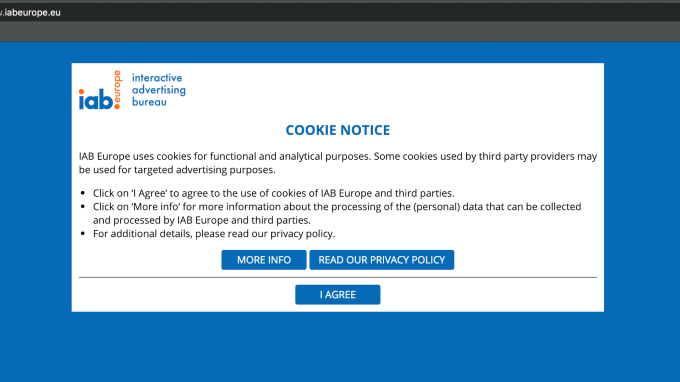
    Internet Advertising Bureau (IAB)’s European site makes a perfect example of what not to do. Their website basically wants visitors to agree to various cookies that demand personal information or issue ads in a single click under the title ‘I AGREE.’

    TechCrunch approached IAB questioning about the concerned issue when a spokeswoman claimed that GDPR does not really prohibit making access to content when consent is asked. IAB’s director for privacy and public policy claimed that they do not intend to make any changes to their cookie banner for the law does not demand them to let the users access the content without agreeing to their cookies as a condition.

    He continued to claim that law is complicated and that when a browser connects to a web link, it basically requests for the content of the website, and hence hinting that it’s the publisher who holds the power to show his content upon certain conditions. He also stated that there is nothing in GDPR that demands him to show his content to everyone and that it is completely legit to determine conditions for showing the content. He claimed that it is his right to not show his website to certain people as much as it is their right not to agree to all cookies and tracking software.

    IAB clearly offends the statement of DPA that clearly states that “When cookie walls on websites that do not grant access unless permissions are not accepted, the permissions cannot be considered to be given ‘freely.’ GDPR says that permission is not ‘free’ if the visitor has no real choice. Or if the person cannot refuse giving permission without unfavorable consequences.”

    The access to users’ personal data allows websites to earn more and more, and the critical eye over the cookie walls that do not comply with GDPR might reduce the publishers’ profit to a great extent. However, this sure might help the netizens trust the Internet and might happen that websites earn more visitors when the awareness spreads positively.

    How to get admin-panel’s missing Icon Fonts, js and css back in magento 2?

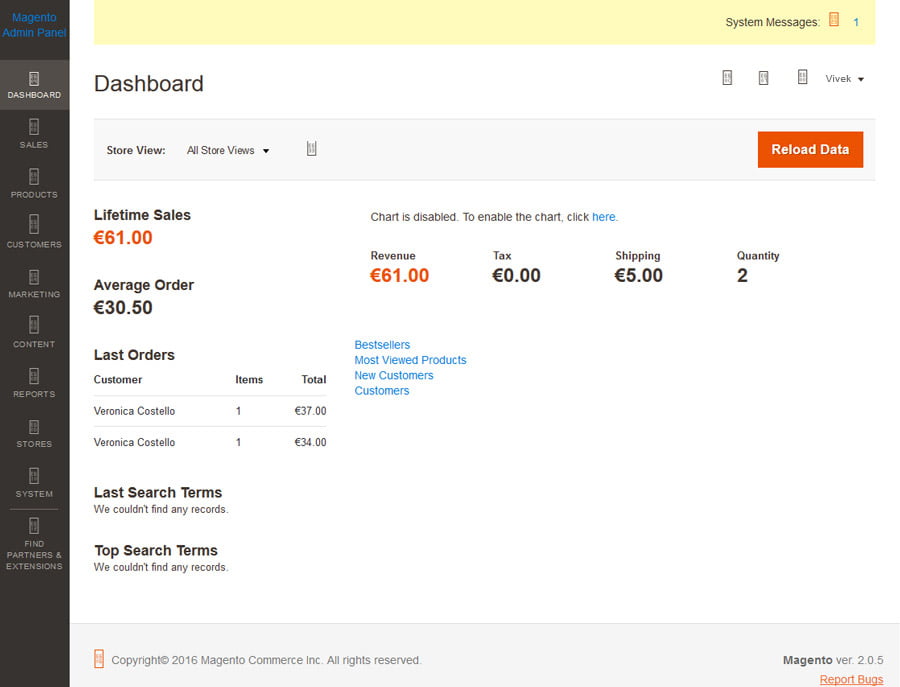
    As you can see in below screenshots, I passed through a situation where I failed to find any type of fonts in any folder that actually display icons.

    Well, by doing further research I found a solution which I am going to share with all of you.

    According to my opinion, if admin-panel’s icon fonts, js and css are missing, then those are not generated properly.

    You just need to follow below steps to make it all work:

    1. Remove pub/static (Keep .htaccess file back-up and copy it again)
    2. Remove var/cache
    3. Remove var/composer_home
    4. Remove var/generation
    5. Remove var/page_cache
    6. Remove var/view_preprocessed
    7. Run this command : php bin/magento setup:static-content:deploy -f

    Magento 2.2.6 not allowing special characters like ä or other special characters in email subject

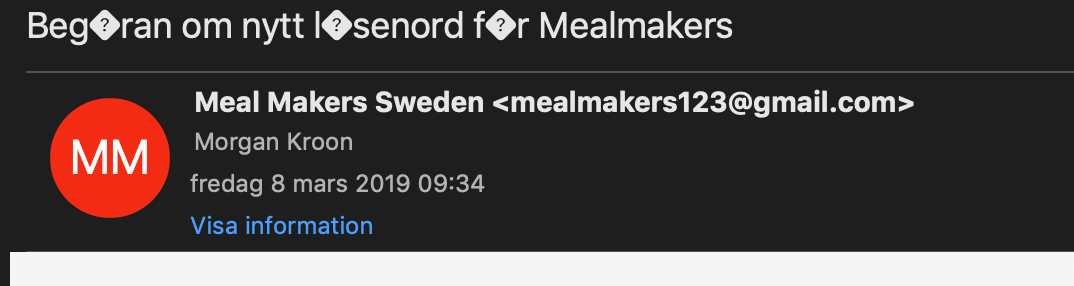
    I was working on email functionality for a Magento client and I faced this error.

    If you observe above screenshot carefully then you will find that special characters are not looking the way they suppose to be.

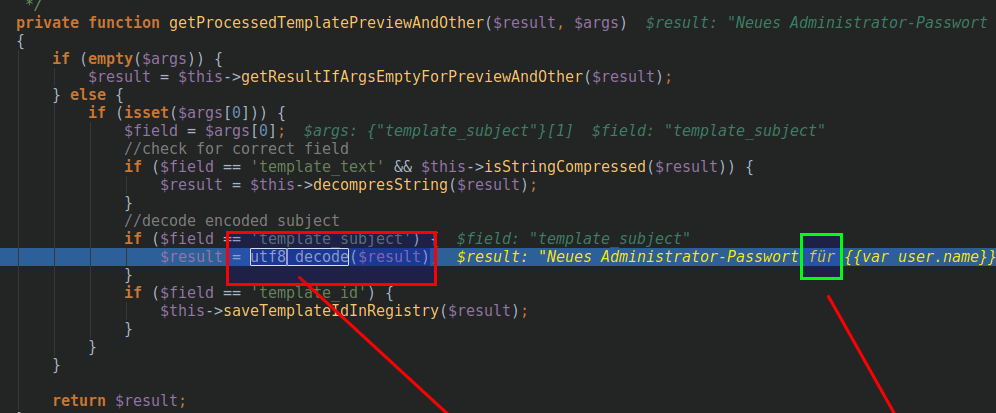
    I dug further and realized that ‘Magento core Dotmailer plugin’ was installed and it was decoding utf-8 string to a terrible creature by utf8_decode() function.

    So, It was necessary for me to disable private function getProcessedTemplatePreviewAndOther() or update module version because in Magento 2.3.0 latest version it is solved and module version is updated.

    Here, I’m sharing with you that how to update dotmailer plugin using composer:

    composer require dotmailer/dotmailer-magento2-extension:"[Dotmailer Latest Version] as [Dotmailer Current Use Version]"

    Like:

    composer require dotmailer/dotmailer-magento2-extension:"3.0.3 as 2.6.0"

    Note: Here 3.0.3 is dotmailer plugin version, which is used in our latest Magento 2.3.0. Aparts, 2.6.0 is dotmailer plugin version which is used in our current Magento 2.2.6.

    How to change product price with plugin in Magento 2?

    Product price is a dynamic thing. It keeps changing time-by-time.

    That’s why we came up today to talk about “product & pricing” subject.

    If you want to change product pricing with plugin, then this article is for you.

    Well, to do the same you have to add below code in di.xml

    <config>
      <type name="MagentoCatalogModelProduct">
        <plugin name="change_product" type=" MagemonkeysPricechangePluginProduct " sortOrder="2" disabled="true"/>
      </type>
    </config>

    After doing same, go to MagemonkeysPricechangePlugin to add new class Product.php.
    There you need to add code which we going to write below. Below code will work when the original method getPrice() complete. You can always put your logic into it.

    <?php
     
    namespace MagemonkeysPricechangePlugin;
     
    class Product
    {
        public function afterGetPrice(MagentoCatalogModelProduct $subject, $result)
        {
            return $result + 100;
        }
    }
    ?>

    Last but not the least, do flush cache before you check.


    How to set Customer’s Firstname and Lastname minimum characters validation in Magento 2?

    In Magento 2, Firstname and Lastname are consider as customer entities.

    Customer’s Firstname and Lastname attributes have been added during Magento 2 installation.

    Firstname and Lastname attributes are mostly used in the registration page and customer form.

    Today, we are going to discuss, how to set minimum characters limit in Firstname and Lastname.

    We are going to set minimum 2 characters limit in Firstname and Lastname.

    For that, We need to change validate_rules column in customer_eav_attribute table for Firstname and Lastname attributes.

    By default Firstname and Lastname attributes contain validate_rules value as {“max_text_length”:255,”min_text_length”:1}

    We need to change that validate_rules column value to {“max_text_length”:255,”min_text_length”:2} for set minimum 2 characters.

    Let’s see server side and client side validations:

    1. Server side validation (After Form Submit)

    You can create extension to get this functionality.
    Extenson Name : Magemonkey_ValidateCustomerName

    Create registration.php file in app/code/Magemonkey/ValidateCustomerName/ and add below code.

    <?php
    
    MagentoFrameworkComponentComponentRegistrar::register(
    MagentoFrameworkComponentComponentRegistrar::MODULE,
    'Magemonkey_ValidateCustomerName',
    __DIR__
    );

    Create module.xml in app/code/Magemonkey/ValidateCustomerName/etc/ and add below code.

    <?xml version="1.0"?>
    <config xmlns:xsi="http://www.w3.org/2001/XMLSchema-instance" xsi:noNamespaceSchemaLocation="urn:magento:framework:Module/etc/module.xsd">
        <module name="Magemonkey_ValidateCustomerName" setup_version="1.0.0">
            <sequence>
                <module name="Magento_Customer" />
            </sequence>
        </module>
    </config>

    Create UpgradeData.php file in app/code/Magemonkey/ValidateCustomerName/Setup/ and add below code.

    <?php
    
    namespace MagemonkeyValidateCustomerNameSetup;
    
    use MagentoEavSetupEavSetup;
    use MagentoFrameworkSetupModuleContextInterface;
    use MagentoFrameworkSetupModuleDataSetupInterface;
    use MagentoFrameworkSetupUpgradeDataInterface;
    
    class UpgradeData implements UpgradeDataInterface
    {
        /**
         * @param EavSetup $eavSetupFactory
         */
        public function __construct(
            MagentoCustomerSetupCustomerSetupFactory $customerSetupFactory
        ) {
            $this->customerSetupFactory = $customerSetupFactory;
        }
    
        /**
         * Upgrades customer_eav_attribute table for validate_rules to set limit on character for first and lastname
         *
         * @param ModuleDataSetupInterface $setup
         * @param ModuleContextInterface $context
         * @return void
         */
        public function upgrade(ModuleDataSetupInterface $setup, ModuleContextInterface $context)
        {
            $setup->startSetup();
            /** @var CustomerSetup $customerSetup */
            $customerSetup = $this->customerSetupFactory->create(['setup' => $setup]);
    
            $entityAttributes = [
                'customer_address' => [
                    'firstname' => [
                        'validate_rules' => '{"max_text_length":255,"min_text_length":2}'
                    ],
                    'lastname' => [
                        'validate_rules' => '{"max_text_length":255,"min_text_length":2}'
                    ],
                ],
                'customer' => [
                    'firstname' => [
                        'validate_rules' => '{"max_text_length":255,"min_text_length":2}'
                    ],
                    'lastname' => [
                        'validate_rules' => '{"max_text_length":255,"min_text_length":2}'
                    ],
                ],
            ];
            $this->upgradeAttributes($entityAttributes, $customerSetup);
            $setup->endSetup();
        }
    
        protected function upgradeAttributes(array $entityAttributes, MagentoCustomerSetupCustomerSetup $customerSetup)
        {
            foreach ($entityAttributes as $entityType => $attributes) {
                foreach ($attributes as $attributeCode => $attributeData) {
                    $attribute = $customerSetup->getEavConfig()->getAttribute($entityType, $attributeCode);
                    foreach ($attributeData as $key => $value) {
                        $attribute->setData($key, $value);
                    }
                    $attribute->save();
                }
            }
        }
    }

    Above script will change validate_rules in customer_eav_attribute table to apply validation for server side.

    2. Client Side Validation (Before Form Submit)

    Override /vendor/magento/module-customer/view/frontend/templates/widget/name.phtml file to add client side validations.

    Add minimum-length-2 validate-length class in Firstname and Lastname input elements.

    So Firstname and Lastname inputes look like below in name.phtml file,

    Firstname input :

    <input type="text" id="<?= $block->escapeHtmlAttr($block->getFieldId('firstname')) ?>"
                           name="<?= $block->escapeHtmlAttr($block->getFieldName('firstname')) ?>"
                           value="<?= $block->escapeHtmlAttr($block->getObject()->getFirstname()) ?>"
                           title="<?= $block->escapeHtmlAttr($block->getStoreLabel('firstname')) ?>"
                           class="minimum-length-2 validate-length input-text <?= $block->escapeHtmlAttr($block->getAttributeValidationClass('firstname')) ?>" <?php if ($block->getAttributeValidationClass('firstname') == 'required-entry') echo ' data-validate="{required:true}"' ?>>

    Lastname input :

    <input type="text" id="<?= $block->escapeHtmlAttr($block->getFieldId('lastname')) ?>"
                           name="<?= $block->escapeHtmlAttr($block->getFieldName('lastname')) ?>"
                           value="<?= $block->escapeHtmlAttr($block->getObject()->getLastname()) ?>"
                           title="<?= $block->escapeHtmlAttr($block->getStoreLabel('lastname')) ?>"
                           class="minimum-length-2 validate-length input-text <?= $block->escapeHtmlAttr($block->getAttributeValidationClass('lastname')) ?>" <?php if ($block->getAttributeValidationClass('lastname') == 'required-entry') echo ' data-validate="{required:true}"' ?>>