We sacrifice by not doing any other technology, so that you get the best of Magento.

We sacrifice by not doing any other technology, so that you get the best of Magento.

    Magento 2: Set collapsible widget in your custom html using script

    Here is an example for setting Magento 2 collapsible widget in custom div by using a script.

    <div class="wraperdiv">
    <h4>Title</h4>
    <ul data-role="content">
    <li><a href="">Link</a></li>
    <li><a href="">Link</a></li>
    <li><a href="">Link</a></li>
    <li><a href="">Link</a></li>
    <li><a href="">Link</a></li>
    </ul>
    </div>
    <script>
    require(['jquery', 'mage/collapsible'], function($) {
     $(".wraperdiv").collapsible({"header": "h4", "content": "ul", "openedState": "active", "active": true});
    });
    </script>

    you can use this script in your any phtml files or js script you can set on your theme js file.

    Magento 2 How to disable cache block?

    Please follow below steps to disable cache for block :

    –  layout cache disable:-
    1) You can use cacheable=”false” attribute in your layout to disable cache for a block but problem is that it will disable whole page cache.

    <block class="QaisarSattiHelloWorldBlockHelloWorld" name="helloworld" cacheable="false" />
    

    2) Another option for cache diable

    <block class="QaisarSattiHelloWorldBlockHelloWorld" name="helloworld"  ttl="30" />
    

    programmatically cache disable :
    Disable cache for block programmatically:-

    <?php
    /**
    * Simple Hello World Module
    *
    * @category QaisarSatti
    * @package QaisarSatti_HelloWorld
    * @author Muhammad Qaisar Satti
    * @Email qaisarssatti@gmail.com
    *
    */
    namespace QaisarSattiHelloWorldBlock;
    class HelloWorld extends MagentoFrameworkViewElementTemplate
    {
    public function getCacheLifetime()
        {
            return null;
        }
    
    }


    Magento 2 : How to show full breadcrumbs path in product view page?

    1. Create a file with the following layout: VendorModuleviewlayoutcatalog_product_view.xml

    <?xml version="1.0"?>
    <page layout="1column" xmlns:xsi="http://www.w3.org/2001/XMLSchema-instance" xsi:noNamespaceSchemaLocation="urn:magento:framework:View/Layout/etc/page_configuration.xsd">
        <body>
            <referenceBlock class="VendorModuleBlockBreadcrumbs" name="breadcrumbs" template="Magento_Theme::html/breadcrumbs.phtml"/>
        </body>    
    </page>

    2. Create a file with the following block: Vendor/Module/Block/Breadcrumbs.php

    <?php
    namespace VendorModuleBlock;
    use MagentoCatalogHelperData;
    use MagentoFrameworkViewElementTemplateContext;
    use MagentoStoreModelStore;
    use MagentoFrameworkRegistry;
    
    class Breadcrumbs extends MagentoThemeBlockHtmlBreadcrumbs
    {
        /**
         * Catalog data
         *
         * @var Data
         */
        protected $_catalogData = null;
    
        /**
         * @param Context $context
         * @param Data $catalogData
         * @param array $data
         */
        public function __construct(Context $context, Data $catalogData, Registry $registry, array $data = [])
        {
            $this->_catalogData = $catalogData;
            $this->registry = $registry;
            parent::__construct($context, $data);
        }
    
        /**
         * Retrieve HTML title value separator (with space)
         *
         * @param null|string|bool|int|Store $store
         * @return string
         */
        public function getTitleSeparator($store = null)
        {
            $separator = (string)$this->_scopeConfig->getValue('catalog/seo/title_separator', MagentoStoreModelScopeInterface::SCOPE_STORE, $store);
            return ' ' . $separator . ' ';
        }
    
        public function getCrumbs() {
            return $this->_crumbs;
        }
    
        /**
         * Preparing layout
         *
         * @return MagentoCatalogBlockBreadcrumbs
         */
        protected function _prepareLayout() {
    
            $title = [];
            if ($breadcrumbsBlock = $this->getLayout()->getBlock('breadcrumbs')) {
                $breadcrumbsBlock->addCrumb(
                        'home', [
                    'label' => __('Home'),
                    'title' => __('Go to Home Page'),
                    'link' => $this->_storeManager->getStore()->getBaseUrl()
                        ]
                );
                $path = $this->_catalogData->getBreadcrumbPath();
                $product = $this->registry->registry('current_product');
    
                if ($product && count($path) == 1) {
                    $categoryCollection = clone $product->getCategoryCollection();
                    $categoryCollection->clear();
                    $categoryCollection->addAttributeToSort('level', $categoryCollection::SORT_ORDER_DESC)->addAttributeToFilter('path', array('like' => "1/" . $this->_storeManager->getStore()->getRootCategoryId() . "/%"));
                    $categoryCollection->setPageSize(1);
                    $breadcrumbCategories = $categoryCollection->getFirstItem()->getParentCategories();
    
                    foreach ($breadcrumbCategories as $category) {
                        $catbreadcrumb = array("label" => $category->getName(), "link" => $category->getUrl());
                        $breadcrumbsBlock->addCrumb("category" . $category->getId(), $catbreadcrumb);
                        $title[] = $category->getName();
                    }
                    //add current product to breadcrumb
                    $prodbreadcrumb = array("label" => $product->getName(), "link" => "");
                    $breadcrumbsBlock->addCrumb("product" . $product->getId(), $prodbreadcrumb);
                    $title[] = $product->getName();
                } else {
                    foreach ($path as $name => $breadcrumb) {
                        $breadcrumbsBlock->addCrumb($name, $breadcrumb);
                        $title[] = $breadcrumb['label'];
                    }
                }
                $this->pageConfig->getTitle()->set(join($this->getTitleSeparator(), array_reverse($title)));
                return parent::_prepareLayout();
            }
            $path = $this->_catalogData->getBreadcrumbPath();
            foreach ($path as $name => $breadcrumb) {
                $title[] = $breadcrumb['label'];
            }
            $this->pageConfig->getTitle()->set(join($this->getTitleSeparator(), array_reverse($title)));
            return parent::_prepareLayout();
        }
    } ?>

    3. Override breadcrumbs.phtml below theme path:
    YOUR_THEMEMagento_Themetemplateshtmlbreadcrumbs.phtml

    Send Unique Coupon Code on Every New Subscriber

    Here you have to override the Subscriber Model so for that, you have to create a new module and override the Subscriber model?

    If the answer is yes, then please do the below steps.

    Step 1: Paste the below code in your di.xml

    <?xml version="1.0"?>
    <config xmlns:xsi="http://www.w3.org/2001/XMLSchema-instance" xsi:noNamespaceSchemaLocation="urn:magento:framework:ObjectManager/etc/config.xsd">
    
        <preference for="MagentoNewsletterModelSubscriber" type="MagemonkeyNewsletterModelSubscriber" />
    		
    </config>

    Step 2: Paste the below code in Your Subscriber.php under Magemonkey/Newsletter/Model/Subscriber.php

    <?php
    
    namespace MagemonkeyNewsletterModel;
    
    use MagentoFrameworkAppObjectManager;
    
    class Subscriber extends MagentoNewsletterModelSubscriber
    {
        /**
         * @var MagentoCustomerModelGroupFactory
         */
        protected $_customerGroup;
    
        /**
         * @var MagentoStoreModelWebsite
         */
        protected $_website;
    
        /**
         * @var MagentoSalesRuleModelRule
         */
        protected $_salesRule;
    
        /**
         * Sends out confirmation success email
         *
         * @return $this
         */
        public function sendConfirmationSuccessEmail()
        {
            
            
            if ($this->getImportMode()) {
                return $this;
            }
    
            if (!$this->_scopeConfig->getValue(
                self::XML_PATH_SUCCESS_EMAIL_TEMPLATE,
                MagentoStoreModelScopeInterface::SCOPE_STORE
            ) || !$this->_scopeConfig->getValue(
                self::XML_PATH_SUCCESS_EMAIL_IDENTITY,
                MagentoStoreModelScopeInterface::SCOPE_STORE
            )
            ) {
                return $this;
            }
    
            $this->inlineTranslation->suspend();
    
            $this->_transportBuilder->setTemplateIdentifier(
                $this->_scopeConfig->getValue(
                    self::XML_PATH_SUCCESS_EMAIL_TEMPLATE,
                    MagentoStoreModelScopeInterface::SCOPE_STORE
                )
               
            )->setTemplateOptions(
                [
                    'area' => MagentoFrameworkAppArea::AREA_FRONTEND,
                    'store' => $this->_storeManager->getStore()->getId(),
                ]
            )->setTemplateVars(
                ['subscriber' => $this, 'coupon_code' => $this->generateCouponCode()]
            )->setFrom(
                $this->_scopeConfig->getValue(
                    self::XML_PATH_SUCCESS_EMAIL_IDENTITY,
                    MagentoStoreModelScopeInterface::SCOPE_STORE
                )
            )->addTo(
                $this->getEmail(),
                $this->getName()
            );
            $transport = $this->_transportBuilder->getTransport();
            $transport->sendMessage();
    
            $this->inlineTranslation->resume();
    
            return $this;
        }
    
        /**
         * Retrieve the coupon code
         *
         * @return string
         */
        protected function generateCouponCode()
        {
            try {
                
                /** @var MagentoSalesRuleModelRule $rule */
                $rule = $this->_getSalesRule();
                $couponCode = $rule->getCouponCodeGenerator()->setLength(4)->setAlphabet(
                    'ABCDEFGHIJKLMNOPQRSTUVWXYZ0123456789'
                )->generateCode().'WELCOME';
                
                /*$rule->loadPost($couponData);
                $rule->save();*/
                $objectManager = MagentoFrameworkAppObjectManager::getInstance(); 
                $datetime = $objectManager->get('MagentoFrameworkStdlibDateTime');
                $date = $objectManager->get('MagentoFrameworkStdlibDateTimeDateTime');
            	$nowTimestamp = $datetime->formatDate($date->gmtTimestamp());
                $coupon = $objectManager->create('MagentoSalesRuleModelCoupon')
    				->setRuleId(81)
                    ->setUsageLimit(NULL)
                    ->setUsagePerCustomer(1)
                    ->setCreatedAt($nowTimestamp)
                    ->setType(MagentoSalesRuleHelperCoupon::COUPON_TYPE_SPECIFIC_AUTOGENERATED)
                    ->setCode($couponCode)
                    ->save();
    
                return $couponCode;
            } catch (Exception $e) {
                return null;
            }
        }
    
        /**
         * Retrieve the customer group ids
         *
         * @return array
         */
        protected function getCustomerGroupIds()
        {
            $groupsIds = [];
            $collection = $this->_getCustomerGroup()->getCollection();
            foreach ($collection as $group) {
                $groupsIds[] = $group->getId();
            }
            return $groupsIds;
        }
    
        /**
         * Retrieve the website ids
         *
         * @return array
         */
        protected function getWebsiteIds()
        {
            $websiteIds = [];
            $collection = $this->_getWebsite()->getCollection();
            foreach ($collection as $website) {
                $websiteIds[] = $website->getId();
            }
            return $websiteIds;
        }
    
        /**
         * @return MagentoCustomerModelGroup
         */
        protected function _getCustomerGroup()
        {
            if ($this->_customerGroup === null) {
                $this->_customerGroup = ObjectManager::getInstance()->get(MagentoCustomerModelGroup::class);
            }
            return $this->_customerGroup;
        }
    
        /**
         * @return MagentoStoreModelWebsite
         */
        protected function _getWebsite()
        {
            if ($this->_website === null) {
                $this->_website = ObjectManager::getInstance()->get(MagentoStoreModelWebsite::class);
            }
            return $this->_website;
        }
    
        /**
         * @return MagentoSalesRuleModelRule
         */
        protected function _getSalesRule()
        {
            if ($this->_salesRule === null) {
                $this->_salesRule = ObjectManager::getInstance()->get(MagentoSalesRuleModelRule::class);
            }
            return $this->_salesRule;
        }
    }

    Here, we have passed the ‘coupon_code’ variable in the template vars.
    This variable contains the unique coupon code for every subscriber. Also, we have used the object Manager but you can use the construct method. And we have passed the static RULE id in the code. You can also change the rule id.

    How to upgrade Magento 2 using command line?

    Here we are discussing Magento 2 version upgrade by using the command line.

    For this, we need the ssh access and log in with the username-password and go to root directory and where Magento 2 is installed.

    Then we need to run below commands one by one :

    composer require magento/product-community-edition 2.3.4 --no-update
    
    composer update
    
    rm -rf var/di var/generation
    
    php bin/magento setup:upgrade
    php bin/magento setup:di:compile
    php -dmemory_limit=2G bin/magento setup:static-content:deploy
    php bin/magento indexer:reindex
    php bin/magento cache:flush
    php bin/magento cache:clean

    Here It will get upgraded to 2.3.4 version of Magento 2, we can change this to the latest version and add apply that command in ssh

    After apply commands we can check our Magento version with the following command:

    php bin/magento –version

    That’s it.  After performing all above steps, Magento will get upgraded to latest version with the upgraded source.

    Magento bundle product price shows different on list page and product page

    By default Magento bundle product display min price on the listing page and full price on the product page.

    Today I’m sharing you the list page to show the same price as the product page because it’s confusing for customers when they see the different prices.

    You have to override below file in your appropriate theme:

    app/design/frontend/base/default/template/bundle/catalog/product/price.phtml

    Then put below code after:

    $_priceModel  = $_product->getPriceModel(); [around line no. 45]
    $product = Mage::getModel('catalog/product')->setStoreId(Mage::app()->getStore()->getId())->load($_product->getId());
    $collection = $product->getTypeInstance(true)
        ->getSelectionsCollection($product->getTypeInstance(true)->getOptionsIds($product), $product);
     $totalPriceArray = [];
     foreach ($collection as $item) {
        $price = $_product->getPriceModel()->getSelectionPreFinalPrice($_product, $item, $item->getQty());
        $priceTax    = $_taxHelper->getPrice($item, $price);
        $formated = $priceTax;
        $totalPriceArray[] = $formated; 
     }
    $finalPrice = array_sum($totalPriceArray);

    Now replace the current price variable to $finalPrice [like $_minimalPriceTax its depend on tax settings you have to find excet condition which is a call for your list page]

    For example, I am replacing below line:

    Old Line : <?php echo $_coreHelper->currency($_minimalPriceTax) ?>
    Replace Line: <?php echo $_coreHelper->currency($finalPrice) ?>

    Now reload your list page and see price should be the same as like product page.

    Magento 2 execute the command using script

    Create the command file and put the command script into that file on the Magento root directory. Then execute that script using browser Url.

    Upgrade command script

    <?php
    use MagentoFrameworkAppBootstrap;
     
    require __DIR__ . '/app/bootstrap.php';
     
    $params = $_SERVER;
     
    $bootstrap = Bootstrap::create(BP, $params);
     
    $obj = $bootstrap->getObjectManager();
     
    $state = $obj->get('MagentoFrameworkAppState');
    $state->setAreaCode('frontend');
    $logger = $obj->get('PsrLogLoggerInterface');
    try{
    	$logger->info("upgrade start");
    	echo passthru('php -d memory_limit=1G bin/magento setup:upgrade');
    	$logger->info("upgrade finished");
    }
    catch(Exception $e){
    	$logger->info("upgrade not working");
    }
    ?>

    di.comple command script

    <?php
    use MagentoFrameworkAppBootstrap;
     
    require __DIR__ . '/app/bootstrap.php';
     
    $params = $_SERVER;
     
    $bootstrap = Bootstrap::create(BP, $params);
     
    $obj = $bootstrap->getObjectManager();
     
    $state = $obj->get('MagentoFrameworkAppState');
    $state->setAreaCode('frontend');
    
    $logger = $obj->get('PsrLogLoggerInterface');
    
    try{
    	$logger->info("compile start");
    	echo passthru('php -d memory_limit=1G bin/magento setup:di:compile');
    	$logger->info("compile finished");
    }
    catch(Exception $e){
    	$logger->info("compile not working");
    }
    ?>

    Deploy command script

    <?php
    use MagentoFrameworkAppBootstrap;
     
    require __DIR__ . '/app/bootstrap.php';
     
    $params = $_SERVER;
     
    $bootstrap = Bootstrap::create(BP, $params);
     
    $obj = $bootstrap->getObjectManager();
     
    $state = $obj->get('MagentoFrameworkAppState');
    $state->setAreaCode('frontend');
    
    $logger = $obj->get('PsrLogLoggerInterface');
    
    try{
    	$logger->info("compile start");
    	echo passthru('php -d memory_limit=1G bin/magento setup:static-content:deploy');
    	$logger->info("deploy finished");
    }
    catch(Exception $e){
    	$logger->info("deploy not working");
    }
    ?>

    Indexer command script

    <?php
    use MagentoFrameworkAppBootstrap;
     
    require __DIR__ . '/app/bootstrap.php';
     
    $params = $_SERVER;
     
    $bootstrap = Bootstrap::create(BP, $params);
     
    $obj = $bootstrap->getObjectManager();
     
    $state = $obj->get('MagentoFrameworkAppState');
    $state->setAreaCode('frontend');
    
    $logger = $obj->get('PsrLogLoggerInterface');
    
    try{
    	$logger->info("indexing start");
    	echo passthru('php -d memory_limit=1G bin/magento indexer:reindex');
    	$logger->info("indexing finished");
    }
    catch(Exception $e){
    	$logger->info("indexing not working");
    }
    ?>

    Cache Flush command script

    <?php
    use MagentoFrameworkAppBootstrap;
     
    require __DIR__ . '/app/bootstrap.php';
     
    $params = $_SERVER;
     
    $bootstrap = Bootstrap::create(BP, $params);
     
    $obj = $bootstrap->getObjectManager();
     
    $state = $obj->get('MagentoFrameworkAppState');
    $state->setAreaCode('frontend');
    
    $logger = $obj->get('PsrLogLoggerInterface');
    try{
    	$logger->info("cache start");
    	echo passthru('php -d memory_limit=1G bin/magento cache:flush');
    	$logger->info("cache finished");
    }
    catch(Exception $e){
    	$logger->info("cache not working");
    }
    ?>


    How to Move Billing Address Before the Payment Method in checkout Magento2?

    By Default, In Magento2  Billing address is displayed with the Payment method, and the second option to display billing address is on the Payment page.

    If you have a custom requirement like, Display the Billing address before all the payment methods you need to do customization for that.

    Create a di.xml file at the location,
    app/code/Magemonkeys/BillingAddressBeforePayment/etc/frontend/di.xml

    <?xml version="1.0"?>
    <config xmlns:xsi="http://www.w3.org/2001/XMLSchema-instance"
            xsi:noNamespaceSchemaLocation="urn:magento:framework:ObjectManager/etc/config.xsd">
        <!-- Set Billing address above the payment method plugin -->
        <type name="MagentoCheckoutBlockCheckoutLayoutProcessor">
            <plugin name="move_billing_address_above_payment_method"
                    type="MagemonkeysBillingAddressBeforePaymentPluginBlockCheckoutLayoutProcessor"/>
        </type>
    </config>

    Based on the XML file, Create a Plugin Class, app/code/Magemonkeys/BillingAddressBeforePayment/Plugin/Block/Checkout/LayoutProcessor.php

    <?php declare(strict_types=1);
    
    namespace MagemonkeysBillingAddressBeforePaymentPluginBlockCheckout;
    
    use MagentoCheckoutBlockCheckoutLayoutProcessor as CheckoutLayoutProcessor;
    
    /**
     * Move Billing address to top
     */
    class LayoutProcessor
    {
        /**
         * @param CheckoutLayoutProcessor $subject
         * @param array $jsLayout
         * @return array
         */
        public function afterProcess(
            CheckoutLayoutProcessor $subject,
            array $jsLayout
        ): array {
            $paymentLayout = $jsLayout['components']['checkout']['children']['steps']
            ['children']['billing-step']['children']['payment']['children'];
    
            if (isset($paymentLayout['afterMethods']['children']['billing-address-form'])) {
                $jsLayout['components']['checkout']['children']['steps']
                ['children']['billing-step']['children']['payment']['children']
                ['beforeMethods']['children']['billing-address-form']
                    = $paymentLayout['afterMethods']['children']['billing-address-form'];
    
                unset($jsLayout['components']['checkout']['children']['steps']
                ['children']['billing-step']['children']['payment']
                ['children']['afterMethods']['children']['billing-address-form']);
            }
    
            return $jsLayout;
        }
    }

    before method is used to display content before the payment methods.

    Clear the cache and go to the checkout page to see the billing address. It will be at the top of the payment page.

    How to display CMS block below order summary section on checkout page?

    If you want to show some text or message using CMS block below Order Summary section on Checkout Page, then follow below steps.

    Step 1 : Create file like app/code/Magemonkeys/Belowordersummary/registration.php

    <?php
    
        MagentoFrameworkComponentComponentRegistrar::register(
        MagentoFrameworkComponentComponentRegistrar::MODULE,
        'Magemonkeys_Belowordersummary',
        __DIR__
        );

    Step 2 : Create file like app/code/Magemonkeys/Belowordersummary/etc/frontend/di.xml

    <?xml version="1.0"?>
    <config xmlns:xsi="http://www.w3.org/2001/XMLSchema-instance" xsi:noNamespaceSchemaLocation="urn:magento:framework:ObjectManager/etc/config.xsd">
        <type name="MagentoCheckoutModelCompositeConfigProvider">
            <arguments>
                <argument name="configProviders" xsi:type="array">
                    <item name="cms_block_config_provider" xsi:type="object">MagemonkeysBelowordersummaryModelCmsConfigProvider</item>
                </argument>
            </arguments>
        </type>
        <type name="MagemonkeysBelowordersummaryModelCmsConfigProvider">
            <arguments>
                <argument name="blockId" xsi:type="string">checkout-cms-block</argument>
            </arguments>
        </type>
    </config>

    Step 3 : Create file like app/code/Magemonkeys/Belowordersummary/etc/module.xml

    <?xml version="1.0"?>
    <config xmlns:xsi="http://www.w3.org/2001/XMLSchema-instance" xsi:noNamespaceSchemaLocation="urn:magento:framework:Module/etc/module.xsd">
        <module name="Magemonkeys_Belowordersummary" setup_version="1.0.0"></module>
    </config>

    Step 4 : Create file like app/code/Magemonkeys/Belowordersummary/Model/CmsConfigProvider.php

    <?php
        
        namespace MagemonkeysBelowordersummaryModel;
    
        use MagentoCheckoutModelConfigProviderInterface;
        use MagentoFrameworkViewLayoutInterface;
        use MagentoStoreModelStoreManagerInterface;
    
        /**
        * Class ConfigProvider
        * @codeCoverageIgnore
        */
        final class CmsConfigProvider implements ConfigProviderInterface
        {
    
            private $layout;
            private $storeManager;
            private $cmsBlock;
    
            public function __construct(LayoutInterface $layout, StoreManagerInterface $storeManager, $blockId)
            {
                $this->layout = $layout;
                $this->storeManager = $storeManager;
                $this->cmsBlock = $blockId;
            }
    
            public function getStoreId()
            {
                return $this->storeManager->getStore()->getId();
            }
    
            public function constructBlock($blockId)
            {
                $storeId = $this->getStoreId();
                $block = $this->layout->createBlock('MagentoCmsBlockBlock')->setBlockId($blockId)->setStoreId($storeId)->toHtml();
                return $block;
            }
    
            public function getConfig()
            {
                $cmsBlock = '';
                $blockId = $this->cmsBlock;
                if (isset($blockId) && $blockId != '') {
                    $cmsBlock = $this->constructBlock($blockId);
                }
                return ['cms_block' => $cmsBlock];
            }
        }

    Step 5 : Copy file sidebar.html in your theme from vendor/magento/module-checkout/view/frontend/web/template/sidebar.html

    Add this code in your sidebar.html

    <div class="opc-block-shipping-information">
        <div data-bind="html: window.checkoutConfig.cms_block"></div>
    </div>

    That’s it…

    Now, you can check your Checkout Page. It will show your text or message which is set in static block as displaying below Order Summery section.

    17 Ecommerce Trends Will Continue To Grow In 2021

    The COVID pandemic disturbed many business plans we had for the year. The next half we have left in 2020 will go down in recovering the loss of the first half.

    Various new trends have started emerging which would mature and reach their true potential by 2021. By exploring these trends in the remaining half of 2020, you can make great progress and start 2021 in style.

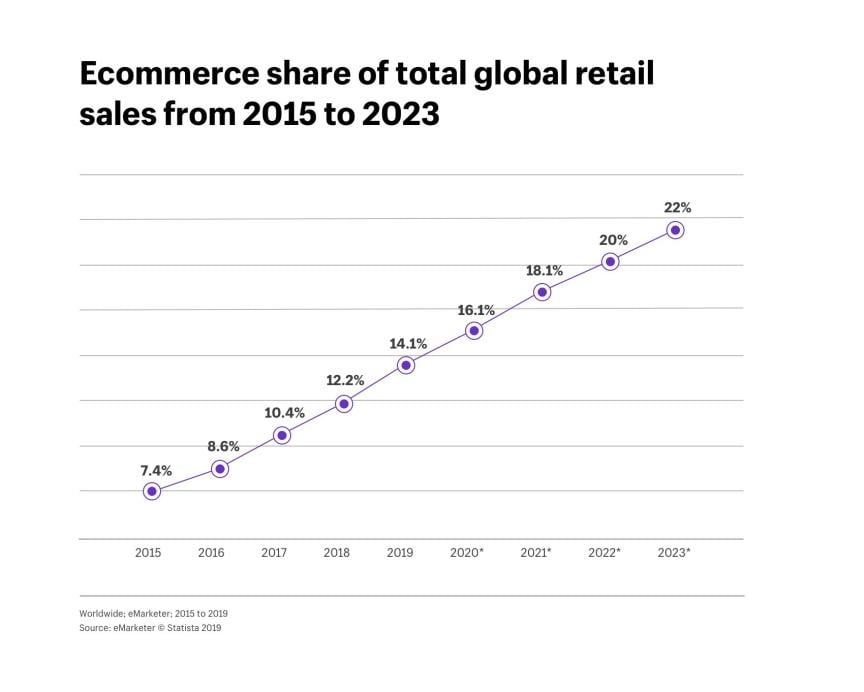
    eCommerce trends 2021 - Graph 2015 to 2023
    eCommerce trends 2021 – Graph 2015 to 2023

    PWA & Headless eCommerce
    It is so rare for a customer to understand the technical aspects of eCommerce services they love. But it doesn’t mean that it shouldn’t be shaped by the new technology trends.

    Headless eCommerce on the other side is an interesting new trend that helps us separate the presentation layer from the eCommerce functionality of a webpage. With the help of PWA, One can personalize the customer experience and also enhance the quality of your content.

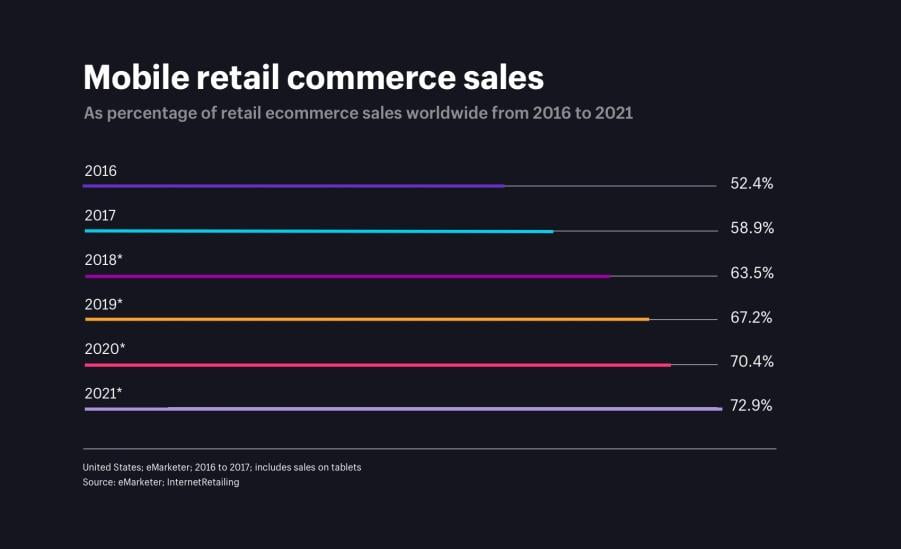
    Mobile retail commerce sales from 2016 to 2021
    Mobile retail commerce sales from 2016 to 2021

    Voice Shopping

    Internet users are going crazy over voice shopping helping it gain so much traction. By the end of 2017, almost 13% of the people who own a smart speaker admitted that they make a purchase only with their voice.
    OC&C strategy consultants have predicted that this 13% might have a significant rise for up to 55% within 2022. Records are showing a similar rise in the UK as well.

    The launch of Amazon’s smart speaker “Echo” officially kick started this trend back in 2014. Since then, the user curve of the voice shopping trend is getting steeper by the day.

    Voice shopping is still on the verge of getting perfected, but according to discussed statistics, it should only be getting better and popular over the years.

    The major role of Social Media In eCommerce

    The number of people who shop through the influence of social media is on the rise. Facebook and Instagram checkouts recently added a “Buy” button to their site which turned out to be a great strategy.

    Apart from the effect it has on our everyday life; social media completely changed how we buy things. Brands should make use of this opportunity and escalate the position and popularity they have on social media. Your brand has better chances of getting recognized among the customers. With the number of hours we spend on social media rising every day; seeking help from Instagram Influencers is also a viable option for eCommerce businesses.

    eCommerce Personalization

    Personalizing your site plays a major role in getting your e-commerce business recognized. A wide range of products are available online and each product needs to get showcased in the right way to the right customer.

    Failing to do so will result in your products remaining stagnant in your inventory without reaching the customers who require it. E-commerce Personalization lies in understanding the choice and needs of each customer and offering them a unique tailored experience. Employing this strategy will help you see a 20% increase in sales.

    Research Online, Purchase Offline

    People have always preferred to buy products offline after researching them online. And some might do the opposite of researching offline and buying them online.

    Almost 88% of the customers browse through the internet before buying something. Even if there’s nothing new to this, the number of people who follow this strategy would grow in 2021.

    SMS (Text) Marketing for eCommerce Sites

    A report produced by mobilestatistics.com says that an average person spends about 90 minutes a day staring at their phones. By summing this up, we spend about 23 days a year and almost 4 years of our life doing nothing but this.

    Although there is nothing new about text messaging, there are several brands that still don’t use it to its full potential in communicating with their customers.

    Emails have an opening rate of 20% whereas this goes as high as 98% in the case of text messages. To put it in simple words, the odds of a customer seeing a text message are significantly higher.

    User-generated content (including influencers and reviews)

    Customers have a hard time trusting traditional adverts, and they choose to prefer recommendations and reviews instead. Almost 68% of online shoppers say that reliable reviews were all they needed to make a purchase.

    The reviews that online shoppers leave for a product is the most sought-after user-generated content. To increase customer engagement rate, give more importance to reviews of both your business and individual products.

    Price Transparency

    Customers lose interest and opt-out of the checkout process when they encounter unforeseen fees and charges. By remaining transparent about your prices, fees, practices, and charges, you have better chances of success while entering into 2021.

    Apart from being open and upfront about your prices and fees, there are certain things that you should take care of. You must avoid withholding any information in the fine print about your data privacy, return policy, and exceptions.

    Free Shipping and Free Returns

    Free shipping is ubiquitous and this trend is only going to grow in popularity in 2021. Almost every consumer expects their products to have free shipping and it will be extremely hard to pin a delivery fee on to a purchase particularly if the product costs above a certain price range.

    If you don’t currently have an option to deliver your products for free, this a great time to start thinking about ways to make it possible. This might be a major factor that’s holding back your sales. Offering various delivery options and each having their own speed is a great start. If you are planning on taking it up a notch, offer free returns too.

    Environmental Topics Influence Buyers

    Green consumerism is gaining more attention than ever before and brands should start giving importance to it. Half of the online consumers admit that environmental factors play a major role in making purchase decisions.

    It is essential for e-commerce businesses to adapt to various sustainable practices. People have started respecting the environmental concerns and the impact that a product has over it.

    It is the responsibility of online businesses to make sure that their practices are eco-friendly. Sourcing products from fair-trade organizations would make the job of stepping into a greener eCommerce environment easier for you.

    Flexible Payment Options for Big Purchases

    Attempting to sell products having expensive price labels might turn out to be a difficult task. New customers generally don’t engage in expensive purchases owing to the risk that’s involved.

    Afterpay, Final, and Affirm are some of the flexible payment options that you can offer to battle this problem.

    New Countries and Territories

    By the end of 2020, the world’s middle-class population will have over 1.4 billion new additions out of which about 85% would come from the Asia Pacific Region (APAC).

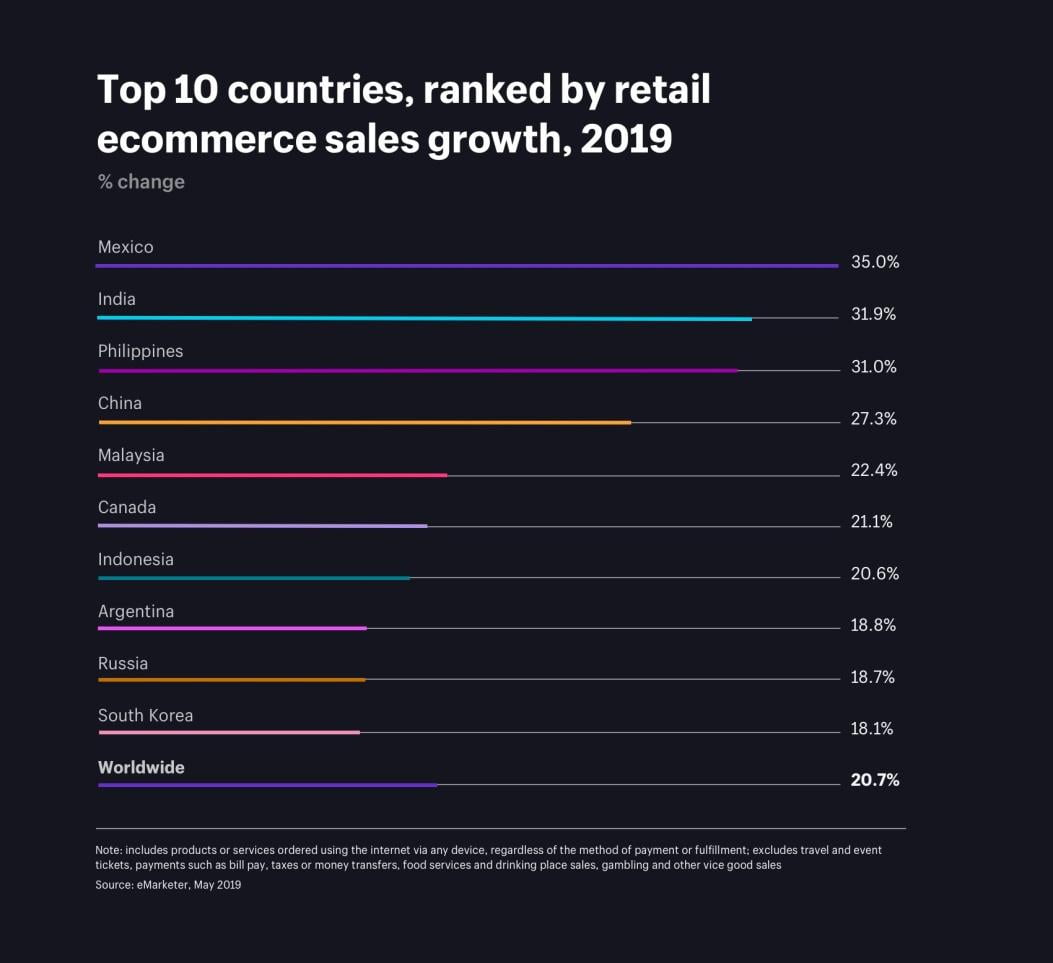
    The entire eCommerce trend seems to be drifting apart from the west even after the active Chinese economy settles. Focusing on countries with higher growth rates will yield great profits.

    eCommerce trend growth country-wise
    eCommerce trend growth country-wise

    Live chat will be inevitable

    This generation has a lot of people who seek instant appreciation. Email conversations and phone calls are going out of trend and people are losing interest in them.

    Live chats are a great way for eCommerce businesses to provide customer support and clear the doubts they have over a product.

    Video Marketing will grow without any doubt, but not as fast as you think

    Understanding your customers and creating content that they can relate to and understand better is vital irrespective of the medium that you are going to use.

    This includes podcasts, audio, videos, and written posts. However, proofs stating that customers react better to video reviews and product overviews increasing the chances of a sale. In case you haven’t already started it, 2021 is a great year to make use of video reviews.

    Visual commerce will boom

    In an eCommerce store, the major task is to sell products to a customer who can never physically interact with the product. Visual commerce can step up and help you here. To put it in simple words, it is an evolution from the conventional static visuals.

    Instead of saturating your business’ marketing with just product photos, visual commerce takes this once step higher. It makes use of engaging videos, interactive content, consumer-generated media, and augmented reality.

    Employing User-generated content on Social Media

    Influencer partnerships have been a part of a brand’s marketing strategy for quite a while now. User-Generated Content (UGC) is a great upside of social media campaigns that we’re just beginning to explore.

    When influencers share photos and videos of a product, it can kindle various distinctive and appealing ideas.

    Consumers find it even more trustable and authentic to make a purchase decision when common people talk about your product compared to celebrities and models.

    Reports say that over 64% of the people on social media rely on UGC every time they make a purchase. The view of a UGC video is tenfold higher compared to the ones made by the brand itself.

    B2B eCommerce

    The overall revenue of B2B eCommerce would rise to over $6.6 trillion within 2021 while B2C eCommerce would stumble behind with revenue of $3.2 trillion. This is a trend that you can never afford to miss.

    The B2B model has always been dominant in the e-commerce market. Adopt B2B solution for your business. Not just customers, but almost every business needs goods and services in order to survive and thrive.

    The only task is to have a better understanding of their needs and shopping experiences. This trend is going to shoot up in 2021. Let’s wait and witness the massive growth in the eCommerce sector.