We sacrifice by not doing any other technology, so that you get the best of Magento.

We sacrifice by not doing any other technology, so that you get the best of Magento.

    Magento 2: Get list of website programmatically

    If you need lists of websites in template file then follow below steps:

    Add one block file(GetWebsiteList.php) in your existing module and paste below code:

    <?php 
    namespace VendernameModulenameBlock; 
    class GetWebsiteList extends MagentoFrameworkViewElementTemplate 
    { 
        public function __construct( 
            MagentoFrameworkViewElementTemplateContext $context, 
            MagentoStoreModelResourceModelWebsiteCollectionFactory $websiteCollectionFactory, 
            array $data = [] ) 
        {
            $this->_websiteCollectionFactory = $websiteCollectionFactory;
            parent::__construct($context, $data);
        }
    
         /**
         * Retrieve websites collection of system
         *
         * @return Website Collection
         */
        public function getWebsiteLists()
        {
            $collection = $this->_websiteCollectionFactory->create();
            return $collection;
        }
    }
    

    Call in the template file,

    <?php foreach($block->getWebsiteLists() as $website) {
    	echo $website->getCode(); //code of website
    	echo $website->getName(); //name of website
    	print_r($website->getData());
    }

    How to truncate reviews, products, customers, & orders tables in Magento 2?

    Before firing below queries, I advice you to take backup of your database. Because, it’s always a good habit to save your data.

    I performed an audit on all tables.
    Below list of the tables should be truncated, if you wish to clear test data.

    SET FOREIGN_KEY_CHECKS = 0;

    Truncate order tables

    TRUNCATE TABLE `gift_message`;
    TRUNCATE TABLE `quote`;
    TRUNCATE TABLE `quote_address`;
    TRUNCATE TABLE `quote_address_item`;
    TRUNCATE TABLE `quote_id_mask`;
    TRUNCATE TABLE `quote_item`;
    TRUNCATE TABLE `quote_item_option`;
    TRUNCATE TABLE `quote_payment`;
    TRUNCATE TABLE `quote_shipping_rate`;
    TRUNCATE TABLE `reporting_orders`;
    TRUNCATE TABLE `sales_bestsellers_aggregated_daily`;
    TRUNCATE TABLE `sales_bestsellers_aggregated_monthly`;
    TRUNCATE TABLE `sales_bestsellers_aggregated_yearly`;
    TRUNCATE TABLE `sales_creditmemo`;
    TRUNCATE TABLE `sales_creditmemo_comment`;
    TRUNCATE TABLE `sales_creditmemo_grid`;
    TRUNCATE TABLE `sales_creditmemo_item`;
    TRUNCATE TABLE `sales_invoice`;
    TRUNCATE TABLE `sales_invoiced_aggregated`;
    TRUNCATE TABLE `sales_invoiced_aggregated_order`;
    TRUNCATE TABLE `sales_invoice_comment`;
    TRUNCATE TABLE `sales_invoice_grid`;
    TRUNCATE TABLE `sales_invoice_item`;
    TRUNCATE TABLE `sales_order`;
    TRUNCATE TABLE `sales_order_address`;
    TRUNCATE TABLE `sales_order_aggregated_created`;
    TRUNCATE TABLE `sales_order_aggregated_updated`;
    TRUNCATE TABLE `sales_order_grid`;
    TRUNCATE TABLE `sales_order_item`;
    TRUNCATE TABLE `sales_order_payment`;
    TRUNCATE TABLE `sales_order_status_history`;
    TRUNCATE TABLE `sales_order_tax`;
    TRUNCATE TABLE `sales_order_tax_item`;
    TRUNCATE TABLE `sales_payment_transaction`;
    TRUNCATE TABLE `sales_refunded_aggregated`;
    TRUNCATE TABLE `sales_refunded_aggregated_order`;
    TRUNCATE TABLE `sales_shipment`;
    TRUNCATE TABLE `sales_shipment_comment`;
    TRUNCATE TABLE `sales_shipment_grid`;
    TRUNCATE TABLE `sales_shipment_item`;
    TRUNCATE TABLE `sales_shipment_track`;
    TRUNCATE TABLE `sales_shipping_aggregated`;
    TRUNCATE TABLE `sales_shipping_aggregated_order`;
    TRUNCATE TABLE `tax_order_aggregated_created`;
    TRUNCATE TABLE `tax_order_aggregated_updated`;

    Truncate Customer tables

    TRUNCATE TABLE `customer_address_entity`;
    TRUNCATE TABLE `customer_address_entity_datetime`;
    TRUNCATE TABLE `customer_address_entity_decimal`;
    TRUNCATE TABLE `customer_address_entity_int`;
    TRUNCATE TABLE `customer_address_entity_text`;
    TRUNCATE TABLE `customer_address_entity_varchar`;
    TRUNCATE TABLE `customer_entity`;
    TRUNCATE TABLE `customer_entity_datetime`;
    TRUNCATE TABLE `customer_entity_decimal`;
    TRUNCATE TABLE `customer_entity_int`;
    TRUNCATE TABLE `customer_entity_text`;
    TRUNCATE TABLE `customer_entity_varchar`;
    TRUNCATE TABLE `customer_grid_flat`;
    TRUNCATE TABLE `customer_log`;
    TRUNCATE TABLE `customer_log`;
    TRUNCATE TABLE `customer_visitor`;
    TRUNCATE TABLE `persistent_session`;
    TRUNCATE TABLE `wishlist`;
    TRUNCATE TABLE `wishlist_item`;
    TRUNCATE TABLE `wishlist_item_option`;

    Truncate Review tables

    TRUNCATE TABLE `review`;
    TRUNCATE TABLE `review_detail`;
    TRUNCATE TABLE `review_entity_summary`;
    TRUNCATE TABLE `review_store`;

    Truncate Product tables

    TRUNCATE TABLE `cataloginventory_stock_item`;
    TRUNCATE TABLE `cataloginventory_stock_status`;
    TRUNCATE TABLE `cataloginventory_stock_status_idx`;
    TRUNCATE TABLE `cataloginventory_stock_status_tmp`;
    TRUNCATE TABLE `catalog_category_product`;
    TRUNCATE TABLE `catalog_category_product_index`;
    TRUNCATE TABLE `catalog_category_product_index_tmp`;
    TRUNCATE TABLE `catalog_compare_item`;
    TRUNCATE TABLE `catalog_product_bundle_option`;
    TRUNCATE TABLE `catalog_product_bundle_option_value`;
    TRUNCATE TABLE `catalog_product_bundle_price_index`;
    TRUNCATE TABLE `catalog_product_bundle_selection`;
    TRUNCATE TABLE `catalog_product_bundle_selection_price`;
    TRUNCATE TABLE `catalog_product_bundle_stock_index`;
    TRUNCATE TABLE `catalog_product_entity`;
    TRUNCATE TABLE `catalog_product_entity_datetime`;
    TRUNCATE TABLE `catalog_product_entity_decimal`;
    TRUNCATE TABLE `catalog_product_entity_gallery`;
    TRUNCATE TABLE `catalog_product_entity_int`;
    TRUNCATE TABLE `catalog_product_entity_media_gallery`;
    TRUNCATE TABLE `catalog_product_entity_media_gallery_value`;
    TRUNCATE TABLE `catalog_product_entity_media_gallery_value_to_entity`;
    TRUNCATE TABLE `catalog_product_entity_media_gallery_value_video`;
    TRUNCATE TABLE `catalog_product_entity_text`;
    TRUNCATE TABLE `catalog_product_entity_tier_price`;
    TRUNCATE TABLE `catalog_product_entity_varchar`;
    TRUNCATE TABLE `catalog_product_index_eav`;
    TRUNCATE TABLE `catalog_product_index_eav_decimal`;
    TRUNCATE TABLE `catalog_product_index_eav_decimal_idx`;
    TRUNCATE TABLE `catalog_product_index_eav_decimal_tmp`;
    TRUNCATE TABLE `catalog_product_index_eav_idx`;
    TRUNCATE TABLE `catalog_product_index_eav_tmp`;
    TRUNCATE TABLE `catalog_product_index_price`;
    TRUNCATE TABLE `catalog_product_index_price_bundle_idx`;
    TRUNCATE TABLE `catalog_product_index_price_bundle_opt_idx`;
    TRUNCATE TABLE `catalog_product_index_price_bundle_opt_tmp`;
    TRUNCATE TABLE `catalog_product_index_price_bundle_sel_idx`;
    TRUNCATE TABLE `catalog_product_index_price_bundle_sel_tmp`;
    TRUNCATE TABLE `catalog_product_index_price_bundle_tmp`;
    TRUNCATE TABLE `catalog_product_index_price_cfg_opt_agr_idx`;
    TRUNCATE TABLE `catalog_product_index_price_cfg_opt_agr_tmp`;
    TRUNCATE TABLE `catalog_product_index_price_cfg_opt_idx`;
    TRUNCATE TABLE `catalog_product_index_price_cfg_opt_tmp`;
    TRUNCATE TABLE `catalog_product_index_price_downlod_idx`;
    TRUNCATE TABLE `catalog_product_index_price_downlod_tmp`;
    TRUNCATE TABLE `catalog_product_index_price_final_idx`;
    TRUNCATE TABLE `catalog_product_index_price_final_tmp`;
    TRUNCATE TABLE `catalog_product_index_price_idx`;
    TRUNCATE TABLE `catalog_product_index_price_opt_agr_idx`;
    TRUNCATE TABLE `catalog_product_index_price_opt_agr_tmp`;
    TRUNCATE TABLE `catalog_product_index_price_opt_idx`;
    TRUNCATE TABLE `catalog_product_index_price_opt_tmp`;
    TRUNCATE TABLE `catalog_product_index_price_tmp`;
    TRUNCATE TABLE `catalog_product_index_tier_price`;
    TRUNCATE TABLE `catalog_product_index_website`;
    TRUNCATE TABLE `catalog_product_link`;
    TRUNCATE TABLE `catalog_product_link_attribute_decimal`;
    TRUNCATE TABLE `catalog_product_link_attribute_int`;
    TRUNCATE TABLE `catalog_product_link_attribute_varchar`;
    TRUNCATE TABLE `catalog_product_option`;
    TRUNCATE TABLE `catalog_product_option_price`;
    TRUNCATE TABLE `catalog_product_option_title`;
    TRUNCATE TABLE `catalog_product_option_type_price`;
    TRUNCATE TABLE `catalog_product_option_type_title`;
    TRUNCATE TABLE `catalog_product_option_type_value`;
    TRUNCATE TABLE `catalog_product_relation`;
    TRUNCATE TABLE `catalog_product_super_attribute`;
    TRUNCATE TABLE `catalog_product_super_attribute_label`;
    TRUNCATE TABLE `catalog_product_super_link`;
    TRUNCATE TABLE `catalog_product_website`;
    TRUNCATE TABLE `catalog_url_rewrite_product_category`;
    TRUNCATE TABLE `downloadable_link`;
    TRUNCATE TABLE `downloadable_link_price`;
    TRUNCATE TABLE `downloadable_link_purchased`;
    TRUNCATE TABLE `downloadable_link_purchased_item`;
    TRUNCATE TABLE `downloadable_link_title`;
    TRUNCATE TABLE `downloadable_sample`;
    TRUNCATE TABLE `downloadable_sample_title`;
    TRUNCATE TABLE `product_alert_price`;
    TRUNCATE TABLE `product_alert_stock`;
    TRUNCATE TABLE `report_compared_product_index`;
    TRUNCATE TABLE `report_viewed_product_aggregated_daily`;
    TRUNCATE TABLE `report_viewed_product_aggregated_monthly`;
    TRUNCATE TABLE `report_viewed_product_aggregated_yearly`;
    TRUNCATE TABLE `report_viewed_product_index`;


    SET FOREIGN_KEY_CHECKS = 1;


    Overriding Block in Magento 1.9.X

    Well, We created a very simple custom module that will override the core product listing block (app/code/core/Mage/Catalog/Block/Category/View.php) in the category known as page view.

    Our first step should be to create one module file. Create a file ‘app/etc/modules/Namespace_Catalog.xml’ and paste the below content into that file:

    <?xml version="1.0"?>
    <config>
      <modules>
        <Namespace_Catalog>
          <active>true</active>
          <codePool>local</codePool>
        </Namespace_Catalog>
      </modules>
    </config>

    Next, we have to create a module configuration file. Create “app/code/local/Namespace/Catalog/etc/config.xml” and paste the below contents in that file.

    <?xml version="1.0"?>
    <config>
      <modules>
        <Namespace_Catalog>
          <version>1.0</version>
        </Namespace_Catalog>
      </modules>
     
      <global>
        <blocks>
          <catalog>
            <rewrite>
              <category_view>Namespace_Catalog_Block_Category_View</category_view>
            </rewrite>
          </catalog>
        </blocks>
      </global>
    </config>

    At the starting point of module, we’ve done a set-up of the module’s version no. by using <version> tag. Following to it, the <catalog> and <rewrite> tags are utilized to override. So Magento system knows that we’re going to override one of the “blocks” of the “Catalog” core module.

    The <category_view> tag is utilized to define the identity of the block and that will be overridden by the Namespace_Catalog_Block_Category_View class. It’s mapped to a block file “Category/View.php” under the “Block” directory of the Catalog module.

    The last step will be to define a block class Namespace_Catalog_Block_Category_View. Let’s create a block file “app/code/local/Namespace/Catalog/Block/Category/View.php” and paste the below code in that file:

    <?php
    class Namespace_Catalog_Block_Category_View extends Mage_Catalog_Block_Category_View
    {
      public function getProductListHtml()
      {
        /** Your Custom Code Goes Here **/
        return $this­>getChildHtml('product_list');
      }
    }

    We have defined the Namespace_Catalog_Block_Category_View class which extends the core Mage_Catalog_Block_Category_View block class. Thus, you can easily override the method of the base class and create new methods when required.

    Magento 2: How to reset orders, customers, reviews and products

    If you need to reset data of orders, customers, reviews and products in magento 2 using mysql queries then follow below steps:

    Reset order tables

    SET FOREIGN_KEY_CHECKS = 0;
    TRUNCATE TABLE `gift_message`;
    TRUNCATE TABLE `quote`;
    TRUNCATE TABLE `quote_address`;
    TRUNCATE TABLE `quote_address_item`;
    TRUNCATE TABLE `quote_id_mask`;
    TRUNCATE TABLE `quote_item`;
    TRUNCATE TABLE `quote_item_option`;
    TRUNCATE TABLE `quote_payment`;
    TRUNCATE TABLE `quote_shipping_rate`;
    TRUNCATE TABLE `reporting_orders`;
    TRUNCATE TABLE `sales_bestsellers_aggregated_daily`;
    TRUNCATE TABLE `sales_bestsellers_aggregated_monthly`;
    TRUNCATE TABLE `sales_bestsellers_aggregated_yearly`;
    TRUNCATE TABLE `sales_creditmemo`;
    TRUNCATE TABLE `sales_creditmemo_comment`;
    TRUNCATE TABLE `sales_creditmemo_grid`;
    TRUNCATE TABLE `sales_creditmemo_item`;
    TRUNCATE TABLE `sales_invoice`;
    TRUNCATE TABLE `sales_invoiced_aggregated`;
    TRUNCATE TABLE `sales_invoiced_aggregated_order`;
    TRUNCATE TABLE `sales_invoice_comment`;
    TRUNCATE TABLE `sales_invoice_grid`;
    TRUNCATE TABLE `sales_invoice_item`;
    TRUNCATE TABLE `sales_order`;
    TRUNCATE TABLE `sales_order_address`;
    TRUNCATE TABLE `sales_order_aggregated_created`;
    TRUNCATE TABLE `sales_order_aggregated_updated`;
    TRUNCATE TABLE `sales_order_grid`;
    TRUNCATE TABLE `sales_order_item`;
    TRUNCATE TABLE `sales_order_payment`;
    TRUNCATE TABLE `sales_order_status_history`;
    TRUNCATE TABLE `sales_order_tax`;
    TRUNCATE TABLE `sales_order_tax_item`;
    TRUNCATE TABLE `sales_payment_transaction`;
    TRUNCATE TABLE `sales_refunded_aggregated`;
    TRUNCATE TABLE `sales_refunded_aggregated_order`;
    TRUNCATE TABLE `sales_shipment`;
    TRUNCATE TABLE `sales_shipment_comment`;
    TRUNCATE TABLE `sales_shipment_grid`;
    TRUNCATE TABLE `sales_shipment_item`;
    TRUNCATE TABLE `sales_shipment_track`;
    TRUNCATE TABLE `sales_shipping_aggregated`;
    TRUNCATE TABLE `sales_shipping_aggregated_order`;
    TRUNCATE TABLE `tax_order_aggregated_created`;
    TRUNCATE TABLE `tax_order_aggregated_updated`;
    SET FOREIGN_KEY_CHECKS = 1;
    

    Reset Customer tables

    SET FOREIGN_KEY_CHECKS = 0;
    TRUNCATE TABLE `customer_address_entity`;
    TRUNCATE TABLE `customer_address_entity_datetime`;
    TRUNCATE TABLE `customer_address_entity_decimal`;
    TRUNCATE TABLE `customer_address_entity_int`;
    TRUNCATE TABLE `customer_address_entity_text`;
    TRUNCATE TABLE `customer_address_entity_varchar`;
    TRUNCATE TABLE `customer_entity`;
    TRUNCATE TABLE `customer_entity_datetime`;
    TRUNCATE TABLE `customer_entity_decimal`;
    TRUNCATE TABLE `customer_entity_int`;
    TRUNCATE TABLE `customer_entity_text`;
    TRUNCATE TABLE `customer_entity_varchar`;
    TRUNCATE TABLE `customer_grid_flat`;
    TRUNCATE TABLE `customer_log`;
    TRUNCATE TABLE `customer_log`;
    TRUNCATE TABLE `customer_visitor`;
    TRUNCATE TABLE `persistent_session`;
    TRUNCATE TABLE `wishlist`;
    TRUNCATE TABLE `wishlist_item`;
    TRUNCATE TABLE `wishlist_item_option`;
    SET FOREIGN_KEY_CHECKS = 1;

    Reset Review tables

    SET FOREIGN_KEY_CHECKS = 0;
    TRUNCATE TABLE `review`;
    TRUNCATE TABLE `review_detail`;
    TRUNCATE TABLE `review_entity_summary`;
    TRUNCATE TABLE `review_store`;
    SET FOREIGN_KEY_CHECKS = 1;

    Reset Product tables

    SET FOREIGN_KEY_CHECKS = 0;
    TRUNCATE TABLE `cataloginventory_stock_item`;
    TRUNCATE TABLE `cataloginventory_stock_status`;
    TRUNCATE TABLE `cataloginventory_stock_status_idx`;
    TRUNCATE TABLE `cataloginventory_stock_status_tmp`;
    TRUNCATE TABLE `catalog_category_product`;
    TRUNCATE TABLE `catalog_category_product_index`;
    TRUNCATE TABLE `catalog_category_product_index_tmp`;
    TRUNCATE TABLE `catalog_compare_item`;
    TRUNCATE TABLE `catalog_product_bundle_option`;
    TRUNCATE TABLE `catalog_product_bundle_option_value`;
    TRUNCATE TABLE `catalog_product_bundle_price_index`;
    TRUNCATE TABLE `catalog_product_bundle_selection`;
    TRUNCATE TABLE `catalog_product_bundle_selection_price`;
    TRUNCATE TABLE `catalog_product_bundle_stock_index`;
    TRUNCATE TABLE `catalog_product_entity`;
    TRUNCATE TABLE `catalog_product_entity_datetime`;
    TRUNCATE TABLE `catalog_product_entity_decimal`;
    TRUNCATE TABLE `catalog_product_entity_gallery`;
    TRUNCATE TABLE `catalog_product_entity_int`;
    TRUNCATE TABLE `catalog_product_entity_media_gallery`;
    TRUNCATE TABLE `catalog_product_entity_media_gallery_value`;
    TRUNCATE TABLE `catalog_product_entity_media_gallery_value_to_entity`;
    TRUNCATE TABLE `catalog_product_entity_media_gallery_value_video`;
    TRUNCATE TABLE `catalog_product_entity_text`;
    TRUNCATE TABLE `catalog_product_entity_tier_price`;
    TRUNCATE TABLE `catalog_product_entity_varchar`;
    TRUNCATE TABLE `catalog_product_index_eav`;
    TRUNCATE TABLE `catalog_product_index_eav_decimal`;
    TRUNCATE TABLE `catalog_product_index_eav_decimal_idx`;
    TRUNCATE TABLE `catalog_product_index_eav_decimal_tmp`;
    TRUNCATE TABLE `catalog_product_index_eav_idx`;
    TRUNCATE TABLE `catalog_product_index_eav_tmp`;
    TRUNCATE TABLE `catalog_product_index_price`;
    TRUNCATE TABLE `catalog_product_index_price_bundle_idx`;
    TRUNCATE TABLE `catalog_product_index_price_bundle_opt_idx`;
    TRUNCATE TABLE `catalog_product_index_price_bundle_opt_tmp`;
    TRUNCATE TABLE `catalog_product_index_price_bundle_sel_idx`;
    TRUNCATE TABLE `catalog_product_index_price_bundle_sel_tmp`;
    TRUNCATE TABLE `catalog_product_index_price_bundle_tmp`;
    TRUNCATE TABLE `catalog_product_index_price_cfg_opt_agr_idx`;
    TRUNCATE TABLE `catalog_product_index_price_cfg_opt_agr_tmp`;
    TRUNCATE TABLE `catalog_product_index_price_cfg_opt_idx`;
    TRUNCATE TABLE `catalog_product_index_price_cfg_opt_tmp`;
    TRUNCATE TABLE `catalog_product_index_price_downlod_idx`;
    TRUNCATE TABLE `catalog_product_index_price_downlod_tmp`;
    TRUNCATE TABLE `catalog_product_index_price_final_idx`;
    TRUNCATE TABLE `catalog_product_index_price_final_tmp`;
    TRUNCATE TABLE `catalog_product_index_price_idx`;
    TRUNCATE TABLE `catalog_product_index_price_opt_agr_idx`;
    TRUNCATE TABLE `catalog_product_index_price_opt_agr_tmp`;
    TRUNCATE TABLE `catalog_product_index_price_opt_idx`;
    TRUNCATE TABLE `catalog_product_index_price_opt_tmp`;
    TRUNCATE TABLE `catalog_product_index_price_tmp`;
    TRUNCATE TABLE `catalog_product_index_tier_price`;
    TRUNCATE TABLE `catalog_product_index_website`;
    TRUNCATE TABLE `catalog_product_link`;
    TRUNCATE TABLE `catalog_product_link_attribute_decimal`;
    TRUNCATE TABLE `catalog_product_link_attribute_int`;
    TRUNCATE TABLE `catalog_product_link_attribute_varchar`;
    TRUNCATE TABLE `catalog_product_option`;
    TRUNCATE TABLE `catalog_product_option_price`;
    TRUNCATE TABLE `catalog_product_option_title`;
    TRUNCATE TABLE `catalog_product_option_type_price`;
    TRUNCATE TABLE `catalog_product_option_type_title`;
    TRUNCATE TABLE `catalog_product_option_type_value`;
    TRUNCATE TABLE `catalog_product_relation`;
    TRUNCATE TABLE `catalog_product_super_attribute`;
    TRUNCATE TABLE `catalog_product_super_attribute_label`;
    TRUNCATE TABLE `catalog_product_super_link`;
    TRUNCATE TABLE `catalog_product_website`;
    TRUNCATE TABLE `catalog_url_rewrite_product_category`;
    TRUNCATE TABLE `downloadable_link`;
    TRUNCATE TABLE `downloadable_link_price`;
    TRUNCATE TABLE `downloadable_link_purchased`;
    TRUNCATE TABLE `downloadable_link_purchased_item`;
    TRUNCATE TABLE `downloadable_link_title`;
    TRUNCATE TABLE `downloadable_sample`;
    TRUNCATE TABLE `downloadable_sample_title`;
    TRUNCATE TABLE `product_alert_price`;
    TRUNCATE TABLE `product_alert_stock`;
    TRUNCATE TABLE `report_compared_product_index`;
    TRUNCATE TABLE `report_viewed_product_aggregated_daily`;
    TRUNCATE TABLE `report_viewed_product_aggregated_monthly`;
    TRUNCATE TABLE `report_viewed_product_aggregated_yearly`;
    TRUNCATE TABLE `report_viewed_product_index`;
    SET FOREIGN_KEY_CHECKS = 1;

    How to move checkout buttons to order review on desktop view and to the bottom on mobile view?

    Let’s start with the plan of what we need to do. I would like to keep the buttons in the same place on mobile, at the bottom of the page. So my plan will be to just hide them on the desktop via styles. So on the desktop, I need to hide the original buttons, add new buttons to the order summary block, but I also need to detect when I should show the Next button and when I should show the  Place Order button. In this case, I will need to add a couple of methods to my code.

    Template

    Let’s focus first on templates, so we know how to look at the problem. We will need to add two buttons to the summary.html file. I will copy summary.html file into vendor/vendor-name/theme-name/Magento_Checkout/web/template/ where “vendor-name“, “theme-name” needs to be replaced with your name of vendor and theme name. For this example, I am adding a file into a theme. In order to overwrite this file via the module, you need to update XML file, but I will not talk about it now.

    summary.html

    At this point, I will copy summary.html into the path mentioned above and add custom code as below:

    <div class="opc-block-summary" data-bind="blockLoader: isLoading">
        <span data-bind="i18n: 'Order Summary'" class="title"></span>
        <!-- ko foreach: elems() -->
        <!-- ko template: getTemplate() --><!-- /ko -->
        <!-- /ko -->
    </div>
    <!-- ko if: (isVisibleShippingButton()) -->
    <div class="actions-toolbar-trigger" id="continue-to-payment-trigger-wrapper">
        <div class="primary">
            <button type="button" id="continue-to-payment-trigger" class="button action continue primary">
                <span><!-- ko i18n: 'Next'--><!-- /ko --></span>
            </button>
        </div>
    </div>
    <!-- /ko -->
    <!-- ko if: (isVisiblePaymentButton()) -->
    <div class="actions-toolbar-trigger" id="place-order-trigger-wrapper">
        <button type="button" class="button action primary" id="place-order-trigger">
            <span><!-- ko i18n: 'Place Order'--><!-- /ko --></span>
        </button>
    </div>
    <!-- /ko -->

    Let’s analyze the code I have added. The first part is default Magento, however, the two next ones are mine.

    <!-- ko if: (isVisibleShippingButton()) -->
    <div class="actions-toolbar-trigger" id="continue-to-payment-trigger-wrapper">
        <div class="primary">
            <button type="button" id="continue-to-payment-trigger" class="button action continue primary">
                <span><!-- ko i18n: 'Next'--><!-- /ko --></span>
            </button>
        </div>
    </div>
    <!-- /ko -->

    First of all, I have added the method isVisibleShippingButton() which I still need to create, however this method will detect if I should show the Next button or if it is the payment step and I shouldn’t show it. I also created a special wrapper with id "continue-to-payment-trigger-wrapper" and added a button which is pretty much the same as the default ones, I just added id "continue-to-payment-trigger" which I will use later on as well.

    <!-- ko if: (isVisiblePaymentButton()) -->
    <div class="actions-toolbar-trigger" id="place-order-trigger-wrapper">
        <button type="button" class="button action primary" id="place-order-trigger">
            <span><!-- ko i18n: 'Place Order'--><!-- /ko --></span>
        </button>
    </div>
    <!-- /ko -->

    A really similar story over here. I have added the method isVisiblePaymentButton() which I will create later on. I have added a wrapper with id "place-order-trigger-wrapper" and button with id "place-order-trigger" which I will use later on.

    Javascript

    My next step will be to create missing methods and actions. As I have added code into summary.html I will extend the summary.js file.

    requirejs-config.js

    We will use Javascript Mixins as we want to add new methods to the class and augment the behavior of the base class by adding different mixins to it.

    It is really important to add this file into the correct place. It should be added to vendor/vendor-name/module-name/view/frontend/ or vendor/vendor-name/theme-name/module-nameor vendor/vendor-name/theme-name/ where “vendor-name“, “theme-name” and “module-name” needs to be replaced with your name of vendor, theme and module name. If you are not creating a new module, you can follow the second example and use the Magento_Checkout module in your theme for this case as we make an implementation into the checkout part. Another solution would be to follow the third example and add files directly into your theme.

    Whichever solution you will choose, requirejs-config.js needs to be in the root folder of the module, theme or theme module. As soon as you choose one way, you need to follow it.

    Solution 1

    Let’s say we will add our file to vendor/vendor-name/module-name/view/frontend/ or vendor/vendor-name/theme-name/module-name/,  our file should look like the one below:

    var config = {
        config: {
            mixins: {
                'Magento_Checkout/js/view/summary': {
                    'Vendor_Module/js/view/summary-mixin': true
                }
            }
        }
    };

    Solution 2

    In case you decide to choose the last solution vendor/vendor-name/theme-name/,  your file should look like the following:

    var config = {
        config: {
            mixins: {
                'Magento_Checkout/js/view/summary': {
                    'js/view/summary-mixin': true
                }
            }
        }
    };

    summary-mixin.js

    At this point, we will add our new file summary-mixin.js. The new file will be added to vendor/vendor-name/module-name/view/frontend/web/js/ or vendor/vendor-name/theme-name/module-name/web/js/ or vendor/vendor-name/theme-name/web/js/ where “vendor-name“, “theme-name” and “module-name” needs to be replaced with your name of vendor, theme and module name. If you are not creating a new module, you can follow the second example and use the Magento_Checkout module in your theme for this case, as we make an implementation into the checkout part. Another solution would be to follow the third example and add files directly into your theme. Your decision depends on where you have added requirejs-config.js file.

    define([
        'jquery',
        'jquery/ui',
        'ko',
        'Magento_Checkout/js/model/step-navigator'
    ], function($, ui, ko, stepNavigator){
        'use strict';
        var mixin = {
            isVisibleShippingButton: function () {
                return !stepNavigator.getActiveItemIndex();
            },
            
            isVisiblePaymentButton: function () {
                return stepNavigator.getActiveItemIndex();
            },
    
            initialize: function () {
                var self = this;
                
                $(function() {
                    $('body').on('click', '#continue-to-payment-trigger', function () {
                        $('#shipping-method-buttons-container').find('.action.continue.primary').trigger('click');
                    });                     
                    $('body').on('click', '#place-order-trigger', function () {
                        $('.payment-method._active').find('.action.primary.checkout').trigger('click');
                    });
                });
    
                this._super();
            }
        };
    
        return function (target) {
            return target.extend(mixin);
        };
    });

    Let’s analyze this code. I have been following the Magento 2 documentation JavaScript Mixins where I wanted to add a mixin module that extends the target component with new functions.

    'jquery',
    'jquery/ui',
    'ko',
    'Magento_Checkout/js/model/step-navigator'

    These are references to certain functions which I will use in the code.

    $, ui, ko, stepNavigator

    These are aliases to the functions above.

    isVisibleShippingButton and isVisiblePaymentButton

    These are the two missing methods which return a value, certain values based on stepNavigator.getActiveItemIndex() which return 0 for shipping step and 1 for payment step.

    In the next part of the code, I trigger click action on the original button after clicking my custom buttons.

    this._super();

    At this point, I return the original code of the initialize method.

    return function (target) {
        return target.extend(mixin);
    };

    This part is the default Magento method to extend targeted function by our mixins.

    Styling

    The last thing which we need to do is add styling to hide buttons depending on the resolution of the screen. You can add it to any of the styling files in your module, or your theme. For example you can use vendor/vendor-name/module-name/view/frontend/web/css/source/_module.less for modules.

    _module.less or _order-summary.less

    I have decided to use Magento_Checkout/web/css/source/module/checkout/_order-summary.less in my theme and added following code:

    .media-width(@extremum, @break) when (@extremum = 'max') and (@break = @screen__m) {
        .custom-slide.opc-summary-wrapper {
            .modal-inner-wrap {
                .actions-toolbar-trigger {
                    display: none;
                }
            }
        }
    }
    .media-width(@extremum, @break) when (@extremum = 'min') and (@break = @screen__m) {
        .checkout-payment-method,
        .checkout-shipping-method {
            .actions-toolbar {
                display: none;
            }
        }
    }

    I just hide buttons in certain parts on desktop and mobile. That’s it!

    Result

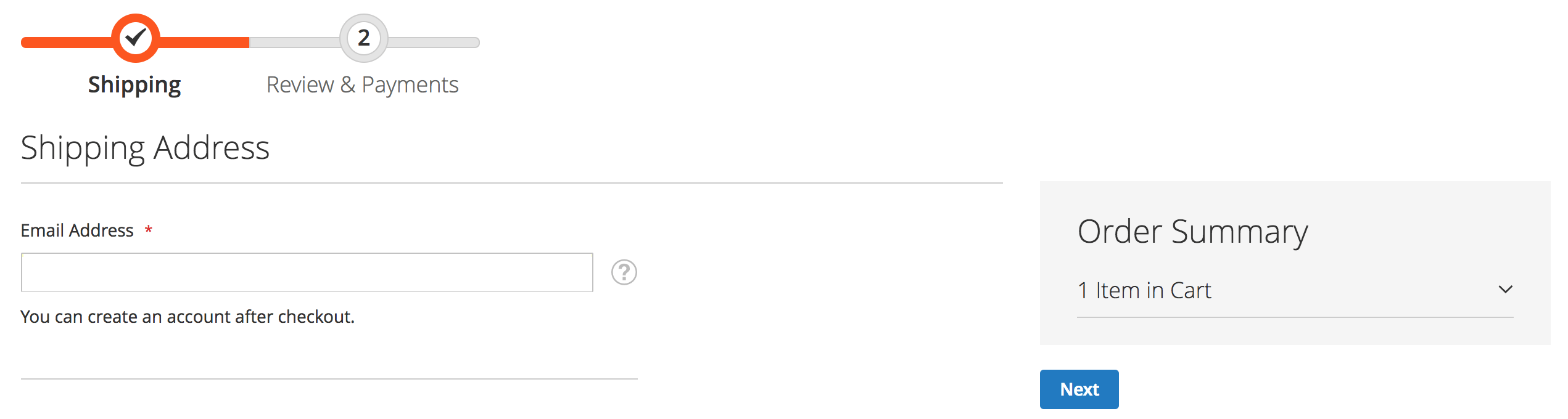
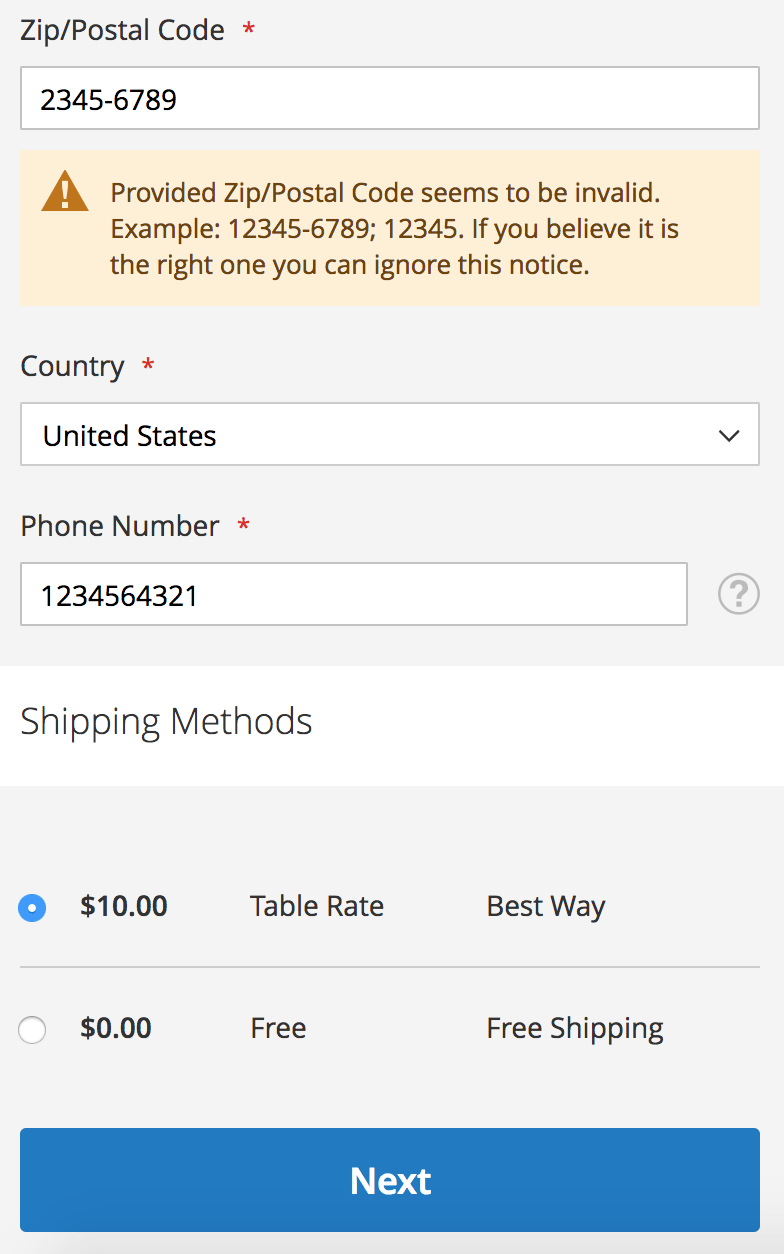
    I have taken some screenshots of our implementations based on the Luma theme. I have not added any styling so this is how it will be displayed by default.

    Desktop
    Mobile
    How to show subtotals in first checkout step?

    Basically, Magento doesn’t provide functionality to enable total summary in shipping step. So we have to change some of the files.
    Let’s follow below steps:

    Step 1: To enable summary, you need to override below file.

    app/code/Magento/Checkout/view/frontend/web/js/view/summary/abstract-total.js

    Override isFullMode() function

    isFullMode: function() {
                if (!this.getTotals()) {
                    return false;
                }
               // return stepNavigator.isProcessed('shipping');
                return true;
            }


    Step:2 To change shipping price value on selection of the shipping method. You can override the following file.

    app/code/Magento/Checkout/view/frontend/web/js/view/summary/shipping.js

    Change getValue() function.

    getValue: function() {
    
                    if (!this.isCalculated()) {
                        return this.notCalculatedMessage;
                    }
                    //var price =  this.totals().shipping_amount; /* comment this line and add below two lines. */
                     var shippingMethod = quote.shippingMethod();
                    var price =  shippingMethod.amount;
                    return this.getFormattedPrice(price);
                }


    Magento 2: How to Enable Persistent Shopping Cart?

    Here we are discussing how to enable persistent shopping cart in Magento 2.

    In Magento 2, a persistent cart is one of the relatively effective features to decrease the abandonment cart.
    It allows storing the product in the shopping cart even when the customers sign out your site.

    Below are the steps to enable persistent cart in Magento 2.

    • Login to Magento 2 Admin, go to menu Stores -> Configuration -> Customers -> Persistent Shopping Cart.
    • Leave the checkbox Use system value empty.
    • Choose “Yes” option for this field.
    • Set the time for the updating of the persistent cookie in the Persistence Lifetime field. The used default value is 31,536,000 seconds.
    • Enable Remember Me to show a checkbox on the Login page that allows saving the shopping cart information.
    • It is optional if you want to set default option “Remember Me” once they login to your site.
    • Set “No” option for Clear Persistence on Sign Out to ensure that all shopping cart information is saved.
    • Then, click on Save to enable the persistent shopping cart function on the storefront.
    • In the Persist Shopping Cart field, select “Yes” if you want to keep the persistent cookie when the session cookie expires.

    Magento 2: Magento 2.2.6 “Clear Shopping Cart” button not working on cart page

    I have encountered that in Magento 2.2.6 “Clear Shopping Cart” button is not working on cart page.

    I have found out that in vendor/magento/module-checkout/view/frontend/templates/cart/form.phtml -line 27, Magento Team seems missed to put a dot for the ‘action’ classname.

    <table id="shopping-cart-table"
    class="cart items data table"
    data-mage-init='{"shoppingCart":{"emptyCartButton": "action.clear",
    "updateCartActionContainer": "#update_cart_action_container"}}'>

    Replace above code with below code:

    <table id="shopping-cart-table"
    class="cart items data table"
    data-mage-init='{"shoppingCart":{"emptyCartButton": ".action.clear",
    "updateCartActionContainer": "#update_cart_action_container"}}'>

    It’s a small bug that creates a big problem.

    Hopefully, this will be fixed in next release.

    Magento 2 Install / Uninstall Sample Data via Command Line

    In this tutorial, we will talk about how to Install/Uninstall Sample Data via Command Line . As you know, Magento 2 have many commands in bin/magento folder. But it may be difficult to get approach with this, so let me explain about it in more detail.

    Install / Uninstall Sample Data via command line

    Go to Magento root folder and see usages:

    php bin/magento maintenance:enable
    

    Result:

    Usage:
      sampledata:deploy [options]
    
    Options:
          --no-update       Update composer.json without executing composer update
      -h, --help            Display this help message
      -q, --quiet           Do not output any message
      -V, --version         Display this application version
          --ansi            Force ANSI output
          --no-ansi         Disable ANSI output
      -n, --no-interaction  Do not ask any interactive question
      -v|vv|vvv, --verbose  Increase the verbosity of messages: 1 for normal output, 2 for more verbose output and 3 for debug
    
    Help:
      Deploy sample data modules

    Install Sample Data Syntax

    php bin/magento sampledata:deploy [options]
    

    By default, it will update latest version of sample data via composer, then install it. You can disable it with parameter: --no-update

    php bin/magento sampledata:deploy --no-update
    

    Uninstall Sample Data Syntax

    Go to Magento root folder and see usages:

    php bin/magento sampledata:remove -h
    

    Output:

    Usage:                                                                                                                     
      sampledata:remove [options]                                                                                              
                                                                                                                               
    Options:                                                                                                                   
          --no-update       Update composer.json without executing composer update                                             
      -h, --help            Display this help message                                                                          
      -q, --quiet           Do not output any message                                                                          
      -V, --version         Display this application version                                                                   
          --ansi            Force ANSI output                                                                                  
          --no-ansi         Disable ANSI output                                                                                
      -n, --no-interaction  Do not ask any interactive question                                                                
      -v|vv|vvv, --verbose  Increase the verbosity of messages: 1 for normal output, 2 for more verbose output and 3 for debug 
                                                                                                                               
    Help:                                                                                                                      
      Remove all sample data packages from composer.json

    Syntax:

    php bin/magento sampledata:remove [options]   


    Magento 2 How to Add Admin User via Command Line

    In this tutorial, we will talk about How to Add Admin User via Command Line. As you know, from Magento 2, they add many commands in bin/magento. It may be difficult to get approach with this, so let me explain about ‘How to Add Admin User via Command Line’  in more detail .

    How to Add Admin User via Command Line

    Go to Magento root folder and see the usage:

    php bin/magento admin:user:create --help
    

    Output:

    Usage:
      admin:user:create [options]
    
    Options:
          --admin-user=ADMIN-USER                    (Required) Admin user
          --admin-password=ADMIN-PASSWORD            (Required) Admin password
          --admin-email=ADMIN-EMAIL                  (Required) Admin email
          --admin-firstname=ADMIN-FIRSTNAME          (Required) Admin first name
          --admin-lastname=ADMIN-LASTNAME            (Required) Admin last name
          --magento-init-params=MAGENTO-INIT-PARAMS  Add to any command to customize Magento initialization parameters
                                                     For example: "MAGE_MODE=developer&MAGE_DIRS[base][path]=/var/www/example.com&MAGE_DIRS[cache][path]=/var/tmp/cache"
      -h, --help                                     Display this help message
      -q, --quiet                                    Do not output any message
      -V, --version                                  Display this application version
          --ansi                                     Force ANSI output
          --no-ansi                                  Disable ANSI output
      -n, --no-interaction                           Do not ask any interactive question
      -v|vv|vvv, --verbose                           Increase the verbosity of messages: 1 for normal output, 2 for more verbose output and 3 for debug
    
    Help:
      Creates an administrator

    Let’s create a admin account with the following information:

    User: magemonkeys
    Password: WeLoveMagento123
    Email: hi@magemonkeys.com
    First Name: magemonkeys
    Last Name: Family
    See the command line is:

    php bin/magento admin:user:create --admin-user=magemonkeys --admin-password=WeLoveMagento123 --admin-email=hi@magemonkeys.com --admin-firstname=magemonkeys --admin-lastname=Family
    

    And thus we have successfully created a new admin account, it returned message:

    Created Magento administrator user named magemonkeys