We sacrifice by not doing any other technology, so that you get the best of Magento.

We sacrifice by not doing any other technology, so that you get the best of Magento.

    How to get category count in Magento 2?

    You can get the total category count for the store in Magento 2 by using the getCount() method.

    You can fetch that information from
    MagentoCatalogApiCategoryManagementInterface.

    All you need to do is just create a simple Model class which will help you to retrieve the total number of the category.  Code is as per below.

    <?php
    namespace MagemonkeyCategoryCountModel;
     
    use MagentoCatalogApiCategoryManagementInterface;
     
    class CategoryCount
    {
        /**
         * @var CategoryManagementInterface
         */
        private $categoryManagement;
     
        public function __construct(
            CategoryManagementInterface $categoryManagement
        ) {
            $this->categoryManagement = $categoryManagement;
        }
     
        /**
         * Fetch all Category count
         *
         * @return int
         */
        public function getCategoryCount()
        {
            $categoryCount = $this->categoryManagement->getCount();
     
            return $categoryCount;
        }
    }

    Once you done with the code part, you can call method by using below command,

    $categoryCount = $this->getCategoryCount();

    That’s it.
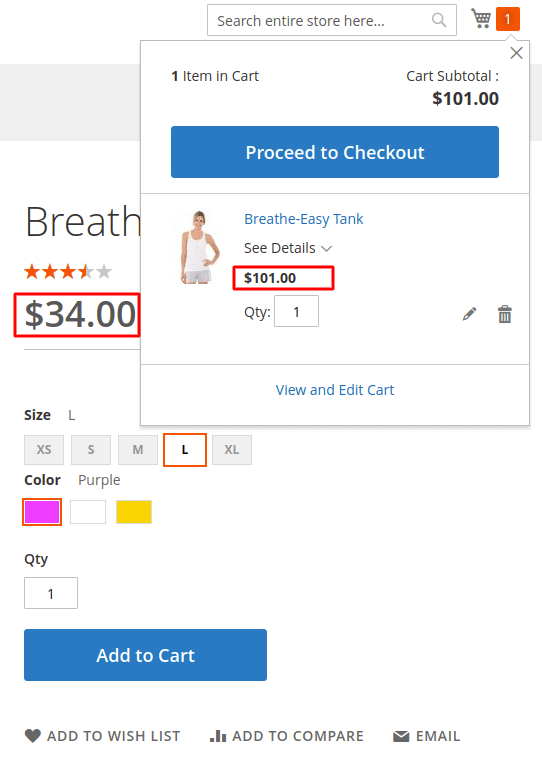
    In Magento 2, how to set custom price for products in cart?

    Firstly, we have to create a custom module.

    Then, we have to declare a file named events.xml to catch an event that takes place after a product is added to the cart.

    Create events.xml file at the following path Magemonkeys/CustomPriceInCart/etc/frontend/events.xml

    <?xml version="1.0"?>
    <config xmlns:xsi="http://www.w3.org/2001/XMLSchema-instance" xsi:noNamespaceSchemaLocation="urn:magento:framework:Event/etc/events.xsd">
    	<event name="checkout_cart_product_add_after">
    		<observer name="CustomPriceInCart" instance="MagemonkeysCustomPriceInCartObserverCustomPriceInCart" />
    	</event>
    </config>

    The next step is to create the observer to make changes to the price.

    Create CustomPriceInCart.php file at the following path Magemonkeys/CustomPriceInCart/Observer/CustomPriceInCart.php

    <?php
    namespace MagemonkeysCustomPriceInCartObserver;
    use MagentoFrameworkEventObserverInterface;
    use MagentoFrameworkAppRequestInterface;
    
    class CustomPriceInCart implements ObserverInterface
    {
    	public function execute(MagentoFrameworkEventObserver $observer)
    	{
    		$item = $observer->getEvent()->getData('quote_item');
    		$item = ($item->getParentItem() ? $item->getParentItem() : $item);
    		// here your custom price goes
    		$customPrice = 101;
    		$item->setCustomPrice($customPrice);
    		$item->setOriginalCustomPrice($customPrice);
    		$item->getProduct()->setIsSuperMode(true);
    	}
    }

    By turning on super mode to the product through function setIsSuperMode(true), we can stop the system generating the price.

    Then we can set the custom prices for products in the cart.

    How to add new button on sales order view page in admin side?

    If you want to add a new button on the sales order view page in the admin side then you have to do that by the plugin.

    Please follow the below steps.

    Step 1: Create a di.xml file on the below path and paste the below code in it.
    Path: app/code/Magemonkeys/CustomOrderButton/etc/adminhtml/di.xml

    <?xml version="1.0"?>
    <config xmlns:xsi="http://www.w3.org/2001/XMLSchema-instance"
            xsi:noNamespaceSchemaLocation="urn:magento:framework:ObjectManager/etc/config.xsd">
        <type name="MagentoBackendBlockWidgetButtonToolbar">
            <plugin name="add_custom_button_toolbar" type="MagemonkeysCustomOrderButtonPluginCustomButtonPlugin" />
        </type>
    </config>

    Step 2: Create the plugin file on the below path and paste the below code in it.
    Path: app/code/Magemonkeys/CustomOrderButton/Plugin/CustomButtonPlugin.php

    <?php declare(strict_types=1);
    
    namespace MagemonkeysCustomOrderButtonPlugin;
    
    use MagentoSalesBlockAdminhtmlOrderCreate;
    use MagentoFrameworkViewElementAbstractBlock;
    use MagentoBackendBlockWidgetButtonButtonList;
    use MagentoBackendBlockWidgetButtonToolbar as ToolbarContext;
    
    class CustomButtonPlugin
    {
        public function beforePushButtons(ToolbarContext $toolbar,AbstractBlock $context,ButtonList $buttonList): array {
            $orderObject = false;
            $layoutName = $context->getNameInLayout();
            if ('sales_order_edit' == $layoutName) {
                $orderObject = $context->getOrder();
            }
    
            if ($orderObject) {
            	$url = 'My Custom URL'
    	        $buttonList->add('custom_btn',['label' => __('Custom Button'),'on_click' => sprintf("location.href = '%s';", $url),'class' => 'primary custom_button','id' => 'custom_btn']);
            }
    
            return [$context, $buttonList];        
        }
    }
    ?>


    What to do when Magento 2.3.1 created invoices miss items?

    This could happen when bundled products and simple products are mixed in the order.

    To solve this, override the Invoiceservice.php from vendor/magento/module-sales/Model/Service/InvoiceService.php and change the below functions codes.

    public function prepareInvoice(Order $order, array $qtys = [])
    {
        $isQtysEmpty = empty($qtys);
        $invoice = $this->orderConverter->toInvoice($order);
        $totalQty = 0;
        $qtys = $this->prepareItemsQty($order, $qtys);
        foreach ($order->getAllItems() as $orderItem) {
            if (!$this->_canInvoiceItem($orderItem, $qtys)) {
                continue;
            }
            if (isset($qtys[$orderItem->getId()])) {
                $qty = (double) $qtys[$orderItem->getId()];
            } elseif ($orderItem->isDummy()) {
                $qty = $orderItem->getQtyOrdered() ? $orderItem->getQtyOrdered() : 1;
            } elseif ($isQtysEmpty) {
                $qty = $orderItem->getQtyToInvoice();
            } else {
                $qty = 0;
            }
            $item = $this->orderConverter->itemToInvoiceItem($orderItem);
            $this->setInvoiceItemQuantity($item, $qty);
            $invoice->addItem($item);
            $totalQty += $qty;
        }
        $invoice->setTotalQty($totalQty);
        $invoice->collectTotals();
        $order->getInvoiceCollection()->addItem($invoice);
        return $invoice;
    }
    private function prepareItemsQty(Order $order, array $qtys = [])
    {
        foreach ($order->getAllItems() as $orderItem) {
            if (isset($qtys[$orderItem->getId()])) {
                if ($orderItem->isDummy() && $orderItem->getHasChildren()) {
                    $qtys = $this->prepareItemQty($orderItem, $qtys);
                }
            } else {
                if (isset($qtys[$orderItem->getParentItemId()])) {
                    $qtys[$orderItem->getId()] = $qtys[$orderItem->getParentItemId()];
                }
            }
        }
        return $qtys;
    }
    private function prepareItemQty(MagentoSalesApiDataOrderItemInterface $orderItem, &$qtys)
    {
        /** @var OrderItemInterface $childOrderItem */
        foreach ($orderItem->getChildrenItems() as $childOrderItem) {
            if (!isset($qtys[$childOrderItem->getItemId()])) {
                $productOptions = $childOrderItem->getProductOptions();
                if (isset($productOptions['bundle_selection_attributes'])) {
                    $bundleSelectionAttributes = $this->serializer
                        ->unserialize($productOptions['bundle_selection_attributes']);
                    $qtys[$childOrderItem->getItemId()] =
                        $bundleSelectionAttributes['qty'] * $qtys[$orderItem->getItemId()];
                }
            }
        }
        return $qtys;
    }

    Once the changes will go live, the customer will have a complete invoice. None items will be missed.

    Magento2 : Display New label of product in product list page

    If you need to display a new label of the product on the list page, then you can do it via helper file.

    Here I have made one extension for that.

    1, First you need to create module directories on app/code.
    2. Then add registration.php in app/code/vender/module/.

    <?php 
    MagentoFrameworkComponentComponentRegistrar::register(
     MagentoFrameworkComponentComponentRegistrar::MODULE,
     'vender_module',
     __DIR__
    );

    3. The next step is to add module.xml file in app/code/vender/module/etc/

    <?xml version="1.0"?>
    <config xmlns:xsi="http://www.w3.org/2001/XMLSchema-instance" xsi:noNamespaceSchemaLocation="../../../../../lib/internal/Magento/Framework/Module/etc/module.xsd">
     <module name="vender_module" setup_version="1.0.0">
     </module>
    </config>

    4. In the final step, you need to create one helper file Newlabel.php in app/code/vender/module/Helper/

    <?php
    namespace vendermoduleHelper;
    
    use MagentoFrameworkStdlibDateTimeTimezoneInterface;
    
    class Newlabel extends MagentoFrameworkUrlHelperData
    {
    
     /**
     * @var TimezoneInterface
     */
     protected $localeDate;
    
     public function __construct(
     TimezoneInterface $localeDate
     ) {
     $this->localeDate = $localeDate;
     }
    
     public function isProductNew($product)
     {
     $newsFromDate = $product->getNewsFromDate();
     $newsToDate = $product->getNewsToDate();
     if (!$newsFromDate && !$newsToDate) {
     return false;
     }
    
     return $this->localeDate->isScopeDateInInterval(
     $product->getStore(),
     $newsFromDate,
     $newsToDate
     );
     }
    }

    After creating all the above files, run setup:upgrade command

    Then, you will able to add a new label on your override list.phtml file in product loop) as per below.

    <?php $helper = $this->helper('vendormoduleHelperNewlabel');
    if($helper->isProductNew($_product)): ?>
    <div class="lable newlbl">
        <?php echo __('New'); ?>
    </div>
    <?php endif; ?>

    Hope my post will helped you to enrich your Magento knowledge.

    Magento 2: Set collapsible widget in your custom html using script

    Here is an example for setting Magento 2 collapsible widget in custom div by using a script.

    <div class="wraperdiv">
    <h4>Title</h4>
    <ul data-role="content">
    <li><a href="">Link</a></li>
    <li><a href="">Link</a></li>
    <li><a href="">Link</a></li>
    <li><a href="">Link</a></li>
    <li><a href="">Link</a></li>
    </ul>
    </div>
    <script>
    require(['jquery', 'mage/collapsible'], function($) {
     $(".wraperdiv").collapsible({"header": "h4", "content": "ul", "openedState": "active", "active": true});
    });
    </script>

    you can use this script in your any phtml files or js script you can set on your theme js file.

    Magento 2 How to disable cache block?

    Please follow below steps to disable cache for block :

    –  layout cache disable:-
    1) You can use cacheable=”false” attribute in your layout to disable cache for a block but problem is that it will disable whole page cache.

    <block class="QaisarSattiHelloWorldBlockHelloWorld" name="helloworld" cacheable="false" />
    

    2) Another option for cache diable

    <block class="QaisarSattiHelloWorldBlockHelloWorld" name="helloworld"  ttl="30" />
    

    programmatically cache disable :
    Disable cache for block programmatically:-

    <?php
    /**
    * Simple Hello World Module
    *
    * @category QaisarSatti
    * @package QaisarSatti_HelloWorld
    * @author Muhammad Qaisar Satti
    * @Email qaisarssatti@gmail.com
    *
    */
    namespace QaisarSattiHelloWorldBlock;
    class HelloWorld extends MagentoFrameworkViewElementTemplate
    {
    public function getCacheLifetime()
        {
            return null;
        }
    
    }


    Magento 2 : How to show full breadcrumbs path in product view page?

    1. Create a file with the following layout: VendorModuleviewlayoutcatalog_product_view.xml

    <?xml version="1.0"?>
    <page layout="1column" xmlns:xsi="http://www.w3.org/2001/XMLSchema-instance" xsi:noNamespaceSchemaLocation="urn:magento:framework:View/Layout/etc/page_configuration.xsd">
        <body>
            <referenceBlock class="VendorModuleBlockBreadcrumbs" name="breadcrumbs" template="Magento_Theme::html/breadcrumbs.phtml"/>
        </body>    
    </page>

    2. Create a file with the following block: Vendor/Module/Block/Breadcrumbs.php

    <?php
    namespace VendorModuleBlock;
    use MagentoCatalogHelperData;
    use MagentoFrameworkViewElementTemplateContext;
    use MagentoStoreModelStore;
    use MagentoFrameworkRegistry;
    
    class Breadcrumbs extends MagentoThemeBlockHtmlBreadcrumbs
    {
        /**
         * Catalog data
         *
         * @var Data
         */
        protected $_catalogData = null;
    
        /**
         * @param Context $context
         * @param Data $catalogData
         * @param array $data
         */
        public function __construct(Context $context, Data $catalogData, Registry $registry, array $data = [])
        {
            $this->_catalogData = $catalogData;
            $this->registry = $registry;
            parent::__construct($context, $data);
        }
    
        /**
         * Retrieve HTML title value separator (with space)
         *
         * @param null|string|bool|int|Store $store
         * @return string
         */
        public function getTitleSeparator($store = null)
        {
            $separator = (string)$this->_scopeConfig->getValue('catalog/seo/title_separator', MagentoStoreModelScopeInterface::SCOPE_STORE, $store);
            return ' ' . $separator . ' ';
        }
    
        public function getCrumbs() {
            return $this->_crumbs;
        }
    
        /**
         * Preparing layout
         *
         * @return MagentoCatalogBlockBreadcrumbs
         */
        protected function _prepareLayout() {
    
            $title = [];
            if ($breadcrumbsBlock = $this->getLayout()->getBlock('breadcrumbs')) {
                $breadcrumbsBlock->addCrumb(
                        'home', [
                    'label' => __('Home'),
                    'title' => __('Go to Home Page'),
                    'link' => $this->_storeManager->getStore()->getBaseUrl()
                        ]
                );
                $path = $this->_catalogData->getBreadcrumbPath();
                $product = $this->registry->registry('current_product');
    
                if ($product && count($path) == 1) {
                    $categoryCollection = clone $product->getCategoryCollection();
                    $categoryCollection->clear();
                    $categoryCollection->addAttributeToSort('level', $categoryCollection::SORT_ORDER_DESC)->addAttributeToFilter('path', array('like' => "1/" . $this->_storeManager->getStore()->getRootCategoryId() . "/%"));
                    $categoryCollection->setPageSize(1);
                    $breadcrumbCategories = $categoryCollection->getFirstItem()->getParentCategories();
    
                    foreach ($breadcrumbCategories as $category) {
                        $catbreadcrumb = array("label" => $category->getName(), "link" => $category->getUrl());
                        $breadcrumbsBlock->addCrumb("category" . $category->getId(), $catbreadcrumb);
                        $title[] = $category->getName();
                    }
                    //add current product to breadcrumb
                    $prodbreadcrumb = array("label" => $product->getName(), "link" => "");
                    $breadcrumbsBlock->addCrumb("product" . $product->getId(), $prodbreadcrumb);
                    $title[] = $product->getName();
                } else {
                    foreach ($path as $name => $breadcrumb) {
                        $breadcrumbsBlock->addCrumb($name, $breadcrumb);
                        $title[] = $breadcrumb['label'];
                    }
                }
                $this->pageConfig->getTitle()->set(join($this->getTitleSeparator(), array_reverse($title)));
                return parent::_prepareLayout();
            }
            $path = $this->_catalogData->getBreadcrumbPath();
            foreach ($path as $name => $breadcrumb) {
                $title[] = $breadcrumb['label'];
            }
            $this->pageConfig->getTitle()->set(join($this->getTitleSeparator(), array_reverse($title)));
            return parent::_prepareLayout();
        }
    } ?>

    3. Override breadcrumbs.phtml below theme path:
    YOUR_THEMEMagento_Themetemplateshtmlbreadcrumbs.phtml

    Send Unique Coupon Code on Every New Subscriber

    Here you have to override the Subscriber Model so for that, you have to create a new module and override the Subscriber model?

    If the answer is yes, then please do the below steps.

    Step 1: Paste the below code in your di.xml

    <?xml version="1.0"?>
    <config xmlns:xsi="http://www.w3.org/2001/XMLSchema-instance" xsi:noNamespaceSchemaLocation="urn:magento:framework:ObjectManager/etc/config.xsd">
    
        <preference for="MagentoNewsletterModelSubscriber" type="MagemonkeyNewsletterModelSubscriber" />
    		
    </config>

    Step 2: Paste the below code in Your Subscriber.php under Magemonkey/Newsletter/Model/Subscriber.php

    <?php
    
    namespace MagemonkeyNewsletterModel;
    
    use MagentoFrameworkAppObjectManager;
    
    class Subscriber extends MagentoNewsletterModelSubscriber
    {
        /**
         * @var MagentoCustomerModelGroupFactory
         */
        protected $_customerGroup;
    
        /**
         * @var MagentoStoreModelWebsite
         */
        protected $_website;
    
        /**
         * @var MagentoSalesRuleModelRule
         */
        protected $_salesRule;
    
        /**
         * Sends out confirmation success email
         *
         * @return $this
         */
        public function sendConfirmationSuccessEmail()
        {
            
            
            if ($this->getImportMode()) {
                return $this;
            }
    
            if (!$this->_scopeConfig->getValue(
                self::XML_PATH_SUCCESS_EMAIL_TEMPLATE,
                MagentoStoreModelScopeInterface::SCOPE_STORE
            ) || !$this->_scopeConfig->getValue(
                self::XML_PATH_SUCCESS_EMAIL_IDENTITY,
                MagentoStoreModelScopeInterface::SCOPE_STORE
            )
            ) {
                return $this;
            }
    
            $this->inlineTranslation->suspend();
    
            $this->_transportBuilder->setTemplateIdentifier(
                $this->_scopeConfig->getValue(
                    self::XML_PATH_SUCCESS_EMAIL_TEMPLATE,
                    MagentoStoreModelScopeInterface::SCOPE_STORE
                )
               
            )->setTemplateOptions(
                [
                    'area' => MagentoFrameworkAppArea::AREA_FRONTEND,
                    'store' => $this->_storeManager->getStore()->getId(),
                ]
            )->setTemplateVars(
                ['subscriber' => $this, 'coupon_code' => $this->generateCouponCode()]
            )->setFrom(
                $this->_scopeConfig->getValue(
                    self::XML_PATH_SUCCESS_EMAIL_IDENTITY,
                    MagentoStoreModelScopeInterface::SCOPE_STORE
                )
            )->addTo(
                $this->getEmail(),
                $this->getName()
            );
            $transport = $this->_transportBuilder->getTransport();
            $transport->sendMessage();
    
            $this->inlineTranslation->resume();
    
            return $this;
        }
    
        /**
         * Retrieve the coupon code
         *
         * @return string
         */
        protected function generateCouponCode()
        {
            try {
                
                /** @var MagentoSalesRuleModelRule $rule */
                $rule = $this->_getSalesRule();
                $couponCode = $rule->getCouponCodeGenerator()->setLength(4)->setAlphabet(
                    'ABCDEFGHIJKLMNOPQRSTUVWXYZ0123456789'
                )->generateCode().'WELCOME';
                
                /*$rule->loadPost($couponData);
                $rule->save();*/
                $objectManager = MagentoFrameworkAppObjectManager::getInstance(); 
                $datetime = $objectManager->get('MagentoFrameworkStdlibDateTime');
                $date = $objectManager->get('MagentoFrameworkStdlibDateTimeDateTime');
            	$nowTimestamp = $datetime->formatDate($date->gmtTimestamp());
                $coupon = $objectManager->create('MagentoSalesRuleModelCoupon')
    				->setRuleId(81)
                    ->setUsageLimit(NULL)
                    ->setUsagePerCustomer(1)
                    ->setCreatedAt($nowTimestamp)
                    ->setType(MagentoSalesRuleHelperCoupon::COUPON_TYPE_SPECIFIC_AUTOGENERATED)
                    ->setCode($couponCode)
                    ->save();
    
                return $couponCode;
            } catch (Exception $e) {
                return null;
            }
        }
    
        /**
         * Retrieve the customer group ids
         *
         * @return array
         */
        protected function getCustomerGroupIds()
        {
            $groupsIds = [];
            $collection = $this->_getCustomerGroup()->getCollection();
            foreach ($collection as $group) {
                $groupsIds[] = $group->getId();
            }
            return $groupsIds;
        }
    
        /**
         * Retrieve the website ids
         *
         * @return array
         */
        protected function getWebsiteIds()
        {
            $websiteIds = [];
            $collection = $this->_getWebsite()->getCollection();
            foreach ($collection as $website) {
                $websiteIds[] = $website->getId();
            }
            return $websiteIds;
        }
    
        /**
         * @return MagentoCustomerModelGroup
         */
        protected function _getCustomerGroup()
        {
            if ($this->_customerGroup === null) {
                $this->_customerGroup = ObjectManager::getInstance()->get(MagentoCustomerModelGroup::class);
            }
            return $this->_customerGroup;
        }
    
        /**
         * @return MagentoStoreModelWebsite
         */
        protected function _getWebsite()
        {
            if ($this->_website === null) {
                $this->_website = ObjectManager::getInstance()->get(MagentoStoreModelWebsite::class);
            }
            return $this->_website;
        }
    
        /**
         * @return MagentoSalesRuleModelRule
         */
        protected function _getSalesRule()
        {
            if ($this->_salesRule === null) {
                $this->_salesRule = ObjectManager::getInstance()->get(MagentoSalesRuleModelRule::class);
            }
            return $this->_salesRule;
        }
    }

    Here, we have passed the ‘coupon_code’ variable in the template vars.
    This variable contains the unique coupon code for every subscriber. Also, we have used the object Manager but you can use the construct method. And we have passed the static RULE id in the code. You can also change the rule id.

    How to upgrade Magento 2 using command line?

    Here we are discussing Magento 2 version upgrade by using the command line.

    For this, we need the ssh access and log in with the username-password and go to root directory and where Magento 2 is installed.

    Then we need to run below commands one by one :

    composer require magento/product-community-edition 2.3.4 --no-update
    
    composer update
    
    rm -rf var/di var/generation
    
    php bin/magento setup:upgrade
    php bin/magento setup:di:compile
    php -dmemory_limit=2G bin/magento setup:static-content:deploy
    php bin/magento indexer:reindex
    php bin/magento cache:flush
    php bin/magento cache:clean

    Here It will get upgraded to 2.3.4 version of Magento 2, we can change this to the latest version and add apply that command in ssh

    After apply commands we can check our Magento version with the following command:

    php bin/magento –version

    That’s it.  After performing all above steps, Magento will get upgraded to latest version with the upgraded source.