We sacrifice by not doing any other technology, so that you get the best of Magento.

We sacrifice by not doing any other technology, so that you get the best of Magento.

    Open a new window and use the empty layout in admin magento 2 using controller

    If you want to open a new window when you click on the button & use the empty layout in it then you have to follow the below steps.

    Step 1: Place a new button in the admin and you have to make the on-click as per the below code.

    $this->setChild(
        'add_print_button',
        $this->getLayout()->createBlock('MagentoBackendBlockWidgetButton')->setData(
            [
                'label'     => __('Print Registry'),
                'onclick'   => "window.open('".$printUrl."','_blank', 'toolbar=yes,scrollbars=yes,resizable=yes')",
                'class'     => 'task action-primary registry-print',
            ]
        )
    );

    Step 2: Now in your controller you have to copy-paste the below code in the execute method to display your content in the empty layout.

    /** @var MagentoBackendModelViewResultPage $resultPage */
    $resultPage = $this->resultFactory->create(ResultFactory::TYPE_PAGE);
    
    $registryId = $this->getRequest()->getParam('registry_id');
    $registry = $this->registryFactory->create()->load($registryId);
    $items = $this->getPrintItems($registryId);
    
    $resultPage->addHandle('admin-empty');
    $this->_addContent($resultPage->getLayout()->createBlock('MirasvitGiftrBlockMailPrintitems')->setRegistry($registry)->setPrintItems($items));
    
    return $resultPage;

    That’s it. Now I can see content in the empty layout page in the Magento admin side by clicking the button.

    Note: This code is designed as per our requirement. You can modify it as per your requirements.


    How to get shipping and billing address by id in magento 2?

    Here we are going to explain, how to get billing and shipping address by customer id in Magento 2?

    We need to create a module for that.

    Let’s call it – Magemonkeys_Customeraddress

    The next step is to create a block file – Block/Address.php

    <?php
    namespace MagemonkeysCustomeraddressBlock;
    
    class Address extends MagentoFrameworkViewElementTemplate
    {
        protected $accountManagement;
    
        public function __construct(
            MagentoFrameworkViewElementTemplateContext $context,
            MagentoCustomerApiAccountManagementInterface $accountManagement,
            array $data = []
        ) {
            $this->accountManagement = $accountManagement;
            parent::__construct($context, $data);
        }
    
        public function getDefaultShippingAddress($customerId)
        {
            try {
                $address = $this->accountManagement->getDefaultShippingAddress($customerId);
            } catch (NoSuchEntityException $e) {
                return __('You have no shipping address');
            }
            return $address;
        }
    
        public function getDefaultBillingAddress($customerId)
        {
            try {
                $address = $this->accountManagement->getDefaultBillingAddress($customerId);
            } catch (NoSuchEntityException $e) {
                return __('You have no billing address');
            }
            return $address;
        }
    }

    Then, we need to call block function in phtml file w we can create view/customeraddress.phtml file

    $customerId = 11;
    echo $this->getDefaultShippingAddress($customerId);
    echo $this->getDefaultBillingAddress($customerId);

    Last, but not least, clear your cache to check the output.

    500 error on checkout after payment is successful in Magento 2.3.3 – how to add multiple emails with comma in Magento?

    • While auditing the code we found the below error code was generated in the system log :
    PHP Fatal error: Uncaught TypeError: Argument 1 passed to MagentoEmailModelTemplate::setVars() must be of the type array, null given

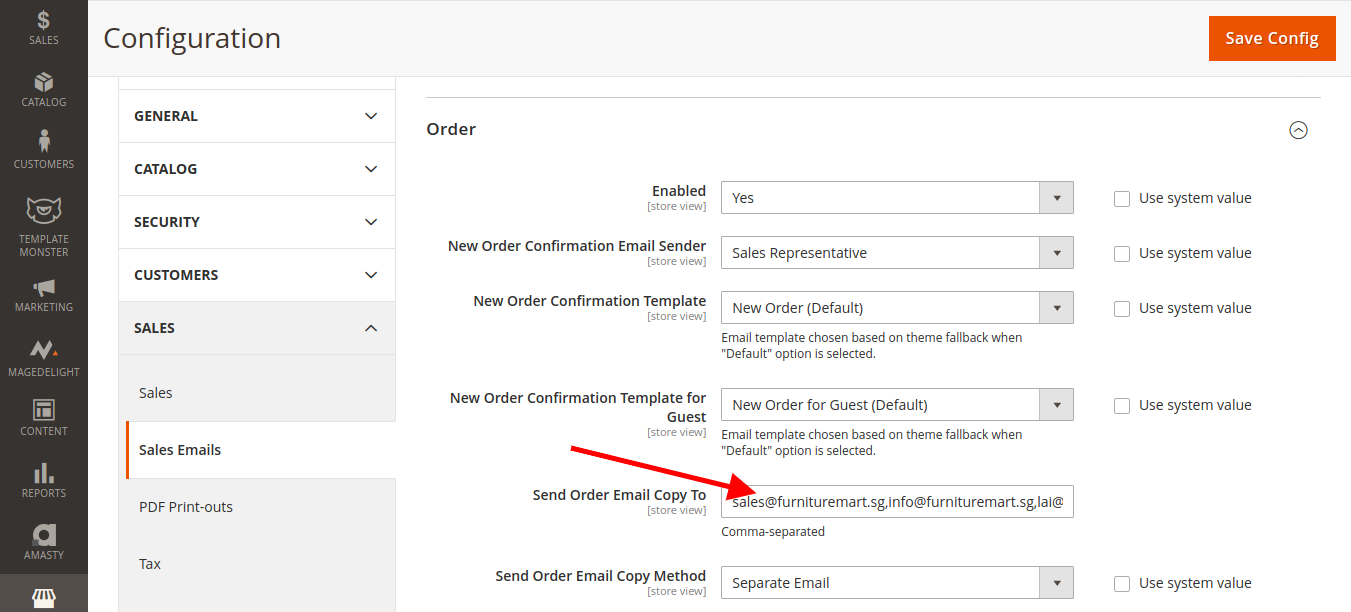
    Above Error throwing due to adding comma separated email in Sales Emails > Order > order copy

    check the below screenshot for reference:

    • Please follow the below steps to get resolved error:   

      It has the issue with the file which has below path

    vendor/magento/module-sales/Model/Order/Email/SenderBuilder.php

    Please override the above file by

    Replacing this Function :

    public function sendCopyTo()
        {
            $copyTo = $this->identityContainer->getEmailCopyTo();
    
            if (!empty($copyTo) && $this->identityContainer->getCopyMethod() == 'copy') {
                $this->configureEmailTemplate();
                foreach ($copyTo as $email) {
                    $this->transportBuilder->addTo($email);
                    $transport = $this->transportBuilder->getTransport();
                    $transport->sendMessage();
                }
            }
        }

    With :

    public function sendCopyTo()
        {
            $copyTo = $this->identityContainer->getEmailCopyTo();
    
            if (!empty($copyTo) && $this->identityContainer->getCopyMethod() == 'copy') {
                
                foreach ($copyTo as $email) {
                    $this->configureEmailTemplate();
                    $this->transportBuilder->addTo($email);
                    $transport = $this->transportBuilder->getTransport();
                    $transport->sendMessage();
                }
            }
        }

    That’s It! Now you can add multiple emails with comma-separated.

    Please let me know your thought if this blog is helpful to You.


    How to fix magento database import mysql error? Table storage engine for ‘catalog_product_relation’ doesn’t have this option

    While trying to import the Magento database in my MySQL 5.7.31 version, I faced an error which read  “Table storage engine for ‘catalog_product_relation’ doesn’t have this option”

    So here I’m sharing with you how we can easily solve this import error.

    For Linux & Window run the below command before using the .sql file for import:

    sed -i '' 's/ROW_FORMAT=FIXED//g' your-database.sql

    For Mac run the below command before using the .sql file for import:

    LC_ALL=C sed -i '' 's/ROW_FORMAT=FIXED//g' your-database.sql

    Now you are importing your-database.sql successfully.

    Magento 2 Unable to unserialize value on the product page.

    Please change the unserialize function in vendor/magento/framework/Serialize/Serializer/Json.php.

    You also need to check whether the string is serialized or not.

    public function unserialize($string)
    {
        /************** Custom code ***********/
        if($this->is_serialized($string))
        {
            $string = $this->serialize($string);
        }
        /************** Custom code ***********/
        $result = json_decode($string, true);
        if (json_last_error() !== JSON_ERROR_NONE) {
             throw new InvalidArgumentException('Unable to unserialize value.');
    
        }
        return $result;
    }


    How to download a file programmatically in Magento 2?

    Today we are going to explain how to download the file programmatically in Magento 2.

    Here we have added controller through which we can download image based on the click or call directly.

    namespace MagemonkeysDownloadControllerIndex;
    
    use MagentoFrameworkAppFilesystemDirectoryList;
    
    class Image extends MagentoFrameworkAppActionAction
    {
        protected $fileFactory;
    
        public function __construct(
            MagentoFrameworkAppActionContext $context,
            MagentoFrameworkAppResponseHttpFileFactory $fileFactory
        ) {
            $this->fileFactory = $fileFactory;
            parent::__construct($context);
        }
    
        public function execute()
        {
            $mediafilePath = 'media/download/homeimage.jpg';
            $downloadFilenm = 'homeimage.jpg';
            $imagearr['type'] = 'mediafilePath';
            $imagearr['value'] = $filePath;
            $imagearr['rm'] = 0;
            return $this->fileFactory->create($downloadFilenm, $imagearr, DirectoryList::PUB);
        }
    }

    We can add our logic in execute() method which will help us to download homeimage.jpg by calling this action.

    Magento 2 – switch Product Name & SKU according to the selection of child products in the configurable product.

    You can try below custom module and modify according to your requirement.

    1. app/code/Magemonkey/Simpleconfigure/registration.php

    <?php
    
    MagentoFrameworkComponentComponentRegistrar::register(
        MagentoFrameworkComponentComponentRegistrar::MODULE,
        'Magemonkey_Simpleconfigure',
        __DIR__
    );

    2. app/code/Magemonkey/Simpleconfigure/composer.json

    {
        "name": "magemonkey/simpleconfigure",
        "description": "Magemonkey Simpleconfigure",
        "require": {
          "php": "~5.6.0|7.0.2|~7.0.6",
          "magento/module-store": "0.74.0-beta4",
          "magento/module-theme": "0.74.0-beta4",
          "magento/module-widget": "0.74.0-beta4",
          "magento/module-backend": "0.74.0-beta4",
          "magento/module-catalog": "0.74.0-beta4",
          "magento/module-email": "0.74.0-beta4",
          "magento/module-ui": "0.74.0-beta4",
          "magento/module-variable": "0.74.0-beta4",
          "magento/module-media-storage": "0.74.0-beta4",
          "magento/framework": "0.74.0-beta4",
          "magento/magento-composer-installer": "*"
        },
        "type": "magento2-module",
        "version": "0.74.0-beta4",
        "license": [
            "OSL-3.0",
            "AFL-3.0"
        ],
        "extra": {
            "map": [
                [
                    "*",
                    "Magemonkey/Simpleconfigure"
                ]
            ]
        }
    }

    3. app/code/Magemonkey/Simpleconfigure/etc/module.xml

    <?xml version="1.0"?>
    <config xmlns:xsi="http://www.w3.org/2001/XMLSchema-instance" xsi:noNamespaceSchemaLocation="../../../../../lib/internal/Magento/Framework/Module/etc/module.xsd">
        <module name="Magemonkey_Simpleconfigure" setup_version="1.0.0">
            <sequence>
                <module name="Magento_Backend"/>
                 <module name="Magento_Sales"/>
                <module name="Magento_Quote"/>
                <module name="Magento_Checkout"/>
                <module name="Magento_Cms"/>
            </sequence>
    	</module>
    </config>

    4. app/code/Magemonkey/Simpleconfigure/etc/di.xml

    <?xml version="1.0"?>
    <config xmlns:xsi="http://www.w3.org/2001/XMLSchema-instance" xsi:noNamespaceSchemaLocation="urn:magento:framework:ObjectManager/etc/config.xsd">
    	<type name="MagentoConfigurableProductBlockProductViewTypeConfigurable">
            <plugin disabled="false" name="Magemonkey_Simpleconfigure_Plugin_ConfigurableProduct_Block_Product_View_Type_Configurable" sortOrder="10" type="MagemonkeySimpleconfigurePluginConfigurableProductBlockProductViewTypeConfigurable"/>
        </type>
     
        <type name="MagentoSwatchesBlockProductRendererConfigurable">
            <plugin disabled="false" name="Magemonkey_Simpleconfigure_ConfigurableSkuSwitch_Plugin_Magento_Swatches_Block_Product_Renderer_Configurable" sortOrder="10" type="MagemonkeySimpleconfigurePluginSwatchesBlockProductRendererConfigurable"/>
        </type>
    </config>

    5. app/code/Magemonkey/Simpleconfigure/Plugin/Swatches/Block/Product/Renderer/Configurable.php

    <?php
    namespace MagemonkeySimpleconfigurePluginSwatchesBlockProductRenderer;
     
    class Configurable
    {
        public function afterGetJsonConfig(MagentoSwatchesBlockProductRendererConfigurable $subject, $result) {
     
            $jsonResult = json_decode($result, true);
            $jsonResult['skus'] = [];
            $jsonResult['names'] = [];
     
            foreach ($subject->getAllowProducts() as $simpleProduct) {
               $jsonResult['skus'][$simpleProduct->getId()] = $simpleProduct->getSku();
               $jsonResult['names'][$simpleProduct->getId()] = $simpleProduct->getName();
            }
            $result = json_encode($jsonResult);
            return $result;
    	}
    }

    6. app/code/Magemonkey/Simpleconfigure/Plugin/ConfigurableProduct/Block/Product/View/Type/Configurable.php

    <?php
    namespace MagemonkeySimpleconfigurePluginConfigurableProductBlockProductViewType;
     
    class Configurable
    {
     
        public function afterGetJsonConfig(
            MagentoConfigurableProductBlockProductViewTypeConfigurable $subject,
            $result
    	) {
     
        $jsonResult = json_decode($result, true);
        $jsonResult['skus'] = [];
        $jsonResult['names'] = [];
            foreach ($subject->getAllowProducts() as $simpleProduct) {
                $jsonResult['skus'][$simpleProduct->getId()] = $simpleProduct->getSku();
                $jsonResult['names'][$simpleProduct->getId()] = $simpleProduct->getName();
    	}
        $result = json_encode($jsonResult);
            return $result;
    	}
    }

    7. app/code/Magemonkey/Simpleconfigure/Plugin/ConfigurableProduct/Block/Product/Renderer/Configurable.php

    <?php
    namespace MagemonkeySimpleconfigurePluginSwatchesBlockProductRenderer;
     
    class Configurable
    {
        public function afterGetJsonConfig(MagentoSwatchesBlockProductRendererConfigurable $subject, $result) {
     
            $jsonResult = json_decode($result, true);
            $jsonResult['skus'] = [];
            $jsonResult['names'] = [];
     
            foreach ($subject->getAllowProducts() as $simpleProduct) {
               $jsonResult['skus'][$simpleProduct->getId()] = $simpleProduct->getSku();
               $jsonResult['names'][$simpleProduct->getId()] = $simpleProduct->getName();
            }
            $result = json_encode($jsonResult);
            return $result;
    	}
    }

    8. app/code/Magemonkey/Simpleconfigure/view/frontend/requirejs-config.js

    var config = {
        config: {
            mixins: {
                'Magento_ConfigurableProduct/js/configurable': {
                    'Magemonkey_Simpleconfigure/js/model/skuswitch': true
                },
                'Magento_Swatches/js/swatch-renderer': {
                    'Magemonkey_Simpleconfigure/js/model/swatch-skuswitch': true
                }
            }
    	}
    };

    9. app/code/Magemonkey/Simpleconfigure/view/frontend/web/js/model/swatch-skuswitch.js

    define([
        'jquery',
        'mage/utils/wrapper'
    ], function ($, wrapper) {
    	'use strict';
     
        return function(targetModule){
            var updatePrice = targetModule.prototype._UpdatePrice;
            targetModule.prototype.configurableSku = $('div.product-info-main .sku .value').html();
            targetModule.prototype.configurableName = $('div.product-info-main .page-title .base').html();
            var updatePriceWrapper = wrapper.wrap(updatePrice, function(original){
                var allSelected = true;
                for(var i = 0; i<this.options.jsonConfig.attributes.length;i++){
                    if (!$('div.product-info-main .product-options-wrapper .swatch-attribute.' + this.options.jsonConfig.attributes[i].code).attr('option-selected')){
                    	allSelected = false;
                    }
                }
                var simpleSku = this.configurableSku;
                var simpleName = this.configurableName;
                if (allSelected){
                    var products = this._CalcProducts();
                    simpleSku = this.options.jsonConfig.skus[products.slice().shift()];
                    simpleName = this.options.jsonConfig.names[products.slice().shift()];
                }
                $('div.product-info-main .sku .value').html(simpleSku);
                $('div.product-info-main .page-title .base').html(simpleName);
                  return original();
            });
     
            targetModule.prototype._UpdatePrice = updatePriceWrapper;
            return targetModule;
    	};
    });

    10. app/code/Magemonkey/Simpleconfigure/view/frontend/web/js/model/skuswitch.js

    define([
        'jquery',
        'mage/utils/wrapper'
    ], function ($, wrapper) {
    	'use strict';
     
        return function(targetModule){
     
            var reloadPrice = targetModule.prototype._reloadPrice;
            var reloadPriceWrapper = wrapper.wrap(reloadPrice, function(original){
            var result = original();
            var simpleSku = this.options.spConfig.skus[this.simpleProduct];
            var simpleName = this.options.spConfig.names[this.simpleProduct];
     
                if(simpleSku != '') {
                    $('div.product-info-main .sku .value').html(simpleSku);
                }
                if(simpleName != '') {
                    $('div.product-info-main .page-title .base').html(simpleName);
                }
                return result;
            });
            targetModule.prototype._reloadPrice = reloadPriceWrapper;
            return targetModule;
    	};
    });
     

    Add products to registry with the CSV import functionality in Mirasvit Gift Registry module

    I have added the new tab & added the file upload field as per my requirements. I have also added some CSV checking functionality in that code. You can modify the code as per your requirement.

    So here I will be showing you the controller code to import multiple products through CSV in the gift registry.

    My Upload file name is ‘importdata’.

    You can add the below code

    // Add back tag for redirect on the edit item page while importing items through CSV
    $back = false;
    
    if ($registry->getId()) {
        $data['image'] = $registry->getImage();
    
        /*** CSV Import Functionality ***/
        if ( (isset($_FILES['importdata']['name'])) && ($_FILES['importdata']['name'] != '') )  {
            $back = true;
            try  {    
                $uploaderFactory = $this->uploaderFactory->create(['fileId' => 'importdata']);
                $uploaderFactory->setAllowedExtensions(['csv']);
                $uploaderFactory->setAllowRenameFiles(true);
                $uploaderFactory->setFilesDispersion(true);
    
                $mediaDirectory = $this->fileSystem->getDirectoryRead(DirectoryList::MEDIA);
                $destinationPath = $mediaDirectory->getAbsolutePath('import_gift_registry_products');
    
                $result = $uploaderFactory->save($destinationPath);
    
                if (!$result) {
                    throw new LocalizedException
                    (
                    __('File cannot be saved to path: $1', $destinationPath)
                    );
                }
                else {
                    $csvPath = 'import_gift_registry_products'.$result['file'];
    
                    $mediaDirectory = $this->fileSystem->getDirectoryRead(DirectoryList::MEDIA);
    
                    $destinationfilePath = $mediaDirectory->getAbsolutePath($csvPath);
    
    
                    $f_object = fopen($destinationfilePath, "r");
    
                    $column = fgetcsv($f_object);
    
                    if($f_object) {
                        if( ($column[0] == 'Item Sid') && ($column[1] == 'Local UPC') && ($column[2] == 'DCS') && ($column[3] == 'Vend Code') && ($column[4] == 'Desc1') && ($column[5] == 'Attr') && ($column[6] == 'Size') && ($column[7] == 'Price') && ($column[8] == 'Qty') && ($column[9] == 'Qty Sent') && ($column[10] == 'Qty Due') && ($column[11] == 'Ext Ord Price') && ($column[12] == 'Disc %') && ($column[13] == 'Disc$') && ($column[14] == 'Disc Rsn') && ($column[15] == 'Tax%') && ($column[16] == 'Lookup')  && ($column[17] == 'Tax$')  && ($column[18] == 'Tax') && ($column[19] == 'Assoc') ) { // check the column sequence if it is not matched then import will no proceed further   
    
                            // Delete all items before importing
                            $items = $this->itemCollectionFactory->create()
                            ->addFieldToFilter('registry.registry_id', $registry->getId())
                            ->setOrder('item_id', 'desc');
                            $remainingItems = array();
                            foreach ($items as $deleteItem) {
                                $item = $this->itemFactory->create()->load($deleteItem->getId());
                                if($item->getQtyOrdered() == 0 && $item->getQtyReceived() == 0) {
                                    $item->delete();
                                }
                                else {
                                    $remainingItems[$item->getProductId()] = $item->getId();
                                }
                            }


                            $positiveCount = 0;
                            $negativeCount = 0;
                            $flag = false;
                            $notExistString = '';
                            while (($columns = fgetcsv($f_object)) !== FALSE) {
    
                                $sku = $columns[0];
                                $product = $this->product->getIdBySku($sku); // Get Product By SKU
    
                                if($product) { // Checking product is empty or not
    
                                    if(array_key_exists($product,$remainingItems)) { //check product is exist or not in the remainingItems as a key
    
                                        // Update the exisitng item
                                        $item = $this->itemFactory->create()->load($remainingItems[$product]);
                                        $itemData = array('key' => $data['key'], 'form_key' => $data['form_key'], 'qty' => $columns[8], 'qty_ordered' => $item->getQtyOrdered(), 'qty_received' => $item->getQtyReceived(), 'priority_id' => $item->getPriorityId(),'note' => $item->getNote(), 'registry_id' => $registry->getId(), 'product_id' => $product, 'store_id' => 1);
                                        $item->addData($itemData);
                                        $item->save();
    
                                        $positiveCount++;
                                    }
                                    else { // Add the item
    
                                        $itemData = array('key' => $data['key'], 'form_key' => $data['form_key'], 'qty' => $columns[8], 'qty_ordered' => '0', 'qty_received' => '0', 'priority_id' => '','note' => '', 'registry_id' => $registry->getId(), 'product_id' => $product);
    
    
                                        $item = $this->itemFactory->create();
                                        $item->addData($itemData);
                                        $item->save();
    
                                        // Prepare buy request
                                        $buyRequest = new MagentoFrameworkDataObject($itemData);
                                        $buyRequest->setProduct(str_replace('product/', '', $item->getProductId()))
                                            ->setProductId($buyRequest->getProduct());
    
                                        // Add item in buyrequet
                                        $item->updateItem($buyRequest);
                                        $positiveCount++;
                                    }
                                    
                                }
                                else {
                                    $flag = true;
                                    $negativeCount++;
                                    $notExistString .= $sku .' product not exist in the magento.<br/>';
                                }
                            }                                    
    
                            if($flag) {
                                $this->messageManager->addError($notExistString);
                                $this->messageManager->addError(__('A total of %1 record(s) have not added.', $negativeCount));
                                
                            }
    
                            $this->messageManager->addSuccessMessage(__('A total of %1 record(s) have been added.', $positiveCount));
                            
                        }
                        else {
                            $this->messageManager->addError(__("invalid Formated File"));
                        }
                    }
                    else {
                        $this->messageManager->addError(__("File hase been empty"));
                    }
    
                }
            }
            catch (Exception $e) {   
               $this->messageManager->addError(__($e->getMessage()));
               $this->_redirect('*/*/edit', ['id' => $this->getRequest()->getParam('id')]);
            }
        }
    
        /*** CSV Import Functionality ***/
    }

    in the below file
    File Path: app/code/Mirasvit/Giftr/Controller/Adminhtml/Registry/Save.php

    Here I have added the code as per my requirement. You can change or modify the code as per your requirement.

    How to fix custom customer attribute value programmatically in Magento 2?

    To fix this issue, we need to create ‘controller.php’ file at the below location.

    appcodeMagemonkeysCustomerControllerIndex

    <?php
    Namespace MagemonkeysCustomerControllerIndex;
    
    class Controller extends MagentoFrameworkAppActionAction
    {
    
    protected $customer;
    
    protected $customerFactory;
    
    public function __construct(
        MagentoCustomerModelCustomer $customer
        MagentoCustomerModelResourceModelCustomerFactory $customerFactory
    )
    {
        $this->customer = $customer;
        $this->customerFactory = $customerFactory;
    }
    
    public function execute()
    {
    
        $custom = $this->_customerFactory ->create();
        $custom = $custom->setWebsiteId($helperData->getWebsiteId());
        $custom = $custom->loadByEmail("jayesh@webtechsystem.com");
        $custom->setCustomAttributeCode(custom attribute value);   
    
      // Main code to resolve this issue.
        $customerData = $custom->getDataModel();
        $customerData->setCustomAttribute('custom_attribute_code', 'custom attribute value');
        $custom->updateData($customerData);
    
        $custom->save();
    }
    }


    Redirect Url to 410 and 301 in ngnix server – Different codes and their explanations

    For redirect to 301

    – Temporary redirect to an individual page by using the below piece of code.

    rewrite ^/test1 /test2 redirect;

    – Permanent redirect to a specific page by using the below piece of code.

    rewrite ^/test1 /test2 permanent;

    For redirect to 410 without the query string, you can use the below code lines.

    Url = http://example.com/test1.php
    location /test1.php {
        return 410;
    }

    For redirect to 410 with query string, you can use the below code lines.

    Url = http://example.com/test1.php?page=1
    location = /test1.php {
      if ($args ~* (page=1)(.*)){
        return 410;
      }
    }

    If the query string URL having special characters like + then use the below code.

    Url = http://example.com/test1.php?page=1+cat=1
    location = /test1.php {
      if ($args ~* (page=1(.+)cat=1)(.*)){
        return 410;
      }
    }