We sacrifice by not doing any other technology, so that you get the best of Magento.

We sacrifice by not doing any other technology, so that you get the best of Magento.

    What should be ideal meta title & meta description length in Magento 2?

    Meta Data information not visible on the frontend user but it’s used for search engine result display.

    Please check the screenshot for your reference.


    For Meta Title
    Meta Title should be less than 60 character length because after 60 character Meta title showing (…) in the search engine. You can see in the screenshot (…) showing in the meta title.

    For Meta Description
    Meta Description should be less than 155 character length because after 155 character Meta Description showing (…) in the search engine.

    How to get product collection by product id in Magento 2?

    You can get product data by product id using below code snippets.

    <?php
    
    namespace MagemonkeysProductCollectionBlock;
    
    class Product extends MagentoFrameworkViewElementTemplate
    {
        /**
         * Constructor
         *
         * @param MagentoFrameworkViewElementTemplateContext  $context
         * @param array $data
         */
        public function __construct(
            MagentoFrameworkViewElementTemplateContext $context,
            MagentoCatalogApiProductRepositoryInterface $productRepository,
            array $data = []
        ) {
            $this->productRepository = $productRepository;
            parent::__construct($context, $data);
        }
    
        /**
        * Get Product by Id
        * @param int
        * @return MagentoCatalogModelProduct $product
        */
        public function getProduct($id)
        {
            return $this->productRepository->getById($id);
        }
    }

    Just write the below code inside the template file(.phtml file)

    $product_id = 1;
    $product = $block->getProduct($product_id);
    echo $product->getName(); // product name
    echo $product->getSku(); // product sku


    Magento 2 : How to give some space (Margin) in more views thumbnail images on product detail page?

    By default in Magento 2, we can’t set margin or space between more views thumbnail images using CSS on the product detail page.

    If you want to give some space between more views thumbnail images on the product detail page then follow the below steps.

    Step 1 : Override this file into your theme : vendor/magento/module-catalog/view/frontend/templates/product/view/gallery.phtml

    Step 2: Paste the below code in the last of the file

    <script type="text/x-magento-init">
        {
            "[data-gallery-role=gallery-placeholder]": {
                "mage/gallery/gallery": {
                    "mixins":["magnifier/magnify"],
                    "magnifierOpts": <?= /* @escapeNotVerified */ $block->getMagnifier() ?>,
                    "data": <?= /* @escapeNotVerified */ $block->getGalleryImagesJson() ?>,
                    "options": <?= /* @noEscape */ $block->getGalleryOptions()->getOptionsJson() ?>,
                    "thumbmargin":18,  /* You can set your margin here */
                    "fullscreen": <?= /* @noEscape */ $block->getGalleryOptions()->getFSOptionsJson() ?>,
                    "breakpoints": <?= /* @escapeNotVerified */ $block->getBreakpoints() ?>
                }
            }
        }
    </script>

    Step 3: Run below mentioned commands

    - php bin/magento setup:upgrade
    - php bin/magento cache:clean

    That’s it.

    Now, you can check your product detail page. You can see margin or space between more views thumbnail images.

    How to get recently view product collection in Magento 2?

    To do this programmatically, you need the collection function to get called in custom phtml file so that the product will be shown in the file.

    Let’s say we have a module which is named “Magemonkeys_Recentlyview”

    For that module, we have to create a block file Recentlyview.php at app/code/Magemonkeys/Recentlyview/Block/

    namespace MagemonkeysRecentlyviewBlock;
    
    class Recentlyview extends MagentoFrameworkViewElementTemplate
    {
        protected $recentlyView;
    
        public function __construct(
            MagentoFrameworkViewElementTemplateContext $context,
            MagentoReportsBlockProductViewed $recentlyView,
            array $data = []
        ) {
            $this->recentlyView = $recentlyView;
            parent::__construct($context, $data);
        }
    
        public function getRecentviewCollection()
        {
            return $this->recentlyView->getItemsCollection()->load();
        }
    }

    Now we can call that block function in custom phtml file

    create app/code/Magemonkeys/Recentlyview/view/recentlyview.html file

    $productviewcollection = $this->getRecentviewCollection();
    foreach ($productviewcollection as $recentlyview)
    {
         echo $recentlyview->getName();
    }

    Now check the result by clearing the cache.


    Magento 2 – How to hide cash on delivery payment method?

    Create a custom module and follow the below step.

    1. Create file di.xml on app/code/Vendor/Module/etc

    <?xml version="1.0"?>
    <config xmlns:xsi="http://www.w3.org/2001/XMLSchema-instance" xsi:noNamespaceSchemaLocation="urn:magento:framework:ObjectManager/etc/config.xsd">	
    	<type name="MagentoOfflinePaymentsModelCashondelivery">
            <plugin name="restrict_payment_on_shippingmethod" type="VendorModulePluginMethodList" disabled="false" sortOrder="10"/>
        </type>
    </config>

    2. Create file MethodList.php on app/code/Vendor/Module/Plugin

    <?php 
    namespace VendorModulePlugin;
     
    use MagentoPaymentModelMethodAbstractMethod;
    use MagentoQuoteModelQuote;
    
    class MethodList
    {  
        public function __construct(
            PsrLogLoggerInterface $logger,
            MagentoCheckoutModelSession $checkoutSession
        ) {
            $this->logger = $logger;
            $this->_checkoutSession = $checkoutSession;
        }
    
        public function aroundIsAvailable(
          MagentoPaymentModelMethodAbstractMethod $subject, callable $proceed)
        {
            $shippingMethod = $this->_checkoutSession->getQuote()->getShippingAddress()->getShippingMethod();
            // $this->logger->debug($shippingMethod);
    
            if ($shippingMethod == 'freeshipping_freeshipping')
                return false;
    
            return $proceed();
        }
    } ?>


    Disable add to cart for particular customer group

    Please follow the below steps if you want to disable add to cart for a particular customer group.

    Step 1: Create a plugin and define in Magemonkeys/Customerrestriction/etc/di.xml

    <config xmlns:xsi="http://www.w3.org/2001/XMLSchema-instance"
            xsi:noNamespaceSchemaLocation="urn:magento:framework:ObjectManager/etc/config.xsd">
        <!-- Disable Add to Cart -->
        <type name="MagentoCatalogModelProduct">
            <plugin name="IsSalablePluginAfter" type="MagemonkeysCustomerrestrictionPluginIsSalablePlugin"/>
        </type>
    </config>

    Step 2: Create a configuration field to select a customer group so that you can disable add to cart for that particular group in Magemonkeys/Customerrestriction/etc/adminhtml/system.xml.

    <?xml version="1.0" encoding="UTF-8"?>
    <config xmlns:xsi="http://www.w3.org/2001/XMLSchema-instance" xsi:noNamespaceSchemaLocation="../../../../Magento/Config/etc/system_file.xsd">
        <system>
            <section id="catalog">
                <group id="customer_group" translate="label" type="text" sortOrder="10" showInDefault="1" showInWebsite="1" showInStore="1">
                    <field id="disable_cutomer_group" translate="label" type="multiselect" sortOrder="80" showInDefault="1" showInWebsite="1" showInStore="0">
                        <label>Disbale Add to Cart</label>
                        <source_model>MagemonkeysCustomerrestrictionModelConfigSourceCustomerGroup</source_model>
                        <can_be_empty>1</can_be_empty>
                        <comment>Please slect only one group</comment>
                    </field>
                </group>
            </section>
        </system>
    </config>
    

    Step 3: Create a source model on this path Magemonkeys/CustomerrestrictionModel/Config/Source/Customer/Group.php

    <?php
    namespace MagemonkeysCustomerrestrictionModelConfigSourceCustomer;
     
    class Group implements MagentoFrameworkOptionArrayInterface
    {
    
        /**
         * @var MagentoCustomerModelResourceModelGroupCollectionFactory
         */
        private $_groupCollectionFactory;
    
        private $_options;
    
        public function __construct(MagentoCustomerModelResourceModelGroupCollectionFactory $groupCollectionFactory)
        {
            $this->_groupCollectionFactory = $groupCollectionFactory;
        }
     
        /**
         * @return array
         */
        public function toOptionArray()
        {
            if (!$this->_options) {
                $this->_options = $this->_groupCollectionFactory->create()->loadData()->toOptionArray();
            }
            return $this->_options;
        }
    }

    Step 4: Set default value for the disable add to cart configuration field. You have to add the below code

    <?xml version="1.0"?>
    <config xmlns:xsi="http://www.w3.org/2001/XMLSchema-instance" xsi:noNamespaceSchemaLocation="urn:magento:module:Magento_Store:etc/config.xsd">
        <default>
            <catalog>
                <customer_group>
                    <disable_cutomer_group>0</active>
                </wkmodule>
            </payment>
        </default>
    </config>

    on this path: Magemonkeys/CustomerrestrictionModel/etc/config.xml

    Step 5: Now create a plugin for disable add to cart for a particular customer group :

    <?php
    
    declare(strict_types=1);
    
    namespace MagemonkeysCustomerrestrictionPlugin;
    
    use MagentoFrameworkAppHttpContext;
    use MagentoCustomerModelContext as CustomerContext;
    use MagentoFrameworkAppConfigScopeConfigInterface;
    use MagentoStoreModelScopeInterface;
    
    /**
     * Class IsSalablePlugin
     *
     * @category Plugin
     */
    class IsSalablePlugin
    {
        /**
         * Scope config
         *
         * @var ScopeConfigInterface
         */
        protected $scopeConfig;
    
        /**
         * HTTP Context
         * Customer session is not initialized yet
         *
         * @var Context
         */
        protected $context;
    
        /**
         * @var MagentoCustomerModelSession
         */
        protected $_customerSession;
    
        /**
         * SalablePlugin constructor.
         *
         * @param ScopeConfigInterface $scopeConfig ScopeConfigInterface
         * @param Context              $context     Context
         */
        public function __construct(
            ScopeConfigInterface $scopeConfig,
            MagentoCustomerModelSession $customerSession,
            Context $context
        ) {
            $this->scopeConfig = $scopeConfig;
            $this->context = $context;
            $this->_customerSession = $customerSession;
        }
    
        /**
         * Check if customer group for disable add to cart functionality
         *
         * @return bool
         */
        public function afterIsSalable(): bool
        {
            $groupId = $this->scopeConfig->getValue('catalog/customer_group/disable_cutomer_group',MagentoFrameworkAppConfigScopeConfigInterface::SCOPE_TYPE_DEFAULT);
            $customerGroup = $this->_customerSession->getCustomer()->getGroupId();
            if($customerGroup == $groupId)
            {
                return false;
            }
            
            return true;
        }
    }

    You have to follow the above steps to achieve the functionality of disabling add to cart for a particular customer group.

    Magento 2 product meta description override – how to use short description instead of product’s information?

    Currently, Magento allows you to use the Product related information to set as meta description in configuration settings but let’s say if you wish to use short description, then?

    Well, while working on a project I faced the above situation and fixed it like a pro 🙂

    If no Short Description is set in the product’s information use Magento’s configuration settings for the Meta Description.

    First, you have to add the below code in [Vendor Name]/[Module Name]/etc/events.xml in your existing module or create a new module:

    <?xml version="1.0"?>
    <config xmlns:xsi="http://www.w3.org/2001/XMLSchema-instance" xsi:noNamespaceSchemaLocation="urn:magento:framework:Event/etc/events.xsd">
        <!-- Product Meta Tags Changes Action -->
        <event name="catalog_controller_product_view">
            <observer name="product__meta_observer" instance="[Vendor Name][Module Name]ObserverSeoMetaObserver"/>
        </event>
    </config>

    After that, you have to create a new observer file which you have mention in events.xml file like:

    [Vendor Name][Module Name]ObserverSeoMetaObserver.php

    And add below code:

    <?php
    namespace [Vendor Name][Module Name]Observer;
    
    use MagentoFrameworkEventObserverInterface;
    
    class SeoMetaObserver implements ObserverInterface
    {
        const XML_PRODUCT_AUTO_METADESCRIPTION = 'catalog/fields_masks/meta_description';
        /**
         * @var MagentoFrameworkAppConfigScopeConfigInterface
         */
        protected $scopeConfig;
        
        /**
         * SeoMetaObserver constructor.
         * @param MagentoFrameworkAppConfigScopeConfigInterface $scopeConfig
         */
        public function __construct(
            MagentoFrameworkAppConfigScopeConfigInterface $scopeConfig
        )
        {
            $this->scopeConfig = $scopeConfig;
        }
        
        public function execute(MagentoFrameworkEventObserver $observer)
        {
            $product = $observer->getProduct();
            $metaDesc = trim($product->getMetaDescription());
            if ($metaDesc == '') {
                if ($product->getShortDescription() != '') {
                    $metaDesc = $product->getShortDescription(); //If no SEO Meta Description is set in the product’s information use the Short Description
                } else {
                    $configMeta = $this->scopeConfig->getValue(self::XML_PRODUCT_AUTO_METADESCRIPTION, MagentoStoreModelScopeInterface::SCOPE_STORE); //If no Short Description is set in the product’s information use configuration settings for the Meta Description
                    $string = str_replace("{{","",str_replace("}}","",$configMeta));
                    $finalMeta = explode(' ', $string);
                    $i = 0;
                    foreach ($finalMeta as $meta) {
                        if ($i == 0) {
                            $metaDesc .= $product->getData($meta);
                        } else {
                            $metaDesc .= ' ' . $product->getData($meta);
                        }
                        $i++;
                    }
                }
            }
            $product->setMetaDescription($metaDesc);
        }
    }

    Then flush the Magento cache and check the product page meta description tag.

    Magento 2: Change review tab ordering in product detail page

    If you want to change ordering of review tab in product detail page then follow below steps:

    Step 1. You need to override catalog_product_view.xml file in your theme [vendername]/[yourthemename]/Magento_Review/layout/ folder and paste the below code in between the body tag.

    <referenceBlock name="reviews.tab">
     <arguments>
     <argument name="sort_order" xsi:type="string">50</argument>
     </arguments>
     </referenceBlock>

    Here I have set tab order 50, so you can change it with whatever value you want.

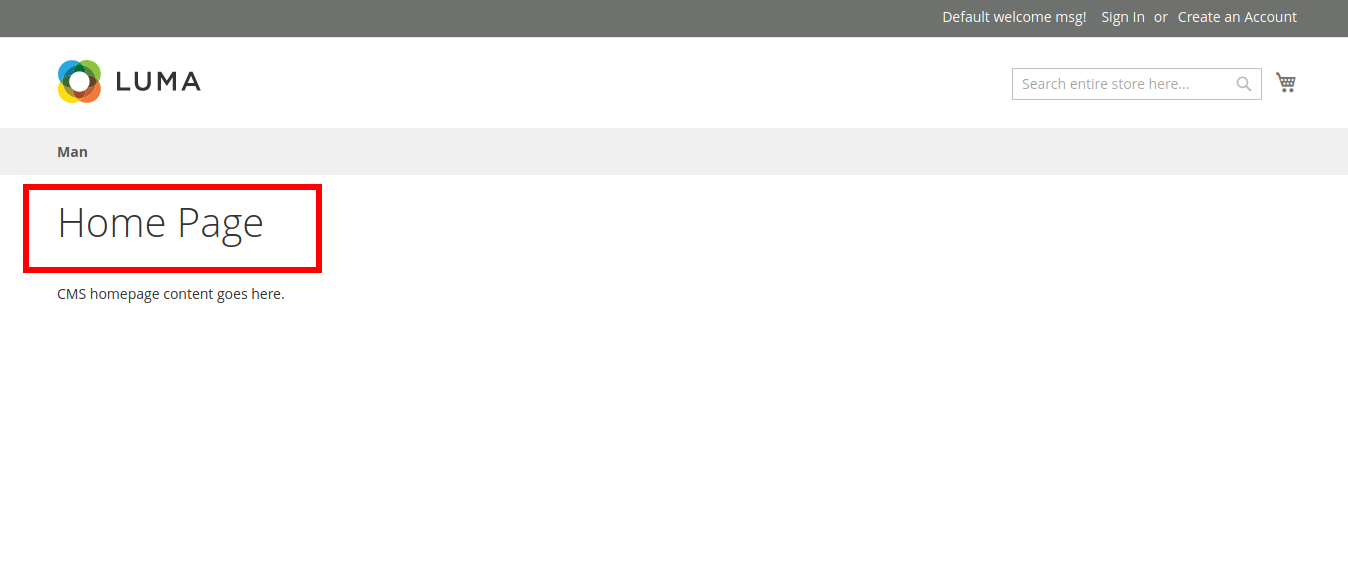
    Magento 2: Remove page title only on home page

    If you want to remove the page title only on the home page, then follow the below institution.

    You need to override the cms_index_index.xml file in your theme app/design/frontend/themevender/themename/Magento_Cms/layout/cms_index_index.xml and paste the below code in between the body tag.

    <referenceContainer name="content-container">
     <referenceBlock name="page.main.title" remove="true" />
     </referenceContainer>