We sacrifice by not doing any other technology, so that you get the best of Magento.

We sacrifice by not doing any other technology, so that you get the best of Magento.

    How to get recently view product collection in Magento 2?

    To do this programmatically, you need the collection function to get called in custom phtml file so that the product will be shown in the file.

    Let’s say we have a module which is named “Magemonkeys_Recentlyview”

    For that module, we have to create a block file Recentlyview.php at app/code/Magemonkeys/Recentlyview/Block/

    namespace MagemonkeysRecentlyviewBlock;
    
    class Recentlyview extends MagentoFrameworkViewElementTemplate
    {
        protected $recentlyView;
    
        public function __construct(
            MagentoFrameworkViewElementTemplateContext $context,
            MagentoReportsBlockProductViewed $recentlyView,
            array $data = []
        ) {
            $this->recentlyView = $recentlyView;
            parent::__construct($context, $data);
        }
    
        public function getRecentviewCollection()
        {
            return $this->recentlyView->getItemsCollection()->load();
        }
    }

    Now we can call that block function in custom phtml file

    create app/code/Magemonkeys/Recentlyview/view/recentlyview.html file

    $productviewcollection = $this->getRecentviewCollection();
    foreach ($productviewcollection as $recentlyview)
    {
         echo $recentlyview->getName();
    }

    Now check the result by clearing the cache.


    Magento 2 – How to hide cash on delivery payment method?

    Create a custom module and follow the below step.

    1. Create file di.xml on app/code/Vendor/Module/etc

    <?xml version="1.0"?>
    <config xmlns:xsi="http://www.w3.org/2001/XMLSchema-instance" xsi:noNamespaceSchemaLocation="urn:magento:framework:ObjectManager/etc/config.xsd">	
    	<type name="MagentoOfflinePaymentsModelCashondelivery">
            <plugin name="restrict_payment_on_shippingmethod" type="VendorModulePluginMethodList" disabled="false" sortOrder="10"/>
        </type>
    </config>

    2. Create file MethodList.php on app/code/Vendor/Module/Plugin

    <?php 
    namespace VendorModulePlugin;
     
    use MagentoPaymentModelMethodAbstractMethod;
    use MagentoQuoteModelQuote;
    
    class MethodList
    {  
        public function __construct(
            PsrLogLoggerInterface $logger,
            MagentoCheckoutModelSession $checkoutSession
        ) {
            $this->logger = $logger;
            $this->_checkoutSession = $checkoutSession;
        }
    
        public function aroundIsAvailable(
          MagentoPaymentModelMethodAbstractMethod $subject, callable $proceed)
        {
            $shippingMethod = $this->_checkoutSession->getQuote()->getShippingAddress()->getShippingMethod();
            // $this->logger->debug($shippingMethod);
    
            if ($shippingMethod == 'freeshipping_freeshipping')
                return false;
    
            return $proceed();
        }
    } ?>


    Many Magento 1.X online stores hacked in the largest campaign to date

    Almost 2000 stores using the Magento eCommerce platform had been affected over the weekend.

    Security researchers claim this to be the “Largest Campaign Ever” they have observed to date since 2015.

    According to security experts, it was a typical Magecart scheme where hackers inject malicious code to breach intercept and logged the payment card details that trusted shoppers entered inside the checkout page.

    The founder of Sanguine Security (Sansec) Willem de Groot, a Dutch cyber-security firm specialized in tracking Magecart attacks found the following data during the observation:

    • 11th September (Friday) 10 stores got infected.
    • 12th September (Saturday)1058
    • 13th September (Sunday) 602 and
    • 14th September (Monday) 233

    Most stores were operating on Magento 1.x (EOL) version

    The Sansec notes that the affected stores were found to be running Magento version 1.x.

    On June 30, 2020, Magento version 1 reached its end-of-life (EOL). Currently, this version is not receiving any security updates or support for any fixes.

    Last year in November 2019, Adobe (owned by Magento) issued the first alert about store owners needing to update to the Magento 2.x as the company was expecting attacks since last year.

    Earlier, Adobe warned about the forthcoming attacks on Magento 1.x stores which were later resonated in similar advisories issued by Visa and MasterCard. Several experts in the web security community said that new Magento 1.x vulnerabilities had not been spotted in a while, which was uncharacteristic because the 1.x branch was old and damaged with security holes.

    So, the experts were right!

    However, de Groot has not yet identified how hackers attacked Magento1.x websites that have been targeted over the weekend.

    Sansec founder added that ads for a Magento 1.x zero-day vulnerability had been posted last month on underground hacking forums, further confirming that attackers were waiting for the EOL to come around.

    Magento attack – it’s ongoing – Is your store secure?

    The news is in the tech headlines that Magento stores are getting hacked. More than 4500 Magento stores have been hacked so far this month.

    We hope and wish that your store is safe till the date. But, it’s advisable to be prepared against any such hacking attempt. The question is how?

    The answer is Mage Monkeys’ security service.

    At Mage Monkeys, our Magento experts read the hacking pattern & according to that, they help your store to be more secured against ’em.

    Our service includes:

    Malware scanning – We’ll scan your store & check whether any malware is there or not.

    Store Monitoring – We’ll monitor your store with our tools & scripts. Any suspicious behavior will be taken care of immediately.

    Patching Issues – We’ll let you know that if your website is having missing or having any patching Issues or not.

    Advanced Threat Detection Checking – We’ll read server logs and previous technical history of your Magento store. It will help us to detect any hacking attempt in ADVANCE.

    SSL – We’ll audit your SSL installation and related.

    File Integrity Monitoring – identify which changes have been made to your website.

    Managed Service – Our Magento security experts will become tech your team, managing and responding to online threats to your business.

    The price you’ll pay for our security service will be 0.10% of what you’ll pay when your store will get hacked. CHOICE IS YOURS!!

    Disable add to cart for particular customer group

    Please follow the below steps if you want to disable add to cart for a particular customer group.

    Step 1: Create a plugin and define in Magemonkeys/Customerrestriction/etc/di.xml

    <config xmlns:xsi="http://www.w3.org/2001/XMLSchema-instance"
            xsi:noNamespaceSchemaLocation="urn:magento:framework:ObjectManager/etc/config.xsd">
        <!-- Disable Add to Cart -->
        <type name="MagentoCatalogModelProduct">
            <plugin name="IsSalablePluginAfter" type="MagemonkeysCustomerrestrictionPluginIsSalablePlugin"/>
        </type>
    </config>

    Step 2: Create a configuration field to select a customer group so that you can disable add to cart for that particular group in Magemonkeys/Customerrestriction/etc/adminhtml/system.xml.

    <?xml version="1.0" encoding="UTF-8"?>
    <config xmlns:xsi="http://www.w3.org/2001/XMLSchema-instance" xsi:noNamespaceSchemaLocation="../../../../Magento/Config/etc/system_file.xsd">
        <system>
            <section id="catalog">
                <group id="customer_group" translate="label" type="text" sortOrder="10" showInDefault="1" showInWebsite="1" showInStore="1">
                    <field id="disable_cutomer_group" translate="label" type="multiselect" sortOrder="80" showInDefault="1" showInWebsite="1" showInStore="0">
                        <label>Disbale Add to Cart</label>
                        <source_model>MagemonkeysCustomerrestrictionModelConfigSourceCustomerGroup</source_model>
                        <can_be_empty>1</can_be_empty>
                        <comment>Please slect only one group</comment>
                    </field>
                </group>
            </section>
        </system>
    </config>
    

    Step 3: Create a source model on this path Magemonkeys/CustomerrestrictionModel/Config/Source/Customer/Group.php

    <?php
    namespace MagemonkeysCustomerrestrictionModelConfigSourceCustomer;
     
    class Group implements MagentoFrameworkOptionArrayInterface
    {
    
        /**
         * @var MagentoCustomerModelResourceModelGroupCollectionFactory
         */
        private $_groupCollectionFactory;
    
        private $_options;
    
        public function __construct(MagentoCustomerModelResourceModelGroupCollectionFactory $groupCollectionFactory)
        {
            $this->_groupCollectionFactory = $groupCollectionFactory;
        }
     
        /**
         * @return array
         */
        public function toOptionArray()
        {
            if (!$this->_options) {
                $this->_options = $this->_groupCollectionFactory->create()->loadData()->toOptionArray();
            }
            return $this->_options;
        }
    }

    Step 4: Set default value for the disable add to cart configuration field. You have to add the below code

    <?xml version="1.0"?>
    <config xmlns:xsi="http://www.w3.org/2001/XMLSchema-instance" xsi:noNamespaceSchemaLocation="urn:magento:module:Magento_Store:etc/config.xsd">
        <default>
            <catalog>
                <customer_group>
                    <disable_cutomer_group>0</active>
                </wkmodule>
            </payment>
        </default>
    </config>

    on this path: Magemonkeys/CustomerrestrictionModel/etc/config.xml

    Step 5: Now create a plugin for disable add to cart for a particular customer group :

    <?php
    
    declare(strict_types=1);
    
    namespace MagemonkeysCustomerrestrictionPlugin;
    
    use MagentoFrameworkAppHttpContext;
    use MagentoCustomerModelContext as CustomerContext;
    use MagentoFrameworkAppConfigScopeConfigInterface;
    use MagentoStoreModelScopeInterface;
    
    /**
     * Class IsSalablePlugin
     *
     * @category Plugin
     */
    class IsSalablePlugin
    {
        /**
         * Scope config
         *
         * @var ScopeConfigInterface
         */
        protected $scopeConfig;
    
        /**
         * HTTP Context
         * Customer session is not initialized yet
         *
         * @var Context
         */
        protected $context;
    
        /**
         * @var MagentoCustomerModelSession
         */
        protected $_customerSession;
    
        /**
         * SalablePlugin constructor.
         *
         * @param ScopeConfigInterface $scopeConfig ScopeConfigInterface
         * @param Context              $context     Context
         */
        public function __construct(
            ScopeConfigInterface $scopeConfig,
            MagentoCustomerModelSession $customerSession,
            Context $context
        ) {
            $this->scopeConfig = $scopeConfig;
            $this->context = $context;
            $this->_customerSession = $customerSession;
        }
    
        /**
         * Check if customer group for disable add to cart functionality
         *
         * @return bool
         */
        public function afterIsSalable(): bool
        {
            $groupId = $this->scopeConfig->getValue('catalog/customer_group/disable_cutomer_group',MagentoFrameworkAppConfigScopeConfigInterface::SCOPE_TYPE_DEFAULT);
            $customerGroup = $this->_customerSession->getCustomer()->getGroupId();
            if($customerGroup == $groupId)
            {
                return false;
            }
            
            return true;
        }
    }

    You have to follow the above steps to achieve the functionality of disabling add to cart for a particular customer group.
    Magento 2 product meta description override – how to use short description instead of product’s information?

    Currently, Magento allows you to use the Product related information to set as meta description in configuration settings but let’s say if you wish to use short description, then?

    Well, while working on a project I faced the above situation and fixed it like a pro 🙂

    If no Short Description is set in the product’s information use Magento’s configuration settings for the Meta Description.

    First, you have to add the below code in [Vendor Name]/[Module Name]/etc/events.xml in your existing module or create a new module:

    <?xml version="1.0"?>
    <config xmlns:xsi="http://www.w3.org/2001/XMLSchema-instance" xsi:noNamespaceSchemaLocation="urn:magento:framework:Event/etc/events.xsd">
        <!-- Product Meta Tags Changes Action -->
        <event name="catalog_controller_product_view">
            <observer name="product__meta_observer" instance="[Vendor Name][Module Name]ObserverSeoMetaObserver"/>
        </event>
    </config>

    After that, you have to create a new observer file which you have mention in events.xml file like:

    [Vendor Name][Module Name]ObserverSeoMetaObserver.php

    And add below code:

    <?php
    namespace [Vendor Name][Module Name]Observer;
    
    use MagentoFrameworkEventObserverInterface;
    
    class SeoMetaObserver implements ObserverInterface
    {
        const XML_PRODUCT_AUTO_METADESCRIPTION = 'catalog/fields_masks/meta_description';
        /**
         * @var MagentoFrameworkAppConfigScopeConfigInterface
         */
        protected $scopeConfig;
        
        /**
         * SeoMetaObserver constructor.
         * @param MagentoFrameworkAppConfigScopeConfigInterface $scopeConfig
         */
        public function __construct(
            MagentoFrameworkAppConfigScopeConfigInterface $scopeConfig
        )
        {
            $this->scopeConfig = $scopeConfig;
        }
        
        public function execute(MagentoFrameworkEventObserver $observer)
        {
            $product = $observer->getProduct();
            $metaDesc = trim($product->getMetaDescription());
            if ($metaDesc == '') {
                if ($product->getShortDescription() != '') {
                    $metaDesc = $product->getShortDescription(); //If no SEO Meta Description is set in the product’s information use the Short Description
                } else {
                    $configMeta = $this->scopeConfig->getValue(self::XML_PRODUCT_AUTO_METADESCRIPTION, MagentoStoreModelScopeInterface::SCOPE_STORE); //If no Short Description is set in the product’s information use configuration settings for the Meta Description
                    $string = str_replace("{{","",str_replace("}}","",$configMeta));
                    $finalMeta = explode(' ', $string);
                    $i = 0;
                    foreach ($finalMeta as $meta) {
                        if ($i == 0) {
                            $metaDesc .= $product->getData($meta);
                        } else {
                            $metaDesc .= ' ' . $product->getData($meta);
                        }
                        $i++;
                    }
                }
            }
            $product->setMetaDescription($metaDesc);
        }
    }

    Then flush the Magento cache and check the product page meta description tag.

    Magento 2: Change review tab ordering in product detail page

    If you want to change ordering of review tab in product detail page then follow below steps:

    Step 1. You need to override catalog_product_view.xml file in your theme [vendername]/[yourthemename]/Magento_Review/layout/ folder and paste the below code in between the body tag.

    <referenceBlock name="reviews.tab">
     <arguments>
     <argument name="sort_order" xsi:type="string">50</argument>
     </arguments>
     </referenceBlock>

    Here I have set tab order 50, so you can change it with whatever value you want.

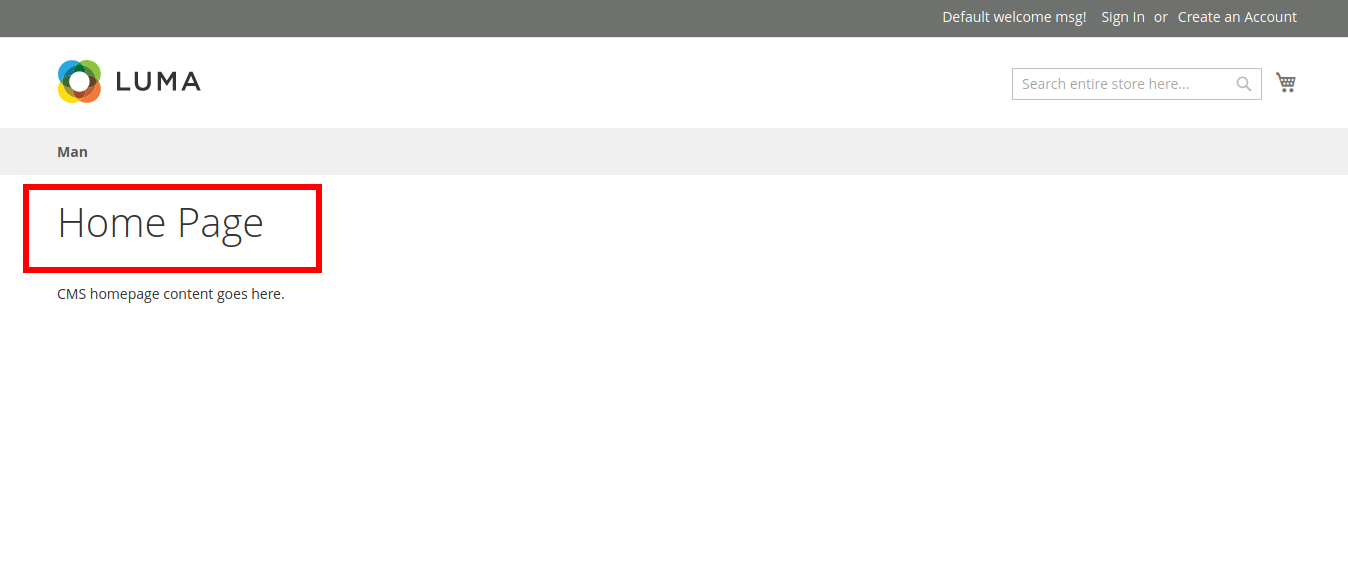
    Magento 2: Remove page title only on home page

    If you want to remove the page title only on the home page, then follow the below institution.

    You need to override the cms_index_index.xml file in your theme app/design/frontend/themevender/themename/Magento_Cms/layout/cms_index_index.xml and paste the below code in between the body tag.

    <referenceContainer name="content-container">
     <referenceBlock name="page.main.title" remove="true" />
     </referenceContainer>

    Open a new window and use the empty layout in admin magento 2 using controller

    If you want to open a new window when you click on the button & use the empty layout in it then you have to follow the below steps.

    Step 1: Place a new button in the admin and you have to make the on-click as per the below code.

    $this->setChild(
        'add_print_button',
        $this->getLayout()->createBlock('MagentoBackendBlockWidgetButton')->setData(
            [
                'label'     => __('Print Registry'),
                'onclick'   => "window.open('".$printUrl."','_blank', 'toolbar=yes,scrollbars=yes,resizable=yes')",
                'class'     => 'task action-primary registry-print',
            ]
        )
    );

    Step 2: Now in your controller you have to copy-paste the below code in the execute method to display your content in the empty layout.

    /** @var MagentoBackendModelViewResultPage $resultPage */
    $resultPage = $this->resultFactory->create(ResultFactory::TYPE_PAGE);
    
    $registryId = $this->getRequest()->getParam('registry_id');
    $registry = $this->registryFactory->create()->load($registryId);
    $items = $this->getPrintItems($registryId);
    
    $resultPage->addHandle('admin-empty');
    $this->_addContent($resultPage->getLayout()->createBlock('MirasvitGiftrBlockMailPrintitems')->setRegistry($registry)->setPrintItems($items));
    
    return $resultPage;

    That’s it. Now I can see content in the empty layout page in the Magento admin side by clicking the button.

    Note: This code is designed as per our requirement. You can modify it as per your requirements.