We sacrifice by not doing any other technology, so that you get the best of Magento.

We sacrifice by not doing any other technology, so that you get the best of Magento.

    How to get all the products including out of stock products?

    Let’s say if you need to get all the products through the collection with out-of-stock products and send it in JSON format then what will you do?

    Step 1: Create a front controller GetProducts.php file

    <?php
    
    namespace MagemonkeysCustomInventoryControllerInventory;
    
    use MagentoFrameworkAppActionContext;
    use MagemonkeysCustomInventoryHelperData;
    
    
    class GetProducts extends MagentoFrameworkAppActionAction
    {
        public function __construct(
            Context $context,
            Data $helper
        ){
            $this->helper = $helper;
            parent::__construct($context);
        }
    
        public function execute()
        {
            $data = $this->helper->getProductData();
    
            header('Content-Type: application/json');
    
            echo json_encode(array(
                'data'=>$data,
                'meta'=> array(
                    'count' => count($data)
                )
            ));
    
            return;
    
        }
    }


    Step 2: Create a Data.php in the helper folder of your module and paste the below code into it.

    <?php
    
    namespace MagemonkeysCustomInventoryHelper;
    
    use MagentoFrameworkAppHelperAbstractHelper;
    use MagentoFrameworkAppFilesystemDirectoryList;
    use MagentoCatalogInventoryModelStockStockItemRepository; // Probably deprecating this with the following
    use MagentoCatalogInventoryApiStockRegistryInterface;
    
    
    class Data extends AbstractHelper
    {
        private $productFactory;
        private $productCollectionFactory;
        private $stockItemRepository;
        private $inflightStatuses;
        protected $stockRegistry;
    
    
        public function __construct(
            MagentoCatalogModelProductFactory $productFactory,
            StockItemRepository $stockItemRepository, // Probably deprecating this with the following
            StockRegistryInterface $stockRegistry,
            MagentoCatalogModelResourceModelProductCollectionFactory $productCollectionFactory
        )
        {
            $this->inflightStatuses = array('processing', 'fulfillment_picking', 'incomplete', 'holded', 'on_review');
            $this->productFactory = $productFactory;
            $this->productCollectionFactory = $productCollectionFactory;
            $this->stockItemRepository = $stockItemRepository; // Probably deprecating this with the following
            $this->stockRegistry = $stockRegistry;
        }
    
        public function getProductData()
        {
            $data = array();
    
            $collection = $this->productCollectionFactory->create();
            $collection->addAttributeToSelect('*');
            $collection->setPageSize(100000);
            $collection->setFlag('has_stock_status_filter', false);
    
    
            /*echo $collection->count();
            exit;*/
    
            $collection->load();
    
            /* Start to add out of stock products in collection */
            $collection->clear();
            
            $updatedWhere = array();
            $where = $collection->getSelect()->getPart('where');
            foreach ($where as $key => $condition)
            {
                if(strpos($condition, 'stock_status_index.stock_status = 1') !== false){
                    $updatedWhere[] = 'AND (stock_status_index.stock_status IN (1,0))';
                } else {
                    $updatedWhere[] = $condition;
                }   
            }
            $collection->getSelect()->setPart('where', $updatedWhere);
            /* End of to add out of stock products in collection */
    
            $collection->load();
    
            foreach ($collection as $product) {
    
                $sku = trim($product->getSku());
    
                //$stockItem = $this->stockItemRepository->get($product->getId());
                $stockItem = $this->stockRegistry->getStockItemBySku($sku);
    
    
                $data[$sku] = array(
                    'sku' => $sku,
                    'name' => $product->getName(),
                    'qty' => (int) $stockItem->getQty(),
                    'in_stock' => $stockItem->getIsInStock()
                );
            }
            return $data;
        }
    }


    Magento 2 : How to change admin login form logo via module base?

    If you want to change the admin login form logo then follow the below steps.

    1. Create file admin_login.xml on app/code/Magemonkeys/AdminLogo/view/adminhtml/layout

    <?xml version="1.0"?>
    <page xmlns:xsi="http://www.w3.org/2001/XMLSchema-instance" layout="admin-login" xsi:noNamespaceSchemaLocation="urn:magento:framework:View/Layout/etc/page_configuration.xsd">
        <body>
            <referenceBlock name="logo">
                <arguments>
                    <argument name="logo_image_src" xsi:type="string">Magemonkeys_AdminLogo::images/adminlogo.png</argument>
                </arguments>
            </referenceBlock>
        </body>
    </page>

    2. Put adminlogo.png on app/code/Magemonkeys/AdminLogo/view/web/images

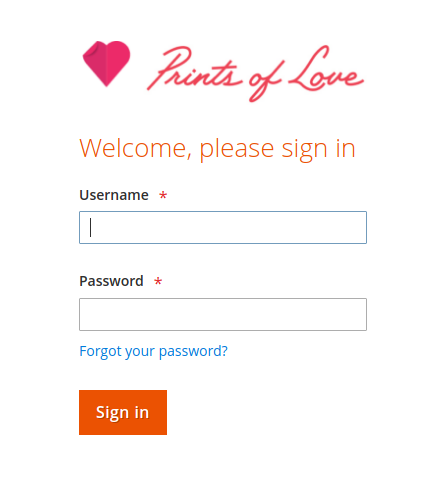
    3. Output.

    Magento 2: How to check customer email id exist or not?

    You can check the email id for a specific website by using the below code.

    <?php
    namespace VendorModuelModel;
    
    use MagentoCustomerApiAccountManagementInterface;
    use MagentoStoreModelStoreManagerInterface;
    
    class EmailExist {
        /**
         * @var AccountManagementInterface
         */
        protected $customerManagement;
    
        /**
         * @var StoreManagerInterface
         */
        protected $storeManager;
    
        /**
         * Data constructor.
         *
         * @param AccountManagementInterface $customerManagement
         * @param StoreManagerInterface $storeManager
         */
        public function __construct(
            AccountManagementInterface $customerManagement,
            StoreManagerInterface $storeManager
        ) {
            $this->customerManagement = $customerManagement;
            $this->storeManager = $storeManager;
        }
    
        /**
         *
         * @return bool
         */
        public function emailExistOrNot(): bool
        {
            $email = "testemail@email.com";
            $websiteId = (int)$this->storeManager->getWebsite()->getId();
            $isEmailNotExists = $this->customerManagement->isEmailAvailable($email, $websiteId);
            return $isEmailNotExists;
        }
    }

    Hope this article will help you to check customer email id’s existance.

    How to show special character in minicart in magento 2?

    You may have face this problem where sometimes you failed to show special character(s) in mini-cart in product name. But what shall one do when he/she has to show special characters like single quote, double quote in product title in minicart.

    Well, all you need to do is to copy default.html file from the vendor directory and place it with the relevant path in the theme.

    app/design/frontend/Magento/theme/Magento_Checkout/web/template/minicart/item/default.html

    Below is the whole code you need to replace in the above file.

    <!--
    /**
     * Copyright © Magento, Inc. All rights reserved.
     * See COPYING.txt for license details.
     */
    -->
    <li class="item product product-item" data-role="product-item">
        <div class="product">
            <!-- ko if: product_has_url -->
            <a data-bind="attr: {href: product_url, title: product_name}" tabindex="-1" class="product-item-photo">
                <!-- ko foreach: $parent.getRegion('itemImage') -->
                    <!-- ko template: {name: getTemplate(), data: item.product_image} --><!-- /ko -->
                <!-- /ko -->
            </a>
            <!-- /ko -->
            <!-- ko ifnot: product_has_url -->
            <span class="product-item-photo">
                <!-- ko foreach: $parent.getRegion('itemImage') -->
                    <!-- ko template: {name: getTemplate(), data: item.product_image} --><!-- /ko -->
                <!-- /ko -->
            </span>
            <!-- /ko -->
    
            <div class="product-item-details">
                <strong class="product-item-name">
                    <!-- ko if: product_has_url -->
                    <a data-bind="attr: {href: product_url}, html: product_name"></a>
                    <!-- /ko -->
                    <!-- ko ifnot: product_has_url -->
                        <!-- ko html: product_name --><!-- /ko -->
                    <!-- /ko -->
                </strong>
    
                <!-- ko if: options.length -->
                <div class="product options" data-mage-init='{"collapsible":{"openedState": "active", "saveState": false}}'>
                    <span data-role="title" class="toggle"><!-- ko i18n: 'See Details' --><!-- /ko --></span>
    
                    <div data-role="content" class="content">
                        <strong class="subtitle"><!-- ko i18n: 'Options Details' --><!-- /ko --></strong>
                        <dl class="product options list">
                            <!-- ko foreach: { data: options, as: 'option' } -->
                            <dt class="label"><!-- ko text: option.label --><!-- /ko --></dt>
                            <dd class="values">
                                <!-- ko if: Array.isArray(option.value) -->
                                    <span data-bind="html: option.value.join('<br>')"></span>
                                <!-- /ko -->
                                <!-- ko if: (!Array.isArray(option.value) && option.option_type == 'file') -->
                                    <span data-bind="html: option.value"></span>
                                <!-- /ko -->
                                <!-- ko if: (!Array.isArray(option.value) && option.option_type != 'file') -->
                                    <span data-bind="text: option.value"></span>
                                <!-- /ko -->
                            </dd>
                            <!-- /ko -->
                        </dl>
                    </div>
                </div>
                <!-- /ko -->
    
                <div class="product-item-pricing">
                    <!-- ko if: canApplyMsrp -->
    
                    <div class="details-map">
                        <span class="label" data-bind="i18n: 'Price'"></span>
                        <span class="value" data-bind="i18n: 'See price before order confirmation.'"></span>
                    </div>
                    <!-- /ko -->
                    <!-- ko ifnot: canApplyMsrp -->
                    <!-- ko foreach: $parent.getRegion('priceSidebar') -->
                        <!-- ko template: {name: getTemplate(), data: item.product_price, as: 'price'} --><!-- /ko -->
                    <!-- /ko -->
                    <!-- /ko -->
    
                    <div class="details-qty qty">
                        <label class="label" data-bind="i18n: 'Qty', attr: {
                               for: 'cart-item-'+item_id+'-qty'}"></label>
                        <input data-bind="attr: {
                               id: 'cart-item-'+item_id+'-qty',
                               'data-cart-item': item_id,
                               'data-item-qty': qty,
                               'data-cart-item-id': product_sku
                               }, value: qty"
                               type="number"
                               size="4"
                               class="item-qty cart-item-qty">
                        <button data-bind="attr: {
                               id: 'update-cart-item-'+item_id,
                               'data-cart-item': item_id,
                               title: $t('Update')
                               }"
                                class="update-cart-item"
                                style="display: none">
                            <span data-bind="i18n: 'Update'"></span>
                        </button>
                    </div>
                </div>
    
                <div class="product actions">
                    <!-- ko if: is_visible_in_site_visibility -->
                    <div class="primary">
                        <a data-bind="attr: {href: configure_url, title: $t('Edit item')}" class="action edit">
                            <span data-bind="i18n: 'Edit'"></span>
                        </a>
                    </div>
                    <!-- /ko -->
                    <div class="secondary">
                        <a href="#" data-bind="attr: {'data-cart-item': item_id, title: $t('Remove item')}"
                           class="action delete">
                            <span data-bind="i18n: 'Remove'"></span>
                        </a>
                    </div>
                </div>
            </div>
        </div>
    </li>
    

    That’s it. Hope this article helped you to solve your programmatical problem.

    Magento 2: How to Add Prefix word for Orders Increment ID?

    We are going to add prefix word using the database operation.

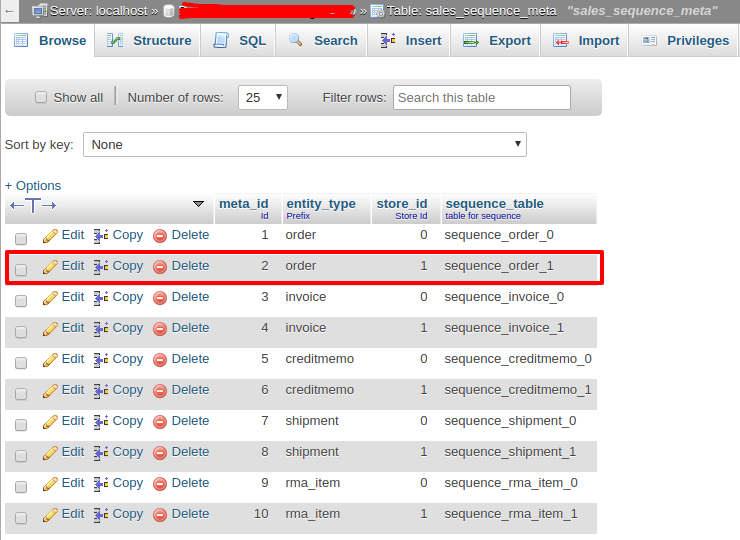
    – Login to Database & Check table ‘sales_sequence_meta’

    In the above SC “meta_id” is:  ‘ 2 ‘  And after run the below query :

    UPDATE ‘sales_sequence_profile’ SET ‘prefix’ = ‘HAZ’ WHERE ‘meta_id’ = 2;

    That’s it!! Now when you will going to place an order, You will get the next increment Id Like ‘HAZ21050001′ by ‘HAZ’ prefix word.

    Thank you.

    How to Upgrade Magento version from 2.1.7 to 2.3.4

    If you have to upgrade your Magento version from 2.1.7 to 2.3.4 then follow the below steps.

    Note: Please take the backup of your existing database and take a full backup.

    After taking backup follow the below upgrade steps on the Magento root directory using the terminal.

    Step 1 : php bin/magento maintenance:enable

    Step 2 : Take backup using existing composer.json of your site’s Magento root folder

    Step 3 : composer remove magento/product-community-edition –no-update

    Step 4 : composer require magento/product-community-edition=2.3.4 –no-update

    Step 5 : composer require –dev allure-framework/allure-phpunit:~1.2.0 friendsofphp/php-cs-fixer:~2.13.0 lusitanian/oauth:~0.8.10 magento/magento-coding-standard:~1.0.0 magento/magento2-functional-testing-framework:~2.3.14 pdepend/pdepend:2.5.2 phpunit/phpunit:~6.5.0 sebastian/phpcpd:~3.0.0 squizlabs/php_codesniffer:3.3.1 –sort-packages –no-update

    Step 6 : composer remove –dev sjparkinson/static-review fabpot/php-cs-fixer –no-update

    Step 7 : Open composer.json and add the below line in “autoload”: “psr-4” section in last.

    "autoload": {
        "psr-4": {
            ...
            ...
            "Zend\Mvc\Controller\": "setup/src/Zend/Mvc/Controller/"
        },
        ...
    }

    Step 8 : composer update

    Step 9 : php bin/magento cache:clean

    Step 10 : rm -rf var/cache/* var/log/* var/page_cache/* var/session/* var/view_preprocessed/* generation/* pub/static/*

    Step 11 : php bin/magento setup:upgrade

    Step 12 : php bin/magento maintenance:disable

    Thats it.

    Now clean the cache and check your Magento version. It should be upgraded to 2.3.4

    Magento 2: How to change main container max-width using less?

    Generally, you can see luma theme container’s max-width is: 1280px

    So in case, if you wish to change the main container max-width in your theme, Just override _theme.less file in your theme web/css/source/ folder and change max-width in below less variable. You don’t need to disturb any other CSS.

    @layout__max-width: 1360px;

    Note: I have tried the above solution in Magento 2.3.* and 2.4.* and I have made a custom theme based on the luma theme. It worked for me.

    Hope the above solution will also help you in your programming journey.

    Magento 2 Reset password token not getting in reset password form.

    While going through the logs, I noticed:

    Message: Notice: Undefined offset: 0 in vendor/magento/module-customer/Model/ForgotPasswordToken/GetCustomerByToken.php on line 87

    To get the solution, I followed the below steps.

    Step 1). Override the block of reset password – Vendor/Module/etc/di.xml

    <?xml version="1.0"?>
    <config xmlns:xsi="http://www.w3.org/2001/XMLSchema-instance" xsi:noNamespaceSchemaLocation="urn:magento:framework:ObjectManager/etc/config.xsd">
        <preference for="MagentoCustomerBlockAccountResetpassword" type="VendorModuleBlockCustomerAccountResetpassword" />
    </config>

    Step 2). Vendor/Module/Block/Customer/Account/Resetpassword.php

    <?php
    
    namespace VendorModuleBlockCustomerAccount;
    
    class Resetpassword extends MagentoCustomerBlockAccountResetpassword
    {
        public function __construct(
        MagentoFrameworkViewElementTemplateContext $context,
        MagentoCustomerModelSession $customerSession,  
        MagentoFrameworkObjectManagerInterface $objectManager,
        array $data = []
         ) {
            parent::__construct($context, $data);
            $this->customerSession = $customerSession;
            $this->_objectManager = $objectManager;
          }
    	public function getResetPasswordLinkToken()
        {
            return $this->customerSession->getRpToken();         
        }
    
    }


    How to print barcode on invoice PDF?

    One of our clients was looking to add the Barcode using OrderIncrement id.

    To achieve that I used picqer/php-barcode-generator library in Magento. You can follow the remaining steps only after installing the library.

    Step 1: Create a Plugin and define that plugin di.xml. Use the below code and add it to the di.xml file.

    <type name="MagentoSalesModelOrderPdfInvoice">
        <plugin name="barcodes_pdf_invoice" type="MagemonkeysBarcodesPluginInvoice" sortOrder="10" />
    </type>

    Step 2: Create a Invoice.php file under Plugin under this folder “app/code/Magemonkeys/Barcode/Plugin“.

    <?php
    /**
     * @category Print Barcode On Invoice PDF
     * @package  Magemonkeys_Barcodes
     * @author   Abbacus Team
     */
    namespace MagemonkeysBarcodesPlugin;
    
    use MagentoFrameworkAppConfigScopeConfigInterface;
    use PicqerBarcodeBarcodeGeneratorPNG;
    
    class Invoice
    {
        /**
         * @var ScopeConfigInterface
         */
        private $scopeConfig;
        /**
         * @var MagentoSalesModelOrderInvoice
         */
        private $invoiceModel;
        
        /**
         * 
         * @param ScopeConfigInterface $scopeConfig
         * @param MagentoSalesModelOrderInvoice $invoiceModel
         */
        public function __construct(
            ScopeConfigInterface $scopeConfig,
            MagentoSalesModelOrderInvoice $invoiceModel
        ) {
            $this->scopeConfig = $scopeConfig;
            $this->invoiceModel = $invoiceModel;
        }
        
        /**
         * 
         * @param string $subject
         * @param object $page
         * @param string $text
         */
        public function beforeInsertDocumentNumber($subject, $page, $text)
        {
            $docHeader = $subject->getDocHeaderCoordinates();
            $image = $this->generateBarcode($text);
            $page->drawImage($image, $docHeader[2] - 150, $docHeader[1] + 20, $docHeader[2] , $docHeader[1] +55);
        }
        
        /**
         * 
         * @param string $text
         * @return Zend_Pdf_Resource_Image_Png
         */
        protected function generateBarcode($text)
        {
            $invoiceIncrement = $this->extractInvoiceNumber($text);
            $invoice = $this->invoiceModel->loadByIncrementId(trim($invoiceIncrement));
            $order = $invoice->getOrder();
            $orderIncrementId = $order->getIncrementId();
            $generator = new BarcodeGeneratorPNG;
            $image = new Zend_Pdf_Resource_Image_Png('data:image/png;base64,' . base64_encode($generator->getBarcode($orderIncrementId, $generator::TYPE_CODE_128)));
            return $image;
        }
        
        /**
         * 
         * @param string $text
         * @return string
         */
        protected function extractInvoiceNumber($text)
        {
            $array_of_words = explode("#", $text);
            return $array_of_words[1];
        }
    }
    

    Now, when you print the Invoice PDF, the barcode will be shown on the top of the PDF. Happy coding. 🙂

    How to generate invoice PDF & save it on server at invoice creation time?

    Follow the below steps to generate invoice PDF & save it on the server at invoice creation time.

    1. Create file event.xml on app/code/Magemonkeys/Saveinvoice/etc

    <?xml version="1.0"?>
    <config xmlns:xsi="http://www.w3.org/2001/XMLSchema-instance" xsi:noNamespaceSchemaLocation="urn:magento:framework:Event/etc/events.xsd">
      <event name="sales_order_invoice_save_after">
        <observer name="save_invoice_pdf" instance="MagemonkeysSaveinvoiceObserverSaveinvoice" />
      </event>
    </config>

    2. Create file Saveinvoice.php on app/code/Magemonkeys/Saveinvoice/Observer

    <?php
    namespace MagemonkeysSaveinvoiceObserver;
    
    use MagentoFrameworkEventObserverInterface;
    
    class Saveinvoice implements ObserverInterface
    {
        protected $_pdfInvoiceModel;
        protected $_outputDirectory;
        private $_myPdfStorageSubDirectory = "pdfinvoices";
    
        public function __construct(
            MagentoSalesModelOrderPdfInvoice $pdfInvoiceModel,
            MagentoFrameworkFilesystem $filesystem
            ) {
                $this->_pdfInvoiceModel = $pdfInvoiceModel;
                $this->_outputDirectory = $filesystem->getDirectoryWrite(MagentoFrameworkAppFilesystemDirectoryList::VAR_DIR);
        }
    
        public function execute(MagentoFrameworkEventObserver $observer)
        {
            try{            
                $invoice = $observer->getEvent()->getInvoice();            
                $pdfContent = $this->_pdfInvoiceModel->getPdf([$invoice])->render();
                //save to file  var/pdfinvoices/[IncrementID].pdf
                $this->_outputDirectory->writeFile($this->_myPdfStorageSubDirectory. "/" . $invoice->getIncrementId() . ".pdf" ,$pdfContent);
            } catch (Exception $e){
                $message = $e->getMessage();
            }
            return $this;
        }
    }