We sacrifice by not doing any other technology, so that you get the best of Magento.

We sacrifice by not doing any other technology, so that you get the best of Magento.

    Add contact us as a top menu in Magento

    Step 1: For this, you have to create a small module. In that module, you have to create di.xml on the below path where we will define the plugin.

    Path : appcodeVortexCravensetcdi.xml

    You have to add the below code in the di.xml file

    <?xml version="1.0"?>
    <config xmlns:xsi="http://www.w3.org/2001/XMLSchema-instance" xsi:noNamespaceSchemaLocation="urn:magento:framework:ObjectManager/etc/config.xsd">
    	<type name="MagentoThemeBlockHtmlTopmenu">
            <plugin name="contact_us_menu" type="VortexCravensPluginTopmenu" sortOrder="1" />
        </type>
    </config>

    Step 2: Create a plugin on the below path and add the below-mentioned code into that file.

    Path : appcodeVortexCravensPluginTopmenu.php

    Code:

    <?php 
    namespace VortexCravensPlugin;
    use MagentoFrameworkDataTreeNodeFactory;
    class Topmenu
    {
        protected $nodeFactory;
        protected $_storeManager;
        protected $_pageFactory;
        protected $_urlBuilder;
     
        public function __construct(
            NodeFactory $nodeFactory,
            MagentoCmsModelPageFactory $pageFactory,
            MagentoStoreModelStoreManagerInterface $storeManager,
            MagentoFrameworkUrlInterface $urlBuilder
        ) {
            $this->nodeFactory = $nodeFactory;
            $this->_pageFactory = $pageFactory;
            $this->_storeManager = $storeManager;
            $this->_urlBuilder = $urlBuilder;
        }
        public function beforeGetHtml(
            MagentoThemeBlockHtmlTopmenu $subject,
            $outermostClass = '',
            $childrenWrapClass = '',
            $limit = 0
        ) {
    
            $node = $this->nodeFactory->create(
                [
                    'data' => [
                        'name' => __('Contact Us'),
                        'id' => 'contact-us',
                        'url' =>  $this->_urlBuilder->getUrl('contact'),
                        'has_active' => false,
                        'is_active' => false // (expression to determine if menu item is selected or not)
                    ],
                    'idField' => 'id',
                    'tree' => $subject->getMenu()->getTree()
                ]
            );
            $subject->getMenu()->addChild($node);
        }
        
     
    }

    By doing these steps the contact us menu will get added in the top menu.
     

    How to Remove cart item Automatically after 30 Minutes in Magento2?

    Step 1: create a “Registration.php” file inside our extension at the following path.

    Path: appcodeMagemonkeysRemovecart

    <?php
    MagentoFrameworkComponentComponentRegistrar::register(
        MagentoFrameworkComponentComponentRegistrar::MODULE,
        'Magemonkeys_Removecart',
        __DIR__
    );

    Step 2: After that,  create a “Module.xml” file inside extension etc folder. appcodeMagemonkeysRemovecartetc

    <?xml version="1.0"?>
    <config xmlns:xsi="http://www.w3.org/2001/XMLSchema-instance" xsi:noNamespaceSchemaLocation="urn:magento:framework:Module/etc/module.xsd">
        <module name="Magemonkeys_Removecart" setup_version="1.0.0" schema_version="1.0.0">
        </module>
    </config>

    Step 3: After that, create “crontab.xml” file inside extension etc folder. appcodeMagemonkeysRemovecartetc

    <config xmlns:xsi="http://www.w3.org/2001/XMLSchema-instance"
           xsi:noNamespaceSchemaLocation="urn:magento:module:Magento_Cron:etc/crontab.xsd">
        <group id="default">
            <job name="removecart" instance="MagemonkeysRemovecartCronRemovecart" method="getItemData">
                <schedule>* * * * *</schedule>
            </job>
        </group>
    </config>

    Step 4: Lastly, Create the “Removecart.php” file inside the Cron folder of extension. appcodeMagemonkeysRemovecartCron

    <?php
    namespace MagemonkeysRemovecartCron;
    
    class Removecart {
    
        /**
         * @var MagentoQuoteModelQuoteRepository
         */
        protected $quoteRepository;
    
        /**
         * @var MagentoQuoteModelResourceModelQuoteCollectionFactory
         */
        protected $quoteCollectionFactory;
    
        public function __construct(
            MagentoQuoteModelResourceModelQuoteCollectionFactory $quoteCollectionFactory,
            MagentoQuoteModelQuoteRepository $quoteRepository
        ) {
    
            $this->quoteCollectionFactory = $quoteCollectionFactory;
            $this->quoteRepository = $quoteRepository;
        }
        public function getItemData()
        {
            $fromTime = new DateTime('now', new DateTimezone('UTC'));
            $fromTime->sub(DateInterval::createFromDateString('30 minutes'));
    
            $fromDate = $fromTime->format('Y-m-d H:i:s');
            $quoteCollection = $this->quoteCollectionFactory->create();
    
            $quoteCollection
                ->addFieldToFilter('created_at', ['lteq' => $fromDate]);
    
            if($quoteCollection->getSize() >0){
                foreach ($quoteCollection as $quote)
                {
                    $quoteFullObject = $this->quoteRepository->get($quote->getId());
                    $quoteFullObject->delete();
                }
            }
    
    
        }
    }

    Run below command in your command prompt

    php bin/magento cron:install

    php bin/magento cron:run

    Every 30 minutes, the cron is executed. If there is an item available in the cart, it will be then removed, automatically!


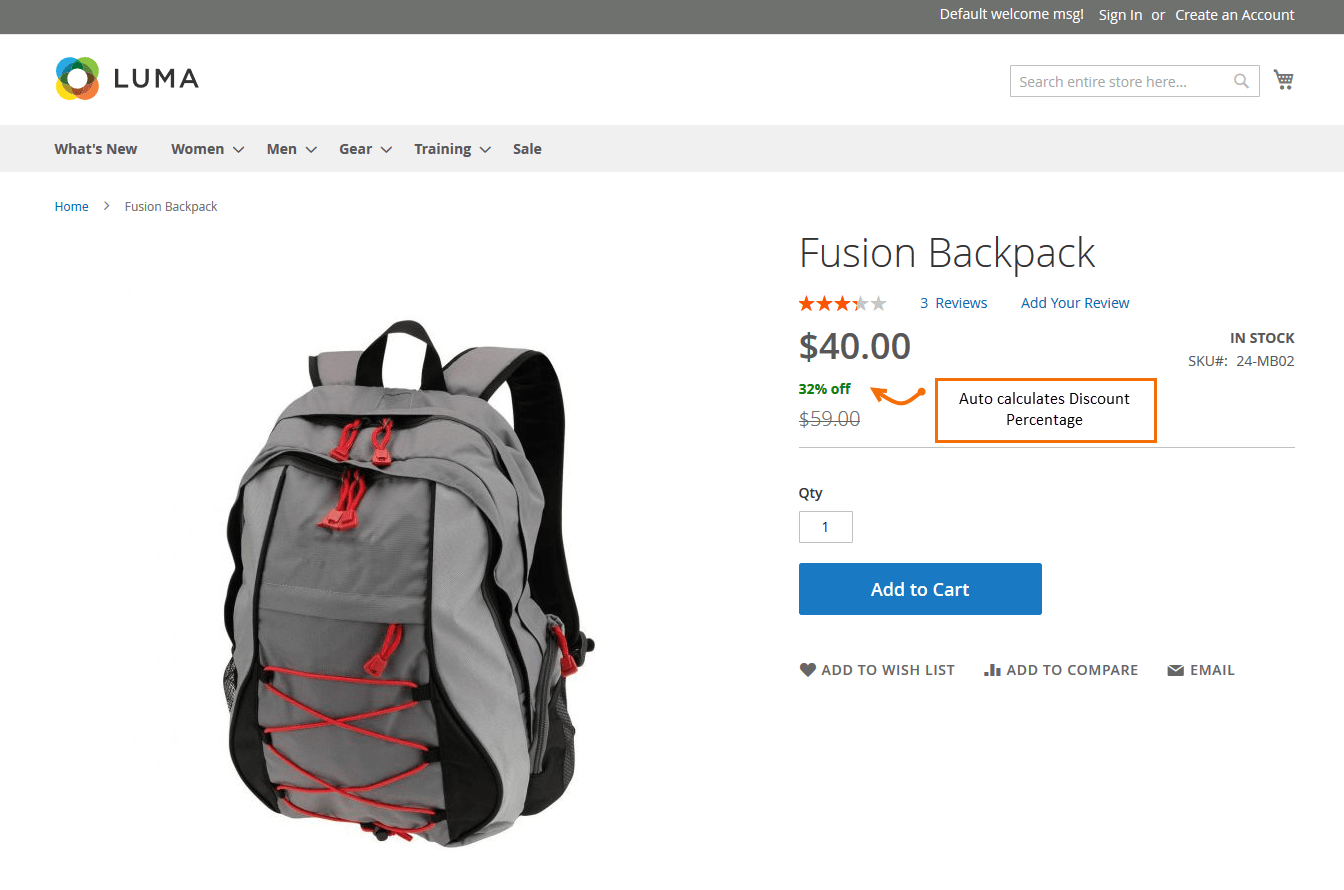
    How to display product discount percent on product details page in Magento2?

    First we need to create ‘catalog_product_prices.xml’ at below location using the given code.

    appcodeMagemonkeysDiscountpercentageviewbaselayoutcatalog_product_prices.xml

    <?xml version="1.0" encoding="UTF-8"?>
    <layout xmlns:xsi="http://www.w3.org/2001/XMLSchema-instance" xsi:noNamespaceSchemaLocation="urn:magento:framework:View/Layout/etc/layout_generic.xsd">
        <referenceBlock name="render.product.prices">
            <arguments>
                <argument name="default" xsi:type="array">
                    <item name="prices" xsi:type="array">
                    <item name="final_price" xsi:type="array">
                        <item name="render_class" xsi:type="string">MagentoCatalogPricingRenderFinalPriceBox</item>
                        <item name="render_template" xsi:type="string">Magemonkeys_Discountpercentage::product/price/final_price.phtml</item>
                    </item>
                    </item>
                </argument>
            </arguments>
        </referenceBlock>
    </layout>

    And create one more file to display the price and discount percentage on the product detail page.

    appcodeMagemonkeysDiscountpercentageviewbasetemplatesproductpricefinal_price.phtml

    <?php
    $priceModel = $block->getPriceType('regular_price');
    $finalPriceModel = $block->getPriceType('final_price');
    $idSuffix = $block->getIdSuffix() ? $block->getIdSuffix() : '';
    $schema = ($block->getZone() == 'item_view') ? true : false;
    ?>
    <?php if ($block->hasSpecialPrice()): ?>
    	<span class="special-price">
            <?php  echo $block->renderAmount($finalPriceModel->getAmount(), [
                'display_label' 	=> __('Special Price'),
                'price_id'      	=> $block->getPriceId('product-price-' . $idSuffix),
        	    'price_type'    	=> 'finalPrice',
                'include_container' => true,
                'schema' => $schema
        	]); ?>
        </span>
    	<span>
    	<?php
    	$item = $block->getSaleableItem();
        $_savePercent = 100 - round(((float)$item->getFinalPrice() / (float)$item->getPrice()) * 100);
    	echo '<b style="color:#008000">'.$_savePercent . '% off </b>';
    	?>
        </span>
    	<span class="old-price">
            <?php  echo $block->renderAmount($priceModel->getAmount(), [
            	'display_label' 	=> __('Regular Price'),
                'price_id'      	=> $block->getPriceId('old-price-' . $idSuffix),
                'price_type'    	=> 'oldPrice',
                'include_container' => true,
                'skip_adjustments'  => true
    	    ]); ?>
        </span>
    <?php else: ?>
        <?php  echo $block->renderAmount($finalPriceModel->getAmount(), [
            'price_id'      	=> $block->getPriceId('product-price-' . $idSuffix),
            'price_type'    	=> 'finalPrice',
            'include_container' => true,
        	'schema' => $schema
    	]); ?>
    <?php endif; ?>
     
    <?php if ($block->showMinimalPrice()): ?>
    	<?php if ($block->getUseLinkForAsLowAs()):?>
        	<a href="<?=  $block->getSaleableItem()->getProductUrl() ?>" class="minimal-price-link">
                <?= $block->renderAmountMinimal() ?>
            </a>
    	<?php else:?>
        	<span class="minimal-price-link">
                <?=  $block->renderAmountMinimal() ?>
            </span>
    	<?php endif?>
    <?php endif; ?>

    Output :

    How to remove unnecessary customer account links in Magento2?

    Create a custom extension or theme and then override customer layout file

    app/design/frontend/Magemonkeys/Theme/Magento_Customer/layout/customer_account.xml

    use remove to remove any extra link from my account

    <page xmlns:xsi="http://www.w3.org/2001/XMLSchema-instance" xsi:noNamespaceSchemaLocation="urn:magento:framework:View/Layout/etc/page_configuration.xsd">
    
    <body>
    
       <!-- Remove unwanted account navigation links -->
    
       <!-- Put this file in: app/design/frontend/Magemonkeys/Theme/Magento_Customer/layout/customer_account.xml -->
    
       <!-- Store credit -->
    
       <referenceBlock name="customer-account-navigation-customer-balance-link" remove="true"/>
    
       <!-- Downloadable product link -->
    
       <referenceBlock name="customer-account-navigation-downloadable-products-link" remove="true"/>
    
       <!-- Subscription link -->
    
       <referenceBlock name="customer-account-navigation-newsletter-subscriptions-link" remove="true"/>
    
       <!-- Billing agreement link -->
    
       <referenceBlock name="customer-account-navigation-billing-agreements-link" remove="true"/>
    
       <!-- Product review link -->
    
       <referenceBlock name="customer-account-navigation-product-reviews-link" remove="true"/>
    
       <!-- My credit card link -->
    
       <referenceBlock name="customer-account-navigation-my-credit-cards-link" remove="true"/>
    
       <!-- Account link -->
    
       <referenceBlock name="customer-account-navigation-account-link" remove="true"/>
    
       <!-- Account edit link -->
    
       <referenceBlock name="customer-account-navigation-account-edit-link" remove="true"/>
    
       <!-- Address link -->
    
       <referenceBlock name="customer-account-navigation-address-link" remove="true"/>
    
       <!-- Orders link -->
    
       <referenceBlock name="customer-account-navigation-orders-link" remove="true"/>
    
       <!-- Wish list link -->
    
       <referenceBlock name="customer-account-navigation-wish-list-link" remove="true"/>
    
       <!-- Gift card link -->
    
       <referenceBlock name="customer-account-navigation-gift-card-link" remove="true"/>
    
       <!-- Order by SKU -->
    
       <referenceBlock name="customer-account-navigation-checkout-sku-link" remove="true"/>
    
       <!-- Gift registry -->
    
       <referenceBlock name="customer-account-navigation-giftregistry-link" remove="true"/>
    
       <!-- Reward points -->
    
       <referenceBlock name="customer-account-navigation-reward-link" remove="true"/>
    
    </body>
    
    </page>

    Clear cache and verify the My Account page the links will be removed.


    Magento 2 : Remove State/Province dropdown from estimate shipping on cart page

    You can create checkout_cart_index.xml in your Magento_Checkout custom theme.

    Visit below path –

    app/design/frontend/Vendor/theme/Magento_Checkout/layout/checkout_cart_index.xml

    And add the below code:

    <?xml version="1.0"?>
    <page xmlns:xsi="http://www.w3.org/2001/XMLSchema-instance" layout="1column" xsi:noNamespaceSchemaLocation="urn:magento:framework:View/Layout/etc/page_configuration.xsd">
        <body>
            <referenceBlock name="checkout.cart.shipping">
                <arguments>
                    <argument name="jsLayout" xsi:type="array">
                        <item name="components" xsi:type="array">
                            <item name="block-summary" xsi:type="array">
                                <item name="children" xsi:type="array">
                                    <item name="block-shipping" xsi:type="array">
                                        <item name="children" xsi:type="array">
                                            <item name="address-fieldsets" xsi:type="array">
                                                <item name="children" xsi:type="array">
                                                    <item name="region_id" xsi:type="array">
                                                        <item name="config" xsi:type="array">
                                                            <item name="componentDisabled" xsi:type="boolean">true</item>
                                                        </item>
                                                    </item>
                                                    <item name="region" xsi:type="array">
                                                        <item name="config" xsi:type="array">
                                                            <item name="componentDisabled" xsi:type="boolean">true</item>
                                                        </item>
                                                    </item>
                                                </item>
                                            </item>
                                        </item>
                                    </item>
                                </item>
                            </item>
                        </item>
                    </argument>
                </arguments>
            </referenceBlock>
        </body>
    </page>


    Magento 2 Create the product attribute programmatically

    If you want to create a product attribute programmatically, but not by admin then this blog post is right the solution for you.

    Create file app/code/Magemonkey/CustomAttribute/Setup/InstallData.php

    <?php
    namespace MagemonkeyCustomAttributeSetup;
    
    use MagentoEavSetupEavSetup;
    use MagentoEavSetupEavSetupFactory;
    use MagentoFrameworkSetupInstallDataInterface;
    use MagentoFrameworkSetupModuleContextInterface;
    use MagentoFrameworkSetupModuleDataSetupInterface;
    
    class InstallData implements InstallDataInterface
    {
    	private $eavSetupFactory;
    
    	public function __construct(EavSetupFactory $eavSetupFactory)
    	{
    		$this->eavSetupFactory = $eavSetupFactory;
    	}
    	public function install(ModuleDataSetupInterface $setup, ModuleContextInterface $context)
    	{
    		$eavSetup = $this->eavSetupFactory->create(['setup' => $setup]);
    		$eavSetup->addAttribute(
    			MagentoCatalogModelProduct::ENTITY,
    			'custom_attribute',
    			[
    				'type' => 'text',
    				'backend' => '',
    				'frontend' => '',
    				'label' => 'Custom Atrribute',
    				'input' => 'text',
    				'class' => '',
    				'source' => '',
    				'visible' => true,
    				'required' => true,
    				'global' => MagentoEavModelEntityAttributeScopedAttributeInterface::SCOPE_GLOBAL,
    				'user_defined' => false,
    				'default' => '',
    				'visible_on_front' => false,
    				'used_in_product_listing' => true,
    				'unique' => false,
    				'apply_to' => '',
    				'searchable' => false,
    				'filterable' => false,
    				'comparable' => false
    			]
    		);
    	}
    	
    }


    Magento 2 bundle product image not showing if child product added in cart programmatically

    If you want to show the bundle product image when the child product added in the cart programmatically, please follow the below step.

    Step 1). Create file app/code/Magemonkeys/Cart/etc/di.xml

    <?xml version="1.0"?>
    <config xmlns:xsi="http://www.w3.org/2001/XMLSchema-instance" xsi:noNamespaceSchemaLocation="urn:magento:framework:ObjectManager/etc/config.xsd">
    	<type name="MagentoCheckoutCustomerDataAbstractItem">
    	     <plugin name="Change_Product_Image_In_Minicart" type="MagemonkeysCartPluginMinicartImage" sortOrder="1"/>
    	</type>
    </config>

    Step 2). Create file app/code/Magemonkeys/Cart/Plugin/Minicart/Image.php

    <?php
    namespace MagemonkeysCartPluginMinicart;
    class Image
    {
        public function aroundGetItemData($subject, $proceed, $item)
        {
            $result = $proceed($item);
            $objectManager = MagentoFrameworkAppObjectManager::getInstance();
            $product = $objectManager->create('MagentoCatalogModelProduct')->load($result['product_id']);
            $parentId = $objectManager->create('MagentoGroupedProductModelProductTypeGrouped')->getParentIdsByChild($result['product_id']);
    
            /* thumb url */ 
            $storeManager = $objectManager->create('MagentoStoreModelStoreManagerInterface'); 
            $currentStore = $storeManager->getStore();
            $mediaUrl = $currentStore->getBaseUrl(MagentoFrameworkUrlInterface::URL_TYPE_MEDIA);
    
            if (isset($parentId[0])) {
                $id = $parentId[0];
                $productdata = $objectManager->create('MagentoCatalogModelProduct')->load($id);
                $result['product_image']['src'] = $mediaUrl."catalog/product".$productdata->getThumbnail();
            }else{
                $result['product_image']['src'];
            }
            return $result;
        }
    }


    How to overriding cart default.phtml in custom module via plugin base in Magento 2?

    Please find below steps to override default.phtml by using plugin

    1. Create an di.xml in : /app/code/Vendor/ModuleName/etc

    <?xml version="1.0"?>
    <config xmlns:xsi="http://www.w3.org/2001/XMLSchema-instance" xsi:noNamespaceSchemaLocation="urn:magento:framework:ObjectManager/etc/config.xsd">    
        <!-- override cart/item/default.phtml file -->
        <type name="MagentoCheckoutBlockCartAbstractCart">
            <plugin name="change_template_for_default" type="VendorModuleNamePluginCartAbstractCart" sortOrder="1"/>
        </type>    
    </config>

    2. Create an AbstractCart.php in : app/code/Vendor/ModuleName/Plugin/Cart

    <?php
    namespace VendorModuleNamePluginCart;
    class AbstractCart
    {
        /*
        *   Override cart/item/default.phtml file
        *   MagentoCheckoutBlockCartAbstractCart $subject
        *   $result
        */
        public function afterGetItemRenderer(MagentoCheckoutBlockCartAbstractCart $subject, $result)
        {
            $result->setTemplate('Vendor_ModuleName::cart/item/default.phtml');
            return $result;
        }
    } ?>

    You can change below file as per requirement your custom module base

    3. Create an default.phtml in : /app/code/Vendor/ModuleName/view/frontend/templates/cart/item

    How to check customer is authenticated(login) or not in Magento 2?

    Customer Authentication in Magento 2 is required when we have to check the customer is a guest user or a login user.

    There are many occasions when we have to check the customer is login or not, and based on the login customer, only we have to show a specific page; otherwise, redirect it to the login page.

    To verify whether it’s a login customer or not,
    use MagentoCustomerModelSession Class and add the Customer Session class to the
     __construct() method of your Controller.

    <?php
    
    namespace MagemonkeysFavoriteListControllerIndex;
    
    use MagentoFrameworkAppAction;
    use MagentoCustomerModelSession;
    use MagentoFrameworkViewResultPage;
    use MagentoFrameworkAppActionContext;
    use MagentoFrameworkControllerResultFactory;
    
    class Index extends Action
    {
        /**
         * @var Session
         */
        protected $customerSession;
    
        public function __construct(
            Context $context,
            Session $customerSession
        ) {
            $this->customerSession = $customerSession;
            parent::__construct($context);
        }
    
        /**
         * Prepare wishlist for share
         *
         * @return ResultInterface
         */
        public function execute()
        {
            if (!$this->customerSession->authenticate()) {
                /** @var Page $resultPage */
                $result = $this->resultFactory->create(ResultFactory::TYPE_REDIRECT);
                $result->setPath('customer/account/login');
                return $result;
            }
    
            // do your logic here
        }
    }

    Using this approach, we can check the customer is a login customer or not.

    Add custom conditions to product collection in Magento 2

    To add custom conditions to product collection, you need to override build() function.  I hope you have a custom module with basic skeletons like registration.php and module.xml file,

    Path: app/code/Magemonkeys/FilterSearch/etc/frontend/di.xml

    <?xml version="1.0"?>
    <config xmlns:xsi="http://www.w3.org/2001/XMLSchema-instance" xsi:noNamespaceSchemaLocation="urn:magento:framework:ObjectManager/etc/config.xsd">
        <!-- Magento Catalog search module's IndexBuilder.php plugin file -->
        <type name="MagentoCatalogSearchModelSearchIndexBuilder">
            <plugin name="Magemonkeys_FilterSearch::custom_filterSearchr_conditions"
                    type="MagemonkeysFilterSearchPluginCatalogSearchModelSearchIndexBuilder" />
        </type>
    </config>

    Path: app/code/Magemonkeys/FilterSearch/Plugin/CatalogSearch/Model/Search/IndexBuilder.php

    <?php
    namespace MagemonkeysFilterSearchPluginCatalogSearchModelSearch;
    
    use MagentoFrameworkSearchRequestInterface;
    
    class IndexBuilder
    {
    
        public function __construct(
            MagentoStoreModelStoreManagerInterface $storeManager,
            MagentoCatalogModelResourceModelProductCollectionFactory $productCollectionFactory
        ) {
            $this->storeManager = $storeManager;
            $this->_productCollectionFactory = $productCollectionFactory;
        }
    
        public function aroundBuild(MagentoCatalogSearchModelSearchIndexBuilder $subject, callable $proceed, RequestInterface $request)
        {
            $select = $proceed($request);
            /* customization by magemonkeys */
            	$storeId = $this->storeManager->getStore()->getStoreId();
                $query = 'WHERE_CUSTOM_CONDITION';
                $select->where($query);
            /* customization by magemonkeys end here */
            return $select;
        }
    
    }