We sacrifice by not doing any other technology, so that you get the best of Magento.

We sacrifice by not doing any other technology, so that you get the best of Magento.

    Magento2 Form Validation Without Form Submit

    require([
        'jquery',
        'mage/validation'
    ], function($){
    
        var dataForm = $('#form-validate');
        var ignore = null;
    
        dataForm.mage('validation', {
            ignore: ignore ? ':hidden:not(' + ignore + ')' : ':hidden'
        }).find('input:text').attr('autocomplete', 'off');
    
        $('button#my-button').click( function() { //can be replaced with any event
            dataForm.validation('isValid'); //validates form and returns boolean
        });
    });

    #form-validate – Replace with your form id

    #my-button – Replace with your button id


    Magento 2 Guide: Get formatted price with currency

    There is this code which used to get price with currency.  Let’s see how to get it.

    We can use below helper price to get it.

    <?php
    use MagentoFrameworkPricingHelperData
    protected $priceHelper;
    public function __construct(Data $priceHelper)
    {
        $this->priceHelper = $priceHelper;
    }
    public function getFormattedPrice($price)
    {
        return $this->priceHelper->currency($price, true, false);
    }
    ?>

    Also, we can use directly in phtml file

    $this->helper('MagentoFrameworkPricingHelperData')->currency(number_format(50,2),true,false);


    How to add custom text after price on product detail page in Magento 2?

    If you want to show custom text after price on product detail page in product view page, then follow the below steps.

    1. Create catalog_product_view.xml in your custom theme

    app/design/frontend/[Vendor_name]/[theme_name]/Magento_Catalog/layout/catalog_product_view.xml

    <?xml version="1.0" ?>
    <page xmlns:xsi="http://www.w3.org/2001/XMLSchema-instance" xsi:noNamespaceSchemaLocation="urn:magento:framework:View/Layout/etc/page_configuration.xsd">
        <body>
            <referenceContainer name="product.info.main">
                <block class="MagentoFrameworkViewElementTemplate" name="price.after.text" template="Magento_Catalog::view/price_after_text.phtml" after="product.info.price"/>
            </referenceContainer>
        </body>
    </page>

    Now you have to create price_after_text.phtml fle and add your custom text in it

    app/design/frontend/Vendor/theme/Magento_Catalog/templates/view/price_after_text.phtml

    2. If you want to set custom text after price at everywhere then override default final_price.phtml file

    from

    vendor/magento/module-catalog/view/base/templates/product/price/final_price.phtml

    to

    app/design/frontend/[Vendor_name]/[theme_name]/Magento_Catalog/templates/product/price/final_price.phtml

    3.  Most easy way to doing it with some style

    .catalog-product-view .product-info-price .price:after { content: 'per piece'; }

    After doing above task run below commands

    - php bin/magento setup:upgrade
    - php bin/magento setup:static-content:deploy
    - php bin/magento cache:clean

    That’s it.

    Now clean cache and check your product page for custom text after price.

    How to get product attribute label using attribute code in Magento 2?

    For this we need product object. Either you can use MagentoCatalogModelResourceModelProduct class or you can use product model class MagentoCatalogModelProduct

    You have to add any one class in your construct like below:

    public function __construct(
        MagentoCatalogModelProduct $product,
        array $data = []
    ) {
        $this->product = $product;
    }

    Now you can use product object to get attribute label.

    Get label considering current store view use this :

    $this->product->getResource()->getAttribute($code)->getStoreLabel();

    &

    Get default label use this :

    $this->product->getResource()->getAttribute($code)->getFrontendLabel();


    How to remove product attribute programmatically in Magento 2?

    1. Create InstallData.php at the following path and paste the below code.

    appcodeMagemonkeysRemoveAttributeSetupInstallData.php

    <?php
     namespace MagemonkeysRemoveAttributeSetup;
    
     use MagentoEavSetupEavSetup;
     use MagentoEavSetupEavSetupFactory;
     use MagentoFrameworkSetupInstallDataInterface;
     use MagentoFrameworkSetupModuleContextInterface;
     use MagentoFrameworkSetupModuleDataSetupInterface;
    
    class InstallData implements InstallDataInterface
     {
         private $eavSetupFactory;
    
         public function __construct(EavSetupFactory $eavSetupFactory) 
         {
             $this->eavSetupFactory = $eavSetupFactory;
         }
     
         public function install(ModuleDataSetupInterface $setup, ModuleContextInterface $context)
         {
             $eavSetup = $this->eavSetupFactory->create(['setup' => $setup]);
             $eavSetup->removeAttribute(MagentoCatalogModelProduct::ENTITY,
             'custom_attribute_id');
         }
     } ?>


    2. Refresh the cache and deploy the static content command.

    php bin/magento setup:upgrade
    
    php bin/magento setup:static-content:deploy -f
    
    php bin/magento cache:flush


    How to Create Country & State Dropdown in Magento2 Frontend Custom Form?

    First create a file “index.php” at appcodelocalMagemonkeysFormBlock with below code.

    <?php
    namespace MagemonkeysFormBlock;
     
    class Index extends MagentoFrameworkViewElementTemplate
    {
        protected $directoryBlock;
        protected $_isScopePrivate;
        
        public function __construct(
             MagentoFrameworkViewElementTemplateContext $context,
             MagentoDirectoryBlockData $directoryBlock,
             array $data = []
             )
             {
             parent::__construct($context, $data);
             $this->_isScopePrivate = true;
             $this->directoryBlock = $directoryBlock;
             }
     
             public function getCountries()
             {
             $country = $this->directoryBlock->getCountryHtmlSelect();
             return $country;
             }
             public function getRegion()
             {
             $region = $this->directoryBlock->getRegionHtmlSelect();
             return $region;
             }
             public function getCountryAction()
             {
             return $this->getUrl('magemonkeys/form/country', ['_secure' => true]);
             }
        
        
    }

    Now, you need to create another file at appcodelocalMagemonkeysFormviewfrontendlayout with following code and name it as “form_form_index.xml

    <?xml version="1.0"?>
    <page xmlns:xsi="http://www.w3.org/2001/XMLSchema-instance" layout="1column" xsi:noNamespaceSchemaLocation="../../../../../../../lib/internal/Magento/Framework/View/Layout/etc/page_configuration.xsd">
             <head>
             <title>form</title>
             </head>
         <body>     
             <referenceContainer name="content">                 
                         <block class="MagemonkeysFormBlockIndex" name="form" template="form/index.phtml">
                         </block>
             </referenceContainer>       
             </body>
    </page>

    Now create “index.phtml” with following code at appcodelocalMagemonkeysFormviewfrontendtemplatesform

    <?php
    $countryList=$block->getCountries();
    $regionList=$block->getRegion();  ?>
    <form class="form retuns"
             action="<?php /* @escapeNotVerified */ echo $block->getFormAction(); ?>"
             id="return-form"
             method="post"
             data-hasrequired="<?php /* @escapeNotVerified */ echo __('* Required Fields') ?>"
             data-mage-init='{"validation":{}}'>
     
             <div class="field country required">
                           <label class="label" for="country"><span><?php /* @escapeNotVerified */ echo __('Country') ?></span></label>
                           <div class="control">
                                       <?php echo $countryList?>
                           </div>
                   </div>
     
             <div class="field region required">
                           <label class="label" for="state"><span><?php /* @escapeNotVerified */ echo __('State') ?></span></label>
                           <div class="control">
                           <?php echo $regionList?>
                           </div>
                           </div>
                           
                           
                           <div class="field states required" style="display:none">
                           <label class="label" for="states"><span><?php /* @escapeNotVerified */ echo __('State') ?></span></label>
                           <div class="control">
                           <input name="state" id="states" title="<?php /* @escapeNotVerified */ echo __('State') ?>"  class="input-text" type="text" />
                           </div>
                           </div>
     
    </form>
     
    <script>
             jQuery(document).on('change','#country',function() {
             var param = 'country='+jQuery('#country').val();
             jQuery.ajax({
                         showLoader: true,
                         url: '<?php /* @escapeNotVerified */ echo $block->getCountryAction(); ?>',
                         data: param,
                         type: "GET",
                         dataType: 'json'
             }).done(function (data) {
                         jQuery('#state').empty();
                         if(data.value=='')
                         {
                                     jQuery('.field.states.required').show();
                                     jQuery('.field.region.required').hide();
                         }
                         else
                         {
                         jQuery('#state').append(data.value);
                                     jQuery('.field.states.required').hide();
                                     jQuery('.field.region.required').show();
                         }
             });
        });
    </script>

    Lastly, you need to create “Country.php” in your form folder at appcodelocalMagemonkeysFormControllerForm with following code.

    <?php
    namespace MagemonkeysFormControllerForm;
     
    class Country extends MagentoFrameworkAppActionAction
    {
             protected $resultJsonFactory;
        
        protected $regionColFactory;
     
             public function __construct(
             MagentoFrameworkAppActionContext $context,
             MagentoFrameworkControllerResultJsonFactory $resultJsonFactory,
             MagentoDirectoryModelRegionFactory $regionColFactory)
        {     
             $this->regionColFactory     = $regionColFactory;
             $this->resultJsonFactory     = $resultJsonFactory;
             parent::__construct($context);
             }
     
             public function execute()
             {
             $this->_view->loadLayout();
             $this->_view->getLayout()->initMessages();
             $this->_view->renderLayout();
     
             $result           = $this->resultJsonFactory->create();
             $regions=$this->regionColFactory->create()->getCollection()->addFieldToFilter('country_id',$this->getRequest()->getParam('country'));
             
             $html = '';
             
             if(count($regions) > 0)
             {
                         $html.='<option selected="selected" value="">Please select a region, state or province.</option>';
                         foreach($regions as $state)
                         {
                                     $html.=    '<option  value="'.$state->getName().'">'.$state->getName().'.</option>';
                         }
             }
             return $result->setData(['success' => true,'value'=>$html]);
       }
    }


    How to rewrite customer controller in Magento 2?

    We can do it by using preference if we need to add or edit some information in createPost controller.

    To do that we will need a module : Magemonkeys_General

    We have need two files.

    Create di.xml file in this folder app/code/Magemonkeys/General/etc/

    <?xml version="1.0"?>
    <config xmlns:xsi="http://www.w3.org/2001/XMLSchema-instance" xsi:noNamespaceSchemaLocation="urn:magento:framework:ObjectManager/etc/config.xsd">
        <preference for="MagentoCustomerControllerAccountCreatePost" type="MagemonkeysGeneralControllerMagentoCustomerAccountCreatePost" />
    </config>

    Create CreatePost.php in this folder app/code/Magemonkeys/General/Controller/Magento/Customer/Account/

    <?php
    
    namespace MagemonkeysGeneralControllerMagentoCustomerAccount;
    use MagentoCustomerApiCustomerRepositoryInterface as CustomerRepository;
    use MagentoFrameworkAppActionHttpPostActionInterface as HttpPostActionInterface;
    use MagentoCustomerModelAccountRedirect as AccountRedirect;
    use MagentoCustomerApiDataAddressInterface;
    use MagentoFrameworkApiDataObjectHelper;
    use MagentoFrameworkAppActionContext;
    use MagentoCustomerModelSession;
    use MagentoFrameworkAppConfigScopeConfigInterface;
    use MagentoFrameworkAppCsrfAwareActionInterface;
    use MagentoFrameworkAppObjectManager;
    use MagentoFrameworkAppRequestInvalidRequestException;
    use MagentoFrameworkAppRequestInterface;
    use MagentoFrameworkControllerResultRedirect;
    use MagentoFrameworkExceptionLocalizedException;
    use MagentoFrameworkPhrase;
    use MagentoStoreModelStoreManagerInterface;
    use MagentoCustomerApiAccountManagementInterface;
    use MagentoCustomerHelperAddress;
    use MagentoFrameworkUrlFactory;
    use MagentoCustomerModelMetadataFormFactory;
    use MagentoNewsletterModelSubscriberFactory;
    use MagentoCustomerApiDataRegionInterfaceFactory;
    use MagentoCustomerApiDataAddressInterfaceFactory;
    use MagentoCustomerApiDataCustomerInterfaceFactory;
    use MagentoCustomerModelUrl as CustomerUrl;
    use MagentoCustomerModelRegistration;
    use MagentoFrameworkEscaper;
    use MagentoCustomerModelCustomerExtractor;
    use MagentoFrameworkExceptionStateException;
    use MagentoFrameworkExceptionInputException;
    use MagentoFrameworkDataFormFormKeyValidator;
    use MagentoCustomerControllerAbstractAccount;
    
    class CreatePost extends MagentoCustomerControllerAccountCreatePost
    {
    	/**
         * @var Validator
         */
        private $formKeyValidator;
        protected $inlineTranslation;
    
        /**
         * @var MagentoFrameworkStdlibCookiePhpCookieManager
         */
        private $cookieMetadataManager;
    
        /**
         * @var MagentoFrameworkStdlibCookieCookieMetadataFactory
         */
        private $cookieMetadataFactory;
    
        public function __construct(
        	Context $context,
            Session $customerSession,
            ScopeConfigInterface $scopeConfig,
            StoreManagerInterface $storeManager,
            AccountManagementInterface $accountManagement,
            Address $addressHelper,
            UrlFactory $urlFactory,
            FormFactory $formFactory,
            SubscriberFactory $subscriberFactory,
            RegionInterfaceFactory $regionDataFactory,
            AddressInterfaceFactory $addressDataFactory,
            CustomerInterfaceFactory $customerDataFactory,
            CustomerUrl $customerUrl,
            Registration $registration,
            Escaper $escaper,
            CustomerExtractor $customerExtractor,
            DataObjectHelper $dataObjectHelper,
            AccountRedirect $accountRedirect,
            CustomerRepository $customerRepository,
            Validator $formKeyValidator = null
        ) {
        	$this->formKeyValidator = $formKeyValidator ?: ObjectManager::getInstance()->get(Validator::class);
            $this->accountRedirect = $accountRedirect;
        	return parent::__construct($context,$customerSession,$scopeConfig,$storeManager,$accountManagement,$addressHelper,$urlFactory,$formFactory,$subscriberFactory,$regionDataFactory,$addressDataFactory,$customerDataFactory,$customerUrl,$registration,$escaper,$customerExtractor,$dataObjectHelper,$accountRedirect,$customerRepository,$formKeyValidator);
        }
    
    	public function execute()
        {          
            /** @var Redirect $resultRedirect */
            $resultRedirect = $this->resultRedirectFactory->create();
            if ($this->session->isLoggedIn() || !$this->registration->isAllowed()) {
                $resultRedirect->setPath('*/*/');
                return $resultRedirect;
            }
    
            // We can write our login here
        }
    }

    we will also need to add private function in this file as we used execute method.

    /**
         * Retrieve cookie manager
         *
         * @deprecated 100.1.0
         * @return MagentoFrameworkStdlibCookiePhpCookieManager
         */
        private function getCookieManager()
        {
            if (!$this->cookieMetadataManager) {
                $this->cookieMetadataManager = ObjectManager::getInstance()->get(
                    MagentoFrameworkStdlibCookiePhpCookieManager::class
                );
            }
            return $this->cookieMetadataManager;
        }

    That’s it.
    Patch for the Credit Memo custom template don’t include the returned items in the email

    I have faced the issue while trying to override the Credit Memo Email template from the admin. The email template doesn’t include the item list in the email. So, I have made a small plugin for that.

    Step 1: You have to add this line in the Magemonkeys/SalesEmails/etc/di.xml

    <?xml version="1.0" ?>
    <config xmlns:xsi="http://www.w3.org/2001/XMLSchema-instance" xsi:noNamespaceSchemaLocation="urn:magento:framework:ObjectManager/etc/config.xsd">
    	<type name="MagentoEmailModelTemplate">
    		<plugin disabled="false" name="Magemonkeys_SalesEmailTemplate_Plugin_Sales_Email_Model_Template" sortOrder="10" type="MagemonkeysSalesEmailTemplatePluginSalesEmails"/>
    	</type>
    </config>

    Step 2: Add the SalesEmails.php file on this ‘Magemonkeys/SalesEmailTemplate/Plugin’ location and add the below code in it.

    <?php
    declare(strict_types=1);
    
    namespace MagemonkeysSalesEmailTemplatePlugin;
    
    class SalesEmails 
    {
    
        public function beforeBeforeSave(MagentoEmailModelTemplate $subject)
        {
        	$subject->setData('is_legacy', 1);
            return [];
        }
    }
    

    That’s it.

    After executing above tech codes,  run the required command to see the effect.

    Note : Please delete the old custom template entry and made the new one.

    How to solve cluster_block_exception [TOO_MANY_REQUESTS/12/disk usage exceeded flood-stage watermark, index has read-only-allow-delete block] in Magento 2?

    If you get below type indexer related error in command line and want to resolve,

    user1234@user1234-pc /var/www/html/magento241 $ php bin/magento indexer:reindex
    Design Config Grid index has been rebuilt successfully in 00:00:04
    Customer Grid index has been rebuilt successfully in 00:00:04
    Category Products index has been rebuilt successfully in 00:00:01
    Product Categories index has been rebuilt successfully in 00:00:00
    Catalog Rule Product index has been rebuilt successfully in 00:00:06
    Product EAV index has been rebuilt successfully in 00:00:01
    Stock index has been rebuilt successfully in 00:00:01
    Inventory index has been rebuilt successfully in 00:00:00
    Catalog Product Rule index has been rebuilt successfully in 00:00:00
    Product Price index has been rebuilt successfully in 00:00:01
    Catalog Search index process unknown error:
    {"error":{"root_cause":[{"type":"cluster_block_exception","reason":"index [magento2_product_1_v1] blocked by: [TOO_MANY_REQUESTS/12/disk usage exceeded flood-stage watermark, index has read-only-allow-delete block];"}],"type":"cluster_block_exception","reason":"index [magento2_product_1_v1] blocked by: [TOO_MANY_REQUESTS/12/disk usage exceeded flood-stage watermark, index has read-only-allow-delete block];"},"status":429}

    Then follow below steps:

    Step 1 : Go to your root project in command line

    Step 2 : Run below mentioned command

    curl -XPUT -H "Content-Type: application/json" http://localhost:9200/_cluster/settings -d '{ "transient": { "cluster.routing.allocation.disk.threshold_enabled": false } }'

    Step 3 : After running above command successfully, run another below mentioned command

    curl -XPUT -H "Content-Type: application/json" http://localhost:9200/_all/_settings -d '{"index.blocks.read_only_allow_delete": null}'

    After running above codes, run below mentioned commands

    – php bin/magento setup:upgrade
    – php bin/magento setup:static-content:deploy
    – php bin/magento indexer:reindex
    – php bin/magento cache:clean

    That’s it.

    Now, your reindexer related issue should be resolved.

    CONTACT US to get Magento programming solutions by hiring a certified Magento expert.

    Magento 2: Add Customer Attribute Programmatically Using Setup Script

    Create setup file InstallData.php

    File: app/code/Magemonkeys/Customer/Setup/InstallData.php

    <?php
    
    namespace MagemonkeysCustomerSetup;
    
    use MagentoEavSetupEavSetup;
    use MagentoEavSetupEavSetupFactory;
    use MagentoFrameworkSetupInstallDataInterface;
    use MagentoFrameworkSetupModuleContextInterface;
    use MagentoFrameworkSetupModuleDataSetupInterface;
    use MagentoEavModelConfig;
    use MagentoCustomerModelCustomer;
    
    class InstallData implements InstallDataInterface
    {
    	private $eavSetupFactory;
    
    	public function __construct(EavSetupFactory $eavSetupFactory, Config $eavConfig)
    	{
    		$this->eavSetupFactory = $eavSetupFactory;
    		$this->eavConfig       = $eavConfig;
    	}
    
    	public function install(ModuleDataSetupInterface $setup, ModuleContextInterface $context)
    	{
    		$eavSetup = $this->eavSetupFactory->create(['setup' => $setup]);
    		$eavSetup->addAttribute(
    			MagentoCustomerModelCustomer::ENTITY,
    			'sample_attribute',
    			[
    				'type'         => 'varchar',
    				'label'        => 'Sample Attribute',
    				'input'        => 'text',
    				'required'     => false,
    				'visible'      => true,
    				'user_defined' => true,
    				'position'     => 999,
    				'system'       => 0,
    			]
    		);
    		$sampleAttribute = $this->eavConfig->getAttribute(Customer::ENTITY, 'sample_attribute');
    
    		// more used_in_forms ['adminhtml_checkout','adminhtml_customer','adminhtml_customer_address','customer_account_edit','customer_address_edit','customer_register_address']
    		$sampleAttribute->setData(
    			'used_in_forms',
    			['adminhtml_customer']
    
    		);
    		$sampleAttribute->save();
    	}
    }

    Run command line to install the module: php bin/magento setup:upgrade and php bin/magento setup:static-content:deploy

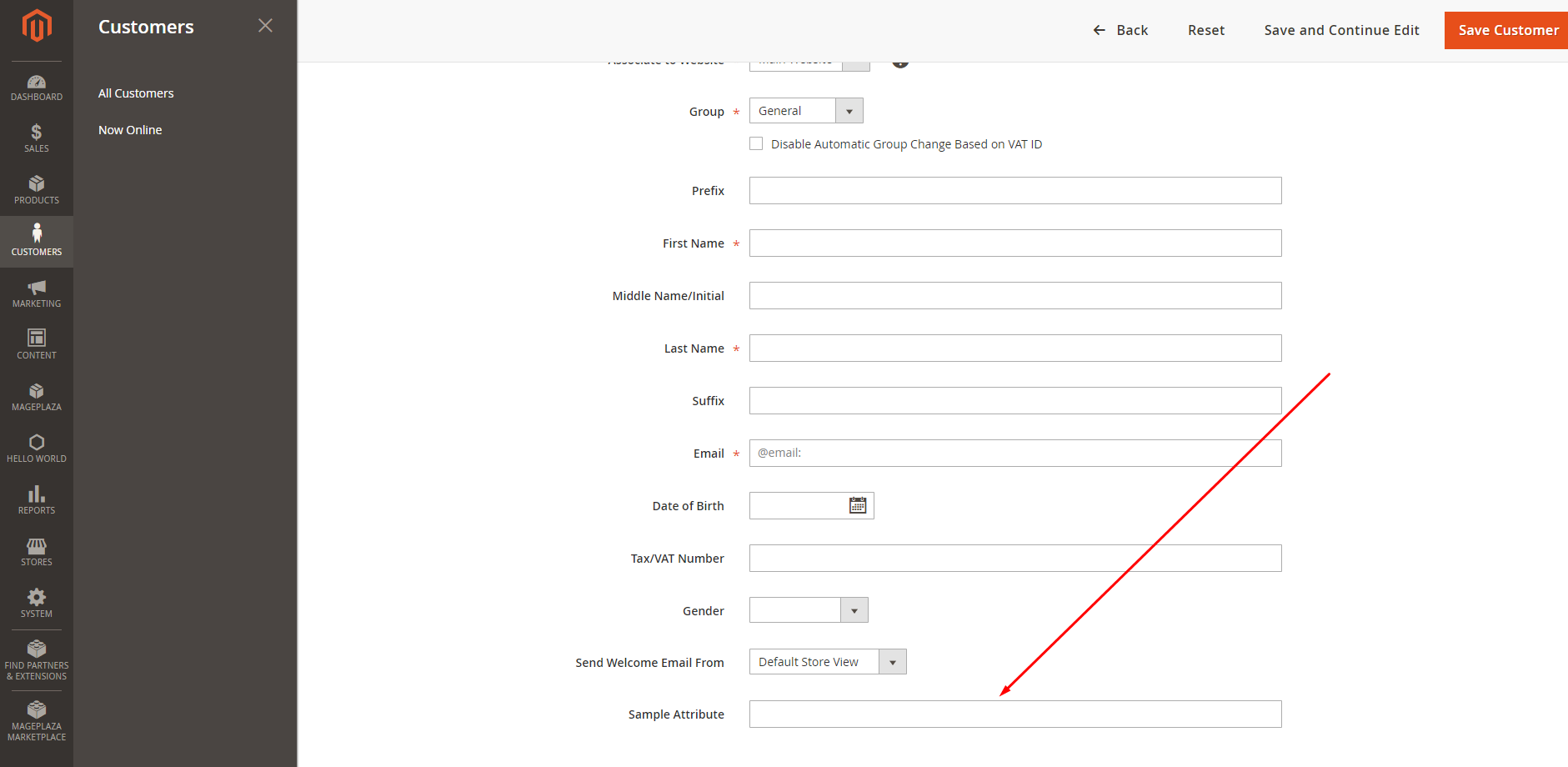
    Then check the result. It will show like this: