We sacrifice by not doing any other technology, so that you get the best of Magento.

We sacrifice by not doing any other technology, so that you get the best of Magento.

    How to check the version of your Magento store?

    Every Magento version comes with strengths and weaknesses and upgrading your Magento to the latest version is the key to increase speed, Security problems and new extensions from which some should be compatible with your Magento’s older versions. For the upgrade, you need to check the current version first.

    How to check version for Magento 1?

    There are minimum different options to find out:

    1. You can use free online tools to check the version where you just have to enter your website address, e.g.: LatestVersionCheck.com

    2. You can check the version using admin panel:

    • Go to your Magento admin panel.
    • In the center of the footer of the page you will see your current version.

    3. You can check the version in the app/mage.php file of your Magento installation. Search for getVersioninfo() function

    Example: publicstaticfunction

    {

    returnarray(

    ‘major’=> ‘1’,

    ‘minor’=> ‘6’,

    ‘revision’=> ‘1’,

    ‘patch’=> ‘0’,

    ‘stability’=> ”,

    ‘number’=> ”,

    );

    }

    4. You can either use SSH to know the version.

    • Login to server via SSH in which you have use your root password.
    • Go to the directory where Magento is installed
    • Use the following command
      cd /home/username/public_html php -r “include ‘app/Mage.php’; echo ‘Magento version is: ‘, Mage::getVersion();

    How to check version in Magento 2?

    Magento 2 has an effortless way to find out its version and that is to add /magento_version to the website address and start searching and you will see a short answer including the version and edition you are using , e.g.: Magento 2.1 (Enterprise)

    How to check Magento Community or Enterprise version is used?

    There are two ways to check Magento Edition;

    1. Enter example.com/giftcard/customer in your browser:

    • If you see 404 Page Not Found error, the website doesn’t run MEE version;
    • If you are redirected to a login page, this is MEE version.

    This is the easiest way to check Magento version.

    2. You can either use command line by the code Mage::getEdition() that is to give you all the necessary information.

    Example:
    /**
    * Magento edition constants
    */
    const EDITION_COMMUNITY = ‘Community’;
    const EDITION_ENTERPRISE = ‘Enterprise’;
    const EDITION_PROFESSIONAL = ‘Professional’;
    const EDITION_GO = ‘Go’;

    /**
    * Current Magento edition.
    *
    * @var string
    * @static
    */
    static private $_currentEdition = self::EDITION_COMMUNITY;
    /**
    * Get current Magento edition
    *
    * @static
    * @return string
    */

    How to Migrate Theme from Magento 1 to Magento 2?

    A theme makes your website more friendly and attractive and to move your current theme from Magento 1 to 2 is impossible. Still, you can choose among the following different ways:

    1. Find a free theme for Magento 2 and install it on the new store (included customization if needed) this will save your time and also money
    2. Another alternative is to buy a quality ready-made theme for Magento 2 and install it on your store (included customization if needed) it is not only cheap but fast too.
    3. Clone the old Magento 1 website to build a similar one for Magento 2 website (Magento 1 PSD design is required) but be ready to spend some extra money as it is expensive and it will take a lot of Time.
    4. Clone your favorite website design to create a similar one for your store again this will cost you and time-consuming
    5. Create a unique design from the scratch though you are doing everything from scratch so it will be an expensive affair and you have to dedicate a lot of time to it.

    For a proper method, you need to determine your requirements, budget and time. Still, we would recommend you to go for the select option which is applying a ready-to-use Magento 2 theme. A number of Well-design Magento 2 themes and templates are available in the Market and you will get at affordable prices. If you use those themes then you just have to spend 1 week to install it on the new site and make some minor customization (only if you want) on the other hand, the third, fourth and fifth options are likely to take 1 month to conduct which will obviously increase the overall cost.

    When Should You Migrate Magento 1 to Magento 2?

    Migrating from Magento 1 to Magento 2 is a big concern for many of our clients and the most often questions are:

    • “Is Magento 2 stable?”
    • “Should we migrate Magento 1 to 2?”
    • “When is the correct time for Magento 2 migration?”
    • “Can we run our website permanently on Magento 1?”

    After trying all the versions till now with our experience with Magento 2 we can say now is the best time to migrate to Magento 2 from Magento 1. About 2 years ago, Magento 2 was quite unstable with the irrelevant number of ready-made themes and extensions Magento 2 has seen its noticeable improvements over time especially on the latest version Magento 2.2.5 (released on 27th June 2018). Currently, Magento 2 is not only stable but it also gives an impressive performance with a wide range of features. Hence, there is no valid reason for not upgrading to Magento 2 now if you can afford the Magento migration cost.

    Take a note:

    You can keep running your Magento 1 website in the short-term but in the long-term, there is a possibility that you might come across some hidden threats such as:

    • Due to the outdated design and performance, you can be left behind by your rivals.
    • Limited help will be provided from Magento Community
    • No more patches and platform enhancements.
    • It will be difficult to get any support from Magento 1 Module developers or providers.
    • Magento officials will not give any free support for your current store.

    Conclusion: Migrating to Magento 2 will not disappoint since it delivers a much better website from design to functionality. Anytime which is not a holiday season is best for migration.

    How Much Time Will It Take to Build an E-commerce Mobile App for Magento Website?

    When we think of developing a mobile app for Magento website, the first thought we all have is the time it takes to build the app. We are 80% sure that you will receive many indistinct answers if you ask the developer.

    Like: “It depends”, “I don’t know”, “It’s hard to say”, etc.

    But what is the reason?

    To build a mobile app for Magento website depends on various factors such as the type of app (progressive web app/ hybrid app/ native app/ …), the app complexity (number of features/ customers/…), the experience of a developer(s), and your financial ability, and so on.

    Besides, if you sure of all of these things yet it will be impractical to predict the amount of time needed to build a mobile app for Magento until it is released.

    Nevertheless, don’t worry because we are here to help you with every step. We hold years of experience on Magento mobile app development so we can definitely tell you the right time for developing a Magento mobile app based on the following criterion:

    If you have an Idea…

    Yes: if you have certain ideas and know your specific requirements of the desired app like design, functions, etc then it would take 2-4 months to build the app.

    No: or else, you have to study and come up with some good ideas for the app creation in 1-2 months first, so it might take 4-6 months from kick off to testing and the delivery.

    Level of the App Complexity

    One of the most essential factors is the level of app complexity which decides the duration of mobile app development for your Magento store. Back-end development includes the number and difficulty of functions, the supported platform(s), the audience size, and so on. Further, for front-end development, it mainly relates to the user interface (UI) development.

    As a result, if you want to build simple mobile E-commerce app then it would take 1-3 months while a complex one will take the 4-8 month because of its lengthy process to make it bug and glitch free.

    Type of Apps:

    Till now, there are different types of mobile app for Magento such as native apps, hybrid apps, and progressive web apps.

    • Native Apps:

      Out of the three popular types of mobile app, developing your magneto mobile app on the native apps will take maximum time, cost and effort. As each native app is optimized for a single platform. You cannot run an iOS app on Android and vice versa. Further, the average time to develop each version of an app is months which ultimately results spending 1 year to serve the customers using iOS or Android operating system.

    • Hybrid Apps:

      Hybrid apps will let you build apps on a single base and you can add new features to different versions of apps, unlike the native apps. Normally t will take 3 months on an average to build hybrid mobile apps for Magento website right from the scratch. If you are using any ready-made Magento 2 Mobile App Builder then your app will be ready in just a few days and in this case if you are willing to customize some parts of your newly created app then you can use our customization service at an affordable fee. Thus it takes 1 month time to create your Magento hybrid app with customized features which are quite easy and fast than the native app.

    • Progressive Web Apps (PWA):

      PWA is the latest technology of Google that competes with the native/ hybrid apps due to use modern web capabilities to deliver an app-like experience to the mobile users. If you want to build a progressive web app, then you must spend at least 1 month to build it on your own (including time for studying).

    Team Size

    The above estimations are for just only one developer. If you want more developers like a team of 3-4 persons then time for building the mobile app for your Magento website will be shortened significantly.

    Why magento 2 is the best choice for mcommerce?

    Now a day’s M-commerce is booming and according to a recent survey, there are more than 2.3 Billion Smartphone users across the world hence one cannot deny that we are becoming addictive day by day.

    As the number of internet surfing is increasing at a faster rate lot of companies are investing in the mobile commerce industry. If you want to be part M-commerce industry then there are different platoforms available such as Magento, WooCommerce, Joomla, etc. these platform will help you build your Ecommerce store. Among these choices, many Ecommerce businesses prefer Magento 2.

    You May ask Why Magento 2?

    Magento 2 comes with numerous good reasons and below we have mentioned some key facts of Magento 2 to answer your question.

    How do the facts stack up?

    • As per the e-commerce stats, Today 19,336 business websites use Magento 2.
    • Retail apps capture 42% of mobile revenue for the top 500 retailers
    • According to the statistics, in 2021, 53.9 percent of all retail e-commerce is expected to be generated via m-commerce.
    • In 2015, worldwide mobile commerce revenues amounted to 96.34 billion U.S. dollars and are set to surpass 693 billion U.S. dollars in 2019.

    Here are some great reasons for you to consider Magento 2 for your Mobile store:

    Great and improved M2 Admin Panel:

    When it comes to the admin panel user-friendliness is the most important aspect. No one will like to mess up with things that are too complicated to get familiar with. User interface which is easy to use is always welcome d by people and Magento 2 has an enhanced admin panel with is very easy for admins to manage the website.

    Increase Your Sales:

    Days are gone when we use to open our laptops and desktops and look for business online. Mobile phone is the first thing we turn it on for any kind of help and these days’ mobile phones generate more sales. According to recent research buyers are 51% more likely to order things from an online retailer having a fully optimized mobile-friendly website.

    To increase their conversions, website owners should update their websites for different mobiles screen to ensure uninterrupted browsing and buying experience. Magento 2 will let you build a mobile app which will help you to boost conversations and increase your overall sales.

    Your Mobile is all in one:

    Magento 2 is fully packed with amazing features which will help you run your business more efficiently. Open source version itself has everything that you need to start your online venture. Here’s what you can look forward to it:

    • Catalog management features
    • SEO functionality
    • Marketing/promotions suite
    • Order management (invoicing, etc.)
    • Site management (CMS functionality, etc.)

    Hence, building your website with Magento 2 will give you accessibly to manage all your Magento websites and functionalities right from your mobile by using an admin extension in your eCommerce store. In short, you will be able to manage all your websites right from your mobile phone.

    Be Google Friendly:

    In April 2015, Google algorithm announced that it gives more preference to mobile-friendly websites in its search engine search results. Besides it also penalizes and lowers the ranking of those websites that are not easy to use on mobile.

    Years back it was cumbersome to create different versions of your website for diversified devices but now with Magento 2 you don’t have to worry about creating a different version of your website for mobile devices. If your website is build with Magento 2 then you can easily target both Ecommerce and M-commerce because it is responsive for any device.

    Painless Checkout:

    If the checkout process in your store is complex then you will have an increasing number of abandoned arts and no one likes abandoned carts. It is neither a good experience for you nor for your customers. This is the most critical step in an eCommerce mobile app and the process becomes quite prolonged and time-consuming if it happens through desktops.

    Magento 2 will let rovide easy and secure checkout for your e-commerce website and when people can buy on their fingertips in a short span of time then it will definitely boost the traffic on your e-store.

    Advanced and Reliable Caching Capabilities

    Caching is a reliable performance parameter for websites, particularly for mobile websites because of the aspect of the unpredictability of mobile connectivity. Magento 2 has some reliable caching capabilities and it also supports Varnish Full Cache, which is very easy to configure and it will help developers to enhance the performance of websites despite the connectivity issues they come face.

    Outstanding Marketing Features:

    • Magento 2 comes jam-packed with advanced marketing features like:
    • Customer Segmentation
    • Optimized Product Category Pages
    • Visual Merchandising
    • Creating Wishlist
    • Sharing an Email
    • Drag and Drop Functionality

    And much more which will help you to take your Magento store to the next level. It also enhances the overall visibility of the website.

    User-Friendly:

    Magento 2 is completely user friendly and simple to get used to. If your user finds it difficult to navigate through your mobile store then he won’t ever return. This means, you lost your customer and no one likes to deal with the complex stuff!

    Magento 2 will make things are quite simple as it comes with its own default themes, but you can also install external third-party themes or get an all-new theme developed as per your creativity. With Magento 2 your customers are easily search the product, add it to cart and perform the checkout without any hassle.

    Conclusion:

    Today focusing on m-commerce is very important for e-commerce business and Magento 2 is indeed the best choice for mobile commerce for all the reasons it has leverage over Magento 1. The main reason is that it’s user-friendly, fully optimized, comes with much-improved scalability, flexible usability and is extremely productive. With a fully functioning Magento 2 website development for desktop and mobile devices will invite more customers – and help you increase your overall business.

    How to Improve Magento Ecommerce Store Performance to Boost Sales?

    An Ecommerce website with numerous products that offers high perfomance is something every Magento store owner needs.

    In this article we have covered some of the trade and some less popular techniques which will maintain a huge traffic on your site and reduces bounces and drops via website speed hike.

    Key Points

    • High speed, high sales
    • Loading time and search engine rankings
    • Improving speed and performance in Magento
    • Reducing the size of HTML, CSS, JavaScript
    • Optimizing image sizes
    • Minimizing elements that may block frontend appearance load
    • Static content – JavaScript, CSS files, and images
    • Enabling server-side compression
    • Server side
    • Varnish
    • Optimizing frontend in terms of design

    Here, we have focused majorly on Magento performance optimization service and also on how website owners can improve their site performance.

    Let’s assume…

    You want to buy something, and you opened first 5 websites that appeared on Google search. After navigating through first two websites on search result pages, you found them slow. Products are not displayed, instead, round circles are coming up which are indicating that images are under loading.

    Now, think over below questions:

    • How long will you wait? 5 seconds, 1 minute or more before returning to Google search results to try another search or website
    • Will you come back to this slow website in future?
    • Will you put forth the name of this website in front of your friends?
    • What would happen in case you needed to access this slow website on the mobile phone?

    Answers are clear-cut. As an internet store owner, any web merchant obviously will try to remove pebbles that come in the way of its visitors but very few achieve 100% success while rest of them fade away.

    It’s about company’s reputation. If the website will take too much time to load then it will result in visitors pressing the close button and may be they will not come back rather they might look for an alternative websites that gives quick response time and better user experience.

    E-commerce speed optimization is a huge topic.
    Website load speed has been a foremost factor for years now and with time website speed requirements are becoming more stringent and stricter.

    For the reference we have shared below data which was collected in the year 2011.

    A recent study by the Financial Times have stated that People tendency and preference for website change in proportion to how much they had to wait while purchasing. Website load speed is articulately a major problem addressed by internet users. More than 65% online shoppers are unhappy with it.

    Some high-priority statistics:

    • 40% of users close the site if it takes more than 3 seconds.
    • On an average, users wait maximum 2.078 seconds for a page to display
    • If all content of a page is rendered between 1 and 2 seconds then the number of visitors increases by 2%
    • The figure of website visitors further rise to 4.6% if it loads in less than 1 second

    High speed equals to High sales

    Speed and Revenue go hand in hand.

    This is especially applicable and requires laser focus in case of e-commerce business.

    If website speed increases only by 100 milliseconds, revenue grows by 1%. for high traffic websites such as Amazon and Walmart And we all know 1% makes a big sum for such huge companies.

    There are 46% people who share their unpleasant experience of online shopping with others.

    Hence, you need to consider this fact seriously that is as 1-second decrease in loading time yields 7% rise in income, and if your daily revenue is supposed USD 1,000, you earn an extra income up to $25,000 (1,000 x 0.07 x 365) per year.

    Loading Time and Search Engine Rankings

    A well known SEO expert, John Mueller has studies this topic in detail. As per his analysis from his collected data he mentioned that slower websites are pulled down in ranking but if a website that has equally competitive features with a speed difference in milliseconds in comparison with fast websites, it will not be taken off.

    So, primarily there are 2 parameters which go positive as we optimize website speed.

    1. Google ranking

    When you try for Ecommerce website speed optimization then making a note to submit in other search engines as well especially on major ones like Bing, Baidu, Yandex, Yahoo etc.

    There is an algorithm which allows ranking remunerations in a proportion of speed that is adopted by all standard engines and this step will ensure maximum benefits.

    2. User experience

    Improving speed and performance in Magento,

    To give the best user experience you need to use Magento speed optimization extension which is a convenient approach for the most hordes of people. You might not receive desired results but remember each website is different and it needs customized treatment to increase its speed.

    Therefore,

    Google has set forth certain requirements that every internet business owner should comply. These requirements comprise of few front code suggestions, technically referred to as “front end” part of the site.

    You might see a noticeable difference in your business visibility if you imply Google guidelines. Google provides versatile page speed test tool and the best part is 100% free altogether. It will be wise decision to use it over many others as Google will give marks to your website.

    After you have checked and received findings, take a closer look at their suggestions and when all detected issues are resolved, your site’s page speed will be enhanced.

    Cache Static content,

    JavaScript, CSS files, and images can be kept in cache so that it takes fewer round trips. Any reliable CDN network solution, like AWS, comes in handy for this purpose.

    Frontend Design Optimization

    Though it doesn’t come directly under speed augmentation tips but this topic should be given a thought.

    When front-end design is optimized, website layout is mobile and screen responsive and responsive site theme ensures that it will display seamlessly and without cluttering even if the visitor is looking at it from any device, like desktop, laptop, mobile, iPad etc.

    Below we have mentioned an example of a website that fulfils the above conditions.


    Image size considerations and compression

    Images with reduced size need less data to transfer over a network.

    Web has plenty of tools for image compression but make sure that one which you select does not deteriorate image quality. .

    Downsize all images and then see a report from Google PageSpeed Insights..

    Make a note to check Website speed on Desktop as well as on Mobile as it helps you in taking elaborate actions exactly where they are needed..

    If your website is created using Magento then you can easily download any authentic extension right away without manually doing image-by-image compression. .

    What this tool basically does is, it gathers all the pictures resided in

    • media
    • skin &
    • other frontend

    Folders and then optimize them with image manipulation methods located in server directories like jpegoptim, optipng etc.

    With time, Magento performance optimization has become smooth thanks to its availability of free plugins.

    Reducing Elements Which Increase Appearance Load

    Number or size of CSS and JavaScript objects enlarge abnormally when you add rich graphics with heavy animation effects which in return make your website response time higher.

    With the help of Chrome Developer Tools you can reduce the load time of every single file.

    You can enable ‘file merge’ option from Magento admin panel and Magento will merge files to minimize their rendering time.

    ‘File-merge’ option in Magento is available under System/Configuration/Developer.

    You will not come across any error if your Ecommerce website developers have coded JavaScript classes and objects in a robust way. or else it will show runtime error and for that you may need to consult your web development agency.

    • Nginx
    • Apache
    • ISS

    It also describes in details what modules to install to accomplish the task.

    Further, when you apply changes then effect can be transparently seen in a browser. For example, go to Chrome, right click and go to inspector mode.

    On the network tab, following attributes indicate that changes have taken place.

    Reducing the size of HTML, CSS, JavaScript

    Unnecessary whitespace and characters removal in code lines aid in valuable speed improvement when all other techniques do not pay off. This procedure is called minification of HTML CSS JS code but sometimes result in increased stress for developers in the understanding code after it is done.

    You can get in touch with our certified Magento developer before doing so.

    Varnish

    Varnish 4 is a refined and by default caching solution inside Magento 2. It helps serving dynamic content faster. You have to configure Varnish settings properly and it will act just like a secret weapon to boost website speed.

    Apply our presented tips for your Magento performance optimization and let us know your take on it.

    What positive values Magento 2.3 can offer for your store?

    We are already impressed with amazing features of Magento 2. The software becomes more attractive as we get time to time updates of Magento 2. It has plenty of features and renovates the default Ecommerce events. Now, with Magento 2.3 registered customer no longer has to enter the delivery address, payment details and purchase isviewed on the right side of the product screen.

    During the Las Vegas conference in 2018, Magneto declared the scheme about the new Magneto 2.3 release during its Las Vegas conference 2018. Magneto 2.3 will be out at the end of this year. Now let’s, explore the amazing features of Magneto 2.3.

    Features of Magento 2.3

    Magento 2.3 releases has these two areas:

    • Magento open source
    • Magento Commerce

    Magento open source and commerce 2.3 comes with new features and some improvement and secure the core product. Highlights of this release are mentioned below:

    Progressive Web Application

    PWA is the advance and modern application path. When the internet service is unavailable then this application helps to catch the data in offline mode. Its back-end application is totally different then its Front-end, front-end uses modern JavaScript framework. PWA Studio is a tool that helps to develop, deploy, and maintain the progressive web application. The main advantage will be seen in the front-end production and also the speed increases 10X on the on boarding Magento front-end developers.

    Declarative schema

    The installation and upgrade process for Magneto becomes easy with declarative schema. There is no need to define database script; the new Magento 2.3 will merge the database with XML. The core advantage of this feature is to roll back of a module in database patch releases. This feature will carry a split database structure and also eliminates the necessity of maintaining multiple code versioning.

    Graph API

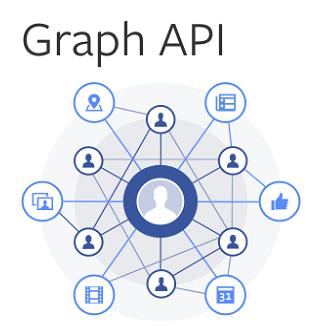
    Graph API was originally developed by Facebook and at present it released as open source. It is a best alternative option for REST & SOAP because of its ability to request specific data or a subset of data which is also known as ‘search attribute’. That means a faster execution and lesser processing time. Moreover, the search attribute is further divided into three category EAV attributes, Custom attributes, and Extension attributes. Hence, it is an advance query language.

    Multi-Source Inventory

    MSI is another excellent feature as it allows merchant to manage product inventory in multiple physical locations. It will let you create stock from different inventory by creating inventory pools. These pools could be accessed using API for one or multiple websites as well as third-party order management from other websites.

    Blue Foot CMS & Page Builder

    The next interesting feature is Blue Foot CMS & Page Builder which is a business-friendly feature. It gives Magneto merchants to produce and personalize a page without any burden of coding. Blue Foot support is a different type of modified content. One of the major features of Magneto 2.3 is the improvement of native CMS. Using some basic features and technology the Blue Foot CMS can rewrite by Page Builder. Page Builder helps in template creation, drag and drop function. After the release of Magneto 2.3, now even a non-technical person can customize a page from product to article. We expect that in this new version for the first time there will a Default Blog about the history of Magneto ecosystem.

    Amazon 3rd party sales channel

    For better sell option, Magento 2.3 will be combined with Amazon. If in future Amazon provides full access of fulfilled then you will be able to expand your business through this access to the Amazon Fulfilled network with running and advance shipping option. This access allows purchasing its entire feature for the order placed on Amazon.Com, Magneto store, and the others. There is a better option to sync the Magneto store and product with Amazon.

    RabbitMQ

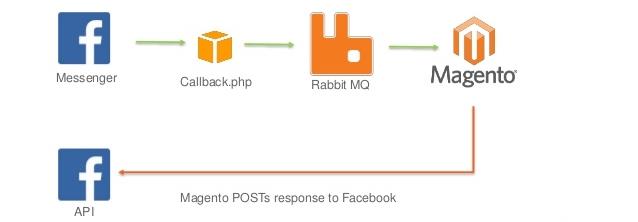
    Another attractive feature of Magento 2.3 is RabbitMQ. Message queues is an asynchronous connection system. RabbitMQ has specific features like the sender and the receiver do not directly connect with each other and also there is no need to connect with message queues. The sender’s message will be stored until the recipient receives this. Now it is available only in Magneto commerce but with latest Magneto 2.3 release it will be available also in Magneto open source.

    Apart from above new features, there are a various improvement on existing features such as:

    • Magneto’s tech stack and PHP upgrade
    • Improvement to import and export process
    • Security improvement
    • Elastic Search support for Magneto community version
    • CMS improvement
    • Release packing improvement

    Now, Magento is more sophisticated due to its new and improved existing features which we have discussed above. Latest Magento 2.3 will allow a Magento developer to build or an enterprise a faster and better Ecommerce platform to provide better customer experience and higher sales.

    Are You Missing Something in your Magento Website?

    According to recent research, online sales have surpassed the increase in sales through the traditional store format. Still, to start an e-commerce business may require a demanding process because each consumer is different and has unique needs.

    It’s not only about the gorgeous look which will make your e-commerce store successful but also about building distinctive elements to generate sales. You need to develop a site with a great user experience which will make your site trustworthy and a consumer will have confidence in buying.

    There are countless ways to improve your Magento websites but apart from that, there are some major ways which are missing out on your Magento website which could potentially help in increasing sales and profit online.

    Go to User-Friendly Shopping Cart:

    It takes a lot of time to build an eCommerce site; one must know that Magento offers a fully hosted, subscription-based cart which provides all the hosting and payment integration. A cart should always be updated whenever you add something and it should give clear information about each item. If you take good control of your site then Magento must come with a decent feature which allows you to customize your shopping cart. Addition to that, it should have a clear call to action whenever the consumer wants to make changes to their purchase.

    Elevate Search Engines:

    Optimize your eCommerce site because your products are competing with so many other eCommerce websites. All you need is a good title tag that includes your targeted keywords and a good content on the page along with some decent links from another web page to your web page. Make sure that your website has a set of unique product descriptions and other distinctive elements to prevent duplicates. Optimizing your eCommerce website will not just drive traffic to your store but also increase revenue.

    Social Media Sites:

    Today social media plays a very important role in generating the good amount of traffic. You need to promote your products on various sites such as Facebook, Twitter, Instagram, and Google+.This kind of marketing is inexpensive and you can easily build your brand by targeting the right people.

    Different Payment Methods:

    Providing preferred payment methods will lead to more sales. Today different modes are available for instance; credit card, debit card, net banking or cash on delivery (COD) offering a payment to a wide variety of consumers is highly significant for the success of your Magento eCommerce site.

    Easy Sign-up Process:

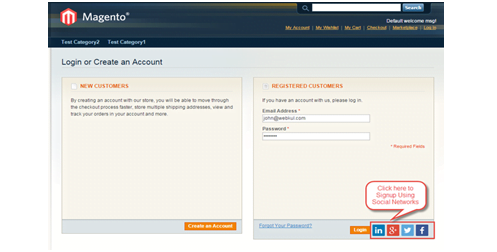
    Keep your sign-up process as simple as you can, it will turn into more leads to a consumer. Do not ask for too much of information because no one really wants so spend more time on the sign-up process as they are more interested in the content of your eCommerce website. There are many websites that force the consumer to sign-up before they can actually place an order. In fact, 1 out of 4 abandoned online purchases is due to forced registration so think again that you really need to include sign-up process. Even though if you want to then keep it simple which even a non-tech person can also browse easily. You can include email address and password, login and register buttons and forgot password link.

    Consider the above-mentioned points to make a complete Magento eCommerce website. visit your site number of times to avoid any kind of problem and try to make more and more user-friendly since it will help you in attracting more customer.

    10 Most Common Magento Problems and their solutions

    Magento store owner comes across so many common errors that are easy to tackle if he is aware of the right processes. Magento site can have some complicated errors to solve;hence if they has solutions documented then he can easily solve the most common problems.

    Below are the most common Magento problems that a developer can face:

    Problem 1 :

    Magento work on a new Domain name

    Let’s say that your Magento is configured with www.abcdomain.com and now you want to change it to another domain name say www.xyzdomain.com

    Solution:

    A: Change the database settings

    Go to the tool that you use to access your database ->Core_config_data then change the first two fields by replacing your old domain with the new one. Click the Go button to save the changes.

    B: Clear Magento Cache

    You need to go to var->cache and clear the folder.

    Problem 2 :

    Change the Admin Password

    If your Magento developer wants to reset admin password then it can be done by using the following chain:

    Solution:

    cPanel ->phpMyAdmin or MySQL Manager, Select your Magento database and find admin_user table.

    Replace your old password with a new password and keep in mind that you insert a password in MD5 function.

    Problem 3 :

    Increase the speed of Magento

    It is important to speed up your magento for better functioning so it is advised to enable Magento Compilation function and then you will see the increase in the page loads by 25% to 50%.

    Solution:

    Go to System -> Tools -> Compilation -> Click on Run Compilation Process.
    Your hosting solution provider is important in deciding the speed of your Magento store so you need to choose a provider which optimized to run a Magento store with smooth performance.

    Problem 4 :

    Disable Compare products functionality

    Compare products functionality can create complication in your store’s user experience more to a small amount of relatively different products. This problem is quiet easy to solve

    Solution:

    Go to Magento root folder and then
    app/code/core/Mage/Catalog/Helper/Product/Compare.php

    Replace the code

    public function getAddUrl($product){return $this->_getUrl(’catalog/product_compare/add’, $this->_getUrlParams($product));}

    With this code

    public function getAddUrl($product){//return $this->_getUrl(’catalog/product_compare/add’, $this->_getUrlParams($product)); return false;}

    After you have done the above steps then go to your

    /app/design/frontend/base/default/layout/ and open yourcatalog.xml file.

    After this, make sure you clear your Magento cache.

    Problem 5 :

    Enable Search Engine Friendly URLs in Magento

    Search engine friendly URLs are hard for any eCommercestore, else Google and Co. would have recommend your store to browsing customers.

    Solution:

    If you want to enable Search Engine Friendly URLs in Magento then you have to login into your Magento admin page and then go to

    System -> Configuration -> click on Webin left panel.

    You will see blue lines once the page loads, signifying closed options tablets.

    Then,

    Click on Search Engines Optimization -> turn the ‘Use Web Server Rewrites’ option (Select and mark as ‘Yes’)

    After that, click on ‘Save Config’ button then you will see that your Megento Search Engine friendly URLs will be enabled.

    Problem 6 :

    Redirecting your Magento Site

    For SEO and usability purposes all you need is to redirect your visitor to open your Magento store only through ‘www.’ only for instance www.abcdomain.com

    Solution:

    Open your .htaccess file which is in Magento root in that search for the ‘RewriteEngine’. Now type the following code:

    • RewriteCond %{HTTP_HOST} ^abcdomain.com$ [NC]
    • RewriteRule ^(.*)$ http://www.abcdomain.com/$1 [R=301,L]

    Save the changes in your .htaccess file and then login to your Magento admin. Next, go to System -> Configuration -> Web.

    Click on the ‘unsecure’ tab and change the base URL option from http://abcdomain.com to http://www.abcdomain.com.

    After this, click on ‘Save Config’ button to save the changes.

    Now, your Magento Store will be optional with your www.abcdomain.com URL.

    Problem 7 :

    Contact Us form in Magento

    By default Contact us form functionality is included in Magento. This page is usually shown in the footer of Magento store and you can add this form to any page you like.

    Solution:

    Login to Magento Admin go to CMS -> pages and click on new page button

    Use the following code in your new page content field shown in right side:

    1<!– CONTACT FORM CODE BEGIN–>

    2

    3

    4

    5<!– CONTACT FORM CODE END–>

    Save the change and then you will see a contact form on the page you want.

    Problem 8 :

    Blog in Magento Site

    Adding a blog to your Magento site shouldn’t be a difficult task. It does not come by default in Magento you have to use the custom extension. A blog helps to build a connection with a customer at a personal level. The Blog is used to tell a story behind your Magento store and so we would suggest you to make it a part of your business.

    Solution:

    Search for Magento connect for an extension which suits your needs and your brand.

    Problem 9 :

    Switch Off an Extension Quickly

    This problem arises when you have installed an extension.

    Solution:

    Go to ‘appetcmodules’, and there you will find XML files.

    Rename the file to switch off an extension.

    For example;you have an extension called xyz_extension.xml.

    Rename it to;xyz_extension.xml.off and then clear the cache immediately.

    Problem 10:

    Add a Custom Users Group

    Use the ‘Customer Groups on the creation page to select the relevant customers’ groups applicable for promotion. You have to enter the specific details and set rules, terms, and conditions.

    Solution:

    In your Magento Admin page go to Customers -> Customer Groups -> Add New Customer Group.

    To set a new discount for your new user group go to Promotions ->Catalog Price Rules -> Add New Rule and click on Save Rule button.

    Every page or websitecomes across its own glitches and errors which can be solved easily if right procedures are followed. Above were some of the common problems that a Magento developer faces. Before you make any changes make sure you know Magento Coding very well.

    If you face any problem in your Magento Store or you think we have missed any error that should be added here then let us know through the comment section below!

    Magento 2 create customer attribute with add column and filter in customer grid

    Create the below files and add the code in your custom module

    Create the registration.php file to the following path in the app/code/Magemonkeys/CustomerAttr/registration.php
    <?php
    MagentoFrameworkComponentComponentRegistrar::register(
    	MagentoFrameworkComponentComponentRegistrar::MODULE,
    	'Magemonkeys_CustomerAttr',
    	__DIR__
    );
    Create the module.xml file to the following path in the app/code/Magemonkeys/CustomerAttr/etc/module.xml
    <?xml version="1.0"?>
    <config xmlns:xsi="http://www.w3.org/2001/XMLSchema-instance" xsi:noNamespaceSchemaLocation="urn:magento:framework:Module/etc/module.xsd">
        <module name="Magemonkeys_CustomerAttr" setup_version="1.0.0">
        </module>
    </config>
    Create MyCustomerAttribute.php file to the following path in the app/code/Magemonkeys/CustomerAttr/Setup/Patch/Data
    <?php
    namespace MagemonkeysCustomerAttrSetupPatchData;
     
    use MagentoFrameworkSetupPatchDataPatchInterface;
    use MagentoFrameworkSetupPatchPatchRevertableInterface;
    use MagentoFrameworkSetupModuleDataSetupInterface;
    use MagentoCustomerSetupCustomerSetupFactory;
    use MagentoCustomerSetupCustomerSetup;
    use MagentoEavModelEntityAttributeSetFactory;
     
    class MyCustomerAttribute implements DataPatchInterface, PatchRevertableInterface
    {
     
        /**
         * @var ModuleDataSetupInterface
         */
        private $moduleDataSetup;
        /**
         * @var CustomerSetup
         */
        private $customerSetupFactory;
     
        /**
         * Constructor
         *
         * @param ModuleDataSetupInterface $moduleDataSetup
         * @param CustomerSetupFactory $customerSetupFactory
         */
        public function __construct(
            ModuleDataSetupInterface $moduleDataSetup,
            CustomerSetupFactory $customerSetupFactory,
            SetFactory $attributeSetFactory
        ) {
            $this->moduleDataSetup = $moduleDataSetup;
            $this->customerSetupFactory = $customerSetupFactory;
            $this->attributeSetFactory = $attributeSetFactory;
        }
     
        /**
         * {@inheritdoc}
         */
        public function apply()
        {
            $this->moduleDataSetup->getConnection()->startSetup();
            /** @var CustomerSetup $customerSetup */
            $customerSetup = $this->customerSetupFactory->create(['setup' => $this->moduleDataSetup]);
            $customerEntity = $customerSetup->getEavConfig()->getEntityType(Customer::ENTITY);
            $attributeSetId = $customerEntity->getDefaultAttributeSetId();
    
            /** @var $attributeSet Set */
            $attributeSet = $this->attributeSetFactory->create();
            $attributeGroupId = $attributeSet->getDefaultGroupId($attributeSetId);
    
            $customerSetup->addAttribute(
                MagentoCustomerModelCustomer::ENTITY,
                'pan_number',
                [
                    'type' => 'varchar',
                    'label' => 'Pan Number',
                    'input' => 'text',
                    'source' => '',
                    'required' => false,
                    'visible' => true,
                    'position' => 500,
                    'system' => false,
                    'backend' => ''
                ]
            );
             
            $attribute = $customerSetup->getEavConfig()->getAttribute('customer', 'customer_pan_no')->addData([
                'is_used_in_grid' => true,
                'is_filterable_in_grid' => true,
                'is_searchable_in_grid' => true,
                'used_in_forms' => [
                    'adminhtml_customer'
                ]
            ]);
            $attribute->addData([
                'attribute_set_id' => $attributeSetId,
                'attribute_group_id' => $attributeGroupId
    
            ]);
            $attribute->save();
     
            $this->moduleDataSetup->getConnection()->endSetup();
        }
     
        public function revert()
        {
            $this->moduleDataSetup->getConnection()->startSetup();
            /** @var CustomerSetup $customerSetup */
            $customerSetup = $this->eavSetupFactory->create(['setup' => $this->moduleDataSetup]);
            $customerSetup->removeAttribute(MagentoCustomerModelCustomer::ENTITY, 'pan_number');
            $this->moduleDataSetup->getConnection()->endSetup();
        }
     
        /**
         * {@inheritdoc}
         */
        public function getAliases()
        {
            return [];
        }
     
        /**
         * {@inheritdoc}
         */
        public static function getDependencies()
        {
            return [
             
            ];
        }
    }
    Create CustomerPancolumn.php file to the following path in the app/code/Magemonkeys/CustomerAttr/Ui/Component/Listing/Column
    <?php
    namespace MagemonkeysCustomerAttrUiComponentListingColumn;
    
    use MagentoFrameworkViewElementUiComponentContextInterface;
    use MagentoFrameworkViewElementUiComponentFactory;
    use MagentoUiComponentListingColumnsColumn;
    use MagentoCustomerModelCustomerFactory;
    
    class CustomerPancolumn extends Column
    {
        /**
         *
         * @param ContextInterface   $context
         * @param UiComponentFactory $uiComponentFactory
         * @param array              $components
         * @param array              $data
         */
        public function __construct(
            ContextInterface $context,
            UiComponentFactory $uiComponentFactory,
            CustomerFactory $customerFactory,
            array $components = [],
            array $data = []
        ) {
            $this->customerFactory = $customerFactory;
            parent::__construct($context, $uiComponentFactory, $components, $data);
        }
        /**
         * Prepare Data Source
         *
         * @param array $dataSource
         * @return array
         */
        public function prepareDataSource(array $dataSource)
        {
            if (isset($dataSource['data']['items'])) {
                foreach ($dataSource['data']['items'] as & $item)
                {
                    $customer = $this->customerFactory->create()->load($item['entity_id']);
                    $item[$this->getData('name')] = $customer->getCustomerPanNumber();
                }
            }
            return $dataSource;
        }
    }
    ?>
    create customer_listing.xml file to the following path in the app/code/Magemonkeys/CustomerAttr/view/adminhtml/ui_component
    <?xml version="1.0" encoding="UTF-8"?>
    <listing xmlns:xsi="http://www.w3.org/2001/XMLSchema-instance" xsi:noNamespaceSchemaLocation="urn:magento:module:Magento_Ui:etc/ui_configuration.xsd">
    <listingToolbar name="listing_top"/>
        <columns name="customer_columns" class="MagentoCustomerUiComponentListingColumns">
            <column name="customer_pan_number" class="MagemonkeysCustomerAttrUiComponentListingColumnCustomerPancolumn">
                <argument name="data" xsi:type="array">
                    <item name="config" xsi:type="array">
                        <item name="filter" xsi:type="string">text</item>
                        <item name="label" translate="true" xsi:type="string">Pan Number</item>
                    </item>
                </argument>
            </column>
        </columns>
    </listing>
    
    Please execute the required command
    php bin/magento setup:upgrade
    php bin/magento setup:di:compile
    php bin/magento cache:flush
    Now you can check your PAN number field showing in the column and filter for the customer grid.