We sacrifice by not doing any other technology, so that you get the best of Magento.

We sacrifice by not doing any other technology, so that you get the best of Magento.

    Why you should hire only certified magento developer?

    Among the array of e-commerce platforms available, Magento has consistently shone with its exceptional features and unparalleled flexibility. However, to fully unlock the potential that Magento offers, it’s not just a choice but a necessity to hire certified Magento developers. In this comprehensive guide, we’ll delve into the substantial reasons why this decision is pivotal from a market perspective, expanding on each aspect that provides you with a holistic view of the topic.

    Why Do Certified Magento Developers Matter?

    Certified Magento developers aren’t simply professionals who’ve completed some training; they’ve undergone rigorous training programs and successfully navigated stringent examinations to validate their competence. The expertise they’ve acquired extends to encompass a profound understanding of Magento’s architecture, functionality, and the best practices that govern the platform. This depth of comprehension empowers them to craft e-commerce sites that are robust, efficient, and secure, poised to thrive in the dynamic market.

    Ensuring Quality through Unmatched Expertise

    One of the primary reasons to hire certified Magento developers is their mastery of the platform’s core concepts. These experts can configure product catalogs, streamline the checkout process, and implement a plethora of features effectively. Their profound understanding of Magento’s core concepts ensures that your online store operates smoothly and efficiently, offering a seamless shopping experience to your customers. Magento certified developers can manage speed and quality together.

    Elevating Code Craftsmanship to the Zenith

    In the world of e-commerce, it’s not just about the quantity of code but the quality that prevails. Certified Magento developers diligently adhere to Magento’s coding standards and industry best practices when crafting code for your online store. The result? High-quality code that’s free from errors and optimized for superior performance. This commitment to coding excellence translates into the efficient and glitch-free operation of your e-commerce site.

    They understand business, not just coding

    Every e-commerce business is unique, with distinctive requirements that demand customized solutions. Certified Magento developers possess the ability to tailor solutions to fit your business like a bespoke suit. This guarantees that your online store is a genuine reflection of your brand, setting you apart and creating a unique identity in the fiercely competitive e-commerce market.

    Guardians of Security in a Cyber-threat Landscape

    In an age where cyber threats loom large and data breaches are becoming increasingly common, the security of your e-commerce store is paramount. Certified Magento developers are well-versed in the best practices for securing your store against vulnerabilities and potential breaches. Their expertise in implementing robust security measures instills trust in your brand and ensures the protection of your business and customer data.

    Performance Optimization for Enhanced User Experience

    Online shoppers have become increasingly demanding, expecting swift and efficient websites. Certified Magento developers are adept at employing various performance optimization techniques, including image optimization, content caching, and code minification. These techniques ensure that your online store loads at lightning speed, enhancing the user experience and increasing the likelihood of conversions.

    Masters of Troubleshooting: Resolving Issues Swiftly

    In the intricate world of e-commerce, technical glitches can disrupt your empire. Certified Magento developers excel at quickly identifying and resolving issues due to their profound knowledge of Magento’s architecture. Their troubleshooting skills are invaluable as they reduce downtime, ensuring that your online store operates seamlessly, even when challenges inevitably arise.

    Staying Current with Magento

    The digital realm is in a perpetual state of evolution, and Magento consistently releases updates with new features and security patches. Certified developers keep pace with these changes, ensuring that your e-commerce site remains current, secure, and competitive. In an e-commerce market that is ever-evolving, this ability to stay updated is invaluable as it equips your store to tackle new challenges and seize emerging opportunities.

    Seamless Integrations for Enhanced Customer Experience

    E-commerce stores often require seamless integration with various services like payment gateways, shipping providers, and marketing tools. Certified developers possess the expertise to orchestrate these integrations flawlessly. This ensures that your operations run smoothly and the customer experience is enhanced as your online store seamlessly interacts with third-party services.

    Conclusion

    In the fiercely competitive world of e-commerce, success isn’t merely about selling products; it’s about providing an exceptional shopping experience. Certified Magento developers emerge as the architects of this success story. They ensure that your online store not only stands out but also operates efficiently and adapts seamlessly to the ever-evolving e-commerce landscape. By choosing certified developers, you’re making an investment in both the present and future success of your e-commerce venture.
    When it comes to Magento development, the message is clear: don’t compromise; opt for the best. At Mob Monkeys, we have a team of certified Magento developers ready to assist you in creating an outstanding e-commerce site. Let’s collaborate to bring your online store to life.
    Hacks to improve your Magento store performance

    In the fast-paced world of e-commerce, your Magento store’s performance can be the key to success. Today’s online shoppers demand seamless experiences, quick loading times, and hassle-free navigation. Even a small delay in your store’s performance can send potential customers running to your competitors. Studies have shown that a one-second delay in page load time can result in a 7% reduction in conversions. In this article, we will explore a range of expert hacks, tips, and strategies to supercharge your Magento store’s performance.

    Image Optimization: The Need for Speed
    Images are essential for engaging your customers, but they can also slow down your store. Large, unoptimized images can be a significant performance bottleneck. Start by optimizing your images. Large image files consume more bandwidth and take longer to load. Use image optimization tools to reduce their size while maintaining quality. Choose the appropriate image format (JPEG, PNG, WebP) based on the type of image and transparency requirements. Image compression can significantly reduce file sizes without a noticeable loss in quality. Use tools like TinyPNG or ImageOptim to compress your images. Implement lazy loading to load images only when they are in the user’s view. This reduces the initial load time and improves the user experience.

    Leveraging Effective Caching Techniques
    Caching is a game-changer when it comes to website performance. Caching stores frequently accessed data, reducing the need to fetch it from the server repeatedly. Full-page caching can significantly improve load times. Extensions like Varnish Cache are popular choices for Magento stores. Utilize browser caching to store static assets like images, stylesheets, and scripts locally on users’ devices. This ensures faster loading for returning visitors. Redis Cache is an in-memory data structure store that can dramatically improve data retrieval speed. Implement it to store frequently accessed data.

    Choosing the Right Hosting for Server Optimization
    Your choice of hosting can have a profound impact on your store’s performance. Consider the following options. Shared Hosting, while affordable, may not provide the resources needed for high-performance Magento stores. VPS (Virtual Private Server) hosting offers dedicated resources and greater control. It’s a solid choice for performance. Dedicated Hosting provides exclusive resources for your store and is suitable for large e-commerce businesses. Cloud Hosting platforms like AWS, Azure, or Google Cloud offer scalability and resources on demand. Integrate a Content Delivery Network (CDN) into your hosting setup to distribute content globally and reduce server load.

    Maximizing Performance with Content Delivery Networks (CDNs)
    A CDN is a network of servers strategically distributed around the world to deliver content efficiently. CDNs work by caching content on multiple servers worldwide. When a user requests content, the server closest to them delivers it. Popular CDNs like Cloudflare, Akamai, and Amazon CloudFront are excellent choices for Magento stores. Integrate your chosen CDN with your Magento store to speed up content delivery and reduce server load.

    Code Optimization and Minification for Speed
    Optimizing your code is crucial for boosting performance. Fine-tune CSS and JavaScript by minimizing and combining CSS and JavaScript files to reduce HTTP requests. Review your codebase and remove any unnecessary or redundant code. Embrace Magento Compilation, enabling Magento’s built-in compilation feature to reduce the load time of PHP scripts. Minify your code to reduce file sizes, and tools like Grunt or Gulp can help automate this process.

    Staying Updated with Magento
    Magento regularly releases updates to improve performance and security. Ensure you’re running the latest version, as new Magento versions often come with performance enhancements and security fixes. Make sure your extensions and themes are compatible with the latest Magento release, and consult with Magento experts if needed during the upgrade process. After an update, conduct extensive testing to identify and fix any issues.

    Cleaning Up and Managing Your Database
    The database plays a crucial role in your store’s performance. Optimize it by cleaning up redundant or unused data to improve efficiency. Proper indexing ensures that database queries are efficient, so regularly optimize and rebuild indexes. For large stores, consider database sharding to distribute the database load across multiple servers.

    Crafting an Efficient Store Design and Layout
    Your store’s design impacts both performance and user experience. Minimize redirects to significantly improve user experience and performance. Streamline navigation menus by simplifying them for faster load times, and limit the number of extensions and customizations to essential ones for better performance. Prioritize mobile responsiveness, as more users shop on mobile devices.

    Monitoring and Testing Performance
    Constantly monitor and test your store’s performance to ensure it meets your customers’ expectations. Use tools like New Relic or Magento Performance Monitoring for real-time performance monitoring. Perform load testing to understand how your store performs under different traffic levels, and conduct A/B testing to identify design or content changes that enhance performance.

    Balancing Security and Performance
    Security is paramount, but it should not compromise performance. Implement security features like firewalls and intrusion detection systems, following best practices to secure your store without sacrificing performance. Explore third-party security services that specialize in e-commerce security.

    Enhancing User Experience
    A fast store means nothing without an excellent user experience. Simplify the checkout process to reduce cart abandonment rates, optimize your store for mobile users, and use strategies like abandoned cart emails to recover potentially lost sales. Implement an effective site search and navigation system for user convenience.

    Leveraging Analytics for Performance Insights
    Data-driven decisions are key to performance improvement. Use Google Analytics to track user behavior and identify performance issues. Tools like Crazy Egg provide heatmaps and session recordings for deeper insights. Monitor key performance indicators like page load times, bounce rates, and conversion rates.

    The Role of Customer Support in Performance Enhancement
    Customer feedback and support can provide valuable insights. Pay attention to customer feedback to identify performance-related issues.

    The Future of Magento Store Performance
    E-commerce is a dynamic industry, and the future holds both opportunities and challenges. E-commerce continues to evolve, with changing consumer behaviors and emerging technologies. Technologies like AI, AR, and blockchain will impact how Magento stores operate, so stay ahead by adapting to emerging trends and technologies.

    In conclusion, optimizing your Magento store for peak performance is not an option; it’s a necessity in the competitive e-commerce landscape. Implement these expert hacks and strategies to supercharge your store, reduce bounce rates, and boost conversions. With a fast, efficient Magento store, you can provide the best possible shopping experience for your customers and stay ahead in the ever-evolving world of e-commerce.

    Difference between magento community and magento enterprise

    In the ever-evolving realm of e-commerce, the choice of platform can be the linchpin for steering your business towards success. Let’s explore how Magento, a heavyweight in the e-commerce arena, plays a pivotal role in shaping your online business. With Magento, you have two core options at your disposal: Magento Community and Magento Enterprise. To chart the course for success in your ecommerce journey, it’s imperative to grasp the distinct features that set these two Magento solutions apart.

    Magento Community: Empowering Small Businesses

    Cost-Effective Solution: When it comes to Magento Community, also known as Magento Open Source, one thing stands out – it’s the free, open-source version of the platform. This cost-effective solution is tailored for smaller businesses with limited budgets.

    Customization and Flexibility: One of the standout features of Magento Community is its high degree of customization. It provides a flexible environment where you can tailor your online store to meet specific business needs.

    Robust Community Support: With a massive and active community of developers, you have access to a vast array of plugins, extensions, and resources. This ensures ongoing support and development for your e-commerce store, enhancing its functionality.
    Scalability: While Magento Community can handle moderate-sized e-commerce businesses effectively, it may face limitations when dealing with extremely high traffic or extensive product catalogs.

    Magento Enterprise – Catering to Larger Enterprises

    Premium Features:
    Magento Enterprise, now rebranded as Adobe Commerce, is the premium, paid version of the platform. It’s designed for larger enterprises and offers advanced features and functionalities that go beyond what the Community version provides.

    Advanced Performance: This edition is optimized for superior performance. It ensures fast loading times and efficient handling of high traffic, which is crucial for larger enterprises with extensive customer bases.

    Dedicated Customer Support: With Magento Enterprise, you receive dedicated customer support and assistance, making it an ideal choice for businesses that demand reliability and quick issue resolution.

    Advanced Marketing Tools: In addition to the Magento Community customization options, Magento Enterprise includes advanced marketing and SEO tools that help businesses enhance their online visibility and reach a broader audience. These tools are designed to boost the effectiveness of your marketing strategies.

    Enhanced Security: Security is a top priority in the e-commerce landscape. Magento Enterprise features enhanced security measures to protect sensitive customer data, which is particularly crucial for enterprises dealing with a vast amount of personal and financial information.

    Key Differences

    Cost: Magento Community vs. Magento Enterprise pricing is the first and foremost consideration. Magento Community is an open-source platform, which means it’s free to download and use. This affordability makes it an attractive choice for startups and small businesses, especially in a global e-commerce market that’s rapidly growing, with an expected valuation of $6.54 trillion by 2027. Smaller businesses can leverage Magento Community to enter this market without a substantial upfront investment, capitalizing on this market opportunity.

    Customization: The key features in Magento Community Edition revolve around customization. It offers a high degree of customization, allowing businesses to tailor their online stores to meet specific needs. You have access to a vast library of extensions and themes, giving you the flexibility to create a unique and engaging shopping experience that resonates with your target audience.

    Avail Magento 1 Support That You’re Missing

    If you’re among the many vendors who have yet to upgrade to Magento 2 and are NOT receiving official Magento support, you’re in luck! Magemonkeys.com is your trusted official Magento support partner, providing comprehensive Magento 1 support services and solutions with a lightning-fast response.

    Magento 1 Support Services Offered by Us to 50+ Magento stores Currently:

    – Speed Optimization
    – Handling Critical Technical Issues
    – Removing Viruses
    – UI/UX Improvements
    – Handling Server Issues
    – Database Management
    – Installing Security Updates
    – Upgrading Store to Latest Version
    – Bug Fixes and Error Resolution
    – Web Content Updates
    – Regular Store Backups
    – Server Performance Check-ups
    – New Feature/Functionality Implementation
    – Third-Party App Integrations
    – & Many more.

    You can also avail such support by industry experts. Don’t feel left out, Increase your eCommerce sales by making store more powerful, we’re here to help.

    Don’t let the cessation of official Magento 1 support hinder your e-commerce journey. Choose Magemonkeys.com for Magento 1 support and secure the future of your online store.

    Black Friday Special:
    FREE 25-Hour Magento Trial + 50% Off Later!

    Black Friday is here, and so is your chance to turbocharge your Magento store!

    At Mage Monkeys, we’re celebrating Black Friday in style, and we have an exclusive offer just for you:

    Try Our Expert Developers with a FREE 25-Hour Trial & If you like our service, HIRE OUR DEVELOPERS AT 50% CHEAPER RATE [No obligations]

    Starting today, you can kickstart your e-commerce development journey with the first 25 hours of our Magento development services absolutely free.

    Why to discuss your eCommerce with us?

    Helped stores to double sales – With our UI-UX and development expertise, we helped numerous stores to double their sales and orders.

    Official Magento Partner: As an official partner, we have a deep understanding of the platform’s intricacies and access to the latest features.

    Certified Magento Developers: Our team is made up of Magento-certified experts, ensuring top-notch solutions and streamlined development.

    450+ Consulted Stores: We’ve successfully consulted and optimized over 450 e-commerce stores, giving us a wealth of experience to share with you.

    Ready to claim your free trial? Fill the below form and let’s connect.

    Looking for Magento support or service? Let’s talk.

    Magento ecommerce stores are NOT easy to maintain.

    To achieve the best performance and sales, store owners have to maintain their e-commerce stores with regular updates.

    Mage Monkeys (an official Magento partner) offers numerous e-commerce solutions to 200+ ecommerce store owners to improve sales.

    Our team of Magento certified technical experts helps you from scratch to end.

    You focus on business, we take your all tech worries.

    If you need any eCommerce support, service, help or have any requirement fill the below form.

    Upgrading Magento 2 via Command Line

    In the fast-paced world of e-commerce, keeping your Magento 2 store up-to-date is crucial for security, performance, and staying ahead of the competition. Upgrading your Magento 2 installation via the command line is a streamlined and efficient process that ensures you have the latest features, security patches, and bug fixes at your fingertips. In this guide, we’ll walk you through the steps to upgrade Magento 2 using the command line.

    Prerequisites

    Before diving into the upgrade process, make sure you have the following prerequisites in place:

    • SSH Access: You need SSH access to your server, as most command-line operations are executed via SSH.
    • Backup: Always backup your website and database before performing any major updates. This is a crucial step to prevent data loss.

    Step 1: Prepare Your Environment

    1.     Access the Server: Log in to your server via SSH using your preferred terminal client. Navigate to your Magento 2 root directory.

    bashCopy code

    cd /path/to/your/magento2 /path/to/your/magento2

    1.     Enable Maintenance Mode: To prevent any disruptions during the upgrade, enable maintenance mode.

    bashCopy code

    php bin/magento maintenance:enable

    Step 2: Update Composer Dependencies

    Magento 2 relies heavily on Composer for managing its dependencies. Ensure you have the latest versions of all packages.

    bashCopy code

    composer require magento/product-community-edition=2.x.x –no-update

    composer update

    Replace 2.x.x with the desired version you want to upgrade to.

    Step 3: Update the Database Schema and Data

    Now it’s time to apply database schema and data updates. This step ensures that your database structure matches the new Magento version.

    bashCopy code

    php bin/magento setup:upgrade

    Step 4: Recompile and Reindex

    Recompile your code and reindex data for optimal performance.

    bashCopy code

    php bin/magento setup:di:compile php bin/magento indexer:reindex

    Step 5: Deploy Static Content

    Deploy static content to make sure your store’s frontend functions correctly.

    bashCopy code

    php bin/magento setup:static-content:deploy -f

    Step 6: Clear Cache

    Clear the cache to remove any stale data.

    bashCopy code

    php bin/magento cache:clean

    Step 7: Disable Maintenance Mode

    Disable maintenance mode to make your website accessible again.

    bashCopy code

    php bin/magento maintenance:disable

    Step 8: Verify the Upgrade

    To verify that your upgrade was successful, run:

    bashCopy code

    php bin/magento –version

    You should see the new Magento version displayed.

    Conclusion

    Upgrading Magento 2 via the command line streamlines the process and ensures your e-commerce store is equipped with the latest features, security patches, and enhancements. By following these steps diligently and maintaining regular backups, you can keep your online store running smoothly and stay ahead in the competitive world of e-commerce.

    mermaidCopy code

    graph TD; A[Start] –> B(Prepare Environment) B –> C(Update Composer Dependencies) C –> D(Update Database Schema and Data) D –> E(Recompile and Reindex) E –> F(Deploy Static Content) F –> G(Clear Cache) G –> H(Disable Maintenance Mode) H –> I(Verify the Upgrade) I –> J[Finish]

    Remember that while this guide covers the core upgrade process, it’s crucial to consider the specific needs of your store, including custom modules and themes. Always perform upgrades first on a staging environment to ensure compatibility with your unique setup.

    Solve your website’s technical issues
    before it’s too late.

    According to a report, around 75% of sites and apps are facing technical issues.

    Majority of the time, web owners avoid to solve them. But later on, such issues create a big mess.

    Every small technical issue needs proper attention.

    The issue that can be solved for 50$ today can cost you 5000$ or more in the future if it is not solved on time. It’s like when you don’t care about a fever at early stage, you may end up suffering more severe diseases later.

    At Mage Monkeys, when we perform a technical audit on hundreds of websites, we often find numerous viruses and technical bugs lurking within the site.

    Website store owners are generally unaware of this issue. Technical troubles can spread and significantly harm the site in the future.

    Therefore, it’s always advisable to conduct a tech audit before it’s too late.

    If your site is experiencing any technical problems, or if you want to safeguard against future issues, contact us today.

    How to move elements in Magento 2?

    Today we are going to see how to move elements in Magento 2.

    Magento 2 is famous for releasing new functionality, features and  approaches. We are going to talk about the new feature of templating.

    Magento 2 offers this functionality where we can move blocks or let’s say containers to different places and that too within the page. With the help of the layout file, we can move containers & blocks.

    Let’s see how to move elements in Magento 2

    We can use this tiny piece of code in layout file to move containers  & blocks.

    <move element="name of conatiner or block" destination="destination block or container name" />

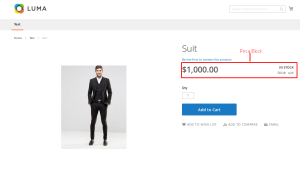
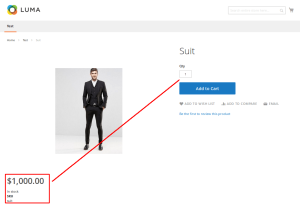
    Let’s see the example. Here we are going to move price block directly at product page.

    Below code will do the magic.

    <page layout="1column" xmlns:xsi="http://www.w3.org/2001/XMLSchema-instance" xsi:noNamespaceSchemaLocation="urn:magento:framework:View/Layout/etc/page_configuration.xsd">
        <move element="product.info.price" destination="product.info.media" />
    </page>

    VOILA!! You see. That’s how a tiny piece of code will help us to move elements in Magento 2.

    Magento 2: How To Add Country And Region Dropdown In Admin Form?

    If you want to add country and region inside the drop-down in custom module admin form, you landed to right page.


    Follow below instruction step-by-step to execute it.

    Step 1 : Add column in table field.

    Create new file : Setup/Installschema.php

    <?php
    
    ->addColumn(
    'country',
    \Magento\Framework\DB\Ddl\Table::TYPE_TEXT,
    '2M',
    ['nullable' => false],
    'country' 
    )->addColumn(
    'store_ids',
    \Magento\Framework\DB\Ddl\Table::TYPE_TEXT,
    '255',
    ['nullable' => false,
    'default' => $defaultstoreid,
    ],
    'store_ids' 
    )->addColumn(
    'statename',
    \Magento\Framework\DB\Ddl\Table::TYPE_TEXT,
    '2M',
    ['nullable' => false],
    'statename'
    )
    
    ?>

    Step 2 : Add country and state drop-down with text

    Create new file : Block/Adminhtml/Grid/Edit/Form.php

    <?php
    $optionsc=$this->_countryFactory->toOptionArray();
    $country = $fieldset->addField(
    'country',
    'select',
    [
    'name' => 'country',
    'label' => __('Country'),
    'title' => __('country'),
    'values' => $optionsc,
    ]
    );
    
    $statename = $fieldset->addField(
    'state',
    'select',
    [
    'name' => 'state',
    'label' => __('State'),
    'id' => 'state',
    'title' => __('state'),
    'class' => 'required-entry',
    'required' => false,
    'values' => ['--Please Select State--'],
    ]
    );
    $fieldset->addField(
    'statename',
    'text',
    [
    'name' => 'statename',
    'label' => __('State'),
    'id' => 'statename',
    'title' => __('state'),
    'class' => 'statename',
    'required' => false,
    ]
    );
    
    /*
    * Add Ajax to the Country select box html output
    */
    $country->setAfterElementHtml(" 
    <script type=\"text/javascript\">
    require([
    'jquery',
    'mage/template',
    'jquery/ui',
    'mage/translate'
    ],
    function($, mageTemplate) {
    jQuery('.field-statename').hide();
    
    jQuery('#addressbook_country').change(function(){
    var conceptName = jQuery('#addressbook_country').find(':selected').val();
    jQuery.ajax({
    url : '". $this->getUrl('grid/lists/regionlist') . "?country=' + conceptName,
    data: conceptName,
    type: 'GET',
    dataType: 'json',
    showLoader:true,
    success: function(data){
    // console.log(data.htmlconent);
    if(data.htmlconent==''){
    jQuery('.field-statename').show();
    jQuery('.field-state').hide();
    }else{
    jQuery('#addressbook_state').empty().append(data.htmlconent);
    jQuery('.field-state').show();
    jQuery('.field-statename').hide();
    
    }
    
    }
    }); 
    });
    
    }
    
    );
    </script>"
    );
    
    $statename->setAfterElementHtml(" 
    <script type=\"text/javascript\">
    require([
    'jquery',
    'mage/template',
    'jquery/ui',
    'mage/translate'
    ],
    function($, mageTemplate) {
    jQuery('.field-statename').hide();
    jQuery(window).load(function(){
    setTimeout(function(){
    var statename ='".$model->getState()."';
    jQuery('#addressbook_state option').each(function (a, b) {
    if (jQuery(this).text().toLowerCase() == statename.toLowerCase() ){
    jQuery(this).attr('selected','selected');
    jQuery(this).trigger('change');
    
    }
    });
    }, 1000);
    });


    var conceptName = jQuery('#addressbook_country').find(':selected').val();
    if(conceptName != ''){
    jQuery('#addressbook_country').trigger('change');
    }
    }
    
    );
    </script>"
    );
    
    ?>

    Step 3 : Getting region list from controller.

    Create new file : Controller/Adminhtml/Lists/Regionlist.php

    /**
    * @SuppressWarnings(PHPMD.CouplingBetweenObjects)
    */
    class Regionlist extends \Magento\Framework\App\Action\Action
    {
    /**
    * @var \Magento\Framework\View\Result\PageFactory
    */
    protected $resultPageFactory;
    /**
    * @var \Magento\Directory\Model\CountryFactory
    */
    protected $_countryFactory;
    
    /**
    * @param \Magento\Framework\App\Action\Context $context
    * @param \Magento\Framework\View\Result\PageFactory resultPageFactory
    */
    public function __construct(
    \Magento\Framework\App\Action\Context $context,
    \Magento\Directory\Model\CountryFactory $countryFactory,
    \Magento\Framework\View\Result\PageFactory $resultPageFactory
    )
    {
    $this->_countryFactory = $countryFactory;
    $this->resultPageFactory = $resultPageFactory;
    parent::__construct($context);
    }
    /**
    * Default customer account page
    *
    * @return void
    */
    public function execute()
    {
    $countrycode = $this->getRequest()->getParam('country');
    
    if ($countrycode != '') {
    $statearray =$this->_countryFactory->create()->setId($countrycode)->getLoadedRegionCollection()->toOptionArray();
    $state = '';
    if(count($statearray) > 0){
    // $state .= "<option value=''>--Please Select State--</option>";
    foreach ($statearray as $_state) {
    if($_state['value']){
    $state .= "<option value=".$_state['label'].">" . $_state['label'] . "</option>";
    }
    }
    }
    }
    $result['htmlconent']=$state;
    $this->getResponse()->representJson(
    $this->_objectManager->get('Magento\Framework\Json\Helper\Data')->jsonEncode($result)
    );
    } 
    
    }
    
    ?>

    Step 4 : Save your data.

    Create new file : Controller/Adminhtml/Grid/Save.php

    <?php
    
    class Save extends \Magento\Backend\App\Action
    {
    /**
    * @var \Namespace\Modulename\Model\GridFactory
    */
    var $gridFactory;
    
    /**
    * @param \Magento\Backend\App\Action\Context $context
    * @param \Namespace\Modulename\Model\GridFactory $gridFactory
    */
    public function __construct(
    \Magento\Backend\App\Action\Context $context,
    \Namespace\Modulename\Model\GridFactory $gridFactory,
    \Magento\Directory\Model\CountryFactory $countryFactory
    ) {
    parent::__construct($context);
    $this->gridFactory = $gridFactory;
    $this->_countryFactory = $countryFactory;
    }
    
    /**
    * @SuppressWarnings(PHPMD.CyclomaticComplexity)
    * @SuppressWarnings(PHPMD.NPathComplexity)
    */
    public function execute()
    {
    $data = $this->getRequest()->getPostValue();
    if (!$data) {
    $this->_redirect('grid/grid/addrow');
    return;
    }
    try {
    
    $countrycode = $data['country'];
    $statearray =$this->_countryFactory->create()->setId($countrycode)->getLoadedRegionCollection()->toOptionArray();
    $rowData = $this->gridFactory->create(); 
    if($data['state'] == '0' || count($statearray) == 0){
    
    $data['state'] = $data['statename'];
    }
    $data['store_ids'] = implode(',', $data['store_ids']); 
    $rowData->setData($data);
    if (isset($data['id'])) {
    $rowData->setEntityId($data['id']);
    }
    $rowData->save();
    $this->messageManager->addSuccess(__('AddressBook has been successfully saved.'));
    } catch (\Exception $e) {
    $this->messageManager->addError(__($e->getMessage()));
    }
    $this->_redirect('grid/grid/index');
    }
    
    /**
    * @return bool
    */
    protected function _isAllowed()
    {
    return $this->_authorization->isAllowed('Namespace_Modulename::save');
    }
    }
    ?>

    Well, that’s it. Try to adopt this solution and let us know how it worked for you.