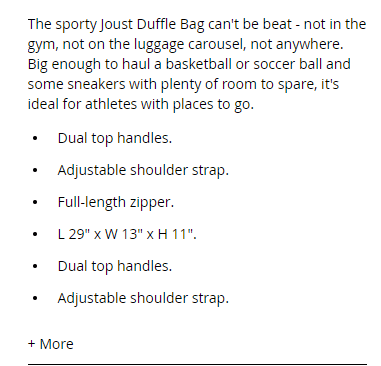
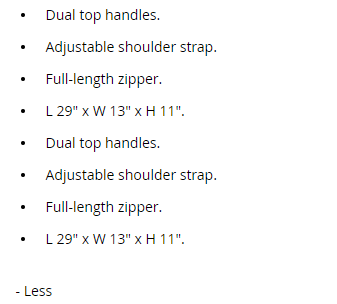
First of all, we need to create several files:
touch app/design/frontend/<your_vendor_name>/<your_theme_name>/Magento_Catalog/layout/catalog_product_view.xml
touch app/design/frontend/<your_vendor_name>/<your_theme_name>/requirejs-config.js
touch app/design/frontend/<your_vendor_name>/<your_theme_name>/web/js/toggle-product-description.js
touch app/design/frontend/<your_vendor_name>/<your_theme_name>/Magento_Catalog/templates/more-less.phtml
touch app/design/frontend/<your_vendor_name>/<your_theme_name>/web/css/source/_theme.less
Let’s review these files and see here description for each one regarding which code will be placed inside of them:
requirejs-config.js
Use this file to register your own JavaScript component:
var config = {
    map: {
        "*": {
            // alias: path-to-corresponding-js-file
            toggleProductDescription: 'js/toggle-product-description'
        }
    }
};
catalog_product_view.xml
Inside of the content container, a new block is created with a specified template file that is going to be used:
<?xml version="1.0"?>
<page xmlns:xsi="http://www.w3.org/2001/XMLSchema-instance" xsi:noNamespaceSchemaLocation="urn:magento:framework:View/Layout/etc/page_configuration.xsd">    <body>
        <referenceContainer name="content">
            <block class="MagentoFrameworkViewElementTemplate" name="more-less-js" template="Magento_Catalog::more-less.phtml" />
        </referenceContainer>
    </body>
</page>
more-less.phtml
This file contains the basic configuration of the more/less functionality.
<script type="text/x-magento-init">
{
    ".product.attribute.description .value":{
       "toggleProductDescription":{
            "contentMaxHeight": 200
        }
    }
}
</script>
toggle-product-description.js
Place all of your JavaScript logic in this file. Skeleton of such a JavaScript component should be like this:
define([
	"jquery", // declare your libraries, if you are using them
], function ($) { // delare library aliases
	'use strict';

	return function (config, node) {
		var moreLess = {
			button: {
				el: $("<a>", {
					id: "toggle-description",
					href: "#"
				}),
				expanded_text: "- Less",
				collapsed_text: "+ More"
			},
			target: {
				el: $(node),
				height: $(node).height(),
				maxHeight: config.contentMaxHeight,
				collapsedClassName: "collapsed",
			}
		};

		if (moreLess.target.height > moreLess.target.maxHeight) {
		// update button text value
			moreLess.button.el.text(moreLess.button.collapsed_text);

			moreLess.target.el
				// add css class to apply some styling
				.addClass(moreLess.target.collapsedClassName)
				// append link to product description
				.parent().append(moreLess.button.el);
		}

		moreLess.button.el.on("click", function (e) {
			e.preventDefault();

			if (moreLess.target.el.hasClass(moreLess.target.collapsedClassName)) {
				moreLess.target.el.removeClass(moreLess.target.collapsedClassName);
				moreLess.button.el.text(moreLess.button.expanded_text);
			} else {
				moreLess.target.el.addClass(moreLess.target.collapsedClassName);
				moreLess.button.el.text(moreLess.button.collapsed_text);
			}
		});
	}
});
_theme.less
This is an optional file for you to create, I have created some minimal styling (transparent-to-solid background) as a nice effect on the more/less button.
.product.attribute.description .value{
  max-height: none;
  position: relative;
  max-height: none;
  border-bottom: 1px solid #d1d1d1;

  &.collapsed {
    max-height: 200px;
    overflow: hidden;

    &:after {
      content: "";
      position: absolute;
      width: 100%;
      height: 160px;
      z-index: 1;
      display: block;
      bottom: 0;

      background: -moz-linear-gradient(top, rgba(255,255,255,0) 0%, rgba(255,255,255,1) 70%, rgba(255,255,255,1) 100%); /* FF3.6-15 */
      background: -webkit-linear-gradient(top, rgba(255,255,255,0) 0%,rgba(255,255,255,1) 70%,rgba(255,255,255,1) 100%); /* Chrome10-25,Safari5.1-6 */
      background: linear-gradient(to bottom, rgba(255,255,255,0) 0%,rgba(255,255,255,1) 70%,rgba(255,255,255,1) 100%); /* W3C, IE10+, FF16+, Chrome26+, Opera12+, Safari7+ */
      filter: progid:DXImageTransform.Microsoft.gradient( startColorstr='#00ffffff', endColorstr='#ffffff',GradientType=0 ); /* IE6-9 */
    }
  }
}

#toggle-description {
  margin-top: 20px;
  display: inline-block;
}
Here is how it looks like on the frontend: