Step 1 ) Create file InstallData.php
creating a InstallData.php file in the app/code/MageMonkeys/HelloWorld/Setup/ directory.
<?php
namespace MageMonkeysHelloWorldSetup;

use MagentoFrameworkSetupInstallDataInterface;
use MagentoFrameworkSetupModuleContextInterface;
use MagentoFrameworkSetupModuleDataSetupInterface;
use MagentoEavSetupEavSetupFactory;

class InstallData implements InstallDataInterface
{

	private $eavSetupFactory;

	public function __construct(EavSetupFactory $eavSetupFactory)
	{
		$this->eavSetupFactory = $eavSetupFactory;
	}

	public function install(
		ModuleDataSetupInterface $setup,
		ModuleContextInterface $context
	)
	{
		$eavSetup = $this->eavSetupFactory->create(['setup' => $setup]);

		$eavSetup->addAttribute(
			MagentoCatalogModelCategory::ENTITY,
			'mm_new_attribute',
			[
				'type'         => 'varchar',
				'label'        => 'MageMonkeys Attribute',
				'input'        => 'text',
				'sort_order'   => 100,
				'source'       => '',
				'global'       => 1,
				'visible'      => true,
				'required'     => false,
				'user_defined' => false,
				'default'      => null,
				'group'        => '',
				'backend'      => ''
			]
		);
	}
}
Step 2 ) Display the category attribute
creating a category_form.xml file in the app/code/MageMonkeys/HelloWorld/view/adminhtml/ui_component/ directory.
<?xml version="1.0" ?>
<form xmlns:xsi="http://www.w3.org/2001/XMLSchema-instance" xsi:noNamespaceSchemaLocation="urn:magento:module:Magento_Ui:etc/ui_configuration.xsd">
    <fieldset name="general">
        <field name="mm_new_attribute">
            <argument name="data" xsi:type="array">
                <item name="config" xsi:type="array">
                    <item name="required" xsi:type="boolean">false</item>
                    <item name="validation" xsi:type="array">
                        <item name="required-entry" xsi:type="boolean">false</item>
                    </item>
                    <item name="sortOrder" xsi:type="number">333</item>
                    <item name="dataType" xsi:type="string">string</item>
                    <item name="formElement" xsi:type="string">input</item>
                    <item name="label" translate="true" xsi:type="string">MageMonkeys new attribute</item>
                </item>
            </argument>
        </field>
    </fieldset>
</form>
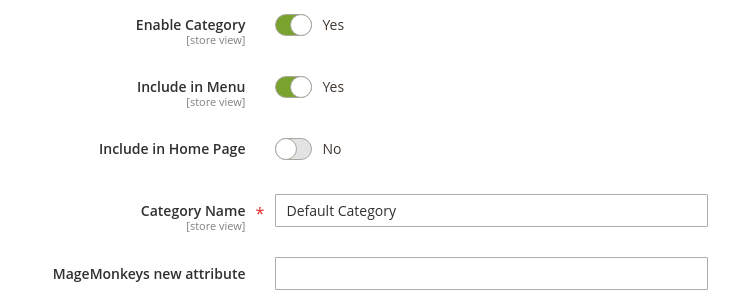
Step 3 ) run upgrade, flush cache and check the result